



Instagram rarely blocks accounts by accident. Most bans happen quietly, without warnings, and often right after you think you’ve done everything “right.” New email, new username, new content — yet the account doesn’t last. That’s usually the moment people realize the problem isn’t the account itself. It’s the environment behind it, especially when managing multiple Instagram accounts from the same setup.
If you’re trying to build an unlimited Instagram account creator, the real challenge isn’t creating more accounts. It’s making sure each account lives in its own mobile reality. Instagram pays close attention to devices, app behavior, stored data, and how consistent everything looks over time. When those signals overlap, accounts get linked. When they get linked, limits follow.
Why Instagram accounts get restricted when you scale
Instagram is built around mobile behavior. Even when accounts are managed carefully, the platform still watches how the app behaves on the device. When multiple accounts come from the same phone, patterns start to form.
This usually happens because:
- App data and login history stay on the same device
- Android system identifiers repeat
- New accounts inherit traces from older ones
Once Instagram connects those dots, restrictions often spread. One account gets limited. Another gets logged out. Then new accounts fail to stick at all.
Why creating more accounts doesn’t fix the problem
Many people respond to bans by creating more accounts faster. That approach usually makes things worse.
Using one phone for multiple accounts
A single phone keeps shared app storage, cached data, and background signals. Even if you log out, the environment remains the same.
App cloners and emulators
These tools reuse device-level signals that Instagram can recognize. Accounts may work briefly, but they rarely age naturally.
IP changes alone
Changing IPs or locations doesn’t reset the Android device. Instagram still sees the same phone underneath.
None of these approaches change the core issue: the device stays the same.
What an unlimited setup actually requires
Before talking about tools, it helps to understand what Instagram expects from long-lasting accounts. Stable setups share a few key traits:
- One Android environment per account
- Persistent app data between sessions
- Consistent device behavior over time
- No signal overlap between accounts
- Centralized control to avoid mistakes
Without these pieces, scaling always turns into a cycle of creation and loss.
How Multilogin changes Instagram account creation
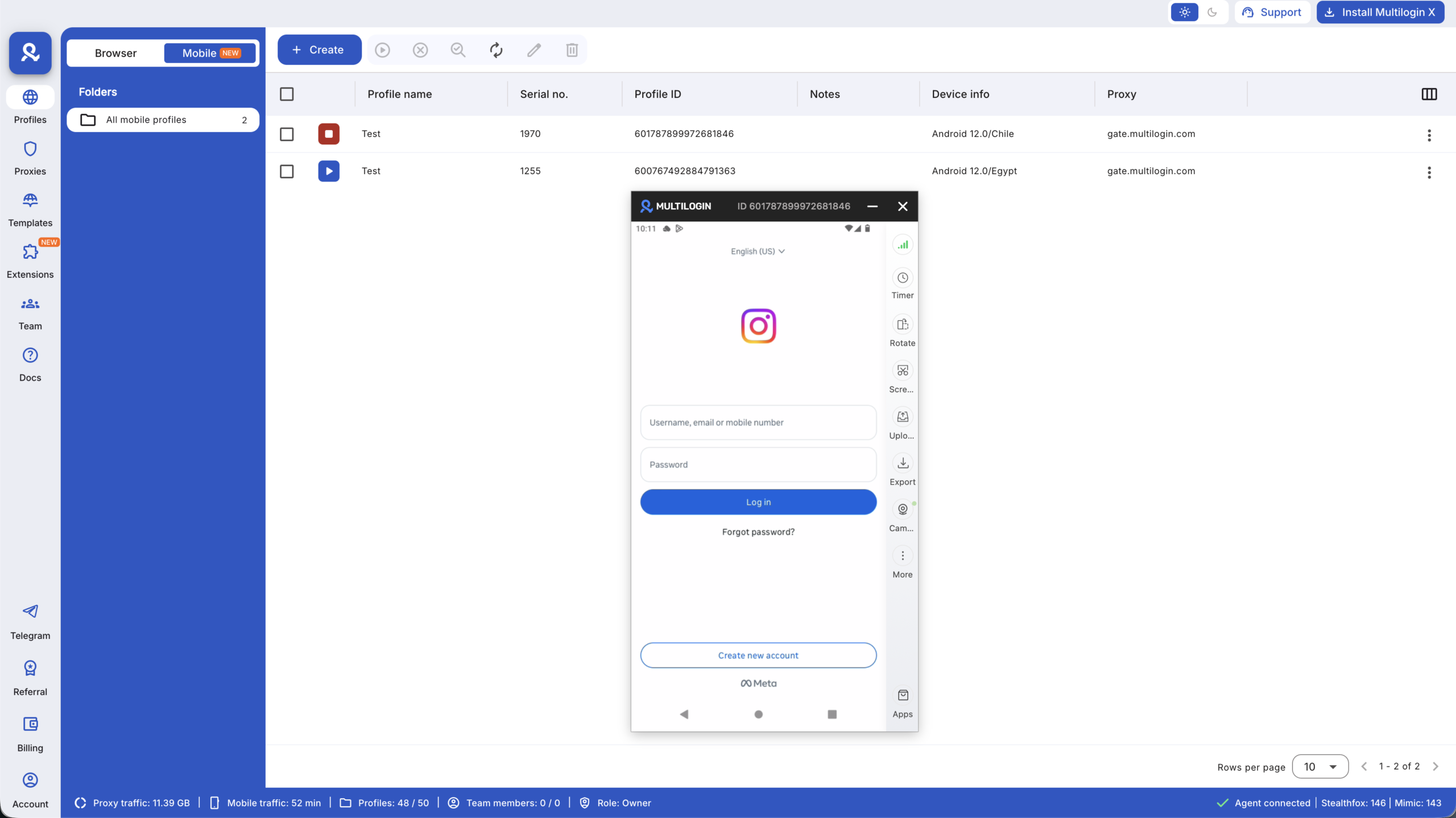
Multilogin Cloud Phones are designed to address the device problem directly. Instead of forcing many accounts onto one phone, each Instagram account runs inside its own real Android cloud phone.
This approach turns Multilogin into an unlimited Instagram account creator not because it generates accounts automatically, but because it removes the technical limit that usually stops people from scaling.
Running each Instagram account on its own real Android cloud phone
Every cloud phone is a full Android system hosted in the cloud. Each one comes with genuine hardware identifiers like IMEI, Android ID, and MAC address. These identifiers aren’t simulated or recycled.
When Instagram opens inside a cloud phone:
- The app sees a real Android device
- App storage stays inside that phone
- The device behaves the same way every time
Each account lives in its own environment, just like having a separate physical phone — without the hardware.
Keeping sessions stable across logins
One of the fastest ways to trigger security checks is logging in from a fresh or inconsistent environment. Cloud phones avoid that by preserving app data, cache, and login state.
When you return to an account:
- It opens as the same device
- The app remembers its history
- Behavior stays predictable
This stability allows accounts to warm up naturally instead of resetting their identity every day.
Preventing account linking through full isolation
Account linking usually happens when signals overlap. Multilogin avoids this by isolating everything at the device level.
Each cloud phone has:
- Its own storage
- Its own system settings
- Its own background signals
If one Instagram account runs into trouble, it stays contained. The rest of your setup remains untouched.
This isolation is what allows an unlimited Instagram account creator workflow to stay controlled instead of fragile.
Managing all Instagram accounts from one desktop
Scaling accounts often becomes messy because tools are scattered. Phones here. Browsers there. Logins everywhere.
Multilogin brings cloud phones and browser profiles into one desktop app. From a single dashboard, you can:
- Launch cloud phones
- Switch between Instagram accounts
- Organize devices clearly
This reduces errors, saves time, and makes daily work more predictable.
Matching mobile identity with built-in proxies
Instagram looks for consistency between device signals and location. Cloud phones use built-in mobile-grade proxies that align IP, region, and device behavior.
There’s no manual setup and no guessing. Each cloud phone keeps its identity aligned over time, which helps avoid conflicts that often lead to restrictions.
Scaling without physical phone farms
Physical phone farms introduce their own problems: charging, rotation, maintenance, and human error. Cloud phones remove all of that.
You scale by adding environments, not hardware. Each new Instagram account gets its own Android device instantly. This makes growth predictable and repeatable.
At this stage, Multilogin becomes less of a tool and more of an unlimited Instagram account creator framework — one where scale doesn’t increase risk.


