
Gmail Farming With Multilogin: The Safe Way to Build and Run Aged Gmail Accounts

How to Create Multiple Gmail Accounts Without Triggering Bans with Multilogin
Image of the author Gayane Gh.
02 Dec 2025
13 mins read
Share with
Run Multiple Accounts Without Bans or Blocks

Get a secure, undetectable browsing environment for just €1.99.

  • 3-day trial 
  • 5 cloud or local profiles 
  • 200 MB proxy traffic 

Table of Contents

Gmail accounts don’t survive long when they look identical, open from the same device pattern, or jump between IPs that don’t match real user behavior. Anyone who has tried farming multiple Gmail accounts knows how quickly the bans hit — one login spike, one location mismatch, and the whole batch can disappear overnight. Losing accounts right before a campaign or a client deadline hits harder than most people admit.

Multilogin changes how this entire routine works. Instead of juggling risky extensions or random proxies, you’re building and warming Gmails inside isolated browser profiles that look and behave like real devices. Each profile carries its own fingerprint, cookies, and residential IP, so running multiple Gmail accounts doesn’t feel like pushing your luck anymore. It feels controlled.

This guide shows how gmail farming becomes stable when every profile acts like a real user. You’ll see how to create profiles, assign trusted IPs, build history, and keep accounts alive even when the workload grows. If you’re tired of bans or restarting batches from zero, this is the setup that finally holds steady.

What Gmail farming is and why accounts get flagged

Gmail farming is the process of creating and warming Gmail accounts until they behave like real users. When you farm multiple Gmail accounts, you’re not just signing up and hoping for the best — you’re building trust slowly so the accounts survive long enough to actually use. Most people get banned because their setup exposes patterns instantly: identical device fingerprints, unstable IPs, or login behavior that shifts too fast for Google to ignore.

Flags hit when something doesn’t feel human. One mismatch is all it takes — a fresh account jumping between countries, a fingerprint changing overnight, or a batch created too quickly. If one account gets flagged, the rest often follow, especially when they share the same weak environment.

Common triggers that get Gmail farms banned:

  • Creating too many accounts in one session
  • Logging in from IPs that change location unexpectedly
  • Using the same device fingerprint for multiple accounts
  • Letting automation move faster than a real person ever would
  • Connecting new accounts to risky websites too early

When each Gmail has its own device, its own IP, and its own rhythm, the bans stop piling up and the farming process finally becomes stable.

How aged Gmail accounts work and why they matter

Aged Gmail accounts survive because they look lived-in. They have history, cookies, login patterns, tiny traces of normal activity — things a fresh account simply can’t fake on day one. When you’re farming multiple Gmail accounts, these small signals make the difference between an inbox that stays alive for months and one that gets flagged the moment you push it a little too hard.

Google trusts behavior that grows slowly. An aged account opens the same way each time, loads familiar pages, and carries a rhythm that feels human. That rhythm is what protects you when you scale. If you need to send emails, log into platforms, or connect a new tool, an aged Gmail won’t panic or throw security prompts the way a young account would. If a fresh account gets banned, you can recover by leaning on your aged ones — they help stabilize the rest of the farm.

Aged Gmails matter because they give you breathing room. You’re not constantly waiting for something to break or for Google to force another verification loop you can’t complete. Instead of fighting with fresh accounts every day, you build a foundation you can actually grow on.

Why aged Gmail accounts make your farm stronger:

  • They carry natural cookies that reduce login suspicion
  • They trigger fewer captchas and verification loops
  • They handle new actions without sudden flags
  • They stabilize your batch if a fresh account gets banned
  • They help your workflow grow without starting from zero each time

When you treat a Gmail account like a real user and let it age properly, the entire farming process becomes far more stable — and far less stressful.

Learn more about how to manage unlimited Gmail accounts!

Why Multilogin is the best environment to farm Gmail accounts

Most Gmail farms fail because the accounts never look like real people. The device changes, the IP jumps, or the fingerprint shifts without warning — and Google doesn’t give second chances. One bad login, and you can lose an entire batch you spent days warming. Multilogin removes that pressure by giving each Gmail its own consistent identity, its own IP footprint, and its own history, so nothing leaks or overlaps behind the scenes.

Every profile in Multilogin behaves like a separate device. You can run 5 accounts or 5,000, and they’ll never touch each other. No shared fingerprints. No reused IP patterns. No accidental cross-contamination that leads to mass suspensions. If you’ve ever had a whole group of Gmails banned because they were all tied to the same weak setup, this environment feels like a different world.

The built-in residential proxies also matter. You’re not guessing which provider is safe or worrying about bad subnets. You get clean, trusted IPs that make Gmail feel stable from the first login. Google sees natural behavior, not a farm trying to disguise itself.

Multilogin gives you control. If an account gets flagged, it stays isolated; it won’t pull down the others with it. That alone saves hours of rebuilding and removes the stress that usually comes with managing multiple Gmail accounts at scale.

Why Multilogin works so well for Gmail farming:

  • Each Gmail runs on its own device fingerprint
  • Built-in residential proxies keep IP behavior stable
  • No cross-profile leakage that triggers mass bans
  • Browser profiles hold long-lived cookies and real browsing history
  • If one account gets banned, the rest stay untouched
  • Works for beginners who farm 5 accounts and teams who manage thousands

When your setup looks human and stays consistent, Gmail stops fighting you — and you finally get accounts that live long enough to be useful.

Try Multilogin today for just €1.99 and manage every account from one secure platform.

Before you start: the setup you need for stable Gmail farming

If your foundation is weak, every Gmail you create will break sooner or later. Most farmers lose accounts not because they did anything “wrong,” but because the setup they used gave Google all the evidence it needed. Before you create a single Gmail, you need an environment that looks human, stays consistent, and doesn’t leak connections between profiles. Once this base is in place, everything becomes easier — warming, aging, and scaling.

Separate browser profiles

Every Gmail needs its own space. When profiles overlap, Google links them instantly. One flagged account can pull others down, even if you never intended them to be connected. Separate browser profiles act like separate devices — different fingerprints, different storage, different identities. If something gets banned, it dies alone, and the rest of your farm stays intact.

Clean residential IPs

Your IP is the first thing Google checks. If it jumps cities, rotates too fast, or comes from a suspicious subnet, the warning flags start piling up. Clean residential IPs give your profiles a stable, believable footprint. When each profile has one trusted IP tied to it, Gmail relaxes, and fewer captchas show up. If you’ve ever lost accounts because of sudden location changes, this is where it starts.

Learn about how to manage unlimited Google accounts!

A realistic warm-up plan

Gmail doesn’t trust newborn accounts. If you push them too quickly, they panic. You need slow, natural steps — checking the inbox, adjusting settings, opening a few Google pages. Nothing rushed. Nothing robotic. When the warm-up feels human, bans drop dramatically, and your accounts survive long enough to age properly.

A predictable schedule

Random bursts of activity look suspicious. Gmail likes patterns. Logging in at certain times, browsing steadily, doing small actions across days — this keeps the account calm. A predictable schedule turns a fragile inbox into a stable one, especially in the first two weeks when most accounts die.

How to farm Gmail accounts safely with Multilogin

Once your environment is stable, you can start farming without feeling like every login might trigger a ban. The goal isn’t speed — it’s trust. With Multilogin, each Gmail behaves like a separate person, which makes the farming process far safer and more controlled.

Create a profile for each Gmail

Give every Gmail its own browser profile. This creates a clean divide between identities so they never leak signals to each other. You can manage five accounts or five hundred, and every single one stays isolated. If one Gmail gets flagged, you don’t lose the rest of your batch overnight.
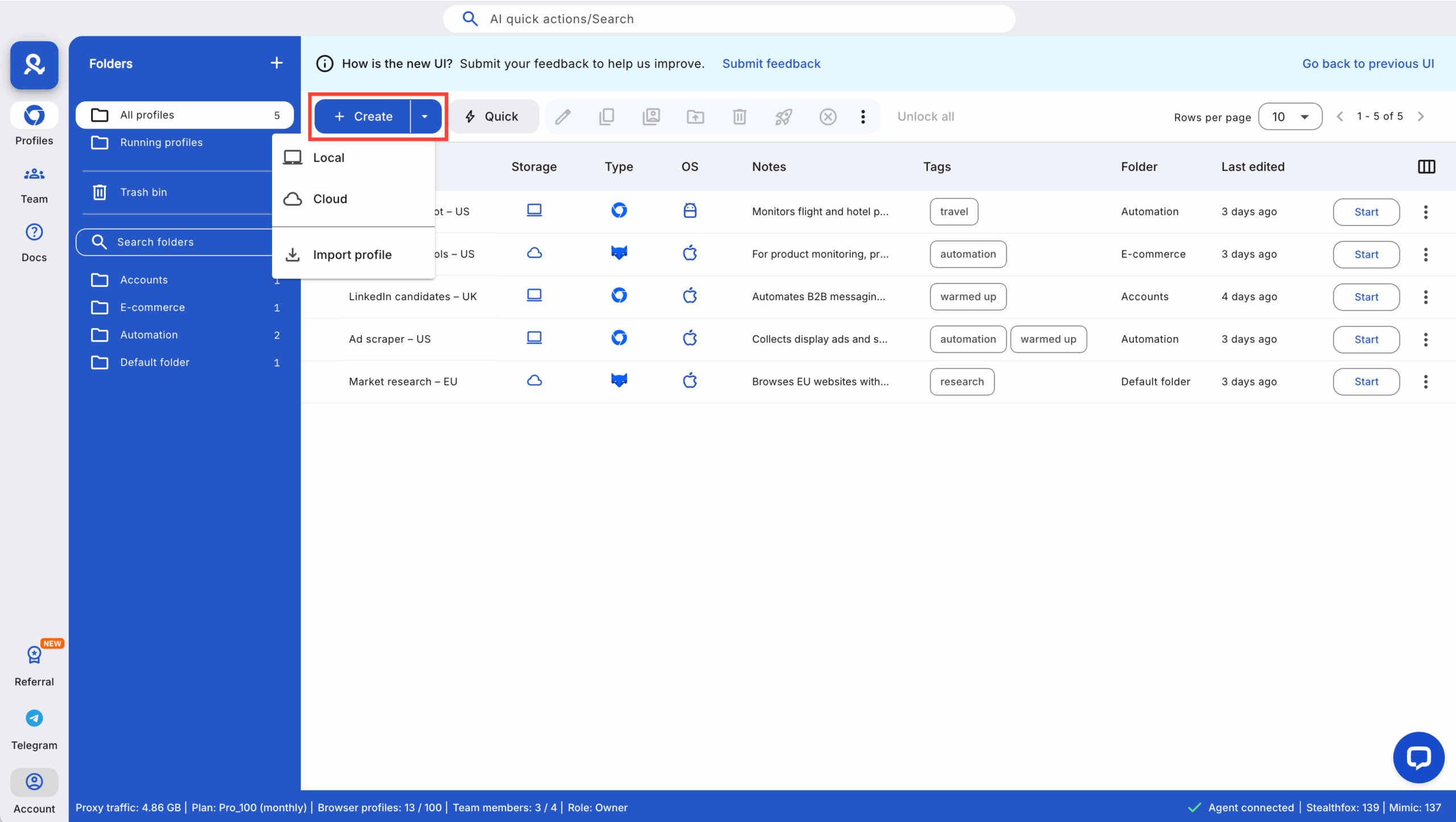
Create your first browser profile

Assign a stable residential IP

Tie each profile to a residential IP that doesn’t jump around. Gmail hates unexpected travel. A stable IP makes the account feel grounded, like it belongs to a real person in a real city. This single step prevents countless bans and login challenges.
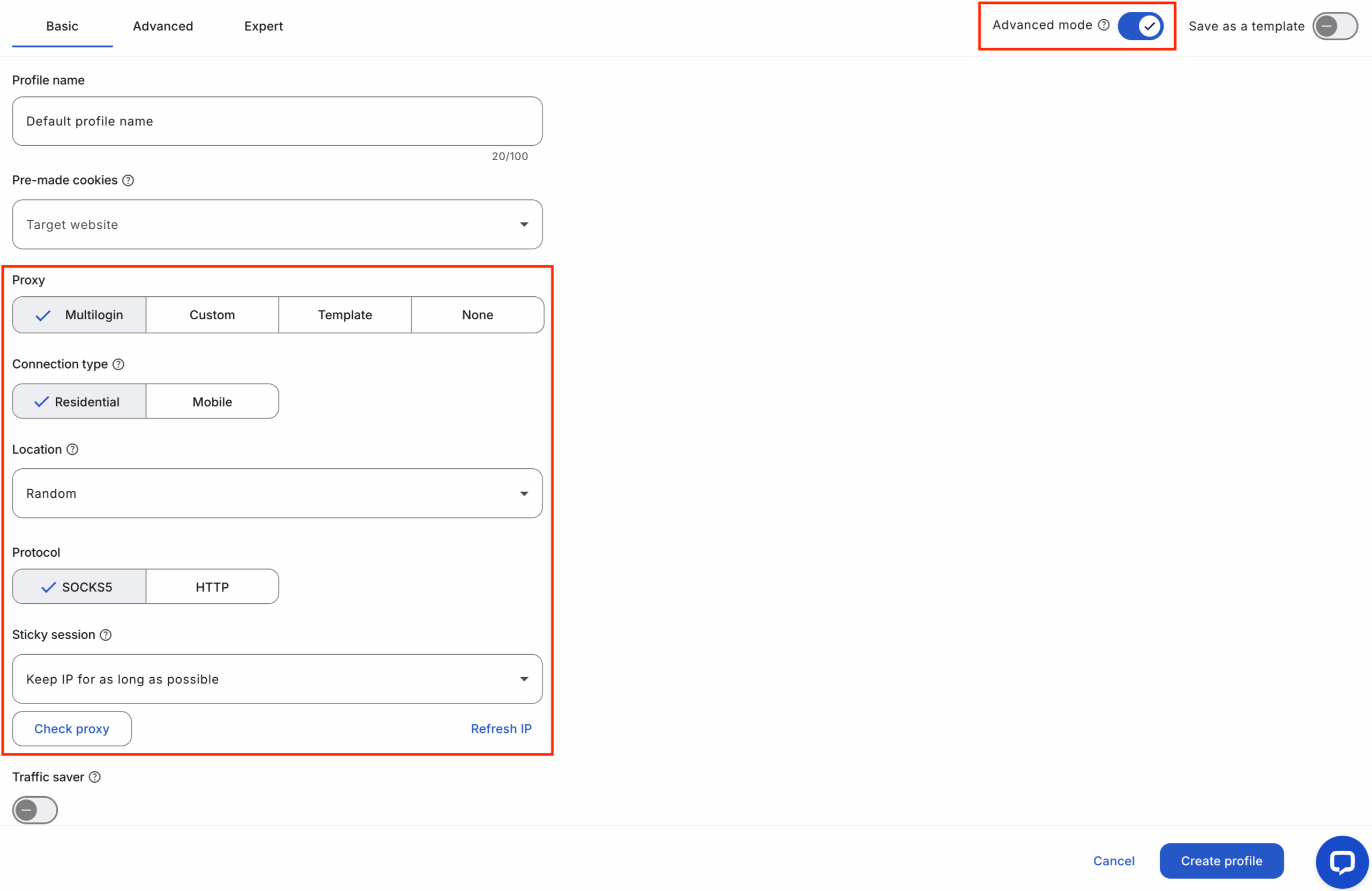
Proxy settings in Multilogin

Warm up new accounts slowly

Start simple. Open Gmail. Let the page load. Click around naturally. Check a few categories. Spend a minute or two browsing another Google service. That’s enough for day one. When you warm up slowly, Gmail starts trusting the account, and every new action becomes safer.

Build cookies and history

Cookies are your quiet helpers. They show that the account has been around, browsing, learning, and acting like a real person. Let the profile interact with light content — Google News, YouTube, simple searches. These small traces make a young Gmail feel older, and Google responds with fewer verification loops and fewer surprises.

If you want to speed this part up, you can use Multilogin’s Cookies Robot to warm profiles automatically. It builds natural browsing signals in the background, so when you finally log in to Gmail, the account doesn’t look like it was created five minutes ago. This extra layer makes the first days far safer, especially when you’re farming multiple Gmail accounts at once.
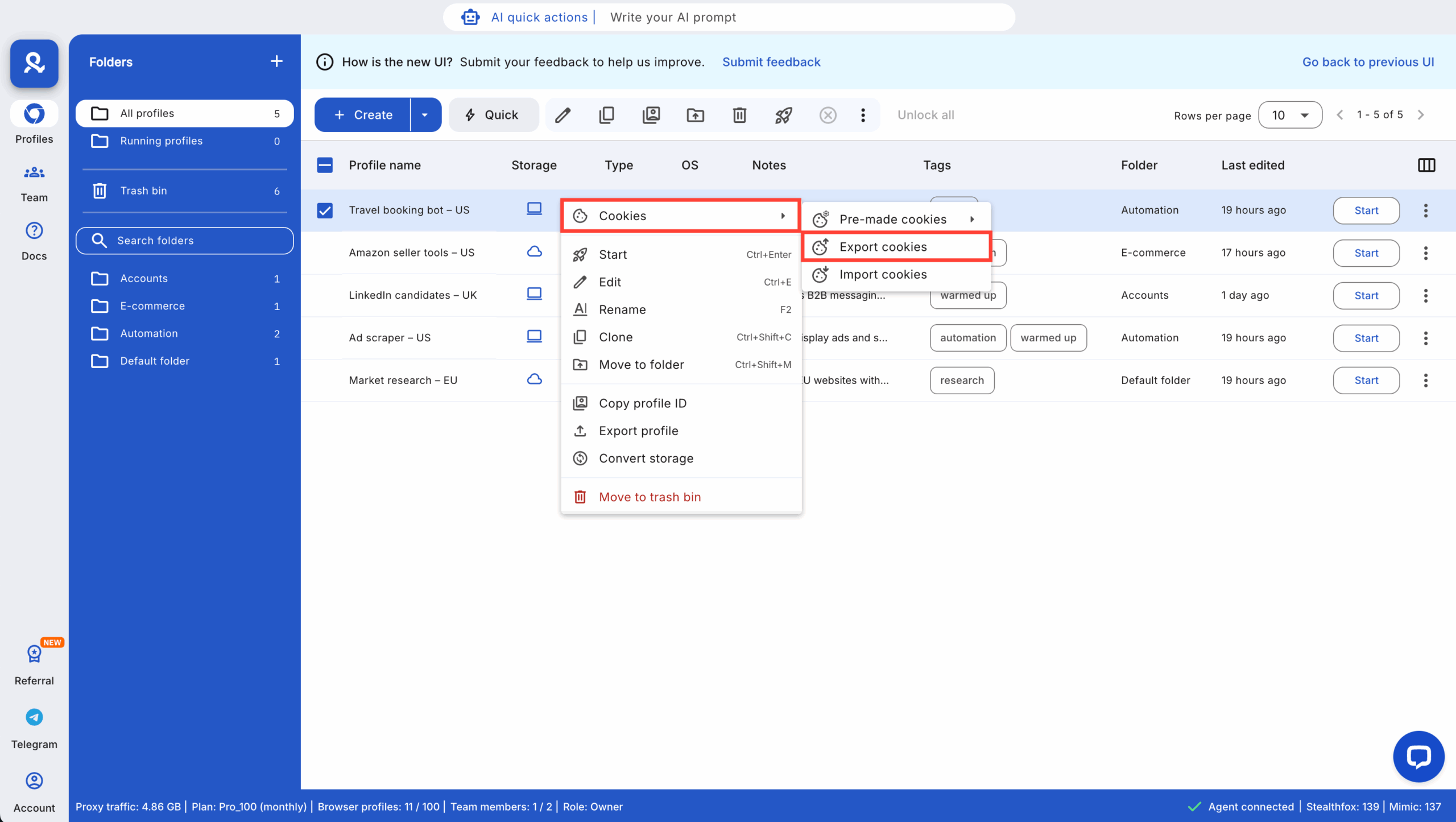
Cookies or browsing data overlap

Maintain natural weekly usage

Don’t ghost your accounts. Real people use Gmail regularly. Log in a few times a week, read something, click something, leave small signals behind. This weekly rhythm keeps the accounts alive. When you don’t disappear suddenly, Gmail stops treating you like a bot trying to hide.

Ready to keep everything steady? Try this rhythm inside Multilogin with the 3-day €1.99 trial and let your accounts grow without stress.

What a healthy Gmail farming routine looks like

A healthy routine feels slow at first, but that’s exactly what keeps your accounts alive. Gmail trusts patterns that look steady — small actions across days, familiar logins, light browsing that doesn’t trigger suspicion. When you treat each account like a real person with real habits, Google stops testing you with captchas and security loops every time you log in.

You don’t need complicated tasks. A few minutes of natural activity is enough. Open Gmail, scroll a bit, switch to a Google service, leave the profile to rest. The goal isn’t volume; the goal is rhythm. When your farm has rhythm, you stop losing accounts to sudden spikes or aggressive bursts of activity.

How to scale from 10 to 100+ Gmail accounts without bans

Scaling only works if every account stays isolated. The moment they overlap — shared IPs, shared fingerprints, shared behavior — Google treats your whole setup as one identity. That’s when mass bans happen. With the right structure, growing from 10 accounts to 100 or more becomes safe instead of stressful.

Use Multilogin groups and tags

Groups and tags keep chaos under control. You know which accounts are warming, which are aged, which are active, and which need attention. When accounts are organized, you farm with intention instead of guessing.

Stick to one IP per profile

One profile. One IP. No surprises. If you’ve ever had Gmail ask “Is this really you?” after a location jump, you know why this matters. A profile tied to a single, stable residential IP behaves like a real user, not a farm switching countries in the middle of the night.

Spread activity across real hours

Humans sleep. They take breaks. They don’t manage 50 inboxes at 3 a.m. in three different time zones. Spread your logins and actions across realistic hours. Gmail notices when something feels rushed or unnatural.

Use aged Gmail accounts as anchors

Aged accounts stabilize your farm. They handle actions without panic, and they give you a backup when new accounts get flagged. When things go wrong, your aged Gmails keep the workflow from collapsing.

Common Gmail farming mistakes that cause instant flags

Most flags come from misunderstandings, not bad intentions. You push an account too fast, you log in from a new IP, or you reuse a fingerprint because it’s convenient. Google sees these shortcuts as threats. If you’ve lost a whole batch in one day before, you already know how unforgiving the system can be.

Common mistakes:

  • Creating too many accounts back-to-back
  • Switching IP locations without warning
  • Reusing fingerprints across multiple profiles
  • Forcing automation to run faster than human behavior
  • Connecting fresh accounts to risky websites too early
  • Logging in from devices that look brand new every time

The moment you avoid these patterns, Gmail stops looking at your farm with suspicion.

How to recover when a Gmail gets flagged or locked

A flagged Gmail doesn’t mean your entire farm is dead. The worst thing you can do is start panic-clicking, logging in from new locations, or trying every recovery method at once. That only confirms to Google that something is off.

Take the calm route. Keep the profile inside Multilogin. Stick to the same IP. Try the basic recovery steps once. If it doesn’t unlock, let it rest and move on. The strength of a good farming system is that one broken account doesn’t pull the others down with it. Isolate the issue, learn what triggered it, and adjust your rhythm. This is how you stop one flag from turning into a chain reaction.

How to keep your Gmail farm stable long-term

Consistency is everything. If your setup stays predictable, the accounts stay healthy. Gmail doesn’t punish slow, natural behavior — it punishes sudden shifts and chaotic environments. When your farm grows, your habits need to grow with it.

Keep fingerprints consistent

Profiles shouldn’t change fingerprint every session. Google notices. Keep each Gmail tied to one stable device identity. It builds trust over time.

Avoid mixing accounts

Never open two unrelated Gmails in the same profile or from the same IP. Even one mistake can link accounts you intended to keep separate.

Maintain light weekly activity

Real users don’t disappear for weeks. A few minutes of gentle activity per week is enough to keep accounts alive and trusted.

Rotate batches as you grow

When you expand, rotate which accounts you warm, which accounts stay idle, and which take on heavier tasks. This spreads risk and keeps your entire farm balanced.

Start your 3-day trial for €1.99 and build your Gmail setup in a safer, more stable environment.

Final verdict: Why Gmail farming works better inside Multilogin

Most Gmail farms fall apart because the environment isn’t strong enough to protect them. Profiles overlap, IPs jump, fingerprints change, and bans start stacking. Multilogin fixes this at the root. Every profile looks like a real device, every IP stays consistent, and your accounts build history without leaking signals to each other.

You get an environment where Gmail stops fighting you. If one account gets banned, the rest stay untouched. If you want to scale, you can do it safely instead of gambling on unpredictable setups. Whether you’re running ten Gmails or a thousand, Multilogin gives you a system that feels calm, controlled, and built for long-term survival.

When everything finally works the way it should, Gmail farming stops being a daily fire drill — and becomes a predictable workflow you can rely on.

FAQs about Gmail farming

A Gmail account builds trust slowly. It usually takes weeks of steady, natural usage before it behaves like a long-standing account. Google responds to consistency, not speed, so accounts that grow gradually face fewer verification checks.

Using one IP for several accounts can make them appear connected. Platforms may interpret shared signals as shared ownership. To stay compliant, each account should have its own clear activity pattern that looks like a separate user.

Buying “aged” accounts is risky because you don’t know their history. Some may carry old flags or inconsistent behavior. Farming your own accounts is generally safer, because you control how trust is built from day one.

Automation is possible, but any workflow must follow platform rules. Multilogin can connect with tools that automate routine browser actions, but users are responsible for ensuring everything complies with Google’s policies and local laws.

A ban on one account doesn’t always impact the others. However, if several accounts share similar signals — like device traits or behavior patterns — platforms may link them. Keeping accounts clearly separated reduces the risk of one issue affecting the rest.

Run Multiple Accounts Without Bans or Blocks

Get a secure, undetectable browsing environment for just €1.99.

  • 3-day trial 
  • 5 cloud or local profiles 
  • 200 MB proxy traffic 

Table of Contents

Join our community!

Subscribe to our newsletter for the latest updates, exclusive content, and more. Don’t miss out—sign up today!

Recent Posts
Share with
Hi, I’m Gayane G., a passionate content creator at Multilogin. With a degree in Marketing and over 9 years of experience, I focus on creating engaging digital content that resonates with audiences. When I’m not writing, you can find me traveling, trying new recipes, or curled up with a good book.
https://multilogin.com/academy/gmail-farming-with-multilogin-the-safe-way-to-build-and-run-aged-gmail-accounts/
Recent Posts
Join our community!

Subscribe to our newsletter for the latest updates, exclusive content, and more. Don’t miss out—sign up today!

Multilogin works with amazon.com