





Yes, you can schedule Instagram posts — and it works well without any reach penalty when you do it right. Whether you’re a solo creator batching a week of content or an agency handling multiple client accounts, scheduling is how you stay consistent without being glued to your phone.
Here’s everything you need to know: which tools to use, how to schedule posts and Stories, and what actually matters for reach.
Can you schedule Instagram posts?
You can schedule Instagram posts directly inside the app, through Meta Business Suite for free, or with third-party tools like Later, Buffer, and Hootsuite. All three routes work — the right one depends on your volume and workflow.
Quick answer by situation:
- One account, occasional scheduling: Instagram’s native scheduler (free, inside the app)
- One account, regular scheduling with analytics: Meta Business Suite (free)
Multiple accounts or clients: Later, Buffer, Hootsuite, or Metricool (paid, but built for this)
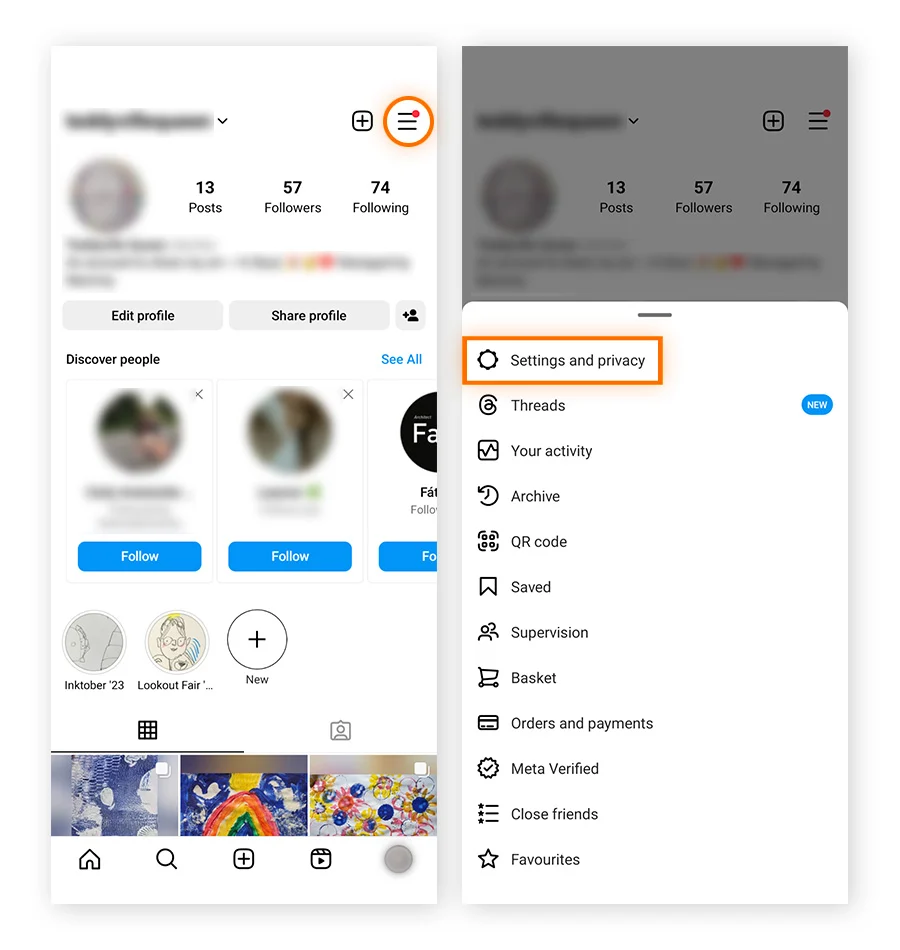
How to schedule posts natively in the Instagram app
Instagram’s built-in scheduler is the simplest option and requires no third-party tools.
- Create your post as normal — add your photo or Reel, write your caption, add hashtags
- Before tapping Share, tap Advanced settings
- Toggle on Schedule this post
- Pick your date and time (up to 75 days ahead)
- Tap Schedule
To find your scheduled posts afterwards: go to your profile, tap the hamburger menu (≡), then tap Scheduled content. You can edit, reschedule, or delete posts from there.
Limitation: the native scheduler works for feed posts and Reels. For Stories, you need Meta Business Suite or a third-party tool.
How to schedule Instagram posts with Meta Business Suite
Meta Business Suite (free at business.facebook.com) is the most capable free option. It lets you schedule feed posts, Reels, and Stories for both Instagram and Facebook from one place.
- Go to business.facebook.com and connect your Instagram account
- Click Create post in the left sidebar
- Build your post — add media, write your caption, add your first comment if you want
- Click the dropdown arrow next to Publish and select Schedule
- Pick your date and time, then confirm
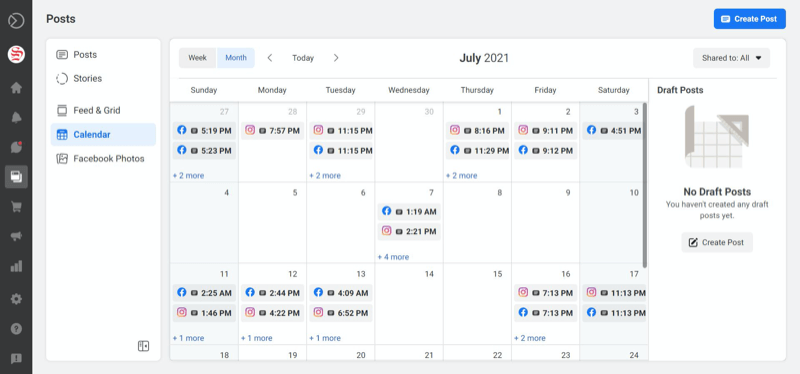
Meta Business Suite also shows you a content calendar view and basic analytics. For single-account users who want more control than the native app offers without paying for a third-party tool, it’s the strongest free option.
Third-party scheduling tools: which one to use
Third-party tools are worth the cost when you’re managing more than one account, need approval workflows, or want analytics that go beyond what Meta provides natively.
- Later is the most popular choice for Instagram specifically. The visual drag-and-drop calendar makes it easy to see how your grid will look before anything goes live. It supports feed posts, Reels, and Stories. The free plan allows 12 posts per month; paid plans start around $16/month. Later also has a best-time-to-post feature that analyses your account’s data rather than giving you generic advice.
- Buffer is clean and simple — good if you’re managing several platforms (Instagram, TikTok, LinkedIn, X) and want one dashboard without a steep learning curve. Solid scheduling and basic analytics. Free plan available; paid from around $5/month per channel.
- Hootsuite is the most feature-rich option and suits agencies managing multiple clients. It has team collaboration, approval workflows, and detailed reporting. It’s more expensive than Later or Buffer, but for an agency context the time saved on client reporting alone often justifies it. It’s also the tool that ran the only real published experiment on whether scheduling hurts reach — their conclusion: it doesn’t, and their scheduled posts actually outperformed native posts in that test.
- Metricool is worth mentioning for anyone who runs Instagram alongside TikTok and Facebook ads. Its analytics are strong and the price is competitive.
One thing all third-party tools share: they connect to Instagram via the official Meta Graph API. Instagram’s official position is that API-based scheduling carries no algorithmic penalty. The Hootsuite experiment backs this up. Where reach differences appear, they’re almost always about being absent during the first 30–60 minutes after posting — not about which tool published the content.
Can you schedule Instagram Stories?
Yes, but not through the native Instagram app. Stories can be scheduled through Meta Business Suite or most third-party tools (Later, Buffer, Hootsuite).
The limitation to know: some native Story features — the “Add Yours” sticker, real-time polls with live results, certain interactive stickers — aren’t fully replicable through scheduled Stories. If those features are important for a particular Story, post it manually.
For standard Stories (images, videos, simple text overlays), scheduling works fine and looks identical to a native post from the audience’s perspective.
Can you schedule Instagram Reels?
Yes. Reels can be scheduled natively in the Instagram app using the same Advanced settings path as feed posts. Meta Business Suite supports Reel scheduling too, as do Later and Hootsuite.
One practical note: if you want to use a trending audio track, you’ll need to post that Reel manually. Trending sounds are only accessible from inside the app at the moment of posting — scheduling tools can’t tap into Instagram’s audio library. If your Reel uses original audio or audio you’ve uploaded separately, scheduled posting works without any issue.
When is the best time to post on Instagram?
The honest answer: it depends on your specific audience. There’s no single best time that works for everyone — your followers’ active windows depend on their demographics, geography, and habits.
That said, the general data points toward:
- Weekdays outperform weekends for most accounts — Tuesday through Friday tend to see higher engagement
- Mid-morning to early afternoon (9am–2pm in your audience’s time zone) is typically when Instagram browsing peaks
- Avoid late night and early morning unless your analytics specifically show activity there
But generic benchmarks are a starting point, not gospel. Your own Instagram Insights show exactly when your followers are online — check Professional dashboard → Audience → Most active times. That data is more reliable than any published guide.
For Reels specifically, check the best time to post Reels on Instagram — the optimal windows can differ slightly from feed posts because Reels get distributed to non-followers, which changes the timing dynamics.
How scheduling fits into a weekly workflow
The most effective approach isn’t “schedule everything” or “post everything manually” — it’s a combination that uses each for what it’s actually good at.
Schedule for:
- Consistent, planned content: product posts, educational carousels, campaign content
- Posts that need client or team approval before going live
- Content tied to specific dates or campaigns
- Anything going out outside your working hours
Post manually for:
- Content using trending audio
- Timely posts responding to something happening right now
- Posts where you want to be present and active in the first hour for engagement
The workflow that works for most social media managers: Plan your week on Sunday or Monday. Load scheduled posts into your tool of choice. Set reminders for the times those posts go live so you can open the app, reply to early comments, and engage with other content. That active session around posting time is what actually drives reach — the tool itself is neutral.
How to schedule Instagram posts for multiple accounts
Managing multiple Instagram accounts on a schedule is where third-party tools earn their cost — but they come with a device-level problem most guides don’t mention.
When you run multiple Instagram accounts from the same device, Instagram can associate them through shared hardware signals. That creates account linking risk that has nothing to do with your scheduler and everything to do with how Instagram reads device fingerprints. For personal accounts this rarely matters. For agencies managing client accounts — especially if a client’s account gets flagged for any reason — it can create spillover.
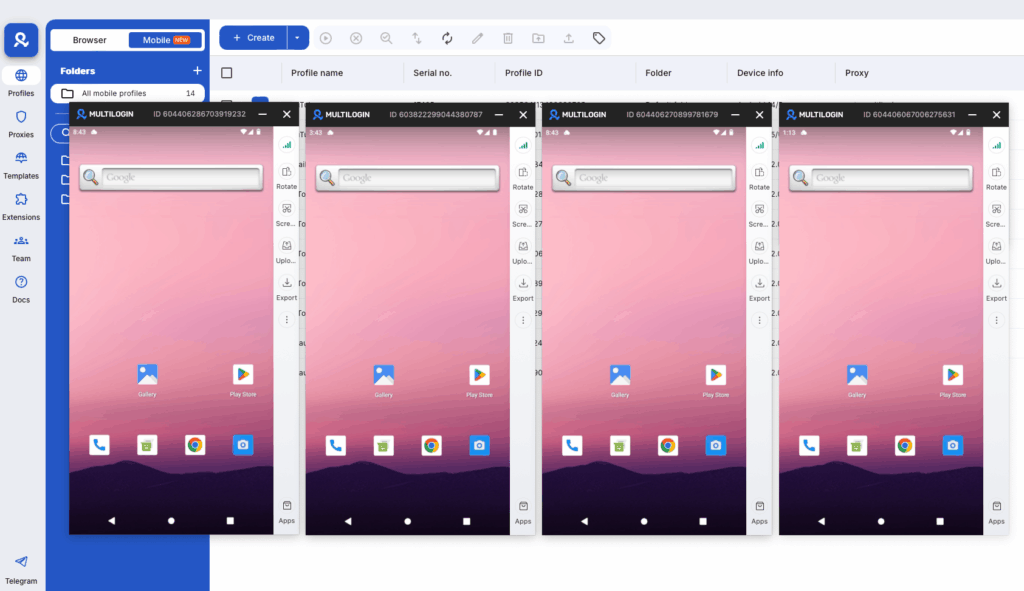
The clean solution is running each account from its own isolated environment. A cloud phone for Instagram gives each account its own real Android device, its own session, and its own hardware identity — managed from one desktop. You schedule through your tool of choice, but each account’s device signal is independent. No shared fingerprints, no linked accounts.
For agencies managing multiple Instagram accounts for clients, this combination — scheduler for planning, cloud phones for isolation — is the setup that scales without creating new risks.
Try Multilogin now and keep every Instagram account properly separated, whatever scheduling tool you use.
Need to manage multiple Instagram accounts? Try Multilogin Cloud Phones.
Frequently asked questions About How to Schedule Instagram Posts
No. Instagram’s official position is that API-based scheduling carries no algorithmic penalty. Hootsuite’s experiment confirmed this — their scheduled posts actually outperformed native posts. Reach differences people observe are almost always due to not being present during the first 30–60 minutes after posting, not the scheduling tool itself.
Through the native Instagram app and Meta Business Suite: up to 75 days. Most third-party tools support similar or longer windows.
Yes, through Meta Business Suite or third-party tools like Later and Hootsuite. Not through the native Instagram app.
Yes, natively in the Instagram app (Advanced settings before publishing) or through Meta Business Suite and most third-party tools. Exception: Reels that need trending audio from Instagram’s library must be posted manually.
In the Instagram app: go to your profile → hamburger menu → Scheduled content. In Meta Business Suite: go to the Planner view to see all scheduled and published posts on a calendar.
Meta Business Suite is the best free option for most users — it supports Stories, Reels, and feed posts, includes a calendar view, and covers both Instagram and Facebook.
Yes, but each account needs its own isolated device environment. Accounts managed from the same device and IP get linked by Instagram’s systems, which creates cascade risk across all of them. Multilogin Cloud Phones give each account its own real Android device with its own IP, enabling independent growth for each account.


