

TL;DR
- What is MoreLogin: MoreLogin is an antidetect browser, a desktop app for Windows, macOS, and Linux that runs many browser profiles from one computer. They recently added Android cloud phones, which are still in testing.
- What is MoreLogin for: E-commerce sellers and affiliate marketers use it to run several accounts at once without those accounts being linked to each other. It also works for regional content checks and QA testing.
- How MoreLogin keeps accounts separate: Each profile gets its own fingerprint, cookies, and proxy, so accounts don’t share a device signature or IP. The catch is that platforms have gotten better at spotting this kind of browser-level separation, and accounts run through antidetect browsers face a growing risk of bans.
- What’s included: Every plan comes with browser profile controls, the Synchronizer, team permissions, an operation log, a local API, and Selenium and Puppeteer support. Real canvas fingerprinting is included too, but only as a limited-time offer.
- MoreLogin pricing: The Free plan gives you 2 profiles and 2 users. Pro starts at $9/month, or $5.40/month billed yearly, for 10 profiles. Extra team seats cost $5 per person per month. Cloud phones cost $0.006/min, capped at $1.50/day, or $23 to $25 per device per month. Proxies aren’t included on any plan.
- MoreLogin main limitations: The core product relies on browser profiles that platforms now actively flag, and the mobile alternative is still in testing. Proxies, cloud phone minutes, extra seats, and extra profiles are all billed on top of the plan, and cheap proxies can put accounts at risk. Cloud phones cover only Android 12 to 15, and fingerprint settings lean on presets rather than fine control.
What is MoreLogin and what is it used for?
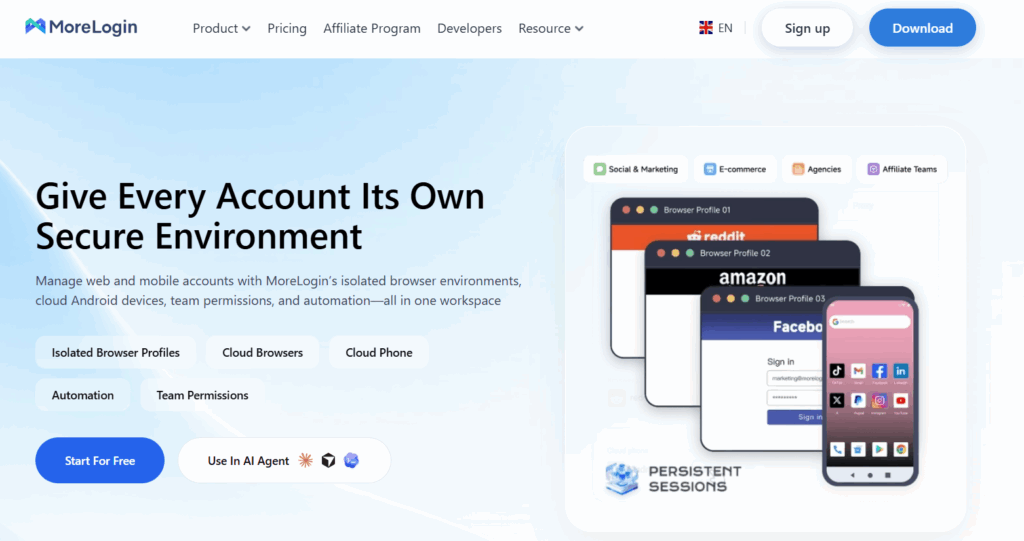
MoreLogin is an antidetect browser: a desktop app for running many browser profiles from one computer, each with its own fingerprint, cookies, and proxy. It targets e-commerce sellers and affiliate marketers who run several accounts at once.
The same fingerprint tricks that kept accounts separate a few years ago are now what gets them flagged. As platforms tighten detection, accounts managed through antidetect browsers face a growing risk of restrictions and bans. MoreLogin added Android cloud phones for apps that need a real mobile environment. They’re billed separately from the browser plan, and because the feature launched so recently, it’s still in testing.
Each browser profile keeps its cookies, fingerprint, and IP address separate from the others. Here’s how that plays out across five common situations.
1. Managing multiple accounts
Platforms link accounts that share a device or network. For agencies running client pages, sellers with several storefronts, or marketers testing ad accounts, one restriction can spread to every connected account.
MoreLogin’s browser profiles keep logins, cookies, and IPs apart, and you switch between them from one dashboard. The problem is that browser-level separation is exactly what detection systems now look for. A profile that seems isolated on your end can still look suspicious to the platform.
2. Running mobile-first apps
Many apps are built for phones first, and an antidetect browser tab can’t fully stand in for them. Platforms notice when an account on a mobile-first app only ever shows up from a desktop browser.
Cloud phones close that gap by giving each account its own remote Android device. MoreLogin only started offering them recently, and the feature is still in testing. Multilogin, by contrast, is built around real Android cloud phones as its core product. We compare pricing and Android coverage later in this review.
3. Protecting privacy
Sites collect cookies and device details to build a picture of who you are. Isolated profiles keep that data contained, so activity in one profile doesn’t follow you into the next.
4. Checking content by region
Search results, ads, and prices change from country to country. Assigning a proxy from a specific location to a profile shows you the page the way a local user sees it. Marketers use this to verify ad placements, and e-commerce teams use it to check regional pricing and listings.
5. Testing in clean environments
Developers and QA teams need fresh, repeatable setups. Profiles with fixed OS, browser, and location settings make it easier to reproduce a bug that only appears for users in one region or on one device type. This is also where an antidetect browser still holds up well, since there’s no account on the line if a platform flags the session.
On paper, MoreLogin covers all five use cases. In practice, how well it covers them depends on which one matters most to you. Regional checks and QA testing suit an antidetect browser well, since nothing is at stake if a session gets flagged. Managing social media accounts and running mobile-first apps is another story.
MoreLogin limitations
- Browser profiles are what platforms now look for
MoreLogin’s core product is still the antidetect browser. Masking a fingerprint changes what a site reads from your browser, but the session still runs on a desktop. Detection systems now weigh signals beyond the fingerprint itself, including how an account behaves and what kind of device it appears to be on. A carefully configured profile lowers the risk. It doesn’t remove it, especially for accounts that are expected to live on a phone.
- Cloud phones are still new
MoreLogin only recently added Android cloud phones, and the feature is still in early stages, with gaps in device options, occasional instability, and changes to how the feature works or is priced as it develops. If you plan to move mobile accounts over, try it with a small batch first rather than migrating everything at once.
- Two products, two bills
Cloud phones are billed separately from the browser plan. Teams that run both web and mobile accounts end up paying for and managing two products, which makes the total monthly cost harder to predict.
- No proxy traffic included
None of MoreLogin’s plans include proxy traffic, so every profile needs an IP from a third-party provider. That means another vendor to pay, another dashboard to manage, and proxies to configure profile by profile. For regional content checks, you’ll also need a provider that covers the exact locations you want to test. Multilogin, for comparison, sells residential, mobile, and ISP proxies directly from $3.50/GB, and unused traffic rolls over to the next month.
MoreLogin Reviews: User’s first impressions
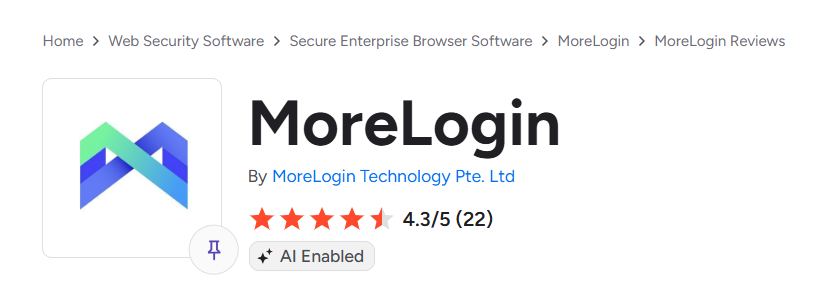 MoreLogin holds a 4.3 out of 5 average on G2, based on 22 reviews. That’s a small pool for a tool in a crowded category, and nearly half of those reviews were written in 2023, long before cloud phones were part of the product. For comparison, Multilogin sits at 4.8 on G2 across 89 reviews, with users praising its ease of use and reliable performance.
What users like
Setup is the most common point of praise. G2’s review summary says users consistently highlight easy setup and strong customer support. Several reviewers describe support reps who stayed with them through proxy and profile configuration until it worked.
Where first impressions fall short
Proxies cause the most friction. Because no MoreLogin plan includes proxy traffic, every new user has to source IPs and connect them profile by profile before the tool is useful, and reviews show that step is where setups stall. Even a long-time user who rates MoreLogin five stars says proxy integrations could use clearer guidance for newcomers. A more critical reviewer asked for proxy testing, better error explanations, and simpler connection instructions. One 2024 review also reported occasional connection failures with MoreLogin, with support sometimes taking up to a day to respond: 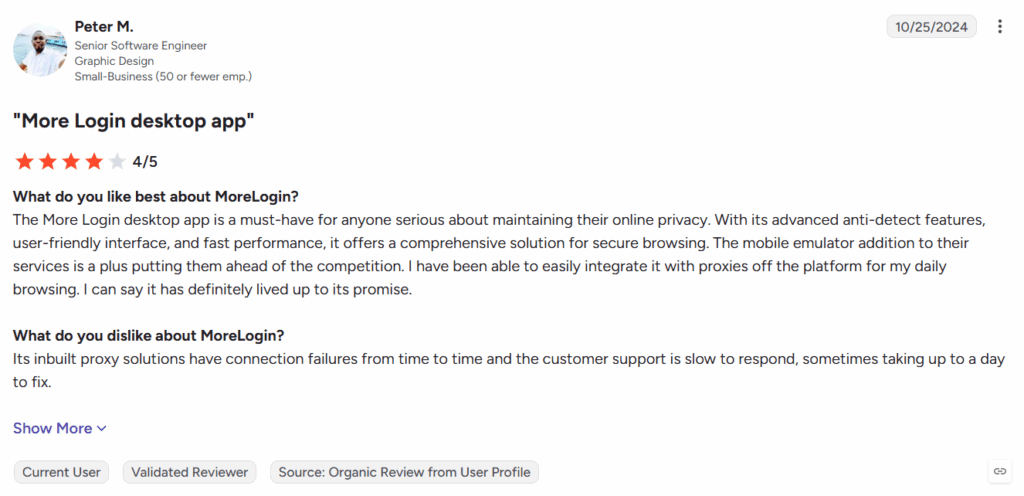
This is where Multilogin takes a different approach. Residential, mobile, and ISP proxies are available directly in the platform from $3.50/GB, and unused traffic rolls over, so there’s no second vendor to manage before your first profile goes live.
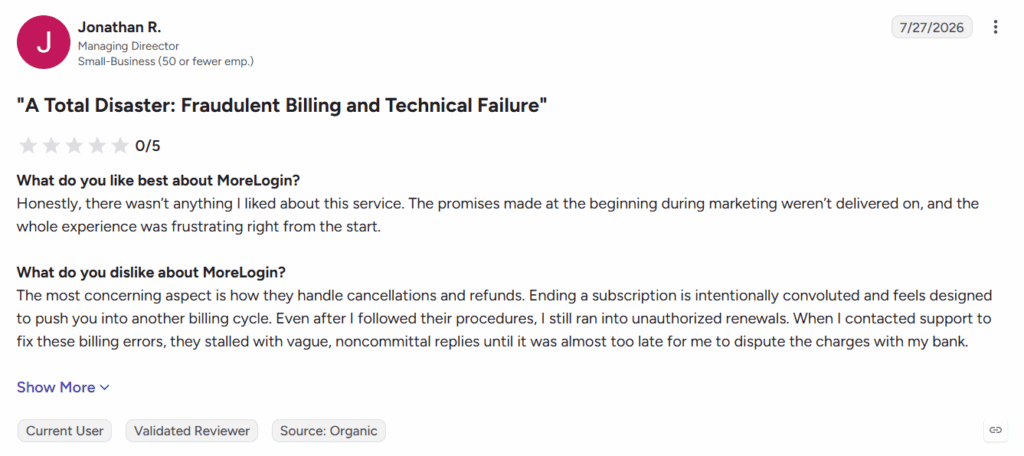
For MoreLogin, the broader learning curve compounds the problem, as users note that the many configuration options take time to learn. Their harshest review is also the most recent: in July 2026, one user gave MoreLogin the lowest score, citing a convoluted cancellation process and renewals they considered unauthorized.
Early feedback on cloud phones
Very few reviewers mention cloud phones at all. One June 2026 reviewer liked having both browser profiles and cloud phone workflows in one place, but said the mix of fingerprints, proxies, team permissions, automation, and cloud phones takes time to figure out, and asked for more built-in guidance and workflow templates. That’s close to the full extent of public feedback so far: 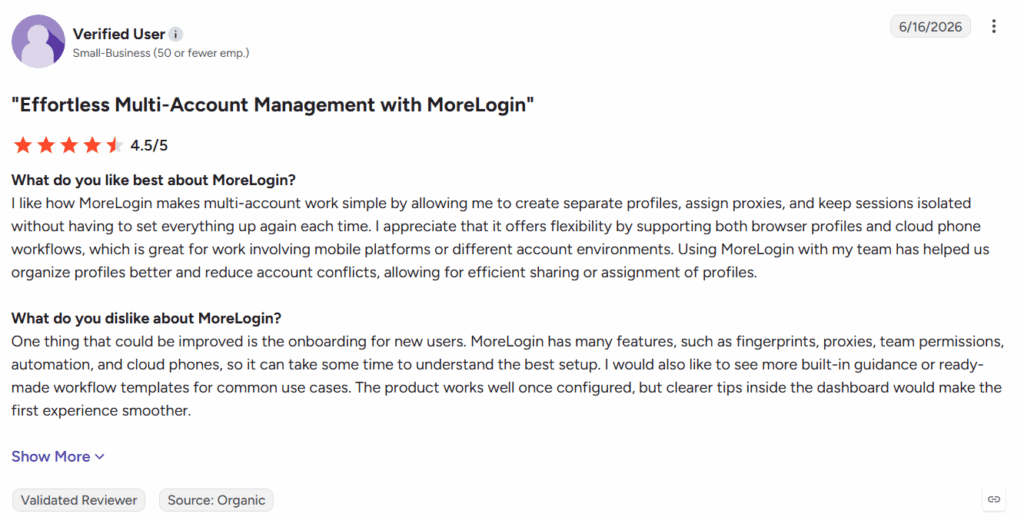
Multilogin runs mobile profiles on real Android cloud phones as its core product. For the onboarding gap MoreLogin reviewers keep pointing to, the Academy section walks new users through setup step by step, and a library of YouTube tutorials covers common workflows for anyone who prefers to learn by watching.
Setting up profiles in MoreLogin: How to use MoreLogin?
Getting started takes three steps:
- Download the app for Windows, macOS, or Linux from the MoreLogin site.
- Register and confirm your email.
- Click “+New Profile,” then pick the browser, OS, and proxy.
The download is quick. In our test, the installer window rendered at a noticeably low resolution. The installation wizard looks like this:

After install, MoreLogin creates a starter profile automatically, though you’ll still need to add a proxy and adjust settings before it’s usable.

Browser profile settings
The core settings are all there. You choose the browser, the operating system, and the user-agent for each profile.

A useful touch is the platform selector: you tell MoreLogin whether the profile is for Google, Amazon, eBay, or a custom site, and it applies matching presets.
Folders and tags help once you pass a few dozen profiles, and the interface stays clean during setup.
The trade-off is control. Most fingerprint options are preset dropdowns rather than individual parameters, which suits beginners but limits advanced users who want to tune specific values.

Cloud phones in MoreLogin
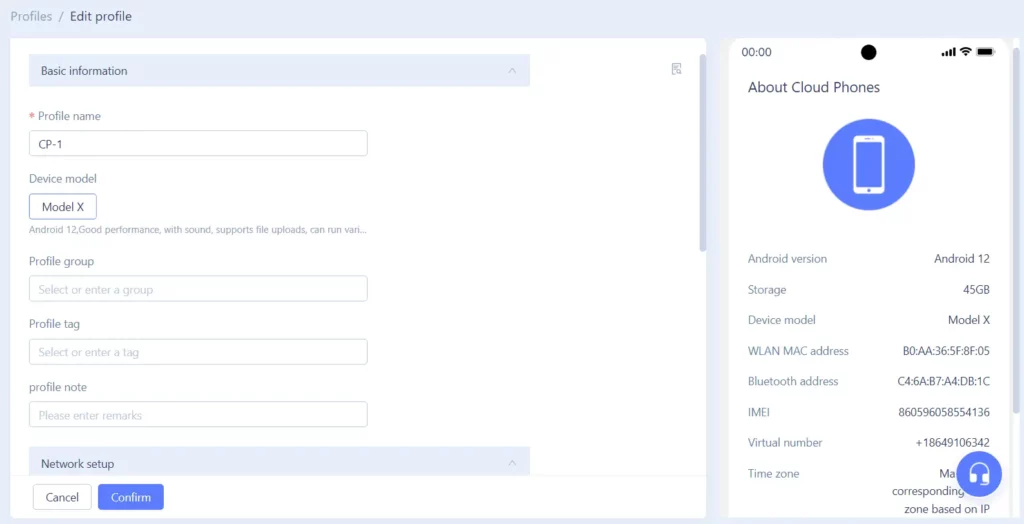
MoreLogin’s cloud phones are Android devices hosted remotely, used for mobile-first apps like TikTok, Instagram, and WhatsApp. During setup, you pick the device model and Android version, and you can view identifiers like the IMEI, WLAN MAC, and Bluetooth address. The setup screen also lists each model’s storage and performance specs, which helps when you’re running heavier apps. Time zone follows the proxy’s IP automatically.
Cloud phones support automation, camera and audio, and file uploads, and you can group and tag them like browser profiles.
Pricing works in two ways:
- Per minute: $0.006/min, capped at $1.50 per day per phone.
- Monthly rental: $23 to $25 per phone for 30 days.
New accounts get 100 free minutes. There’s no monthly minute allowance on paid browser plans, so cloud phone use is always an extra cost. Idle phones cost money too: according to MoreLogin’s cloud phone billing rules, a phone that isn’t started for 7 consecutive days is charged $0.03 per day in storage.
Proxy Management in MoreLogin
MoreLogin lets you connect HTTP, HTTPS, and SOCKS5 proxies and assign a different IP to each profile. That part works well. It keeps location-specific browsing consistent and stops accounts from linking through a shared IP.
The catch is that none of those proxies come with your plan. MoreLogin includes no proxy traffic at any tier, so before a single profile is usable, you have to bring your own proxies, hunt down free ones, or buy them from a third-party provider. MoreLogin does run a proxy marketplace inside the app, but it’s a storefront for extra purchases, not something your subscription covers.
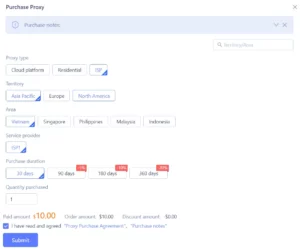
This is where the real cost of MoreLogin shows up. The plan price is only the starting point. Every new profile needs an IP, every account you add pushes the proxy bill higher, and the gap between what you signed up for and what you actually pay keeps widening as you scale. Teams comparing sticker prices can easily underestimate what MoreLogin costs in practice.
Cost isn’t the only risk. When proxies come from wherever you can find them, quality becomes a gamble. Free lists and cheap marketplace IPs are often shared with other users, already flagged from past abuse, or located somewhere that doesn’t match the profile’s settings. Platforms treat those signals as red flags, and a bad IP can get an account restricted or banned no matter how carefully the rest of the profile is configured. If several profiles draw from the same weak pool, one flagged IP can take down more than one account.
Multilogin takes the opposite approach. Built-in residential and mobile proxies are included in every plan, so profiles are ready to run the moment you create them, with no second vendor and no separate bill. If you need more traffic, it’s available from $3.50/GB, and anything you don’t use rolls over to the next month.
As a first impression, MoreLogin holds up. The interface is clean and convenient, and the browser runs smoothly. Look a little closer, though, and a few details start pulling the rating down: proxy costs that sit entirely outside the plan, and canvas customization options that feel limited for a tool built around fingerprint control.
What MoreLogin offers: Overview
Here’s what you get with MoreLogin, based on its current feature list.
1. Security and account protection
MoreLogin supports end-to-end encryption and two-factor authentication on your account, and the company says it uses a six-layer data encryption system. It has also partnered with SlowMist for security audits and includes ScamSniffer’s anti-phishing plugin, which matters most to users running crypto wallets inside profiles.
Each profile checks its IP when it launches and flags network changes in real time, so you know if a proxy drops before you log in to anything.
Pricing: included on every plan. IP detection at launch and real-time network change detection are listed on Free, Pro, and Custom alike.
2. Browser profile controls
Every profile gets its own user agent, screen resolution, WebGL and canvas data, WebRTC settings, fonts, and time zone. MoreLogin says its canvas data comes from real devices rather than randomly generated values. In our test, most options were set through presets, which speeds up setup but gives advanced users less fine control.
Pricing: included for now, but not guaranteed. Real canvas fingerprinting appears on every plan, but MoreLogin’s pricing page marks it as a “Limited Time Experience.” There’s no word on what happens when that period ends, so it could become a paid feature or disappear entirely.
3. Synchronizer
The Synchronizer mirrors mouse and keyboard actions from one profile across several open windows. It’s useful for repetitive manual work, like posting the same update to multiple storefronts. We didn’t test it at high volume.
Pricing: included on every plan, including Free.
4. Team collaboration
Every plan includes permission management, profile transfer, cloud sync of team browser data, and an operation log that records who did what.
Pricing: partly add-on. The recycle bin for deleted profiles is available only on Pro and Custom. Team seats also cost extra: the plan covers two users, and each additional member costs $5 per person every 30 days. A five-person team pays $15 a month in seats alone, before a single extra profile or proxy.
5. Automation
MoreLogin’s local API handles batch creation, launch, and deletion of browser profiles, and connects to Selenium and Puppeteer through WebDriver ports. Cloud phones have their own API and ADB access, so you can install apps, run scripts, and schedule tasks on Android devices without tapping through each one by hand. MoreLogin also offers RPA templates and the Synchronizer for repetitive manual work.
Pricing: included on every plan, including Free. Cloud phone usage itself is still billed separately.
6. Cloud phones
MoreLogin’s Android cloud phones run Android 12 to 15 and support automation, camera, audio, and file uploads. The feature is still new.
Pricing: paid add-on, billed separately from the browser plan. Usage costs $0.006 per minute, capped at $1.50 per day, or $23 to $25 per device for 30 days. New accounts get 100 free minutes to try it.
Overall, MoreLogin covers what most small teams need for day-to-day multi-account work. The catch is how many pieces sit outside the base price. Pro starts at 10 profiles, with more profiles, extra team seats, proxies, and cloud phones each billed on top. We didn’t run large-scale load tests, so we can’t speak to performance at hundreds of simultaneous profiles.
MoreLogin Pricing
MoreLogin offers three plans, with a 40% discount when you pay yearly.
| Plan | Price | Profiles | Team members | What’s included |
|---|---|---|---|---|
| Free | $0, no time limit | 2 | 2 | Core browser features, Synchronizer, local API, Selenium and Puppeteer support |
| Pro | $9/month, or $5.40/month billed yearly | 10 to start, more via calculator | 2, extra seats paid | Everything in Free, plus 24/7 online support and a recycle bin |
| Custom | Quote-based | Custom | Custom | All features plus dedicated consulting |
The base plan price covers browser profiles only. Everything else is billed separately:
- Extra team members cost $5 per person every 30 days beyond the two included users.
- Extra profiles on Pro are priced through a calculator on MoreLogin’s site. There’s no published per-profile rate.
- Cloud phones run on pay-per-minute billing at $0.006 per minute, capped at $1.50 per day, or $23 to $25 per device for 30 days. New accounts get 100 free minutes. Keep in mind the feature is still in testing.
- Proxies aren’t included on any plan. You can bring your own, buy from a third-party provider, or purchase through MoreLogin’s in-app marketplace, but every option is an extra cost.
It’s also worth watching the real canvas fingerprint feature. It’s included on all plans for now, but MoreLogin’s pricing page labels it a “Limited Time Experience,” with no word on what happens after.
MoreLogin accepts PayPal, credit cards, and crypto through Coinbase.
MoreLogin pros and cons: What works and what costs extra
Pros
- Pro costs $5.40/month billed annually ($9 monthly) for 10 profiles, which is a good entry price among tools that also offer cloud phones.
- Free plan available. It includes two users, the local API, and Selenium and Puppeteer support at no cost. Most free plans in this category leave team seats and automation out.
- Cloud phone costs you can predict. Per-minute billing is $0.006, capped at $1.50 per phone per day, and new accounts get 100 free minutes to test with.
- Browser engines on three operating systems. You can run profiles on Windows, macOS, or Linux.
- Fast profile setup. Platform presets for sites like Facebook, Amazon, and eBay fill in the right settings when you create a profile.
- Third-party security audits. MoreLogin works with SlowMist on audits and includes an anti-phishing plugin, alongside 2FA.
Cons
- Proxies cost extra on every plan. No proxy traffic is included, so you’ll need a budget for a proxy provider or MoreLogin’s in-app proxy store from day one.
- Cloud phones are always pay-as-you-go. Paid plans don’t include monthly minutes. A phone left running all day costs up to $1.50, or $23 to $25 a month on rental.
- A narrower Android range. Cloud phones run Android 12 to 15 only. There’s no Android 16, and no older versions for legacy apps.
- Presets over precision. Fingerprint settings are available, but setup leans on presets, so tuning individual values takes extra work.
- Seats get expensive as you grow. Beyond the free plan, each extra team member is billed separately on Pro.
- Real canvas data may not last. MoreLogin’s pricing page lists this feature as a limited-time offer.
Best for: Solo users and small teams who already have their own proxies.
Less suited to: Teams that want proxy traffic and mobile minutes bundled into one plan, or that need Android 16.
Comparison: MoreLogin vs. Multilogin
Both tools run browser profiles and Android cloud phones from one dashboard. The main differences are what’s bundled into the plan and how much mobile coverage you get.
| Multilogin | MoreLogin | |
|---|---|---|
| Free plan | 5 profiles incl. 1 cloud phone, 200 MB proxy traffic and 30 mobile minutes (one-time), no card | 2 profiles, 2 users, 100 cloud phone minutes at signup, no card |
| Entry paid plan | $7.08/month billed annually (10 profiles) | $5.40/month billed annually (10 profiles) |
| Built-in proxy traffic included | 1 GB to 5 GB+ per month on paid plans | None |
| Mobile minutes included | 60 to 150+ per month on paid plans | None |
| Extra mobile minutes | From $0.0073/min, rolls over | $0.006/min, capped at $1.50/day |
| Android versions | 10 to 16 | 12 to 15 |
| Built-in proxies | Residential, mobile, and ISP, plus third-party import | In-app purchase or bring your own |
| Automation | API, ADB, Selenium, Playwright, Puppeteer | Local API and Open API, ADB for cloud phones, Selenium, Puppeteer, Synchronizer, RPA |
MoreLogin’s pricing starts low, but the math shifts once you count what it takes to actually run accounts. Multilogin bundles proxy traffic and mobile minutes into every plan, including Free, so there’s no second vendor to pay before your first profile goes live, and unused traffic and minutes roll over to the next month. The free plan also gives you five profiles instead of two, and Multilogin’s cloud phones cover Android 10 through 16, compared with 12 through 15 on MoreLogin.
For a full breakdown, see our Multilogin vs. MoreLogin comparison.