


Black Friday 2026 is on Friday, November 27, and Cyber Monday follows on November 30. On TikTok Shop, the sale starts more than two weeks earlier: the official US Black Friday and Cyber Monday campaign runs from November 11 to November 30, Pacific Time, according to TikTok Shop’s 2026 BFCM announcement.
That gap is where most of the work happens. Registration reviews, creator samples, stock, LIVE rehearsals and team access all need to be settled before shoppers start hunting for TikTok Shop Black Friday deals. This guide walks through each piece, with a checklist, a timeline and a setup for sellers who run more than one store with a team. The examples use TikTok Shop’s US dates and rules. If you sell in the UK or another English-speaking market, the same playbook applies with the dates and thresholds from your own Seller Center.
TL;DR
- Key dates: Black Friday is November 27, 2026. Cyber Monday is November 30. TikTok Shop’s US campaign runs November 11 to 30, Pacific Time.
- How to join: register in Seller Center > Marketing > Campaigns. Reviews take 5 to 14 business days, so submit early in November at the latest.
- Eligibility: Shop Performance Score of 3.5 or higher, late dispatch rate of 20% or lower, a healthy Account Health Rating and Holiday Mode turned off.
- Offers: set variations and campaign prices before you register. You can’t add or remove variations on registered products, and many of your own promotions won’t stack on campaign pricing.
- Content: plan for the whole window, not one day. The campaign opens 16 days before Black Friday, so your offers and videos need to be live from day one.
- Multiple stores: keep Seller Center work in browser profiles and each TikTok app account on its own Android cloud phone, with team access set by role.
When is Black Friday 2026, and when does the TikTok sale start?
Black Friday always lands on the Friday after US Thanksgiving, which puts it on November 27 this year. For TikTok Shop sellers, the more useful date is November 11, when the BFCM campaign opens and campaign pricing goes live. Product registration opened on September 27 and content registration on September 30, and both close at 11:59 p.m. on November 30.
Date | What happens | What it means for your shop |
Sept 27 | Product registration opens | You can already submit campaign products in Seller Center |
Sept 30 | Content registration opens | Shoppable videos and LIVEs can be entered in content campaigns |
Oct 28 | Two weeks before launch | TikTok recommends creating new listings at least 2 weeks before a campaign starts |
Nov 3 | Last comfortable registration date | A worst-case 14-business-day review still clears before Black Friday week |
Nov 11 | BFCM campaign starts (Pacific Time) | Campaign prices go live, the holiday return window and SLA extensions begin |
Nov 25 to Dec 1 | Peak SLA extension | Local sellers get +2 business days on dispatch for standard orders |
Nov 26 | Thanksgiving (US) | Shoppers start buying the evening before Black Friday |
Nov 27 | Black Friday | Highest-traffic day of the window |
Nov 28 | Small Business Saturday (US) | Good slot for founder-led LIVEs and brand stories |
Nov 30 | Cyber Monday | Last campaign day and last day to register |
Feb 10, 2027 | Holiday return deadline (US) | Eligible BFCM orders can be returned until this date |
One detail trips up teams spread across time zones. TikTok lists the US campaign dates in Pacific Time, three hours behind Eastern and eight hours behind the UK. Whatever time zone your team or creators work in, convert every reminder, flash offer and LIVE slot to the campaign’s own time zone so nobody launches early or late.
Selling outside the US? Black Friday falls on November 27 in every country that marks it, including the UK, Canada and Australia. TikTok Shop, however, sets campaign dates, registration windows, eligibility scores and return rules per market. Treat the US dates in this guide as the reference and confirm your market’s own on the campaign card in Seller Center.
What last year’s TikTok Black Friday numbers tell you
TikTok Shop’s 2025 results point to a longer, more LIVE-driven sale than most sellers plan for. In the US, TikTok said nearly 50% more shoppers bought something during the 2025 BFCM campaign than in 2024, across a campaign that ran November 12 to December 1.
Sales over the four days from Black Friday to Cyber Monday passed $500 million in the US, according to figures TikTok shared with trade press. That is the peak, not the whole story.
TikTok hasn’t published a US day-by-day breakdown, but its UK market data shows where the rest of the demand sits. TikTok Shop UK reported that the week before Black Friday, which it calls “Fake Friday”, reached the same sales as its previous record day, and that LIVE shopping sales grew 68% over the period.
Three planning decisions follow from this:
- Treat November 11 as launch day. Your hero videos, creator posts and first offers should be live when the campaign opens, not on the 27th.
- Budget team hours for LIVE. If LIVE is growing faster than the rest of the shop, it deserves its own run-of-show, rehearsal and staff, covered below.
- Hold a second wave for Cyber Monday. Shoppers who browsed on Friday come back. A distinct Monday offer gives them a reason to buy.
How to join the TikTok Shop Black Friday campaign
You join the TikTok Shop Black Friday campaign from Seller Center, under Marketing > Campaigns. The requirements below come from TikTok’s 2026 BFCM Seller Campaign Guide for US sellers. Sellers in the UK and other markets follow their own campaign rules, and TikTok can change any of them during the season, so check the live campaign card in your Seller Center before you plan around a threshold.
- Open the campaign. Go to Seller Center > Marketing > Campaigns and select the 2026 BFCM campaign.
- Check shop eligibility. The Campaign Details page shows whether your shop qualifies. The Shop Criteria page shows your current Shop Performance Score.
- Clear the blockers. Turn off Holiday Mode, confirm your warehouse is set to available and resolve any Order Volume Limit on your Account Health page.
- Register products. Add items on the Register Products page and set campaign prices. Each product shows a status: Under review, Approved, Rejected or Scheduled.
- Register content if you want it. Product registration is enough to join BFCM. Content and creator campaigns are optional, and some require your products to be registered first.
- Watch the status daily. TikTok monitors performance every day during the campaign, and a drop in your score can remove you mid-sale.
Requirement | 2026 US threshold | What to check this week |
Shop Performance Score (SPS) | 3.5 or higher. Benefits may be revoked below 3.0 | Ratings, response times and aftersales handling |
New shops without an SPS | Fewer than 3 serious violations in the last 30 days | Policy notifications in Seller Center |
Late Dispatch Rate | 20% or lower over the last 30 days | Warehouse cut-off times and carrier handover |
Account Health Rating (AHR) | Ideally above 150 | Open violations and appeals |
Holiday Mode | Off | Account settings |
Products | In stock, accurate, compliant, low complaint rate, no IP issues | Product Ratings page and listing content |
Extra visibility | Shops with an SPS of 4.0 or higher may get perks for key products | Whether a small push gets you over 4.0 |
The timing math matters more than any single threshold. TikTok says most applications are reviewed within 5 to 14 business days. Count back 14 business days from Monday, November 23, and you land on November 3. Submit after that and your approval could arrive in the middle of Black Friday week, when your best traffic is already flowing.
If a product is rejected, fix the cause and re-register it. TikTok’s guide lists high complaint rates, content policy issues, zero stock, Holiday Mode and order volume limits as the most common reasons.
Stock and offer checklist for TikTok Shop Black Friday deals
A Black Friday offer on TikTok Shop is locked earlier and pays out later than most sellers expect. Variations freeze once a product is registered, campaign pricing usually overrides your own promotions, and in the US the holiday return window keeps BFCM orders open until February 10, 2027. Build your margin model with all three in mind.
Task | Why it matters | Finish by | |
Pick a short list of hero products | Creators and LIVE hosts sell better with a focused range | Now | |
Model margin per SKU: campaign price, affiliate commission, platform fees, expected returns | Returns stay open until Feb 10, 2027, so November revenue isn’t final in November | Before registering | |
Finalize sizes, colors and bundles | You can’t add or delete variations on a registered product during the campaign | Before registering | |
Set the campaign price below regular retail | The strike-through price only shows when the campaign price is lower | Before registering | |
Decide which self-promotions run on non-campaign SKUs | Many of your own discounts and flash deals don’t stack on BFCM pricing | Nov 3 | |
Cover stock for Nov 11 to 30 plus restock lead time | Out-of-stock products get removed from the campaign | Nov 3 | |
Confirm warehouse capacity and daily carrier handover | A high overdue-dispatch rate removes products mid-campaign | Nov 10 | |
Note which orders the SLA extension skips | Pre-order and back-order items don’t get the extra dispatch days | Nov 10 | |
Turn on aftersales automations | Missed review deadlines can auto-approve refunds in the buyer’s favor | Nov 10 | |
Turn off Holiday Mode and set the warehouse to available | Either one blocks campaign participation | Nov 10 |
Two aftersales deadlines are worth printing for your support team: order cancellation requests must be reviewed within one calendar day, and refund-only requests within two business days for US local sellers. Seller Center lets you automate returnless refunds, approvals, partial refunds and replacements, which helps when volume spikes after the weekend.
Content plan: short videos for each phase of the sale
Black Friday TikTok content works best when each phase has its own job. Before the campaign, videos build a list of people waiting for your offer. During the campaign, they move people to the product card. On the peak days, they create urgency without repeating the same clip.
Phase | Dates | Job of the content | Formats that fit |
Warm-up | Now to Nov 10 | Show the product in use and hint at the offer | Demos, unboxings, “what’s in the bundle” teasers, answers to common comments |
Campaign open | Nov 11 to 25 | Send viewers to the product card at the campaign price | Price reveals, gift guides by budget or recipient, creator reviews, comparisons |
Peak | Nov 26 to 30 | Push last-chance buyers and LIVE traffic | Countdown clips, stock updates, LIVE announcements, Cyber Monday offer reveals |
Some content and creator campaigns require your products to be registered in the product campaign first, so register products before you plan the posting calendar. TikTok is also running a Short Video Challenge for sellers this season, with prizes of up to $10,000. Read the challenge terms in Seller Center before you enroll, since eligibility and rules vary by campaign.
Keep a simple content board per shop: product, hook, creator or in-house, post date and the LIVE it promotes. When several people post for several accounts, that board is what stops two creators from launching the same angle on the same day.
Read more about on our article about TikTok content ideas for 2026.
If you’re new to selling through videos, our guide on how to sell on TikTok Shop covers listings, shoppable posts and the basics of the affiliate program.
LIVE selling setup and team roles
A Black Friday LIVE is a small production, and it runs better with named roles than with one person holding the phone. Whether you stream for one hour or ten, the structure is the same: a host who sells, and a team behind them who keeps the stream, the comments and the stock in sync.
Role | Owns during the LIVE | Works from |
Host | Demos, offer calls, answering questions on camera | The streaming phone or camera setup |
Producer | Run-of-show, product pinning order, timing of each offer | The shop’s TikTok account |
Moderator | Comments, FAQs, spam and links, flagging hot questions to the producer | A separate moderator account |
Stock and pricing | Inventory levels, campaign prices, pulling a SKU before it oversells | Seller Center |
Customer service | DMs, order issues and the aftersales queue within TikTok’s review deadlines | Seller Center and the shop’s inbox |
Analyst | Which product is converting, when to repeat an offer | LIVE and shop dashboards |
Before the first campaign LIVE, run through this:
- Run-of-show: a block per hero product, with the demo, the offer and the call to action. Bring your best product back at regular intervals for viewers who join late.
- Rehearsal: one test LIVE in early November with the full team, so you find the gaps before the traffic does.
- Slots: test a few time slots during the first campaign week, then put your biggest LIVEs where your audience showed up.
- Stock sync: the stock owner confirms counts before going live and every hour during long streams.
- Escalation: the moderator knows which questions go to the host and which go to customer service.
The weak point in most LIVE teams is access. The producer, moderator and support agent each need to be logged in to the right account at the same time, often from different places. The section on running more than one store shows how to set that up without sharing one phone or one password.
Affiliate activation: get creators posting before the rush
Affiliates matter during TikTok Black Friday because their videos reach people who don’t follow your shop yet. The constraint is time: creators fill their November calendars early, samples take days to ship, and a creator who gets your product on November 20 can’t film, edit and post before the peak.
Work backward from November 11. Samples should be in creators’ hands in the first days of November so their videos are ready when campaign pricing goes live. A practical sequence:
- Set your commission for the campaign. Factor it into the margin model above, and decide whether hero products get a higher rate than the rest of the catalog.
- Open the offer to all creators in the Affiliate Center so smaller creators can find and promote your products on their own.
- Invite a shortlist directly with targeted offers. Prioritize creators who already sold in your category over raw follower counts.
- Ship samples with a one-page brief: the campaign price, the dates, two or three hooks that worked for you, claims to avoid and the hashtag or challenge you want them to join.
- Track output, not promises. Log which creators posted, which videos sold and who to rebook for Cyber Monday.
Creators have their own Black Friday challenge in Creator Center this year, and the live campaign card there is the source of truth for their eligibility. Mention it in your brief so your affiliates know it exists.
For affiliate managers handling dozens of creator conversations across several brands, the risk is mixing them up: replying from the wrong shop or sending the wrong brief. Separate workspaces per brand, covered next, fix that.
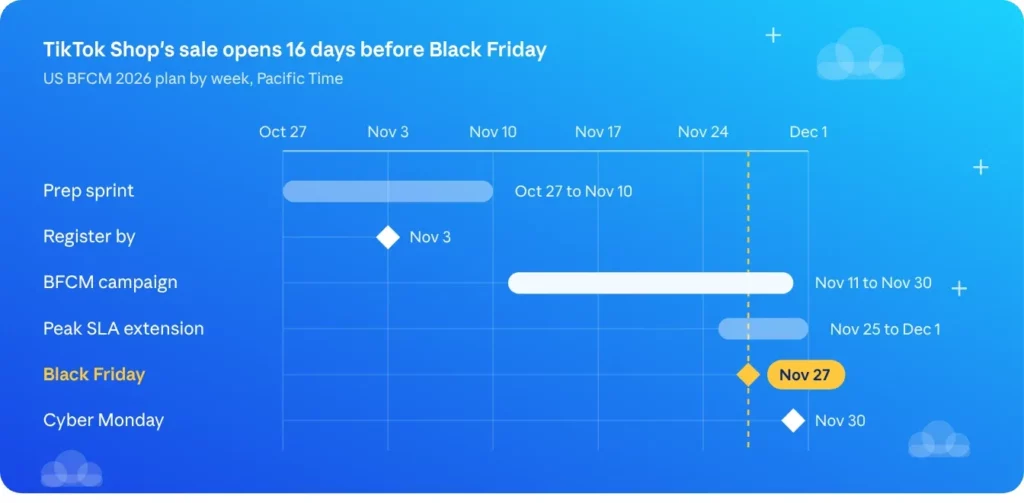
Your TikTok Black Friday timeline
Everything that needs a review, a shipment or a rehearsal belongs before November 11. After that date, your team’s job is to run the campaign, not to set it up.
Week | Focus | Key outputs |
Oct 27 to Nov 2 | Lock the offer | Hero products, margin model, final variations, products registered |
Nov 3 to Nov 10 | Get ready to sell | Samples with creators, warm-up videos live, team access set, rehearsal LIVE |
Nov 11 to Nov 22 | Campaign open | Campaign-price videos, first LIVEs, affiliate tracking, time-slot tests |
Nov 23 to Nov 30 | Peak | Thanksgiving to Cyber Monday LIVEs, stock checks, Cyber Monday offer |
Dec 1 to Feb 10 | Aftersales | Returns within review deadlines, restocks, rebooking creators who sold |
Running more than one TikTok Shop with your team on cloud phones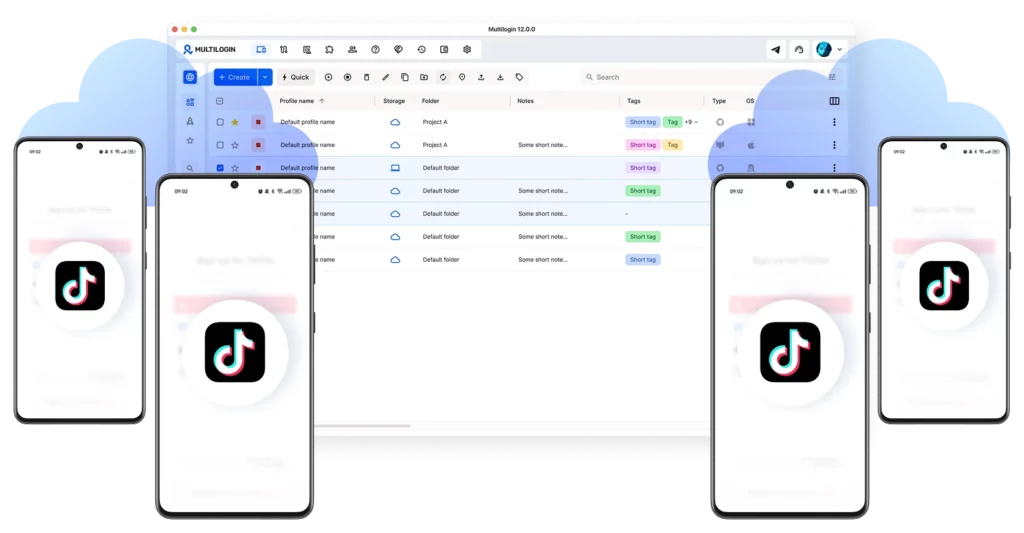
If you run several brands, separate shops for different product lines or stores for agency clients, Black Friday multiplies your access problem. During one LIVE you might need a producer on the brand account, a moderator on a second account, support in Seller Center and an affiliate manager in Affiliate Center, for two or three shops at once.
The usual workarounds break under that load. One shared phone becomes a queue. Shared passwords trigger login prompts and verification codes at the worst moment. Logging several brand accounts in and out of the same device mixes sessions, and a moderator can end up replying from the wrong brand in front of thousands of viewers.
How Multilogin fits a multi-store Black Friday setup
Multilogin is a cloud phone platform for multi-account management. TikTok is a mobile-first app, so the app-side work runs best on Android cloud phones, while web dashboards such as Seller Center run in browser profiles. Both sit in one dashboard.
- One Android cloud phone per TikTok account. Each cloud phone is a separate cloud-based Android environment with its own device details, app data and session, so the brand account, the moderator account and each regional account stay apart.
- Persistent sessions. The TikTok app stays logged in between uses. Your night-shift moderator opens the same account the day team left, with no new login and no code to chase.
- Built-in proxies by market. Assign each account a stable location in its shop’s market (US for a US shop, UK for a UK shop, etc), so every account keeps working from the same place instead of jumping between networks.
- Browser profiles for the web side. Seller Center and Affiliate Center get their own profile per shop, so stock checks and creator messages never cross between brands.
- Team access without sharing passwords. Invite team members, set roles and access levels and share only the profiles each person needs. A freelance moderator gets the moderator cloud phone and nothing else.
Account | Environment in Multilogin | Who gets access |
Brand A: Seller Center | Browser profile, US location | Owner, stock and pricing, customer service |
Brand A: TikTok brand account | Android cloud phone, US location | Producer, social media manager |
Brand A: LIVE moderator account | Android cloud phone, US location | Moderator |
Brand B: Seller Center | Browser profile, US location | Owner, Brand B operations |
Brand B: TikTok brand account | Android cloud phone, US location | Brand B producer |
Affiliate Center (per shop) | Browser profile per shop | Affiliate manager |
Set it up before November 11
- Create one Android cloud phone for each TikTok account you’ll use during the campaign.
- Assign each cloud phone a stable proxy location in its shop’s market and keep it the same through the season.
- Install TikTok, log in and complete any verification inside that cloud phone.
- Name each profile by shop and role, for example “Brand B, LIVE producer”, so nobody opens the wrong one at 2 a.m.
- Invite your team and share profiles by role.
- Run a full rehearsal LIVE with everyone in their own profile, and check how many mobile minutes your plan includes for campaign week, since cloud phone time draws on them.
Cloud phones organize legitimate work. They don’t replace TikTok’s rules: each shop still needs its own verified business, and TikTok’s campaign checks look for behavior such as fake orders. Our multi-account management page covers when a team needs cloud phones, when browser profiles are enough and how to run both from one dashboard.
Mistakes that cost sellers the Black Friday window
- Registering in mid-November. With reviews taking up to 14 business days, a late submission can be approved after the peak has passed.
- Changing variations after registration. New colors or sizes have to wait until the campaign ends, so plan the range first.
- Counting on stacked discounts. Your own flash deals may be disabled on campaign items. Put those promotions on products outside the campaign.
- Forgetting Holiday Mode. A shop left in Holiday Mode after a break can’t join the campaign at all.
- Running LIVEs with one login. When the producer, moderator and support share one account on one phone, the stream slows down exactly when comments speed up.
- Ignoring the return window. In the US, revenue from November 11 to December 31 stays open to returns until February 10, 2027. Other markets set their own holiday return rules. Plan cash flow and restocks with that in mind.
Get your Black Friday team set up this week
The campaign opens on November 11, which leaves a short window to register, brief creators and rehearse your LIVEs. If your team runs more than one TikTok account, set up the access layer now, while there’s still time to test it.
You can start with Multilogin’s free plan: up to 5 profiles, including 1 Android cloud phone, 30 mobile minutes and 200 MB of proxy traffic, with no credit card. When you need more profiles, mobile minutes or team members for campaign week, paid plans start at $7.08 per month.
And once the holiday rush is over, our guide to making money on TikTok covers what to grow next.