





Losing access to your Facebook account can be incredibly frustrating, especially if you rely on it for personal connections or business purposes. Facebook’s strict guidelines sometimes lead to accounts being Facebook shadow banned or disabled, and in some cases, it may seem like a challenge to recover your account.
This guide walks you through the full Facebook banned account recovery process — from submitting your first appeal to understanding what actually happens after 180 days, and what to do when appeals get rejected.
Managing multiple Facebook accounts and tired of bans? Try Multilogin now — isolated profiles and built-in residential proxies keep accounts from linking.
Why Was My Facebook Account Disabled or Banned?
Before going into recovery steps, it’s essential to understand why Facebook might ban or disable an account. Reasons include:
- Violation of Facebook’s Community Standards: Posting content that violates their rules, such as hate speech, adult content, or misleading information.
- Suspicious Activity: If Facebook detects unusual behavior like creating multiple Facebook accounts or engaging in spamming activities.
- False Name or Profile Information: If the name on your account doesn’t match Facebook’s guidelines for real names.
- Report by Other Users: Multiple reports from other users can trigger a review of your account.
Knowing the reason behind the ban helps you structure a stronger recovery appeal. It also tells you whether the suspension is likely temporary or permanent — which changes the approach entirely.
How to Appeal a Facebook Banned Account
If you believe your account was wrongly banned, Facebook allows you to submit an appeal. Follow these steps:
1. Visit the Facebook Help Center
Head over to the Facebook Help Center and find the disabled account section. This page will explain the reasons why accounts are banned and give you options to start the appeal process.
2. Follow Facebook’s appeal or review prompt
If Facebook says your account has been suspended or disabled, log in to the account first. In most cases, Facebook will show a message explaining the issue and whether you can appeal the decision.
- Read the account message carefully
- Check whether Facebook says your account is suspended, disabled, locked, or restricted. These are not always the same thing, and each one may have a different recovery flow.
- Choose the appeal or review option if it appears
- If Facebook gives you an option to appeal, request a review directly from that screen. Meta says suspended accounts can usually be appealed within 180 days. After that window, or if the appeal is not successful, the account may become permanently disabled.
- Explain the issue clearly
- Write a short, polite explanation of why you believe the suspension or disablement was a mistake. Mention any possible misunderstanding, recent account activity, or security issue that may have triggered the decision.
- Avoid harsh or repeated messages
- Keep your tone respectful. Do not send angry messages, threats, or repeated appeals with different information. A clear and consistent explanation is better.
- Upload proof of identity only if Facebook asks for it
- If Facebook requests an ID or other documents, upload clear files that match your account details. Do not send personal documents through random forms, emails, or third-party services.
3. Wait for Facebook’s Response
After submitting the appeal form, you will need to wait for Facebook to review your case. It can take anywhere from a few days to several weeks to get a response. Response times have become less predictable in 2026, with many users reporting longer waits than in previous years.
Facebook Account Recovery Process: Step by Step
If you’re looking for a clear sequence, here’s the full Facebook account recovery process from start to finish:
- Confirm the account status — try logging in to see the exact message. “Disabled” and “suspended” are handled differently.
- Check your email — Facebook often sends a notification explaining why the account was restricted and whether an appeal is possible.
- Go to the Help Center — navigate to the disabled account section and locate the official appeal form link.
- Submit the appeal form — fill it in completely. Incomplete submissions are often rejected automatically.
- Upload identity verification if prompted — a government-issued ID is the most commonly accepted document.
- Wait for a response — do not submit multiple appeals simultaneously. Facebook’s systems flag duplicate submissions and can deprioritize your case.
- Follow up if needed — if you haven’t received a response after two weeks, you can try resubmitting or reaching out via the recovery email.
How to Recover a Disabled Facebook Account Without ID
Sometimes, you may be asked to submit an ID during the appeal process, but what if you don’t have one? While recovering a disabled Facebook account without an ID can be challenging, you still have some options:
- Use Security Questions: If you have set up security questions, Facebook may use these to verify your identity.
- Trusted Contacts: Facebook allows you to designate trusted contacts to help verify your account in the event of a ban.
- Email or Phone Verification: If you’ve linked your email address or phone number to your account, you might be able to regain access using a verification code sent to either.
What Happens After 180 Days of Facebook Suspension
The 180-day mark is where many users hit a wall. Here’s what actually happens and what your options are at that point.
After a Facebook account has been disabled for 180 days, Meta’s systems typically classify it as permanently disabled. This doesn’t mean recovery becomes impossible — but it does mean the standard appeal path has likely already expired.
What to expect after 180 days:
- The account is removed from active status and may no longer appear in search.
- Facebook’s standard appeal window has passed for most violation types.
- Your data — posts, photos, connections — may still be retained by Meta for a period, but access is blocked.
- Re-appealing through the Help Center still sometimes works, particularly for accounts disabled by automated systems in error.
Options after the 180-day period:
- Submit another appeal — some users have had success re-appealing after the 180-day mark, especially if new information can be provided.
- Contact Facebook Support directly — use the Help Center or the recovery email to flag the case as a long-standing disabled account.
- Accept the outcome and plan for a fresh start — if the account was permanently disabled for policy violations, the most practical path forward is building a new account with proper isolation from the start.
If you’re already past the 180-day mark and running other Facebook accounts, now is the time to make sure those are properly isolated. Learn more about how Facebook bans work at the IP and device level and what signals it actually tracks.
What to Do After a Rejected Facebook Appeal: The Meta Recovery Form
When a Facebook appeal gets rejected, many users don’t realize there’s a second layer — the Meta account recovery process specifically designed for cases where the standard appeal has already been denied.
If you’ve received the message stating that Facebook has reviewed your case and will not overturn the decision, here’s what to try next:
Meta’s Post-Rejection Recovery Path
- Request a second review through the Help Center — look for the “Request Review” option after a rejection. Not all account types show this, but it’s worth checking.
- Use the identity verification flow — if you haven’t submitted ID yet, doing so at this stage can sometimes reopen a case that was closed automatically.
- Report the issue as an error — Facebook’s Help Center has a dedicated path for reporting that an automated system made a mistake. This is separate from the standard appeal form and can reach a different review queue.
- Contact via the recovery email — [email protected] — clearly reference that your original appeal was rejected and include your account details and a brief explanation of the error.
A common pattern teams run into: the first appeal gets rejected in minutes — often a sign that an automated system processed it, not a human reviewer. Submitting a second request with clear identity documentation and a factual explanation of the violation has a higher chance of reaching a manual review queue.
There’s no guarantee of recovery after a rejection. If the account was suspended for serious policy violations or for ban evasion where no appeal is available, the realistic outcome is starting fresh with a new account.
If you’re rebuilding Facebook accounts, Try Multilogin now — separate browser profiles and residential proxies keep new accounts from linking to the banned one.
Facebook Banned Account Recovery Email
If you prefer to communicate directly, using the Facebook banned account recovery email can be an effective way to appeal. While Facebook’s official support email isn’t always easy to find, reaching out with a concise, polite, and factual email may increase your chances of getting a response.
- Email Address: [email protected]
- Ensure your email includes:
- Full Name: The name on your account.
- Account Details: Any relevant information such as the email or phone number linked to the account.
- Explanation: A detailed explanation of why you believe your account should be reinstated.
Tips for Preventing Future Bans
If you’ve recovered your account, you’ll want to make sure it doesn’t happen again. Here are some ways to avoid getting banned:
- Adhere to Facebook’s Guidelines: Make sure you understand and follow Facebook’s Community Standards to avoid future bans.
- Use Strong, Accurate Information: Keep your profile information up to date and ensure it adheres to Facebook’s real-name policy.
- Avoid Automated or Suspicious Activity: Don’t use third-party apps that may violate Facebook’s terms of service, and avoid posting spammy content.
What if You Cannot Recover Your Facebook Account? What’s Next?
If you’ve followed all the steps for recovering your Facebook account — from submitting appeals to verifying your identity — and still cannot regain access, it can be incredibly frustrating. Unfortunately, Facebook has strict guidelines and automated systems in place, and sometimes accounts are permanently disabled due to violations or suspicious activity.
So, what should you do next?
1. Accept the Situation (If Recovery Is Not Possible)
If your appeal has been rejected and you’ve exhausted all recovery options, it might be time to consider the possibility that your account is permanently disabled. However, there are still ways to move forward:
Start Fresh: You can create a new Facebook account, but to avoid running into the same issues again, it’s important to use best practices for Facebook account management.
Keep Your Information Clean and Accurate: Ensure your account complies with Facebook’s real-name policy and Community Standards to avoid future bans.
2. Reach Out to Facebook Support Again
If you’re convinced that the ban was a mistake or if the account recovery process wasn’t clear, consider contacting Facebook Support once more. In some cases, appealing again after a few weeks or months may lead to a different outcome.
If you’re concerned about account security and bans happening again in the future, here’s where proper account management infrastructure makes a real difference.
How to Prevent Facebook Account Bans and Protect Your Accounts in the Future
The best way to prevent Facebook account issues is to be proactive in how you manage your accounts. Here’s how Multilogin can help you avoid the common mistakes that lead to bans and keep your accounts stable long-term.
1. Use Multilogin to Manage Multiple Facebook Accounts Safely
Multilogin allows you to create isolated browser profiles for each Facebook account you manage. This means Facebook sees each account as a separate user, preventing account linking and cross-account contamination that often leads to bans.
Facebook’s algorithms flag accounts that show suspicious behavior, like logging into multiple accounts from the same device or IP. By using Multilogin, you ensure that each account has its unique fingerprint, cookies, and proxy, reducing the risk of detection.
2. Avoid Using the Same IP or Device for Multiple Accounts
One of the primary reasons for Facebook account bans is logging into multiple accounts from the same IP address or device. This is an easy way for Facebook to detect suspicious behavior.
With Multilogin, you can assign a unique residential proxy to each browser profile, making each login look like it’s coming from a different real user. This prevents Facebook from flagging your accounts for suspicious activity.
3. Mask Your Digital Fingerprint
Facebook uses browser fingerprinting to track your activity across devices. If your device fingerprint (like your screen resolution, fonts, and plugins) doesn’t match the usual profile, Facebook may flag your account as suspicious.
Multilogin helps teams manage Facebook accounts in separate browser profiles, with each profile keeping its own cookies, browser settings, proxy connection, and session data. This makes it easier to separate account activity, reduce accidental cross-account mixing, and keep workflows more consistent across different users, projects, or business assets.
4. Keep Your Accounts Organized and Secure
Managing multiple accounts can quickly become overwhelming, especially if you’re running campaigns or handling client accounts. Multilogin allows you to manage all your accounts from one central dashboard, keeping them organized and secure.
Multilogin’s user-friendly interface makes it easy to switch between accounts without risking confusion or accidentally logging into the wrong account.
5. Use Multilogin for Automated Account Management
Multilogin allows you to automate tasks like profile creation, proxy assignment, and ad testing. This reduces the risk of human error and helps you scale your Facebook activities without running into issues.
With automation built directly into Multilogin, you can maintain consistent behavior across accounts and follow best practices for Facebook account management.
Managing Facebook Accounts on Mobile: Where Cloud Phones Come In
Most guides on Facebook account recovery focus entirely on the browser side. But a large and growing portion of Facebook bans happen on the native mobile app — and browser-based tools can’t help you there.
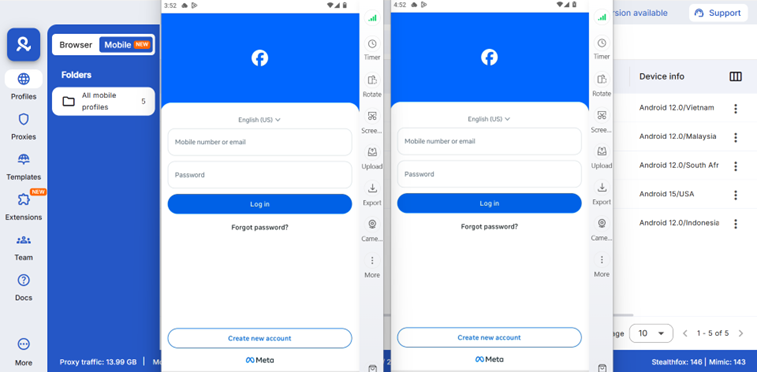
If you’re managing multiple Facebook accounts through the Facebook app (not just the web version), each device you use carries its own hardware identifiers: IMEI, Android ID, MAC address, and more. Facebook reads these identifiers. When multiple accounts are tied to the same physical phone, the risk of account linking — and cascading bans — is real.
This is where Multilogin cloud phones for Facebook help with mobile workflows that browser-only setups cannot cover. Each cloud phone gives your team a separate Android environment in the cloud, so Facebook app sessions can stay organized by account, project, or client.
Instead of mixing mobile activity on one physical device, teams can work from dedicated cloud phone profiles with their own app setup, device environment, network configuration, and account context. This helps reduce accidental account overlap and keeps Facebook management cleaner across mobile and web workflows.
Key advantages for Facebook account management on mobile:
- Each cloud phone has a unique IMEI, Android ID, and MAC address — no shared hardware signals between accounts.
- Persistent app state — login sessions, cached data, and app storage persist between sessions, so each account builds a consistent history rather than looking freshly installed each time.
- Mobile-grade proxies with matched geolocation — the IP and location signals align with the device identity, which is one of the most common sources of detection when managing accounts across locations.
- Managed from your desktop — no physical phones, no SIM cards, no hardware overhead. You control all cloud phones from the Multilogin desktop app.
Teams running Facebook ads at scale often find that their browser profiles stay clean while their mobile-based accounts keep getting flagged. The reason is almost always the same: the mobile environment isn’t isolated. Cloud phones fix that at the device identity level. See how cloud phones compare for Facebook ads management across different use cases.
If you’ve been dealing with repeat Facebook suspensions across mobile accounts, the underlying issue is likely shared device signals — not content policy violations. Addressing the identity layer is what prevents the ban pattern from repeating.
For a deeper look at how Facebook’s account suspension system works and what Multilogin does to prevent repeat bans, see the full academy guide on Facebook account suspension prevention.
Ready to stop the ban cycle on Facebook? Try Multilogin now — browser profiles for web, cloud phones for the native app, all from one dashboard.




