
If you haven’t heard of OpenClaw yet, give it a week. The open-source AI agent has been blowing up on X and Telegram since early 2026 — with over 205,000 GitHub stars and a community that describes it as “the closest thing to early AGI” and “Jarvis but real.” Strong words. But is any of it actually useful for social media marketers?
The short answer: yes, with some important caveats. OpenClaw is genuinely impressive for automating repetitive tasks, monitoring competitors, and orchestrating multi-account workflows. But it’s not plug-and-play, and it won’t replace the identity isolation layer that keeps your accounts safe on platforms that are getting better at detection every month.
That’s where Multilogin comes in. If you’re managing multiple social accounts at any serious scale, pairing OpenClaw’s automation brain with Multilogin’s multi-account management infrastructure is where the real leverage lives.
Start your Multilogin plan from €5.85/month and pair it with the automation stack you’re building — see pricing here.
What is OpenClaw, actually?
OpenClaw is an open-source personal AI agent that runs on your machine (Mac, Windows, or Linux). Unlike a standard AI chatbot that generates text and hands it back to you, OpenClaw can take actions: browsing the web, reading and writing files, running scripts, and executing multi-step tasks through a plugin system called Skills.
You control it through whatever chat app you already use — WhatsApp, Telegram, Discord, Slack, iMessage. Tell it what you want in plain language, and it figures out the steps.
The key word is agentic. OpenClaw doesn’t just help you draft posts — it can schedule them, monitor competitors, compile weekly analytics, and chain these tasks together automatically. Security researchers have been quick to note this also creates new risks (more on that below), but for marketers willing to configure it properly, it’s a genuine capability jump.
It’s free to install. Running it costs roughly $25–50/month depending on your VPS hosting and AI token usage. That compares favorably to Hootsuite at $99/month or Sprout Social at $199/month — for tools that, at their core, are just scheduling interfaces.
What OpenClaw can do for social media managers
Scheduling and posting
Through the Mixpost skill (available on ClawHub, the community skill marketplace), OpenClaw connects to a self-hosted social media scheduler. You tell it what to post, when, and where — it handles the rest. Mixpost Lite covers Facebook, X/Twitter, and Mastodon for free. The Pro version (a one-time $299 payment, not a subscription) adds Instagram, LinkedIn, TikTok, YouTube, Pinterest, Threads, and Bluesky.
The practical win here isn’t just automation — it’s natural language scheduling. Instead of clicking through a calendar UI, you type something like “post this Monday through Friday at 10am, vary the caption for each platform” and move on.
Competitor monitoring
This is one of OpenClaw’s more underappreciated use cases. Set up a daily cron job that checks competitor social accounts, summarizes what they posted in the last 24 hours, and flags anything unusual — product launches, pricing changes, sudden shifts in messaging. The manual equivalent on Sprout Social runs $249/month and still requires someone to read the output. Here, OpenClaw compiles and sends the summary to your Telegram automatically.
Content repurposing
A blog post becomes five tweets, a LinkedIn article, an Instagram caption, and a TikTok script. OpenClaw can follow a transformation recipe and apply it to any piece of content you feed it. The output still needs a human edit before it goes live, but the first-draft work disappears.
Analytics compilation
Every Monday at 8am, a weekly performance summary across your platforms arrives in your inbox or Slack — pulled from your scheduler’s analytics, formatted the way you specified, no manual export required.
The catch: automation alone won’t protect your accounts
Here’s where a lot of marketers using tools like OpenClaw (or any automation layer) run into trouble.
In 2026, every major platform — Instagram, TikTok, LinkedIn, X — is using increasingly sophisticated detection to identify automated or multi-account behavior. It’s not just about whether you’re posting through an API. It’s about whether your device signals, IP, browser fingerprint, and behavioral patterns look consistent with a real human on a real device.
If you’re running multiple accounts for clients, managing different brand personas, or operating across geos — the identity layer matters as much as the automation layer. OpenClaw can tell Mixpost what to post. Multilogin handles why those accounts don’t look linked.
How Multilogin fits into an OpenClaw workflow
Multilogin gives each account its own isolated browser environment: unique browser fingerprint, separate cookies, separate storage, matched residential proxy. Platforms see distinct devices, not one person managing ten tabs.
For social media managers, this matters in a few specific situations:
- Client account isolation. Each client profile lives in its own browser profile. Sessions, cookies, and login states never cross. You’re not accidentally linking a fashion brand to a fintech client because you were logged into both in the same Chrome window.
- Multi-account operations. Running multiple accounts on the same platform — whether for testing, reach diversification, or separate brand voices — requires genuine isolation. Running multiple TikTok accounts without bans, for example, comes down to whether each account looks like a distinct device to TikTok’s detection systems.
- Geo-targeted campaigns. If you’re managing accounts for brands in different regions, matching your browser fingerprint and proxy location to the target market makes those accounts look local. Multilogin’s built-in residential proxies cover 195+ countries with city-level targeting.
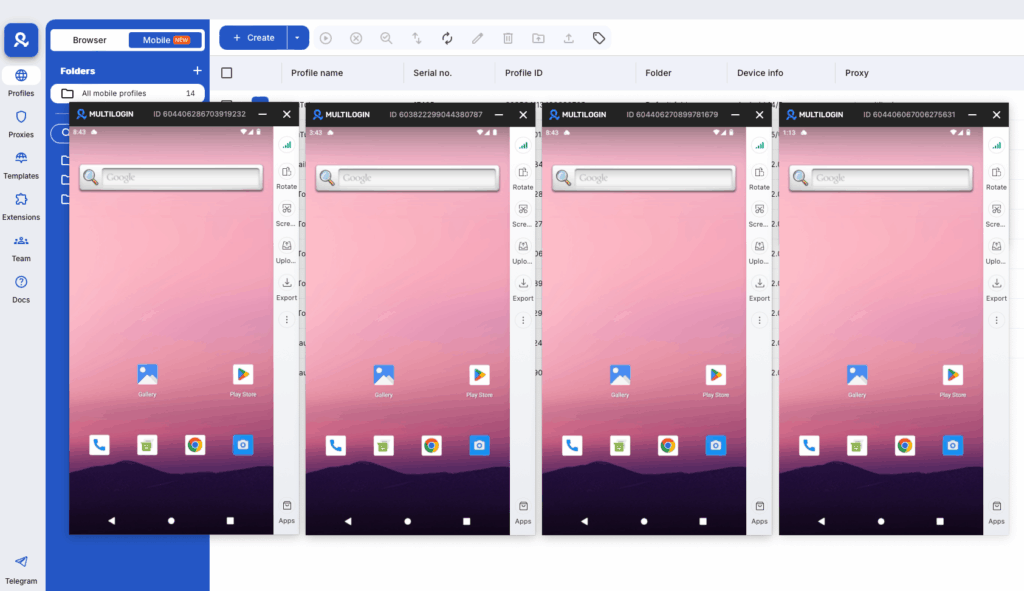
- Cloud phones for mobile-native platforms. For Instagram, TikTok, and similar apps that behave differently on mobile, Multilogin’s cloud phones give you real Android environments — not emulators — with genuine hardware identifiers. Each cloud phone runs its own app state, cache, and session. These are billed at €0.009/minute with bonus minutes included.
The combination looks like this: OpenClaw handles task orchestration, scheduling, monitoring, and content generation. Multilogin handles the identity layer that keeps those accounts stable and separated on platforms that are actively trying to detect this kind of operation.
Both tools are managed from one place — Multilogin’s desktop app handles browser profiles and cloud phones, and OpenClaw connects to whatever output destinations you’ve configured. See how the social media workflow comes together.
Why cloud phones change the game for mobile-first social media
Most antidetect browser setups are built for web. They handle desktop sessions well — isolated fingerprints, separate cookies, matched proxies. But Instagram, TikTok, and increasingly LinkedIn are mobile-first platforms. The apps behave differently than the web versions. Detection is tighter. And device identity signals that are invisible in a browser become central signals in a native app environment.
This is the problem Multilogin Cloud Phones are designed to solve.
Real Android devices, not emulators
The distinction matters more than it sounds. An Android emulator runs a simulated environment on top of your desktop OS. Platforms have spent years learning to detect exactly this — the virtualization layer, the inconsistent hardware signals, the absence of real device wear patterns. Emulators fail detection checks that genuine hardware passes.
Multilogin Cloud Phones are real Android devices (Android 10–15) hosted in the cloud. Each phone has genuine hardware identifiers: a unique IMEI, Android ID, MAC address, and system settings that reflect an actual device. There’s nothing to emulate because it’s not emulated. You’re connecting to a real phone, running real apps, with real device parameters.
That’s the core positioning — and why the phrase “real device fingerprint” isn’t marketing language. It’s describing something technically distinct from what most competitors offer.
What each cloud phone gives you
Every cloud phone in Multilogin runs its own isolated environment:
- Persistent app data, cache, and login states between sessions. When you log in to Instagram on a cloud phone and come back three days later, the session looks like a returning user on a familiar device — not a fresh login from an unknown environment.
- Full app compatibility. Install any app through the built-in store or upload APKs directly. Social media, e-commerce, creator tools, reward apps — they all run natively.
- Around 30 supported device types across Samsung, Google, OPPO, vivo, OnePlus, and Redmi. You can pick the device model that matches the platform behavior you need.
- Built-in mobile-grade proxies with geolocation matching. Each cloud phone’s IP is matched to the location you specify. If you’re managing an account for a brand in Seoul, the device looks like it’s in Seoul.
Managing cloud phones alongside browser profiles
Everything runs from Multilogin’s desktop app. Browser profiles and cloud phones live in the same dashboard — you’re not juggling two separate tools. For a team managing both web-based social work (scheduling, analytics, community management on desktop) and native app work (posting on mobile, engaging via the app), this unified view is a practical time saver.
Bulk actions work across cloud phones: launch, configure, assign proxies, or share access with team members in a few clicks. For agencies with multiple operators, granular permission controls mean each person sees and touches only what they’re supposed to.
The OpenClaw + cloud phone workflow
Here’s how the two tools connect for mobile-heavy social media work:
OpenClaw handles the content and orchestration layer — drafting captions, building posting schedules, summarizing competitor activity, and sending you briefings. Cloud phones handle the execution layer for anything that needs to happen inside a native app.
A practical example: OpenClaw generates a week of Instagram content from your content calendar, formatted for the platform. Your team opens the relevant cloud phone for that account, pastes the content into the app, and posts or schedules from within the native environment. The account’s session is persistent, the device identity is stable, and nothing about the activity looks like it came from an automation tool.
For operators who want to push this further, Multilogin supports Selenium, Puppeteer, Playwright, and Postman integrations — so you can automate cloud phone interactions programmatically. OpenClaw can trigger these workflows through its skill architecture.
The setup is more complex, but for high-volume operations managing dozens of accounts, the combination of OpenClaw’s orchestration and Multilogin’s API access creates a genuinely scalable pipeline.
Multilogin Cloud Phones are billed at €0.009/minute with bonus minutes included on every plan. Browser profiles start at €5.85/month. Both come in one dashboard. Start your Multilogin plan.
Setting up OpenClaw: what you actually need
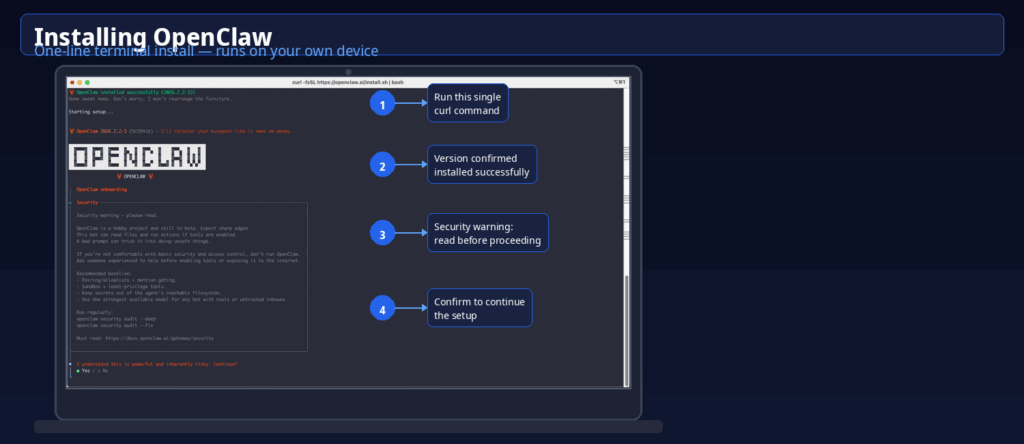
OpenClaw is not a consumer app. It requires a VPS (Hetzner, DigitalOcean, or similar at $6–12/month), API keys for your chosen AI model (Claude or GPT-4o-mini), and comfort with YAML configuration and command-line interfaces. Non-technical users will need developer help for the initial setup.
Once running, the learning curve flattens quickly. Most of what you interact with is plain-language prompts in your chat app of choice.
Skill security is worth taking seriously. ClawHub has 5,700+ community-built skills, and not all of them are vetted. Before installing any skill, read the source code, check what permissions it requests, and test on a secondary account first. This isn’t paranoia — Cisco’s AI security team found skills performing data exfiltration without user awareness in testing. The risk is real if you’re handling client credentials.
For social media work, the minimum viable setup is:
- VPS or local machine with Docker
- AI model API key (start with $10–20 to test token consumption)
- Mixpost deployed and connected via the Mixpost skill
- A social account connected to Mixpost (start with one platform)
- A Telegram or Discord channel for your interface
That gets you scheduled posting and basic automation in an afternoon. Add competitor monitoring, weekly reporting, and content repurposing workflows as you build confidence.
Honest trade-offs
OpenClaw’s self-hosted model means you own the infrastructure — and you maintain it. If your VPS goes down at 2am, posts don’t go out. Security patches, uptime monitoring, and backups are your responsibility. For solo operators and technical teams, this is a reasonable trade. For agencies with strict SLAs, something like Buffer ($6/channel/month) might be a safer floor.
AI-generated content still needs editing. OpenClaw can draft fast, but content that reads like it came from a template is easy to spot — and 62% of consumers are less likely to engage with content they know is AI-generated. Use it for first drafts, not finished posts.
Platform rate limiting is real. Automated logins can trigger security reviews on Instagram and LinkedIn specifically. Posting through official APIs (what Mixpost does) is safer than browser automation for publishing, but monitoring workflows that involve logging into dashboards carry more risk.
None of this is unique to OpenClaw. Every automation tool has the same exposure. The difference is that OpenClaw’s agentic model amplifies both the upside and the risk surface — which is exactly why the identity isolation layer from a proper antidetect browser setup becomes more important, not less, as you automate more.
Who should use this combination
The OpenClaw + Multilogin stack is a strong fit if you’re:
- A social media agency managing 5+ client accounts across platforms, where client isolation is non-negotiable
- An operator running multiple accounts on mobile-first platforms like Instagram and TikTok, where native app behavior matters more than web access
- A creator or team handling accounts across different geos with location-specific requirements — cloud phones with matched proxies make each account look genuinely local
- A phone farming or mobile multi-account operator who wants to drop the hardware overhead and run real Android environments from a desktop instead
- A growth operator who wants competitor monitoring and content workflows automated without paying $200+/month in SaaS subscriptions
It’s a poor fit if you want something that runs without any technical involvement, or if you’re managing a single account with no identity isolation requirements. In those cases, Buffer or a basic Hootsuite plan is genuinely easier.
For everyone else — the combination of OpenClaw’s automation flexibility and Multilogin’s account isolation is, as of 2026, one of the more complete social media management setups available without enterprise pricing.
Want to maage more social media accounts? Try Multilogin Cloud Phones.
Frequently asked questions About OpenClaw for Social Media Marketing
OpenClaw is an open-source AI agent that automates repetitive social media tasks: scheduling posts, monitoring competitors, repurposing content, and compiling analytics reports. It connects to a self-hosted scheduler (typically Mixpost) and operates through natural language commands in chat apps like Telegram or WhatsApp.
OpenClaw itself posts through official APIs when paired with Mixpost, which is the safest automation path. The bigger risk is skill security — community-built plugins can request broad permissions, so reviewing source code before installing is essential. For account isolation and identity protection, OpenClaw should be paired with a tool like Multilogin that gives each account its own isolated environment.
OpenClaw is free to install. Running costs are $25–50/month for most small teams: $6–12/month for a VPS and $15–35/month in AI token costs depending on usage volume. This compares to $99–199/month for commercial alternatives like Hootsuite or Sprout Social.
Yes, OpenClaw can orchestrate posting across multiple accounts via Mixpost. For accounts that need to stay genuinely separate (different clients, different brand personas, different geos), you’ll need identity isolation on top of scheduling automation. Multilogin handles the browser fingerprinting, proxy matching, and session isolation that keeps multi-account operations stable. Read more about managing multiple Twitter/X accounts and LinkedIn accounts the right way.
Partially. OpenClaw with Mixpost replaces the scheduling and basic analytics features of tools like Hootsuite or Buffer. It doesn’t replace purpose-built platforms for team collaboration, compliance workflows, or enterprise reporting — but for individual operators and small agencies, the overlap is significant at a fraction of the cost.
A chatbot creates content and hands it back to you. OpenClaw executes multi-step tasks — it can research competitors, draft content, schedule posts, and send you a summary, all triggered by a single prompt and running while you sleep. That’s the core distinction between assistant AI and agentic AI. It also connects to social media automation infrastructure through skills, so actions happen in the real world, not just in a text window.
Multilogin Cloud Phones are real Android devices (not emulators) hosted in the cloud and controlled from your desktop. Each one has genuine hardware identifiers — IMEI, Android ID, MAC address — and maintains persistent app data and login states between sessions. For social media managers, this matters because mobile platforms like Instagram and TikTok use device-level signals to detect suspicious activity. A real device with a stable session history looks dramatically different to a platform’s detection systems than an emulator or a fresh browser login. Cloud phones let you manage native app activity at scale without the hardware overhead of running physical phones.
Key takeaways
Try Multilogin now and pair it with your automation stack — plans start at €5.85/month. Start your Multilogin plan.

