


 Back to Glossary
  4 min read
 TikTok Mod
What Is a TikTok Mod APK?
A TikTok Mod APK (short for “modified TikTok”) is an unofficial, repackaged version of the TikTok app. A developer outside TikTok Inc. builds it and distributes it independently of the Google Play Store or Apple App Store.
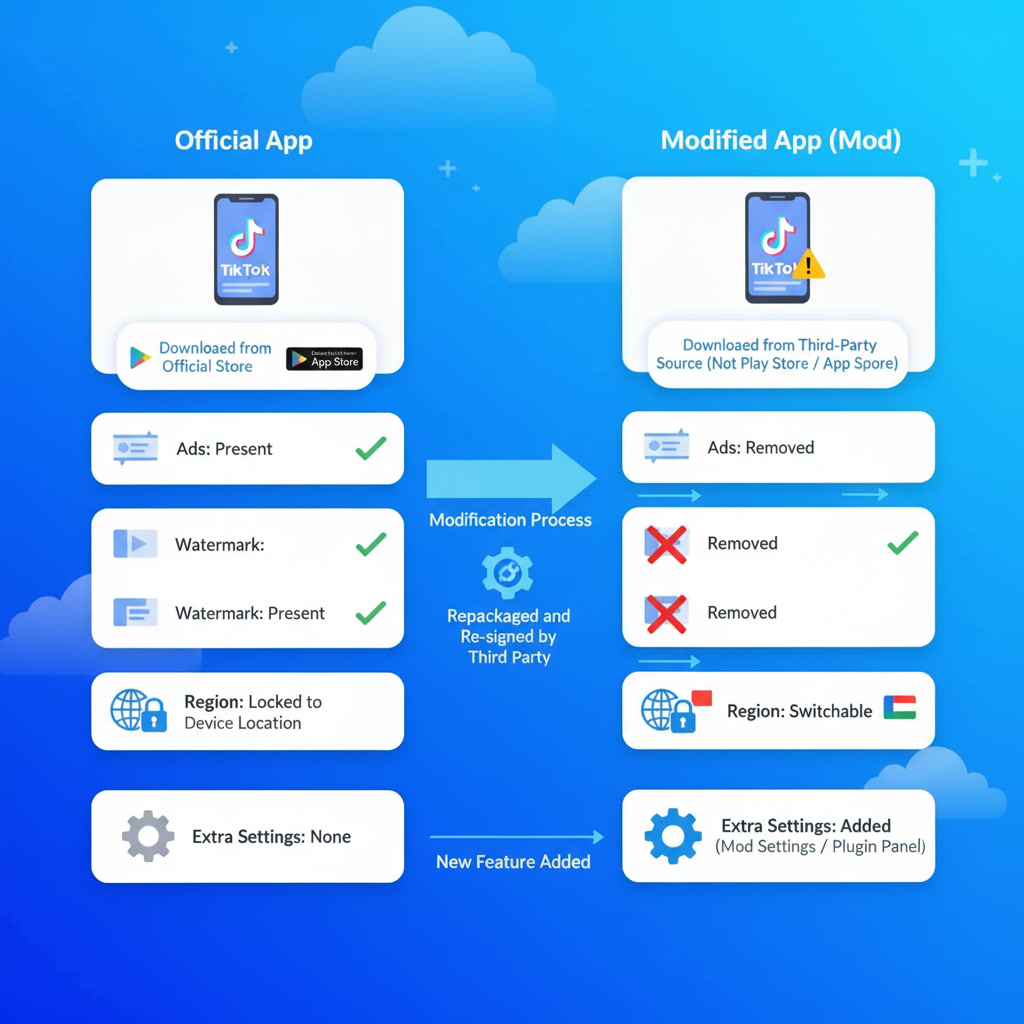
To build a mod, a developer decompiles the official TikTok app (APK is Android’s app installer file, IPA is iOS’s): they reverse the finished app back into readable code, edit that code or the app’s resource files, then repackage and sign it with their own certificate instead of TikTok’s. A certificate is a digital signature that proves who built an app; when it isn’t TikTok’s own, neither TikTok nor the app stores can verify what’s actually running.
The result looks and works like the standard app in most ways, but it can add, remove, or change features the official release doesn’t have. Because TikTok and the app stores never review this code, no one outside the mod’s own developer can confirm what it actually does.
How Mod Builds Are Made
Developers usually build TikTok mods one of two ways:
- Client patching. The developer unpacks the official APK or IPA, edits its code (commonly in smali, a low-level Android code format) and resource files directly, then resigns the package with a new certificate before distributing it. Developers use this method to change which region the app reports, strip out ad calls, or remove limits on saving videos.
- Companion plugin architecture. The developer installs a second, separate app alongside a lightly modified TikTok client. This companion app carries a settings screen (often labeled “Mod Settings” or “Plugin”) where the user sets region and other parameters, while the main TikTok client stays closer to the original code. This split makes it easier for the developer to keep the mod working through TikTok’s own updates.
Common Types of Modification
TikTok mods typically offer one or more of these:
- Region spoofing. The app reports a country different from the device’s actual location, which changes which content feed TikTok’s servers deliver.
- Ad removal. The mod suppresses or strips in-app ads and sponsored content from the interface.
- Watermark removal. Videos saved through the mod export without TikTok’s standard watermark overlay.
- Interface and feature changes. The mod adds extra settings, swaps in alternate feed algorithms, or restores older interface elements TikTok has since removed.
How Mod Files Spread
Modified clients break the rules of official app stores, so Google Play and the App Store never carry them. Instead, developers distribute them through independent APK hosting sites, code-sharing repositories, messaging app channels, and technical forums. On iOS, installing a mod also means bypassing Apple’s app-signing rules, usually through enterprise certificate tools (systems meant for companies to distribute internal apps outside the App Store) or third-party sideloading tools (apps that install other apps without going through an official store), since Apple blocks unsigned or unofficially signed apps by default.
Why TikTok Mods Are Risky
A mod’s distribution method creates its risk: no independent reviewer checks the code before it lands on your device.
- Hidden malicious code. Since no app store reviews the package, it can contain code the distributor never discloses, including hidden data-collection modules, background processes, or trojans (malware disguised as legitimate software).
- Exposed credentials. When you log in through a modified client, your credentials pass through code an unverified third party controls, not just TikTok’s own servers.
- Account bans. Running a modified client breaks TikTok’s Terms of Service. TikTok can restrict or suspend any account it identifies as using a non-official client.
- Update instability. Mods sit outside TikTok’s official update pipeline. A server-side change on TikTok’s end can break a mod without warning, and you’ll need to track down and install a new build yourself.
- No maintenance guarantee. A mod keeps working only as long as an unpaid individual or small group of developers keeps updating it. No one guarantees ongoing support.
Official Download Sources
Skip the mod and get TikTok from an official source instead:
- Android: Google Play Store
- iOS: Apple App Store
- Direct installers: TikTok’s official download page
Get What a Mod Promises, Safely, with Multilogin
Most people reach for a TikTok mod to run several accounts, switch regions, or keep accounts separate. You can do all of that with the official app on Multilogin’s Android cloud phones, no modding required.
- Launch a cloud phone from your dashboard.
- Install TikTok from the built-in app store, or upload the official APK yourself.
- Each cloud phone runs on real Android hardware with genuine device identifiers, so TikTok sees a normal device, not a modified or emulated one.
- Each profile keeps its own app data, login state, and location settings, so you can run several TikTok accounts side by side, each in its own isolated environment.
People Also Ask
Is the TikTok mod safe?
No. Since no app store reviews a mod's code, you can't verify what it actually does. Documented risks include hidden malware, exposed login credentials, and TikTok banning accounts it identifies as running a modified client.
Where can I download the latest TikTok APK version in 2026?
Only from an official source: the Google Play Store, the Apple App Store, or TikTok's own download page. If you manage several TikTok accounts, Multilogin's cloud phones let you install this same official app on separate, isolated Android devices instead of hunting for APK mirrors.
How to mod on TikTok mobile?
We don't recommend it. Modified clients aren't supported by TikTok, can carry hidden malware, and usually get accounts banned. If your real goal is running multiple accounts, switching regions, or setting up different devices, Multilogin's cloud phones do this with the official app, keeping each account on its own real, isolated Android device.
Does TikTok steal your information?
"Steal" implies hidden theft, but TikTok discloses its data collection in its privacy policy. Under TikTok's policy, last updated July 15, 2026, TikTok collects device identifiers, usage data, and location data. TikTok's 2026 policy now explicitly classifies location tracking as sensitive data, and the app can collect precise location depending on a user's settings. The updated policy also lets TikTok collect data from users' interactions with in-app AI tools and use that data for ad targeting outside the app, changes that drew concern from lawmakers and privacy experts following TikTok's 2026 sale from ByteDance to the majority American-owned TikTok USDS Joint Venture LLC. This kind of data collection isn't unique to TikTok, other major platforms disclose similar practices, but it's worth checking the current policy and your app permissions if you're concerned.


