





YouTube is one of the few platforms where a creator can start with an idea, an audience of zero, and eventually build several different revenue streams around the same content.
But if you are searching for how to make money on YouTube in 2026, there is an important distinction to make from the start: YouTube does not pay creators simply for uploading videos, collecting subscribers, or reaching a fixed number of views.
Revenue depends on the monetization method, the audience, the type of views you generate, advertiser demand, YouTube Partner Program eligibility, and what you build around the channel.
If you are starting from zero, begin with our guide on how to make a YouTube channel. This guide focuses on what comes next: how to earn money from YouTube once you start building an audience.
If you already operate several channels for brands, clients, or different projects, see our deeper guide to YouTube monetization workflows for multi-profile operators.
Try Multilogin for free if managing those channels is already becoming an operational job of its own.
Key takeaways
- YouTube’s built-in monetization options include Watch Page Ads, Shorts Feed Ads, YouTube Premium revenue, memberships, Supers, and Shopping.
- Full ad-revenue eligibility generally requires 1,000 subscribers plus either 4,000 qualified public watch hours in the previous 12 months or 10 million qualified public Shorts views in the previous 90 days.
- In eligible regions, expanded YPP can provide earlier access to selected fan-funding and Shopping features at 500 subscribers, provided the additional upload and viewing requirements are met.
- Subscribers do not have a fixed monetary value. YouTube income depends on monetized viewing activity and the revenue model you use.
- RPM is usually the more useful top-level creator revenue metric. CPM tells you more about advertiser spending.
- YouTube’s monetization policies require original, authentic content. Repetitive or mass-produced content can be considered “inauthentic content” and may not qualify for monetization.
- AI can be part of a monetized YouTube workflow, but using AI does not remove YouTube’s originality, authenticity, disclosure, or advertiser-friendly content requirements.
YouTube officially distinguishes between the earlier expanded-YPP requirements and the higher requirements needed for Watch Page Ads and Shorts Feed Ads.
Quick metric distinction
RPM shows how much revenue a creator earned per 1,000 views in YouTube Analytics. CPM and playback-based CPM measure advertiser spending rather than the creator’s direct payout.
Read our full RPM vs CPM on YouTube guide if you want to understand why those figures differ and which one to use when estimating YouTube earnings.
Five facts to know before calculating YouTube income
Before opening a calculator and multiplying views by a random “YouTube pay per 1,000 views” number, get these five things straight.
- Full YPP ad-revenue eligibility uses the higher threshold. You generally need 1,000 subscribers plus either 4,000 qualified public watch hours from long-form videos during the previous 12 months or 10 million qualified public Shorts views during the previous 90 days.
- Some YouTube monetization features can become available earlier. In countries where expanded YPP is available, creators can apply with 500 subscribers, three valid public uploads within 90 days, and either 3,000 qualified public watch hours or 3 million qualified Shorts views. This tier can unlock features such as memberships, Super Thanks, Super Chat, Super Stickers, and selected Shopping options.
- Hitting the numbers does not automatically monetize your channel. YouTube reviews channels against its monetization policies before approving them and continues evaluating monetized channels afterward.
- YouTube tightened the wording around mass-produced content. Since July 2025, the former “repetitious content” policy is called the inauthentic content policy. YouTube says repetitive, generic, or mass-produced content has always been ineligible. This matters particularly for anyone exploring YouTube automation or AI-assisted production in 2026.
- YouTube does not guarantee a specific income. Revenue calculators, CPM examples, and “earnings per million views” figures are estimates. Once a channel has real data, its own YouTube Analytics should replace generic benchmarks.
You should also avoid creating duplicate AdSense accounts for the same payee. New AdSense for YouTube accounts should be created through the YouTube Studio monetization flow.
How do creators make money on YouTube?
Creators make money on YouTube through several different revenue models.
Some come directly from YouTube. Others use YouTube as the audience engine for a completely separate business.
That distinction matters because not every dollar generated by a YouTube channel appears in YouTube Analytics.
1. Watch Page Ads
Watch Page Ads are the familiar ads shown around eligible long-form videos and live streams.
To earn from them, a creator in YPP must accept the Watch Page Monetization Module. YouTube currently pays eligible partners 55% of net revenue from ads displayed or streamed on eligible public Watch Page videos.
The Watch Page Monetization Module is therefore not just another Studio setting. It is the contract module that enables Watch Page advertising revenue sharing.
YouTube is also rolling out updated monetization terms. As of August 2026, YouTube says creators must accept the applicable updated modules by January 31, 2027 to continue earning from the associated monetization features from February 1, 2027 onward.
One more important point: an advertiser’s CPM is not what lands in your account.
Some views have no ad. Different viewers can attract different advertiser demand. Revenue also changes by country, topic, season, device, and content format.
That is why RPM is generally more useful when the question is, “How much did my channel actually make?”
2. Shorts Feed Ads
YouTube Shorts use a different monetization model.
Ads appear between videos in the Shorts Feed. YouTube pools eligible Shorts Feed advertising revenue, accounts for music licensing where applicable, allocates revenue through its Creator Pool system, and then pays creators 45% of their allocated amount.
So, how much do YouTube Shorts pay per 1,000 views?
There is no official fixed Shorts rate per 1,000 views.
Two creators can receive very different revenue from the same number of Shorts views because the payment is based on the Shorts revenue-sharing system rather than a universal per-view price.
Our guide to YouTube Shorts ad revenue explains the calculation in more detail.
3. YouTube Premium revenue
YouTube Premium viewers do not see normal advertising, but their viewing can still generate creator revenue.
Eligible creators receive a portion of YouTube Premium subscription revenue when Premium members watch their content.
That makes Premium another reason why “number of ads shown” and “total YouTube revenue” are not the same metric.
4. Channel memberships
Channel memberships allow eligible viewers to pay a recurring monthly fee in exchange for creator-defined benefits.
Those benefits might include badges, members-only posts, exclusive videos, live streams, or other community perks.
Memberships can become available before Watch Page ad revenue in eligible expanded-YPP regions, provided the channel meets the applicable requirements.
5. Super Chat, Super Stickers and Super Thanks
Supers turn highly engaged viewers into direct supporters.
Super Chat and Super Stickers are commonly associated with live streams, while Super Thanks can let viewers financially support eligible uploaded videos and Shorts.
YouTube states that creators who accept the Commerce Product Module receive 70% of net revenues from channel memberships, Super Chat, Super Stickers, and Super Thanks.
For a small but deeply engaged community, these revenue streams can sometimes matter more than squeezing another fraction of a cent out of every video view.
6. YouTube Shopping
YouTube Shopping connects content with commerce.
Depending on channel eligibility, region, and Shopping feature, creators may be able to promote products from their own stores or tag products from participating third-party brands.
This is especially relevant for creators whose content already has purchase intent, such as beauty tutorials, product reviews, technology channels, fashion content, fitness, hobbies, or home improvement.
7. Affiliate marketing
Affiliate marketing pays creators when viewers complete a qualifying action through a tracked affiliate link.
You might review a camera and link to the retailer. Teach a software workflow and recommend the tool. Build a comparison video and monetize viewers who are already researching a purchase.
This revenue sits outside YouTube’s normal RPM calculation.
A channel with modest advertising revenue can therefore still become a strong business if its viewers have high commercial intent.
8. Paid sponsorships and product placements
Sponsorships are direct commercial agreements between creators and brands.
There is no official “YouTube sponsorship price per 1,000 views.” Pricing can depend on audience quality, niche, geography, expected views, usage rights, exclusivity, deliverables, and the strength of the creator’s relationship with the audience.
When content contains a paid commercial relationship, creators need to use YouTube’s paid-promotion disclosure where required and comply with applicable local disclosure rules.
So publishing a universal sponsorship rate would be misleading.
A 20,000-view video watched by the exact buyers a B2B company wants can have more commercial value than a 200,000-view entertainment video with little purchase intent.
9. Products and services
Some creators make far more money because of YouTube than they make from YouTube.
A channel can drive people toward:
- courses
- consulting
- software
- paid communities
- ecommerce products
- professional services
- events
- digital products
Those earnings will not necessarily appear in YouTube Analytics.
If a tutorial generates $300 of YouTube revenue but also creates $5,000 in software subscriptions, focusing only on RPM misses most of the business value.
10. Revenue from faceless and AI-assisted formats
You do not have to appear on camera to earn money on YouTube.
Tutorials, documentaries, animation, screen recordings, original explainers, data-driven videos, narration, and many other formats can work without a visible presenter.
Read our guide on starting a faceless YouTube channel for the production side.
AI-assisted production can also be monetized.
What matters is not whether an AI tool touched your workflow. YouTube has explicitly said that creators can use AI while remaining eligible for YPP. The content still needs to comply with monetization policies, including the rules against repetitive or mass-produced inauthentic content.
YouTube also requires disclosure when generative AI meaningfully creates or alters realistic content in ways covered by its disclosure policy. Routine assistance such as generating ideas, scripts, titles, or thumbnails generally does not require the same disclosure.
That creates a useful rule for YouTube automation in 2026:
Automate the workflow where it makes sense. Do not automate originality out of the content.
Can you make money on YouTube without making videos?
Not from an empty YouTube channel.
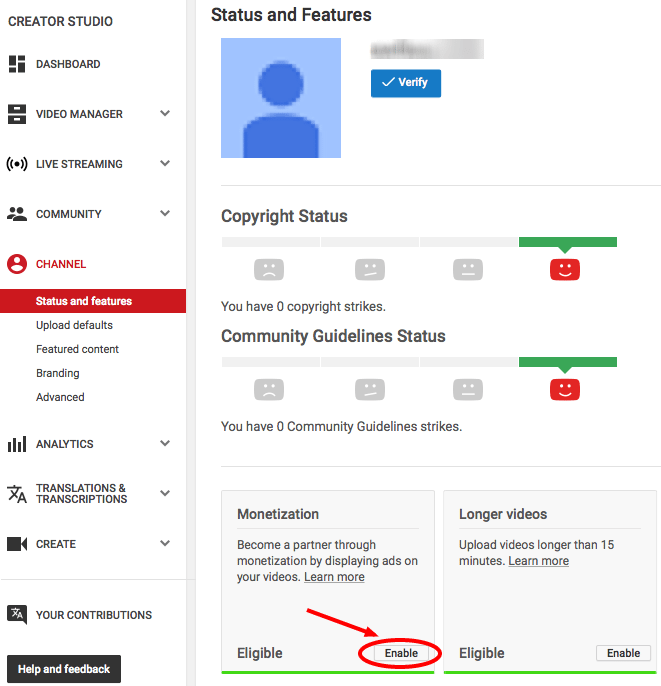
To earn creator revenue through YPP, you need eligible content that viewers can watch. A faceless channel still creates videos. AI-assisted channels still create videos. Screen-recorded tutorials still create videos.
What you can do is make money in the broader YouTube economy without owning a monetized channel.
Editors, thumbnail designers, researchers, scriptwriters, channel managers, consultants, and other specialists can earn money by helping creators produce or grow their channels.
And if the question you actually meant was whether people get paid simply for watching other people’s YouTube videos, that is a different business model. See our guide to making money by watching ads.
When YouTube’s own monetization features become available
Creators do not necessarily have to wait for YPP before earning anything.
Affiliate partnerships, sponsorships, consulting, products, and services can potentially generate revenue earlier because they are external business arrangements rather than YouTube’s own revenue-sharing products.
YouTube’s native monetization features open progressively.
In eligible expanded-YPP regions, selected fan-funding and Shopping features can become available at 500 subscribers plus the required uploads and viewing threshold.
Watch Page Ads and Shorts Feed Ads use the higher 1,000-subscriber eligibility level.
Reaching either threshold starts the application and review process. It does not guarantee approval.
Keep our YouTube Partner Program guide bookmarked if you need the eligibility requirements in one place.
How does YouTube pay creators?
For YPP earnings, payments run through AdSense for YouTube.
YouTube says finalized earnings from the previous month are normally added to the creator’s YouTube payments account between the 7th and 12th of the following month. If the account has reached its local payment threshold and has no payment holds, payment is generally issued between the 21st and 26th.
The exact payment method and threshold depend on the creator’s country and payments account.
This is the answer to “how does YouTube pay?” that often gets lost in revenue-per-view discussions: views generate estimated earnings first, earnings are finalized later, and eligible balances are then paid through AdSense for YouTube.
How to estimate YouTube income without mistaking CPM for payout
If you want to estimate YouTube income per 1,000 views, start with RPM rather than CPM.
RPM represents creator revenue per 1,000 views as reported in YouTube Analytics after YouTube’s revenue share.
CPM represents what advertisers pay per 1,000 ad impressions.
Playback-based CPM narrows that further to video playbacks where one or more ads were shown.
They answer different questions.
| Metric | Use it for | Do not treat it as |
|---|---|---|
| RPM | Understanding creator revenue per 1,000 views | A universal YouTube pay rate |
| CPM | Measuring advertiser demand | The creator’s payout |
| Playback-based CPM | Understanding monetized playbacks | Revenue across every channel view |
There is no official universal “good YouTube RPM.”
A finance channel watched primarily in one market can look very different from gaming, entertainment, education, music, or a globally distributed Shorts audience.
Use the channel’s own historical performance whenever possible.
For the detailed math, see RPM vs CPM on YouTube.
You can also run scenarios with our YouTube money calculator. Treat the result as an estimate, not a promise.
Two simple examples (illustrations, not benchmarks)
Example 1: estimate from the channel’s own RPM
Imagine a channel generated 100,000 views during a period in which its YouTube Analytics RPM was $5.
The simplified calculation would be:
100,000 ÷ 1,000 × $5 = $500
The important part is not the $5 figure. That number is hypothetical.
The correct workflow is to replace it with the RPM from your own YouTube Analytics.
Example 2: separate YouTube revenue from wider business income
Suppose the same channel reports $500 in YouTube Analytics but also generates $300 through an external affiliate program.
The wider business produced $800.
But the affiliate commission does not suddenly become part of YouTube RPM.
This is why creators building serious businesses should track YouTube platform revenue and YouTube-assisted revenue separately.
How much money can creators make on YouTube?
There is no fixed answer to how much YouTubers make.
A creator can earn nothing from a video with thousands of views. Another channel can earn from ads, Premium viewers, memberships, affiliate sales, sponsorships, and products from the same audience.
YouTube itself does not promise a fixed amount per subscriber, per video, or per 1,000 views.
Your YouTube earnings potential depends on factors including:
- monetization features enabled
- eligible views
- audience location
- content category
- advertiser demand
- long-form versus Shorts consumption
- Premium viewing
- audience purchase intent
- community engagement
- external revenue models
That is why “How much does YouTube pay for 100,000 views?” should be treated as a scenario question, not a lookup table.
Use the YouTube views-to-money calculator for rough planning. Replace its assumptions with real channel data as soon as you have it.
How long does it take to make money on YouTube?
There is no verified standard timeline.
A new channel might grow very quickly. Another might publish consistently for a long time before reaching the relevant YPP threshold.
YouTube does not promise that creators will reach monetization after three months, six months, one year, or any other fixed period.
A better way to measure progress is to track:
- subscribers
- qualified public watch hours
- qualified Shorts views
- upload frequency
- returning viewers
- click-through rate
- audience retention
- production capacity
A strong YouTube content strategy can help turn those metrics into a repeatable publishing system.
Discovery matters too. Our YouTube SEO guide covers how video topics, search intent, titles, descriptions, and channel optimization can improve discoverability.
Five best practices for building sustainable YouTube revenue
1. Build the content engine before obsessing over monetization
Revenue is downstream from useful content.
Before asking how to monetize every view, make sure you can consistently produce videos people actually want to watch.
YouTube evaluates channels for original and authentic content, and its monetization policy specifically addresses repetitive and mass-produced material.
AI tools can make production faster. They cannot make low-value repetition valuable.
2. Do not depend on one income stream
Ads are only one piece of YouTube monetization.
Premium revenue, memberships, Supers, Shopping, sponsorships, affiliate marketing, and your own products respond to different types of viewer intent.
A diversified channel is less dependent on a single RPM fluctuation.
3. Track RPM and CPM together
RPM answers: “How much revenue did the channel generate per 1,000 views?”
CPM answers: “What were advertisers paying?”
Playback-based CPM answers another narrower question.
Watch them together rather than trying to force every revenue problem into one metric.
4. Treat packaging and distribution as part of monetization
A great video that nobody clicks is difficult to monetize.
Titles and thumbnails affect whether people enter the video in the first place. If packaging is the weak point, use our guide to creating YouTube thumbnails.
Then think beyond uploading. Search, suggested videos, Shorts, communities, collaborations, social distribution, and other channels can all contribute to discovery.
Our guide on how to promote your YouTube channel covers that side of the growth equation.
5. Keep commercial and AI disclosures clean
Paid sponsorships and product placements should be disclosed where YouTube and applicable laws require it.
Likewise, realistic AI-generated or meaningfully altered content needs disclosure in the circumstances covered by YouTube’s AI policy.
Using AI production assistance by itself does not automatically make a channel ineligible for monetization. But originality and authenticity still matter.
When monetization becomes an operations problem
One YouTube channel is mostly a content problem.
Five channels for different brands, clients, markets, or projects start becoming an operations problem.
Now you are dealing with saved logins, permissions, Google accounts, YouTube Studio sessions, mobile-app activity, team access, payment ownership, and handoffs between people.
The first rule is still to use YouTube’s own account and permission features correctly.
After that, keeping workspaces organized becomes important.
For web-based YouTube Studio work, browser profiles can keep different authorized channel environments, cookies, sessions, and IP settings separate.
For workflows that need the YouTube Android app, an Android cloud phone gives that social profile its own mobile environment.
That is where Multilogin fits.
Multilogin is a cloud phone platform for social media marketers. It combines Android cloud phones for mobile workflows with browser profiles for web workflows, built-in residential proxies, team features, and automation support from one dashboard.
For the operational setup, read our guide to create and manage multiple YouTube accounts or the dedicated guide to managing multiple YouTube accounts with Multilogin.
The important distinction is that operational infrastructure does not guarantee monetization or replace YouTube’s policies. It simply helps authorized teams keep different social profiles and working environments organized as the operation grows.
Conclusion
If you are figuring out how to earn money on YouTube in 2026, do not reduce the answer to “views × CPM.” Creators can earn from Watch Page Ads, Shorts, YouTube Premium, memberships, Supers, Shopping, affiliate marketing, sponsorships, and their own products or services.
The strongest strategy is usually a combination:
Create original content people want. Reach the relevant YouTube monetization requirements. Understand the difference between RPM and CPM. Follow YouTube’s current monetization and disclosure policies. Then build additional revenue streams around the audience where they make sense.
There is no universal amount YouTube pays per 1,000 views.
There is, however, a repeatable business model: turn useful content into attention, understand what that attention is worth, and give the audience more than one way to support or buy from you.




