





A Google Ads suspension stops your campaigns instantly. Revenue drops. And Google’s explanation is often frustratingly vague — a policy name with no specific detail about what triggered it.
If you’re running Google Ads for your own business, a suspension is painful. If you’re an agency managing multiple client accounts, a suspension on one account creates an immediate question about the others.
This guide covers what actually causes Google Ads account suspensions in 2026, how to appeal them effectively, what realistic recovery looks like, and the operational setup that prevents suspensions from cascading across multiple client accounts.
The Main Reasons Google Ads Suspends Accounts
Circumventing Systems — The Most Common Suspension in 2026
“Circumventing systems” is Google’s catch-all policy for anything its detection interprets as an attempt to work around its policies or detection mechanisms. It’s the broadest and most frustrating suspension category because the cause isn’t always obvious.
Common triggers for circumventing systems suspensions include:
Shared device environments across multiple accounts. When multiple Google Ads accounts are accessed from the same browser fingerprint, the same IP address, or the same device, Google can detect the shared environment. If one account gets suspended for any reason, the shared environment fingerprint connects it to others. Agencies that manage ten client ad accounts from one person’s browser are at risk of a cascade suspension.
Creating a new account after a previous suspension. If a suspended account’s operator creates a new Google Ads account, and Google detects any connecting factors (same payment method, same device, same IP, same business address), the new account gets flagged immediately for circumventing the original suspension.
Accessing accounts from flagged IP ranges. VPN exit nodes associated with prior abuse, shared networks with flagged history, or datacenter IP addresses rather than residential ones can all trigger this policy.
Patterns that look like coordinated account operation. Multiple accounts promoting the same product, service, or destination URL from similar device environments — even if each account is technically separate — can trigger circumventing systems flags.
Billing and Payment Issues
Unpaid balances, declined payment methods, billing information that doesn’t match identity verification, or payment methods previously associated with fraudulent activity are all suspension triggers. These are usually the easiest to resolve — fix the billing issue, submit an appeal.
Ad Policy Violations
Running ads for prohibited products (certain firearms accessories, some pharmaceuticals, counterfeit goods, adult content outside approved programs), deceptive or misleading ad copy, landing pages that don’t match the ad content, or ads that make false claims about products or services.
Misrepresentation
This covers ads or landing pages that present false information about who is selling, what is being sold, or what the buyer will receive. Bait-and-switch tactics, hidden subscription terms, and false “limited time” pressure fall into this category.
Multiple Accounts Violation
Google Ads prohibits operating multiple accounts to circumvent policy enforcement. This is different from legitimately managing multiple client accounts — it refers to creating new accounts specifically to get around a policy restriction or suspension on another account.
How to Appeal a Google Ads Suspension: Step by Step
Step 1: Read the Suspension Notice Carefully
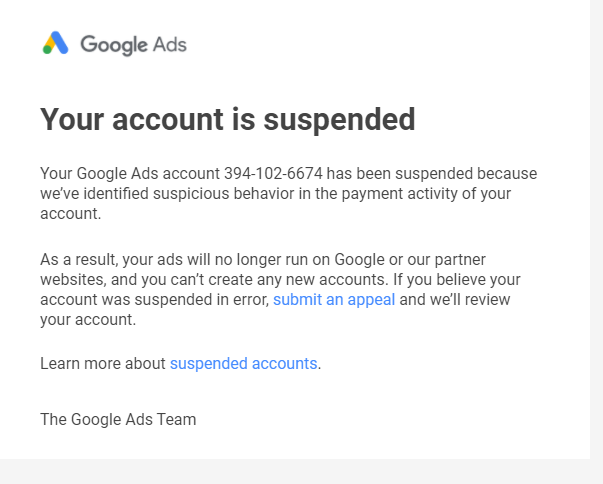
Google sends an email and displays a notification in your account explaining which policy was violated. The policy name is often listed but specific details about what triggered it usually aren’t. Read what you have. It tells you the direction of the issue even if it doesn’t specify the exact trigger.
Step 2: Fix the Underlying Issue Before Appealing
Appealing without addressing the actual cause almost never works. If it’s a billing issue, resolve it. If it’s a landing page issue, update the page. If it’s a content violation, remove or change the problematic ad. If you’re not sure what caused it, conduct a thorough audit of your account before submitting anything.
Step 3: Submit an Appeal Through Google Ads Help
In your Google Ads account, click the notification about the suspension. Follow the appeal instructions in the interface. If the in-account option isn’t available, go to the Google Ads Help Center and submit a request with:
- Your account ID (ten-digit number in the top right of your account)
- A specific description of what you believe caused the issue
- What changes you’ve made to address it
- Why you believe the account should be reinstated
Be specific. “I will follow your policies” is not sufficient. “I have updated the landing page at [URL] to remove the claim about [specific claim], which I believe triggered the misrepresentation policy, and have paused the campaigns linking to that page pending your review” is useful.
Step 4: Follow Up if You Don’t Hear Back
Most appeals receive a response within 5–10 business days. One professional follow-up if you haven’t heard back after a week is appropriate. Repeated follow-ups before that window don’t help.
Step 5: Escalate if Standard Appeals Fail
For circumventing systems suspensions specifically, standard appeals sometimes don’t work because the detection was triggered by environment factors rather than content issues. In these cases, escalating through Google Ads Expert support or working with a Google Partner agency that has direct account team access can sometimes produce results that standard appeal channels don’t.
Realistic Recovery Expectations
Billing and payment suspensions: Usually reversible relatively quickly once the billing issue is resolved. These are the most straightforward to fix.
Content and policy violations (first occurrence): Often reversible through the appeal process with documented evidence that the violation has been corrected.
Misrepresentation violations: More scrutinized. Google wants to see specific changes to ads and landing pages, not just assurances.
Circumventing systems: The hardest to appeal. Google’s stance is firm on accounts that appear to be attempting policy workarounds. Recovery requires demonstrating clearly that the account is legitimately operated, the connecting factors to any previously suspended account have been severed, and billing is clean and verifiable.
For accounts where circumventing systems was triggered by environment issues (shared device fingerprint with other accounts), demonstrating that each account is now operating from a genuinely isolated environment is part of the argument. See the Google Ads account suspended Academy guide for the detailed approach.
How Multilogin Prevents Google Ads Cascade Suspensions
For agencies managing Google Ads accounts for multiple clients, the circumventing systems risk is one of the most important operational concerns. Here’s the specific mechanism:
When you manage 15 client Google Ads accounts and log into all of them from the same browser on the same machine, every login session shares the same browser fingerprint, the same cookies, the same local storage, and the same IP address. Google can see that all 15 accounts are accessed from the same environment.
If any one of those 15 accounts gets suspended for any reason — a client’s billing issue, a landing page problem, a policy violation on one campaign — the shared environment fingerprint connects all 15 to that suspension. Google doesn’t know whether you’re a legitimate agency managing client accounts or one person operating multiple accounts to circumvent a policy. The pattern looks the same.
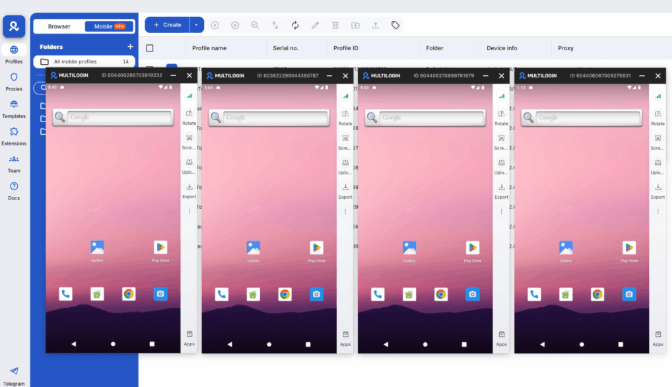
Multilogin browser profiles eliminate this risk. Each client’s Google Ads account gets its own browser profile with completely separate cookies, local storage, and browser fingerprint. Google sees 15 separate sessions from 15 separate environments — not one environment with 15 accounts.
This is standard practice for professional agencies doing Google Ads management. See creating multiple Google Ads accounts for the complete setup guide.
For TikTok advertising and other mobile-first ad platforms, Multilogin Cloud Phones provide the equivalent isolation at the device level. Try Multilogin for free, then continue from $7.08/month. Cloud phones, residential proxies, and browser profiles are bundled into every plan.
Need to manage multiple accounts? Try Multilogin Cloud Phones.
Frequently asked questions
Common causes: circumventing systems detection (often from shared environment with other accounts), billing or payment issues, ad policy violations, or landing page misrepresentation. Google’s notifications identify the policy but not always the specific trigger.
Creating a new account to circumvent a suspension violates Google’s policies and will result in the new account being flagged if Google detects any connection to the suspended account. Resolve the suspension first, or ensure the new account has zero connecting factors to the old one.
Most appeals receive a response within 5–10 business days. Complex circumventing systems cases can take longer.
Google flags access from unfamiliar browser environments, devices, or IP addresses. When team members log in from different countries using different browser setups, Google’s risk systems see erratic behavior even if every person has legitimate permission. Using Multilogin’s isolated browser profiles with location-matched residential proxies keeps each session consistent and reduces verification prompts significantly.
Direct user access adds someone as a named user inside a single account. MCC links an agency Manager Account to multiple client accounts. For agencies, MCC is almost always the cleaner and more scalable structure.


