


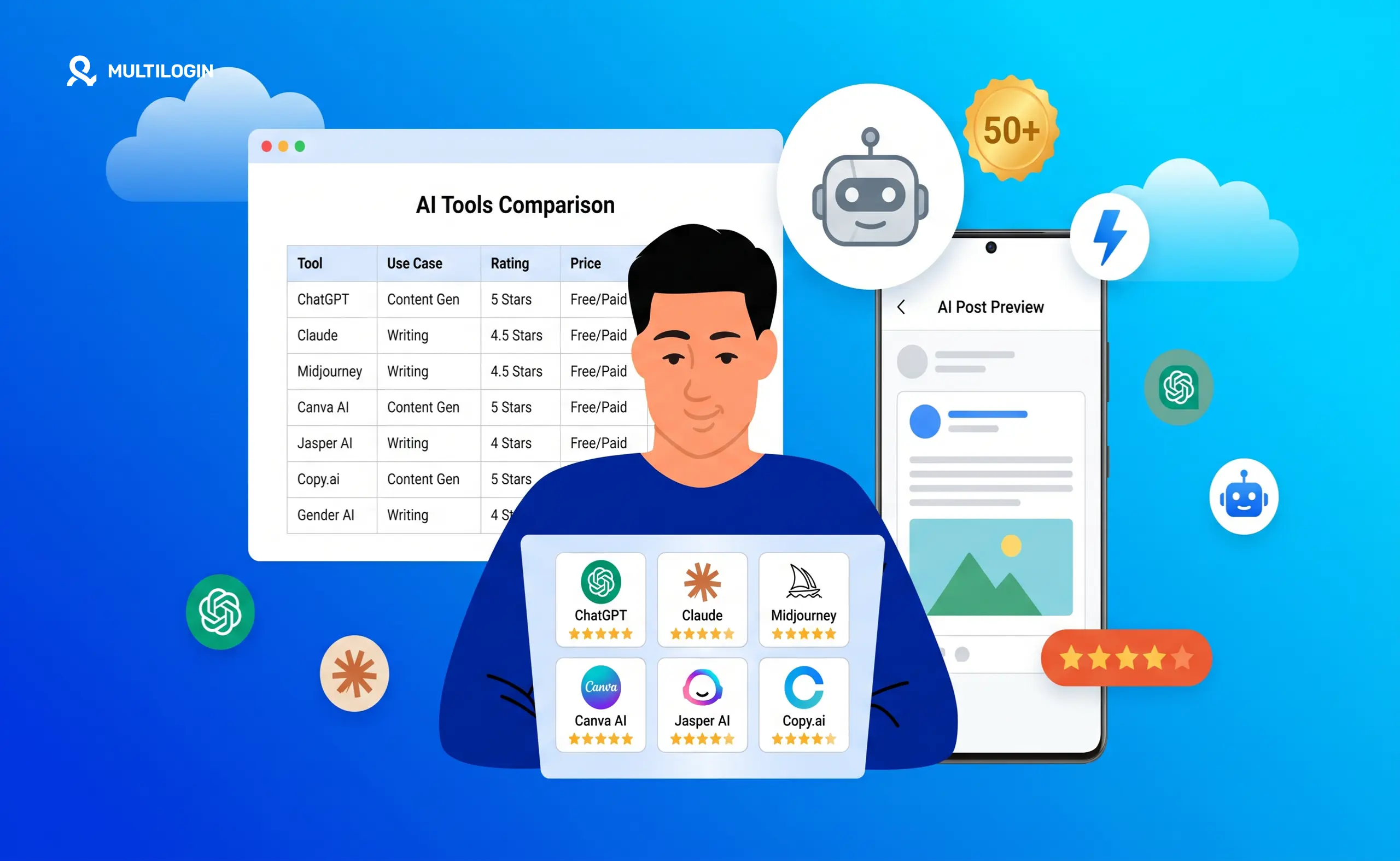



You’ve definitely used it already. Maybe you typed a caption idea into ChatGPT, used Canva’s magic image feature to generate a graphic from a text prompt, or let an AI tool write the first draft of a content brief. That’s generative AI.
But if you’re a social media manager and you’re still treating AI as just a caption helper, you’re leaving a lot on the table.
In 2026, generative AI is what separates the social media managers who are constantly behind from the ones running smooth, scalable operations across multiple clients and platforms. The tools are genuinely good now, and the workflows that combine them are changing what’s possible for a single person or small team in a serious way.
This guide is written specifically for social media managers. We’ll cover what generative AI is, how it works without the technical jargon, every tool category worth knowing about with the actual tools named, and how to pair AI with the right account management infrastructure so your operation actually scales.
We’ll also cover Multilogin, which is not a generative AI tool but has AI-powered features and automation built in that make managing multiple accounts faster and more organized.
Let’s get into it.
What Is Generative AI? The Simple Version
Generative AI is a type of artificial intelligence that creates new content when you give it a prompt.
You type something in, it gives something back. The output could be a caption, an image, a short video clip, a voiceover, a song, or even code. That’s the whole idea.
What makes it different from older AI is that it doesn’t just analyze or sort things. A spam filter is AI. An algorithm that recommends videos is AI. But neither of those creates anything new. Generative AI actually produces original content that didn’t exist before you asked for it.
The reason this matters so much for social media managers is simple. You are constantly being asked to produce more content, faster, for more platforms, across more accounts. Generative AI is the only technology that actually addresses that production problem head-on.
How Does It Work? (The Non-Technical Version)
Generative AI models are trained on huge amounts of existing content. Text models like ChatGPT and Claude were trained on billions of pages of text from the internet, books, and articles. Image models like Midjourney were trained on hundreds of millions of images.
The model learns the patterns in all that data. It figures out which words tend to follow which other words. It learns what a product launch announcement on Instagram should look and sound like. It understands the difference in tone between a TikTok caption and a LinkedIn post.
When you give it a prompt, it uses everything it learned to generate something new that fits what you asked for. It is not copy-pasting from its training data. It is producing something original based on the patterns it absorbed.
You don’t need to understand the math behind it to use these tools well. You just need to know what each tool is good for and how to give it a clear enough prompt to produce useful output.
The Generative AI Tools Every Social Media Manager Should Know
This is the section that matters most for your daily work. Here is every tool category broken down with the specific tools worth your attention, what they’re good at, and when you’d reach for each one.
AI Text and Caption Generators
These tools write captions, scripts, post ideas, bio copy, hashtag lists, email newsletters, and anything else that involves words. For social media managers, this is where you get the biggest time savings on the repetitive writing work that eats up hours every week. When AI-generated copy is part of a regular publishing workflow, an AI detector can also help teams review drafts and identify content that may read as machine-generated before it goes live.
- ChatGPT is the most widely used and the most flexible. You can give it a detailed brief about your brand voice, your audience, the platform, and the post goal, and it will produce solid first drafts fast. The GPT-4o model is particularly good at adjusting tone and style based on specific instructions, and you can save custom instructions so it remembers your clients’ voices across sessions.
- Claude (by Anthropic) tends to produce cleaner, more natural-sounding copy compared to ChatGPT. It is particularly strong for longer content and for following nuanced instructions about voice and style. Many social media managers and content teams use Claude when they want first drafts that need less editing before they’re ready to publish.
- Gemini (by Google) is integrated into Google Workspace, making it useful if your team already lives in Google Docs and Sheets. Its live web access is a genuine advantage when you need to write about current trends or recent news without switching between tools to do research.
- Jasper is built specifically for marketing teams. It has templates for social media posts, ad copy, and campaign content, and the Brand Voice feature is designed to learn and replicate a specific tone across outputs. Strong for agencies with consistent brand guidelines to maintain across clients.
- Copy.ai is strong for short-form marketing copy, product descriptions, and social captions. Its workflow automation features are worth noting because they let you create content pipelines rather than generating one post at a time.
- Writesonic has a social media caption generator and integrates with publishing tools. Useful if you want to move from AI draft to scheduled post without bouncing between too many apps.
- Perplexity combines AI writing with live web search. For social media managers writing about current trends, platform updates, or news-relevant content, Perplexity produces content that’s accurate and up-to-date rather than just well-written but potentially outdated.
AI Image Generators
You no longer need a designer for every piece of visual content. AI image generators produce graphics, product mockups, branded visuals, and ad creatives in seconds. Here are the ones worth knowing.
- Midjourney consistently produces the most visually impressive results. It excels at artistic, editorial, and lifestyle aesthetics. It runs through Discord, which takes a little getting used to, but the output quality is genuinely the standard other tools are measured against. Social media managers use Midjourney for brand content, campaign visuals, and anything that needs to look polished and creative.
- Adobe Firefly is built into Photoshop and Adobe Express. Its biggest advantage is that it is trained on licensed content, which makes it the safest option for commercial use. If you’re creating visuals that will run as paid ads or be used in client campaigns, Firefly reduces copyright risk significantly. The quality is solid and improving with every release.
- DALL-E 3 is integrated directly into ChatGPT, which makes it easy to go from drafting a caption to generating a matching visual without switching tools. It follows detailed text prompts well and is a practical option if you’re already working in the ChatGPT ecosystem.
- Canva’s AI image generator is the most accessible option for social media managers already working in Canva. You can generate images, edit existing ones with AI, and use the generative fill feature to extend or change parts of an image, all within the design tool you’re already using for templates and scheduling. And if you ever need to double-check your Instagram post size before exporting, Canva handles that too without switching apps.
- Ideogram stands out for one specific reason: it can generate images that include legible, readable text. Most other AI image generators struggle badly with words inside images. If you need quote graphics, promotional tiles, or any visual with copy baked in, Ideogram handles this far better than the alternatives.
- Flux is gaining popularity for photorealistic outputs. It’s a strong choice when you need images that are meant to look like real photographs rather than illustrations or artistic renders.
- Leonardo AI has strong character and style consistency tools. If you’re running a campaign where a specific character, person, or visual look needs to appear the same across multiple posts, Leonardo’s consistency features give you more control than most other generators.
- Stable Diffusion is an open-source model that can be run locally or through platforms like DreamStudio. It requires more technical setup but gives you more control and no subscription cost if you have the hardware to run it yourself.
- Freepik’s AI image generator integrates with its library of existing assets. Useful if your workflow involves mixing AI-generated visuals with stock photography or existing design elements.
- Microsoft Designer is a free option integrated into Microsoft 365 and accessible through the web. It has improved significantly and is worth knowing about for teams already working in the Microsoft ecosystem.
AI Video Generators
Short-form video is non-negotiable in 2026. AI video generators let you produce Reels, TikToks, and YouTube Shorts without a camera, a studio, or a dedicated video editor. Here are the tools that matter.
- Kling (by Kuaishou) is one of the top options for producing short, realistic video clips from text prompts or still images. The motion quality is strong and it handles subtle, natural-looking movement particularly well. Widely used by social media content teams for its consistency and output quality.
- Runway Gen-3 is a professional-grade tool used by creative agencies and production teams. It has strong controls for camera movement, style guidance, and motion direction. More advanced than many social media managers need day-to-day, but worth knowing if you’re producing higher-end content.
- Sora (by OpenAI) generates video clips from text descriptions and is available through ChatGPT Plus and Pro. It performs particularly well for cinematic-style clips, environmental scenes, and abstract or stylized content.
- Hailuo produces smooth, realistic short video clips and has become popular for social media content specifically because of how well it handles close-up and portrait-style shots, which are common formats on TikTok and Instagram.
- Google Veo 3 is Google’s most capable video generation model as of 2026. Available through Google AI Studio and Gemini Advanced. Quality is strong across a range of styles and subject matter.
- CapCut’s AI video generator is built into a tool many social media managers are already using for editing. The AI features include auto-captions, text-to-video, script-to-video, background removal, and templates designed specifically for TikTok and Reels formats. The most practical option if you want AI video features inside an editing workflow you already know.
- InVideo AI takes you from a written prompt or a full script to a complete short video with voiceover, music, and transitions. It’s a full video production tool rather than a raw generator, which makes it fast for social media managers who need ready-to-post output without doing post-production manually.
- Pika Labs is straightforward for generating and editing short clips. Its image-to-video feature animates still photographs, which is a quick way to turn static content into something more dynamic for Reels or Stories.
- Synthesia creates AI avatar videos where a realistic-looking human presenter delivers your script. Used heavily for explainer content, product demos, and educational videos where you want a person on screen without filming anyone.
- Luma AI produces cinematic video from text and image prompts. The Dream Machine feature is strong for looping and atmospheric clips that work well as background-style content or visually driven posts with minimal text.
AI Voice Generators
Recording a voiceover used to mean sitting in front of a microphone or paying a voice actor. AI voice generators have made that mostly optional.
- ElevenLabs is the industry standard for realistic AI voice. It can clone your own voice from a short audio sample, generate narration in dozens of languages and accents, and produce output that is extremely difficult to distinguish from a real recording. Used by creators and agencies around the world for video narration, podcast content, and branded audio.
- Murf is a professional voice generation platform designed for business use. It has a large library of natural-sounding voices, strong output quality controls, and integrations with video tools. A solid choice for explainer videos and professional-sounding product content.
- Play.ht offers real-time voice generation with a broad voice library and an API for integrating into content pipelines. Useful if you are building automated video production workflows where voice generation is one step in a larger process.
- Narakeet converts scripts directly to narrated videos, including slides and screen recordings. A fast option if you want to go from a written script to a fully narrated video without handling audio separately in an editing tool.
- Speechify started as a text-to-speech reading tool but now has a voice studio with cloning features and studio-quality output. Popular with creators who produce audio alongside social video content.
- Descript combines AI voice generation with an audio and video editing interface. If you edit podcasts or video content for social media, Descript’s AI voice features include overdub, which lets you fix mistakes by typing the correction rather than re-recording.
AI Music Generators
Background music makes videos more engaging, and it used to mean either paying for licensing or risking copyright strikes. AI music generators solve both problems.
- Suno generates full songs with vocals and instrumentals from a text description of the style, mood, and genre you want. The output quality has improved significantly and many creators now use Suno-generated tracks as original music for their content. You can prompt it to sound like a specific genre or era without naming artists.
- Udio produces high-quality AI music with strong control over genre, instrumentation, and energy level. Particularly good for instrumental tracks that work as background music under voice or dialogue-heavy content.
- Soundraw generates royalty-free music based on mood, genre, and length, and lets you adjust the energy and instrument mix after generation. Designed specifically for content creators and grants commercial licensing on all output.
- Mubert generates AI music in real-time based on a mood or genre tag. It integrates directly with Canva and has a content creator plan tailored to social media use. Strong for quick, consistent background music across a high volume of posts.
- Loudly combines a library of AI-generated tracks with a generation tool. All tracks come with explicit commercial use rights, which makes it a safe option for client work and paid campaigns.
- Beatoven.ai creates original background music from your content’s mood and genre preferences. It allows you to set the pacing and energy level to match the rhythm of your video content, which gives you more control than tools that produce a single track you take or leave.
AI Scheduling and Social Media Management Tools with AI Features
These are the platforms that sit on top of all the content tools and connect everything into a working workflow.
- Buffer has AI writing assistance built directly into its scheduling interface. You can draft, generate, and schedule posts without switching tools. It is clean, fast, and practical for smaller teams managing a tidy set of accounts.
- Hootsuite has OwlyWriter AI built in, which generates captions, content ideas, and hashtag suggestions connected to your actual audience and performance data. Because it pulls from your analytics, the suggestions are more relevant than generic AI outputs.
- Sprout Social has AI-powered features across its platform including smart inbox management, sentiment analysis, and suggested responses for community management. It is enterprise-oriented in pricing but genuinely comprehensive in capability.
- HubSpot combines social media scheduling and management with AI-powered features through Breeze. Teams can generate and refine social posts, schedule content across channels, monitor engagement, and use performance data to improve their social strategy. It is particularly useful for marketing teams that want social activity connected to their CRM and broader marketing campaigns.
- Metricool combines scheduling with analytics and has AI caption generation connected to your historical performance data. Particularly strong for agencies managing multiple client accounts because of its white-label reporting and clean multi-account dashboard.
- Later has an AI caption generator and a link-in-bio feature with AI-optimized scheduling recommendations based on when your specific audience is most active. Simple enough to pick up quickly, useful enough to stick with.
- SocialBee has solid AI content generation built into its scheduling flow, and its content categories system helps you automatically maintain a balanced posting mix across account types and themes without manually planning the ratio.
- Publer includes AI image generation, caption generation, link shortening, watermarking, and scheduling in one platform. Popular with freelance social media managers working across a range of clients because of how much it covers without requiring additional tools.
- Lately uses AI to repurpose long-form content like blog posts and podcast episodes into social media posts automatically. If you work with clients who produce a lot of written or audio content, Lately turns that existing content into a social media calendar with minimal manual work.
AI Hashtag and Analytics Tools
- Flick uses AI to suggest hashtags based on actual engagement data and niche relevance rather than just raw popularity. It has caption generation built in and an analytics dashboard showing which hashtags are actually driving reach for your specific account.
- RiteTag analyzes hashtags in real time and shows you engagement data and competition level for each tag. Its browser extension lets you check hashtag performance while you’re creating content without leaving the post composer.
- Brand24 uses AI to monitor brand mentions, track sentiment, and identify trending topics relevant to your clients’ industries. Useful for both community management and proactive content planning based on what people are actually saying.
- Sprinklr has AI-powered listening and analytics built for agencies and enterprise teams managing large numbers of accounts across multiple platforms. High price point, but the depth of insight and the scale it supports are genuine differentiators at the top end.
What a Social Media Manager’s AI Workflow Actually Looks Like
Theory is useful. What does this actually look like in practice for someone running multiple client accounts day-to-day?
A social media manager handling five to ten client accounts in 2026 might work something like this.
- They use ChatGPT or Claude to draft a month’s worth of captions for each client based on a content brief and brand voice document they’ve refined over time.
- They use Midjourney or Canva AI to generate platform-specific visuals, making sure everything is sized correctly for each format.
- They use CapCut’s AI features to turn still images into short video clips with auto-captions for Reels and TikTok.
- They add original background music from Suno or Soundraw. Then everything goes into Metricool or Buffer where it’s scheduled across accounts with platform-specific timing recommendations.
What used to require a full creative team now takes one person with the right stack. At this stage, an AI humanizer can also help refine captions and scripts so outputs feel more natural and less machine-generated.
But there’s a catch that most generative AI guides completely ignore. When you’re managing multiple accounts for multiple clients, especially accounts on the same platform, you run into a problem that AI tools can’t solve on their own.
The Problem No One Talks About: Multiple Accounts Getting Linked
Social media platforms are built to detect when multiple accounts are connected.
Instagram, TikTok, Facebook, and Pinterest all check things like your device fingerprint, your IP address, browser cookies, and behavioral patterns. If they see multiple accounts behaving similarly from the same device and the same IP, they start linking those accounts together and applying restrictions. Even if your content is completely compliant with platform rules, accounts can get shadowbanned or terminated purely because of how they’re technically connected in the background.
This affects social media managers in two main ways. The first is managing multiple client accounts on the same platforms, where linking risks one client’s account affecting another’s. The second is running multi-account growth strategies, for example managing multiple Pinterest accounts across different niches, where detection would collapse the whole operation.
You do everything right on the content side, and then accounts start getting flagged because of something invisible in the infrastructure. It’s one of the most frustrating operational problems in this line of work.
This is exactly the problem Multilogin is built to solve.
Multilogin: Not Generative AI, But Smarter Account Management
Multilogin is not a generative AI content tool. It does not write captions, generate images, or produce videos. What it does is let you manage multiple social media accounts from a single machine without those accounts being linked or detected by platforms.
Here is how it works. Multilogin lets you create separate browser profiles for each account. Each profile has its own isolated fingerprint, its own cookies, its own session storage, and its own residential proxy IP.
To Instagram or Facebook, each profile looks like a completely different device used by a completely different person in a completely different location. There is no fingerprint overlap, no cookie bleed, no connection between accounts at the technical level that platforms are checking. It’s a more powerful alternative to things like incognito mode, which doesn’t actually isolate sessions at all.
And in 2026, Multilogin has also added AI-powered features and automation that make managing a large number of profiles faster and more organized. Automated profile creation, smarter proxy assignment, and workflow automation through integrations with tools like Selenium, Puppeteer, Playwright, and Postman.
So while Multilogin is not a generative AI product, it uses AI-assisted features to speed up and streamline the account management and automation work that social media managers at scale deal with constantly.
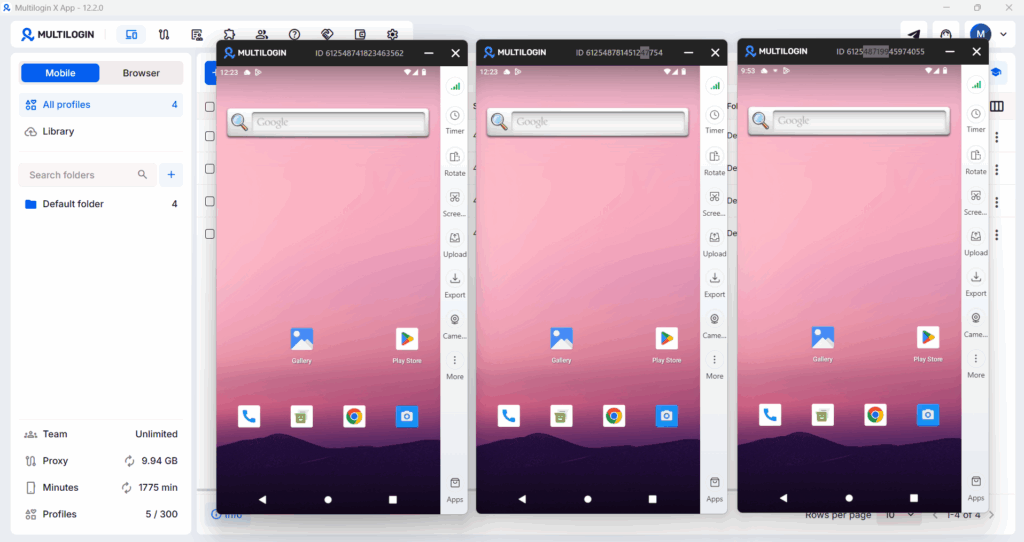
For mobile-first platforms like TikTok and Instagram, Multilogin Cloud Phones extend this account isolation to real Android devices hosted in the cloud.
Multilogin Cloud Phones: Isolated Mobile Accounts at Scale
A lot of the platforms social media managers work with daily are mobile-first. TikTok and Instagram in particular behave differently for mobile sessions than desktop ones. They check device identifiers like IMEI numbers, Android IDs, and hardware signatures that simply don’t exist in a browser profile.
Running multiple TikTok or Instagram accounts from the same physical phone links them. Running them through Android emulators gets them flagged because emulators have telltale technical signs that platforms now detect reliably. Neither works at scale.
Multilogin Cloud Phones give you real, physical Android devices hosted in the cloud. Each Cloud Phone has its own unique device identity, its own hardware fingerprint, its own residential proxy matched to a specific region. To TikTok or Instagram, it looks exactly like a real person’s real phone in a specific location, because it is a real phone, just hosted remotely and accessed through your desktop. This is a fundamentally different approach from emulation, and you can read exactly how cloud phones work if you want the full technical picture.
Your app data, login sessions, and account history all persist between sessions. You can install apps from the built-in store or upload APKs directly. For someone handling TikTok content for multiple clients, this means each client’s account runs from its own isolated Cloud Phone, with its own regional IP, its own device identity, and no technical connection to any other account. No linking, no flags, no account losses from infrastructure problems.
Cloud Phones are useful across a wide range of social media use cases. If you manage WhatsApp Business accounts for multiple clients, each account gets its own isolated device. If you run LinkedIn outreach across multiple profiles, the same isolation applies. There’s also a comparison of the top cloud phone providers if you want to see how Multilogin stacks up before making a decision.
What About Proxies?
Account isolation is only half of the equation. The other half is making sure each account has a clean, unique IP address.
This is where proxies come in. Multilogin includes built-in residential proxies, but if you’re managing accounts across specific platforms or regions, understanding how proxies work is genuinely useful.
For example, proxies for Telegram work differently from proxies for social platforms, and the wrong setup can create more problems than it solves. Each Cloud Phone automatically gets a residential proxy matched to its configured region, which removes a lot of that manual configuration work.
The combination of isolated browser profiles or Cloud Phones plus clean residential proxy IPs is what makes multi-account management actually stable long-term.
Need to manage multiple social media accounts? Try Multilogin Cloud Phones.
Frequently asked questions About What Is Generative AI
It’s AI that creates new content when you give it a prompt. You ask for something, it produces something original that didn’t exist before your request. The output can be text, images, video, audio, or music depending on the tool.
AI is a broad category covering any technology that makes machines do things that normally require human intelligence. Generative AI is a specific type of AI focused on creating new content rather than just analyzing or classifying existing content. Most AI systems don’t create anything. Generative AI does.
The content itself is not the issue platforms are flagging. What platforms detect is how accounts are managed technically: shared devices, shared IPs, linked browser fingerprints. That’s an infrastructure problem, not a content problem. Tools like Multilogin address the infrastructure side.
Canva has the most practical free tier for social media managers because it combines image generation, design templates, and scheduling in one place. ChatGPT’s free version is strong for caption writing and content ideation. CapCut is free and powerful for short-form video.
It depends on the tool. Adobe Firefly is explicitly trained on licensed content and grants commercial use rights on output. Most other tools have varying policies and some restrict commercial use on free plans. Always read the terms of service before using AI-generated visuals in paid advertising or client deliverables.
Multilogin lets you manage multiple client accounts from one machine without the accounts being linked or detected by platform systems. Each account gets its own isolated browser profile or Cloud Phone with a unique device fingerprint and IP. It also has AI-powered automation features and integrations that make creating and organizing large numbers of profiles faster.
Real Android devices hosted in the cloud, each with a unique device identity, hardware fingerprint, and residential proxy IP. You access and control them through the Multilogin desktop app. Social media managers use them to run mobile-first accounts on platforms like TikTok and Instagram without those accounts being linked to each other. You can read the full breakdown of how cloud phones work to understand what’s happening under the hood.
The Honest Limitations of Generative AI
These tools are genuinely useful. They also have real limitations worth being straight about, especially when you’re relying on them for client work.
AI text tools sometimes produce content that sounds slightly generic or off-brand even with detailed prompting. The best results come from giving the AI strong examples of the voice you want, not just descriptions of it. Always treat first drafts as first drafts and edit properly before publishing.
As AI-generated visuals become increasingly realistic, an AI image detector can also be useful for assessing whether an image was created or manipulated using artificial intelligence.
If you need the same character, person, or specific look to appear the same across twenty images, you often need specific consistency features or techniques to get there. Leonardo AI and Midjourney have the strongest tools for this but it still takes real work.
AI video generators continue to improve fast but have limitations with complex motion, hands and faces in certain positions, and anything requiring a longer coherent narrative. Short clips of five to fifteen seconds are where the quality is most reliable.
Most AI text tools have a training data cutoff, meaning they don’t know about recent news or recent platform updates unless they have live web access built in. For time-sensitive content, Perplexity or Gemini with live search are more reliable than standard chatbots.
And when it comes to the account management side, no AI tool replaces proper infrastructure. Generating great content means nothing if the accounts it’s posted from keep getting flagged. Whether you’re managing Facebook monetization for clients or running Google accounts at scale, the infrastructure has to be right before anything else matters.
The social media managers getting the best results from generative AI in 2026 are the ones who have invested time in building strong, specific prompts and refined them based on what actually produces usable output for each client. It is a real skill and it develops with practice.


