


Look, you’re researching antidetect browsers, and “free” sounds pretty damn appealing. X Browser keeps popping up in your searches, and you’re wondering: is this the real deal, or is it one of those “you get what you pay for” situations?
After weeks of actual testing (not just skimming their website like most reviews do), the verdict? It’s complicated. Here’s everything you need to know—the good, the bad, and the “wait, why doesn’t it do that?” moments.
What Even Is X Browser? (The Quick Version)
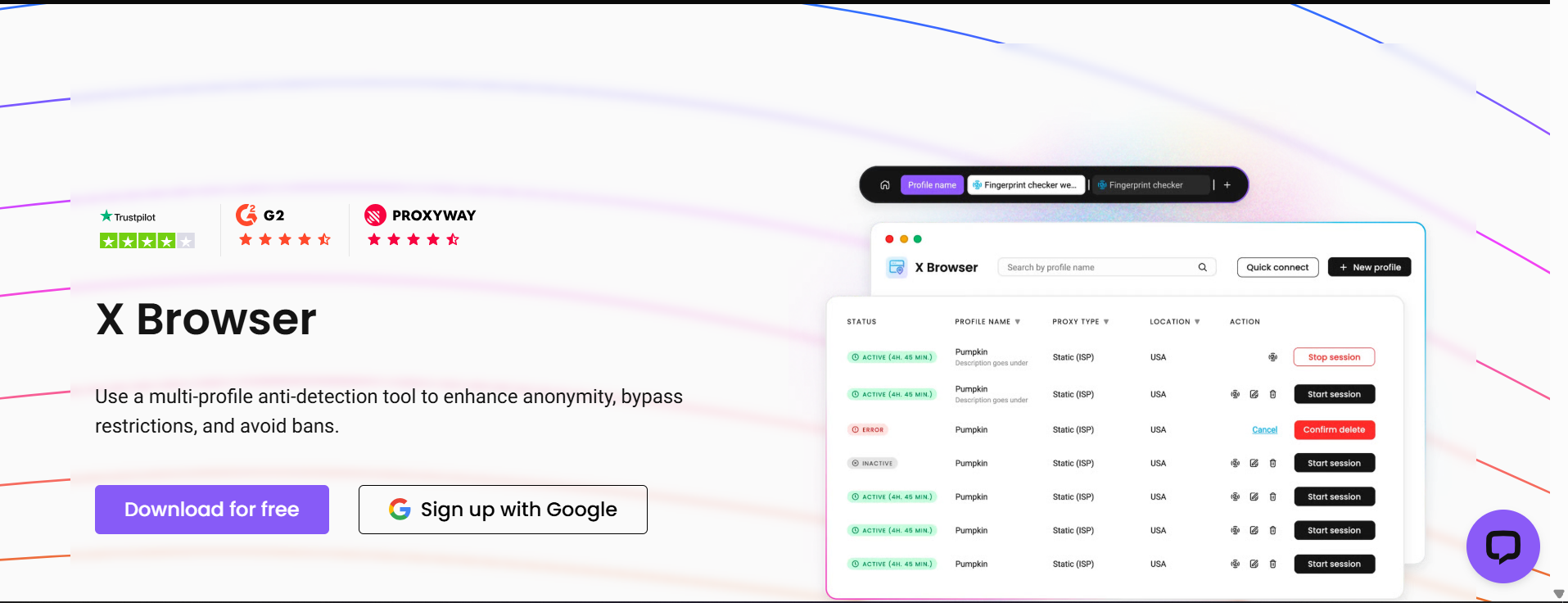
X Browser is a free antidetect browser created by Smartproxy, the proxy company from Lithuania. Notice the big caveat: you need an active Smartproxy subscription to use it. So it’s not really free—it’s more like a “bonus tool that comes with your proxy plan.”
The whole point? It’s supposed to help you manage multiple accounts without getting banned. Different browser profiles, different fingerprints, isolated sessions. You know, the usual antidetect browser stuff.
But here’s where things get interesting…
The Straight-Up Pros (What X Browser Actually Does Well)
1. It’s Simple AF
No joke, X Browser is probably one of the easiest antidetect browsers you’ll ever use. Download it, open it, boom—you’re in. No 50-page user manual, no confusing settings menus, no “wait, where do I click?” moments.
The interface is clean and minimal. Some people might say it’s too minimal, but honestly? If you just need to switch proxies and open a quick session, the simplicity actually works.
2. Automatic Smartproxy Integration
If you’re already a Smartproxy customer, X Browser connects to your proxies automatically. No copy-pasting proxy credentials, no configuration headaches. Log into your Smartproxy account, launch X Browser, and everything syncs itself.
For someone who’s not super technical, this is actually pretty nice. It takes away that intimidating “how do I set up proxies?” barrier.
3. Quick Sessions Are Handy
The “Quick Sessions” feature lets you spin up temporary browser profiles for one-off tasks. Think of it like incognito mode but with actual fingerprint protection. Need to check something quick without messing up your main profiles? Quick Session handles it.
4. It Actually Works on Mac (Now)
Early versions of X Browser had issues on macOS, but the 2025 update made it way more stable. If you’re a Mac user, it actually runs smoothly now without random crashes. Small win, but worth mentioning.
5. Smartproxy Has Great Support
While X Browser itself doesn’t get much love, Smartproxy’s customer support is legit good. If you run into proxy issues or connection problems, their support team actually knows what they’re talking about. That counts for something.
The Not-So-Great Parts (X Browser Cons)
1. It’s Basically Just a Proxy Switcher
Let’s be real: X Browser isn’t really trying to be a full-featured antidetect browser. It’s more like a basic proxy management tool with some light fingerprinting thrown in.
You can adjust a couple settings—operating system, screen resolution—but that’s about it. Compare that to actual antidetect browsers that let you customize 50+ browser fingerprinting parameters, and yeah… X Browser feels pretty basic.
2. No Mobile Version, No Mobile Fingerprints
In 2025, most platforms are mobile-first. Instagram? Mobile-first. TikTok? Mobile-first. And X Browser? Desktop only, baby.
There are apps called “X Browser” on the Play Store, but those are completely different products from random developers. Smartproxy’s X Browser doesn’t do mobile at all. If you need mobile capabilities, you’ll want to check out mobile antidetect browser solutions instead.
3. Limited Browser Features
Here’s something weird: the browser window itself is pretty restricted. No bookmarks. Limited extensions. It feels like they built it on a custom platform instead of using Chrome’s full engine, which means you lose a lot of standard browser features you probably take for granted.
4. Not Really Built for Business
X Browser gets minimal updates. Like, really minimal. It’s clear this is a side project for Smartproxy, not a core product they’re actively developing.
For personal use? Fine. For running client accounts or managing a serious business? You’re gonna hit walls fast. No team features, no advanced automation, no collaboration tools.
5. You Still Need Smartproxy
Remember that “free” thing? Yeah, it’s only free if you’re paying Smartproxy $12.50+ per GB for their proxy service. If you don’t need Smartproxy’s proxies specifically, you’re paying for a service just to access the browser.
6. Fingerprinting Is… Basic
Look, X Browser does some fingerprinting, but it’s not sophisticated. For casual browsing or basic multi-accounting? Probably fine. For managing Instagram accounts that make you money? For running Facebook ads? For e-commerce operations?
You’re playing with fire.
What X Browser Is Actually Good For
After extensive testing, here’s the honest take on when X Browser makes sense:
Use X Browser if you:
- Already use Smartproxy and want a simple bonus tool
- Need basic proxy browsing for personal stuff
- Just want to hide your IP for casual web browsing
- Don’t care about advanced features or mobile support
- Aren’t managing accounts worth money
Don’t use X Browser if you:
- Run a business managing client accounts
- Need sophisticated fingerprint masking
- Want mobile device emulation
- Require team collaboration features
- Manage accounts on strict platforms (Facebook, Instagram, Amazon)
- Can’t afford to lose accounts to bans
The Download and Setup Process (Super Quick)
Since people search for “X Browser download,” here’s the actual process:
- Go to your Smartproxy dashboard
- Find the X Browser download section
- Download for Windows, macOS, or Linux
- Install (takes like 30 seconds)
- Log in with your Smartproxy credentials
- Start creating profiles
That’s it. Literally that easy. The setup experience is probably X Browser’s biggest strength.
X Browser vs. The Competition (Real Comparison)
X Browser vs. AdsPower
AdsPower is way more powerful with RPA automation and synchronizer tools, but also more expensive and way more complicated. X Browser is simpler but can’t do 10% of what AdsPower does.
X Browser vs. GoLogin
GoLogin offers more features, better fingerprinting, and built-in proxies at $24/month. X Browser is “free” with Smartproxy but far less capable. If you’re not locked into Smartproxy, GoLogin makes more sense.
X Browser vs. Dolphin Anty
Dolphin Anty has better fingerprinting and is optimized for crypto operations. X Browser is more basic across the board. Dolphin costs more but delivers more.
X Browser vs. Multilogin
Now we’re talking. This is where things get interesting…
Why Most Professionals Skip X Browser for Multilogin
Here’s the thing nobody wants to say out loud: X Browser is fine for what it is, but it’s not built for serious operations. And if you’re serious about multi-account management, you’re probably going to end up on Multilogin anyway.
Let’s explain why.
The Features Gap Is Massive
X Browser gives you:
- Basic fingerprint modification (like 5-10 parameters)
- Proxy integration (if you use Smartproxy)
- Quick sessions
- That’s… pretty much it
Multilogin gives you:
- 55+ customizable digital fingerprint parameters
- Built-in residential proxies (30M+ IPs, 150+ countries)
- Two proprietary browsers (Mimic and Stealthfox)
- Pre-farmed cookies so accounts look aged immediately
- Mobile device emulation that actually works
- Professional automation with Selenium/Puppeteer/Playwright
- Team collaboration with unlimited seats on Business plans
- 24/7 expert support in 5 languages
- Daily testing on 50+ platforms to ensure you stay undetected
See the difference? X Browser is a basic tool. Multilogin is a complete professional system.
The “Free” Math Doesn’t Add Up
Let’s do some actual math because this matters:
X Browser “free” cost:
- Smartproxy: $12.50/GB minimum (let’s say $75/month for reasonable usage)
- Limited features
- No team support
- Basic fingerprinting
- Total: $75/month for proxy access + limited browser
Multilogin cost:
- Solo plan: €9/month
- Includes 1GB residential proxy traffic
- Full advanced features
- Professional fingerprinting
- Team collaboration available
- 24/7 support
- Total: €9/month all-inclusive
Wait, what? Multilogin is actually cheaper than paying Smartproxy just to use X Browser? Yep. And you get 10x the features. Wild, right?
Business Operations? Not Even Close
Testing both for managing Instagram accounts (where account protection actually matters) revealed stark differences:
X Browser:
- Created 3 profiles
- Basic fingerprinting
- Had to manually configure everything
- Accounts got verification requests within 2 weeks
- No real way to troubleshoot
Multilogin:
- Created 10 profiles in same time
- Advanced fingerprinting tested on Instagram daily
- Pre-farmed cookies made accounts look established
- No verification requests after months
- Support helped optimize settings
For stuff that actually matters—protecting accounts worth money—there’s no comparison.
The Platform Testing Matters More Than You Think
Here’s something X Browser doesn’t do: test their fingerprints on actual platforms.
Multilogin? Their team literally tests fingerprints daily on 50+ sites including Facebook, Instagram, Amazon, TikTok, LinkedIn. When platforms update their detection systems (which happens constantly), Multilogin updates their fingerprinting before you notice problems.
X Browser? You’re basically hoping it works. No ongoing testing, no validation, no guarantees. You find out if it works when your accounts get banned. Not ideal.
Is X Browser Safe? (The Security Question)
People ask this a lot: is X Browser actually safe?
Short answer: probably fine for basic use, but not for anything important.
Longer answer: Smartproxy is a legitimate EU company with decent security practices. The browser itself isn’t malicious. But “safe” for important business operations? That’s different.
The limited fingerprinting means platforms can potentially link your accounts more easily. The basic feature set means you can’t customize things for maximum secure browsing. The lack of ongoing updates means you’re not protected against new bot detection methods.
For casual browsing? Sure, it’s safe. For managing accounts worth thousands of dollars? You wouldn’t trust it.
Multilogin, on the other hand, has been around since 2015 with zero security breaches, maintains GDPR compliance, offers 2FA and end-to-end encryption, and has an actual security track record you can verify.
The Verdict: Should You Use X Browser?
Alright, real talk time. After extensive testing for actual work (not just writing a review), here’s the honest take:
X Browser is fine if:
- You already use Smartproxy and just want a little bonus tool
- You need basic proxy browsing for personal, low-stakes stuff
- You’re not managing accounts that make you money
- You want the simplest possible experience
Skip X Browser if:
- You run any kind of business
- You manage client accounts
- You need reliable multi-account management
- You want mobile support
- You need team collaboration
- You can’t afford account bans

