
Ten profiles can disappear surprisingly quickly. One client has four accounts. Another campaign needs three. You add a few regional profiles, a test account, perhaps a separate YouTube or Reddit setup, and suddenly a 10-profile workspace is full. That is exactly where Multilogin Pro 20 fits.
The Pro 20 plan gives growing social media operations 20 profiles, 2 team seats, 2 GB of premium proxy traffic per month, and 75 mobile minutes per month, while unlocking several workflow features that make managing those profiles easier.
More importantly, it sits in the practical middle ground between Pro 10 and the larger Pro 50 plan.
If Pro 10 feels tight but 50 profiles would be overkill, Pro 20 is designed for that gap.
What is the Multilogin Pro 20 plan?
Multilogin Pro 20 is a paid plan built for users who need up to 20 social profiles, more collaboration, and stronger profile-management tools without moving straight to a 50-profile setup.
Multilogin is a cloud phone platform for social media marketers. It lets people and AI agents create, run, organize, and manage multiple social profiles from one dashboard.
With Pro 20, those 20 profiles can be used across the two environments Multilogin supports:
Android cloud phones for mobile-first workflows on apps such as TikTok, Instagram, and Facebook
Browser profiles for web-based workflows such as Reddit, YouTube, dashboards, seller centers, and other websites
You are not buying 20 physical phones.
You are getting room for 20 dedicated profile environments inside one Multilogin workspace, then deciding which ones need Android cloud phones and which ones make more sense as browser profiles.
For a social media marketer, that could look like below or any other combinations:
5 TikTok profiles for different campaigns
4 Instagram profiles for clients
3 Facebook profiles
3 YouTube profiles
2 Reddit profiles
3 profiles kept for testing, new regions, or future campaigns
Twenty is enough space to build a real operating system for your social profiles without jumping immediately into a much larger plan.
What is included in Multilogin Pro 20?
The Pro 20 plan includes:
| Pro 20 resource | What you get |
|---|---|
| Profiles | 20 |
| Android cloud phones | Included |
| Browser profiles | Included |
| Team seats | 2 |
| Premium proxy traffic | 2 GB/month |
| Mobile minutes | 75 minutes/month |
| 300+ social and mobile apps | Included |
| API access | Included – RPM 75 |
| ADB access | Included |
| CLI | Included |
| Selenium, Puppeteer and Playwright support | Included |
| Smart Auto-Stop | Included |
| Profile transfer | Included |
| Extension Manager | Included |
| Profile Template Creator | Included |
| Proxy Template Manager | Included |
| Team Creative Library | Included |
| Tags and notes | Included |
| Advanced team permissions | Included |
| 2FA | Included |
You can also purchase additional mobile minutes and proxy traffic when your included allowance is not enough.
For the latest billing options and add-on pricing, use the Multilogin pricing page.
Why does Pro 20 make more sense than simply adding 10 more profiles?
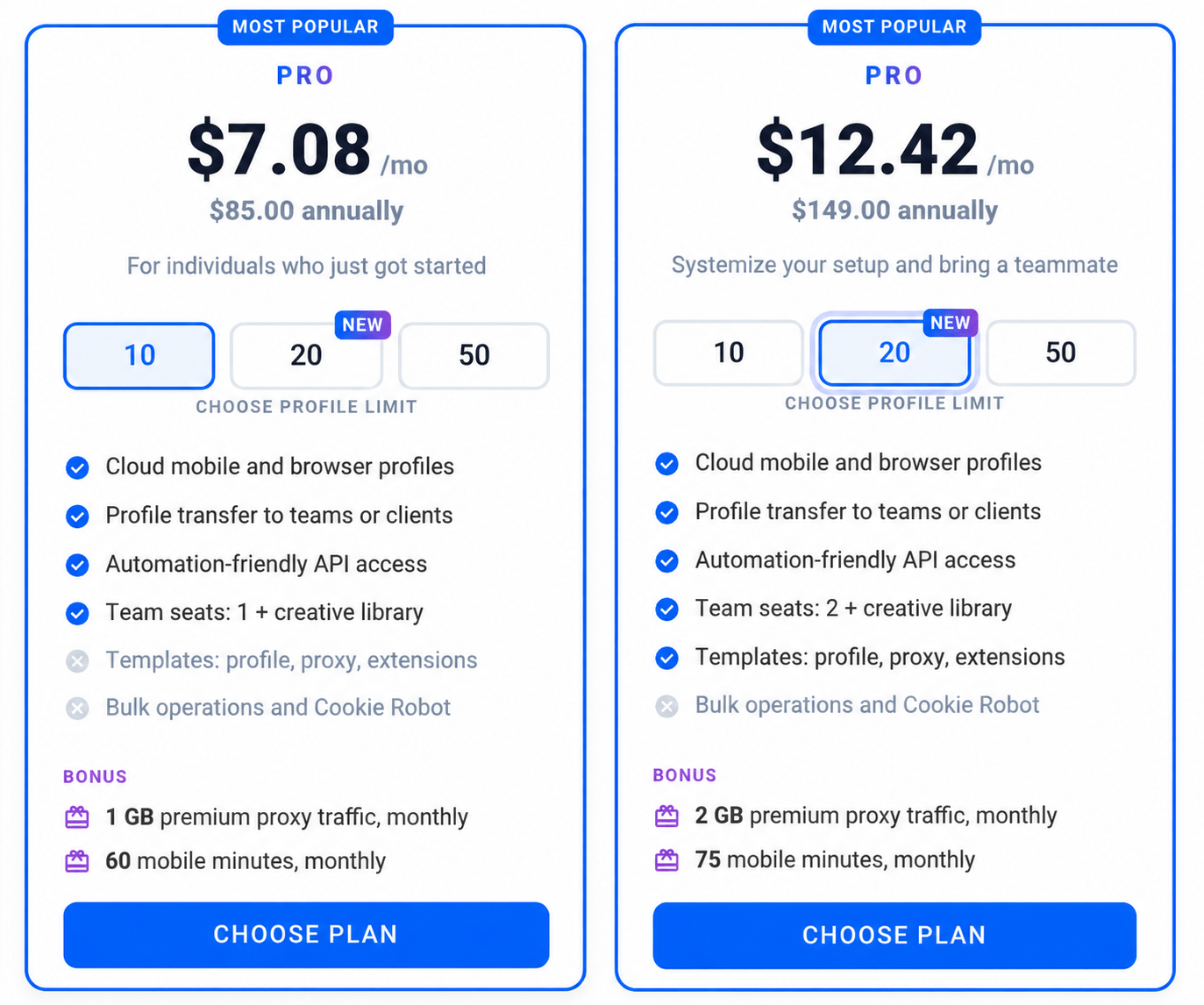
Because the upgrade from Pro 10 to Pro 20 changes more than the profile limit.
Yes, your capacity doubles from 10 to 20 profiles. But several workflow tools also become available.
That matters once Multilogin becomes part of your daily operation instead of something you occasionally open.
Auto-stop mobile profiles saves mobile minutes
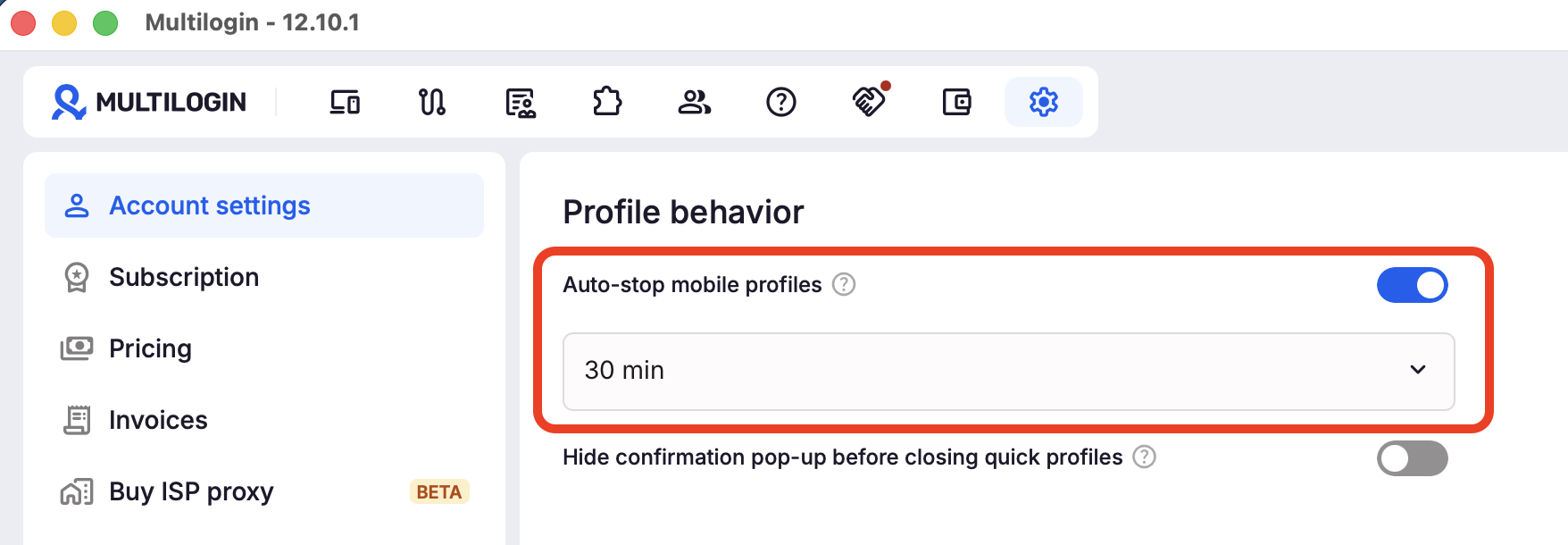
Cloud phones use mobile minutes while they are running. If you forget to stop one, you may use minutes you do not actually need.
With Auto-stop mobile profiles (Smart Auto-Stop), Pro 20 can automatically stop an idle cloud phone, helping you manage your included mobile minutes more efficiently. This is especially useful when you manage several profiles at the same time.
Reuse setups instead of rebuilding them
Pro 20 also adds the Profile Template Creator.
If you repeatedly launch profiles with similar configurations, rebuilding the same setup profile by profile becomes unnecessary work.
Templates let you create a repeatable starting point.
This becomes useful for workflows such as:
Creating separate profiles for new clients
Launching campaigns across multiple regions
Building similar profiles for different products
Setting up social profiles for different AI agents
Standardizing profile creation across a small team
You still control each individual profile. The repetitive setup becomes easier.
Manage extensions more easily
For browser-based workflows, Pro 20 includes the Extension Manager.
Instead of treating every browser profile as a completely separate setup job, you can manage the browser extensions needed for your workflow more consistently.
That can be useful for YouTube operations, web dashboards, e-commerce tools, CRM workflows, browser-based social platforms, or other processes that depend on specific extensions.
Save reusable proxy setups
Pro 20 includes the Proxy Template Manager.
If several profiles follow repeatable network configurations, templates help reduce manual proxy setup work.
This matters especially when profiles are organized around:
Clients
Countries
Campaigns
Brands
Markets
Product lines
Multilogin also includes premium proxy traffic with the plan, so cloud phones, browser profiles, proxy management, and the profiles themselves remain inside the same platform.
How does Pro 20 help with social media profile management?
Pro 20 gives growing social media operations enough capacity and workflow control to treat individual accounts as separate social profiles rather than one large pile of logins.
A profile is more than a username.
It can have its own:
Platform account
Content strategy
Target region
Audience
Login history
Apps
Session data
Proxy configuration
Campaign goal
Team owner
Multilogin lets you keep those profiles in dedicated environments.
For mobile-first platforms, you can use Android cloud phones. Each cloud phone keeps its own Android environment, apps, app data, and persistent account state.
For web workflows, browser profiles maintain separate cookies, sessions, storage, and network configuration.
The result is much easier to operate when one social profile becomes five, ten, or twenty.
What can you do with 20 Multilogin profiles?
Pro 20 gives you enough room to separate profiles by platform, client, region, campaign, or business goal without needing to jump straight to a 50-profile plan.
For example, you might use part of your workspace for:
Several TikTok profiles for different campaigns or markets
Several Instagram profiles for clients or brands
Additional Facebook, YouTube, or Reddit profiles
Extra profiles for testing new regions, content strategies, or offers
Agencies can organize profiles by client. Social media marketers can separate them by platform or region. E-commerce and affiliate teams can create dedicated profiles for different products or campaigns.
For AI-assisted workflows, Pro 20 also includes API and ADB access alongside integrations with tools such as Selenium, Puppeteer, and Playwright, so profiles can support both human-operated and automated workflows.
The main benefit is flexibility: 20 dedicated profile environments give you enough space to organize a growing social media operation without managing everything from the same few profiles.
Multilogin Pro 10 vs Pro 20: what is the difference?
Pro 20 is the stronger choice for growing operations because it doubles profile capacity and adds practical workflow and collaboration features that Pro 10 does not include.
Here is the comparison.
| Feature | Pro 10 | Pro 20 |
|---|---|---|
| Profiles | 10 | 20 |
| Team seats | 1 | 2 |
| Premium proxy traffic | 1 GB/month | 2 GB/month |
| Mobile minutes | 60/month | 75/month |
| Android cloud phones | Yes | Yes |
| Browser profiles | Yes | Yes |
| API access | Yes – RPM 50 | Yes – RPM 75 |
| ADB access | Yes | Yes |
| Smart Auto-Stop | No | Yes |
| Profile transfer | Yes | Yes |
| Extension Manager | No | Yes |
| Profile Template Creator | No | Yes |
| Proxy Template Manager | No | Yes |
| Team Creative Library | Yes | Yes |
| Tags and notes | Yes | Yes |
| Team permissions | Yes | Yes |
| Best fit | Small starter setup | Growing social profile operation |
Pro 20 is a better choice
Pro 10 still makes sense if your main priority is keeping the initial subscription as small as possible and ten profiles are genuinely enough.
But that is a fairly specific situation.
For users who already expect to grow, collaborate, create repeatable profile setups, or use cloud phones regularly, Pro 20 gives considerably more operational room before you have to upgrade again.
That is why Pro 20 is the more balanced choice.
The profile limit doubles.
Proxy traffic doubles.
You get another team seat.
Mobile minutes increase.
And several everyday workflow tools become available at the same time.
It is not just more capacity. It is a better operating layer.
Why choose Pro 20 instead of waiting until you need 50 profiles?
Because buying capacity you aren’t using won’t help you grow, it just costs more. Pro 50 is the stronger option when you actually need 50 profiles or features specifically available at that level.
For example, larger profile operations may need functionality such as bulk profile creation, Cookie Robot, pre-made cookies, profile import/export, or other Pro 50 capabilities.
But imagine you manage 13 profiles. In this case, you need more than Pro 10, but you don’t need 50, and there’s a big gap between the two. Pro 20 lets you solve your immediate constraint while leaving room for another seven profiles.
For many solo marketers, two-person teams, smaller agencies, and growing social operations, that is a much more natural progression:
Free → Pro 10 → Pro 20 → Pro 50 → Business
Grow when the operation requires it. Not three stages earlier.
Who should choose Multilogin Pro 20?
Choose Pro 20 if 10 profiles are starting to restrict your workflow but a 50-profile operation is still ahead of you.
It is particularly suited to:
Solo marketers managing several campaigns
You may work alone today but need enough capacity to separate accounts by client, platform, niche, region, or experiment.
Twenty profiles leave room to grow without pushing you into a large workspace too early.
Two-person social media teams
Pro 20 includes two team seats and collaboration features, making it a natural fit for two-person operations.
Profiles can be organized, shared, and assigned without sharing individual account setups informally.
Small agencies
An agency with a few clients can burn through ten profiles almost immediately. Three clients across TikTok, Instagram, and Facebook already use nine. Pro 20 gives you room for additional channels and new clients while adding profile and proxy templates.
Creators running multiple social properties
Creators do not always operate one brand on one platform.
One creator might manage:
A main TikTok account
A niche TikTok channel
Instagram
Facebook
YouTube
A second YouTube project
Regional accounts
Experimental content profiles
Pro 20 leaves room to build without constantly deleting older profile environments.
E-commerce and affiliate operators
When different products or campaigns need their own social profiles, separating them into dedicated environments makes the operation easier to understand and maintain.
Teams experimenting with AI-operated social workflows
Because Pro 20 retains API, ADB, CLI, Selenium, Puppeteer, and Playwright support, it can also serve as an infrastructure layer for human-operated and AI-assisted profile workflows.
Pro 20 benefits beyond the feature list
A pricing table shows the limits. The more important question is what those extra profiles, seats, proxy traffic, and mobile minutes actually change in your day-to-day workflow.
| Attribute | Pro 10 | Pro 20 (NEW) | Pro 50 |
| Monthly price | $11/mo | $19/mo | $29/mo |
| Annual price | $85/yr (~$7.08/mo equivalent) | $149/yr (~$12.42/mo equivalent) | $230/yr (~$19.17/mo equivalent) |
| Profiles | 10 | 20 | 50 |
| Team seats | 1 | 2 | 2 |
| Premium proxy bonus | 1 GB/mo | 2 GB/mo | 3 GB/mo |
| Mobile minutes | 60/mo | 75/mo | 85/mo |
For many growing users, Pro 20 is the practical middle ground. It doubles the profile capacity of Pro 10, adds a second team seat, increases included proxy traffic and mobile minutes, and gives you more room to grow without moving straight to a 50-profile setup.
You have more room to grow and experiment
Ten profiles can fill up quickly once you start separating accounts by client, platform, campaign, region, or content strategy.
With 20 profiles, you can keep established social profiles running while creating dedicated environments for new campaigns, markets, clients, or platform tests.
You can test a new region, launch another content angle, add a client, or create an extra TikTok, Instagram, YouTube, or Reddit profile without constantly reorganizing your workspace.
Your setup becomes easier to repeat
As the number of profiles grows, repeatedly configuring the same setting becomes unnecessary work.
Pro 20 includes tools such as the Profile Template Creator, helping you reuse common setups when launching similar profiles for new clients, campaigns, or markets.
Instead of rebuilding the same environment again and again, you can create a more repeatable workflow.
Collaboration becomes more practical
Pro 20 increases the team allowance from one seat to two team seats, making it a better fit for small teams and growing agencies.
You can share and manage profiles together while using features such as profile administration, folder access controls, shared groups, permissions, profile transfer, and the Creative Library to keep responsibilities organized.
For a solo user starting to collaborate with another marketer, assistant, or team member, this can be one of the most noticeable differences from Pro 10.
You get more included resources for everyday use
Pro 20 also increases the included premium proxy traffic from 1 GB to 2 GB per month and mobile time from 60 to 75 minutes per month.
That gives you more room to run social profiles across different locations and use Android cloud phones without reaching the included limits as quickly.
Features such as Smart Auto-Stop can also help manage mobile minutes by stopping cloud phones when they are left idle.
Mobile and web workflows stay together
Not every social platform needs the same environment.
TikTok and Instagram workflows may rely more heavily on Android cloud phones, while Reddit and many YouTube workflows can run through browser profiles.
With Multilogin, both stay inside the same dashboard.
That means you can manage mobile profiles, browser profiles, proxies, sessions, and team access without combining several separate tools.
As your operation grows from 10 profiles toward 20, having everything organized in one workspace becomes increasingly useful.
How to upgrade from Pro 10 to Pro 20
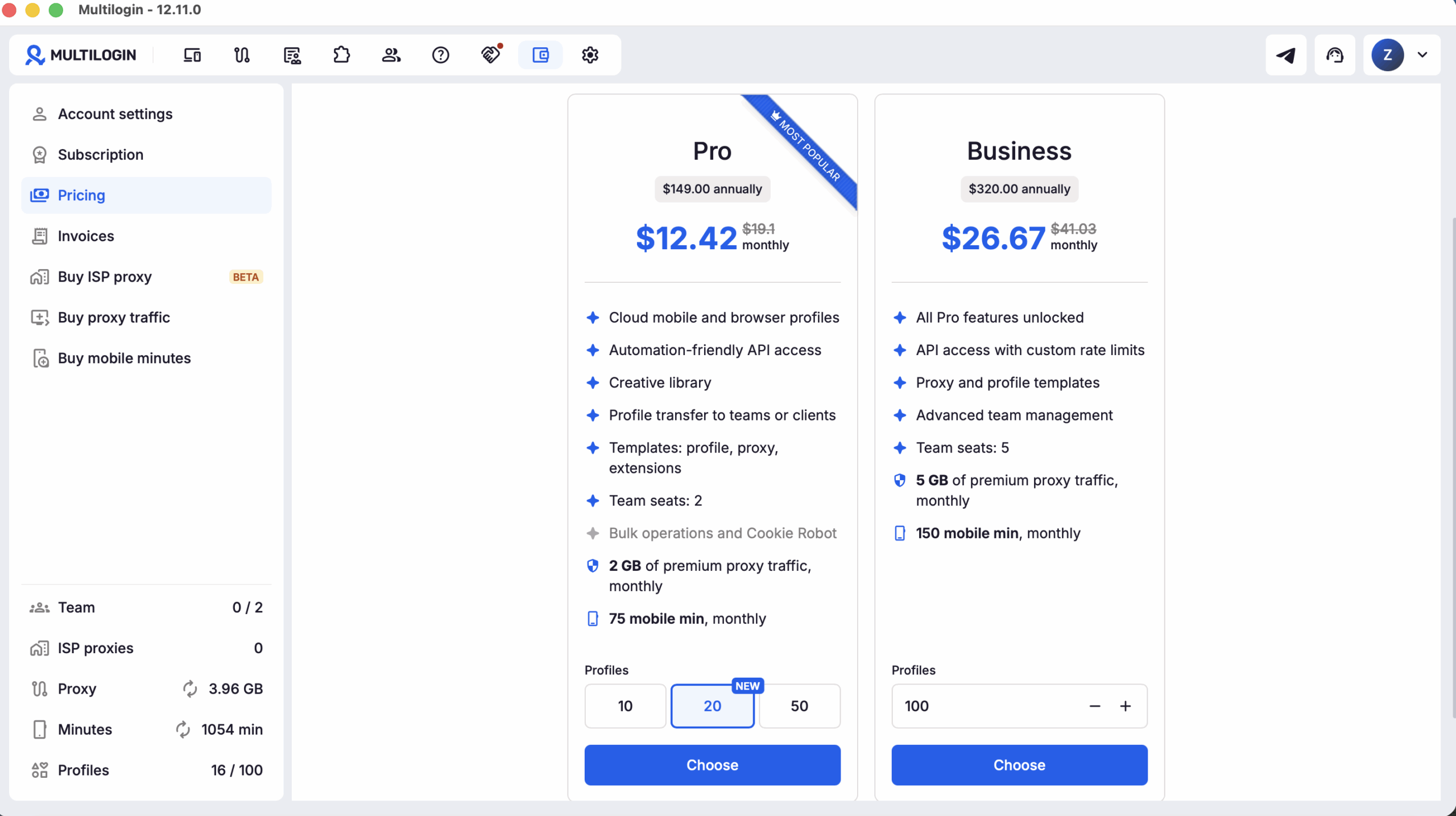
Upgrading is straightforward.
Sign in to Multilogin.
- Open Setting.
Open Pricing.
Select your preferred billing option.
Choose Pro 20.
- Press the Choose button.
Review the plan details.
Complete the upgrade.
Upgrades take effect immediately, with the payment adjusted according to the current subscription and billing cycle.
After upgrading, your workspace receives the new Pro 20 limits, including the increase from 10 to 20 profiles and the updated team, proxy, and mobile-minute allowances.
For detailed subscription instructions, see the Multilogin subscription guide.
Can you try Multilogin before choosing Pro 20?
Yes. Multilogin has a Free plan with no time limit and no credit card required.
The Free plan is useful if you have not yet worked with Multilogin and want to understand how cloud phones and browser profiles fit your workflow.
You can explore the platform first.
Then upgrade when the Free plan or Pro 10 no longer gives you enough capacity.
The important difference is that the Free plan is not a countdown timer pushing you toward checkout.
You can start with the platform, understand the workflow, then choose the paid plan that matches the operation you are actually building.
Is Multilogin Pro 20 worth it?
Pro 20 is worth considering when your operation has moved beyond a basic 10-profile setup and you want more capacity without paying for a 50-profile workspace you do not yet need.
The strongest value is the combination:
20 profiles + 2 team seats + 2 GB proxy traffic + 75 mobile minutes + workflow templates + profile transfer + Smart Auto-Stop + collaboration tools.
Any one of those improvements alone might not justify an upgrade.
Together, they change how comfortably you can operate the workspace.
That is what makes Pro 20 the strongest middle option in the Pro lineup.
Pro 10 gets you started.
Pro 20 gives you room to build.
Pro 50 is there when the operation becomes substantially larger.
Twenty social profiles shouldn’t mean twenty phones on a desk, several browser installations, spreadsheets full of proxy details, and a collection of passwords called final-final-final-accounts-v3.xlsx.
Multilogin Pro 20 brings the entire workflow into one dashboard. Use Android cloud phones for mobile-first profiles, browser profiles for web workflows, and manage your proxies within the same platform. Organize accounts with tags, notes, groups, and templates, bring in a teammate, and connect your own tools or AI workflows when needed. And when twenty profiles eventually isn’t enough, simply upgrade again. That’s how a pricing ladder should work.