





CloneBrowser grew popular for being free, lightweight, and easy to use—but in 2026, it is no longer enough for growing multi-account operations.
If you are managing multiple browser accounts, automating data collection, or operating advertising and e-commerce profiles, you may quickly reach the limits of what CloneBrowser can handle. Basic profile isolation, no native mobile app environment, and limited automation support make it difficult to build reliable workflows at scale.
That is why we have reviewed the best CloneBrowser alternatives for 2026, including browser-based options such as GoLogin and Incogniton.
We will also look at a different option for teams whose workflows have moved beyond browser-only account management: Multilogin, a cloud phone platform for social media marketers.
Why You Need a CloneBrowser Alternative in 2026
CloneBrowser may be free, but it is limited where growing operations need more control: profile isolation, automation stability, mobile app access, proxy management, and team collaboration.
You may have outgrown CloneBrowser if you are:
- Scaling multiple e-commerce, marketplace, or advertising accounts
- Running scraping, testing, or browser automation workflows
- Managing profiles across a remote team
- Trying to keep account sessions, cookies, IP addresses, and profile data separate
- Expanding into mobile-first platforms such as TikTok, Instagram, or Facebook
The right replacement depends on whether you only need isolated browser profiles or need to operate both browser and native mobile app workflows.
Best Browser-Based CloneBrowser Alternatives
The following tools are direct alternatives for users who primarily need separate browser environments, proxy configuration, automation support, and profile sharing.
1. GoLogin
GoLogin is a popular browser profile management tool that offers more flexibility than CloneBrowser while maintaining a relatively simple interface. It supports profile isolation, cloud synchronization, proxy management, and browser automation.
Key Features
- Free plan with three browser profiles
- Control over browser identity parameters such as timezone, Canvas, and language
- Cloud profile storage and synchronization
- Team access and profile sharing
- Proxy rotation and management
- Compatibility with Puppeteer, Playwright, and Selenium
Comparison Table: GoLogin vs CloneBrowser
| Feature | GoLogin | CloneBrowser |
| Browser Identity Controls | Advanced controls | Basic controls |
| Native Mobile App Environment | No | No |
| Automation Support | Puppeteer, Playwright, and Selenium | Limited |
| Proxy Management | Yes | Manual setup |
| Team Features | Yes | No |
Best for: Small and mid-sized teams that need isolated browser profiles and browser automation.
Also see: GoLogin alternatives.
2. Incogniton
Incogniton is a lightweight browser profile management tool aimed at beginners, small teams, and affiliate marketers. It provides a simple interface, a free entry plan, profile isolation, and support for common browser automation frameworks.
Key Features
- Free plan with one browser profile
- Simple interface with configurable browser identity settings
- Puppeteer and Selenium API access
- Team synchronization and profile sharing on paid plans
- Manual proxy setup
- No native Android cloud phone environment
Comparison Table: Incogniton vs CloneBrowser
| Feature | Incogniton | CloneBrowser |
| Browser Identity Controls | Moderate | Basic |
| Native Mobile App Environment | No | No |
| Automation Support | Puppeteer and Selenium | Limited |
| Team Access | Available on paid plans | No |
| Proxy Integration | Manual | Manual |
Best for: Beginners, smaller affiliate operations, and users who mainly work through browsers.
Also see: Incogniton vs Multilogin.
3. AdsPower
AdsPower is designed around e-commerce, advertising, and account-based browser workflows. It offers bulk profile management, proxy assignment, team permissions, and built-in workflow automation.
Key Features
- Configurable browser profiles for e-commerce and advertising workflows
- Cloud profile synchronization and bulk import or export
- Custom proxy assignments
- Team permissions and management dashboards
- Built-in RPA and script management
Comparison Table: AdsPower vs CloneBrowser
| Feature | AdsPower | CloneBrowser |
| Browser Profile Management | Advanced | Basic |
| Native Android Cloud Phones | No | No |
| RPA and Automation | Built-in RPA | Limited |
| Proxy Management | Yes | Manual setup |
| Team Features | Yes | No |
Best for: E-commerce and advertising teams that want bulk browser profile management and built-in RPA workflows.
Also see: AdsPower alternatives.
4. Kameleo
Kameleo is a browser profile management tool aimed at developers, QA teams, and users who need configurable desktop and mobile browser environments. Its developer-focused setup makes it suitable for testing, research, and custom browser automation.
Key Features
- Configurable desktop and mobile browser profiles
- Control over Canvas, Audio, fonts, device settings, and other browser identity parameters
- Designed for QA testing, browser research, and automation
- Developer API and scripting support
- Manual proxy configuration
- No free plan
Comparison Table: Kameleo vs CloneBrowser
| Feature | Kameleo | CloneBrowser |
| Mobile Browser Profiles | Yes | No |
| Browser Identity Controls | Advanced | Basic |
| Native Android Apps | Not the primary workflow | No |
| Developer Tools | API and scripting support | Limited |
| Proxy Setup | Manual | Manual |
Best for: Developers, browser researchers, app testers, and QA teams that need configurable browser environments.
Also see: Kameleo alternatives.
5. Hidemyacc
Hidemyacc is a budget-friendly browser profile management tool with a simple interface and basic account separation features. It offers more profile controls than CloneBrowser but remains focused primarily on browser-based workflows.
Key Features
- Free plan available
- Selenium automation support
- Simple interface and basic profile management
- Encrypted browser profile data
- Separate cookies, sessions, and browser settings for each profile
- No native Android cloud phone environment
Comparison Table: Hidemyacc vs CloneBrowser
| Feature | Hidemyacc | CloneBrowser |
| Browser Identity Controls | Basic to moderate | Basic |
| Automation Support | Selenium | Limited |
| Native Android Cloud Phones | No | No |
| Profile Data Isolation | Yes | Basic |
| Interface | Simple and beginner-friendly | Basic |
Best for: Budget-conscious users and smaller teams with light browser profile management needs.
Also see: Hidemyacc alternatives.
When a Browser Alternative Is Not Enough
Tools such as AdsPower, Kameleo, Hidemyacc, GoLogin, and Incogniton can be suitable when the entire workflow happens inside a browser. They help users separate browser sessions, assign proxies, manage profile data, and automate browser actions.
The limitation appears when important work moves into native mobile apps. TikTok, Instagram, and many Facebook workflows are designed around Android and iOS apps rather than desktop browsers. A mobile-looking browser profile is not the same as operating inside a real Android app environment.
This is where Multilogin serves a different category of user.
Multilogin: A Cloud Phone Platform for Social Media Marketers
Multilogin is a cloud phone platform for social media marketers. It enables individuals, agencies, and AI agents to create, run, manage, and grow multiple social profiles from one dashboard.
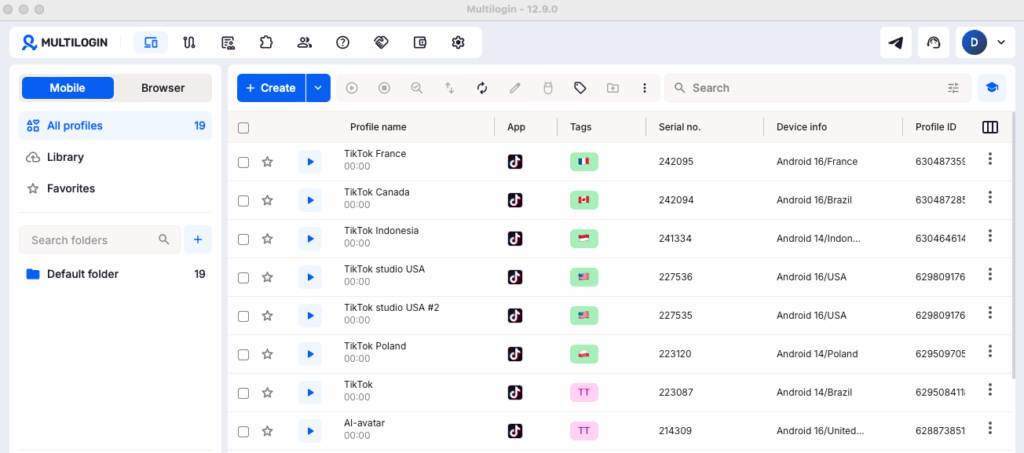
Instead of limiting users to browser-only environments, Multilogin combines real Android cloud phones with isolated browser profiles. This allows teams to manage mobile-first platforms and web-based workflows from the same platform.
A mobile social profile runs on its own Android cloud phone—a real Android device hosted in the cloud. It has its own apps, app data, login history, network connection, location, and device identity. This gives every TikTok, Instagram, or Facebook profile a consistent and persistent environment without requiring a physical phone farm.
A web social profile runs in its own isolated browser environment with separate cookies, sessions, storage, IP address, and browser identity. This supports Reddit, YouTube, Facebook web, and other browser-based workflows that require profile separation.
Together, these environments provide the core capabilities teams expect for separated account workflows—persistent sessions, unique profile identities, proxy assignment, isolated storage, automation support, and team access—while also supporting native Android applications.
Why Multilogin Is Different
- Real Android cloud phones: Run native social media apps on dedicated Android devices hosted in the cloud.
- Isolated browser profiles: Manage browser-based profiles with separate cookies, sessions, storage, IP addresses, and profile identities.
- Persistent account environments: Keep app data, login states, and account history available between sessions.
- Built-in residential proxies: Use integrated IP and location management without purchasing a separate proxy tool.
- One dashboard: Organize mobile and web profiles without switching between cloud phone and browser management products.
- Automation-ready infrastructure: Connect workflows through ADB, API, Selenium, Puppeteer, Playwright, and Postman.
- Built for people and AI agents: Support human-operated profiles and AI-driven workflows through the same infrastructure.
- Team collaboration: Share, assign, tag, organize, and manage profile access from one place.
Who Multilogin Is Best For
Multilogin is designed for users who rely on multiple social profiles to generate reach, engagement, traffic, testing insights, or sales, including:
- Social media marketers and agencies
- Content creators and social growth teams
- Affiliate marketers and media buyers
- E-commerce and dropshipping operators
- TikTok Shop and marketplace sellers
- AI workflow builders
The primary platform use cases include TikTok, Instagram, Facebook, Reddit, and YouTube.
Multilogin Pricing
Multilogin offers a Free plan with no time limit and no credit card required. Paid plans start from $7.08 per month.
Cloud phones, browser profiles, built-in residential proxies, and mobile minutes are available within one platform. This reduces the need to pay separately for a cloud phone service, browser profile manager, proxy provider, and team management system.



