




Octo Browser alternatives are worth considering when unstable sessions, slow workflows, limited mobile support, or fragmented proxy management begin to restrict your operations. In this guide, you’ll compare seven leading options for 2026 based on performance, stability, automation, team collaboration, proxy access, mobile capabilities, pricing, and practical scalability.
The right choice depends on whether you manage browser-based accounts, mobile apps, or both. Some platforms focus mainly on browser profiles, while others support native Android workflows through cloud phones. Multilogin stands out by combining browser profiles, built-in residential proxies, automation tools, and Android Cloud Phones in one platform, making it relevant for teams that want to manage both web and mobile operations without relying on multiple disconnected services.
Explore the seven best Octo Browser alternatives and find the platform that best fits your workflow, budget, and growth plans.
👉 Try Multilogin for free and see how its Cloud Phones and browser profiles can simplify your operations.
If Octo Browser gives you trouble, it’s time to switch
If you’re encountering persistent issues with Octo Browser, such as frequent crashes, limited automation capabilities, or inadequate proxy management, these problems can significantly hinder your operations. You’re not alone — some users have reported experiencing similar challenges. For instance, on Capterra, one user shared, “We encountered a few account bans during transitions, which we later realized were due to proxy issues.”
Moreover, Octo Browser’s fingerprint isolation, while robust, may not offer the level of protection required for high-risk activities. Without strong fingerprint isolation, platforms can easily detect reused environments, leading to account bans.
Switching to a more reliable and unified solution can improve workflow consistency, simplify profile and device organization, reduce manual configuration, and provide better support as your team or account volume grows. For businesses that manage both mobile-first platforms and web-based accounts, the strongest alternative should combine Android Cloud Phones, browser profiles, proxies, automation, and collaboration rather than forcing teams to connect several standalone services.
How an unreliable solution might be hurting your business
Using a browser like Octo Browser that doesn’t meet the demands of your operations can lead to significant business setbacks. While it might seem like a temporary inconvenience, the cumulative impact on your campaigns, growth, and revenue can be substantial.
- Account Bans = Lost RevenueWeak fingerprint isolation leads to account bans, wasting ad spend and losing traffic, commissions, and opportunities.
- Glitches Disrupt CampaignsCrashes or glitches during launches and tests can delay deadlines, damage your brand’s reputation, and hurt your ROI.
- Manual Workflows Slow GrowthThe lack of automation tools forces you into manual workflows, limiting your ability to scale and increasing inefficiency.
- Poor Proxy Management Risks DetectionOcto Browser’s weak proxy handling can expose your identity, creating inconsistent account environments and avoidable operational risk.
- Time to SwitchIf your browser is causing bottlenecks in scaling, automation, or proxy management, it’s holding your business back. Upgrade to a more reliable solution that allows you to scale.
What to look for when choosing an alternative
When searching for an Octo Browser replacement, several key factors should guide your decision. Look beyond browser profile count alone and consider whether the platform can support both web and mobile workflows. A stronger solution should provide reliable profile separation, Android Cloud Phones where needed, seamless automation, integrated proxy access, transparent pricing, and practical team collaboration.
- Strong Fingerprint Isolation: Ensure that the tool offers real browser profiles with unique fingerprints for each one. This minimizes the risk of detection and bans.
- Automation Integration: Choose a browser that integrates with automation tools like Playwright, Puppeteer, or Selenium. This allows you to scale quickly and manage tasks with ease.
- Proxy Support: Look for built-in proxy management with a wide range of high-quality options. Residential proxies and rotating IPs are critical to maintaining consistent network assignments.
- User-Friendliness: The interface should be intuitive and easy to navigate, making it simple to manage multiple profiles, proxies, and automated workflows.
- Scalability and Performance: The browser should handle hundreds or even thousands of profiles without crashing or slowing down.
- Customer Support: Opt for a provider with reliable, 24/7 multilingual customer support to quickly resolve any issues.
By focusing on the complete operational package, you can choose a platform that supports high-demand tasks, scales with your team, and reduces the need to purchase separate tools for browser profiles, mobile devices, proxies, and automation.
Top 7 alternatives to Octo Browser
If you’re ready to move on from Octo Browser, here are the top 7 alternatives to consider. These options offer better performance, more reliable fingerprint isolation, and comprehensive support for automation and proxy management.
1. Multilogin
Multilogin is a unified platform for managing accounts across mobile apps and the web. Rather than positioning itself only as a browser profile tool, Multilogin now brings Android Cloud Phones, isolated browser profiles, built-in residential proxies, automation support, and team operations into one dashboard.
This broader setup is particularly useful for teams that manage mobile-first accounts on TikTok, Instagram, Facebook, Telegram, and other Android apps while also operating web-based accounts through browser profiles. Instead of combining Octo Browser with a separate cloud phone and proxy provider, users can manage the main infrastructure through one product.
Why to switch to Multilogin
- Free residential proxy traffic: No external proxy setup needed; includes proxy traffic in every plan.
- Tested on 50+ platforms: Ensures consistent performance on major websites.
- Android Cloud Phones: Run mobile apps inside remotely accessible Android environments without purchasing and maintaining physical devices.
- Browser profiles: Keep browser sessions, cookies, storage, and account data separated across clients, projects, or workflows.
- AI-powered automation: Speeds up workflows with efficient automation tools.
- Unlimited team collaboration: Share access with customizable permissions for team management.
- Custom fingerprints: Tailor browser profiles to your specific use case.
- Data security control: Choose between local storage or encrypted cloud syncing.
- 24/7 expert support: Instant help in five languages, anytime you need it.
Check the direct comparison between Octo Browser and Multilogin here!
Updated Multilogin pricing
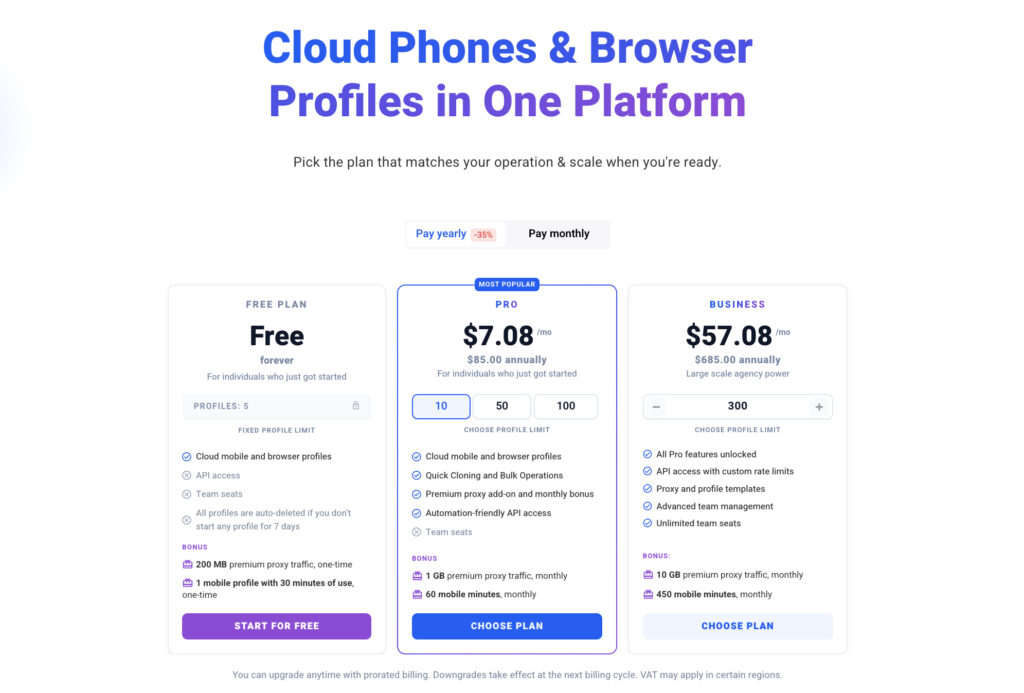
Multilogin now starts with a permanent free plan instead of a paid three-day trial. The free plan has no time limit and requires no credit card, giving users an opportunity to test browser and Cloud Phone workflows before upgrading.
| Plan | Price | What it is designed for |
| Free | $0, no time limit | Testing Multilogin with cloud mobile and browser profiles, introductory residential proxy traffic, and Cloud Phone usage |
| Pro 10 monthly | $11/month | Smaller operations that need recurring allowances and automation-ready access |
| Pro 10 annual | $7.08/month, billed annually | Users who want the lower effective monthly rate through annual billing |
Multilogin starts with a free plan, so you can test the platform before committing. Paid plans then start at $7.08/month when billed annually, with Cloud Phones, residential proxies, and browser profiles brought together within one product ecosystem.
For more information about the updated platform, see the top Cloud Phones for social media marketing, the Multilogin Free Plan overview, and the guide to free social media management tools.
Go to the Multilogin pricing page to compare the latest profile limits, proxy allowances, Cloud Phone minutes, automation access, and team features before selecting a plan.
2. GeeLark
If your work is focused almost entirely on mobile accounts, GeeLark is a cloud phone platform designed for Android-based workflows. It provides hosted Android environments, app installation, automation features, and team tools without requiring users to maintain a physical phone farm.
Key features includes:
- Cloud-Based Android Devices: Access real Android phones without physical hardware.
- Unique Device Fingerprints: Each cloud phone has its own distinct fingerprint.
- Android App Market: Built-in access to Android applications without Google Play.
- Automation Tools: Supports automation for repetitive tasks.
- Proxy Support: Compatible with various proxy types for location and connection management.
- Team Collaboration: Manage multiple users with role-based access.
Read our full GeeLark review here.
3. Undetectable.io
Undetectable.io is a multi-account browser platform focused on configurable browser environments, local profile capacity, cloud synchronization, and automation. It is mainly suited to web-based workflows rather than native Android app management.
Key features includes:
- Fingerprint Switching: Generates unique device fingerprints across operating systems.
- Local Profile Storage: Offers unlimited local profiles on paid plans.
- Cloud Profile Syncing: Sync profiles across devices with encrypted cloud storage.
- Automation Support: Integrates with automation tools for streamlined tasks.
- Proxy Integration: Supports various proxy types for location and connection management.
- Team Collaboration: Share profiles securely with team members.
Check the direct comparison between Undetectable and Multilogin here!
4. Incogniton
Incogniton is a browser profile management solution with configurable environments, bulk profile tools, proxy assignment, cloud storage options, and automation integrations. It can be useful for users who primarily need web sessions and do not require native Cloud Phones.
Key features includes:
- Bulk profile creation: Generate dozens of unique profiles in a few clicks.
- Profile isolation: Ensures no data cross-contamination between profiles.
- Advanced filtering: Streamline profile management with detailed filters.
- Team collaboration: Share profiles with customizable permissions.
- Automation tools: Integrates with Selenium and Puppeteer for automated tasks.
- Proxy management: Supports various proxy types for location and connection management.
Check the direct comparison between Incogniton and Multilogin here!
5. AdsPower
AdsPower is a browser profile platform commonly used by marketing and e-commerce teams. It offers profile organization, browser automation, proxy integration, and collaboration features, with plans aimed at both individual users and larger teams.
Key features includes:
- Unique Browser Fingerprints: Each account has its own distinct fingerprint, ensuring no overlap.
- Profile Synchronization: Sync profiles across devices with ease.
- Targeted for Ad Platforms: Ideal for managing multiple accounts on platforms like Facebook, Instagram, and Google Ads.
- Proxy Integration: Easily integrate proxies for location and connection management.
- Automated Workflows: Automate repetitive tasks, saving time and reducing the risk of manual errors.
- Traffic Optimization: Custom settings reduce data usage, which is ideal for large-scale operations.
- Team Collaboration: Manage access and share profiles securely within your team.
Check the direct comparison between AdsPower and Multilogin here!
6. GoLogin
GoLogin is a browser profile management tool that combines configurable browser environments, cloud and local workflows, proxy options, and automation compatibility. It is often considered by social media, e-commerce, research, and ad-verification teams that mainly work through the web.
Key features include:
- Browser fingerprinting: Each profile mimics a real device setup, reducing unintended overlap between browser environments.
- Cloud and local profiles: Store data locally or sync across devices via encrypted cloud storage.
- Automation-ready: Supports Selenium and Puppeteer for task automation.
- Built-in proxy support: Easily assign proxies per profile to maintain anonymity.
- Team access: Invite and manage teammates with role-based permissions.Clean user interface: Simple, intuitive UI for fast onboarding and daily use.
Check the direct comparison between GoLogin and Multilogin here!
7. Ghost Browser
Ghost Browser is a Chromium-based multi-session browser aimed at digital professionals who need several logins on the same website. It is better suited to lighter session-management use cases than to complex mobile, proxy, and automation infrastructure.
Key features include:
- Multi-session tabs: Log into multiple accounts on the same site simultaneously.
- Identity isolation: Each tab can run a different proxy and cookie session.
- Chrome extension support: Use your favorite extensions from the Chrome Web Store.
- Team-focused features: Share sessions and workflows with team members.
- Limited fingerprint protection: Better suited for less aggressive platforms.
- No mobile emulation: Primarily designed for desktop session management.
Check the direct comparison between Ghost Browser and Multilogin here!
Which Octo Browser alternative is best?
The best choice depends on whether your work is web-only, mobile-only, or spread across both environments. Ghost Browser may be sufficient for basic multi-session work, while Incogniton, AdsPower, GoLogin, and Undetectable.io focus more heavily on browser profile management. GeeLark is more appropriate for teams that primarily need Android Cloud Phones.
Multilogin is the strongest all-in-one alternative when your operation includes both browser-based and mobile-first accounts. Its current positioning combines Android Cloud Phones, browser profiles, built-in residential proxies, automation support, and team functionality within a single platform.
Final thoughts
Octo Browser can still serve web-focused users, but businesses increasingly need more than a browser profile tool. Mobile apps, proxy infrastructure, automation, remote teams, and transparent scaling costs are now part of the same operational decision.
Multilogin addresses this broader requirement by bringing Cloud Phones, residential proxies, and browser profiles together in one platform. Users can begin with the permanent free plan, test both browser and mobile workflows, and upgrade when they need additional capacity, recurring allowances, or automation features.
Try Multilogin for free, then continue from $7.08/month with annual billing. Cloud Phones, residential proxies, and browser profiles are bundled into every plan.


