





Looking for the best free social media management tools in 2026? Most “free social media management software” roundups recycle the same six names without checking whether their free plans still exist or what they actually cap.
This guide verifies each free social media management tool’s current limits — profiles, posts, platforms — and covers the one gap no free social media manager software closes: managing more than a few accounts on the same platform.
TL;DR
- Genuinely free-forever tools in 2026: Buffer (3 channels, 10 posts/channel), Metricool (1 brand, 20 posts/month), Publer (3 accounts, 10 posts/account), Zoho Social (1 brand, 6 channels), Tailwind (Pinterest-focused, ~20 pins/month free), Meta Business Suite (Facebook + Instagram, unlimited), and Multilogin (5 social profiles, no card, no time limit).
- Trial-only now, not free: Hootsuite ended its permanent free plan in March 2023; Later and SocialPilot lead with 14-day trials, not lasting free tiers.
- “Free” downloadable desktop apps are mostly gone. Almost every tool on this list in 2026 is a web dashboard or browser extension, not a program you install — worth knowing if you searched expecting a download.
- Skip anything calling itself a follower or engagement “booster.” These aren’t scheduling tools at all — they’re fake-engagement services that violate every major platform’s terms and put your account at risk. More on that below.
- What none of the real scheduling tools do: every one of them connects through the platform’s official API from one shared environment. None of them address what happens when you run more than a few accounts on the same platform — that’s an account-isolation problem, not a scheduling one, and it’s the gap this article covers that the standard “best free tools” listicle doesn’t.
Quick comparison table
# | Tool | Profiles (free) | Posts (free) | Platforms |
1 | Buffer | 3 channels (8 lifetime) | 10 queued/channel | 11, incl. TikTok, IG, Shorts |
2 | Metricool | 1 brand | 20/month combined | No LinkedIn/X free |
3 | Publer | 3 (no X) | 10/account | Most major networks |
4 | Zoho Social | 1 brand, 6 channels | High volume, no calendar | FB, IG, X, LinkedIn, GBP |
5 | Meta Business Suite | Unlimited | Unlimited | Facebook + Instagram only |
6 | Tailwind | 1 brand | ~20 pins/month | Pinterest (+ IG, FB cross-post) |
7 | Canva (scheduling) | 1 per platform | Limited | Design-first platforms |
8 | Planable | 1 workspace | Limited posts | Major networks |
9 | Adobe Express | 1/platform | ~1,000/month across 6 channels | 6 channels |
10 | Hootsuite | Trial only (30 days) | — | — |
11 | Later | Trial-first (14 days) | — | — |
12 | Multilogin | 5 social profiles | N/A — not a scheduler | TikTok, Instagram, Facebook, Reddit, YouTube |
Rows 1–9 answer “how do I schedule posts for free?” Row 12 answers a different question: “how do I keep several accounts on the same platform from getting linked to each other?” That’s the distinction the rest of this article walks through.
The 12 tools, one by one
- Buffer — 3 connected channels, 10 scheduled posts per channel at any time (a rolling queue, not a monthly cap — a slot reopens once a post publishes). Up to 8 unique channels total can ever be connected on a free account. No analytics, no team members, no AI assistant.
- Metricool — the strongest free option for reporting: one brand, 20 posts a month across all connected networks combined, 30 days of analytics history, and a built-in AI assistant. X and LinkedIn require a paid plan.
- Publer — 3 accounts (X excluded on free), 10 scheduled posts per account, 25 drafts, 24-hour post history. Analytics, the inbox, and approval workflows are Business-tier only.
- Zoho Social — up to six channels on one brand with a generous post allowance, but the free tier strips out the actual scheduling calendar and SmartQ features — closer to publish-and-basic-stats than a planner.
- Meta Business Suite — unlimited and genuinely free, but Facebook and Instagram only, and it doesn’t help if you’re managing more than one Page or account under the same login.
- Tailwind — the go-to free tool if Pinterest is the priority. The forever-free plan schedules roughly 20 pins a month with basic SmartSchedule and analytics, and it also cross-posts to Instagram and Facebook. As an official Pinterest Partner, it’s built specifically to publish within Pinterest’s own guidelines rather than working around them.
- Canva — scheduling is bundled into the design tool, useful if you’re already designing there, but publishing limits and platform support are thin compared to a dedicated scheduler.
- Planable — free tier is built around approval workflows for small teams reviewing content before it goes out, with a capped number of posts.
- Adobe Express — free scheduling across six channels with a healthy combined post allowance, but one account per platform, and it’s built around design-first workflows rather than analytics or engagement.
- Hootsuite — no longer has a permanent free plan; it ended in March 2023 and was replaced with a 30-day trial. Several older “best free tools” articles still list it as free — that’s now outdated. More detail on this specifically below, since it’s one of the most-asked questions about this space.
- Later — has quietly moved its default entry point to a 14-day trial rather than a lasting free plan. A limited legacy free tier still exists for some accounts but isn’t the advertised option.
- Multilogin — not a scheduler at all. The Free plan gives you 5 separate social profiles, each running in its own isolated environment: a real Android cloud phone for TikTok, Instagram, and Facebook, or an isolated browser profile for Reddit and YouTube. No card required, no time limit. Where tools 1–9 solve “post to one account,” Multilogin solves “keep several accounts from looking like the same person” — see the account-isolation section below.
Free social media tools for TikTok specifically
TikTok is the platform where “free scheduling tool” and “what you actually need” diverge the most. A few things worth knowing before picking a tool:
- TikTok has no native scheduler inside its mobile app. Native scheduling only exists through TikTok Studio on desktop web, for Creator or Business accounts, one account at a time, with posts queued no more than 10 days out.
- Buffer, Metricool, and Publer all support TikTok on their free tiers, but they publish through TikTok’s Content Posting API rather than the app itself — a more restricted path with its own rate limits, and it’s still capped by each tool’s overall post allowance (10/channel on Buffer, part of the shared 20/month on Metricool, 10/account on Publer).
- None of the free schedulers help if you’re running more than one TikTok account. TikTok’s in-app account switcher tolerates only a handful of accounts on one device before coordinated activity starts reading as suspicious — a scheduling tool doesn’t touch this, because it’s a device and network signal, not a publishing one. If that’s your actual situation, see the walkthrough further down.
Free social media tools for Instagram specifically
- Meta Business Suite is the most complete free option for a single Instagram account — unlimited scheduling, a unified inbox with Facebook, and native analytics, at no cost.
- Buffer, Metricool, and Publer all connect to Instagram too, useful if you want one dashboard covering Instagram alongside other platforms, within the same profile/post caps listed above.
- Instagram’s Content Publishing API caps every connected account at 100 API-published posts within a rolling 24-hour period, and it only works with Business or Creator accounts — never personal profiles. That ceiling is irrelevant for a single brand posting a few times a day, but it’s a hard wall if a tool is trying to publish for you across many accounts.
- Instagram limits five logged-in accounts per device before requiring a full logout and login — documented in both Buffer’s and Hootsuite’s own help centers. This is a device-level restriction, not something any scheduler can raise.
Free social media tools you can download
If you searched for social media management software free of a monthly fee and expected an installable program rather than a web dashboard, it’s worth knowing that the market has moved almost entirely to browser-based tools in 2026. A few notes on what still exists in a downloadable form:
- Buffer, Metricool, Publer, and Zoho Social are all web-based dashboards, with mobile companion apps (iOS/Android) for checking on scheduled posts, not full desktop programs.
- Canva and Adobe Express have desktop apps, but the scheduling feature itself runs through their web platforms.
- Multilogin has an actual downloadable desktop application (Windows, macOS, Linux) — because cloud phones and browser profiles need a local app to launch and manage isolated environments, unlike a scheduler that only needs a browser tab.
- Be cautious of anything marketed as a “free social media management tool download” from an unfamiliar site outside these named vendors. Standalone downloadable apps in this space are increasingly rare, and unofficial installers are a common vector for bundled adware or credential-harvesting malware.
Is Hootsuite still a free social media tool?
No — this is worth stating plainly because it’s one of the most commonly searched questions in this space, and a lot of older content still gets it wrong. Hootsuite ended its permanent free plan on March 31, 2023, and replaced it with a 30-day trial of its paid plans. There is no lasting free tier to fall back to afterward.
If a “best free tools” article you’re reading still lists Hootsuite as free, that’s outdated information. Its paid Standard plan starts around $99/user/month billed annually for up to 10 accounts, which is a meaningfully different cost profile than the free tools covered above.
“Social media booster” and free growth hacks — why these aren’t tools at all
Searches for free “boosters” or growth hacks usually turn up sites promising free followers, likes, or views, sometimes framed as a hack, generator, or exploit. It’s worth being direct about what these actually are and why they don’t belong on a “free tools” list:
- They aren’t management tools. They don’t schedule content, manage accounts, or help with any real workflow — they either simulate engagement with bot or fake accounts, or ask for your login credentials and post/like on your behalf without your control.
- They violate every major platform’s terms of service. Instagram, TikTok, and the others actively detect and remove fake engagement, and accounts that use these services risk shadowbanning, feature restrictions, or permanent suspension.
- Many are outright unsafe. A common pattern is a “generator” that asks for your username and password, or pushes an APK download outside the official app store — both are classic phishing and malware vectors, not growth tools.
- Even where a spike in numbers appears, it doesn’t help. A follower count that jumps while likes, comments, and shares stay flat looks worse to both the platform’s algorithm and to real viewers than a smaller, genuinely engaged account.
If real growth is the goal, that’s a content and consistency problem, not a tool problem — and outside the scope of a “free scheduling tools” list. If the actual goal is running several legitimate accounts (client accounts, regional pages, testing content across profiles) without them being flagged as connected, that’s the account-isolation problem this article covers below, not a booster tool.
Free social media tools for TikTok and Pinterest together
If you need one free tool that covers both TikTok and Pinterest rather than running two separate apps:
- Buffer connects both TikTok and Pinterest within its 3-channel free limit, so a single free Buffer account can cover one TikTok profile and one Pinterest profile (using 2 of your 3 channel slots) with a shared 10-post queue per channel.
- Metricool also connects both, inside its single-brand, 20-posts-a-month combined allowance.
- Tailwind is Pinterest-first and doesn’t cover TikTok directly, so it’s the stronger pick if Pinterest volume matters more than having everything in one dashboard, paired with a separate free TikTok-capable tool if needed.
- There isn’t a free tool built specifically around the TikTok-and-Pinterest combination — it’s more a matter of picking a general multi-platform scheduler (Buffer or Metricool) that happens to support both, within its usual caps.
The full list, at a glance
For a scannable reference, here’s every tool covered in this article in one place:
Buffer, Metricool, Publer, Zoho Social, Meta Business Suite, Tailwind, Canva, Planable, Adobe Express, Hootsuite (trial only), Later (trial-first), SocialPilot (trial only), and Multilogin.
What none of the schedulers solve: the account-isolation gap
Every real scheduler above connects to your accounts through the platform’s official API, from one shared environment. That’s fine for a single brand’s accounts. It’s not designed for — and doesn’t attempt to solve — running multiple accounts on the same platform without those accounts getting linked to each other.
Platforms correlate accounts by device, IP, and behavior, not just by login. Buffer’s and Hootsuite’s own help documentation both confirm Instagram limits a single device to five logged-in accounts before you have to fully log out and back in. TikTok’s in-app switcher tolerates a similar handful before coordinated posting from one device starts reading as suspicious activity. None of this is a scheduling problem, so no scheduler — free or paid — addresses it.
This is also where the free tools’ business model works against you at scale: Buffer, Publer, and SocialPilot all price per additional channel or seat, so managing client accounts or a portfolio of profiles means costs scale linearly with every account you add — on top of the isolation problem still being unsolved. For a closer look at what triggers these flags in the first place, see Multilogin’s guide to what causes an IP ban.
Setting up multiple isolated social profiles with Multilogin’s free plan
If you’ve outgrown “one brand, one channel” and need several TikTok, Instagram, or Facebook accounts that don’t read as connected, here’s the basic setup on Multilogin’s free plan:
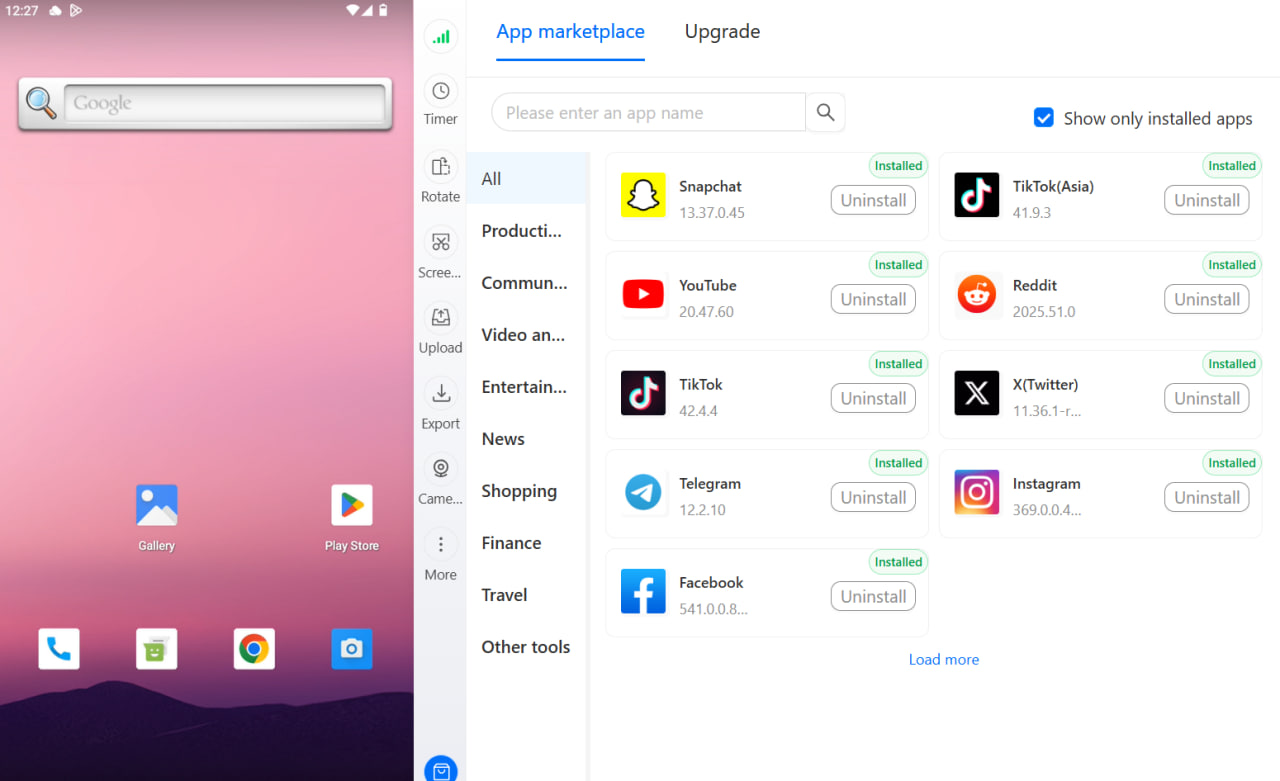
- Create an account and open the dashboard. No credit card is required to start on the Free plan.
- Choose a mobile profile for TikTok, Instagram, or Facebook. Each mobile profile launches its own real Android cloud phone — pick a device type from the available options (30+ real Android device types across 12 brands).
- Assign a location and proxy to the profile. Built-in residential proxies are included on every plan, including Free, and geolocation is matched automatically.
- Install the platform’s app from the built-in app store (or upload an APK). This runs the real TikTok, Instagram, or Facebook app on that profile’s dedicated device — not a browser workaround. Multilogin’s TikTok cloud phone setup covers this step in more detail if TikTok specifically is the priority.
- Log in and build the account’s history inside that profile only. Each of your 5 free profiles keeps its own persistent app data and login history, so switching between accounts doesn’t mean logging in and out of a shared device.
- Repeat for Reddit or YouTube using a web (browser) profile instead of a cloud phone, since those two are web-first platforms where an isolated browser session — its own cookies, session, and IP — is the right tool rather than a cloud phone.
The Free plan supports 5 profiles, 200 MB of proxy traffic, and 30 minutes of mobile runtime, one-time — enough to test the workflow before deciding whether to move to a paid plan for more profiles, proxy traffic, or mobile minutes.
Which free tool actually fits your situation
- One Facebook Page and one Instagram account → Meta Business Suite. Free, unlimited, built for exactly this.
- 2–3 channels across platforms for one brand → Buffer (more channels) or Metricool (built-in analytics).
- High posting volume to one brand across six channels → Zoho Social, accepting a more limited scheduling calendar.
- Pinterest as the main platform → Tailwind.
- Design-first content across a few channels → Canva or Adobe Express.
- Small team needing approval workflows → Planable.
- More than a few accounts on the same platform — client accounts, testing multiple TikTok Shop creatives, regional Instagram pages — where accounts keep getting linked or flagged → this isn’t a scheduling problem anymore. Multilogin’s free plan is built for exactly this.
- Both jobs at once → many teams run a scheduler for content calendars and cadence, and Multilogin underneath it for keeping the accounts themselves isolated. The two aren’t competing for the same job.




