


Black Friday falls on November 27, 2026, and Cyber Monday on November 30. Adobe forecasts $12.9 billion in US online spend on Black Friday and $15.1 billion on Cyber Monday, with 63% of Cyber Week spending on mobile. By that weekend, many shoppers have already found the deal and want someone they trust to say whether it’s worth it.
To sell on YouTube during Black Friday, use long videos to answer buying questions, Shorts to push a single offer, and ads to get both in front of more people. YouTube Shopping connects that content to the purchase: through the affiliate program or a connected store, you tag products in videos, Shorts, and live streams.
This guide covers how YouTube Shopping works, how to tag products, which ad formats to use, and what to publish each week through Cyber Monday. If you run several channels, the team section shows how to split the work between Multilogin cloud Android phones for the app and browser profiles for YouTube Studio.
What role does YouTube play in Black Friday shopping?
YouTube works mainly as the place where shoppers validate a purchase. In a Google-commissioned Ipsos survey of US holiday shoppers, 94% of those who use YouTube said they took a further step toward buying after watching a related video. In Google and Kantar research from the same playbook, 68% of US viewers said creators give helpful context or expertise for more confident purchases.
Both figures come from Google, so treat them as directional. Adobe’s independent retail data points the same way: it expects revenue share from social media to rise 17% this season, and from affiliates and partners to rise 12%, against 4% for paid search.
2026 data point | Figure | What it changes in your plan |
US online spend, Cyber Week (Adobe forecast) | $47.5B, up 7.4% | Plan for five days, starting on Thanksgiving |
Cyber Monday vs. Black Friday (Adobe forecast) | $15.1B vs. $12.9B | Keep tags and Shorts current through Monday |
Mobile share of Cyber Week spend (Adobe forecast) | 63% | Check every tag and sticker in the YouTube app |
Influencers and creators in affiliate traffic (Adobe) | 22% | Cashback and rewards partners hold 36%, so give a reason to buy through you |
Top Cyber Week discounts (Adobe forecast) | Up to 30% off list | Use this as a benchmark when judging a deal on camera |
Traffic from AI services to Black Friday retail sites (Adobe forecast) | Up 95% | Make your videos easy for search and AI tools to understand |
Video format matters by price. Long reviews suit expensive items such as electronics, where buyers look for more evidence before paying. Short video suits a product the viewer already knows, when the only open question is whether today’s price is good.
What is YouTube Shopping, and how does it work?
YouTube Shopping lets eligible channels tag products in videos, Shorts, and live streams, so viewers can tap through and buy on the retailer’s site. There are two routes: the affiliate program for other brands’ products, and a connected store for your own.
Item | Affiliate program | Connected store |
Who it suits | Creators recommending other brands’ products | Creators and brands with their own catalog |
Main requirements | YouTube Partner Program, subscriber threshold, based in the US or another participating country, no music or Made for Kids channels | YouTube Partner Program, subscriber threshold or Official Artist Channel, no Made for Kids channels |
How to connect | Accept the terms in YouTube Studio | Supported platform, such as Shopify, Wix, or SHOPLINE |
Who pays you | Commission through AdSense for YouTube | Your store or retailer |
Timing to plan for | Paid 60 to 120 days after purchase | Product review usually takes a few business days |
US creators find participating sellers, commission rates, and promotions in the Affiliate Hub in YouTube Studio. Amazon product tagging also started rolling out in the US in late August 2026, so check whether it appears for your channel. The YouTube Help page for the program has the current requirements.
The entry bar for Shopping is lower than it used to be. YouTube’s creator page cites 500 subscribers, a level reported alongside 3,000 watch hours or 3 million Shorts views. Each brand sets its commission per product, and YouTube says all affiliate commissions currently go to creators under a temporary incentive that it can end with 30 days’ notice.
Plan cash flow around the payment window. A sale made on November 27, 2026 pays out between January 26 and March 27, 2027, and returns reverse the commission. Q4 sales are therefore a Q1 receipt.
How to tag products before Black Friday
- In YouTube Studio, open Earn, then Shopping, and accept the program terms.
- Under Explore affiliate offers, sort sellers by commission and save the products that fit your channel.
- Use Bulk Tagging to add products to older videos that still get views.
- Add timestamps to long videos. Each lasts 15 to 60 seconds and can only be created on a computer.
- Name the product out loud or show its name on screen. That’s part of YouTube’s tagging guidelines, and spam tagging of unrelated products can cost you program access.
- Recheck your list close to the date. Out-of-stock products can drop off, which changes the product shown first.
One limit gets little attention. YouTube’s Help page says tags don’t show for viewers on smart TVs, game consoles, or mobile browsers, while YouTube says TVs are its most popular viewing device. In long reviews, tell viewers out loud that the product link is in the YouTube app on their phone. Otherwise, someone watching on the living room TV may never see how to buy.
How do you use YouTube Shorts to sell on Black Friday?
Use each Short for one product and one decision. The shopping sticker shows only the first product in your list, and the rest sit behind an arrow. If your lead offer changes, reorder the list instead of uploading a new video.
Four Shorts rules prevent most rework:
- Sound: a Short with a sticker needs an eligible shopping sound or no sound at all, so choose the audio before editing.
- Placement: the sticker sits bottom left and adjusts itself to avoid other interface elements. Moving it by hand turns that adjustment off.
- Purchase flow: tapping a connected-store product pauses the Short, while long videos keep playing in the mini-player. Put the key information before your call to action.
- Testing: check the result in the YouTube app, since mobile browsers don’t show tags.
For the script, borrow from YouTube’s advice to creators who want brands to boost their videos: show the product within five seconds, use high-contrast text that reads on a small screen, and give a specific call to action. These three formats fit the date:
Short format | Structure | When to publish |
Worth it or skip it | Product, today’s price, recent price, verdict | Two weeks out and again during Cyber Week |
Review cut | The 30 seconds that answer the biggest question, plus a pointer to the full video | As soon as the long video goes live |
Price alert | What dropped today, payment terms, when the offer ends | November 23 to 30 |
Include payment terms where they matter. Adobe forecasts $21.3 billion in US buy now, pay later spending across November and December, with 82% of it on mobile, so a large purchase may depend on how it can be paid for.
Which YouTube ad formats work best for Black Friday?
Sellers with smaller budgets should start with Demand Gen, Google’s campaign type for YouTube and other visual surfaces, using a product feed and Shorts placements. Reach formats make more sense when you need to repeat a brand or offer. This table summarizes the video formats described in Google Ads Help, with our suggested use for the date.
Format | Length | Where it runs | Black Friday use |
Skippable in-stream | No maximum (under 3 min recommended) | YouTube videos and partners | Explain the offer to people still comparing |
In-feed | No maximum | Search, Home, Watch Next | Promote a review to people researching the product |
Shorts | Up to 60 s | Shorts feed | Reuse vertical creative on mobile |
Bumper | Up to 6 s | YouTube videos and partners | Repeat the date and the main discount |
Non-skippable in-stream | 15 to 60 s, by subtype | YouTube videos and partners | Deliver a full message when reach is the goal |
Google’s guidance gives a practical deadline. Google Ads Help suggests allowing two weeks of learning before changing bids, so a new Demand Gen campaign should start by November 9 to finish that period before November 23. After that date, raising the budget on a campaign that already works is the safer move.
Google’s 2026 YouTube holiday playbook also recommends adding product feeds to Demand Gen and giving Google’s AI at least 50 conversions per day. Many small accounts won’t reach that volume. If yours won’t, test fewer products and use creator content you already have, as Google reports an average 30% conversion lift from creator partnership boosts on Shorts.
Before you raise budgets, update prices and promotions in Merchant Center, then add promotion assets for the discount. Increase spend gradually instead of making one big jump the night before.
How do you help search and AI tools find your Black Friday videos?
Make the product, price, and verdict explicit in the words around your video. Our reasoning is simple: text systems can only quote what they can read, and Adobe expects AI traffic to US retail sites to rise 130% this season. YouTube has not published a rule for AI citation, so treat this as good practice with no promised result.
- Say the full model name: YouTube’s tag suggestions analyze titles, descriptions, and captions, so clear names help there too.
- Check the captions: correct product and brand names in the auto-generated captions.
- Date your prices: write “price checked November 24, 2026” in the description, and update it when the offer changes.
- Title the question: “Is the [product] worth it on Black Friday?” says more than “best deals this week.”
- Tag your Shorts: YouTube says products you tag appear at the top of Google Lens results for your Shorts.
Black Friday YouTube publishing calendar for 2026
This calendar starts in the first week of November and works for small channels. If time is short, do only the organic column and use ads to promote what already works.
Dates | Organic and Shopping | Ads |
Nov 5 to 8 | Confirm eligibility, pick products in the Hub, log current prices, connect your store | Review the feed, prepare creative, start Demand Gen |
Nov 9 to 15 | Tag older videos, publish reviews and comparisons, add timestamps | Promote the best reviews with in-feed ads; leave bids alone |
Nov 16 to 22 | Publish Shorts cuts and a “what to buy and what to skip” guide | Test Shorts creative; build audiences of review viewers |
Nov 23 to 25 | Publish price alerts, check stock, reorder products | Raise budgets gradually and switch on the offer message |
Nov 26 and 27 | Run a live stream with tagged products on Black Friday, post Shorts with checked prices | Watch budgets through the day and pause sold-out products |
Nov 28 to 30 | Publish “what’s still live” and a Cyber Monday roundup | Swap creative for Cyber Monday |
From Dec 1 | Review clicks and sales, update videos for December gifting | Compare total sales for the period, beyond last click |
Don’t stop on December 1. Google’s playbook describes a second wave after the peak, as viewers watch hauls, “what I got” videos, and gift card and end-of-year sale content. Videos you publish now can keep earning if you update the tags.
Manage Black Friday across several YouTube channels with Multilogin
Teams running several channels work best with one separate environment per channel and clear roles set before Cyber Week. During that week, one team may swap tags, check stock, answer comments, and post Shorts across many channels in a single day. Mixed-up sessions get expensive at that point: all it takes is a Short on the wrong channel or one client’s product on another client’s video.
YouTube itself splits this work by device. Timestamps can only be created on a computer, while editing the sticker on a published Short happens in the mobile app, and the Trending products card lives in the YouTube Studio app. Multilogin, a cloud Android phone platform for multi-account management, covers both sides from one dashboard.
Task | Where YouTube allows it | Where to do it in Multilogin |
Post Shorts and adjust the sticker | YouTube app | The channel’s cloud phone |
Check Trending products | YouTube Studio app | The channel’s cloud phone |
Check how tags look in the app | YouTube app | The channel’s cloud phone |
Create timestamps | Computer | The channel’s browser profile |
Bulk tag and browse the Hub | YouTube Studio | The channel’s browser profile |
Review sales by country and format | Analytics on computer | The channel’s browser profile |
A multi-channel setup in Multilogin can follow these steps:
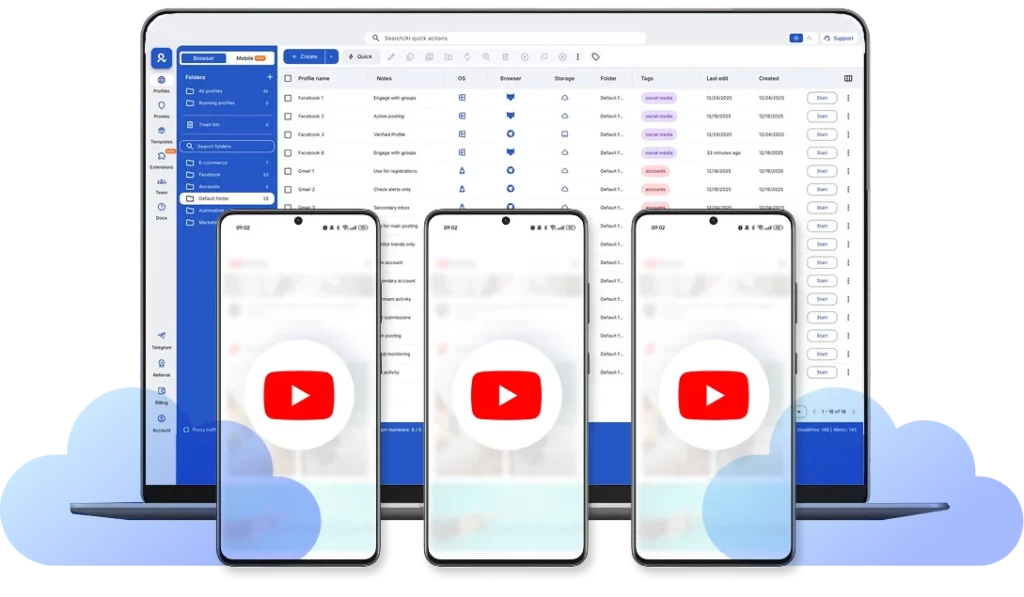
- Create one cloud phone per YouTube channel and install the YouTube and YouTube Studio apps. Each cloud phone keeps its app data and login state between sessions.
- Avoid foldable models, since YouTube doesn’t offer sticker editing on those devices.
- Set each cloud phone’s location and IP to match the market the channel serves. Built-in residential proxies and mobile minutes are included in every plan.
- Create a browser profile for each channel’s Studio work. It has its own cookies, session, and IP, and uses no mobile minutes.
- Give each team member access only to the channels they run, and use YouTube’s channel permissions so nobody needs to share a password.
- Organize channels with tags and custom columns for client, market, and calendar stage, so the Cyber Week review list stays in one place.
Channels in different markets need one extra check. YouTube matches a tagged product to a local merchant for viewers in other countries, and the commission follows that merchant’s rate, so one review can earn at different rates by market. Tags on videos marked as paid promotion aren’t localized.
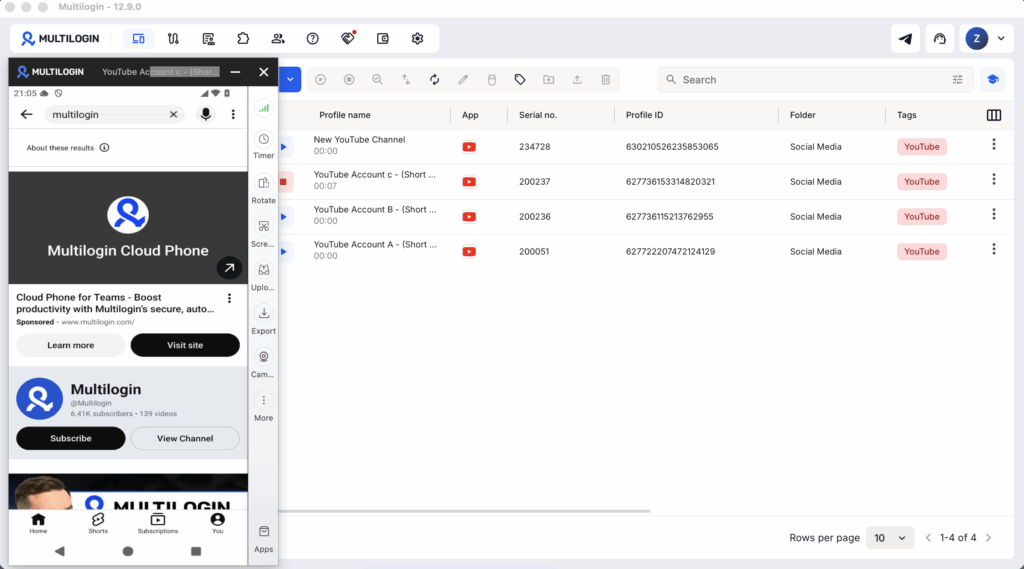
Multilogin pays off when several people work across several channels and use the app often. To test the workflow on one channel, the free plan includes cloud phones, browser profiles, proxies, and mobile minutes.
Ready to get started?
Start with the five videos on your channel that had the most views in the last 28 days: tag the products, record one line telling viewers where to find the link, and log today’s prices. If you run more than one channel, follow our guide to creating multiple YouTube channels on Multilogin cloud phones and test the workflow on one of them before Cyber Week.
Multilogin offers a free plan with no time limit and no credit card needed. Paid plans start from $7.08 per month.