






The market to buy Amazon aged accounts has exploded as sellers seek faster entry into Amazon’s marketplace. A brand-new seller account faces months of restrictions and intense scrutiny. Meanwhile, aged Amazon accounts with established history can access features immediately that new accounts wait months to unlock.
This demand has created a thriving marketplace where aged Amazon accounts for sale command hundreds or thousands of dollars. However, this market is fraught with scams, suspended accounts, and sellers who don’t understand the technical requirements for keeping purchased accounts safe after transfer.
Before you spend money on aged Amazon seller accounts for sale, understand the risks, know how to evaluate sellers, and most critically learn how to protect your investment.
What Is an Aged Amazon Account and Why Sellers Want Them
An aged Amazon account is one created months or years ago with established history through purchases or sales. What’s an aged amazon account worth depends heavily on actual activity history, performance metrics, approved product categories, and whether it has policy violations.
Why Buy Aged Amazon Accounts?
New Account Restrictions:
- Restricted product categories (can’t access profitable niches)
- Lower customer trust signals
- Extended payment holds (weeks vs days)
- Strict inventory limits preventing rapid scaling
- Velocity restrictions on growth
Value of Account Age:
- Pre-approved restricted categories
- Established performance metrics
- Higher inventory limits
- Reduced payment holds
- Lower platform scrutiny
An aged Amazon buyer account with extensive purchase history costs $50-$500. Aged Amazon seller accounts for sale range from $200-$10,000+ based on metrics and category approvals.
Amazon Account Age Requirements
- Minimum age for Amazon account: 18 years old in US/UK
- Age requirement for Amazon account: Varies by country (16-21)
- No maximum age limit for getting an Amazon account
- Amazon seller account age requirement: 18+ in most regions
The Safer Alternative: Pre-Farmed Cookies vs Buying Aged Accounts
Before diving into how to buy aged Amazon accounts, understand that a safer alternative exists. Professional sellers increasingly choose pre-farmed cookies over purchasing questionable aged accounts.
What Are Pre-Farmed Cookies?
Pre-farmed cookies are browsing history files giving new Amazon accounts instant appearance of established activity. When you create a fresh account and start selling immediately, Amazon sees a brand new browser with no history—triggering scrutiny.
However, when your browser contains months of organic browsing history through pre-farmed cookies, your account appears to come from someone who’s been shopping casually before deciding to sell.
What Pre-Farmed Cookies Include:
- Product searches across various categories
- Browsing through listings and reading reviews
- Comparing prices and sellers
- Adding items to wishlists
- Viewing product videos and images
- Natural customer behavior patterns over months
Why Pre-Farmed Cookies Beat Buying Aged Accounts
Cost Comparison:
- Buy aged account: $500-$5,000 one-time
- Multilogin with pre-farmed cookies: from free per month (paid from $7.08 monthly)
Risk Comparison:
- Aged accounts: Unknown history, potential violations, transfer detection risk, TOS violations
- Pre-farmed cookies: Clean slate you control, legitimate browsing history, no transfer risk, compliant approach
Control:
- Aged accounts: Inherit unknown problems, original owner complications, unclear legal ownership
- Pre-farmed cookies: Complete control from creation, your business information, clear ownership
For managing multiple Amazon accounts sustainably, pre-farmed cookies represent the professional choice.
Risks of Buying Aged Amazon Accounts
Despite safer alternatives, many sellers still pursue aged accounts. Understanding risks helps you make informed decisions.
Common Scams and Issues
Outright Fraud:
- Sellers disappear after payment
- Stolen credentials recovered by legitimate owners
- Suspended accounts listed as “active”
- Brand new accounts falsely claimed as aged
- Same account sold to multiple buyers
Compromised Accounts:
- Already suspended but appearing functional
- Under Amazon investigation
- Flagged for previous policy violations
- Hacker backdoor access maintained
- Linked to other suspended accounts
Detection After Transfer: Amazon identifies transfers through:
- Browser fingerprint changes
- Different IP geolocation patterns
- New device characteristics
- Changed behavioral patterns
- Payment method switches
- Shipping address modifications
Without proper protection, Amazon detects transfers within days and suspends accounts.
Legal Complications:
- Account remains in original owner’s name
- Tax obligations fall to original owner
- Legal liability unclear
- Payment processor issues
- Difficulty proving ownership in disputes
Where to Buy Aged Amazon Accounts (With Caution)
If you decide to pursue aged accounts despite risks, understand your options.
Marketplace Options
Private Sellers (Forums/Discord):
- Potentially better prices
- Direct communication
- More flexible terms
- Risks: No buyer protection, difficult to verify reputation, higher scam risk
Established Marketplaces:
- BlackHatWorld, AspKin, specialized sites
- Seller rating systems
- Some buyer protection
- Risks: Higher prices, variable seller quality, still vulnerable to scams
Reddit Communities:
- r/AmazonSeller, r/FulfillmentByAmazon discussions
- Warning: Use for research only, not transactions
- Many aged Amazon accounts Reddit warnings about scams
- Not safe purchasing platforms
Discord/Telegram:
- Aged Amazon accounts Discord servers
- Direct seller communication
- Risks: Minimal oversight, high scam concentration
Social Media:
- Facebook groups, Telegram channels
- Large selection, competitive pricing
- Highest scam risk: Minimal vetting, no protection
Red Flags to Avoid
- Seller refuses escrow services
- Unrealistic pricing (too good to be true)
- Pressure for immediate payment
- Won’t provide live account verification
- No previous transaction history
- Changes story or details frequently
- Poor communication or vague answers
Green Flags for Legitimate Sellers
- Transparent communication with detailed info
- Offers live screen share of account
- Uses escrow services willingly
- Professional handover procedures
- Post-sale support period
- Verifiable reviews from previous buyers
- Consistent pricing aligned with market
Aged Amazon Account Methods and Generators: Scam Alert
You’ll encounter various “methods” and “generators” claiming to create or provide aged accounts. Here’s the reality.
Aged Amazon Account Method (Pastebin/Forums)
Claims:
- Create aged accounts instantly
- Bypass age verification
- Generate accounts with history
- Fake account aging
Reality: These “amazon aged account method” guides are scams or outdated techniques that no longer work. You cannot artificially age an Amazon account. Real age requires real time.
Aged Amazon Account Generator Scams
Claims:
- Generate aged accounts on demand
- Create accounts with any desired age
- Bypass Amazon verification
- Unlimited aged accounts
Reality: No legitimate “aged amazon account generator” exists. These tools either:
- Steal credentials from legitimate accounts (illegal)
- Create fake accounts that suspend immediately
- Deliver non-existent accounts
- Infect your device with malware
Free Aged Amazon Accounts: Don’t Exist
Searches for “free aged amazon accounts” or “amazon aged account free” lead to:
- Stolen accounts that get recovered
- Suspended accounts disguised as active
- Phishing attempts to steal your information
- Malware distribution
The only “free” aged account is one you create yourself and age over months/years using proper protection.
How to Check Age of Amazon Account
When buying aged accounts, verify actual age beyond seller claims.
Verification Steps:
- Login to account and navigate to “Your Account” > “Login & Security”
- Check account settings for creation date (not always displayed)
- Review “Your Orders” to find oldest purchase date
- Verify order history spans claimed age period showing consistent activity
- Check email verification date if accessible
What to Look For:
- Order history quantity: 100+ orders across 2-3 years shows genuine use
- Order consistency: Regular monthly orders vs. suspicious concentrated bursts
- Seller metrics (for seller accounts): Order defect rate, late shipment rate, customer feedback
- Category approvals: Especially restricted categories like grocery, beauty, jewelry
- Policy violations: Clean record vs. previous warnings/restrictions
Remember: Creation age means nothing without activity age. An account created 5 years ago with 2 total purchases isn’t truly “aged” in any valuable sense.
Essential Protection: Multilogin for Amazon Accounts
Even legitimate purchased accounts face Amazon’s detection systems. Professional protection is mandatory, not optional.
Why Purchased Accounts Get Detected
Amazon tracks numerous signals revealing transfers:
- Device fingerprint changes: Canvas, WebGL, fonts, screen resolution
- Behavioral shifts: Navigation patterns, typing rhythms, session duration
- Network changes: IP geolocation, ISP, connection characteristics
- Account modifications: Payment methods, shipping addresses, business info
Without addressing all vectors, your account suspends within days.
How Multilogin Protects Amazon Accounts
As a cloud Android phone platform for multi-account management, Multilogin provides comprehensive protection on both mobile and web level, including Amazon Seller Central, so teams can manage mobile-app and browser workflows from one dashboard:
Consistent Fingerprinting:
- Stable browser fingerprints maintained long-term
- Prevents sudden device changes that flag transfers
- Each account gets unique, persistent fingerprint
Built-In Residential Proxies:
- 30M+ Premium IPs from 150+ countries
- Match account’s historical geographic location
- Not datacenter proxies Amazon blocks automatically
Pre-Farmed Cookies:
- Instant browsing history for new accounts
- Safer alternative to buying aged accounts
- Reduces initial scrutiny dramatically
Multi-Account Management:
- Unlimited profiles for multiple accounts
- Complete isolation prevents linkage
- Each account appears from different device
Team Collaboration:
- Unlimited team seats included
- Secure profile sharing without compromising security
- Maintains consistent fingerprints across team members
Cost Analysis
Buying aged account: $500-$5,000 one-time investment
- Unknown history and hidden risks
- Transfer detection likely without protection
- Potential total loss if suspended
Multilogin offers a free plan with no time limit and no credit card needed, but you get:
- Both cloud phones and browser profiles for mobile and web workflows
- New accounts with pre-farmed cookies
- Includes residential proxies + unlimited accounts
- Helps prevent the bans before they happen
Paid plans start from $7.08 per month. And even the $7.08 monthly investment costs roughly 1% of a typical aged account purchase while providing protection worth far more.
Creating Accounts with Pre-Farmed Cookies: The Professional Approach
Instead of buying questionable aged accounts, professional sellers create new accounts properly.
The Process:
- Register new account with proper business information
- Use Multilogin profile with pre-farmed cookies for instant browsing history
- Configure appropriate proxies matching your target market
- Gradually build activity over 2-4 weeks before aggressive selling
- Maintain consistent fingerprints through Multilogin profiles
Advantages Over Buying:
- Complete control from account creation
- No TOS violations regarding transfers
- No unknown history or hidden problems
- Build legitimate business on accounts you own
- Far lower cost than buying aged accounts
- Sustainable long-term operations
When creating multiple Amazon accounts, each gets its own unique pre-farmed cookie set preventing linkage.
How to Manage Amazon Accounts With Multilogin: Step by Step
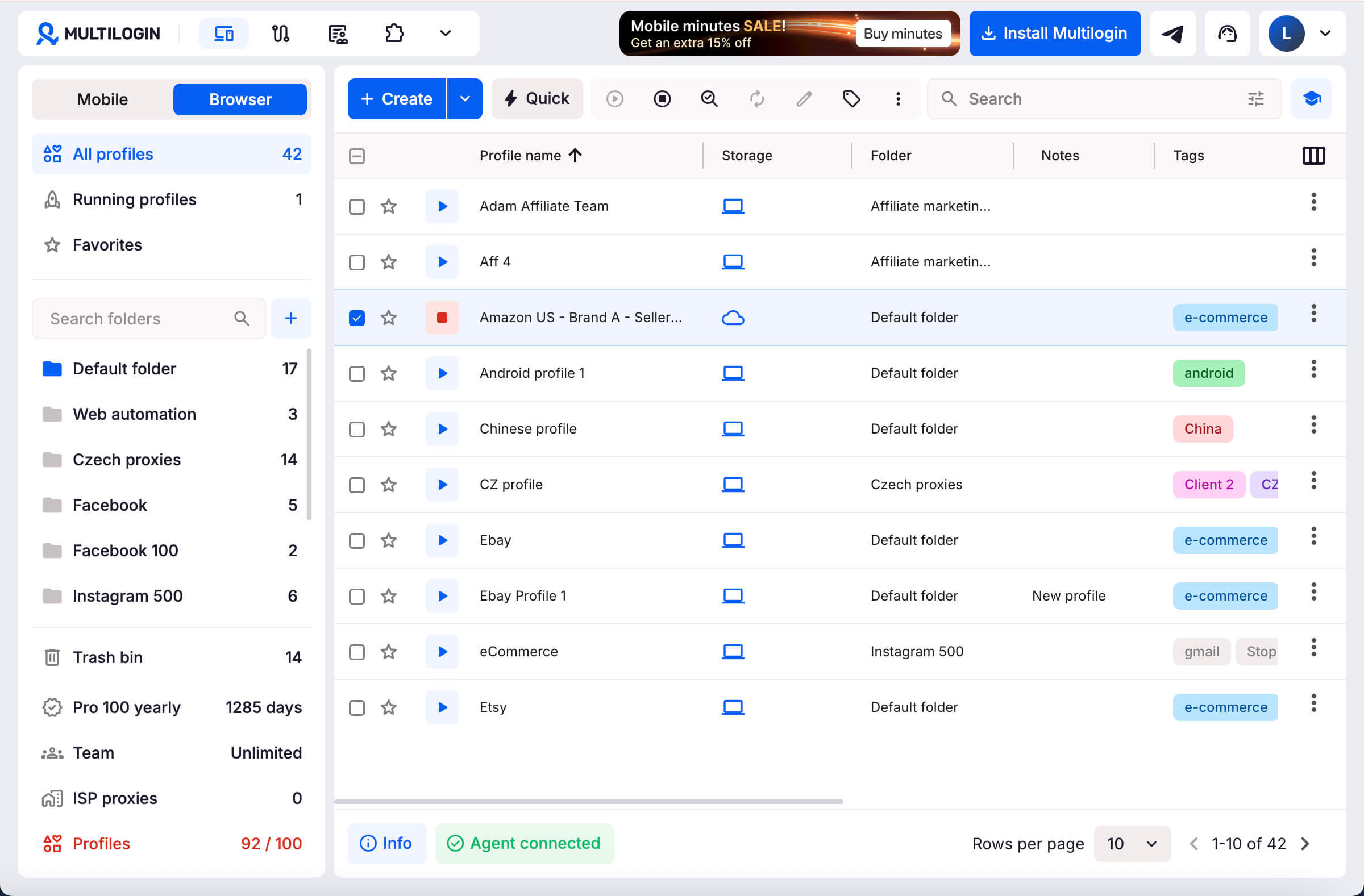
Step 1: Create an Amazon Browser Profile
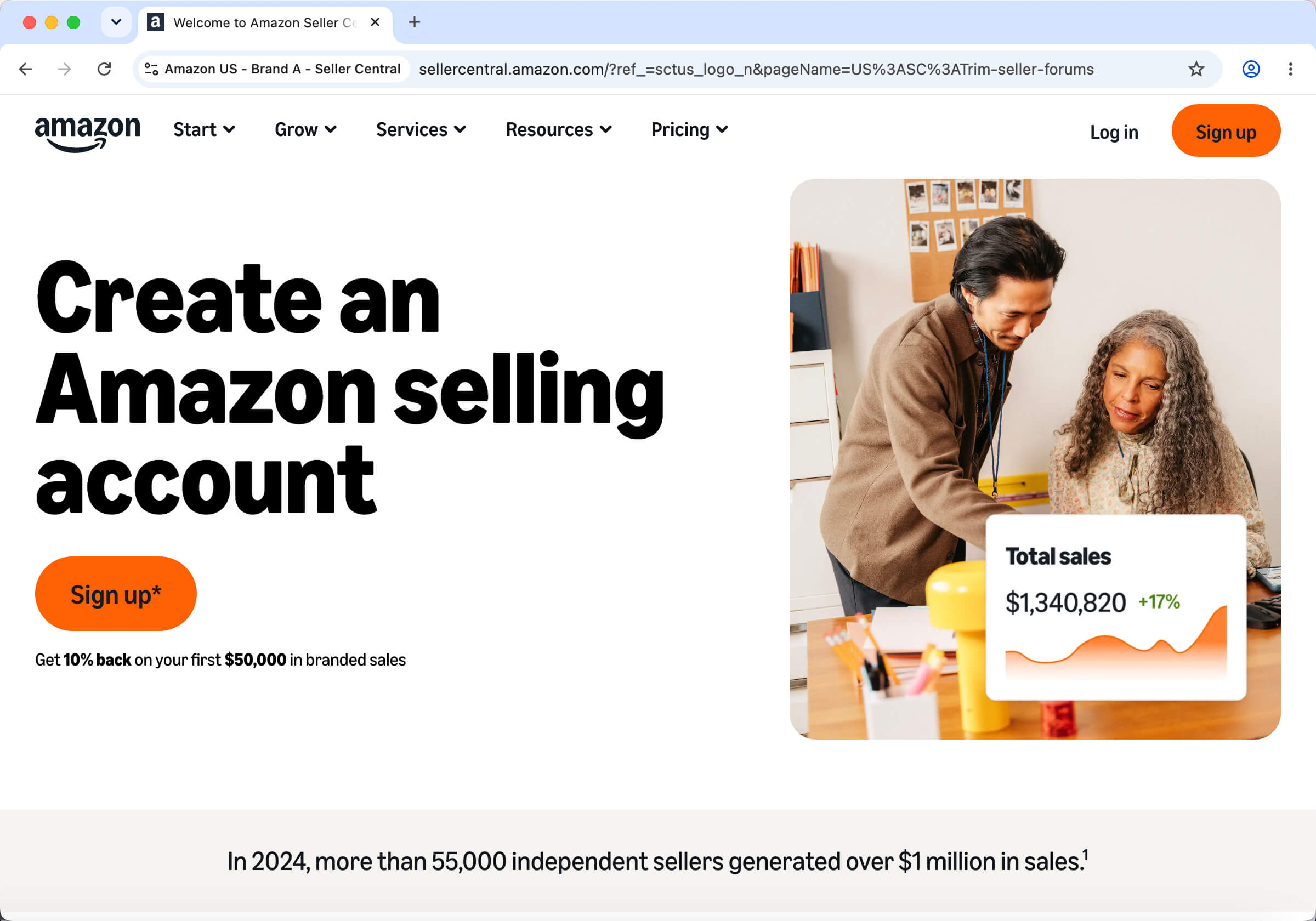
Open Multilogin and go to Profiles → Browser → Create. Use a clear profile name, such as `Amazon_US_Brand_A`, so teammates can identify the correct store without opening it.
Create one browser profile for each Seller Central account.
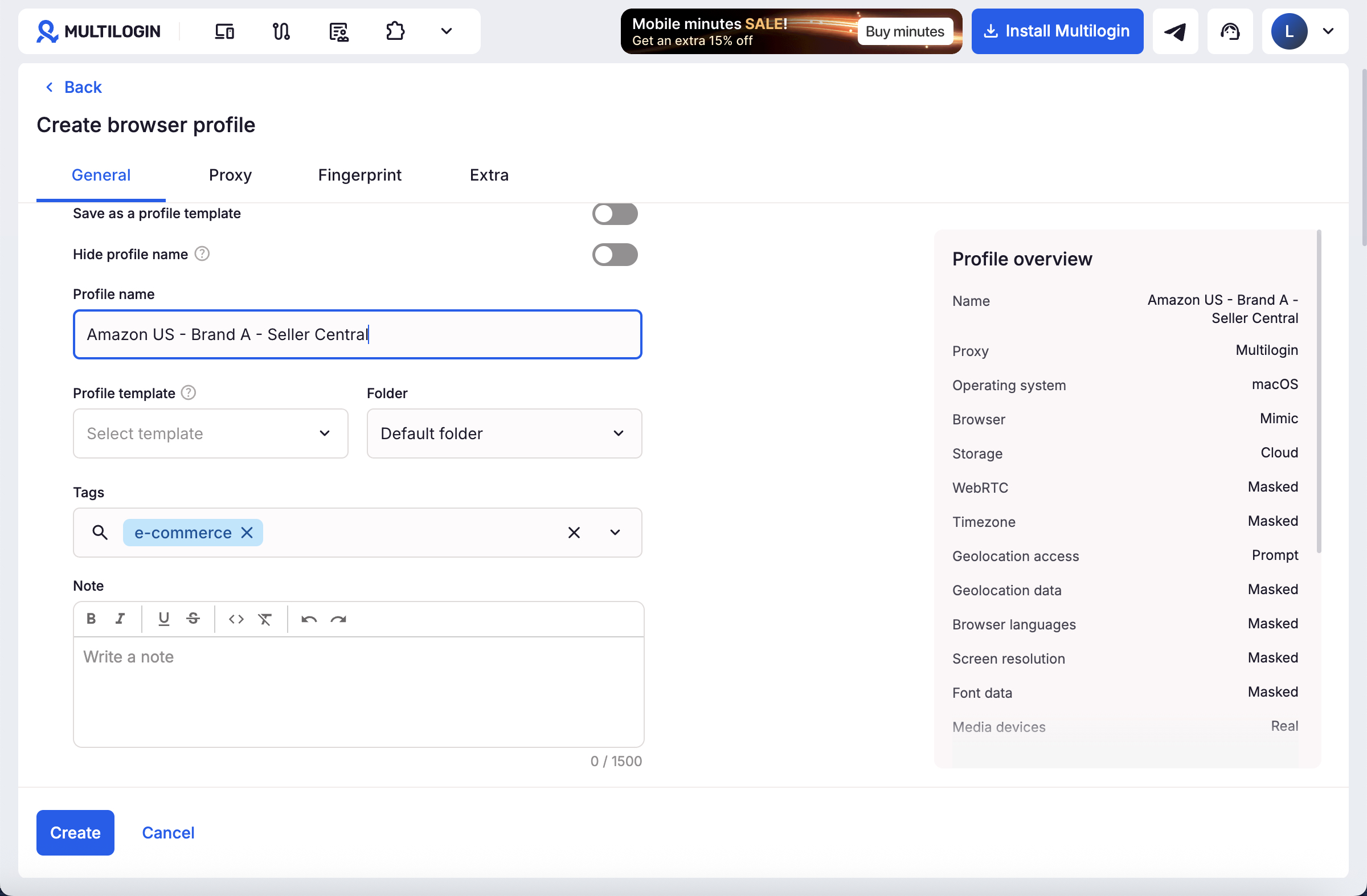
Step 2: Organize the Profile for Seller Central
In the General section, add the folder, tags, and notes. Record the marketplace, business entity, owner, and responsible team member without placing passwords or sensitive documents in the note.
Choose cloud storage when authorized team members need access from more than one computer. Add the relevant Seller Central URL as a startup page if the team opens it regularly.
Step 3: Configure the Connection
Open the Proxy section and choose a Multilogin built-in proxy or a third-party proxy. Use a stable connection appropriate for the business’s normal operating location. ISP proxies are suitable when one long-lived profile needs one stable IP over time.
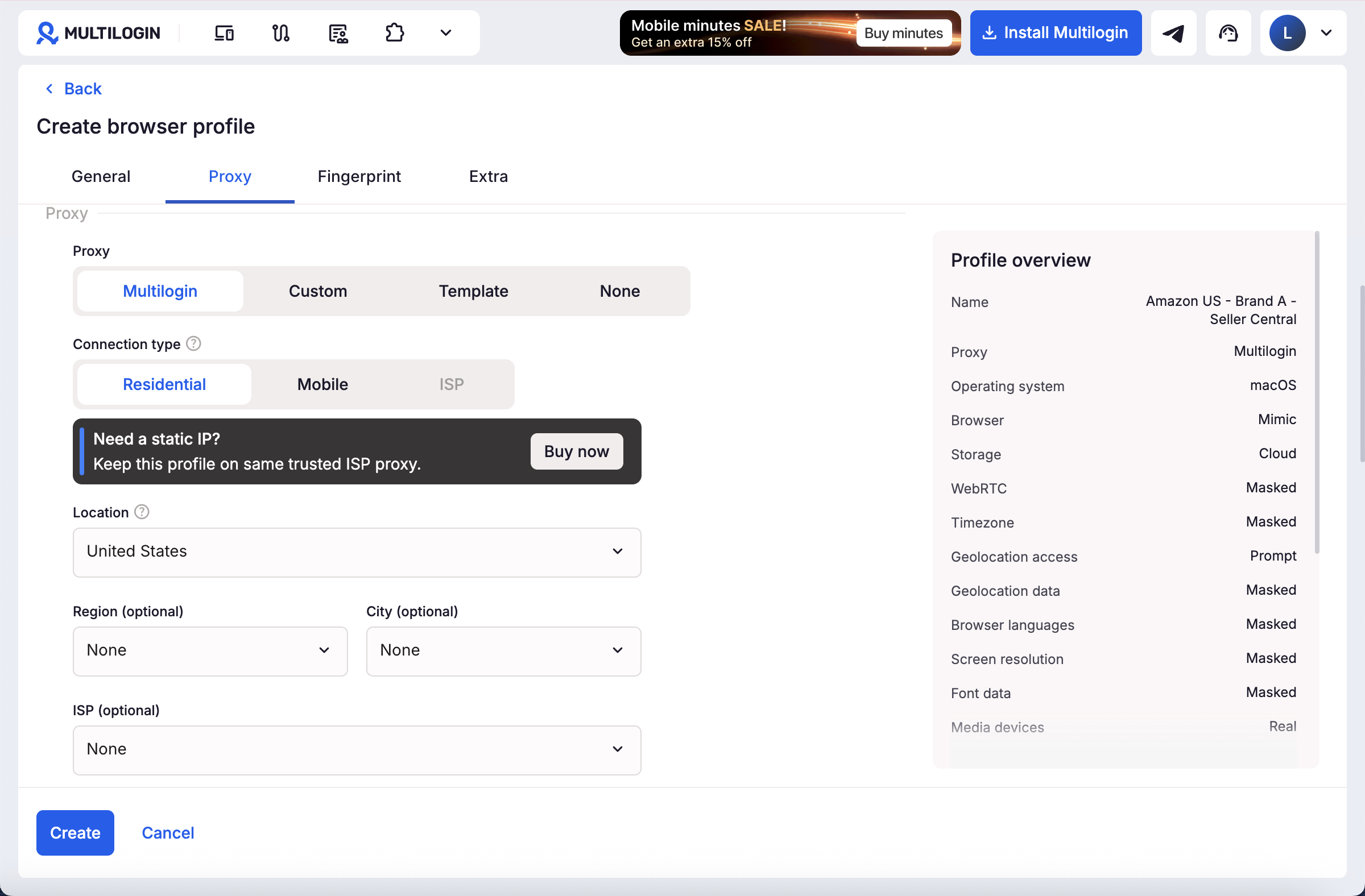
Step 4: Create, Start, and Verify the Profile
Click Create, return to the browser-profile list, and select Start. Open Seller Central and sign in with credentials supplied by the authorized account owner.
Complete Amazon password, identity, or two-factor verification normally. Do not import session data obtained from an account seller or another unknown source.
Step 5: Set Up Team Access
Use Amazon Seller Central user permissions whenever a staff member needs their own authorized access. In Multilogin, assign the relevant profile or folder only to teammates who work on that store.
Use a consistent naming rule and tags such as `US`, `Brand A`, `Finance`, or `Support` so team members do not open the wrong profile.
Step 6: Repeat the Workflow
Repeat the workflow for your accounts. Keep each Seller Central login in its assigned browser profile and stop the profile when the work session is complete.
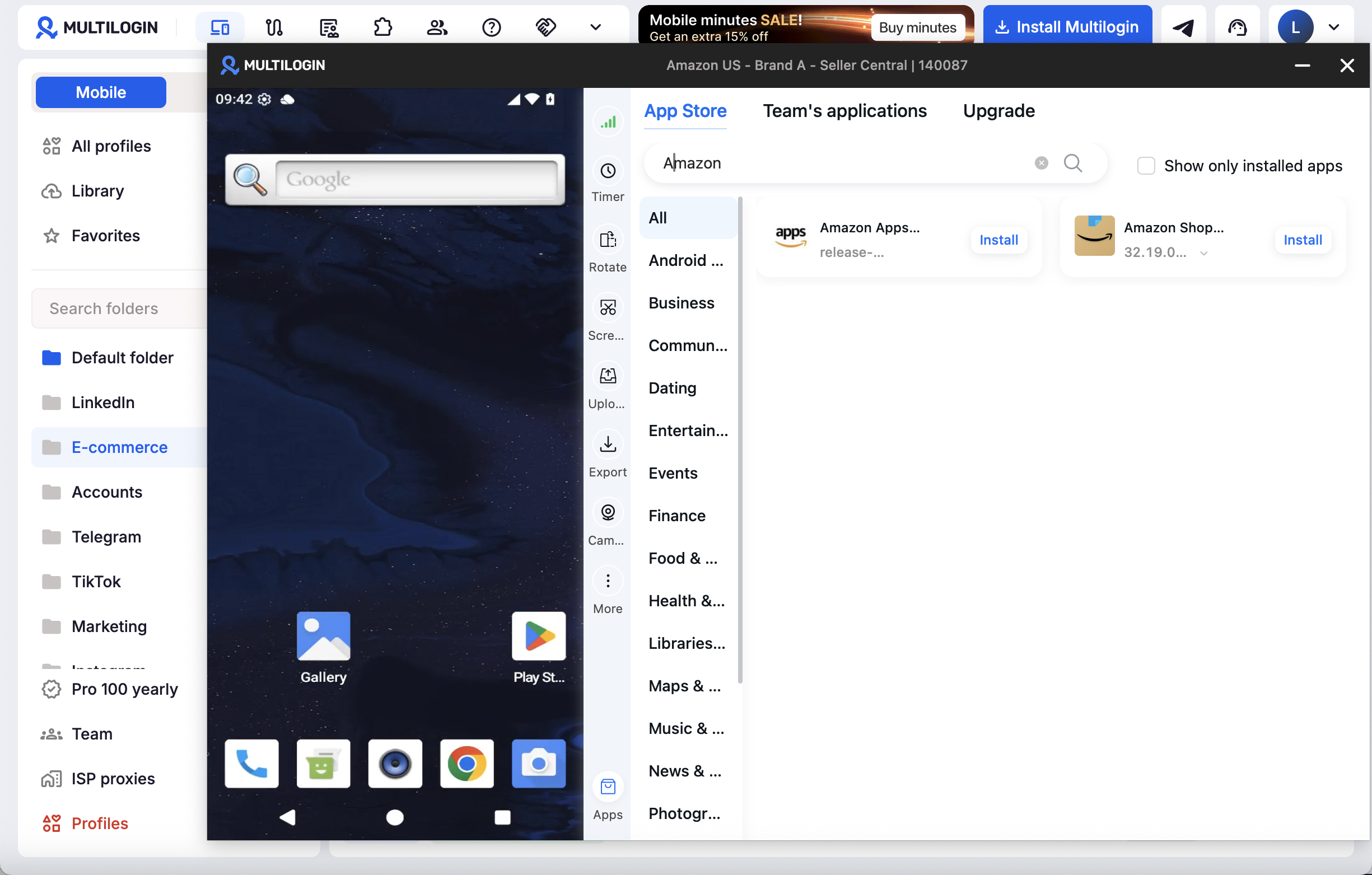
If the workflow uses the Amazon Seller Android app, create a Multilogin cloud phone from Profiles → Mobile → Create and install the app there. Keep web-based Seller Central work in browser profiles and app-based work in cloud phones.
Manage multiple accounts with Android cloud phones
Build account trust, reach new locations, and grow faster from one dashboard
Frequently Asked Questions About Buying Amazon Aged Accounts
What is the minimum age for Amazon account?
The minimum age for Amazon account is 18 years old in most jurisdictions including US and UK. Some regions require 16, others 21. The age requirement for Amazon account exists to ensure contractual capacity. There’s no maximum age limit for getting an Amazon account.
Where to buy aged Amazon accounts?
Aged Amazon accounts are sold through private sellers on forums, established marketplaces like BlackHatWorld and AspKin, Discord/Telegram channels, and social media. However, all purchases violate Amazon’s TOS. The safer alternative is creating accounts with Multilogin’s pre-farmed cookies at €5.85/month.
How to get aged Amazon accounts legitimately?
The only legitimate way: create accounts yourself and age them over 6-12 months through regular use. Use Multilogin with pre-farmed cookies to reduce initial scrutiny while building genuine history. This avoids TOS violations, legal complications, and transfer detection risks.
Are aged Amazon account generators real?
No. All “aged amazon account generator” tools are scams. They either steal credentials illegally, deliver fake accounts that suspend immediately, or infect devices with malware. You cannot artificially age Amazon accounts—genuine aging requires real time and activity.
Can you sell aged Amazon accounts?
While people do sell aged Amazon accounts, it violates Amazon’s TOS which prohibits account transfers. Legitimate alternatives include selling entire businesses through proper channels with Amazon’s approval. Informal aged Amazon seller account for sale transactions carry legal and financial risks for both parties.
Does an aged Amazon account automatically receive the Featured Offer?
No. As of September 2026, Amazon says offers from all sellers can be evaluated for the Featured Offer. Selection still depends on the competitiveness and customer experience of the individual offer.
Can one business operate multiple Amazon seller accounts?
Amazon allows additional Seller Central accounts when there is a legitimate business need and all accounts are in good standing. Sellers should review the current policy before creating or operating another account.
Conclusion: Making Smart Amazon Account Decisions
The aged Amazon account market exists because the value proposition appears compelling: skip months of restrictions for upfront payment. However, the reality involves significant risks including scams, suspended accounts, detection systems, legal complications, and ongoing vulnerability.
If you buy aged Amazon accounts despite these risks, Multilogin protection from free per month is absolutely mandatory. Without comprehensive fingerprint protection, residential proxies, and consistent profiles, purchased accounts suspend within days, wasting your entire investment.
However, consider the superior alternative that professionals increasingly choose: creating new accounts with Multilogin’s pre-farmed cookies.
Why Pre-Farmed Cookies Win:
- Cost: $85 annually vs $500-$5,000 one-time
- Control: Complete ownership from creation vs inherited unknown problems
- Legal: No TOS violations vs prohibited account transfers
- Risk: Clean history vs potential hidden violations
- Sustainability: Build legitimate business vs constant detection threat
For anyone managing valuable Amazon operations—whether Amazon seller accounts or multiple buyer accounts—proper protection isn’t optional. It’s the foundation enabling everything else.
Ready to build sustainable Amazon operations? Start with Multilogin free and choose the professional path—either protecting purchased accounts properly or creating new accounts with pre-farmed cookies that provide instant browsing history without the risks. Your Amazon business deserves better than constant vulnerability to detection systems and arbitrary enforcement.

 Join 4,200+ subscribers