





Managing multiple social media accounts for business sounds like it should get easier the more you do it. In practice, it gets more complex. You’re dealing with different platforms, different audiences, different time zones, different regional content requirements, multiple clients with separate approval workflows, and platforms that actively detect when multiple accounts are being operated from the same environment.
Get the system right and you can manage 20 or 30 accounts with the same control you’d have over two. Get it wrong and a single policy action on one account can cascade across your entire portfolio.
This is the complete guide to managing multiple social media accounts for business in 2026 — the infrastructure, the tools, the content workflows, the geo-specific considerations, and the operational practices that keep everything running cleanly at scale.
Who Needs a Multi-Account Management System
Before getting into the how, it’s worth being specific about who this guide is for — because the right setup genuinely differs by situation.
- Social media agencies managing accounts for 10, 20, or 50+ clients across Facebook, Instagram, LinkedIn, TikTok, and other platforms. Each client is a separate business with separate audiences, brand voices, and reporting requirements. For agencies, account isolation isn’t optional — it’s the difference between a contained incident and a cascading ban across your entire client roster.
- Multi-brand companies running different brands on different social accounts. A parent company with five consumer brands each needing separate Instagram, TikTok, and LinkedIn presences. Same team, different identities — which requires the same isolation logic as an agency.
- Multi-location businesses where each location has its own social accounts — a restaurant chain where each location has its own Facebook Page and Instagram, a retail brand managing regional accounts with localized content for different cities or countries.
- Creators with multiple channels — a content creator running separate TikTok accounts for different niches, managing a personal brand alongside client work, or building accounts in multiple languages for different markets.
- E-commerce operators running multiple storefronts across TikTok Shop, Instagram Shopping, and Facebook Marketplace, each needing their own social presence. If you’re managing multiple Amazon accounts or running multiple Shopify stores, the same multi-account infrastructure applies to your social layer.
The core challenge is the same across all of these: scale without losing control, and isolate accounts from each other without losing operational efficiency.
The Problem With the Obvious Solutions
Most people start with one of three approaches when they try to scale social media management — and all three create problems at scale.
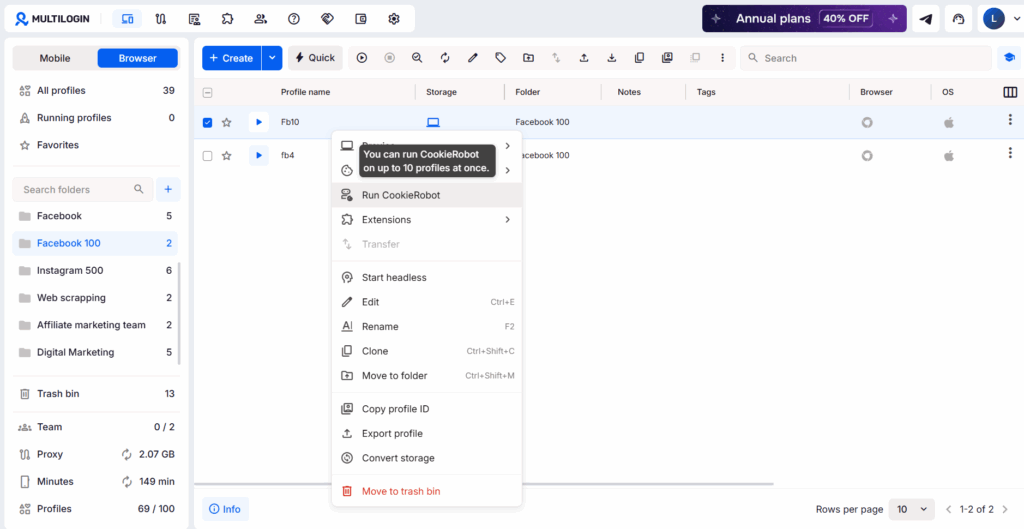
- Multiple browser tabs. Log into Client A in one tab, Client B in another. Seems fine until you realize every tab shares the same browser environment — same cookies, same fingerprint, same IP address. Platforms detect this. Switch between multiple Instagram accounts from the same session and you’ll start seeing verification prompts. Do it across 20 clients and you’re building account-linking risk that cascades when any one account gets reviewed.
- One scheduling tool for everything. Connect all accounts to Buffer or Hootsuite and schedule from there. This handles the publishing layer. It doesn’t handle native sessions — comment moderation, DM management, Stories, ad account access, anything that requires actually being logged in as that account. You still need to open each platform directly for all of that, which brings the browser tab problem right back.
- Sharing passwords with team members. The client gives you their login, your team member logs in from their personal laptop. That account is now associated with a new device and IP it hasn’t used before, triggering a security check. If the team member leaves, access recovery is messy. If they also have their own personal Instagram on the same device, you’ve potentially linked a client account to a personal profile.
None of these scale properly. The right system addresses all three problems at once.
The Right Infrastructure: Device Isolation Per Account
The foundation of professional multi-account social media management is genuine session isolation — each account operating from its own distinct device environment with its own distinct IP address.
Social platforms track accounts not just through login credentials but through device signals. Facebook’s app reads your device’s IMEI, Android ID, and device model. Instagram correlates accounts with shared behavioral patterns and hardware fingerprints.
TikTok’s risk system is particularly aggressive — it reads mobile hardware identifiers that desktop browsers don’t replicate at all. This is why managing multiple TikTok accounts without bans is a different problem from managing multiple Facebook pages — the detection mechanism operates at the device level for mobile-first platforms.
Managing multiple social media accounts for businesses requires more than just switching profiles — it requires digital isolation. Social platforms track IPs, cookies, and browser fingerprints to prevent one person from controlling multiple identities. To avoid chain-reaction bans, you need to give each account a unique digital identity.
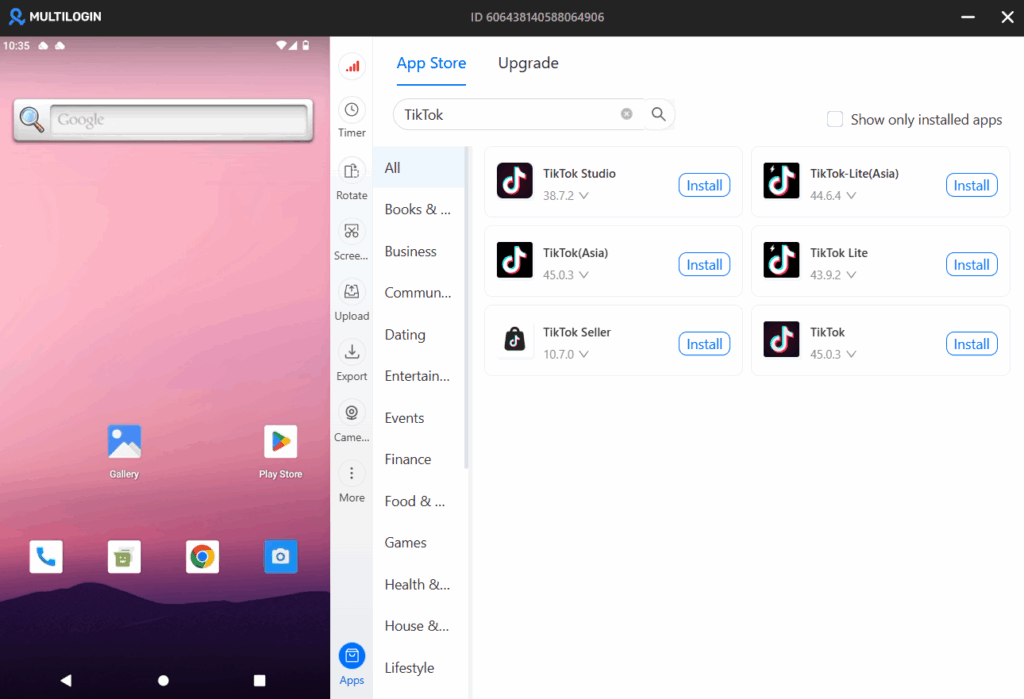
For mobile-first platforms — TikTok, Instagram, Snapchat, and any platform where the native app is the primary environment — the right solution is Multilogin Cloud Phones.
What Cloud Phones Are and Why They Matter for Managing Multiple Accounts
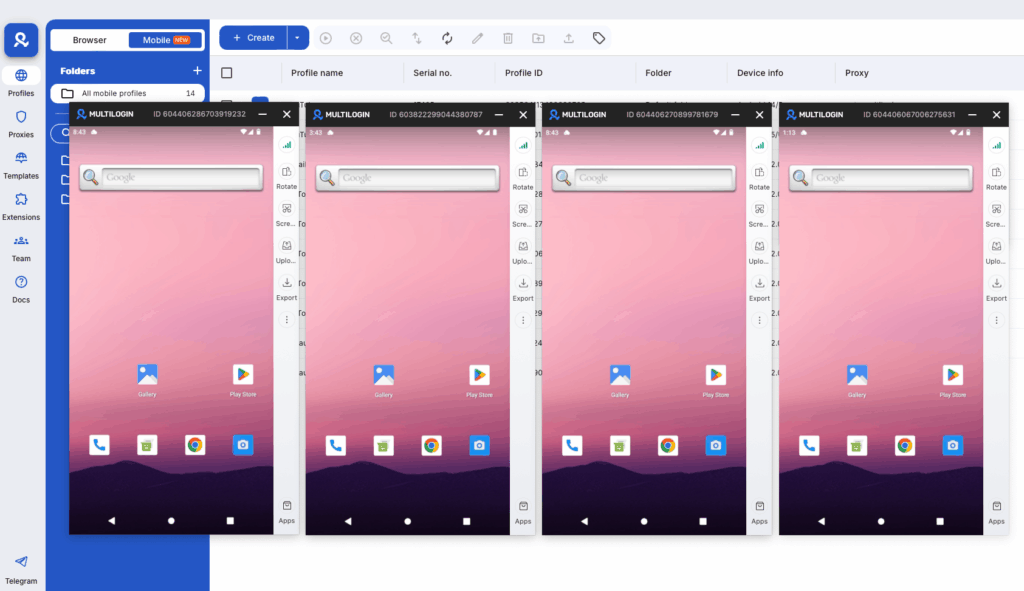
Multilogin Cloud Phones are real Android devices hosted in the cloud. Not emulators, not virtual machines — actual physical hardware, each with its own unique IMEI, Android ID, device model, and hardware fingerprint. Each Cloud Phone connects through its own residential IP address from Multilogin’s pool of 30M+ IPs across 150+ countries and 1,400+ cities.
When you assign a Cloud Phone to each social media account or each client, here’s what the platforms see: a separate phone, in a separate location, on a separate home network, with no connection to any other account you’re managing. Because that’s genuinely what it is.
- For a TikTok account in a US market: A Cloud Phone configured with a US residential IP and a US-appropriate device model. TikTok reads a real Samsung or Google Pixel phone on a real US residential ISP. Session history, behavioral patterns, and device fingerprint all belong exclusively to this account. This is why Cloud Phones for TikTok are the recommended approach for any agency doing serious TikTok management.
- For a client’s Instagram account in Germany: A Cloud Phone with a German residential IP and an Android device configured for the German locale. Instagram sees a German user on a genuine mobile device. For agencies managing Instagram specifically, Cloud Phones for Instagram covers the account-specific setup.
- For a LinkedIn account managed for a UK B2B client: LinkedIn is desktop-first, so Multilogin’s browser profiles handle the desktop session with an isolated fingerprint and UK proxy. Cloud Phones cover the LinkedIn mobile app layer for the same account.
- For Facebook Page management across multiple clients: Cloud Phones for Facebook give each client’s Facebook sessions their own physical device. Combined with proper Meta Business Suite setup, this covers the full Facebook management stack.
This device-level isolation is what prevents cascade suspensions. When one account enters a policy review, there’s no shared fingerprint, shared IP, or shared session history connecting it to your other accounts. The review stays contained.
Managing Multiple Social Media Accounts Across Geographies
One of the most important — and most commonly overlooked — aspects of managing multiple accounts for business is geographic consistency. This is where the geo-blocking dimension comes in.
Platforms don’t just check whether you’re logged in from the right device. They check whether your device’s location, network, time zone, language settings, and behavioral patterns are consistent with the account’s declared market.
A TikTok account targeting Brazilian audiences that’s accessed from a UK IP, with a UK time zone, at hours inconsistent with Brazilian user behavior — that inconsistency registers in the platform’s risk systems. The same applies to Instagram, Facebook, and LinkedIn. Each account should behave like a real user in its declared market.
Cloud Phones solve this comprehensively because the full device environment matches the target market. The IP is from the right country. The device locale is configured for that region. The residential IP comes from a real home ISP in the right city. No mismatched signals.
The Content Workflow Layer: Tools for Scheduling and Planning
Device isolation handles the infrastructure. You still need a content workflow that covers planning, creation, approval, scheduling, and reporting across all your accounts.
The best approach in 2026 combines: native platform tools for compliant scheduling, third-party tools for cross-platform management, and content batching — setting aside dedicated time each week to create content for all accounts in one session.
Step 1: Build Per-Account Content Calendars
Every account should have its own social media content calendar — its own pillar structure, posting cadence, content types, and approval workflow. Managing 15 clients from one shared calendar creates confusion and cross-posting errors. Separate calendars per account, aggregated into a master weekly view for production planning.
Tools for this:
- Google Sheets or Notion for small client sets — free, flexible, collaborative
- Airtable for agencies that need relational databases linking posts to assets, campaigns, and approval stages
- Planable or CoSchedule for agencies that want dedicated visual approval workflow tools built in
Step 2: Schedule Posts in Bulk
Once content is approved, a scheduling tool handles publishing. You don’t log into each platform every day — you queue posts and let the tool publish at optimal times.
- Buffer ($5/channel/month): Best for smaller client rosters. Strong free plan, clean interface, AI assistant included. Good for agencies managing 3–15 accounts.
- Hootsuite ($99/month+): Best for agencies needing social listening, bulk CSV scheduling (350 posts at once), and formal client-facing PDF reports.
- Later: Best for visual-first platforms — Instagram, Pinterest, TikTok — where the grid aesthetic matters.
- Sprout Social: Best for enterprise teams needing CRM integration and deep analytics alongside publishing.
Step 3: Post to Multiple Social Media Accounts at Once
For content that applies across platforms with minimal adaptation — a product launch, a brand announcement, a milestone — posting to multiple social media accounts at once saves significant time.
Most scheduling tools support this natively: write once, select multiple accounts, customize platform-specific details (caption length, hashtags, image crop), and schedule. Buffer, Hootsuite, and Later all handle this.
For content that needs meaningful platform adaptation — a 60-second TikTok becomes a LinkedIn text post, or a detailed Instagram carousel gets distilled into a thread — batch the adaptation before scheduling.
Step 4: Handle Native Sessions Through Cloud Phones
Scheduling covers publishing. Native sessions cover everything else: replying to comments, managing DMs, handling Stories replies, checking platform-native analytics, accessing ad account tools, moderating communities.
Each morning, a team member opens the relevant Cloud Phones for their assigned accounts, handles pending native interactions, and closes the sessions. The Cloud Phone maintains session state between openings — login persists, app data stays, no re-setup required.
For team access without sharing credentials: Multilogin’s sharing features let you grant team members access to specific Cloud Phone profiles. When a team member leaves, revoke their access — the account sessions are unaffected and the account is fully recoverable.
Managing Multiple Clients’ Social Accounts as an Agency
Agency-specific considerations add a layer beyond the technical setup. Managing multiple social media accounts often means juggling dozens — sometimes hundreds — of accounts across regions, brands, and teams.
- Client onboarding documentation. Before touching a client’s accounts, document everything: which accounts exist on which platforms, existing page admin access structure, pending verifications, existing ad accounts and payment methods, and current content performance baseline. This is your recovery document if anything goes wrong.
- One Cloud Phone per client account, clearly labeled. In Multilogin, label each Cloud Phone: “ClientName — Platform — AccountType.” Choose different device models across clients — Samsung Galaxy for one, Google Pixel for another, OPPO for a third. Never access one client’s account from another client’s Cloud Phone.
- Role-based access per team member. A social media coordinator doesn’t need access to client ad account payment methods. Multilogin’s profile sharing assigns specific Cloud Phones to specific team members. Combined with platform-native role-based permissions — Facebook page admin roles, Meta Business Manager access levels, LinkedIn page admin roles — access stays appropriately scoped at every layer.
- Separate reporting per client. Each client gets their own monthly report — their performance, their audience growth, their engagement trends, their paid results. Scheduling tools like Hootsuite produce per-account reports automatically. Build the report template into the onboarding process so delivery is consistent and expected.
- Client approval workflows. Set clear expectations: who approves content, by when, through what process. Documented approval workflows that route draft content to clients for review — with comments, approval status, and revision history — prevent the “I didn’t approve that” conversation.
- Account warming for new clients. When you take on a new client with new accounts, don’t skip warm-up. New accounts that skip straight to high-volume posting or paid campaigns look like spam to platform detection. Account warming is the process of building behavioral history first — and it matters whether you’re starting a brand new TikTok, a new Instagram, or a new Google Ads account.
What Are the Drawbacks of Having Multiple Social Media Accounts?
It’s worth being honest about this — because some businesses shouldn’t be managing five social accounts simultaneously.
- The time cost is real. Every account that exists needs to be maintained. A dormant account with outdated content and unanswered comments looks worse to potential customers than no account at all. Fewer accounts managed well beats more accounts managed poorly.
- Detection risk scales with volume. The more accounts you manage, the more opportunities for an account-linking error. An automation tool triggering detection, a team member using the wrong device, a proxy expiring — each of these creates risk that compounds at scale. Good infrastructure mitigates it, but doesn’t eliminate it entirely.
- Brand voice consistency is harder. At 20 accounts across 10 clients, maintaining genuine voice consistency requires well-documented brand guidelines per client and regular content audits. A clear branding and marketing strategy can help keep messaging consistent across every account.
- Reporting complexity grows significantly. Monthly reporting across 20+ client accounts is a serious workload without proper tooling and templates. Plan for this operational cost before you take on clients, not after.
The benefits — broader reach, audience segmentation, regional targeting, parallel A/B testing, platform diversification — justify the complexity when you have the right system. Without the right system, the complexity wins.
Best Practices for Managing Multiple Social Media Accounts Safely
- Geographic consistency per account, always. Every Cloud Phone’s proxy should match the account’s declared market. Never access a US-market account through a European IP, even once. The signal persists in the platform’s risk model even after you switch back.
- Dedicated device per account, no exceptions. The isolation only holds if it’s maintained consistently. One login from the wrong device creates a signal that can be detected weeks later.
- Never share passwords directly. Use Multilogin’s session sharing and platform-native team roles for access management. Password sharing means account access can’t be revoked cleanly when team members change.
- Warm new accounts before commercial use. New accounts for new clients need a warm-up period — organic activity, profile completion, genuine content — before any paid campaigns or high-volume posting. This applies to Facebook accounts, TikTok accounts, and new Gmail accounts used for platform registration.
- Audit connected third-party apps quarterly. Every scheduling tool and analytics app connected to an account has API permissions. Stale write permissions from tools no longer in use are a common cause of unexpected flags. Revoke access for anything unused.
- Document the full account architecture. Which Cloud Phone runs which account. Which proxy. Which email and phone number. Which team member has access. When something goes wrong or someone leaves, documentation makes recovery manageable.
The Full Stack: What a Professional Multi-Account Setup Looks Like
A professional agency managing multiple social media accounts for business clients in 2026 runs on this stack:
Layer | Tool | Purpose |
Mobile device isolation | One real Android device per account, unique IMEI and residential IP | |
Desktop browser isolation | Isolated fingerprint per account for desktop-first platforms | |
Residential proxies | Location-matched residential IPs per account, 30M+ pool | |
Content planning | Notion, Airtable, or Google Sheets | Per-account content calendars with approval workflows |
Scheduling and publishing | Buffer, Hootsuite, or Later | Cross-platform publishing queue and performance analytics |
Social listening | Hootsuite Insights or Brandwatch | Brand monitoring and competitor tracking |
Reporting | Platform-native exports + scheduling tool reports | Monthly client-facing performance reports |
AI content production | Caption drafts, platform adaptation, content repurposing |
Each layer does its job. None overlap into another’s territory. The result is a system that scales to 50+ accounts without the chaos that comes from trying to do everything from the same browser tab.
No more juggling physical devices or risking account links. Try Multilogin's cloud phones now.
Frequently Asked Questions About How to Manage Multiple Social Media Accounts for Business
Use isolated device environments per account — one Cloud Phone per account with its own IMEI, residential IP, and device fingerprint matched to the account’s target market. Never access multiple accounts from the same browser session or device. Use platform-native role-based access for team sharing rather than password sharing.
No single tool covers everything. The right stack combines a scheduling tool (Buffer, Hootsuite, or Later) for publishing with Multilogin Cloud Phones for native session management and geographic isolation. Scheduling tools handle publishing; Cloud Phones handle authenticated access, account isolation, and geo-consistency.
Scheduling tools like Buffer, Hootsuite, Later, and Sprout Social all support multi-account publishing from one interface. Write once, select multiple accounts, customize per-platform details, and schedule. For content requiring significant platform adaptation, AI tools like Claude accelerate the process.
No. VoIP systems focus on business communications (calls, video, messaging), while cloud phones are virtualized mobile devices designed for managing multiple online accounts and mobile app operations. They serve different purposes for remote teams.
Multilogin, DuoPlus, and Geelark are all excellent choices for social media management. Multilogin offers the most advanced fingerprinting and secure browsing features, DuoPlus provides unlimited device scaling, and Geelark includes AI-powered automation for content creation.
Yes, cloud phones are ideal for managing multiple TikTok accounts because they provide isolated mobile environments that prevent platforms from linking your accounts together, reducing the risk of shadow bans or suspensions.


