





If you are researching MuLogin, you are probably trying to answer a practical question: does it give you the browser profiles, proxy support, team tools, and automation features you need for multi-account management?
MuLogin is a Windows-based browser profile tool built for people managing multiple web accounts. Its official documentation focuses on separate browser environments, configurable proxies, team collaboration, REST API access, Selenium, and Puppeteer.
The important distinction in 2026 is that not every multi-account platform solves the same problem.
MuLogin is primarily built around browser-based workflows. Multilogin takes a broader approach. It is a cloud Android phone platform for multi-account management that also includes isolated browser profiles for web-based work. That makes the comparison especially relevant if your workflow now includes both websites and mobile apps.
This MuLogin review looks at what the product actually offers, what it costs, where its limits are, what public reviews can tell us, and how it compares with Multilogin.
What is MuLogin and how does MuLogin work?
MuLogin is a Windows-based browser profile management tool designed to keep separate web-account environments organized on one computer.
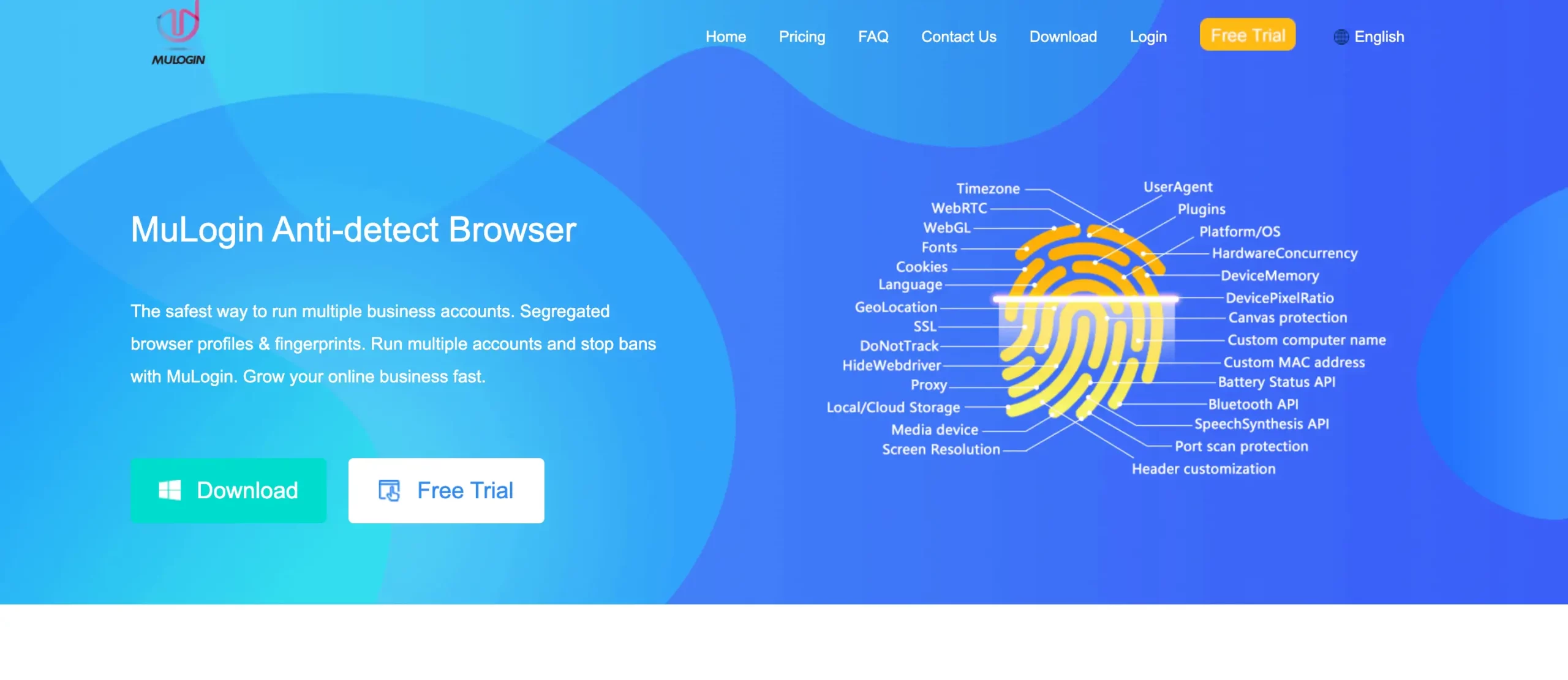
According to MuLogin’s official documentation, each browser profile keeps data such as cookies, local storage, cache files, and browser configuration separate.
That is useful for workflows where different client, store, advertising, social, or research accounts need their own browser environments.
MuLogin currently runs on Windows. Its system requirements list Windows 7, Windows 8, Windows 10, Windows 11, and Windows Server 2016.
Its documentation also makes an important limitation clear: MuLogin is designed for browser-based activity. It cannot install Android apps inside its profiles.
MuLogin’s core value proposition and features
MuLogin covers most of the features you would expect from a browser-based multi-account management platform.
Separate browser environments
Each profile has its own cookies, local storage, cache, and browser settings. This helps teams keep sessions separate rather than mixing many accounts into the same browser environment.
You can read more about the general idea behind isolated browser environments.
Proxy configuration
MuLogin supports user-provided HTTP, HTTPS, SOCKS4, SOCKS5, and IPv6 proxy configurations according to its official documentation.
That means you need to bring and configure the proxy infrastructure that fits your workflow.
If proxy management is an important part of your setup, our guide to using a proxy browser explains how browser profiles and proxies typically work together.
Team collaboration
Higher MuLogin plans include sub-accounts and additional profile-management options. Depending on the plan, teams can share profiles, transfer profiles, and organize browser environments between users.
Automation
MuLogin provides REST API functionality and documents integrations with Selenium and Puppeteer.
Its API can perform actions including creating profiles, updating profiles, listing profiles, launching and closing profiles, managing groups, importing or exporting cookies, taking screenshots, and executing scripts.
For a broader explanation of these workflows, see our guide to browser automation.
MuLogin pricing and target audience
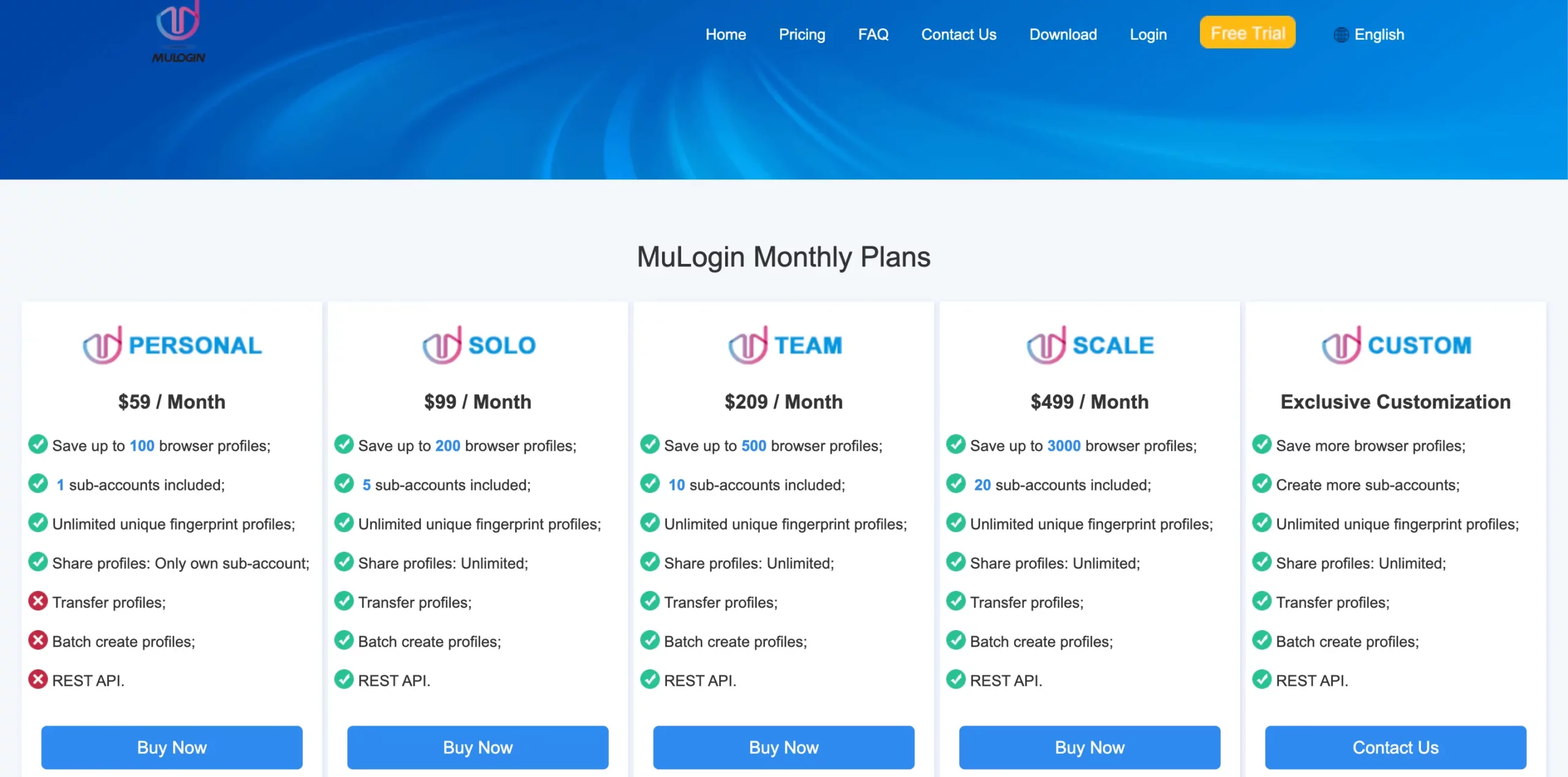
MuLogin currently lists these monthly plans:
| Plan | Browser profiles | Sub-accounts | Price |
|---|---|---|---|
| Personal | 100 | 1 | $59/month |
| Solo | 200 | 5 | $99/month |
| Team | 500 | 10 | $209/month |
| Scale | 3,000 | 20 | $499/month |
| Custom | Custom | Custom | Contact MuLogin |
The Personal plan does not include every team or automation feature. MuLogin’s current pricing page shows profile transfer, batch profile creation, and REST API access beginning with the Solo plan.
MuLogin also advertises a free trial. Its documentation says new users need to contact customer service to have the trial package manually activated.
For users whose work is entirely browser-based, the combination of profile management, team features, proxies, and automation may cover the main requirements.
But the distinction becomes more important when mobile apps are part of the workflow.
MuLogin’s own documentation says it cannot install applications inside its browser environments. That makes it different from a cloud Android phone platform where an account can run inside an actual Android environment in the cloud.
MuLogin vs Multilogin: the key comparison for multi-account management
MuLogin and Multilogin overlap in browser-profile management, proxy configuration, team workflows, and automation.
But their product scope is now different.
MuLogin is centered on browser environments.
Multilogin is a cloud Android phone platform for multi-account management. Mobile accounts can run on real Android devices in the cloud, while web accounts can run in isolated browser profiles from the same dashboard.
That distinction matters more than simply comparing the number of profiles in each plan.
Browser environments: what is the practical difference?
For web-based work, both platforms provide separate browser environments.
MuLogin lets users configure multiple browser profiles and keep their browser data separate. It also supports proxy configuration and browser automation.
Multilogin also supports isolated browser profiles for web-based accounts. However, browser profiles are only one part of the platform.
When the workflow moves to a mobile-first platform or requires an Android app, Multilogin provides cloud Android phones alongside its browser environments.
That means a team managing web stores, browser dashboards, Instagram, TikTok, WhatsApp, marketplace apps, or other mobile-first workflows does not necessarily need separate browser and cloud-phone products.
This is also why comparing MuLogin and Multilogin only as browser tools no longer gives the full picture.
Safety and reliability: is MuLogin safe to use?
There is not enough independent evidence to make a broad claim that MuLogin is either universally safe or unsafe.
MuLogin publishes product documentation, terms of service, pricing, and technical information on its own website. Its public Trustpilot profile also exists, but the review sample is extremely small.
As of this review, Trustpilot shows only four MuLogin reviews and explicitly warns that the reviews may not be representative.
That is too small a sample to draw strong conclusions about reliability across thousands of customers.
A better evaluation is to check factors you can verify yourself:
whether the product supports your operating system;
whether your workflow needs websites, Android apps, or both;
which proxy types it supports;
whether automation is included in your plan;
how profiles and team permissions are handled;
where profile data is stored;
what support channels are available;
and whether the product fits the rules of the platforms you use.
No multi-account management tool can guarantee that a third-party platform will never restrict, verify, or suspend an account. Platform rules and account behavior still apply.
Pricing and value: MuLogin vs Multilogin
The pricing comparison has changed significantly since earlier versions of this article.
MuLogin currently starts at $59/month for 100 browser profiles.
Multilogin now offers a Free plan with no time limit and no credit card needed. Paid plans start from $7.08 per month.
You can check the latest details on the Multilogin pricing page.
The Multilogin Free plan includes five profiles across cloud phones and browser profiles, plus one-time proxy traffic and mobile minutes. Paid plans increase profile capacity and include monthly residential proxy traffic, mobile minutes, automation access, and additional team capabilities.
So comparing the two products based only on profile quantity can be misleading.
| Feature | MuLogin | Multilogin |
|---|---|---|
| Main product focus | Browser profiles | Cloud Android phones for multi-account management |
| Browser profiles | Yes | Yes |
| Android cloud phones | No | Yes |
| Install Android apps | No | Yes |
| Proxy support | Bring your own proxies | Built-in residential proxies + third-party proxy support |
| Automation | REST API, Selenium, Puppeteer | API, ADB, Selenium, Puppeteer, Playwright, Postman and AI-agent workflows |
| Team features | Yes, depending on plan | Yes, depending on plan |
| Free access | Manually activated free trial | Free plan, no time limit |
| Paid entry price | $59/month | From $7.08/month |
For a browser-only operation needing a large number of profiles, MuLogin’s profile allowances may be attractive.
For a workflow that combines mobile apps and websites, Multilogin covers both layers from one dashboard.
Why consider Multilogin as a MuLogin alternative?
The main reason to consider Multilogin instead of MuLogin in 2026 is not simply that both products manage browser profiles.
It is the difference in product architecture.
Multilogin gives each mobile account its own real ARM Android device in the cloud. Web-based accounts can still run in isolated browser profiles. Both are managed from the same dashboard.
Built-in residential proxies and mobile minutes are also included, rather than requiring a separate cloud-phone platform and proxy subscription for the mobile side of the workflow.
Cloud Android phones plus browser profiles
Mobile-first platforms increasingly require workflows that happen inside their apps rather than only through a browser.
Multilogin cloud phones support Android versions 10–16 across more than 30 device types from multiple brands. Apps can be installed through the built-in app list, Google Play, or APK files.
Account history persists between sessions, so operators can return to the same environment instead of rebuilding it each time.
Browser-based accounts can remain in isolated browser profiles within the same platform.
This creates a clearer split:
Use cloud phones for mobile-app workflows. Use browser profiles for web workflows. Manage both from one dashboard.
Multi-account management for teams and automation
Multi-account operations become difficult long before the number of accounts reaches hundreds.
The problem is usually organization.
Which account belongs to which client? Which environment should a teammate open? Which proxy configuration belongs to that account? Which profiles can each person access?
Multilogin supports profile assignment, team seats, permissions, folders, tags, notes, templates, profile sharing, and live running-profile management.
Developers can also automate workflows using API access, ADB, Selenium, Puppeteer, Playwright, and Postman.
You can explore the wider workflow in our multi-account management guide.
Multilogin also offers a Free plan if you want to test the mobile and browser workflow before moving to a paid plan.


