




TL;DR: You can rent Android phones in three ways: borrow a physical handset, book time on a remote device lab for app testing, or use a cloud Android phone that stays yours for as long as you need it.
Physical rental suits events and short trials. For running accounts in mobile apps over weeks or months, a cloud Android phone usually costs less and is easier to manage.
Search “rent Android phones” and you’ll get event rental shops, testing labs, and cloud phone services on the same page. They solve different problems, and picking the wrong one costs money and time.
This guide explains each option, what it really costs, and how to decide whether you need a phone in your hand or just an Android device you can open from your computer.
Key takeaways
- Physical rental is the right choice when someone needs to hold the device: events, field work, trying a phone before buying it, or replacing a broken one.
- Remote device labs are built for testing apps across many models, usually in short sessions that end with a reset.
- Cloud Android phones keep app data and logins between sessions, which is what account work needs.
- Rental costs grow with every device. Ten accounts on physical phones means ten phones, ten SIM cards or connections, and ten things to charge and return.
- Multilogin cloud phones can’t receive SMS or calls, so plan a separate number for verification codes.
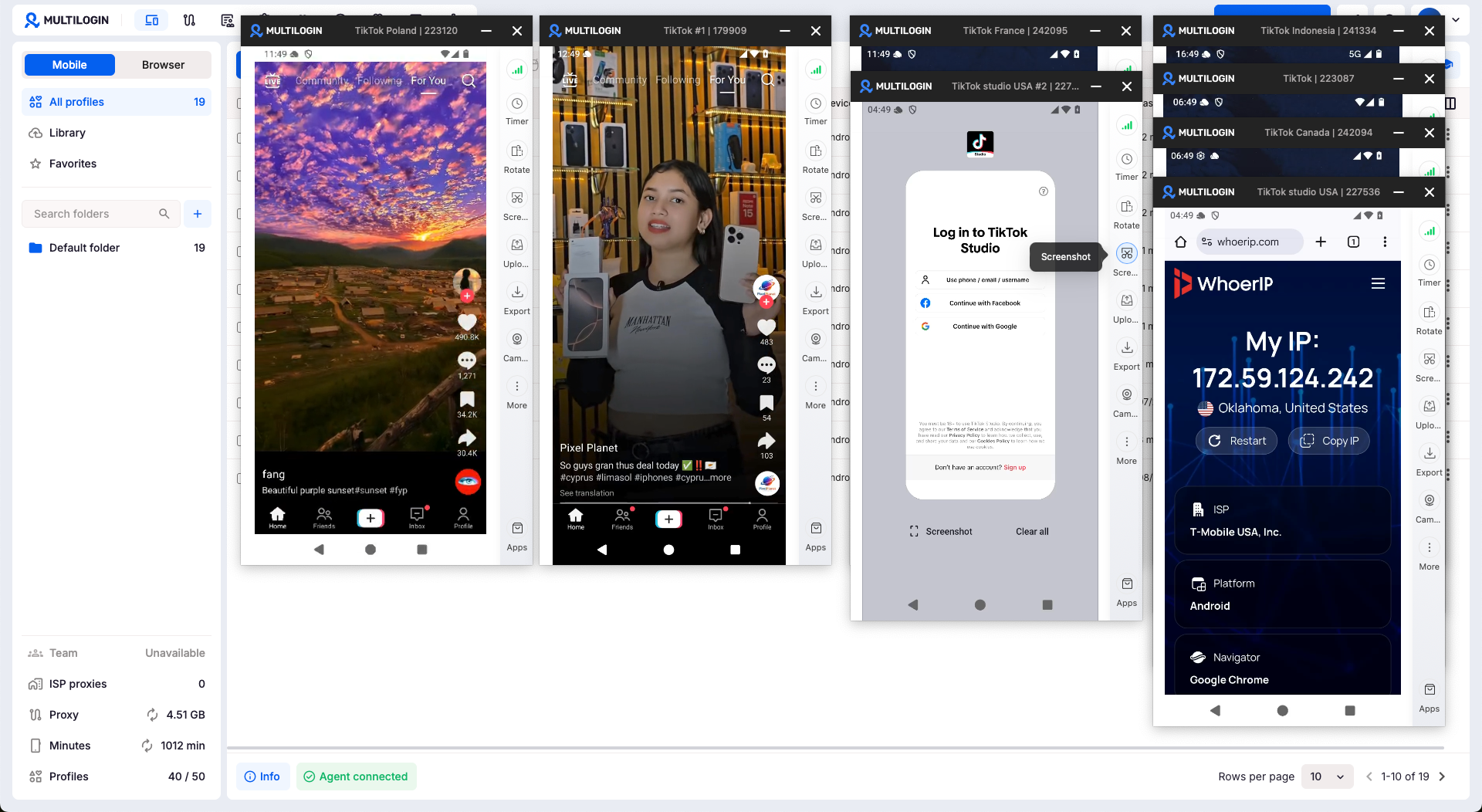
Multilogin dashboard with several Android cloud phones running side by side
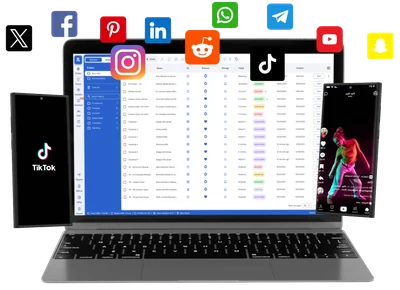
Quick check: what kind of rental do you need?
Read through this list. If two or more points sound familiar, a physical rental will probably slow you down, and a cloud Android phone is worth testing first.
- You run five or more accounts in mobile apps.
- Apps need to stay logged in for weeks, not hours.
- You’ve lost sessions or seen repeated “confirm it’s you” prompts when switching accounts on one device.
- You want each account in its own environment without buying more phones.
- A teammate or contractor needs access to an account, and you don’t want to hand over your own phone.
- You’re tired of charging, updating, and replacing handsets.
If none of these apply and you just need a phone for a weekend event, skip to the physical rental section.
What does renting an Android phone actually mean?
Renting an Android phone means paying for access to an Android device instead of buying it. That access can be physical, with the phone delivered to you, or remote, with the phone’s screen streamed to your computer and controlled with a mouse and keyboard.
Here are the four formats you’ll find, and how they differ:
| Format | Where the phone is | Best for | What to watch |
|---|---|---|---|
| Physical phone rental | Shipped to you | Events, trials, temporary replacement | Deposits, shipping, returns, one device per person |
| Remote device lab | Provider’s data center, shared | App testing across many models | Sessions usually reset; not built for long-term accounts |
| Cloud Android phone | Provider’s data center, assigned to you | Running mobile-app accounts over time | Needs a stable internet connection; no SMS or calls on some platforms |
| Android emulator on your PC | Your computer | Quick tests, development | Not a real phone; heavy on your hardware |
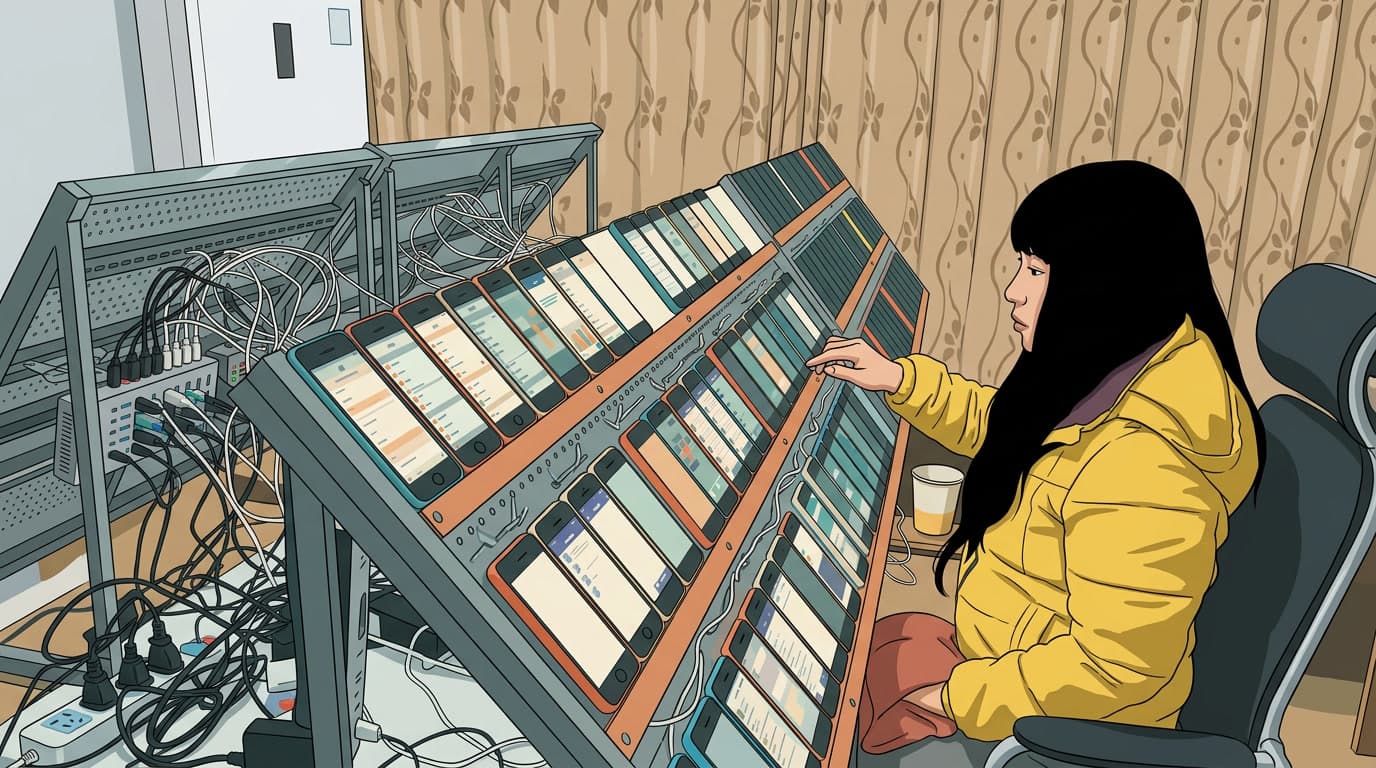
Strictly speaking, an emulator isn’t a rental at all. It’s software that imitates Android on your own computer, so the device doesn’t exist outside your machine.
Where to rent an Android phone, by job
Each format has its own providers. The examples below come from the US search results for “rent Android phones” in November 2026. Prices change often, so check the provider’s page before you commit.
| Rental type | Example providers | Published price | What you get |
|---|---|---|---|
| Physical phones for events | Choose 2 Rent | Quote only, with a multi-day minimum | Samsung Galaxy phones delivered and set up for your event |
| Remote physical phone with a SIM | DistrictDroid, Prox’Easy | DistrictDroid: $30 a day or $150 a month. Prox’Easy: $109.99 a month for an Android phone, or $49.99 for a 7-day trial | One real phone with a US SIM, streamed to your browser |
| Device lab for app testing | AWS Device Farm | $0.17 per device minute, or unmetered slots from $250 a month | A shared pool of real devices for automated and manual tests |
| Cloud phone platforms | Multilogin, GeeLark | DeviceFarm: 30-day plans from $39.99 for 20 phones, plus $0.012 per minute after 60 free minutes. Multilogin: from $7.67 a month billed annually or $11 billed monthly, with minutes and proxies included | Many Android devices in the cloud, billed for runtime. DeviceFarm asks you to bring your own proxy; Multilogin includes proxy traffic |
Prices were taken from each provider’s page on November 23, 2026.
One number is worth remembering: a dedicated remote phone with its own SIM runs about $110 to $150 a month per device. Ten accounts on ten such phones means $1,100 to $1,500 a month before you’ve done any work.
When physical rental is the right choice
Physical rental is still the best option when the phone itself matters, not just the apps on it. Typical cases:
- Events and staffing. Ten identical phones for check-in or lead scanning over two days.
- Trying before buying. Using a new model for a week before paying full price for it.
- Temporary replacement. Your phone is in repair and you need one today.
- Travel and field work. A spare device for a business trip, or a phone with a local SIM.
- Hardware testing. Checking how an app handles a real camera, NFC, or a specific screen in your hand.
For these jobs, renting beats buying because you return the device when the job ends.
Why physical rental doesn’t scale for account work
The trouble starts when the job is ongoing account work: client social media accounts, marketplace stores, app testing over months, or regional ad checks. A rented phone works fine for one account. It gets expensive and messy at ten.
Costs grow with every account
Each account needs its own device, and each device needs its own SIM or network connection. If all your phones share one Wi-Fi network, they share one public IP, and keeping accounts separate gets harder. At $110 to $150 per remote phone a month, the bill climbs fast.
You’re responsible for someone else’s hardware
Rentals usually come with deposits, ID checks, and damage terms. Sending a rented phone to a teammate in another city adds shipping, risk, and paperwork.
Logistics take time
Delivery, returns, extensions, and swapping broken devices are all manual. None of it moves your actual work forward.
It’s a phone farm, just a rented one
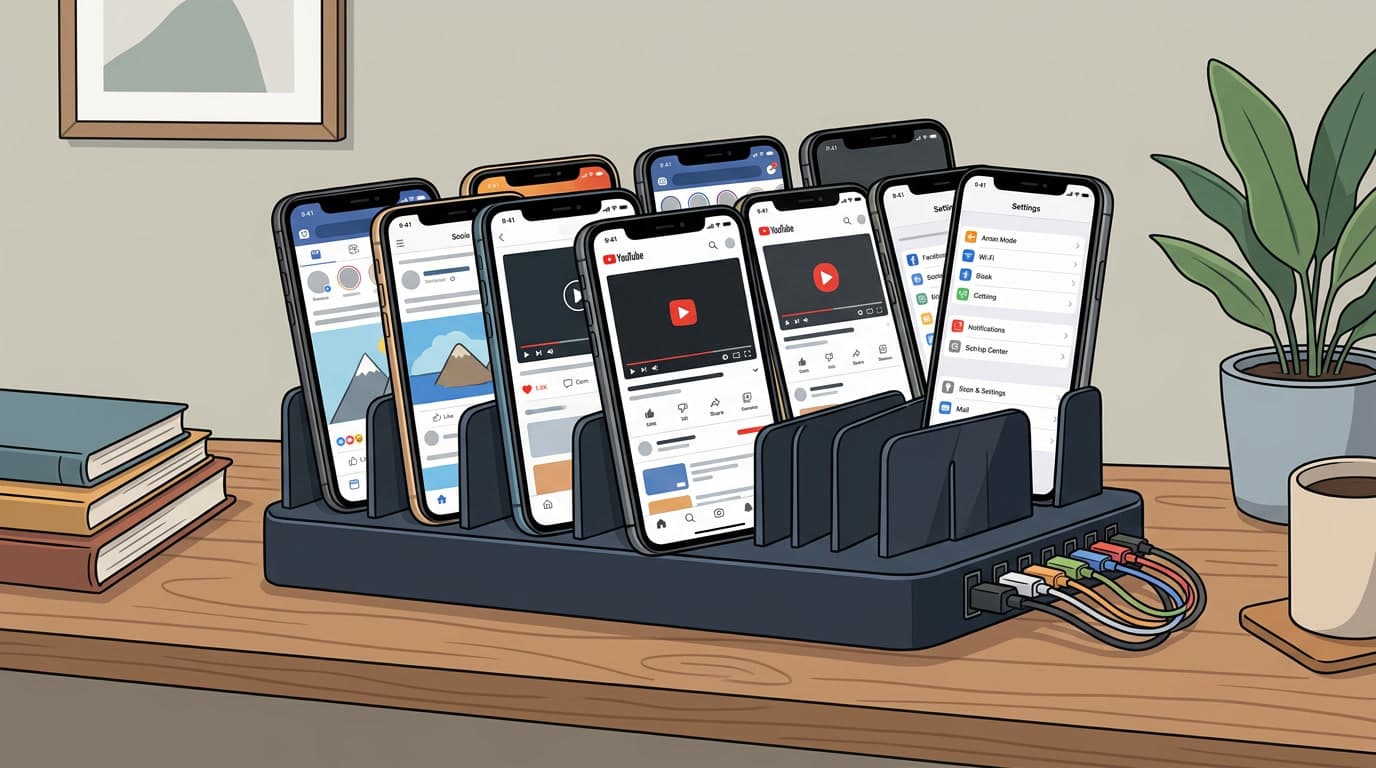
Ten phones on a desk need chargers, cables, a stand, and someone to keep them updated. That’s the classic phone farm, with a rental contract on top.
A cloud Android phone removes most of this. The device sits in a data center and opens in a window on your computer.
You don’t need a SIM card for internet access, because each cloud phone connects through its own proxy with a matching location. Adding the tenth device takes a few clicks, not a courier.
Rented phones vs. your own phone farm vs. cloud phones
| Criteria | Physical phone rental | Your own phone farm | Cloud Android phone (Multilogin) |
|---|---|---|---|
| Upfront cost | Rental fee per device, often a deposit | Buy every device upfront | Free plan; paid plans from $7.67/month billed annually or $11 billed monthly |
| Adding a device | Order and wait for delivery | Buy, set up, and connect another phone | Create a new cloud phone in the app |
| Internet and IP | Buy and set up SIMs or networks yourself | Buy and set up SIMs or networks yourself | Proxy traffic included; each cloud phone gets its own IP and location |
| Account separation | Yes, if each phone has its own connection | Yes, if you set everything up correctly | One cloud phone per account, with separate app data, location, and IP |
| Hardware upkeep | You’re liable for the rented device | You repair and replace devices | Handled by the platform |
| Remote team access | Ship phones to people | Add remote-control software | Share access from the dashboard, with team seats and roles on paid plans |
| Best for | Events, trials, replacements | Large operations with budget and space | Ongoing account work, from a few accounts to hundreds |
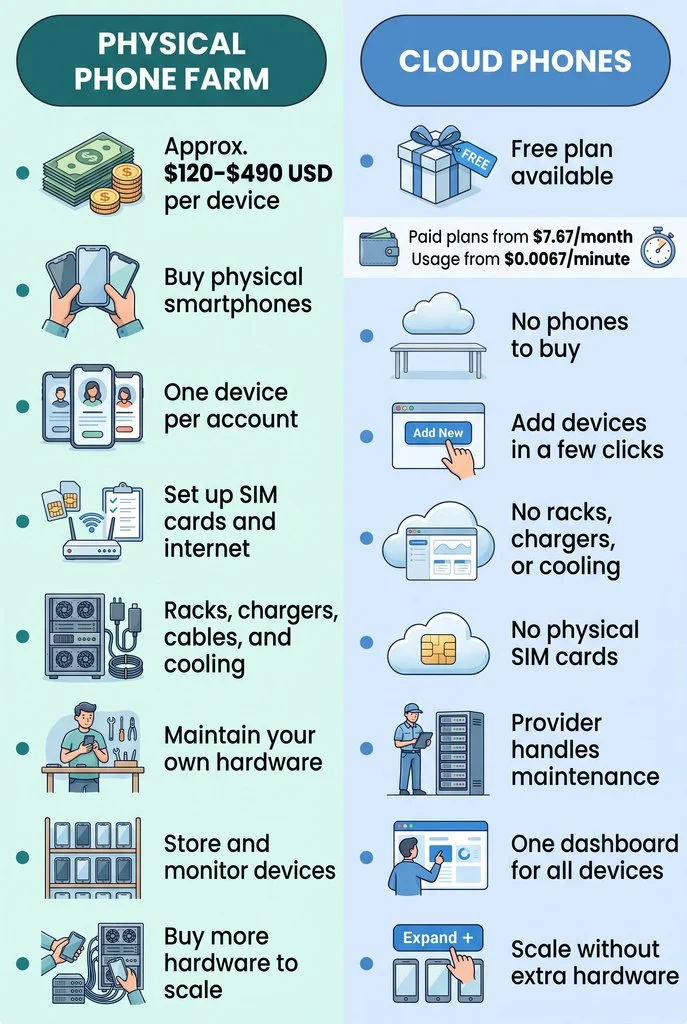
If you need a phone in your hand, rent one. If you need a phone for accounts, rent the environment instead. That’s what a cloud Android phone is.
Top 10 platforms to rent an Android phone in 2026
Not every service that calls itself “cloud Android” does the same job. Some are cloud phones built for accounts, some are gaming services, and some are emulators that run on your own computer. The list below starts with account work and moves toward lighter use.
Prices and details come from each provider’s site or from dated third-party reviews, checked in November 2026. Where a fact comes from a competitor’s review, we say so. Always check the current pricing page before you pay.
1. Multilogin: for running many accounts in mobile apps
Multilogin is a cloud Android phone platform for multi-account management. Each account gets its own cloud phone on a real ARM Android device, with separate app data, location, and IP. Browser profiles for web accounts sit in the same dashboard.
- Best for: social media managers, agencies, and marketplace sellers who run accounts in mobile apps and on the web.
- What’s included: 30+ device types across 12 brands on Android 10 to 16, persistent sessions, APK uploads, built-in residential proxies, and mobile minutes in every plan.
- Price: free plan with no time limit; paid plans from $7.67 per month billed annually or $11 billed monthly. Extra minutes from $0.0067.
- Watch out for: no SMS, calls, or eSIM, and you need a stable internet connection.
More detail is in the Multilogin section below.
2. VMOS Cloud: many remote Android devices at once
VMOS Cloud sells remote Android devices you can run in parallel instead of using an emulator on your PC. It suits people who want apps to keep running without depending on their own computer.
- Best for: running several Android devices side by side.
- Price: billed per device by time period. Check the current rates on the VMOS Cloud pricing page.
- Watch out for: proxies aren’t part of the device price. On Trustpilot, VMOS Cloud had a 2.8/5 rating from 70 reviews in November 2026, with some users reporting unstable devices and Google Play problems.
3. Redfinger: an always-on Android for long sessions
Redfinger is one of the older cloud phone services and is popular with mobile gamers. The phone keeps running after you close the app, which suits tasks that need to stay on for hours.
- Best for: idle games and apps that need to run around the clock.
- Price: per phone, per rental period. A GoLogin review (updated September 2026) lists VIP plans at $0.99 for 1 day, $10.95 for 30 days, and $79.95 for a year, with no free trial.
- Watch out for: the same review found no built-in proxy setup and reported location and latency issues. Compare device tiers and prices carefully.
4. GenFarmer (Genlogin): automation for phone farms
GenFarmer is not a phone rental in itself. According to its documentation, it’s software for screen streaming and no-code automation across “a large number of phones and emulators”, with ADB connections and device backups.
- Best for: teams that already run a phone farm and want to automate it.
- Price: not listed in the documentation we checked.
- Watch out for: you still need the phones, or a separate cloud phone product from the same company. Check that it supports the apps and platforms you use.
5. UGPhone: affordable long-running sessions
UGPhone is a cloud phone service aimed mainly at mobile gaming. Plans are rented by device tier, from one day to a year.
- Best for: keeping games or simple apps running for long periods at a low daily price.
- Price: a GoLogin review (updated November 2026) lists 1-day plans from $1.19 to $3.99 depending on the tier, during a 25% discount.
- Watch out for: the same review found no proxy setup. On Trustpilot, UGPhone had a 2.5/5 rating from 12 reviews, with complaints including Google Play not working.
6. LDCloud: a simple option for basic tasks
LDCloud is a cloud phone service. Its cloud phone guide describes monthly plans, access from a computer, phone, or browser, and multi-instance control.
- Best for: opening an app, keeping a session alive, and other light tasks.
- Price: not listed on the guide. Its blog advertised 100-day plans from $0.22 a day during a Black Friday promotion.
- Watch out for: it isn’t built around managing many accounts, and its blog has a separate guide to buying a proxy for LDCloud, so plan for that cost.
7. GoLogin: browser profiles first, cloud phones on top
GoLogin is best known for browser profiles that keep web accounts separate. It also offers cloud launches, but the core product is browser-based.
- Best for: web-based accounts where you mostly work in a browser.
- Price: the GoLogin pricing page lists the Professional plan at $4.50 a month billed annually ($9 monthly), with a 7-day free trial.
- Watch out for: the Professional plan allows one cloud launch at a time. If most of your work happens in mobile apps, look for a cloud phone product.
8. BlueStacks: easy to start, but it’s an emulator
BlueStacks is a popular Android emulator for your computer. It’s easy to install, which is why many beginners start here. But it runs on your computer, so it isn’t a phone rental.
- Best for: quick app tests and mobile games on a PC.
- Requirements: BlueStacks 5 needs at least 4 GB of RAM and 5 GB of free disk space, and recommends 8 GB of RAM, an SSD, and virtualization turned on.
- Watch out for: performance depends on your PC, and every extra instance uses more of its memory.
9. NoxPlayer: flexible, but also an emulator
NoxPlayer is another desktop emulator. It offers a multi-instance manager and a macro recorder that records and replays your actions.
- Best for: running a few Android sessions on your PC and automating simple, repetitive actions.
- Watch out for: it shares your computer’s hardware and isn’t designed for long-term account work.
10. Real phones on a server: the closest thing to your own handset
Some providers rent out physical phones that sit in their facility and stream to your browser. You get a real handset, often with its own SIM card.
- Best for: tasks that need a real SIM or a specific physical device.
- Price: DistrictDroid charges $30 a day or $150 a month for a Pixel on a US SIM, and Prox’Easy $109.99 a month for an Android phone.
- Watch out for: you pay per device, so costs grow quickly as you add accounts.
Top 10 platforms compared
| Platform | Type | Best for | Main limitation |
|---|---|---|---|
| Multilogin | Cloud phones on real ARM devices, plus browser profiles | Many accounts in mobile apps and on the web | No SMS or calls; needs a stable connection |
| VMOS Cloud | Remote Android devices | Many devices running in parallel | Proxies separate; mixed user reviews |
| Redfinger | Cloud phone, gaming focus | Apps running around the clock | No built-in proxy setup, per a third-party review |
| GenFarmer | Phone farm automation software | Automating an existing phone farm | You still need the phones |
| UGPhone | Cloud phone, gaming focus | Long sessions at a low daily price | No proxy setup, per a third-party review |
| LDCloud | Cloud phone | Basic tasks, keeping sessions alive | Not built for managing many accounts |
| GoLogin | Browser profiles with cloud launches | Web-based accounts | One cloud launch at a time on the entry plan |
| BlueStacks | Desktop emulator | Quick tests and games | Depends on your PC |
| NoxPlayer | Desktop emulator | A few sessions with macros | Not for long-term account work |
| Physical phone on a server | Real handset, remote access | Tasks that need a real SIM | Priced per device, scales poorly |
Four myths about cloud phones
People often arrive with assumptions that push them toward the wrong tool. These four come up most.
Myth 1: “Every cloud Android phone is just an emulator”
Not true, and this is the biggest difference in the market. An emulator imitates Android on top of a regular desktop or server processor. A cloud phone on real ARM hardware runs Android on an actual mobile processor.
On a real device, apps can read the information they expect from a phone, such as device identifiers, hardware details, battery state, and sensor data. Both options are sold as “cloud Android”, so check what’s underneath before you pay.
Myth 2: “Renting a phone is only for gamers”
Gaming is one use, but it’s far from the only one. People rent Android phones for social media management, marketplace selling, app testing, regional ad checks, and giving team members access to accounts.
Myth 3: “An emulator on my PC is always cheaper”
At the start, yes. But every extra emulator instance takes memory and CPU from your own computer, and keeping a dozen of them updated and logged in takes real time. Free software isn’t free when it costs you hours every week.
Myth 4: “More devices automatically means better separation”
Not necessarily. Ten phones on the same Wi-Fi network still share one public IP. Separation depends on giving each account its own device, app data, location, and connection, not just more hardware.
How a cloud Android phone works in Multilogin
Multilogin is a cloud Android phone platform for multi-account management. Each Multilogin cloud phone runs on a real ARM Android device hosted in the cloud. You control it from the Multilogin desktop app, and it stays assigned to your account until you delete it.
In daily work, that looks like this:
- One cloud phone per account. Each account gets its own device, app data, location, and IP.
- Real devices, real Android. Each cloud phone runs on real ARM hardware. Choose from 30+ device types across 12 brands, including Samsung, Google, Xiaomi, OPPO, Motorola, and Vivo, on Android 10 to 16.
- Sessions stay put. App data and login history persist between sessions, so you don’t start from scratch each time.
- Any Android app. Install from the built-in app store or upload your own APK.
- Built-in proxies. Residential proxy traffic is included in every plan. Each cloud phone gets its own IP with a matching location, carrier, and GPS region. You can also bring your own HTTP, HTTPS, SOCKS5, or ISP proxies.
- Camera input. Use your computer’s camera or upload a video file when an app needs the camera.
- Automation. On paid plans, you can use the API and ADB to run scripts and tools such as Appium.
Web accounts fit into the same setup. Multilogin also includes browser profiles with separate cookies and sessions, so a seller who manages a store in an app and its back office in a browser can keep both in one dashboard.
[Image suggestion: real screenshot of the Multilogin mobile profile list with several cloud phones running. Alt: “Multilogin dashboard with several Android cloud phones running side by side”]
What it costs
Multilogin offers a free plan with no time limit and no credit card needed. Paid plans start from $7.67 per month (billed annually) or $11 billed monthly. See plans and pricing for the current details.
The entry paid plan, Pro 10, includes 10 profiles across cloud phones and browser profiles, 60 mobile minutes and 1 GB of proxy traffic per month, API access, and one team seat. Extra mobile minutes start from $0.0067 per minute on the largest packs, and unused paid minutes roll over.
Mobile minutes only count while a cloud phone is running. When you stop it, the apps, files, and logins stay saved, and you aren’t billed until you start it again. That’s the main cost difference from a rented handset, which you pay for whether you use it or not.
A worked example
Say you manage 10 client accounts and spend about 15 minutes in each app every working day. That’s 150 minutes a day, or roughly 3,300 minutes over 22 working days.
On Pro 10, 60 minutes are included. The remaining 3,240 minutes cost about $22 to $27, depending on the minute pack ($0.0067 to $0.0084 per minute). Add the $11 monthly plan, and you’re at roughly $33 to $38 a month for 10 separate Android devices, with proxy traffic included.
This is an illustration, not a quote. Your total depends on how long each phone runs and how much proxy traffic you use.
What cloud phones can’t do
Be clear about the limits before you move accounts over:
- No SMS or calls. Multilogin cloud phones can’t send or receive texts or calls, and they don’t support eSIMs. If an app sends a verification code, use your own phone or an external SMS service and enter the code in the app. See how SMS verification works with cloud phones.
- You need a reliable internet connection. The phone streams to your screen, so a slow connection makes it harder to use.
- Some regions are restricted. Mainland China proxy IPs and apps such as WeChat and Alipay aren’t supported.
- New setups take time. First-time users may need a few Learning Center videos to get comfortable managing cloud phones.
- Separate devices don’t fix content problems. Posting the same content across many accounts can still cause issues, whatever device you use.
How to choose a phone rental service: six questions
Don’t choose on a landing page price alone. Ask these six questions first.
- Do you need to touch the phone? If yes, rent a physical device. If you only need the apps, a remote option will be cheaper and easier.
- Does the device keep its state? Testing labs often reset devices after each session. For accounts, you need app data and logins to stay where you left them.
- Is it a real device or an emulator? Ask whether the service runs on real ARM hardware. “Cloud Android” can mean either.
- Does every account get its own environment? Each account should have its own device, app data, and IP, not just a separate window.
- Do the network and location match? If the IP says one country and the device region says another, things look inconsistent. Check whether proxies are included and whether location settings follow the IP.
- Can your team use it? When contractors or clients join, you’ll want shared access and permissions instead of passing phones or passwords around.
Then add up the full monthly bill: device or plan fee, usage time, proxies or SIM cards, and any team seats. The entry price and the total cost are different numbers.
Cloud phone, virtual phone, remote Android: what’s the difference?
These terms are often used interchangeably, but they aren’t quite the same.
| Term | What it usually means | How close to a real phone |
|---|---|---|
| Cloud phone | An Android device hosted in a data center and accessed over the internet | High when it runs on real ARM hardware; depends on the provider |
| Virtual phone | Any Android environment you control from a computer, including emulators | Low for emulators, high for real-device cloud phones |
| Remote Android | Any Android device you control over the internet, physical or cloud | High, because it’s usually a real device |
In short, “virtual phone” is the broadest term. A cloud phone is one kind of virtual phone, and “remote Android” puts the focus on controlling the device over the internet.
So, should you rent an Android phone?
If you need a device in your hand for an event, a trip, or a test drive, rent a physical phone. If you need to test an app on dozens of models for a few minutes each, use a device lab.
If your accounts have to stay logged in, stay separate, and be shared with a team, a cloud Android phone is usually the more practical choice. You skip the shipping, SIM cards, and chargers, and pay mainly for the time the phones actually run.
The easiest way to find out is to try one. Multilogin’s free plan includes one cloud phone, 30 mobile minutes, with no credit card needed. That’s enough to install your apps and see how the workflow feels.
FAQ
What does it mean to rent an Android phone?
It means paying for access to an Android device instead of buying one. You can rent a physical phone that’s shipped to you, or a remote device that runs in a data center and streams to your computer.
How much does it cost to rent an Android phone?
It depends on the format. In November 2026, a remote physical phone with a US SIM cost about $30 a day or $110 to $150 a month, and device labs such as AWS Device Farm charged $0.17 per device minute.
Multilogin cloud phones are part of a plan, with a free plan and paid plans from $7.67 per month billed annually or $11 billed monthly, plus usage beyond the included minutes.
Is a cloud phone the same as an Android emulator?
No. An emulator imitates Android on your computer’s processor. A Multilogin cloud phone runs on a real ARM Android device in a data center, and you control it remotely.
Can I rent an Android phone to manage multiple social media accounts?
Yes. A cloud Android phone fits this well because you can give each account its own device, app data, location, and IP. Keep in mind that separate devices don’t change platform rules, so follow each app’s terms.
Can a cloud phone receive SMS verification codes?
Multilogin cloud phones can’t receive SMS or calls. Use your own phone number or an external SMS provider for the code, then enter it in the app on the cloud phone.
Do cloud phones keep running when I close the app?
A Multilogin cloud phone uses mobile minutes only while it’s running. When you stop it, your apps and logins stay saved for the next session. You can also set auto-stop on Pro 20 and higher plans so a forgotten phone doesn’t keep using minutes.
Do I still need browser profiles if I use cloud phones?
Only if part of the work happens on websites, such as a seller back office, an ads dashboard, or Reddit in a browser. Multilogin includes browser profiles in the same dashboard, and you can sync their location with a cloud phone used for the same account.
What's the cheapest way to try a rented Android phone?
Start with a free plan. Multilogin’s free plan has no time limit and includes one cloud phone with 30 mobile minutes and 200 MB of proxy traffic as a one-time allowance. Free plan profiles are deleted after 7 days of inactivity, so start a profile at least once a week while you test.
 Join 4,200+ subscribers