



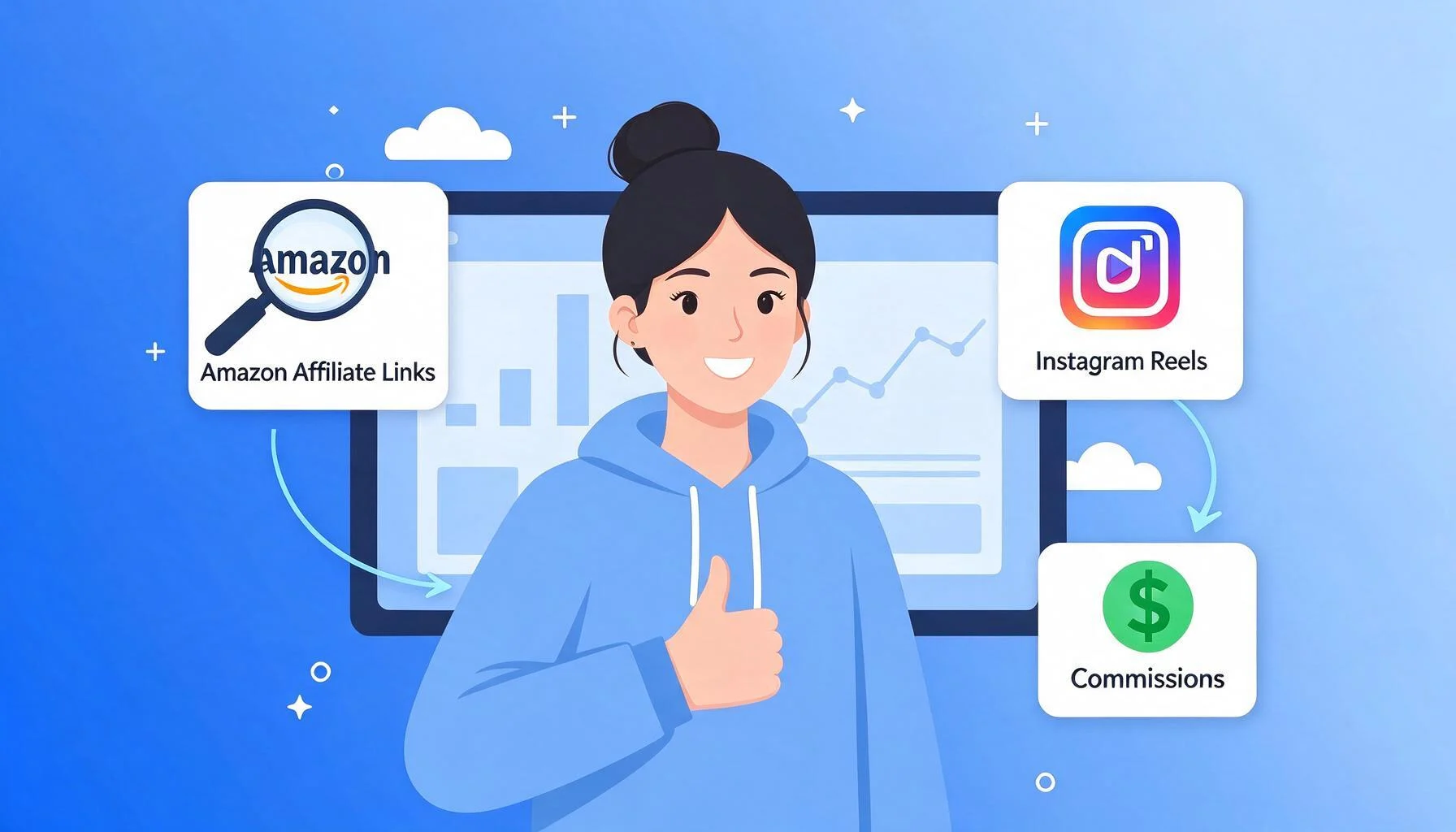

Instagram now allows eligible US creators to add Amazon affiliate links directly to Reels and feed posts. On November 16, 2026, Instagram introduced an Amazon integration that lets creators connect their Amazon Influencer accounts, attach up to 30 products per Reel, and earn commissions from qualifying purchases.
Previously, creators mainly relied on bio links and Instagram Stories to promote Amazon products. The new integration reduces the number of steps viewers need to take to find a recommended product.
If affiliate marketing is part of your strategy to monetize Instagram, you can now combine direct product recommendations with traditional affiliate link placements.
This guide explains how to add Amazon affiliate links to Instagram Reels, meet disclosure requirements, track sales and manage affiliate content across multiple Instagram accounts.
Key takeaways
- Eligible US creators can attach up to 30 Amazon products per Instagram Reel and 20 per feed post.
- Instagram automatically applies affiliate attribution to supported Amazon product links after an eligible account is connected.
- Creators without access to native product linking can use Instagram bio links and Story link stickers.
- Amazon affiliate promotions require clear commission disclosures.
- Amazon tracking IDs help measure the performance of different promotional channels.
- Cloud Android phones can help creators organize affiliate content workflows across multiple Instagram accounts.
Can you add Amazon affiliate links directly to Instagram Reels?
Yes. Instagram introduced direct Amazon affiliate product linking for eligible US creators on November 16, 2026. Creators can connect their Amazon Influencer accounts and attach clickable product links to Reels and feed posts.
According to Instagram’s announcement covered by Social Media Today, the integration supports up to 30 products per Reel and 20 per feed post.
Viewers can select a featured product and continue to Amazon to complete their purchase. Creators earn commissions from qualifying transactions under Amazon’s affiliate program terms.
Unlike standard URLs pasted into Reel captions, native product links provide a clickable shopping option.
| Affiliate link placement | Clickable? | Best for |
|---|---|---|
| Native Reel product links | Yes, for eligible accounts | Products featured in videos |
| Native feed post product links | Yes, for eligible accounts | Product photos and carousels |
| Standard Reel caption URLs | Generally no | Directing viewers to your bio |
| Instagram bio links | Yes | Storefronts and product collections |
| Instagram Story link stickers | Yes | Individual product recommendations |
| Story Highlights | Yes, through link stickers | Long-term product discovery |
Native product linking provides a shorter shopping journey, while bio links and Story stickers remain useful for accounts without access to the integration.
Who can add Amazon affiliate links to Instagram Reels?
Instagram’s Amazon affiliate integration initially launched for eligible US creators participating in the Amazon Influencer Program.
Instagram’s native affiliate tools have reported eligibility requirements that include:
- Being at least 18 years old.
- Having a public professional Instagram account.
- Having at least 1,000 followers.
- Meeting applicable monetization and platform policies.
These requirements do not guarantee access to the Amazon integration. You must also have an eligible Amazon Influencer account and access to the relevant affiliate features.
Check your Instagram Professional Dashboard to confirm your eligibility.
Amazon Associates vs Amazon Influencer Program
Amazon Associates and the Amazon Influencer Program allow participants to earn commissions from product recommendations. However, the programs offer different promotional tools.
The Amazon Influencer Program is an extension of Amazon Associates designed for creators with an established social media presence.
| Feature | Amazon Associates | Amazon Influencer Program |
|---|---|---|
| Affiliate commissions | Yes | Yes |
| Individual product links | Yes | Yes |
| Dedicated influencer storefront | Not a standard Associates feature | Yes |
| Native Instagram Amazon integration | Not confirmed for Associates-only accounts | Available to eligible creators |
| Affiliate performance reporting | Yes | Yes |
Amazon Associates members can promote products through approved Instagram accounts using traditional affiliate links.
The native Instagram integration introduced in November 2026 supports eligible Amazon Influencer accounts.
Is Instagram’s Amazon affiliate integration available in every country?
Instagram’s native Amazon affiliate integration initially launched in the United States. Wider international availability has not been confirmed at the time of writing.
Creators in other countries can continue using traditional affiliate links through Instagram bio links and Stories, subject to their local Amazon affiliate program requirements.
Changing your IP address or device location does not establish eligibility for a regional affiliate program. You must meet Instagram and Amazon’s applicable requirements.
How to add Amazon affiliate links to Instagram Reels: Step by step
To add Amazon affiliate links directly to an Instagram Reel, connect your eligible Amazon Influencer account through Instagram’s Professional Dashboard, create your video and attach the relevant products before publishing.
Step 1. Check your Instagram and Amazon eligibility
Open Instagram and check your Professional Dashboard for available affiliate and monetization features.
Make sure you have an approved Amazon Influencer account. If you have not joined the program, apply through the Amazon Influencer website.
Amazon evaluates your social media presence as part of its application process.
Step 2. Connect your Amazon account to Instagram
Open your Instagram profile and go to the Professional Dashboard.
Navigate to the Monetization section and find the available affiliate program connection options. Select Amazon and follow the authorization instructions to connect your Amazon Influencer account.
Review any permissions related to your account, content usage, affiliate attribution and advertising before accepting them.
If the Amazon connection option is missing, your account may not meet the eligibility requirements, or the feature may not be available in your region.
Step 3. Create a Reel featuring Amazon products
Record or upload a video that demonstrates the products you want to recommend.
Effective product content helps viewers understand how an item works, what problem it solves or whether it meets their needs.
For instance, if you recommend a wireless microphone, demonstrate the difference between audio recorded with and without the microphone.
This gives viewers useful information before they decide whether to purchase it.
Step 4. Add Amazon affiliate product links to your Reel
On the Reel publishing screen, find the product linking option and add the Amazon product URLs for the items featured in your video.
Once your Amazon account is connected, Instagram automatically applies affiliate attribution to supported Amazon products, even when you use a standard product URL.
You do not need to generate a separate affiliate URL through SiteStripe for every product when using the native integration.
Instagram also allows creators to review estimated product commission rates before publishing.
Check your product selection and commission information before continuing.
Step 5. Add your affiliate disclosure
Tell viewers that you may earn a commission when they purchase through your links.
An example disclosure is:
“I may earn a commission if you purchase through the affiliate links in this video.”
Include the disclosure in the video and near the recommendation in the caption. Use Instagram’s applicable commercial content disclosure tools where required.
Step 6. Publish the Reel and check your product links
Publish your Reel and open it to confirm that the product links appear correctly.
Check that the links lead to the intended Amazon listings and that each product matches the recommendation in your video.
Exact menu labels and available options may vary by Instagram app version, account eligibility and region.
How to add Amazon affiliate links if product linking is unavailable
If your Instagram account does not support native Amazon product linking, you can still promote eligible products through Instagram bio links and Story link stickers.
Create trackable Amazon affiliate links with SiteStripe
Amazon SiteStripe allows approved Associates to generate affiliate links directly from Amazon product pages.
To create an Amazon affiliate link:
- Sign in to the Amazon account associated with your Associates membership.
- Open the product page you want to promote.
- Select the text link option in SiteStripe.
- Choose the appropriate tracking ID.
- Copy the generated affiliate link.
- Share the link through an approved promotional channel.
According to Amazon’s SiteStripe documentation, official Amazon short links already contain your Associate ID and tracking ID.
Avoid link-shortening methods that conceal the Amazon destination or interfere with affiliate attribution.
Add Amazon affiliate links to your Instagram bio
Instagram bio links are useful for creators promoting products that cannot be attached directly to Reels.
Open your Instagram profile, select Edit profile and go to the Links section. Add your affiliate product link or Amazon storefront URL with a descriptive title.
A home office creator could use titles such as:
- My home office essentials
- Recommended desk accessories
- Shop my Amazon storefront
Direct viewers to the relevant profile link in your Reels.
If you use a third-party link-in-bio service, make sure the page complies with Amazon’s participation requirements and is included in your approved promotional channels where required.
Share Amazon affiliate links using Instagram Stories
Instagram Story link stickers provide another clickable route from your Reels to Amazon.
Create a Story or share a published Reel to your Story. Add a link sticker containing the relevant Amazon affiliate URL and include a visible commission disclosure.
Save useful Stories in Highlights so followers can access your recommendations after the original Stories expire.
Native product links vs link-in-bio funnels
Native product links allow viewers to select a featured item directly from a Reel. Traditional affiliate funnels require viewers to visit your profile or Story before selecting an Amazon link.
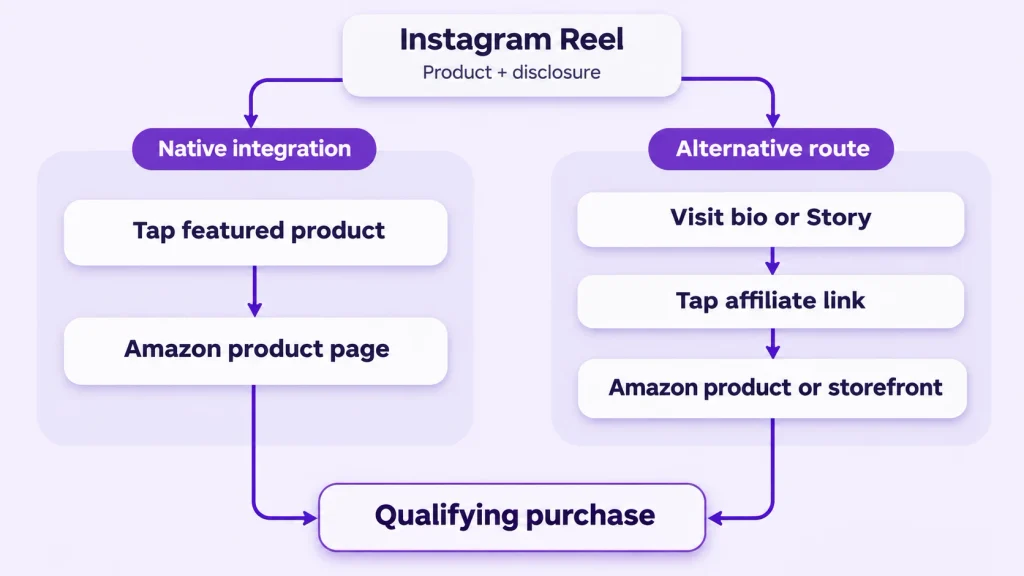
Instagram told TechCrunch that embedded product links attracted roughly twice the clicks of bio links in its internal observations.
This is platform-reported data, not an independent benchmark or a guarantee of additional clicks or sales.
Bio links remain useful for promoting storefronts, larger product collections and products through accounts without native linking access.
How to add multiple Amazon affiliate links to one Instagram Reel
Eligible Instagram creators can attach up to 30 Amazon product links to one Reel.
This is useful for shopping guides, product comparisons and tutorials featuring several related items.
Imagine you create a Reel about setting up a home recording studio. You could attach product links for a microphone, headphones, lighting equipment, a microphone stand and a phone tripod.
Each product gives viewers a separate shopping option.
However, adding more links does not automatically increase sales. Focus on products that appear in the video and are relevant to your audience.
If you regularly recommend larger product collections, an Amazon storefront may be a more practical way to organize them.
What are the rules for Amazon affiliate links on Instagram?
Creators promoting Amazon products on Instagram must follow Amazon’s affiliate program policies, Instagram’s applicable commercial content rules and relevant advertising regulations.
Access to native affiliate linking does not remove these responsibilities.
How to disclose Amazon affiliate links in Instagram Reels
Amazon requires Associates to disclose their commercial relationship near affiliate links and identify themselves as Amazon Associates on their promotional channels.
Amazon’s required Associate identification statement is:
“As an Amazon Associate I earn from qualifying purchases.”
According to Amazon’s affiliate disclosure requirements, creators must include both an appropriate link-level disclosure and their required Associate identification.
The US Federal Trade Commission also explains in its social media influencer disclosure guidelines that video endorsements should include disclosures within the video itself.
| Placement | Example disclosure |
|---|---|
| Reel on-screen text | Affiliate links. I may earn a commission. |
| Spoken disclosure | I may earn a commission if you buy through these links. |
| Reel caption | Affiliate disclosure: I earn commissions from qualifying purchases. |
| Instagram profile | As an Amazon Associate I earn from qualifying purchases. |
| Instagram Story | Affiliate link. I may earn a commission. |
Make disclosures easy to notice and understand. Avoid hiding them among unrelated hashtags or placing them where viewers must expand the caption to find them.
When a Reel contains both visual and spoken recommendations, using both on-screen and spoken disclosures helps viewers understand the commercial relationship.
Use Instagram’s applicable commercial content labels when required, but do not rely on platform labels alone to meet all disclosure obligations.
Amazon affiliate link restrictions and common violations
Amazon may restrict or terminate accounts that violate its affiliate program requirements.
Common mistakes to avoid include:
- Publishing affiliate links through unapproved promotional channels.
- Failing to disclose affiliate commissions.
- Purchasing products through your own affiliate links.
- Offering incentives for affiliate link clicks or purchases.
- Artificially generating referral traffic.
- Making misleading claims about products.
- Presenting outdated product prices as current.
- Concealing the Amazon destination of affiliate URLs.
If you manage several Instagram accounts, make sure the relevant promotional channels are registered with Amazon where required.
Review the current Amazon Associates Program Policies before expanding your affiliate activities.
What permissions do you grant when connecting Amazon to Instagram?
Connecting an Amazon Influencer account to Instagram may involve permissions related to affiliate attribution, content usage and advertising.
Following the November 2026 launch, creators raised concerns about whether their affiliate content could be used in advertisements and how commissions would apply.
Amazon also operates a Creator Ads Boost Program. Participants who agree to its terms authorize Amazon to use eligible affiliate content in advertisements across participating platforms. Amazon’s published program policy provides an opt-out option.
Before connecting your accounts, check which permissions apply to your specific arrangement, whether your content can be used in advertisements and how commissions are calculated.
Do not assume that organic affiliate commissions and earnings from advertising arrangements follow identical terms.
These conditions may affect your existing agreements with brands and other commercial partners.
How to create Instagram Reels that convert Amazon affiliate sales
Affiliate Reels should help viewers make informed purchasing decisions. Demonstrate how a product works, explain its limitations and show why it is relevant to your audience.
Choose products that match your audience
Product relevance matters more than the number of affiliate links you publish.
A fitness creator might recommend resistance bands or exercise mats. A travel creator could focus on luggage, packing organizers and portable chargers.
When choosing products, consider their relevance, quality, price, availability and opportunities for original demonstrations.
Avoid recommending items solely because they offer higher commission rates. Audience trust is important for long-term affiliate earnings.
Use Reel formats that demonstrate product value
Different video formats support different purchasing decisions.
| Reel format | Content example | Purpose |
|---|---|---|
| Product demonstration | Testing a portable blender | Show how the product works |
| Product comparison | Two budget microphones compared | Help viewers choose |
| Honest review | My experience using a standing desk | Explain benefits and limitations |
| Product roundup | Five useful home office accessories | Introduce related products |
| Problem and solution | Organizing a small kitchen | Address a specific need |
| Tutorial | Setting up a home recording studio | Demonstrate products in context |
| Unboxing | What comes with a travel camera kit | Show what buyers receive |
Test different formats and compare their results.
A Reel with fewer views but a more relevant audience may generate more affiliate commissions than a viral video with limited purchasing intent.
How to increase Amazon affiliate link clicks without hurting reach
Instagram stated that adding products through its new native affiliate integration would not reduce content reach, according to reporting by The Verge.
However, this does not guarantee that every affiliate Reel will receive the same distribution as non-promotional content. Viewer interest, originality, engagement and recommendation eligibility still matter.
To improve your affiliate content:
- Introduce the product or problem early in the video.
- Demonstrate the product rather than simply displaying it.
- Give viewers a clear reason to visit the listing.
- Use an accurate and relevant call to action.
- Compare similar videos with and without affiliate links using Instagram Insights.
A natural call to action could be:
“I’ve linked the microphone featured in this Reel if you want to check its specifications and current price.”
Avoid repetitive promotional content, misleading discounts, artificial engagement and unsupported product claims.
How to track Amazon affiliate sales from Instagram Reels
You can track Amazon affiliate performance using Instagram Insights, available affiliate metrics in your Professional Dashboard and Amazon Associates reporting tools.
Instagram provides content performance information, while Amazon reports affiliate referrals, orders and commission earnings.
Use Amazon tracking IDs to organize affiliate traffic
Amazon tracking IDs help creators measure the performance of different promotional channels under one Associates account.
For instance, a creator can use different tracking IDs for Instagram bio links, Stories and a product review website.
| Promotional channel | Illustrative tracking ID |
|---|---|
| Instagram bio | creator-bio-20 |
| Instagram Stories | creator-story-20 |
| Home office Instagram account | creator-office-20 |
| Travel Instagram account | creator-travel-20 |
| Product review website | creator-blog-20 |
These tracking IDs are examples. Create your own through Amazon Associates Central.
According to Amazon’s tracking ID documentation, multiple tracking IDs remain associated with one main Associates ID.
For native Instagram product links, check the reporting and attribution options available through the integration. Custom tracking ID controls may differ from traditional Amazon affiliate links.
Measure Instagram Reel performance and affiliate conversions
Track both content engagement and commercial results to understand which Reels contribute to affiliate earnings.
| Metric | What it measures | Data source |
|---|---|---|
| Reach | Unique accounts that saw your content | Instagram Insights |
| Views | Number of Reel views | Instagram Insights |
| Watch time | Time spent watching your Reel | Instagram Insights |
| Product link taps | Interest in featured products, where reported | Instagram Professional Dashboard |
| Affiliate clicks | Recorded referrals to Amazon | Amazon Associates Central |
| Ordered items | Products ordered through attributed referrals | Amazon Associates Central |
| Conversion rate | Ordered items relative to recorded affiliate clicks | Amazon Associates Central |
| Commission earnings | Income from qualifying transactions | Amazon Associates Central |
Instagram link taps and Amazon-recorded clicks may differ because the platforms use different measurement systems.
Use consistent reporting periods and tracking IDs where available.
Remember that views are not the same as unique viewers, and ordered items are not necessarily the same as individual customers or transactions.
How to calculate the ROI of Amazon affiliate Reels
Return on investment (ROI) measures the profit generated by affiliate content relative to its production and operating costs.
ROI = (Affiliate earnings − Total costs) ÷ Total costs × 100
Consider a creator who publishes an Instagram Reel featuring home office products.
| Performance metric | Example result |
|---|---|
| Reel views | 20,000 |
| Affiliate clicks | 600 |
| Qualifying purchases | 30 |
| Average commission per purchase | $3 |
| Total affiliate earnings | $90 |
| Content production and operating costs | $60 |
| Net profit before tax | $30 |
| ROI | 50% |
In this hypothetical campaign, the creator earns $30 in profit before tax after covering $60 in costs.
The purchase conversion rate is 5%, affiliate earnings per click are $0.15 and the click-to-view ratio is 3%.
These figures are illustrative and do not represent actual Instagram or Amazon performance benchmarks.
When calculating your real ROI, include product samples, editing software, content production, account management tools and other operating expenses. Account for returns and commission adjustments when applicable.
Amazon affiliate Reel ROI calculator
Use the calculator to estimate affiliate earnings, net profit, purchase conversion rates, earnings per click and return on investment.
Enter your Reel views, affiliate clicks, qualifying purchases, average commission and total campaign costs to evaluate your results.
Use confirmed commission earnings rather than estimated commissions when evaluating completed campaigns.
Amazon affiliate Reel ROI calculator
Enter campaign results and costs in USD. Results appear automatically once all fields are completed. Enter 0 where applicable.
How to manage Amazon affiliate Reels across multiple Instagram accounts
Managing affiliate content becomes more complex when you operate multiple Instagram accounts across different niches, brands or audiences.
Each account may have its own content calendar, product recommendations, login sessions, disclosures and performance reports.
A structured account management workflow helps organize these activities without maintaining multiple physical phones.
Organize Instagram accounts by niche, audience or brand
When expanding an established affiliate content workflow, give each Instagram account a clear purpose and original content strategy.
Consider a creator managing three Instagram accounts.
| Account | Content niche | Recommended products | Content format |
|---|---|---|---|
| Account 1 | Home office | Microphones, monitors and desk accessories | Product reviews |
| Account 2 | Home organization | Storage products and kitchen tools | Tutorials |
| Account 3 | Travel | Luggage and portable chargers | Product demonstrations |
Each account serves a different audience and publishes relevant original content.
The creator can use separate Amazon tracking IDs for eligible traditional affiliate links to compare performance without necessarily opening multiple Amazon Associates accounts.
Keep your promotional channels registered with Amazon where required, and check native affiliate integration eligibility for each Instagram account separately.
When expanding your publishing workflow, follow these best practices for setting up multiple social profiles to keep account environments and daily activities organized.
Manage multiple Instagram accounts with Multilogin cloud phones
Multilogin cloud phones for Instagram help creators manage multiple accounts on real Android devices in the cloud.
Instead of maintaining several physical phones, you can access separate cloud Android phones from one dashboard. Each account can have its own app data, IP address and persistent login history.
Multilogin also includes isolated browser profiles for related web-based tasks, such as reviewing Amazon Associates reports.
| Multilogin capability | How it supports Instagram creators |
|---|---|
| Cloud Android phones | Access the native Instagram app for each account |
| Persistent app data | Maintain account sessions between uses |
| Built-in residential and mobile proxies | Manage separate network environments |
| Isolated browser profiles | Access Amazon Associates Central and other web dashboards |
| Tags and notes | Organize accounts by niche or campaign |
| Included mobile minutes | Cover a portion of your cloud phone usage |
| Centralized dashboard | Access mobile and browser workflows from one platform |
Understanding the difference between cloud phones and browser profiles helps you choose the right environment for each task. Cloud phones support native Instagram activities, while browser profiles are suitable for web-based affiliate reporting and research.
For creators managing several Instagram accounts, this setup reduces the need to maintain separate physical devices.
Multilogin does not grant Amazon affiliate approval, generate commissions or guarantee Instagram reach. Access to native affiliate features depends on Instagram and Amazon’s eligibility requirements.
How to set up your Instagram affiliate workflow with Multilogin
- Create a Multilogin account.
- Create an Android cloud phone for each existing Instagram account.
- Configure network settings appropriate to the account’s legitimate operating location.
- Install Instagram app from Multilogin internal Apps marketplace.
- Open Instagram and sign in.
- Check whether the account supports Amazon’s native affiliate integration.
- Upload, publish and review original content for each audience.
- Use browser profiles for related web-based reporting and account management tasks.
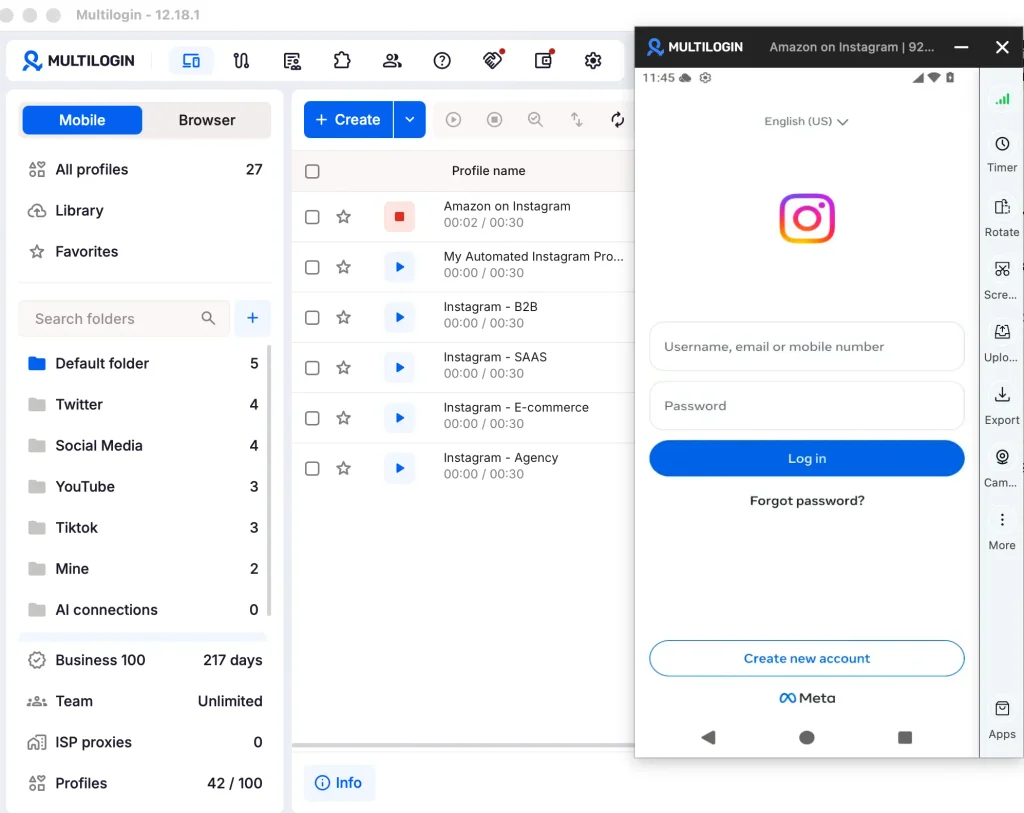
Multilogin’s Android cloud phone features support mobile app workflows and allow you to manage cloud phone sessions from your computer.
If Instagram requests SMS verification, you need access to a separate phone number that Instagram accepts. Multilogin cloud phones cannot receive SMS messages or phone calls directly.
How much does Multilogin cost for Instagram creators?
Multilogin offers a Free plan with no time limit and no credit card required. Standard paid plans start from $7.67 per month billed annually or $11 billed monthly.
| Feature | Free plan | Pro 10 |
|---|---|---|
| Total profiles | 5 | 10 |
| Profile types | 1 cloud phone and 4 browser profiles | Cloud phones and browser profiles |
| Included proxy traffic | 200 MB, one-time | 1 GB per month |
| Included mobile minutes | 30 minutes, one-time | 60 minutes per month |
| Standard monthly subscription | Free | $11 |
| Annual billing equivalent | Free | $7.67/month |
The Free plan allows creators to test a cloud phone before expanding to a paid setup.
Free profiles are deleted after seven days of inactivity, and included mobile minutes and proxy traffic do not renew.
If you are evaluating account management tools for the first time, this guide to free cloud phones explains common usage limits and the differences between free and paid services.
Creators managing several Instagram accounts can choose a paid plan based on their profile capacity and usage requirements. Additional mobile minutes and proxy traffic are available for paid subscriptions.
Prices shown are standard subscription rates and exclude temporary promotional offers.
Why are my Amazon affiliate links not showing in Instagram Reels?
Amazon affiliate product links may not appear because of regional availability, account eligibility, connection problems or product restrictions.
| Problem | What to check |
|---|---|
| Amazon affiliate connection option is missing | Instagram account eligibility and regional availability |
| Amazon account will not connect | Amazon Influencer membership and authorization |
| Product linking option is unavailable | Account eligibility and Instagram app version |
| Caption URL is not clickable | Use native product links, bio links or Story stickers |
| Product link disappears | Product availability and applicable commerce requirements |
| Wrong product opens | Check the linked Amazon listing |
| Clicks but no commission | Attribution rules, reporting delays, returns and qualifying purchases |
| Account verification requested | Complete Instagram’s official verification process |
If native product linking is unavailable, continue using approved Amazon affiliate links through your Instagram bio or Stories.
Final thoughts
Amazon affiliate links in Instagram Reels give eligible creators a more direct way to connect product recommendations with Amazon purchases. The November 2026 integration reduces reliance on bio links and allows multiple products to be attached to one Reel.
However, affiliate earnings still depend on relevant products, original content, transparent disclosures and accurate performance tracking.
For creators managing several Instagram accounts, Multilogin provides cloud Android phones, isolated browser profiles, built-in proxies and mobile minutes in one platform.
Explore Multilogin plans and pricing to test a free cloud phone or choose a paid plan that supports your existing Instagram workflow.
Frequently asked questions
Do I need an Amazon storefront to add affiliate links to Instagram Reels?
Instagram’s native Amazon affiliate integration requires an eligible Amazon Influencer account. Traditional Amazon affiliate product links can also be shared through approved Instagram bio links and Stories without an influencer storefront.
Can I add Amazon affiliate links to an Instagram Reel after publishing?
The ability to add or edit affiliate product links after publication depends on Instagram’s available editing features. Open the published Reel and check its product management options. Adding product links before publishing is the recommended approach.
Does Instagram take a percentage of Amazon affiliate commissions?
At the November 2026 launch, Instagram stated that it would not take a share of creators’ Amazon affiliate commissions or charge transaction fees. Amazon handles commission payments under its program terms. Separate advertising arrangements may have different conditions.
Can I use the same Amazon affiliate account for multiple Instagram accounts?
Amazon Associates supports multiple approved promotional channels and tracking IDs under one Associates account. However, native Instagram affiliate connections may have separate requirements. Check the applicable account connection rules before linking several Instagram accounts.
Can I add Amazon affiliate links to Instagram Reels without many followers?
Instagram’s native affiliate tools have reported eligibility requirements that include at least 1,000 followers. Amazon Influencer membership and other account requirements also apply. Creators who do not qualify for native linking may still share traditional affiliate links through approved bio links and Stories if they meet Amazon’s participation requirements.
How long does Amazon track purchases after someone clicks an affiliate link?
Under the US Amazon Associates Commission Income Statement, a standard referral session lasts up to 24 hours. It can end earlier when the customer places an applicable order or follows another Associate’s link.
Eligible products added to the shopping cart during the referral session may qualify for commission if the order is completed within 89 days of the original affiliate click and all other program conditions are met.
Can Amazon affiliate links reduce Instagram Reel reach?
Instagram has stated that product links added through its new native affiliate integration will not reduce reach. However, this does not guarantee the performance of individual Reels. Content quality, originality, viewer engagement and recommendation eligibility remain important.
Can I add an Amazon storefront link to an Instagram Reel caption?
You can include an Amazon storefront URL in a Reel caption, but standard caption URLs are generally not clickable. Add your storefront to your Instagram bio or use a Story link sticker to provide a clickable destination.
Can I manage Amazon affiliate Reels with a cloud phone?
Cloud Android phones support native Instagram app workflows, including account management and content publishing. Multilogin also provides isolated browser profiles for web-based tasks such as reviewing Amazon affiliate reports. Access to Instagram’s native Amazon affiliate integration depends on account eligibility and feature availability.

 Join 4,200+ subscribers