


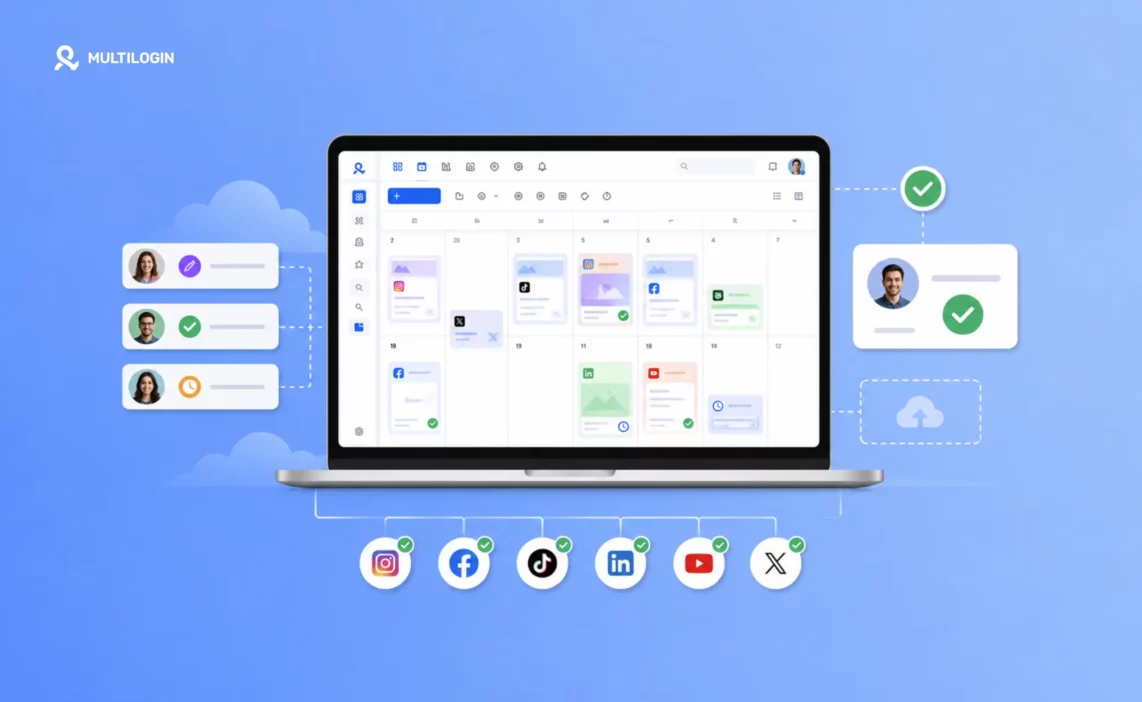



The best way to manage multiple social media accounts is to combine a scheduling tool, a clear content strategy, a shared calendar, and separate account environments. This helps businesses, freelancers, and agencies publish consistently, coordinate client work, and keep accounts organized without managing everything manually.
Scheduling tools like Buffer and Hootsuite handle publishing and reporting. Content frameworks such as the 80/20 rule, the 5-3-2 rule, and the 70/20/10 rule help teams decide what to publish. A content calendar brings those activities together.
But managing several accounts also means handling different logins, app data, locations, and team permissions. That’s where Multilogin cloud phones and isolated browser profiles fit into the workflow.
Whether you manage five Instagram accounts or dozens of client profiles across TikTok, Facebook, LinkedIn, and YouTube, this guide covers the tools, practical steps, and strategies you need.
Step 1: Choose the Right Social Media Management Tool for Multiple Accounts
The right social media management tool helps you schedule posts, monitor performance, organize content, and coordinate work across multiple accounts from one dashboard.
Start by identifying what takes the most time. Is it creating content, publishing, switching between client accounts, reviewing analytics, or keeping login environments separate?
Not every tool solves the same problem. Social media schedulers handle publishing workflows, while cloud phone platforms and browser profiles help teams manage separate account environments.
What Are the Best Social Media Management Tools for Multiple Accounts in 2026?
The best tools for managing multiple social media accounts include Multilogin for separate mobile and web account environments, Buffer for scheduling, Hootsuite for team workflows, and Sprout Social for reporting and engagement.
Here are the options worth considering:
Buffer: A straightforward scheduling tool for freelancers, creators, and small teams. It supports planning, publishing, and basic analytics across connected social channels.
Hootsuite: A social media management platform for teams that need scheduling, analytics, collaboration, and approval workflows.
Multilogin: A cloud Android phone platform for multi-account management. Each mobile-app account can run on its own real Android device in the cloud, while isolated browser profiles support web-based accounts. Teams manage both from one dashboard.
Sprout Social: A social media management platform with reporting, engagement tools, social listening, and collaboration features.
Later: A visual content planning and scheduling platform suited to teams working with Instagram, TikTok, and other content-heavy channels.
Metricool: Combines content scheduling, analytics, and competitor monitoring for creators, freelancers, and marketing teams.
Meta Business Suite: Meta’s free management tools for Facebook and Instagram publishing, account activity, and available insights.
The difference matters. Buffer, Hootsuite, and similar platforms help you decide what gets published and when. Multilogin handles the separate environments used to access and operate multiple accounts.
For example, an agency can plan Instagram content in Buffer while using a dedicated Multilogin cloud phone for each client’s Instagram account.
For a closer look at publishing, analytics, and automation options, explore our guide to the best social media automation tools.
What Are the Best Free Social Media Management Tools?
Buffer, Meta Business Suite, TikTok’s native business tools, and YouTube Studio offer free options for managing social media content, although their supported features and account limits differ.
For smaller teams, a free scheduling tool may cover the basic publishing workflow.
Buffer offers a free plan with limited connected channels and scheduled posts.
Meta Business Suite provides free publishing and management features for eligible Facebook and Instagram accounts.
TikTok’s business tools support content management, analytics, and scheduling for eligible accounts.
YouTube Studio supports video management, analytics, and scheduled publishing.
Multilogin also offers a free plan with no time limit and no credit card required, allowing users to explore cloud phone and browser profile management.
Free scheduling tools are useful when you’re starting with a few accounts. As the number of clients or profiles increases, approval workflows, access permissions, and separate account environments become more important.
Step 2: Build a Content Strategy Using Proven Social Media Rules
A social media content strategy defines what each account should publish, who the content targets, and how success will be measured. Content rules provide simple frameworks for planning a balanced publishing schedule.
These rules are planning methods, not official platform requirements or guaranteed formulas for engagement.
Most agencies don’t need to follow every framework. Choose one or two that match your client’s goals, then adjust them using actual audience data.
What Is the 80/20 Rule for Social Media?
The 80/20 rule for social media suggests publishing 80% helpful, educational, or entertaining content and 20% promotional content.
For example, out of ten Instagram posts, eight might answer customer questions, share useful tips, or demonstrate expertise. The other two could promote a product, service, or offer.
This framework helps brands avoid turning every post into a sales message.
The ratio is a starting point. A product launch or seasonal campaign may require a different content balance.
What Is the 5-3-2 Rule for Social Media?
The 5-3-2 rule is a content planning framework that divides ten posts into five pieces of curated content, three pieces of original content, and two personal or human-focused posts.
An agency managing a fitness brand could use:
Five educational posts about training or nutrition.
Three original posts sharing the brand’s expertise.
Two posts featuring coaches, customers, or behind-the-scenes activity.
The goal is to balance useful information, original ideas, and human connection.
What Is the 5-5-5 Rule for Social Media?
The 5-5-5 rule is a simple engagement routine that divides 15 minutes into three five-minute activities: engaging with relevant content, responding to your audience, and discovering new conversations.
For social media managers handling several accounts, it provides a starting point for organizing daily engagement.
However, don’t treat five minutes as a strict limit. Accounts with active communities or customer support needs may require more time.
Prioritize genuine conversations over repetitive or automated interactions.
What Is the 5-3-1 Rule for Social Media?
The 5-3-1 rule is a short social media management routine: five minutes of audience engagement, three minutes reviewing performance, and one minute identifying an improvement.
It’s useful as a quick daily check for freelancers and teams handling several brand profiles.
For example, a manager might answer comments, review recent post performance, and record one idea for the next content batch.
This is a time-management exercise, not a platform ranking factor.
What Is the 70/20/10 Rule for Social Media?
The 70/20/10 rule helps social media teams balance established content formats, new experiments, and promotional campaigns.
One practical version divides planned content into:
70% content based on topics and formats that already perform well.
20% experiments with new ideas, formats, or audiences.
10% promotional or campaign-focused content.
The framework works best when you have enough historical data to identify which topics perform well.
If you’re managing a new account, focus on testing and learning before committing to fixed ratios.
What Is the 50/30/20 Rule for Social Media?
The 50/30/20 rule divides social media content into 50% educational or entertaining posts, 30% curated content, and 20% promotional posts.
This approach can help small teams reduce the amount of original content they need to produce.
For example, a marketing agency could create five educational posts, share three useful industry resources with attribution, and publish two service-related posts.
Curated content should still add something useful. Share your perspective rather than simply reposting other people’s work.
What Is the 40/40/20 Rule for Social Media?
The 40/40/20 rule is a traditional direct marketing framework that assigns importance to the audience, the offer, and the creative message.
In its original marketing context, the framework emphasizes:
40% audience or targeting.
40% offer.
20% creative execution.
These percentages are a planning heuristic, not a measured breakdown of social media performance.
For social media managers, the lesson is simple: good creative work cannot fully compensate for targeting the wrong audience or promoting an offer people don’t want.
Before improving post design, check whether the content reaches the right people and solves a relevant problem.
What Is the 30/30/30 Rule for Social Media?
The 30/30/30 rule is an informal content planning framework that encourages teams to focus on the opening hook, the main message, and the call to action.
The remaining 10% can be used for supporting details such as captions, thumbnails, and final checks.
It’s not an official video platform rule, and the percentages don’t reflect proven performance weights.
For short-form videos, focus on creating a clear opening, delivering the promised information, and ending with a relevant next step.
A useful video doesn’t always need a sales-focused CTA. Sometimes a question or invitation to discuss the topic is enough.
What Is the 7-11-4 Rule for Social Media Marketing?
The 7-11-4 rule is a marketing framework suggesting that repeated exposure across different content formats and channels can help potential customers become familiar with a brand.
The numbers refer to seven hours of content, 11 touchpoints, and four locations or channels.
These figures should not be treated as universal buying requirements. Different audiences and purchase decisions follow different journeys.
For social media teams, the useful takeaway is that customers rarely make every decision after seeing one post.
A person might discover a brand through TikTok, watch a YouTube demonstration, read customer reviews, and visit the website before taking action.
Keep messaging consistent across those touchpoints, while adapting content to each platform.
What Are the 3 C’s of Social Media?
The 3 C’s of social media are Content, Community, and Consistency. They describe three essential parts of managing an active social media presence.
Content gives people a reason to follow an account. Community builds relationships through comments and conversations. Consistency helps audiences know what to expect.
For agencies managing multiple clients, the challenge is keeping all three working without relying on last-minute manual effort.
A content calendar handles planning, while clear responsibilities help ensure comments and messages receive attention.
What Are the 4 C’s of Social Media?
One common 4 C’s framework for social media is Content, Community, Consistency, and Conversation.
The additional focus on conversation reminds brands that social media is not simply a publishing channel.
Customers may ask questions, share feedback, or request support. Social media managers need a process for responding rather than only posting scheduled content.
For agencies, assign responsibility for community management alongside content production.
What Are the 5 C’s of Social Media?
The 5 C’s of social media can be organized as Context, Content, Consistency, Community, and Conversion.
Each addresses a different part of the strategy:
Context: Understand the platform and its audience.
Content: Publish information that serves a purpose.
Consistency: Maintain a realistic posting schedule.
Community: Build relationships through genuine interaction.
Conversion: Connect social media activity to business goals.
This framework is useful when onboarding a new client because it connects content decisions to measurable outcomes.
What Are the 5 C’s of Content?
The 5 C’s of content are Clear, Concise, Compelling, Credible, and Call to Action. They provide a practical checklist for reviewing content before publication.
Ask whether readers can understand the message, whether unnecessary information can be removed, and whether the content provides a reason to keep reading.
Check factual claims and links before publishing. Finally, make the next step clear when a CTA is appropriate.
These checks are especially useful when several people create content for the same brand.
What Are the 7 C’s of Social Media Strategy?
The 7 C’s of social media strategy can be defined as Content, Community, Consistency, Conversation, Channels, Collaboration, and Conversion.
This extended framework helps teams connect daily publishing with larger marketing goals.
For businesses managing multiple accounts, channel selection matters. Not every brand needs Instagram, TikTok, LinkedIn, X, Facebook, and YouTube at the same time.
Choose the platforms that match your audience and business goals before expanding.
What Are the 5 P’s of Social Media?
The 5 P’s of social media are Purpose, Plan, Produce, Publish, and Performance. Together, they form a simple workflow for managing social media accounts.
Start with the account’s goal, build a content plan, create the material, publish it, and review performance.
This process works well for freelancers and agencies because each stage can have a clear owner and deadline.
For example, a content writer prepares captions, a designer produces visuals, an account manager approves the posts, and a publishing specialist schedules them.
Why Is Gen Z Changing How They Use Social Media?
Gen Z social media habits show why brands should consider communities, direct conversations, and useful content alongside traditional feed posts.
Younger audiences use social media for entertainment, information, product discovery, and communication. Their preferences also differ across platforms and communities.
Rather than assuming an entire generation is leaving social media, study where your audience spends time and what it expects from each channel.
For brands targeting younger customers, that might mean testing short-form videos, creator partnerships, community discussions, and more direct interaction.
The important question is not whether every audience follows the same trend. It’s whether your content matches the people you’re trying to reach.
Step 3: Build a Content Calendar for Managing Multiple Social Media Accounts
A social media content calendar is a shared schedule showing what will be published, where it will appear, who is responsible, and whether the content has been approved.
When managing multiple business or client accounts, a calendar prevents missed deadlines, repeated posts, and confusion between team members.
It also makes the workload visible. If three clients have campaigns launching on the same day, the team can plan ahead instead of discovering the conflict at the last minute.
How to Create a Content Calendar for Multiple Social Media Accounts
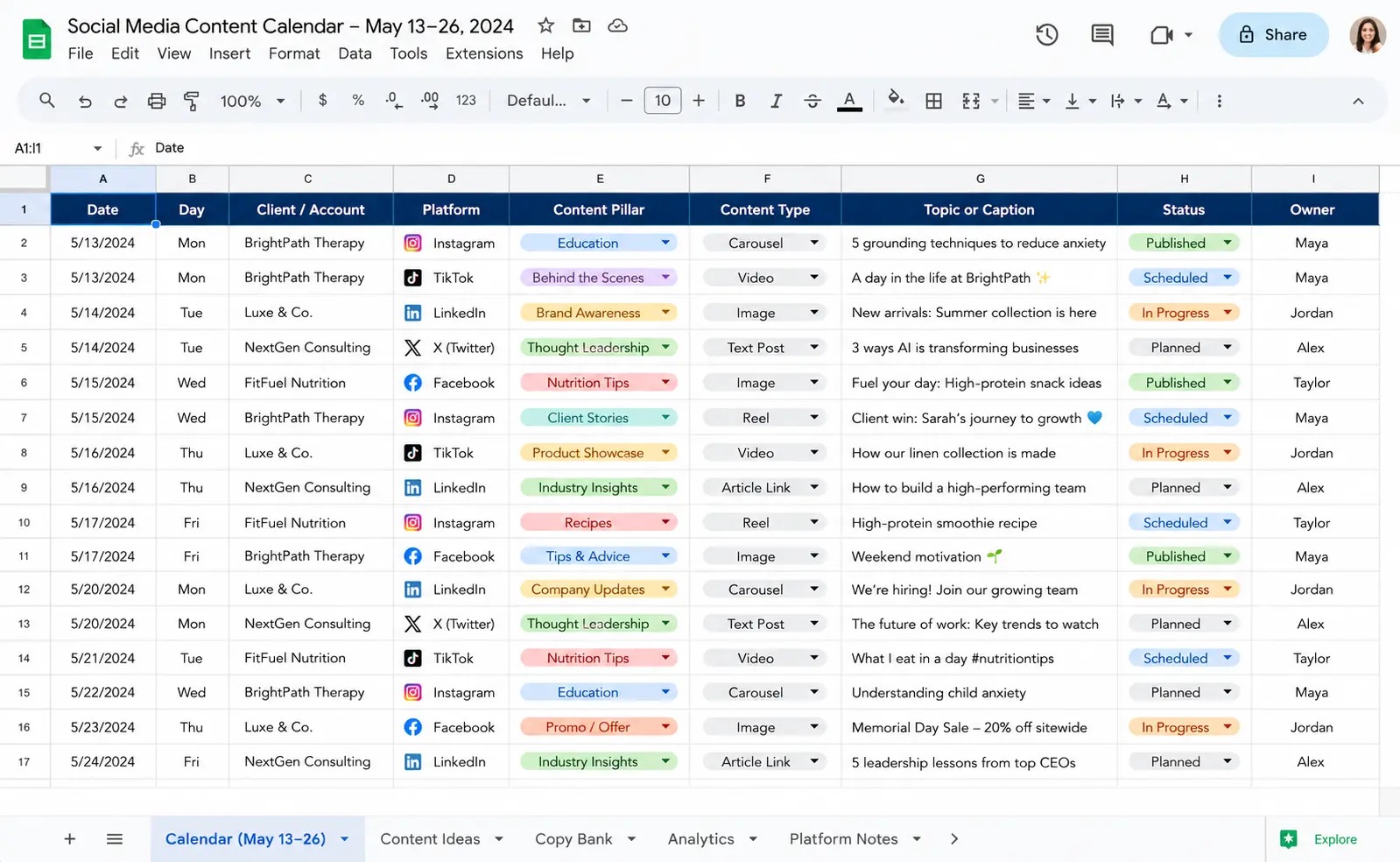
Create one central calendar with separate entries for each account, platform, publishing date, content format, and approval status.
A practical calendar should include:
Date and time: When the post should be published.
Platform and account: The exact profile receiving the content.
Status: Draft, In Review, Approved, Scheduled, or Published.
Content type: Reel, carousel, Story, short-form video, image, or text post.
Copy and creative links: The approved caption, image, or video files.
Content pillar: The main topic or campaign.
Owner: The person responsible for the next action.
Notes: Client feedback, campaign details, or publishing requirements.
Google Sheets works well for a smaller operation. Notion, ClickUp, and Airtable can help teams coordinate more complex approval workflows.
Many scheduling platforms also offer their own visual content calendars.
For client work, make sure approval is visible before a post enters the publishing queue.
How to Batch Content Creation Across Multiple Client Accounts
Content batching means producing several posts during planned work sessions instead of creating every post shortly before publication.
For example, an agency managing five clients might plan topics on Monday, create content on Tuesday and Wednesday, review approvals on Thursday, and schedule approved posts on Friday.
The exact schedule depends on the team’s workload.
Batching doesn’t mean ignoring current events or audience feedback. Leave space for timely content, customer questions, and campaign changes.
You can also organize work by client to reduce the number of times you switch between different brand guidelines, audiences, and approval processes.
How to Repurpose Content Across Multiple Social Media Accounts
Content repurposing means adapting an existing idea or asset into formats that suit different platforms and audiences.
One webinar can become a LinkedIn post, an Instagram carousel, a TikTok video, and a YouTube Short.
But repurposing shouldn’t mean publishing the same file everywhere without changes.
For example:
LinkedIn: Explain the business lesson from the webinar.
Instagram: Turn the main points into a visual carousel.
TikTok: Use a short clip with a clear opening.
YouTube Shorts: Create a focused video answering one question.
Track each version separately in the content calendar.
This gives your team more value from existing material while keeping posts relevant to each platform.
Step 4: Use Separate Account Environments to Manage Multiple Social Media Accounts
Separate account environments help teams keep login sessions, app data, and account workflows organized when managing multiple social media profiles.
A scheduling tool can organize publishing, but it does not replace the environment used to open an account, manage an app, or complete tasks outside its supported integrations.
For agencies managing several clients, that distinction matters.
How Do Social Media Platforms Identify Related Accounts?
Social media platforms may use account information, device and network signals, login activity, and user behavior to assess account activity and enforce their rules.
The exact signals and decisions differ between platforms.
Multiple accounts using the same device or network do not automatically violate platform rules, and separate devices do not guarantee that accounts will never face restrictions.
Common areas to manage include:
Login sessions: Keep business and client account access organized.
App data: Avoid mixing information between unrelated account environments.
IP and location: Document legitimate regional setups and avoid unnecessary location changes.
Permissions: Give team members only the access needed for their work.
Account activity: Follow platform rules and avoid repetitive spam-like behavior.
Using separate environments can make account operations easier to manage, but responsible activity and platform compliance remain essential.
How Do Browser Profiles Help Manage Multiple Web-Based Social Media Accounts?
Isolated browser profiles keep cookies, sessions, and account data separate, allowing teams to access different web-based social media accounts without repeatedly signing in and out of one browser session.
This approach is useful for work involving LinkedIn, Reddit, YouTube, Facebook Business Manager, and other browser-based account tasks.
Multilogin browser profiles provide separate browser environments with their own sessions and proxy configurations.
For example, a social media agency can organize browser profiles by client, assign them to team members, and keep different business accounts in their appropriate environments.
Browser profiles are especially useful for web-first workflows. Mobile-app tasks may require a different setup.
How Do Cloud Phones Help Manage Multiple Instagram, TikTok, and WhatsApp Accounts?
Cloud Android phones let users manage mobile-app accounts on separate Android devices hosted in the cloud, without buying and maintaining a physical phone for every account.
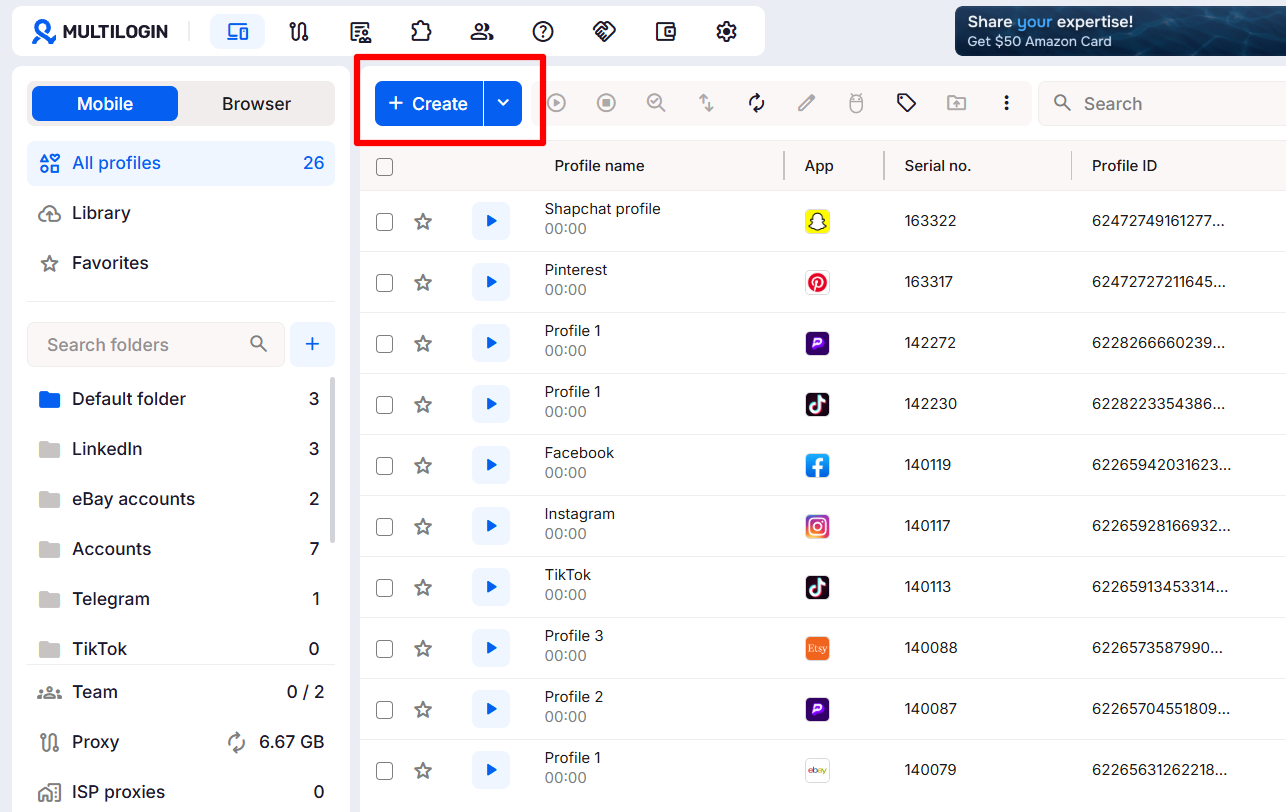
Multilogin is a cloud Android phone platform for multi-account management. Each Multilogin cloud phone runs on a real ARM Android device in the cloud and keeps its own app data and login history between sessions.
The platform supports multiple Android versions, including Android 10–16, and lets users install supported Android apps through its app installation options.
For an agency handling Instagram and TikTok accounts, a practical workflow is:
Create one Multilogin cloud phone for each mobile-app account.
Install the required social media app.
Sign in using the account’s authorized credentials.
Organize the cloud phones by client, platform, or team.
Return to each account’s persistent environment for ongoing work.
The same dashboard also includes isolated browser profiles for web-based tasks.
For WhatsApp, remember that Multilogin does not supply phone numbers or receive SMS verification codes. Users must have an eligible number and complete any required verification through a separate supported method.
You can explore the setup in our guide to managing multiple Instagram accounts.
Do You Need a Separate IP Address for Each Social Media Account?
A separate IP configuration can help teams maintain distinct network environments for different accounts, but it is not a universal platform requirement or a guarantee against restrictions.
Choose network settings according to the account’s legitimate location and operational needs.
Common options include:
Residential proxies: Use IP addresses associated with residential internet connections. They can support account environments that require specific regional network settings.
Mobile proxies: Use mobile carrier networks. They may be relevant to certain mobile workflows, depending on the provider and connection requirements.
VPNs: Route traffic through a VPN connection. Whether accounts share the same exit IP depends on the VPN configuration.
Multilogin includes built-in residential proxies, supports third-party proxies, and provides location options for managing account environments.
For a broader explanation of how proxy types work, see Multilogin’s social media proxy guide.
Choose stable and appropriate settings rather than assuming that changing an IP will resolve an account or policy issue.
Step 5: Prepare New Social Media Accounts Before Managing Them at Scale
Preparing a new social media account means completing its setup, confirming access, understanding platform rules, and establishing a realistic content and engagement workflow before increasing activity.
A new account needs more than a username and password. It also needs clear ownership, accurate information, suitable security settings, and a purpose.
What Is a Practical Account Warming Process?
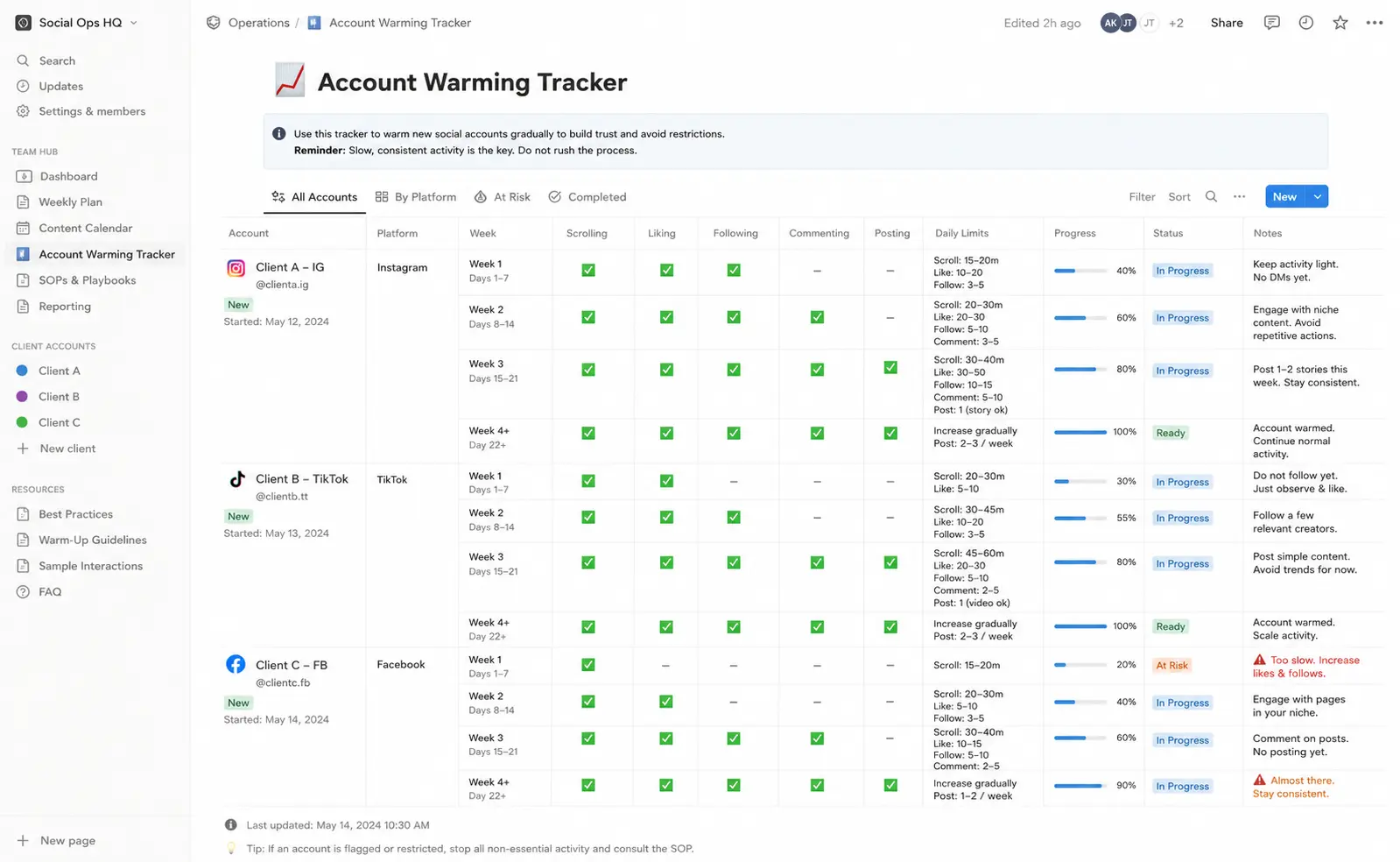
Account warming is commonly used to describe the gradual introduction of normal account activity, but there is no universal four-week schedule that guarantees account acceptance or performance.
A better approach is to prepare accounts according to the relevant platform’s rules and the business’s actual needs.
A simple onboarding timeline could look like this:
Week 1: Complete account setup
Confirm account ownership and recovery details.
Complete required email or phone verification.
Add accurate profile information and branding.
Review the platform’s relevant policies.
Week 2: Begin the content workflow
Publish useful original content when the account is ready.
Respond to genuine audience interactions.
Check whether the content and account settings work as expected.
Week 3: Review early performance
Study engagement and audience feedback.
Identify content topics worth developing.
Fix publishing or access problems.
Week 4 and beyond: Improve the process
Establish a sustainable publishing schedule.
Test different creative approaches.
Review results and adjust the strategy.
These are workflow suggestions, not activity thresholds for avoiding platform enforcement.
Teams should avoid artificial engagement, repetitive mass actions, or automated behavior that violates platform rules.
Step 6: Establish the Right Posting Frequency Across Multiple Accounts
The best posting frequency is one your team can maintain while producing useful content and responding to its audience. There is no universal number of daily or weekly posts that guarantees better reach across every platform.
Posting more often can create more opportunities to learn, but it can also reduce quality or increase workload if the team lacks a reliable process.
Instead of following one fixed formula, set a baseline and review performance.
For each platform:
Instagram: Plan Reels, carousels, Stories, and other formats around audience interest and production capacity.
TikTok: Focus on relevant short-form videos and test different topics, openings, and formats.
LinkedIn: Prioritize useful professional insights, company updates, and discussions that suit the target audience.
Facebook: Balance Page posts, community interaction, and campaigns according to audience needs.
X (Twitter): Choose a posting frequency that supports timely updates and genuine conversations.
YouTube: Set a video publishing schedule that allows enough time for research, recording, editing, and audience interaction.
YouTube’s official upload schedule guidance recommends considering consistency, sustainability, and the time required to produce content.
The 70/30 approach can also help content planning: spend roughly 70% of your effort on established formats and 30% testing new ideas.
Treat it as an optional working method, not a platform requirement.
Step 7: Add New Accounts and Platforms Gradually
The most efficient way to expand social media management is to build a repeatable workflow on your most valuable platforms before adding more accounts, clients, or channels.
Managing ten accounts well can be more valuable than maintaining thirty accounts that rarely receive quality content or audience attention.
Start with the platforms that support your client’s goals.
For example, a B2B company might focus on LinkedIn and YouTube, while a creator-led consumer brand may prioritize Instagram and TikTok.
Once the content calendar, approvals, reporting, and account access are working, expand to additional channels.
For agencies managing multiple clients, document the process before increasing the workload. This makes it easier to delegate tasks and onboard new team members.
The Complete System for Managing Multiple Social Media Accounts
A complete multi-account management system combines content planning, scheduling, account environments, team permissions, analytics, and regular performance reviews.
Each part solves a different problem:
| Part of the workflow | What it handles | Example tools |
|---|---|---|
| Content scheduling | Plan and publish supported posts | Buffer, Hootsuite, Later, Metricool |
| Content strategy | Decide what to publish and why | 80/20, 5-3-2, 70/20/10 frameworks |
| Content calendar | Track deadlines, owners, and approvals | Google Sheets, Notion, ClickUp |
| Mobile account environments | Keep mobile-app accounts in separate Android environments | Multilogin cloud phones |
| Web account environments | Manage separate browser sessions for web accounts | Multilogin browser profiles |
| Network configuration | Manage IP and location settings where needed | Built-in or third-party proxies |
| Performance measurement | Review audience, content, and campaign results | Native analytics and reporting tools |
A practical example is an agency managing 15 social media accounts across five clients.
The team uses a scheduling platform to plan content, a shared calendar for approvals, and Multilogin to organize separate account environments.
Each mobile-app account can have its own cloud phone, while web-based accounts can use browser profiles. Team members receive the permissions needed for their assigned work.
This approach helps the agency coordinate account operations without relying on multiple physical devices or one shared browser session.
How Does Multilogin Support Multiple Social Media Accounts?
Multilogin is a cloud Android phone platform that helps individuals and teams manage multiple mobile-app and web-based accounts from one dashboard.
Each Multilogin cloud phone runs on a real Android device in the cloud, with its own app data, location, and persistent history. For browser-based tasks, Multilogin provides isolated browser profiles.
Teams can organize accounts with folders, tags, notes, assignments, and permissions. Built-in residential proxies and mobile minutes are included in every plan, with additional usage available according to plan pricing.
Multilogin also supports automation through its API and supported developer tools, including ADB for cloud phone workflows and Selenium, Puppeteer, and Playwright for browser workflows.
Multilogin offers a free plan with no time limit and no credit card required. Paid plans start from $7.08 per month.
A scheduler and Multilogin can work together. The scheduler handles supported content publishing and analytics tasks, while Multilogin provides separate environments for account access and ongoing operations.
For agencies coordinating several clients, Multilogin’s social media management solution explains how cloud phones and browser profiles fit into a larger account management workflow.
Multilogin does not replace content strategy, audience engagement, or the rules of social media platforms. Effective multi-account management still depends on original content, genuine interaction, and compliant activity.
Tips for Managing Multiple Social Media Accounts Without Burning Out
The best way to reduce social media management workload is to standardize repeatable tasks while keeping enough flexibility for each client’s goals, audience, and content.
A few habits can make daily work easier:
Batch work by client when it makes sense. Complete related tasks together to reduce constant switching between brands and approval processes.
Create reusable content templates. Prepare layouts for reports, captions, briefs, and common social formats, then adapt them to each client’s voice.
Use clear status labels. Draft, In Review, Approved, Scheduled, and Published should mean the same thing across your team.
Review analytics regularly. Weekly reviews can help identify useful trends, while daily checks remain valuable during active campaigns or urgent events.
Keep content creation and engagement separate. Block time for producing material and another period for comments, messages, and community management.
Spread out publishing tasks when useful. This makes it easier to check posts, reply to early questions, and handle unexpected issues.
Assign clear account ownership. Every client account should have a responsible person and documented access permissions.
Use automation selectively. Automate repeatable administrative work through supported integrations, but keep editorial decisions and sensitive interactions under appropriate human oversight.
If your team manages many client accounts, the biggest improvement often comes from clearer responsibilities rather than simply adding another tool.
Need to Manage Multiple Social Media Accounts? Try Multilogin Cloud Phones.
Manage mobile-app accounts on separate cloud Android phones and web-based accounts in isolated browser profiles, all from one dashboard.
With a free plan and paid plans starting from $7.08 per month, Multilogin gives individuals and teams a practical way to organize their growing account workflows.


