
Best Social Media Automation Tools in 2026: Top 7 Compared

Best Social Media Automation Tools in 2026
Last updated:
October 08, 2026
21 mins read
Share with
Manage Unlimited Mobile & Web Accounts

Manage your accounts
without restrictions or interruptions

  • Log in with mobile/browser profiles
  • Access accounts anywhere
  • Use apps like Instagram, TikTok, Reddit

Summarize this article with your preferred AI

Tells Google to show more useful Multilogin content and use cases in AI Overviews, Search, and Discover. Get better answers about Multilogin with Google AI

Table of Contents

The best social media automation tools in 2026 include Buffer for scheduling, ManyChat for engagement, Multilogin for multi-account management and automation, Zapier for connected workflows, SocialBee for content recycling, Metricool for analytics, n8n for advanced automation, and viaSocket for no-code integrations.

But the best choice depends on what you actually need to automate.

If you’re still publishing posts manually, replying to the same questions, or spending hours preparing weekly client reports, automation can take a lot of that work off your plate.

Today’s social media automation platforms do more than schedule posts. They help teams create content with AI, manage conversations, connect marketing apps, and analyze performance. For agencies handling multiple accounts, there’s another challenge: managing the account environments where all this work happens.

This guide compares eight social media automation tools in 2026, their features, pricing, and limitations. You’ll also learn how to combine them into a practical automation stack for creators, small businesses, and agencies.

What Can Social Media Automation Tools Do?

Social media automation tools help businesses schedule posts, manage messages, create content, track performance, and connect marketing workflows with less manual work. Some platforms also use AI to draft content, analyze results, and build custom workflows.

Many social media automation tools use official integrations, such as the Instagram API, to publish supported content, manage comments, and retrieve account insights. Available features depend on the account type, permissions, and platform requirements.

Social media automation generally covers six areas:

  • Scheduling and publishing: Plan posts in advance and publish them across supported platforms.

  • AI-assisted content creation: Generate captions, suggest content ideas, and adapt posts for different social channels.

  • Inbox and engagement automation: Automatically respond to common questions, comments, and direct messages.

  • Analytics and reporting: Collect performance data and prepare reports without manually copying numbers from each platform.

  • Cross-platform workflows: Connect social media tools with CRMs, spreadsheets, email platforms, and other business applications.

  • Multi-account management and automation: Keep account access, team responsibilities, and working environments organized while supporting compatible mobile-app and browser automation.

For example, an agency managing 20 Instagram and TikTok accounts may use one tool to schedule posts, another to prepare weekly reports, and a platform like Multilogin to manage account environments and automate supported mobile or browser tasks.

That’s because not every automation tool solves the same problem.

A scheduling platform may not offer advanced reporting. A workflow builder can connect dozens of applications but may not have a content calendar. And neither necessarily provides separate environments for managing accounts directly through mobile apps.

Understanding which tasks you want to automate is the first step toward choosing the right tools.

Откройте в браузере ТикТок

Which Social Media Automation Tools Are Best in 2026?

The best social media automation tools depend on the workflow: Buffer and SocialBee for scheduling, ManyChat for messages, Multilogin for multi-account operations, Metricool for reporting, and Zapier, n8n, or viaSocket for connected workflows.

Here are eight tools worth considering.

1. Buffer: Best for Social Media Scheduling and Publishing

Buffer is a social media scheduling tool that helps creators, startups, and small businesses plan and publish content across multiple platforms from one dashboard. It combines a publishing calendar, content queues, analytics, and AI-assisted writing in a simple interface.

Buffer supports popular platforms such as Instagram, Facebook, LinkedIn, X, TikTok, Pinterest, and YouTube.

One of its strengths is simplicity. Instead of opening each social platform to publish content, you can prepare posts in advance and organize them inside Buffer.

Its publishing queue is especially useful. You can define a posting schedule, add approved content, and let Buffer publish it at the selected times.

Buffer also includes an AI Assistant that helps create captions, rewrite existing posts, and adapt content for different platforms. It’s useful when you want to turn one idea into several social media posts without writing each version from scratch.

For creators and small businesses, Buffer’s free plan is a practical starting point. It supports up to three connected channels, with a limit of 10 scheduled posts per channel at a time.

However, pricing increases as you connect more channels. Agencies managing dozens of client accounts should calculate the cost of their full setup rather than focusing only on the starting price.

Best for: Scheduling automation, content planning, creators, and small marketing teams.

Pricing: Free plan available. Paid plans start from $5 per channel/month.

2. ManyChat: Best for Instagram DM and Engagement Automation

ManyChat is a messaging automation platform that helps businesses automate Instagram comments, direct messages, and customer conversations across supported channels. It is useful for creators, ecommerce brands, and marketing teams that want to respond to common questions and manage lead follow-ups.

ManyChat focuses on conversations rather than content scheduling.

For example, imagine you publish an Instagram post offering a free guide. Instead of manually messaging everyone who comments, you can create an approved automation that responds when someone uses a specific keyword.

Depending on the platform and available features, ManyChat can send a resource, ask a follow-up question, or guide someone through a conversation.

This makes it useful for businesses receiving frequent questions about products, prices, or services.

ManyChat also offers visual flow-building tools, so you can design conversations without coding every response.

However, messaging automation needs careful planning. Generic replies can frustrate users, and aggressive automated messaging may violate platform requirements.

It’s also important not to confuse automated engagement with genuine engagement. ManyChat can help manage customer conversations, but it cannot guarantee higher sales or audience growth.

Best for: Instagram DM automation, comment responses, lead generation, and customer communication.

Pricing: Free plan available. Paid pricing depends on the selected plan and eligibility.

3. Multilogin: Best for Multi-Account Management and Social Media Automation
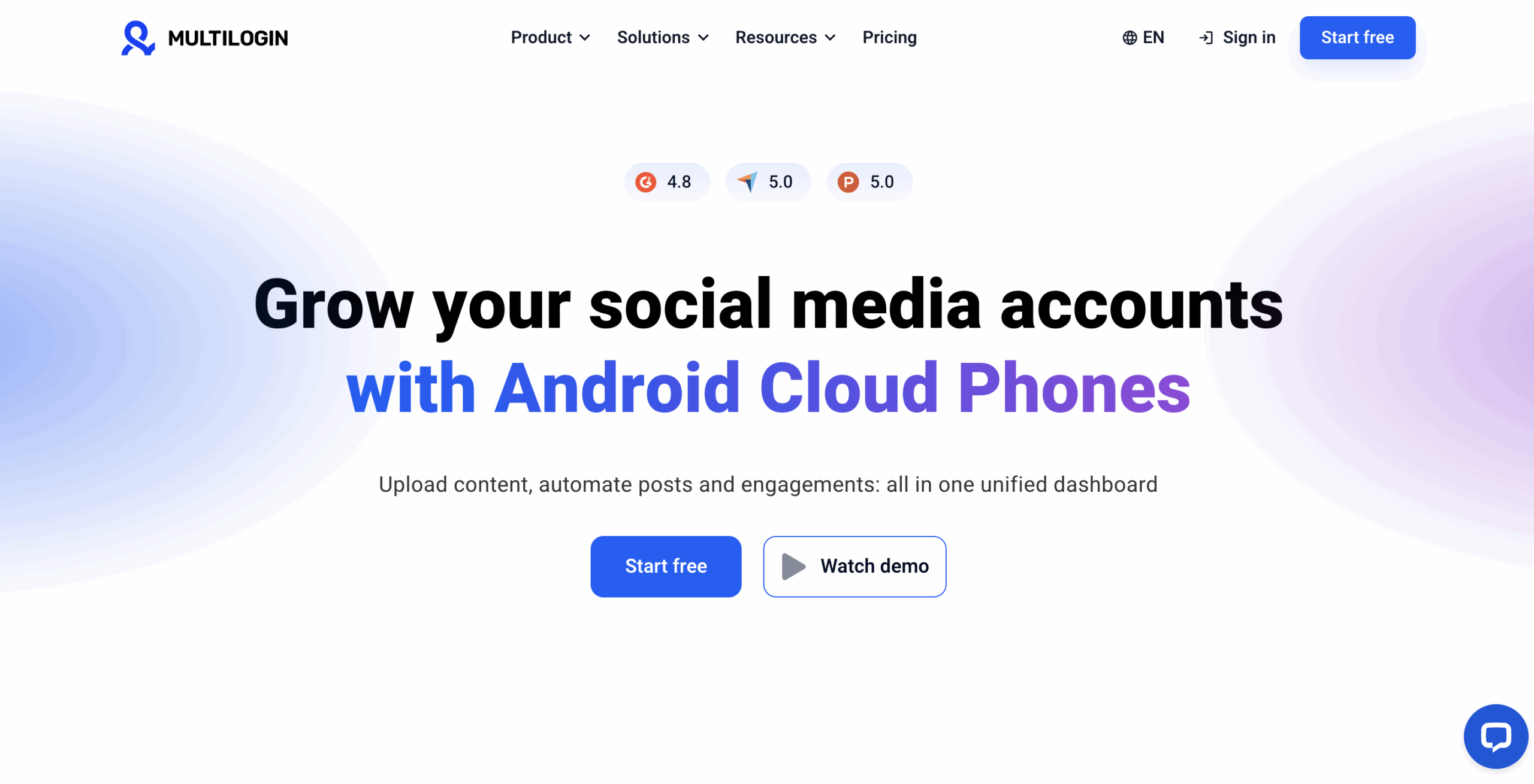
Multilogin: Best overall for combined mobile and web workflows

Multilogin is a cloud Android phone platform for multi-account management that helps agencies, creators, and businesses operate multiple social media accounts from one dashboard. It provides real Android devices in the cloud for mobile-app accounts, isolated browser profiles for web-based accounts, and automation through its API, ADB access, and supported browser automation tools.

Unlike scheduling tools, Multilogin focuses on the environments where social media accounts run.

For example, an agency managing 30 Instagram and TikTok accounts may use a scheduling platform to publish content. But employees still need to open individual accounts, manage app-based tasks, and coordinate account access.

Multilogin provides a separate cloud Android phone for each mobile-app account. Each phone has its own app data, location, IP, and persistent login history.

This means teams can return to the same account environment between sessions without maintaining dozens of physical phones.

For web-based workflows, Multilogin also includes isolated browser profiles with separate cookies, sessions, and storage.

Automation is another important part of the platform.

Developers can use Multilogin’s API and ADB access to create compatible mobile-app workflows. For browser-based tasks, Multilogin supports tools such as Selenium, Puppeteer, and Playwright.

AI agents can also operate supported cloud phone and browser workflows through documented interfaces and integrations.

Consider a social media agency that publishes content across several client accounts. It could use Buffer for scheduling, Metricool for reporting, and Multilogin to manage the Android app and browser environments needed for direct account work.

Multilogin also includes built-in residential proxies, mobile minutes, and team management features such as folders, tags, notes, and permissions.

There are some limitations. Multilogin does not provide SMS verification codes or receive phone calls, so apps requiring phone verification need an external number accepted by that platform. Some automation tasks also require technical setup.

And while Multilogin helps keep account environments separate, it cannot guarantee that social platforms will not restrict an account. Teams still need to follow platform rules and publish original content.

For a practical setup, see our guide to managing multiple Instagram accounts.

Best for: Multi-account management, social media agencies, mobile-app automation, browser automation, and AI-agent workflows.

Pricing: Free plan with no time limit and no credit card required. Paid plans start from $7.08/month.

4. Zapier: Best for Connecting Social Media and Marketing Workflows

Zapier is a no-code automation platform that connects social media tools with CRMs, spreadsheets, project management software, and other business applications. It helps marketing teams automate tasks such as collecting leads, updating records, sending notifications, and transferring information between supported services.

Zapier isn’t a traditional social media scheduler. Instead, it connects the tools you already use.

Consider an agency running Facebook lead-generation campaigns.

When someone submits a lead form, a Zapier workflow can automatically add their details to a CRM, create a follow-up task, and notify the sales team in Slack.

Without automation, someone would need to complete those steps manually.

Zapier uses trigger-and-action workflows called Zaps. A trigger starts the process, and one or more actions follow.

You can also build more advanced workflows using filters, conditions, and integrations with AI services.

For agencies managing several clients, this can reduce the time spent moving information between applications.

The main limitation is that costs can rise with workflow usage. Complex automations also require testing to make sure they handle errors and unexpected data correctly.

Best for: Cross-platform automation, agency operations, lead management, and connecting marketing applications.

Pricing: Free plan available. Paid plans depend on task volume and features.

5. SocialBee: Best for Content Recycling and Social Media Scheduling
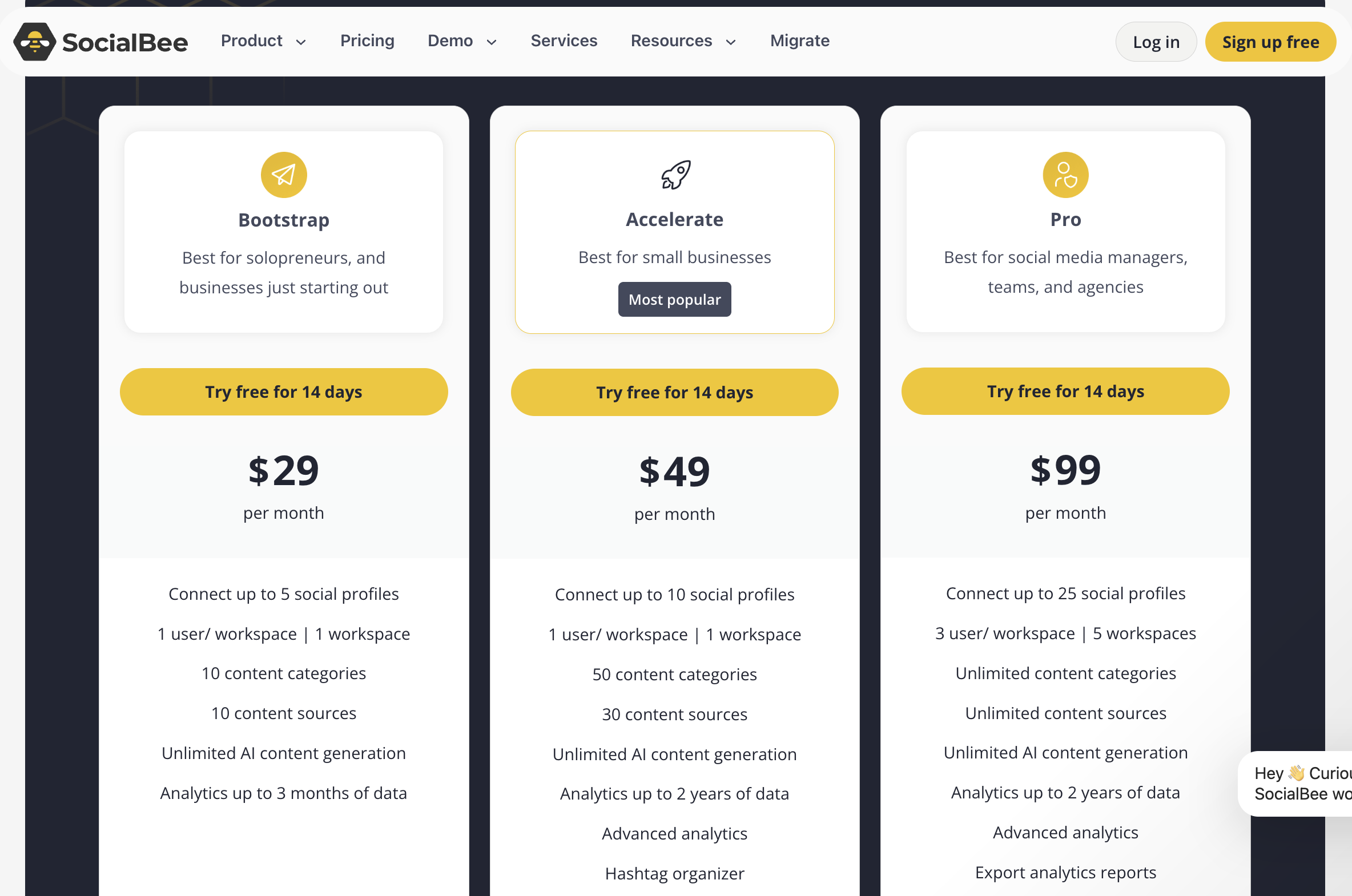
Social Bee Pricing Plan

SocialBee is a social media management platform that helps businesses organize, schedule, and reuse content across multiple social networks. Its category-based scheduling and evergreen content features make it useful for agencies and creators running recurring campaigns.

SocialBee takes a different approach to content scheduling.

Instead of adding every post to one long queue, you can organize content into categories such as educational posts, product updates, customer stories, and evergreen tips.

You can then assign publishing schedules to those categories.

For example, a business might publish educational content on Mondays, product updates on Wednesdays, and customer stories on Fridays.

SocialBee helps maintain that structure without requiring someone to rearrange the calendar every week.

Its content recycling features can also help teams reuse relevant evergreen posts. This is useful when you have a large content library and want to get more value from existing material.

SocialBee includes AI-assisted content features and tools for managing multiple social media profiles.

The trade-off is that it may offer more features than a small creator needs. Teams should also review recycled posts regularly to keep information current and avoid publishing repetitive content.

Best for: Evergreen content, content recycling, batch scheduling, and recurring social media campaigns.

Pricing: Paid plans start from $24/month. A 14-day free trial is available.

6. Metricool: Best for Social Media Analytics and Automated Client Reports

Metricool is a social media management and analytics platform that helps agencies and marketing teams track performance, schedule content, and prepare client reports. Its reporting features can reduce manual data collection, making it useful for businesses managing multiple social accounts.

Metricool is particularly helpful when reporting takes up too much time.

Imagine an agency managing 15 clients. Each week, the team needs to collect information about reach, engagement, audience growth, and campaign performance.

Doing this manually across multiple social platforms can take hours.

Metricool brings available analytics into one dashboard, allowing teams to review results without constantly switching between native reporting tools.

On eligible plans, agencies can also automate recurring reports for clients and stakeholders.

This is especially useful for weekly or monthly reporting. Instead of rebuilding the same document each time, the team can use a consistent reporting process.

Metricool also includes content scheduling and competitor analysis features, so it can serve as a broader social media management platform.

However, report customization, connected brands, and some analytics features depend on the subscription. Check these limits before selecting a plan.

Best for: Automated client reporting, social media analytics, performance monitoring, and agencies.

Pricing: Free plan available. Paid plans vary by features and billing options.

7. n8n: Best for Advanced AI and Custom Social Media Automation

n8n is a workflow automation platform that helps technical teams connect APIs, databases, AI tools, and marketing applications. It is useful for agencies and developers building custom automation that requires advanced logic, multiple integrations, or more control over how workflows run.

n8n gives users more control over the details of their automations.

For example, an agency could build a workflow that collects approved content from a database, sends it for internal review, passes it to a supported publishing service, and saves the publication status.

Instead of relying on a single trigger and action, you can create workflows with multiple steps, conditions, and API requests.

n8n also supports AI integrations, making it useful for teams developing AI-assisted marketing operations.

A technical team might use AI to categorize incoming requests, summarize campaign information, or prepare draft content for human approval.

Self-hosting is another advantage for organizations that want more control over their infrastructure.

But flexibility comes with complexity.

Compared with a simple scheduler, n8n may require more technical knowledge. Authentication, error handling, API limitations, and maintenance still need attention.

If your only goal is to schedule a few Instagram posts, n8n is probably unnecessary. If you’re building an automation system across several clients and applications, it may be a better fit.

Best for: Developers, technical agencies, AI workflows, and advanced marketing automation.

Pricing: Self-hosted Community Edition available. Cloud plans start from €20/month.

8. viaSocket: Best for No-Code AI Workflow Automation

viaSocket is an AI-assisted workflow automation platform that helps businesses connect applications and automate repetitive tasks without extensive coding. Marketing teams can use it to connect lead forms, CRM systems, notifications, and other supported services through custom workflows.

viaSocket is designed to make workflow creation more accessible.

Instead of building every connection manually, users can describe the process they want to automate and use AI assistance to help set it up.

For example, a marketing team could connect a lead-generation form with its CRM and messaging tools.

When a new lead arrives, viaSocket can trigger a workflow that records the information and notifies the relevant employee.

The platform also supports webhooks, API integrations, and conditional logic for more advanced processes.

This makes viaSocket an option for teams that want to build automations without developing a custom application.

However, it isn’t a full replacement for dedicated social media scheduling or reporting software.

If you need a content calendar, detailed platform analytics, or advanced social inbox management, you’ll likely need another tool alongside it.

Best for: No-code automation, AI-assisted workflows, and connecting marketing and business applications.

Pricing: Free plan available with 10,000 standard tasks and 500 AI credits per month.

How Do the Best Social Media Automation Tools Compare?

The main differences between social media automation tools are their primary features, pricing, supported platforms, and automation capabilities. Buffer and SocialBee focus on publishing, ManyChat handles messaging, Multilogin supports multi-account operations, Metricool manages analytics, while Zapier, n8n, and viaSocket connect applications.

ToolPrimary automation focusFree optionBest forStarting paid price
BufferScheduling and publishingYesCreators and small teams$5/channel/month
ManyChatDM and comment automationYesEngagement and lead generationCheck current plans
MultiloginMulti-account management and mobile/browser automationYes, no time limitAgencies and multi-account teams$7.08/month
ZapierCross-platform workflowsYesAgency operationsSee current plans
SocialBeeContent recycling and scheduling14-day trialEvergreen content$24/month
MetricoolAnalytics and reportingYesClient reportingSee current plans
n8nAdvanced workflow automationSelf-hosted Community EditionTechnical teams€20/month
viaSocketAI-assisted workflow automationYesNo-code workflowsSee current plans

Prices and allowances reflect publicly advertised options available in October 2026. Billing periods, currencies, usage limits, and features differ between providers and may change.

There’s no single winner for every business.

For creators and small businesses focused on publishing, Buffer is a straightforward choice. SocialBee is worth considering if you work with recurring content categories and evergreen posts.

ManyChat suits businesses that already receive messages and want to automate part of their customer communication.

For agencies preparing frequent client reports, Metricool offers a more reporting-focused workflow.

Zapier, n8n, and viaSocket become relevant when several applications need to work together.

Multilogin is a better fit when your main challenge is operating multiple social media accounts across mobile apps and browsers. Its cloud Android phones, browser profiles, and supported automation features make it useful alongside scheduling and reporting software.
How to make money on Pinterest

Why Aren’t Scheduling Tools Enough for Managing Multiple Social Media Accounts?

Social media scheduling tools automate publishing and reporting, but they don’t necessarily provide separate device environments for accounts managed directly through mobile apps or browsers. Agencies operating multiple Instagram, TikTok, or Facebook accounts may also need persistent sessions, team permissions, and organized access.

Most scheduling platforms connect to social networks through approved APIs. This allows them to publish supported content and collect available analytics without requiring direct app access for every task.

But some work still happens outside these integrations.

A social media manager may need to open Instagram to review an app-specific feature, access a TikTok account for daily operations, or work inside a client’s web-based business dashboard.

For agencies managing many clients, these tasks introduce another set of challenges:

  • Keeping account sessions and app data separate.

  • Maintaining consistent account environments.

  • Assigning the right accounts to different employees.

  • Managing accounts across different regions.

  • Working with mobile-app features that scheduling platforms don’t support.

  • Coordinating custom automation across accounts.

Consider an agency managing 30 Instagram and TikTok accounts.

Its scheduling tool can handle approved content publishing. Metricool may generate regular performance reports. But employees still need a structured way to access individual accounts for work that requires the native app.

Switching manually between many accounts on the same device can quickly become difficult to organize.

A dedicated account-management platform addresses a different problem: providing and organizing the environments in which those accounts are operated.

It complements social media automation software rather than replacing it.

For more practical advice, explore Multilogin’s multi-account management solution.

How Does Multilogin Complete Your Social Media Automation Stack?

Multilogin completes a social media automation stack by providing separate cloud Android phones for mobile-app accounts and isolated browser profiles for web-based accounts. It supports direct account operations, team access, and compatible mobile and browser automation alongside scheduling and reporting tools.

For agencies managing several brands or clients, this adds an account-management layer to their existing workflow.

Instead of buying and maintaining multiple physical phones, teams can create Multilogin cloud phones and access them from one platform.

Each Multilogin cloud phone uses a real ARM Android device hosted in the cloud. It maintains its app data and account history between sessions, so employees can return to an existing working environment.

This can be particularly useful for mobile-first platforms such as Instagram and TikTok.

For web-based tasks, Multilogin also provides isolated browser profiles. These keep cookies, sessions, and storage separate for each profile.

Both capabilities are managed from the same dashboard.

How Can Agencies Manage Multiple Social Media Accounts With Multilogin?

Agencies can use Multilogin to assign one cloud Android phone to each mobile-app account, organize accounts by client, and control team access from a single dashboard. Browser profiles support accounts and tasks that work primarily through websites.

A typical setup looks like this:

  1. Create a cloud phone for each mobile-app account. Select the Android environment and install the required apps.

  2. Configure the proxy and location. Multilogin includes built-in residential proxies for account environments that require legitimate regional settings.

  3. Log into the account. Keep each account’s app data and login history within its assigned cloud phone.

  4. Organize team access. Use folders, tags, notes, profile assignments, and permissions to coordinate daily work.

  5. Connect compatible automation. Use supported APIs and ADB access for mobile workflows, while keeping publishing and reporting in your chosen social media automation platforms.

For example, an agency may use SocialBee to schedule approved Instagram content while keeping direct account operations inside separate Multilogin cloud phones.

Employees can access the assigned environments without managing a collection of physical devices.

The same approach can support multiple TikTok accounts, Facebook accounts, and other Android-app workflows.

Can Multilogin Work With AI and Social Media Automation Tools?

Multilogin supports automation through its API, Android Debug Bridge (ADB), and compatible browser automation tools. Developers can use these capabilities to build custom workflows for mobile-app and web-based account operations.

For browser tasks, Multilogin supports tools such as Selenium, Puppeteer, and Playwright.

Its API supports programmatic profile management, while ADB provides access to compatible Android automation workflows.

AI agents can also launch and operate supported cloud phone and browser workflows through documented integrations.

This is useful for technical teams building custom workflows or connecting different automation systems.

However, connecting an external automation platform to Multilogin may require API configuration and custom development. It shouldn’t be assumed that every scheduling tool has a ready-made integration.

Learn more about Multilogin’s social media automation capabilities and browser automation workflows.

Is Multilogin Free, and How Much Does It Cost?

Multilogin offers a free plan with no time limit and no credit card required. Paid plans start from $7.08 per month. The platform includes cloud Android phones, isolated browser profiles, built-in residential proxies, and mobile minutes.

The free plan is useful for exploring the platform and testing a smaller account-management setup.

There are some limits worth knowing:

  • Free-plan profiles are deleted after seven days of inactivity.

  • Free-plan proxy traffic and mobile minutes are one-time allowances rather than monthly renewals.

  • Multilogin cloud phones don’t receive SMS messages or phone calls. Apps requiring phone verification need a separate supported number.

  • Custom automation workflows may require technical knowledge.

Account separation also doesn’t replace platform requirements. Businesses should use original content, genuine engagement, and workflows that comply with the rules of each social platform.

You can compare the available options on the Multilogin pricing page.

How Do You Build an Effective Social Media Automation Stack?

An effective social media automation stack combines scheduling, engagement, analytics, workflow automation, and account management based on your team’s needs. For example, an agency might use Buffer for publishing, ManyChat for messages, Metricool for reporting, Zapier for integrations, and Multilogin for managing mobile-app accounts separately.

The key is to choose a tool for each task rather than expecting one platform to do everything.

Here’s what a practical setup could include:

  • Scheduling and publishing: Buffer, SocialBee, or Later to prepare content calendars and publish approved posts.

  • Engagement automation: ManyChat for supported direct-message flows, comment responses, and lead follow-ups.

  • Workflow automation: Zapier, n8n, or viaSocket to connect marketing tools with internal systems.

  • Analytics and reporting: Metricool to track performance and automate recurring client reports.

  • Multi-account management: Multilogin cloud Android phones for mobile-app accounts and isolated browser profiles for web-based workflows.

  • IP and location management: Multilogin’s built-in residential proxies for environments requiring specific regional settings.

You don’t need to start with every tool.

A creator managing two accounts may only need a scheduler and basic analytics.

A small ecommerce business might add ManyChat to respond to Instagram product questions.

An agency managing 40 client accounts has different needs. It may require content approvals, scheduled client reports, team permissions, separate account environments, and customized automation.

Start by identifying the work that takes the most time.

If publishing is the problem, choose a scheduler. If weekly client reports are taking hours, look at reporting automation. If employees struggle to organize many accounts across mobile apps and browsers, consider Multilogin.

Build your stack around real operational needs, and add new tools as your workflows become more complex.

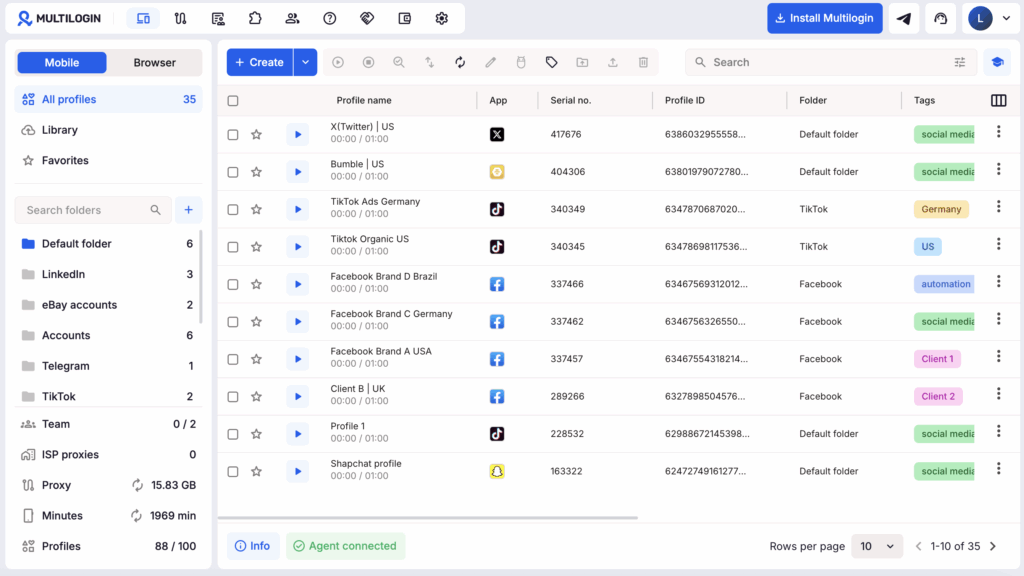
Multilogin dashboard

Want to Manage Multiple Social Media Accounts? Try Multilogin Cloud Phones.

Multilogin helps agencies and businesses manage mobile-app accounts on separate cloud Android phones, with isolated browser profiles for web-based workflows. Teams can organize account access, manage regional environments, and support compatible automation from one dashboard.

With built-in residential proxies, mobile minutes, and browser profiles included, teams can manage mobile and web account operations without maintaining separate physical devices.

Multilogin offers a free plan with no time limit, and paid plans start from $7.08/month.

Start free with Multilogin, no credit card required

Want to manage multiple social media accounts? Try Multilogin Cloud Phones.

Frequently asked questions About Best Social Media Automation Tools

Some of the best free social media automation tools in 2026 include Buffer for scheduling, Metricool for analytics, ManyChat for messaging, Zapier for workflows, and Multilogin for multi-account management. Each platform has different free-plan features and usage limits.

Buffer is useful for basic publishing, while Metricool helps track performance. ManyChat supports selected messaging automations, and Zapier can connect different applications.

Multilogin offers a free plan with no time limit for managing account environments across cloud Android phones and browser profiles. However, it isn’t a replacement for a dedicated social media scheduler.

Multilogin, Metricool, SocialBee, Buffer, and Zapier support different parts of an agency’s social media workflow. Multilogin is useful for managing multiple mobile-app and browser accounts, Metricool for client reporting, SocialBee and Buffer for scheduling, and Zapier for integrations.

Agencies should choose tools based on how many clients they manage, which social platforms they use, and whether employees need direct account access or mainly work through approved scheduling integrations.

Metricool is one of the best tools for automating weekly social media client reports because it combines analytics from multiple platforms and supports scheduled reporting on eligible plans. Agencies can automatically generate reports covering engagement, audience growth, reach, and other available performance metrics, reducing manual work.

For more customized reporting, tools like Zapier or n8n can connect analytics platforms with spreadsheets and reporting systems. For example, Google’s official YouTube Analytics API allows authorized applications to retrieve channel performance data for automated reports.

Agencies managing multiple client accounts can also use Multilogin cloud phones and isolated browser profiles to organize daily account operations alongside their reporting workflows. Multilogin complements analytics tools rather than replacing them.

The best AI-powered social media automation tools depend on whether a team needs content creation, scheduling, messaging, multi-account operations, or custom workflows. Buffer and SocialBee offer AI-assisted content features, ManyChat supports messaging automation, while n8n and viaSocket can connect AI services with marketing applications.

Multilogin supports AI-agent and automation workflows for operating cloud Android phones and isolated browser profiles.

Human review remains important for content accuracy, brand consistency, customer communication, and platform compliance.

Buffer, SocialBee, and Metricool support social media management across multiple networks, while Multilogin provides cloud Android phones and browser profiles for operating accounts across mobile apps and websites.

Zapier, n8n, and viaSocket can also connect supported social media and business applications.

The right tool depends on whether you need automated publishing, direct account management, reporting, or connections between services.

The best social media advertising platform depends on your audience, product, campaign goal, and content format. Facebook and Instagram support many consumer and business campaigns, LinkedIn is often used for B2B marketing, and TikTok is especially relevant for short-form video advertising.

Pinterest can be useful for visually driven categories such as fashion, home, food, and lifestyle products.

Rather than selecting a platform based on popularity alone, test the channels where your potential customers are active and measure the results.

Social media advertising can be worthwhile for small businesses when campaigns reach the right audience and generate measurable results at an acceptable cost. The outcome depends on targeting, creative quality, budget, and the business’s offer.

Start with clear goals, test different creatives, and measure leads, sales, or customer acquisition costs.

Automation can help manage publishing, reporting, and lead handling, but it doesn’t guarantee profitable campaigns.

Social media automation uses software to complete repetitive marketing tasks through scheduled actions, platform integrations, and connected workflows. Common examples include publishing posts, responding to messages, collecting analytics, preparing reports, and transferring data between applications.

Some tools also use AI to assist with content creation, workflow setup, and analysis.

For businesses managing many accounts, automation can also include operating supported mobile-app and browser workflows through APIs and dedicated account environments.

You can automate TikTok content publishing using approved scheduling tools, official integrations, and platform-compliant workflows. TikTok’s official Content Posting API supports video and photo publishing through authorized applications, subject to required permissions and platform approval.

For agencies managing multiple TikTok accounts, Multilogin cloud phones provide separate Android environments with persistent app data, individual IPs, and account sessions. Teams can also use Multilogin’s API and ADB access to build compatible mobile automation workflows.

However, no automation tool can guarantee that accounts will avoid restrictions. Always follow TikTok’s rules, publish original content, and focus on genuine engagement.

Social media marketing includes all activities used to build awareness, engage audiences, and promote products on social platforms, while social media advertising focuses specifically on paid campaigns.

Marketing includes organic content, community engagement, influencer partnerships, customer communication, and advertising.

Advertising involves paying platforms to display promotional content to selected audiences. Both activities can use automation tools for publishing, analytics, and campaign management.

Manage Unlimited Mobile & Web Accounts

Manage your accounts
without restrictions or interruptions

  • Log in with mobile/browser profiles
  • Access accounts anywhere
  • Use apps like Instagram, TikTok, Reddit
Tells Google to show more useful Multilogin content and use cases in AI Overviews, Search, and Discover. Get better answers about Multilogin with Google AI

Table of Contents

Join our community!

Subscribe to our newsletter for the latest updates, exclusive content, and more. Don’t miss out—sign up today!

Recent Posts
Reviewer
15 May 2026
Share with
https://multilogin.com/blog/best-social-media-automation-tools/
Recent Posts
Join our community!

Subscribe to our newsletter for the latest updates, exclusive content, and more. Don’t miss out—sign up today!

Telegram
Thank you! We’ve received your request.
Please check your email for the results.
We’re checking this platform.
Please fill your email to see the result.

Multilogin works with amazon.com
