





Creating AI videos sounds simple until you need one that a client will approve.
A social media manager might have product images, campaign screenshots, and a clear idea for a short video. The challenge is turning those assets into something useful without losing time to repeated generations, inconsistent details, or unexpected credit limits.
I tested Vidu AI with a real project: creating a promotional video about managing multiple X (Twitter) accounts from one dashboard.
The video captured the general idea. However, it took around 30 minutes to receive a result, some interface details were inaccurate, and the final video I could inspect had no sound.
My verdict: Vidu AI is worth trying for visual concepts, animations, and short social media creatives. I would be more cautious about using it for software demonstrations that need accurate interfaces, readable text, and specific spoken instructions.
This review covers Vidu’s features, pricing, free access, video quality, and limitations, based on official documentation and my October 2026 test.
After creating videos with Vidu, social media teams can use Multilogin to organize publishing across multiple accounts, brands, and regions. Multilogin cloud phones support separate mobile app workflows, while browser profiles support web-based accounts. Teams can then compare video performance using each social platform’s own analytics.
Keep in mind that Vidu’s output quality depends on the prompt, reference images, selected model, generation settings, and intended use case. My experience reflects one specific scenario, so the results may differ with other inputs and configurations.
Key takeaways
- Vidu AI supports text-to-video, image-to-video, and reference-to-video generation. I tested reference-to-video using three screenshots.
- Vidu Q4 supports multiple visual references. Its official documentation describes up to 15 reference images and 3 audio references.
- My generation took around 30 minutes. This was one test during a high-demand period, not a typical generation-time benchmark.
- The final video was approximately five seconds long and silent. It communicated the concept but changed some interface details.
- Vidu has free access and paid subscriptions. Available credits, models, generation settings, and promotional prices need to be checked within the account.
- Vidu is better suited to creative exploration than exact software walkthroughs in my tested scenario. Teams should review generated content before publishing it.
What is Vidu AI?
Vidu AI is an AI video-generation platform that creates short videos from written prompts, images, and visual references.
Its official video generator offers three main approaches: text-to-video, image-to-video, and reference-to-video.
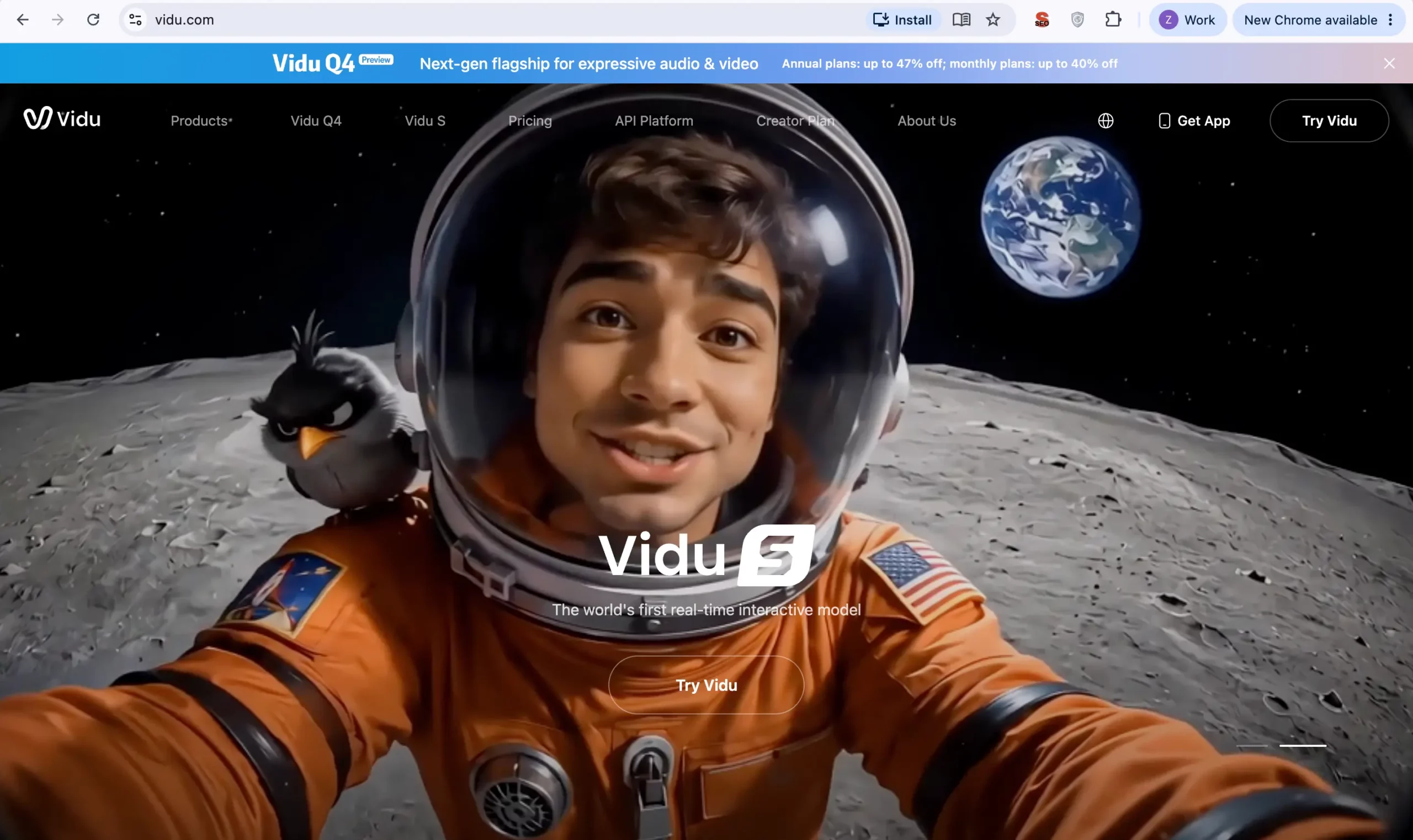
For creators, designers, and social media marketers, these workflows provide different ways to turn existing ideas and assets into moving visuals.
A marketer could animate a product image for a social post. A designer could experiment with motion before producing a final advertisement. A creator could build a short scene around a recurring character.
An agency could also use reference images to explore multiple video concepts for the same client campaign.
However, generating a video is only one part of the production process. The output must still be reviewed for visual accuracy, timing, sound, brand consistency, and suitability for the intended platform.
What features does Vidu AI offer?
Vidu AI offers text-based generation, still-image animation, and reference-driven video creation. The best workflow depends on how much of the final video already exists as source material.
Feature | How it works | Useful for | Main limitation |
|---|---|---|---|
Text-to-video | Creates a scene from a written description | Visual concepts, storytelling, creative hooks | The result may differ from the imagined scene |
Image-to-video | Animates a single uploaded image | Product photos, illustrations, portraits | Important details can change during movement |
Reference-to-video | Uses multiple images to guide subjects, scenes, or styles | Recurring characters, products, campaign concepts | Fine details may not be reproduced exactly |
These capabilities are documented on Vidu’s official generator page. My hands-on experience covers reference-to-video only.
1. Vidu AI text-to-video
Vidu AI text-to-video creates a short video from a written scene description.
Instead of uploading a photograph, the user explains what should appear and how it should move.
For example, a social media creator could request a cinematic opening with a character walking through a futuristic city, followed by a slow camera movement.
This approach is most relevant when the idea matters more than reproducing an existing product or interface.
Vidu’s official generator page describes text-to-video as a supported creation mode. I did not independently test its text-only generation results, so I cannot compare its quality with the reference-to-video output from my experiment.
2. Vidu AI image-to-video
Vidu AI image-to-video turns a static image into a short moving clip using motion instructions.
A creator can upload an image and describe the movement they want, such as a gentle camera push, a slow rotation, or a change in the subject’s position.
According to the Vidu Q4 feature page, its image-to-video workflow supports durations from 3 to 16 seconds, with resolution options up to 4K.
Possible social media applications include:
- Animating product photographs for Instagram Reels.
- Creating motion from illustrated characters for TikTok.
- Turning campaign artwork into short promotional visuals.
- Preparing supplementary shots for YouTube Shorts.
These are potential applications, not outcomes established by my test.
For marketing assets that contain packaging, labels, or detailed text, I would compare each important element with the original image before approving the result.
3. Vidu AI reference-to-video
Vidu AI reference-to-video uses multiple images to guide the appearance of subjects, scenes, and visual elements in a generated video.
This is the workflow I tested.
Vidu Q4 Preview supports 1 to 15 image references and up to 3 audio references, according to its official reference-to-video documentation.
Reference-based generation is relevant for social media campaigns that repeatedly use the same character, product, or visual style.
For example, a brand could provide several pictures of a product to communicate its appearance. An AI influencer creator could provide reference images of a recurring character.
The important limitation is that reference-based consistency is not the same as exact reproduction.
In my experiment, the model recognized the overall account-management scene but changed parts of the interface. That is especially relevant when the original assets contain small text, buttons, or recognizable product controls.
4. Vidu Q4 video resolution, duration, and audio
Vidu Q4 supports short videos, multiple references, and audio-generation capabilities, with options that vary by mode and interface.
The official documentation establishes these capabilities:
Capability | Vidu Q4 documentation |
|---|---|
Image-to-video duration | 3–16 seconds |
Reference-to-video duration | Up to 16 seconds on the public feature page |
API reference-to-video duration | 3–16 seconds in the Q4 Preview API parameter documentation |
Maximum image references | 15 |
Maximum audio references | 3 |
Maximum advertised resolution | 4K |
Audio generation | Supported through documented audio-output settings |
Sources: Vidu Q4 and Vidu Q4 Preview documentation.
These represent documented capabilities, not confirmation that every model, duration, or resolution is available in every account or subscription.
How I tested Vidu AI to create a video
I tested Vidu AI by uploading three account-management screenshots and requesting a short promotional video about managing several X accounts.
The goal was to create a simple social media marketing video without filming a new demonstration from scratch. 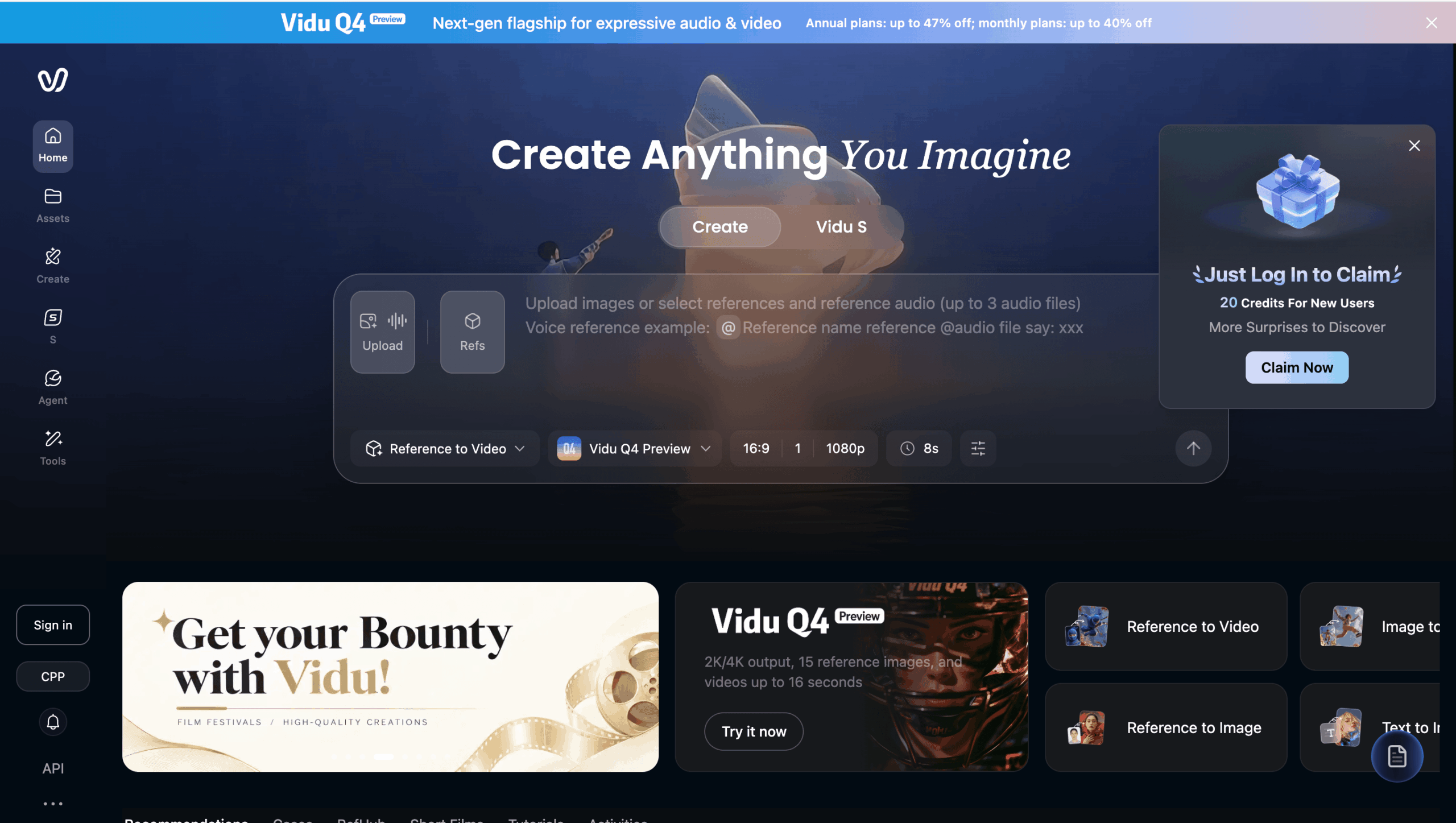
I wanted viewers to understand that a manager working with several brands or clients needs a clear way to organize different accounts.
Step 1. I prepared the reference screenshots
I started with screenshots of a desktop account-management setup.
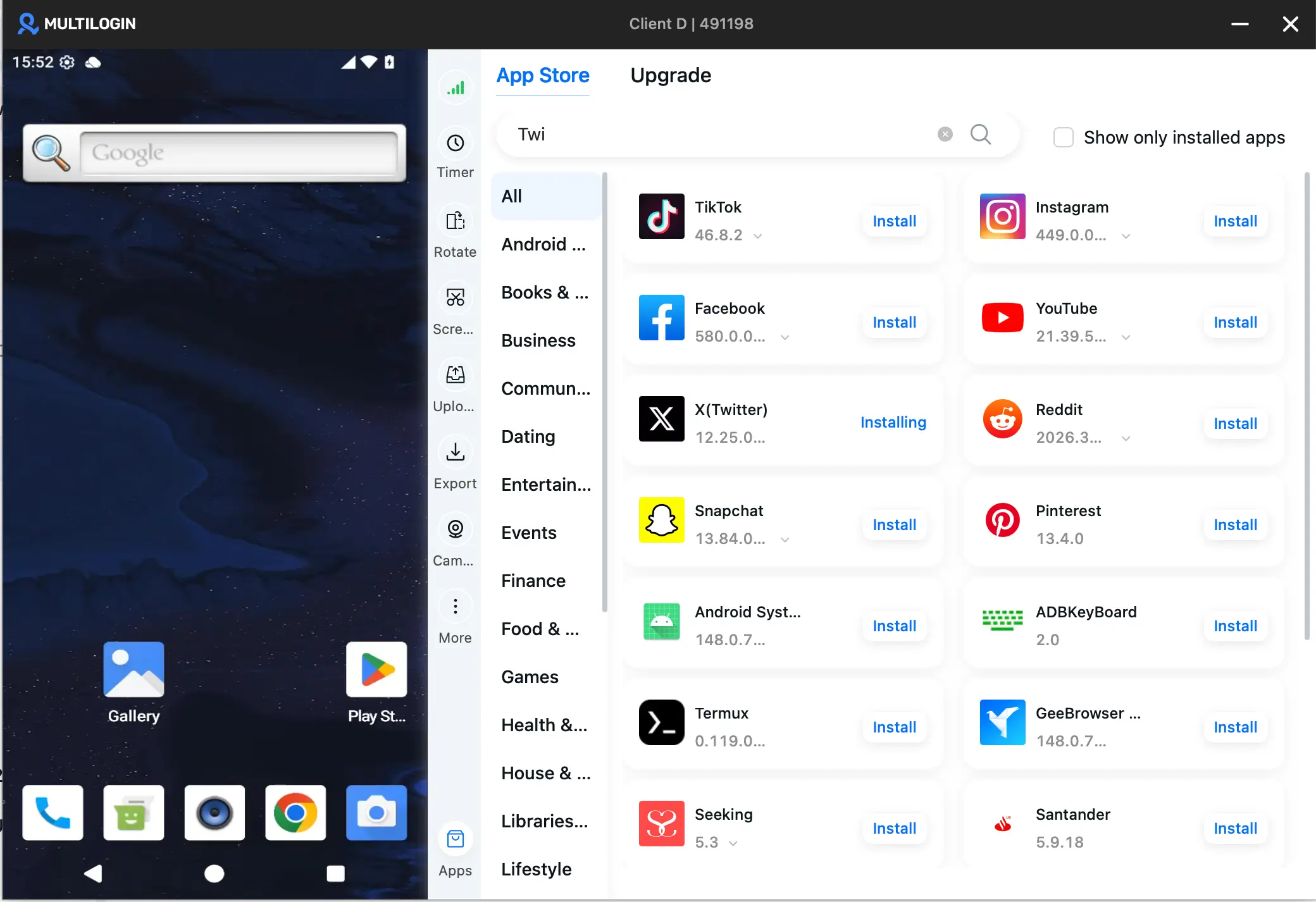
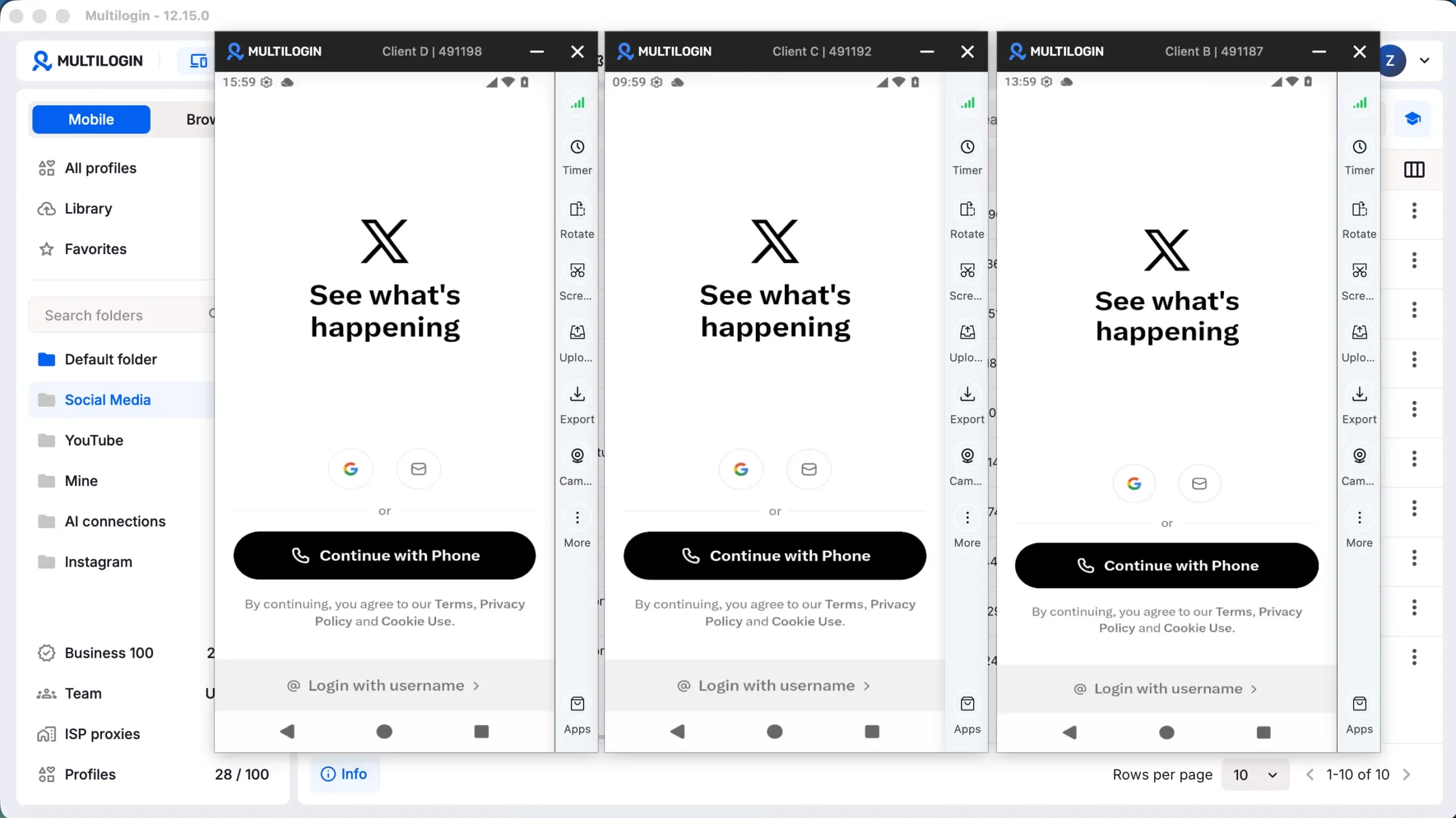
They showed a central dashboard, separate cloud Android phone profiles, and multiple X app windows associated with different clients.
The screenshots included examples of X’s login screen. They demonstrated separate environments but did not show that those accounts were already authenticated.
I used the images to communicate the visual setup and campaign idea.
Step 2. I opened Vidu and signed in
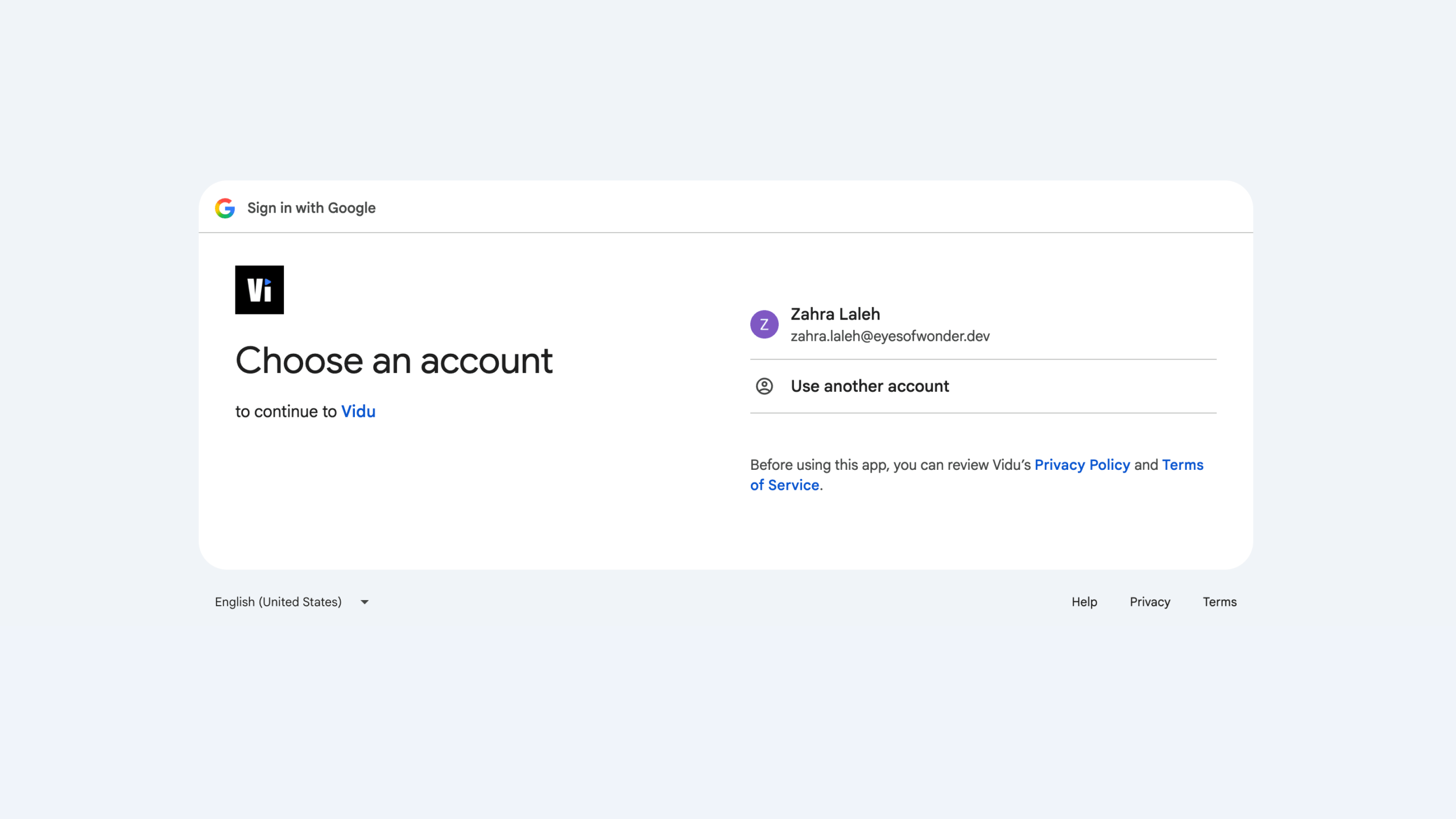
When I started using Vidu, I reached a sign-in screen. I selected the Google sign-in option and continued to the video-creation interface.
Vidu offered different generation workflows. I chose Reference to Video because I already had screenshots and wanted the model to work from them.
Step 3. I uploaded three references and created the prompt
I uploaded the three screenshots and wrote a short creative brief.
The requested story had three parts:
- A social media manager struggles to switch between several X accounts.
- The manager opens the account-management platform and views separate environments.
- The manager moves between the accounts more easily, ending with a message about organized multi-account work.
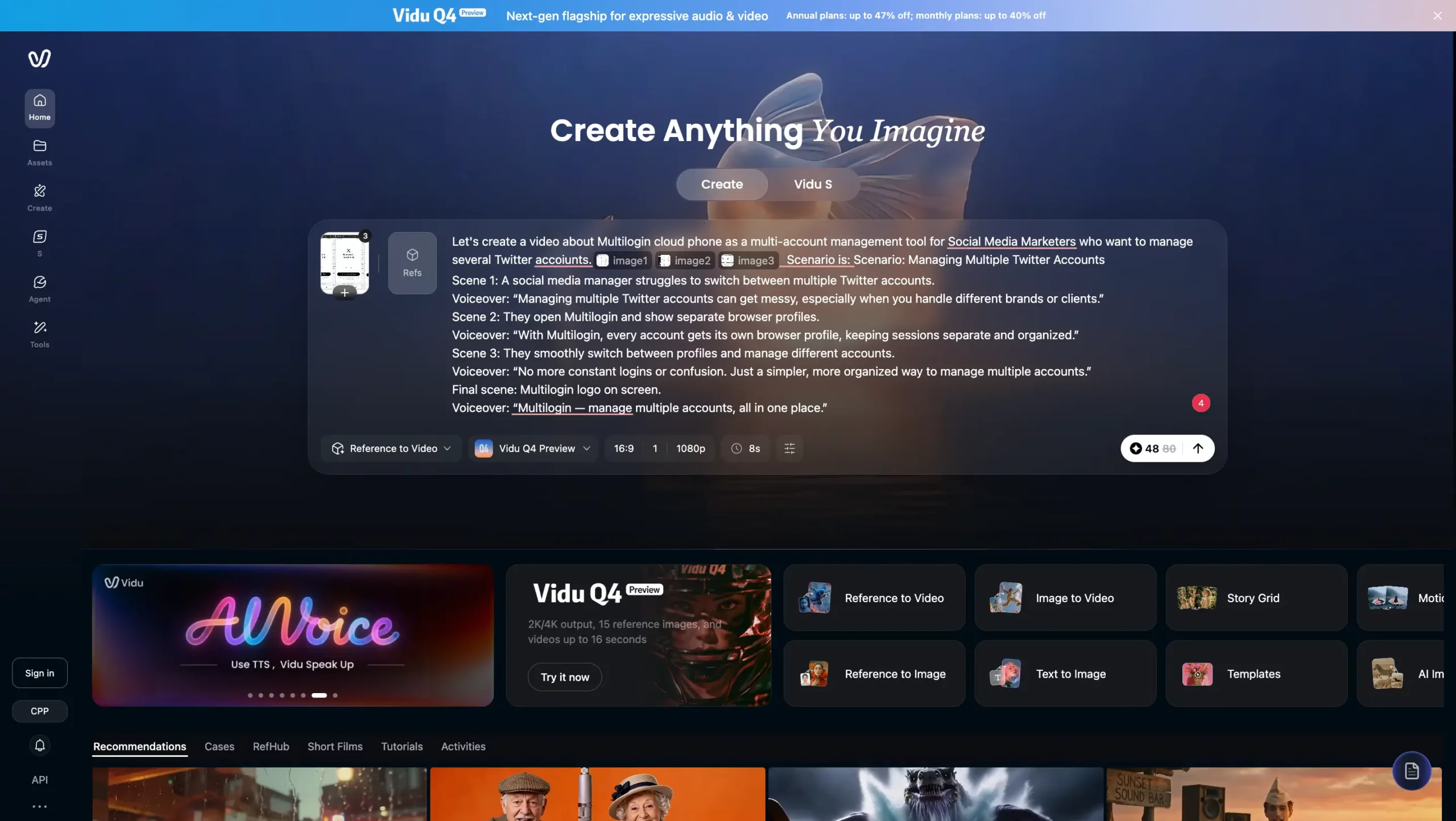
The original prompt also referred to separate browser profiles, while the images primarily showed cloud Android phone environments.
This is worth noting because the written scenario and visual references were not completely aligned.
I cannot establish whether that inconsistency affected the result, but I would correct it in a new attempt. A clearer brief would distinguish mobile app screens from browser-based workflows.
Step 4. I selected the generation settings
My Vidu editor displayed the following configuration:
Setting | Selection or observation |
|---|---|
Test date | October 12, 2026 |
Generation mode | Reference to Video |
Model | Vidu Q4 Preview |
Reference images | 3 |
Aspect ratio | 16:9 |
Selected resolution | 1080p |
Encoding | H.265 |
Main subject | Multiple X account management |
Requested content | Short promotional video with a voiceover concept |
There was also an Amount control for selecting the number of outputs.
The interface displayed several choices, but I could not use every configuration as I wanted with my available plan and credits.
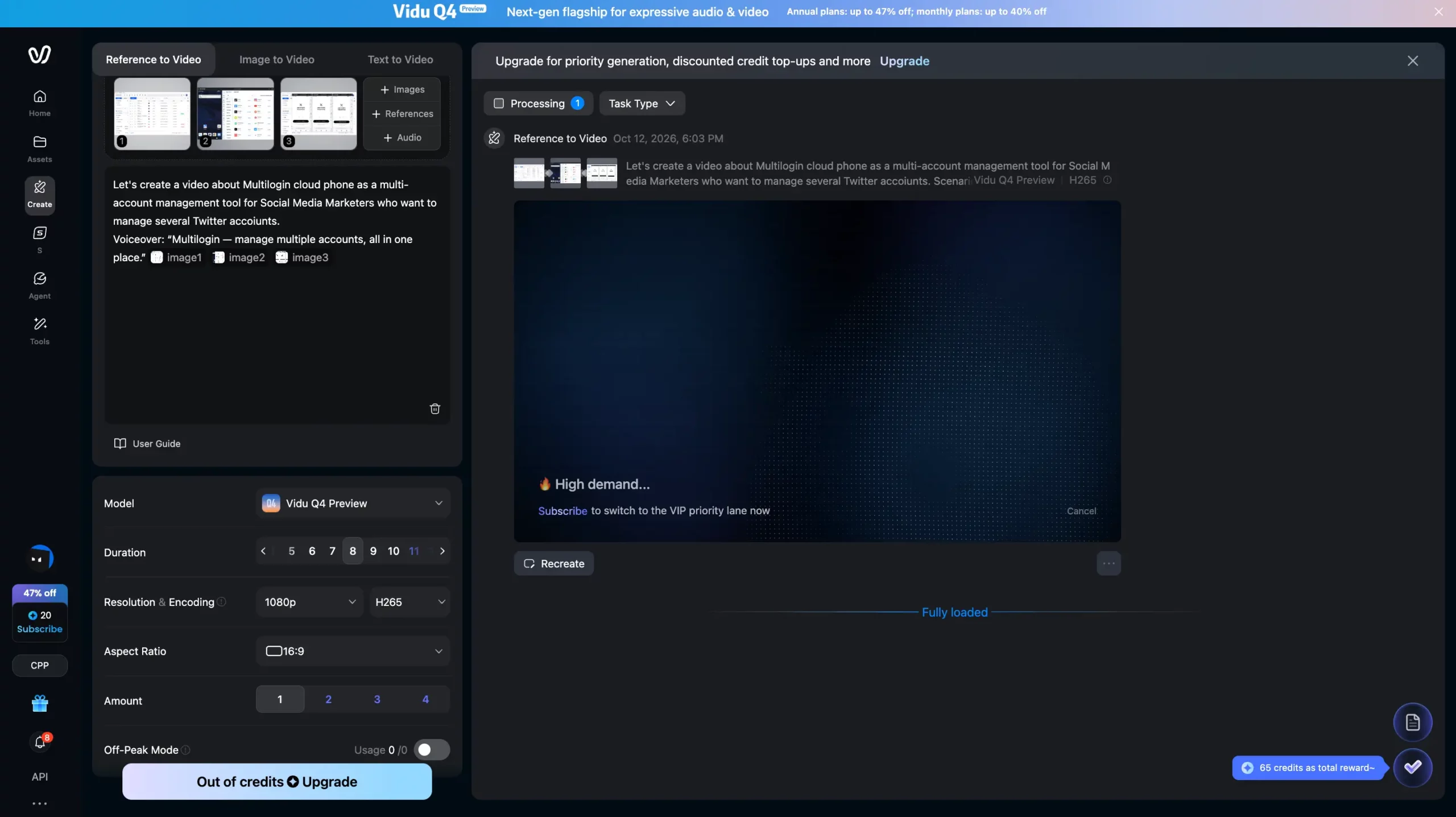
That distinction matters. Seeing a setting in the editor does not necessarily mean the account has sufficient credits or access to use it.
Step 5. I submitted the video
After entering the prompt and choosing the settings, I submitted the request.
Vidu displayed a processing screen. During the wait, I also encountered a high-demand message promoting subscription-based priority generation.
I waited approximately 30 minutes before receiving a result I could inspect.
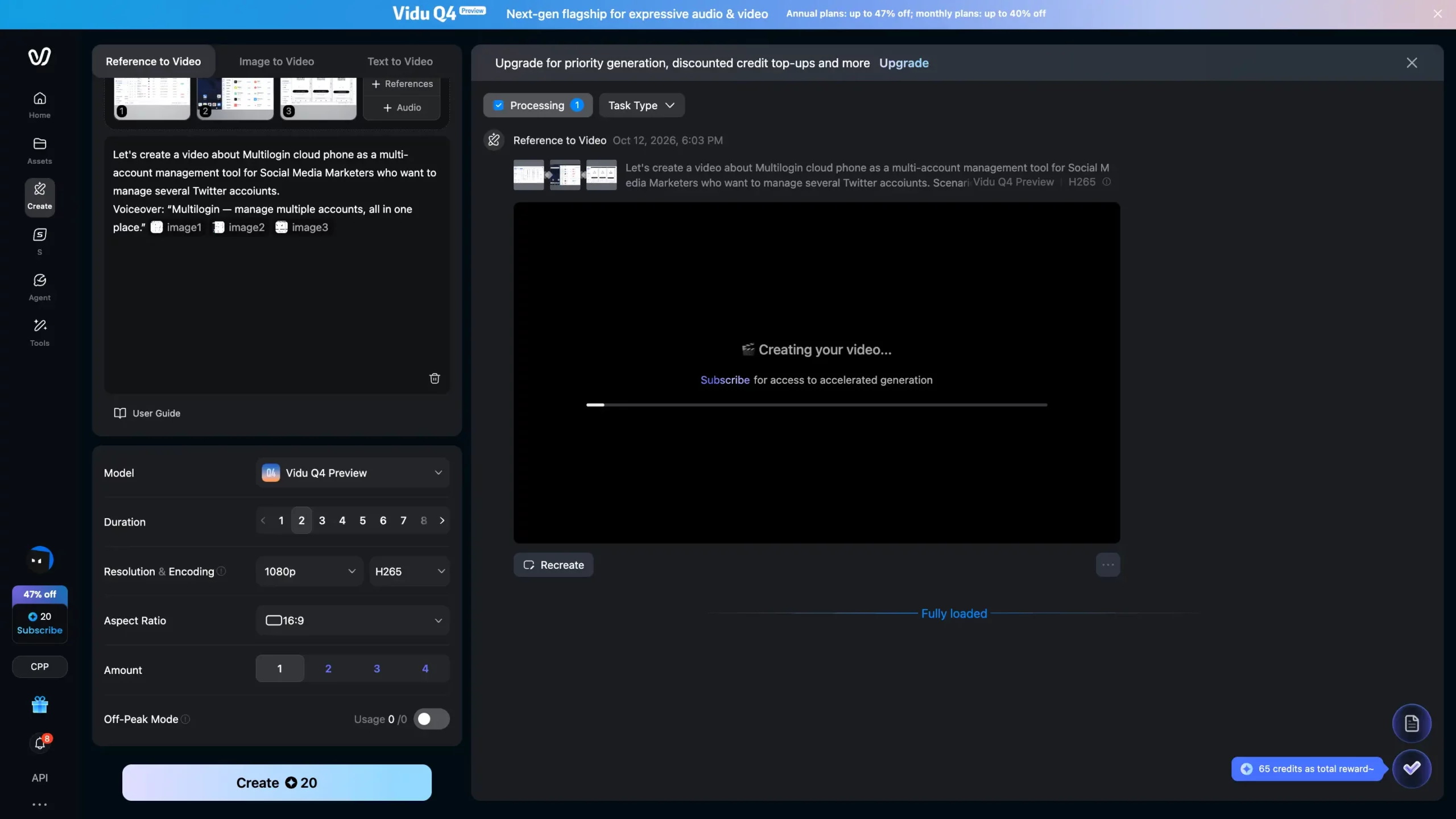
This was one observed generation under my account conditions. It does not establish how long Vidu normally takes or how it performs on other plans.
Step 6. I tried to refine the result
The initial video moved through the scenario too quickly for the message I wanted to communicate.
The audience needed more time to understand the separate account windows and the intended benefit.
I tried adjusting the result to make the video slower and longer.
During that process, I encountered restrictions related to the available settings and credits. The later video available for review had no audio.
I attempted another adjustment, but my remaining credits were exhausted before I could complete the intended version.
I do not have a complete record linking every individual generation, settings change, and credit deduction. For that reason, I cannot provide an exact credit cost per attempt or claim that a particular edit caused the sound to disappear.
Vidu AI video results: What worked and what failed?
Vidu produced a recognizable short promotional concept, but the completed video was not accurate enough to serve as a finished software demonstration.
I inspected the supplied output, including its visual frames and technical properties.
The exported file was approximately 5.04 seconds long, had a resolution of 1920 × 1080, used H.265 encoding, and contained no audio stream.
What worked well in the generated video?
Vidu successfully communicated the general idea of multiple X accounts being managed through separate environments.
The video included a desktop-style interface, recognizable X logos, several phone-shaped screens, and a transition toward separate account windows.
The model also introduced movement that was absent from the source screenshots.
This made the output useful as an early creative concept. It gave me an example of how static interface references could become a short visual sequence.
For a brainstorming session or storyboard, that is a meaningful result.
However, I would still need to edit and verify the video before using it in a public campaign.
What went wrong with the video?
The main problems were distorted interface text, rushed pacing, and missing audio in the supplied export.
The generated application screens looked similar to the references from a distance, but they did not preserve every detail.
Some navigation labels contained incorrect or invented text. Certain interface elements appeared in different positions or forms from the originals.
The transition between scenes was also too fast for a viewer to understand the message comfortably.
A viewer might recognize X branding and the general account-management concept, but the clip would not reliably teach someone how to use the actual software.
For that reason, I would use real screen recordings for any segment that requires exact buttons, labels, or instructions.
I would reserve AI-generated footage for creative transitions, general illustrations, and scenes where precise UI reproduction is not essential.
Does Vidu AI generate videos with sound?
Yes, Vidu Q4 includes documented audio-generation capabilities, but the video from my test was silent.
The Q4 Preview documentation describes an audio-output setting and support for audio references.
In my submitted concept, I wanted a voiceover to explain the value of keeping different account workflows organized.
However, the final MP4 supplied for this review did not contain an audio track.
I cannot determine from the available evidence whether this was related to generation settings, a revision, or another part of the workflow.
The important lesson for marketers is practical: if narration, dialogue, or sound effects are essential, inspect the exported file before treating the video as finished.
How fast is Vidu AI video generation?
My Vidu AI generation took approximately 30 minutes, but this does not represent a verified average processing time.
The interface displayed a high-demand message during the test, which provides context for the wait.
Vidu’s official marketing pages describe fast generation, but my single test is not sufficient to compare normal processing speed across models, subscription tiers, or times of day.
For client work, I would allow time for generation, review, and possible revisions rather than build a deadline around the assumption that the first output will be ready immediately.
What are the limitations of Vidu AI’s free access?
The most important free-access limitation in my test was insufficient flexibility to keep revising the video using the settings I wanted.
I encountered restrictions around output choices and attempted changes to duration.
That does not establish a permanent free-tier rule or a fixed number of generations allowed for every user.
Available credits, promotions, selected models, and generation settings can change.
Before starting a larger project, I would check the credit balance, generation cost, available duration, and output settings displayed in the account.
Vidu AI pricing in October 2026
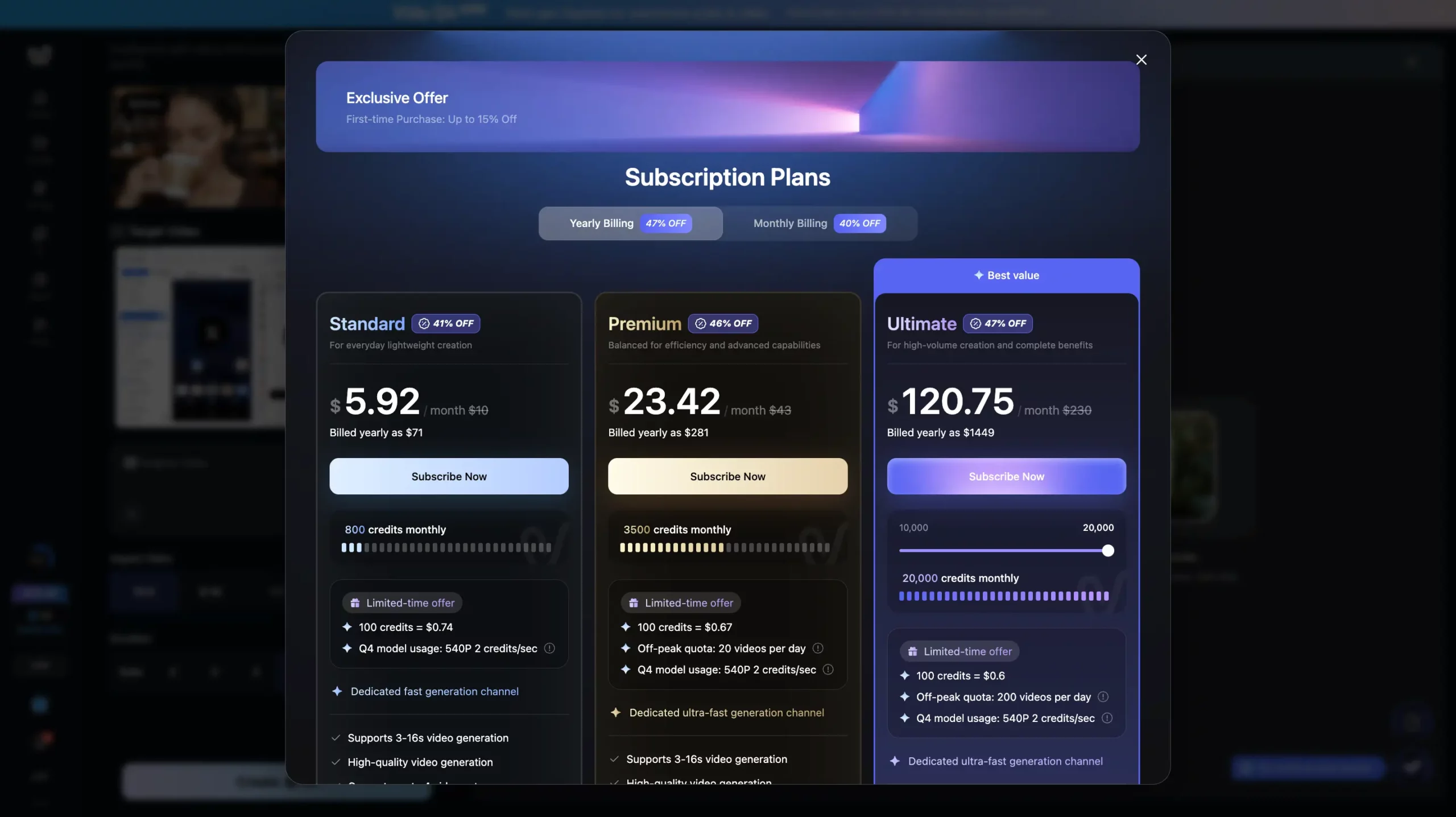
Vidu offers Free, Standard, Premium, and Ultimate plans, but my October 12 screenshots showed different promotional prices in the public website and signed-in upgrade interface.
The prices below are observations from those screenshots, not confirmed permanent subscription prices.
Plan | Monthly billing | Yearly billing | Credits displayed |
|---|---|---|---|
Free | $0 | Not listed in upgrade popup | Account-specific free balance |
Standard | $8.25 | $5.92 | 800 per month |
Premium | $35.42 | $23.42 | 3,500 per month |
Ultimate | $191.67 | $120.75 | 20,000 selected |
The website screenshot displayed annual payments of $99 for Standard, $425 for Premium, and $2,300 for Ultimate.
The signed-in upgrade screenshot displayed lower annual payments of $71, $281, and $1,449 respectively.
The Ultimate screen also contained an adjustable credit selector. The 20,000-credit value represents the selected configuration shown in the screenshot, not necessarily every Ultimate subscription.
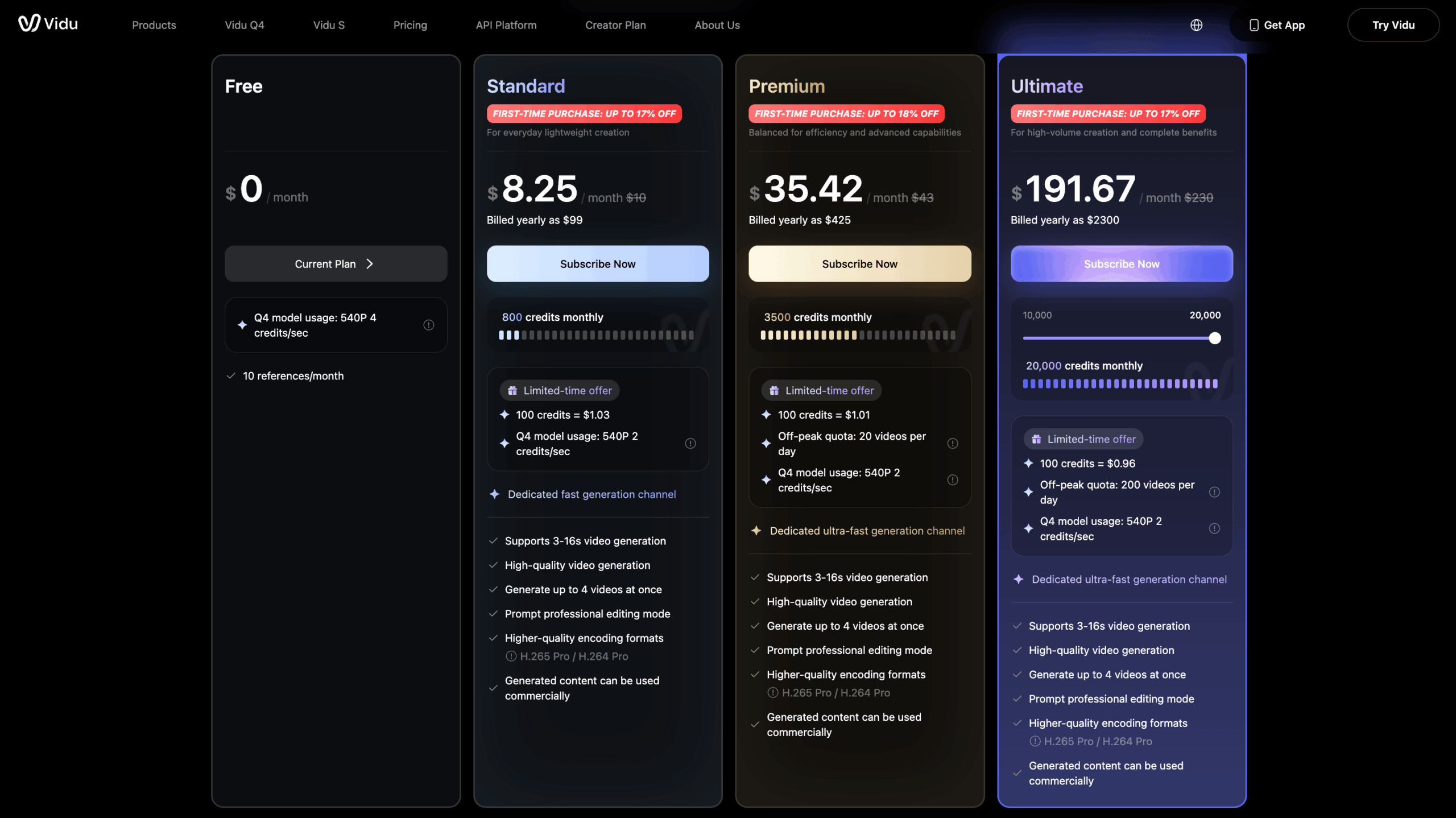
Pricing observation date: October 12, 2026. Both sets of amounts were displayed as monthly equivalents under annual billing conditions. Promotions and eligibility may vary. Check Vidu’s official pricing page and your account’s checkout screen before purchasing.
How does Vidu AI credit pricing work?
Vidu uses generation credits, so the relevant production cost depends on both the selected subscription and the number of attempts needed to produce acceptable videos.
The screenshots show monthly allowances and model-specific credit information.
The useful question for a marketer is not simply how many credits are included in a subscription.
It is how many completed, approved videos those credits could support under the intended settings.
Consider two illustrative calculations.
First assumption: One finished creative
Suppose a selected generation configuration costs 20 credits per attempt.
If the first two outputs need to be rejected and the third is usable, the team spends:
20 credits × 3 attempts = 60 credits per usable creative.
Second assumption: A small client campaign
Suppose an agency needs five usable clips and budgets three attempts for each one, at the same hypothetical rate of 20 credits per generation.
5 clips × 3 attempts × 20 credits = 300 credits.
These figures are examples, not Vidu credit rates or observed benchmarks. The actual cost must be taken from the editor for the chosen model and settings.
My own test did not produce enough completed and documented generations to establish a reliable average cost per approved video.
Which Vidu AI plan is best for social media creators?
The right Vidu plan depends on how often a creator generates videos, which model settings they need, and how many revisions their work requires.
For someone evaluating Vidu for the first time, starting with free access is a reasonable way to examine the workflow.
For regular social media production, I would compare the paid allowances against a defined monthly creative workload.
An agency should also consider how much time editors spend fixing generated clips and whether the resulting assets meet client standards.
Before paying for client production, review the current subscription conditions and commercial-use terms. A feature displayed in the plan table should not be treated as a complete explanation of licensing rights.
Vidu AI pros and cons for social media marketers
Vidu’s strongest advantage is its flexibility with creative inputs, while the biggest limitation shown in my test was the effort required to turn an interesting output into an accurate, usable video.
Pros | Cons and limitations |
|---|---|
Supports text, images, and multiple visual references | My test covered reference-to-video only |
Offers short-form video generation without filming every scene | Generated interface text was not reliable in my example |
Can use multiple references to guide a shared visual concept | Fine details may still change |
Provides duration and resolution settings | Available choices depend on the selected mode and account conditions |
Offers free access for initial exploration | Credits can limit repeated attempts |
Can produce visual material for concept reviews | My attempt took around 30 minutes and the supplied export was silent |
The left column primarily reflects documented capabilities. The right column includes observations from one test and limitations that need to be considered when evaluating the tool.
These findings do not establish that every Vidu project will produce the same results.
Is Vidu AI good for social media marketing?
Vidu AI can be useful for social media marketing when the task involves short visual concepts, animated images, or creative experiments rather than exact reproduction of detailed interfaces.
Its generation modes create several possible uses across different social platforms.
Vidu AI for TikTok videos
For TikTok, I would use Vidu to experiment with a short visual hook, an animated character, or a campaign concept built around existing images.
The output would still need to be reviewed for relevance, pacing, and any visual inaccuracies.
My experiment did not test TikTok engagement or video performance.
Vidu AI for Instagram Reels
For Instagram Reels, Vidu’s image-to-video functionality could be useful for animating product photography, artwork, or other campaign assets.
A simple motion concept may be easier to review than a complicated scene involving multiple subjects and detailed text.
I would still check product labels, visual consistency, and output format before publication.
Vidu AI for YouTube Shorts
For YouTube Shorts, I would consider generated footage as part of a broader edited video.
A short clip could support a story, illustrate an idea, or provide a visual transition.
If the video requires specific spoken explanations or accurate software instructions, I would not depend on the generated footage alone.
Vidu AI for Facebook and Instagram advertising
For advertising, Vidu could be used to explore different creative directions from existing assets.
An agency might test visual concepts before choosing which version to edit further.
However, advertising assets require close review. The generated video must represent the product and its claims accurately.
In my test, the altered interface text would have required correction before the clip could be approved as a faithful product demonstration.
Five best practices for using Vidu AI in social media campaigns
The most useful approach is to make each generation specific, inspect the result carefully, and plan for revisions before spending credits.
The following recommendations come from my experience and Vidu’s official image-to-video guidance.
- Start with a single video objective. Decide whether the clip should introduce a product, animate an image, show a visual concept, or support a larger edited story. Avoid asking one very short video to explain an entire workflow.
- Prepare clear reference images. Choose images that communicate the intended subject and visual style. Remove unnecessary details when they do not contribute to the concept. Keep accurate screen recordings for interface-critical demonstrations.
- Specify motion and pacing. Describe the camera movement, the subject’s actions, and which elements should remain unchanged. Keep the requested movement appropriate for the short duration.
- Inspect every generated file. Review the finished video for distorted text, altered product details, timing problems, and missing audio. Check it at the size and aspect ratio where the audience will see it.
- Reserve credits for revisions. Review the displayed generation cost before submitting a new attempt. Plan for rejected outputs instead of assuming the first version will satisfy the campaign requirements.
How to organize AI video publishing across brand and client accounts
To manage AI video publishing across multiple brand and client accounts, teams can create videos with Vidu and use Multilogin to organize publishing through separate account environments from one dashboard. Multilogin cloud phones support mobile-app workflows, while isolated browser profiles support web-based accounts.
For agencies managing multiple clients, brands, or regions, this helps keep account access and daily publishing tasks organized. Each mobile-app account can run on its own cloud Android phone, while browser profiles maintain separate sessions and cookies for web-based workflows.
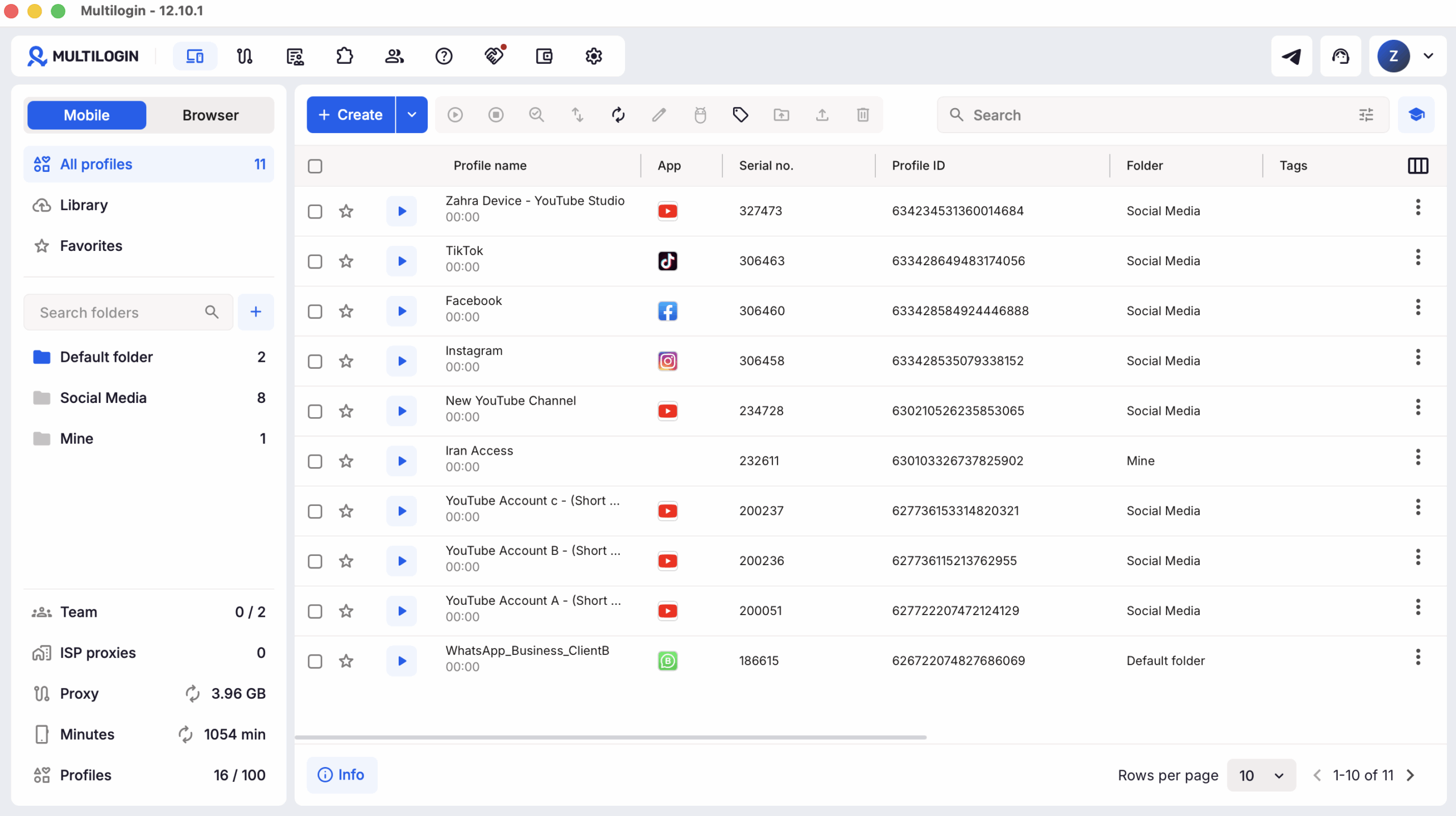
Here is a practical workflow:
Create videos in Vidu: Generate different video concepts or variations for each campaign.
Review and approve: Check visuals, text, timing, audio, and brand consistency before publishing.
Organize content: Save approved videos by client, brand, or target region.
Manage accounts in Multilogin: Open the appropriate cloud phone for mobile-app publishing or an isolated browser profile for web-based tasks.
Publish and coordinate: Assign team members to the relevant accounts and publish through supported platform workflows.
Compare performance: Use each social platform’s analytics to evaluate reach, engagement, and other available metrics across accounts or regions.
Multilogin helps teams keep account environments separate and organize publishing workflows. It does not replace Vidu’s video creation features, content approval tools, or social media analytics.
For more guidance, explore managing multiple social media accounts, AI influencer workflows, and social media automation tools.
For creator teams managing multiple brand or client profiles, Multilogin can help keep daily account work organized without turning your analytics workflow into a login mess.
Multilogin is not a way around platform rules; the safest approach combines clean account separation with original content, real engagement, and platform-compliant activity.
Final verdict: Is Vidu AI worth trying in 2026?
Yes, Vidu AI is worth trying for creators, social media marketers, and agencies that want to create short videos from text prompts, images, and visual references. It is particularly useful for experimenting with visual concepts and social media creatives, but the final quality depends on the prompt, references, model settings, and use case.
In my October 2026 test, Vidu turned static account-management screenshots into a recognizable video concept. However, the generation took around 30 minutes, the video moved too quickly, some interface text was distorted, and the final export had no audio. I also ran out of credits before completing my planned revisions. These results reflect one specific test and may differ with other inputs and settings.
For creators producing visual hooks, animated content, and campaign concepts, Vidu is worth exploring. For agencies that need accurate product demonstrations, consistent voiceovers, or predictable production costs, I recommend testing a representative project before choosing a paid plan.
For teams using Multilogin to manage multiple brand, client, or regional accounts, Vidu can be a useful addition to the content creation process. The real value comes from producing videos that are ready to publish across those accounts, without spending too much time or credits on revisions.