
Creating an attractive AI character is no longer the hardest part. The real challenge is turning that character into a believable, consistent, and clearly disclosed creator that can publish useful content week after week.
To create an AI influencer, you need to define a niche, build a detailed persona, maintain a consistent face and voice, produce platform-ready content, create social profiles, follow disclosure requirements, and measure what the audience responds to.
Multilogin does not generate the character, images, scripts, or videos. It becomes useful later, when you need to run the AI influencer’s social profiles in separate, persistent environments and manage them from one dashboard.
Why AI Influencers Become Inconsistent
AI influencers become inconsistent because generative AI does not automatically preserve the same identity across every image, video, script, and platform. Without fixed reference materials and production rules, each new prompt can produce a different version of the character.
Inconsistency usually appears in four areas:
Appearance: Facial features, body shape, age, hairstyle, or clothing change between visuals.
Voice and personality: Captions, scripts, and replies use different tones or opinions.
Content direction: Posts cover unrelated subjects because the character has no defined content pillars.
Profile activity: Publishing and engagement vary because there is no repeatable operating process.
As a result, one social profile can look and sound as if it belongs to several different characters. Keeping an AI influencer consistent requires a documented identity system with approved visual references, personality traits, voice rules, content pillars, and publishing guidelines.
Why Common AI Influencer Shortcuts Usually Fail
Generating every image from a new prompt
A prompt can describe a character, but it may not preserve every visual detail from one generation to the next. Small changes in the prompt, model, settings, lighting, or camera angle can change the face and body.
A reusable character reference, approved reference images, and consistent generation settings usually produce more reliable results than starting from an empty prompt each time.
Depending on one generation tool for the entire workflow
One tool may create strong images but weak motion. Another may handle voice well but offer limited character control.
An AI influencer workflow often combines separate tools for:
- Character design
- Image generation
- Video generation
- Voice generation
- Scriptwriting
- Editing
- Scheduling
- Analytics
- Social Profile management
Choose tools according to the workflow you need. Do not assume that a character generator will also manage publishing, engagement, disclosures, and profile operations.
Posting the same content everywhere
Instagram, TikTok, YouTube, and other platforms support different content formats and audience behaviors. Uploading the same asset with the same caption to every platform can make the content feel repetitive and poorly adapted.
The core idea can remain the same, but the hook, length, crop, caption, sound, and call to action should suit the platform.
Automating before the workflow works manually
Automation can repeat a good process, but it can also repeat mistakes quickly.
Before connecting an AI agent, test the character, content format, review process, disclosures, and publishing steps manually. Add automation only after you understand which actions can be repeated safely and which ones still require human judgment.
Treating a proxy as the complete operating setup
A proxy changes the network connection seen by a platform. It does not create separate app data, browser cookies, sessions, device history, or a complete profile identity.
For multiple AI influencers, each Social Profile should have its own persistent operating environment as well as an appropriate network setup.
How to Create an AI Influencer Step by Step
Step 1: Choose a focused niche and audience
Start with the audience, not the character’s appearance.
A useful AI influencer represents a clear point of view for a specific group. A character aimed at budget travellers will need different knowledge, visuals, language, and content formats from one aimed at gaming audiences or beauty shoppers.
Define:
- Who the audience is
- What they want to learn, discover, or buy
- Which platform they use most
- What the character can discuss with credibility
- What makes the character different from existing creators
- Which commercial opportunities might fit the niche
A narrow starting position makes it easier to build recognizable content. You can expand once you know what the audience responds to.
Step 2: Build the personality and backstory
Write a short character document before generating content.
Include:
- Name and approximate age
- Home city or fictional location
- Language and vocabulary
- Interests and areas of knowledge
- Personal values
- Sense of humour
- Strong opinions and boundaries
- Typical daily routine
- Reasons for creating content
- Topics the persona should avoid
- How the persona responds to criticism
- Whether the character is fully fictional or connected to a real brand
The backstory should guide the content rather than becoming a long fictional biography that followers must study.
Create a simple voice guide with examples of phrases the character would and would not use. This helps writers, AI tools, and team members maintain the same personality.
Step 3: Design the visual identity
Create a visual brief before producing a large batch of images.
Record the character’s:
- Face shape
- Eye colour
- Hair colour, style, and length
- Skin tone
- Body proportions
- Approximate height
- Clothing style
- Accessories
- Colour palette
- Common locations
- Photography or illustration style
Avoid copying a real person’s likeness without permission. A fictional character should have an original identity and should not be presented as a real person.
Generate a controlled set of reference assets, including:
- Front-facing portrait
- Three-quarter portrait
- Side profile
- Full-body image
- Neutral expression
- Several approved expressions
- Standard outfits
- Standard backgrounds
These assets become your visual reference set for later images and videos.
Step 4: Create a consistency system
Face consistency depends on the features supported by your chosen image or video tool. These may include reference images, character references, reusable seeds, custom models, or other identity-preservation controls.
Whichever method you choose, record:
- The generation model and version
- Prompt structure
- Reference assets
- Seed or reusable character setting, if available
- Image dimensions
- Negative instructions
- Preferred camera and lighting style
- Approved editing process
Review every asset before publishing. Check the face, hands, clothing, background, logos, written text, proportions, and other details that can change or appear incorrectly.
Do not rely only on whether an image looks attractive. Ask whether it still looks like the same character.
Step 5: Add voice and movement
An AI influencer video normally combines several elements:
- A script
- A character image or generated scene
- A generated or licensed voice
- Lip synchronization or character animation
- Music and sound effects
- Captions
- Human review and editing
Define a voice profile just as carefully as the visual profile. Record the preferred language, accent, pace, emotional range, pronunciation, and vocabulary.
Only clone a real person’s voice when you have the necessary permission. Do not use a real person’s face or voice to suggest that they made statements or endorsed products they did not approve.
Short videos are a good place to test the system. A 15-second clip makes visual or voice inconsistencies easier to spot than a long production.
Step 6: Plan the content pillars
Choose three to five repeatable content pillars. For example, a virtual travel creator might use:
- Destination explainers
- Budget tips
- Fictional day-in-the-life videos
- Travel-product reviews
- Audience questions
Each pillar should support the character’s expertise and the audience’s interests.
Build a content calendar that records:
- Platform
- Content pillar
- Format
- Hook
- Script or caption
- Visual requirements
- Disclosure requirements
- Approval status
- Publication date
- Performance results
A consistent calendar is more useful than generating a large pile of unrelated content. It also helps prevent several AI influencers from publishing the same concept at the same time.
Step 7: Establish your disclosure rules
An audience should be able to understand that the character or content is AI-generated. Do not build the persona around misleading people into believing that a fictional character is a real human.
Use clear wording in the profile biography and, where appropriate, in individual posts. Examples may include:
- Virtual creator
- AI-generated character
- Digital persona
- Created with AI
Follow each platform’s current AI-content policies and use its built-in disclosure tools when required.
YouTube requires disclosure when AI is used to create or meaningfully alter realistic content that could be mistaken for a real person, place, scene, or event. Review the current YouTube guidance for altered or synthetic content before uploading.
AI disclosure and advertising disclosure are separate issues. If the influencer receives money, free products, discounts, or another benefit from a brand, the commercial relationship should also be disclosed clearly. The FTC’s influencer disclosure guidance explains that disclosures should be clear, easy to notice, and placed with the endorsement.
Rules vary by country and platform. Check the requirements that apply to your audience and campaign before publishing.
Step 8: Prepare the Social Profiles
Create profile assets before opening the accounts:
- Username options
- Biography
- Profile image
- Link destination
- Disclosure wording
- Brand contact information
- First group of posts
- Comment and moderation guidelines
- Account recovery details
Keep the character’s name, tone, location, and visual identity consistent across platforms.
You may find these Multilogin guides helpful when preparing the accounts:
- Managing multiple Instagram accounts
- Creating multiple Instagram accounts
- Creating multiple TikTok accounts
Follow the rules of each platform. Creating a virtual character does not remove normal restrictions related to spam, impersonation, copyright, fake engagement, or coordinated platform abuse.
Step 9: Give each Social Profile a suitable environment
This is where Multilogin becomes relevant.
Multilogin is a cloud phone platform for social media marketers. It lets people, teams, and AI agents manage multiple Social Profiles from one dashboard.
For mobile-first workflows such as Instagram, TikTok, and Facebook apps, each Social Profile can run in its own Android cloud phone. The cloud phone keeps its own app data, session, proxy, location settings, and device identity.
For web-based workflows, a separate browser profile can preserve its own cookies, session, proxy, and profile identity.
This separation matters when you operate several AI influencers. Without an organized environment structure, team members can open the wrong profile, mix sessions, use an inconsistent location, or publish one character’s content from another character’s setup.
A simple model is:
- One AI influencer
- One documented character identity
- One content system
- One environment per Social Profile
- One clearly assigned operator or AI agent
Multilogin manages the operating environments. It does not create the influencer’s face, voice, scripts, or content.
Step 10: Create an Android cloud phone for a mobile social profile.
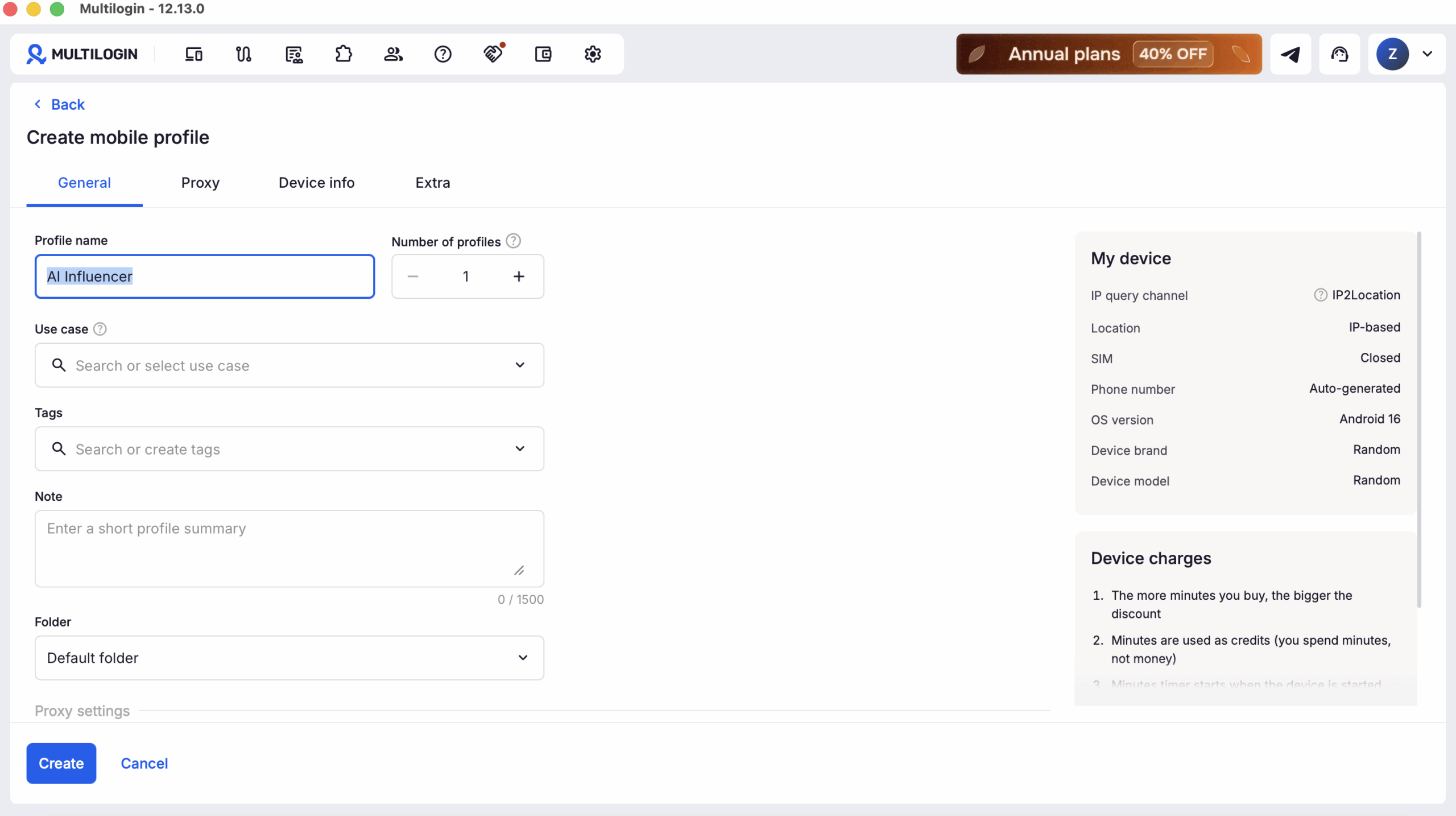
For an Instagram or TikTok workflow:
- Create a new mobile profile in Multilogin.
- Choose an Android cloud phone environment.
- Select settings that match the intended workflow and audience location.
- Assign a suitable built-in or third-party proxy.
- Launch the cloud phone.
- Install or open the required social media app.
- Create the Social Profile or sign in to an existing authorized profile.
- Complete the platform’s normal verification and recovery steps.
- Keep the session persistent instead of repeatedly rebuilding the environment.
- Record the persona, platform, region, owner, and purpose in your profile notes.
Publishing note: Confirm these steps and all UI labels against the latest Multilogin Help Center before publishing.
Step 11: Create a browser profile for web-based work
Use a browser profile when the task takes place primarily on the web, such as browser-based YouTube channel management or other approved web workflows.
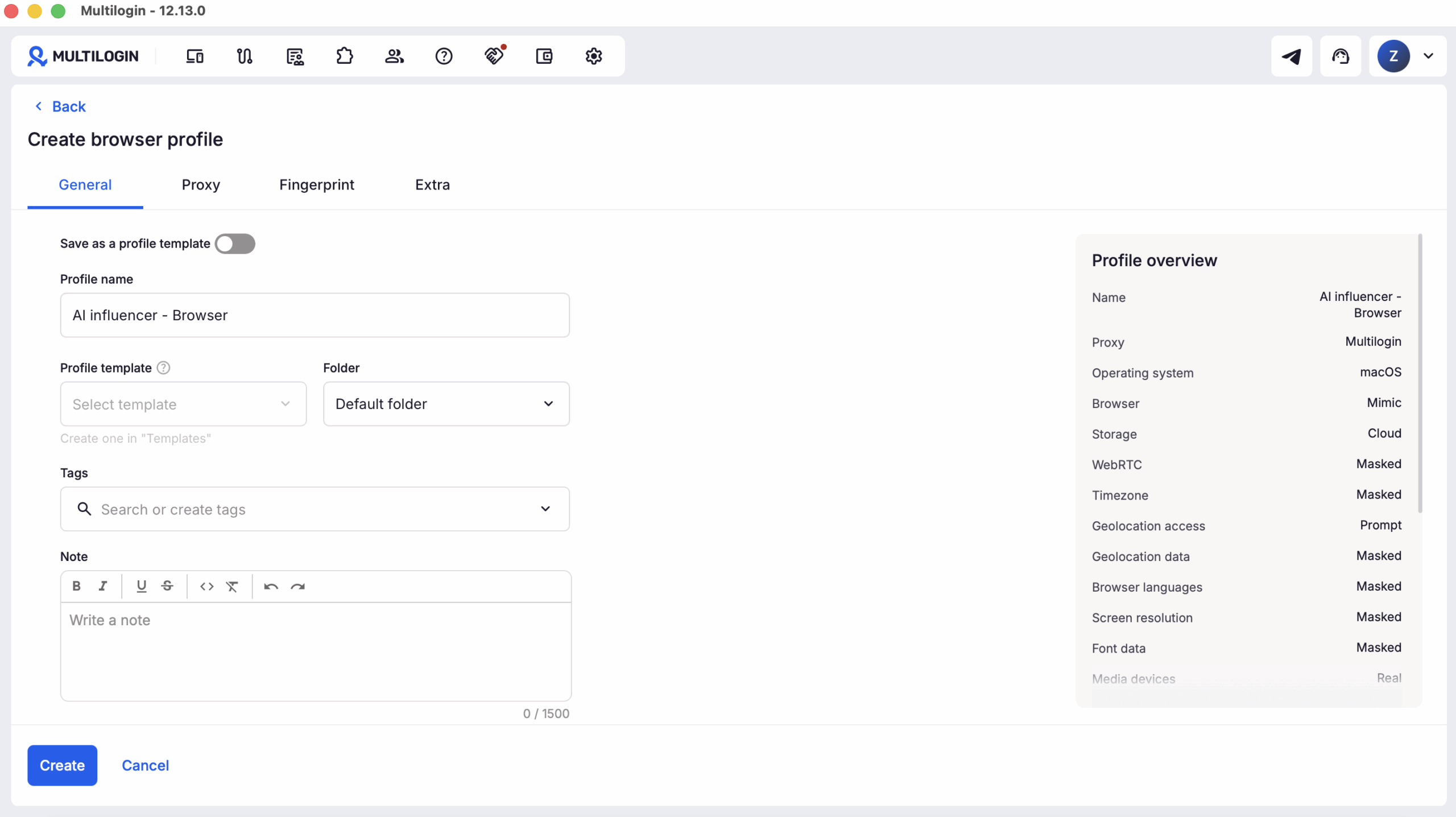
- Create a new browser profile.
- Assign a proxy and location appropriate to the profile.
- Launch the browser profile.
- Sign in to the authorized platform account.
- Keep the cookies and session inside that profile.
- Do not use the profile for a different AI influencer.
- Add clear notes, folders, or tags so the environment is easy to identify.
If the same influencer uses both mobile and web workflows, document which tasks belong in each environment. Consistent operating rules reduce mistakes.
Step 12: Publish and engage gradually
A new Social Profile needs a normal content and engagement routine.
Start with a manageable schedule. Review every post for:
- Character consistency
- Factual accuracy
- Disclosure
- Copyright or trademark issues
- Platform suitability
- Caption quality
- Correct links
- Correct Social Profile
- Originality
Avoid publishing identical posts from several personas at the same time. Each character should have its own audience, perspective, content mix, and publishing calendar.
Engagement also needs rules. Define how the character responds to questions, criticism, sensitive subjects, brand inquiries, and users who ask whether it is AI-generated.
Step 13: Connect AI agents carefully
Multilogin supports automation workflows through tools such as its API, ADB, Selenium, Puppeteer, Playwright, and Postman. The appropriate method depends on whether the workflow runs through an Android cloud phone, a browser profile, or an external system.
An AI agent may assist with tasks such as:
- Preparing captions
- Selecting approved assets
- Opening the correct environment
- Publishing approved content
- Collecting performance data
- Updating workflow records
Automation should not be used for spam, fake engagement, deceptive comments, unauthorized access, or activity that violates platform rules.
Keep a human approval step for sponsorships, sensitive claims, disclosure decisions, major campaign changes, and unexpected responses. Access credentials and recovery methods should also remain under appropriate human control.
Confirm the exact supported automation actions and integration steps against current Multilogin documentation before publishing.
Step 14: Measure performance and improve the character
Track performance by platform and content pillar.
Useful measurements include:
- Views and reach
- Watch time
- Completion rate
- Saves
- Shares
- Meaningful comments
- Profile visits
- Link clicks
- Follower growth
- Email signups
- Affiliate conversions
- Sponsorship inquiries
Do not judge the character only by follower count. A smaller audience with clear interests and regular interaction may be more useful than a large but passive audience.
Review which combinations of topic, hook, format, length, voice, and visual style perform well. Update the content system without changing the character so frequently that it loses its identity.
Step 15: Choose a suitable monetization model
AI influencers can use many of the same business models as human creators, subject to platform rules and eligibility requirements:
- Brand sponsorships
- Affiliate marketing
- Platform monetization programs
- Digital products
- Licensed character content
- Brand-owned virtual ambassadors
- Subscription communities
- E-commerce collaborations
Revenue is not automatic. It depends on audience fit, content quality, trust, reach, eligibility, and the commercial value of the niche.
Disclose paid relationships clearly. Do not let the character claim personal experience with a product that cannot truthfully be supported.
Best Practices for Keeping AI Influencer Profiles Organized
- Use one dedicated environment per Social Profile.
- Keep a character reference sheet for every persona.
- Match the proxy location to the profile’s documented market.
- Avoid frequent and unnecessary location changes.
- Preserve persistent sessions.
- Give every AI influencer separate content pillars and audience goals.
- Avoid publishing identical content across multiple personas.
- Record the platform, region, purpose, owner, and status of every profile.
- Use folders, tags, notes, and clear naming conventions.
- Limit team access according to each person’s role.
- Review AI-generated facts, product claims, and disclosures before publishing.
- Keep a human escalation process for unexpected comments or account issues.
Teams comparing their wider workflow can also review these social media management tools.
Common Mistakes to Avoid
Creating the character before defining the audience
A beautiful character without a clear audience often produces generic content. Define the problem, niche, and viewer first.
Changing the face or voice too often
Frequent identity changes make the character difficult to recognize. Use approved references and documented generation settings.
Hiding that the character is AI-generated
A fictional persona should not depend on deceiving viewers. Use clear profile and content disclosures based on the platform, campaign, and applicable law.
Copying real people without permission
Do not imitate a real person’s likeness, voice, identity, or endorsement without the necessary rights and consent.
Publishing unreviewed AI claims
Generative tools can produce incorrect statements. Review factual claims before publishing, especially in health, finance, legal, political, or safety-related content.
Creating too many Social Profiles at once
Start with one character and prove that the content system works. Scale only after you have reliable production, review, disclosure, publishing, and measurement processes.
Mixing personas in the same environment
Opening several unrelated profiles from the same general setup can create operational confusion and session overlap. Keep the environments clearly separated and documented.
Treating proxies as a complete solution
A proxy handles the network connection. It does not replace separate app data, cookies, sessions, content strategies, or responsible user behavior.
Automating without review or limits
An AI agent should operate within a defined workflow. It should not be given unrestricted permission to publish sensitive claims, make commitments to brands, or respond to every user without oversight.
Ignoring content similarity
Changing a face while reusing the same script, caption, timing, and creative concept does not produce a genuinely different creator. Each persona needs an original point of view.
See How Multilogin Fits the Workflow
Once your character, content system, and disclosure process are ready, Multilogin can give each mobile Social Profile its own Android cloud phone and each web workflow its own browser profile.
You or your approved AI agents can then operate those environments from one dashboard while keeping each influencer’s sessions and profile history organized.
Create your first isolated Social Profile
Multilogin helps with profile separation and workflow organization. It does not guarantee account approval, reach, monetization, or protection from restrictions. Content, platform rules, account history, disclosures, and user activity still matter.