






eBay automation helps sellers save time on repetitive tasks like listing, pricing, offers, shipping, and buyer follow-ups. You can use eBay’s built-in tools, APIs, or third-party software to automate daily workflows and focus on growing your business.
In this guide, you’ll learn which tasks to automate, which tools to use, what eBay allows, and how to manage multiple seller accounts efficiently.
For sellers managing several accounts, Multilogin keeps each account in a separate environment. Run eBay accounts on cloud Android phones with unique app data, IPs, and locations, or use browser profiles for Seller Hub tasks. Residential proxies and mobile minutes are included in every plan.
Set up your free cloud phone and give each eBay account its own device.
Which eBay seller workflows can you automate?
You can automate most repetitive eBay seller work: bulk listing, price and quantity updates, relisting, offers, order reports, tracking uploads and buyer feedback. eBay covers these with Seller Hub features and its Sell APIs. Customer conversations, returns judgments and new product research still need a person.
| Workflow | What runs on its own | eBay tool | API option |
|---|---|---|---|
| Listing creation | New listings created from a filled-in template file | Seller Hub Reports (CSV or XLSX), Merchant Integration Platform | Inventory API, Sell Feed API |
| Price and quantity | Bulk edits from one upload | Reports “Edit price, quantity or delete listings” template | Inventory API bulk price and quantity update |
| Relisting | Fixed price listings renew monthly; eligible auctions relist up to 8 times | Good ‘Til Cancelled and auto-relist | Inventory API, Sell Feed API |
| Negotiation | Offers accepted or declined by your price limits; offers sent to watchers | Best Offer automatic responses, Offers to Buyers | Negotiation API |
| Orders and shipping | Order reports on a schedule; tracking uploaded in bulk | Reports scheduled downloads, tracking upload template | Fulfillment API |
| Feedback | Positive feedback left for buyers automatically | Automated feedback in Seller Hub | Feedback API |
| Business policies | Shipping, payment and return rules applied to many listings | Business policies in Seller Hub | Account API |
What you need before you start
Automation only repeats what you feed it, so clean inputs matter more than the tool. Check these before you build a single rule:
- Seller Hub access. Business sellers are opted in automatically. Private sellers get access after their first sale.
- Business policies. Set up shipping, payment and return policies first. The Inventory API requires them, and bulk uploads are easier to fill in when each listing just points to a policy name.
- Consistent inventory data. Give every product a SKU or custom label, a clean title and complete item specifics. Bulk files and APIs match listings by these fields.
- Hosted images. New listings from a Reports template need image URLs. If you don’t have them yet, use the drafts template and add photos later.
- The right subscription. Some automation sits behind a paid plan. Rule-based automatic offers need an eBay Store subscription. On eBay Australia, where Store subscriptions became Pro subscriptions in 2026, third-party integrations need Pro Basic or above.
- Developer access, if you go the API route. You need an eBay Developers Program account, app keys and an authorized token for each seller account your app manages.
- An account map, if you run several stores. List each account, its marketplace, its product line and who on your team works in it. Every automation rule you add later hangs off this map.
How to automate eBay seller workflows step by step
To automate eBay seller workflows:
- Map the tasks you repeat every week.
- Standardize listings with business policies and templates.
- Move bulk listing and edits to Seller Hub Reports.
- Set relisting rules.
- Automate offer responses and offers to watchers.
- Schedule order reports and upload tracking in bulk.
- Turn on automated feedback.
- Connect the eBay API or an authorized tool when files stop scaling.
Step 1: Map the tasks you repeat every week
For one week, note every eBay task you do more than once and how long it takes. Most sellers find the same few at the top: relisting, price changes, answering low offers and entering tracking numbers. Automate the three biggest first. A rule that saves ten minutes a day is worth more than one that saves an hour a quarter.
Step 2: Standardize listings with business policies and templates
Create one business policy per shipping, payment and return setup you actually use, and name them clearly. Then build listing templates for your main product types. Every automation step after this one works better when listings share the same structure.
Step 3: Move bulk listing and edits to Seller Hub Reports
In Seller Hub Reports, go to Upload, select Get template and choose the template type: new listings, drafts, price and quantity edits, or relisting unsold items. Fill in the file and upload it as CSV or XLSX. eBay usually processes it in under 15 minutes and gives you a report of every action it took. Start with one or two items to check your columns before you upload hundreds.
Step 4: Set relisting rules
Fixed price listings use Good ‘Til Cancelled by default and renew every month until they sell or you end them. Eligible auctions can relist automatically up to 8 times for free, outside vehicle categories. eBay shows the auto-relist option only to new and occasional sellers. Also note that refunded items relist automatically unless you untick Relist item when you issue the refund.
Step 5: Automate offer responses and offers to watchers
With Best Offer on, set an upper limit to accept offers automatically and a lower limit to decline them. The upper limit has to sit below your Buy It Now price. For fixed price listings, send offers to interested buyers and switch on automatic sending. eBay then checks for new watchers every 48 hours and sends them the same discount until the listing ends. eBay Store subscribers can also create rule-based automatic offers. On some sites, such as eBay UK, any automated offers need a Shop subscription.
Step 6: Schedule order reports and upload tracking in bulk
In Seller Hub Reports, open Schedule and create an order report that runs hourly, daily, weekly or monthly. Feed it to your shipping or accounting workflow. After you ship, upload tracking numbers with the “Add order tracking” template instead of typing them one by one.
Step 7: Turn on automated feedback
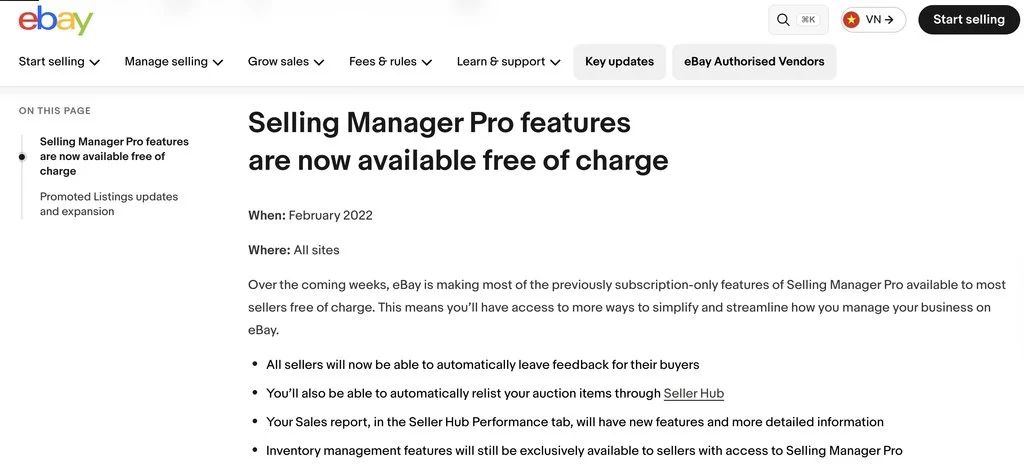
Seller Hub lets you save up to ten positive feedback comments. You then choose whether eBay leaves feedback automatically after the buyer pays, or after they pay and leave you positive feedback.
Step 8: Connect the eBay API or an authorized tool when files stop scaling
When spreadsheets turn into a daily chore, move to the eBay Sell APIs or a listing tool you authorize on your account. The next section covers which API handles which job.
Using the eBay API and third-party tools
The eBay Sell APIs are the approved way to automate eBay at scale. You either build on them yourself through the eBay Developers Program, or you connect a listing, inventory or repricing tool that uses them and that you authorize on your account.
| API | What it automates | Watch out for |
|---|---|---|
| Inventory API | Inventory records, offers and listings, including bulk price and quantity updates | Requires business policies. Listings created here can’t be edited in Seller Hub |
| Sell Feed API | Bulk listing, order and inventory files, plus scheduled reports | Files are processed asynchronously, so check result files |
| Fulfillment API | Order details, shipping fulfillment and tracking, refunds | Only covers orders that completed checkout |
| Negotiation API | Discount offers to buyers who showed interest in a listing | Same eligibility rules as Offers to Buyers |
| Account API | Creating and updating shipping, payment and return policies | Changes apply to every listing that uses the policy |
| Feedback API | Reading and leaving feedback | Keep comments factual and positive |
For most sellers, an existing tool is faster than building. Before you connect one, check three things: which permissions it asks for, whether your eBay plan allows third-party integrations, and whether it can handle several seller accounts. Also note that eBay’s Team Access, which lets staff work in your Seller Hub with their own logins, is not supported through the API. API tools connect to each seller account directly.
How to run eBay automation across multiple seller accounts
eBay automation lives inside each account. Your offer rules, relisting settings and scheduled reports belong to one seller account at a time. Once you run stores for several markets, product lines or clients, the work around those rules multiplies: checking messages, approving uploads, taking photos and switching logins.
eBay’s multiple accounts policy allows several accounts for valid reasons, such as separate product lines. Each account still has to meet eBay’s seller standards on its own, and new accounts can’t be used to get around restrictions on another one.
Multilogin gives each of those accounts its own environment. Each eBay account runs on its own Multilogin cloud phone: a real Android device in the cloud with separate app data, location and IP. The eBay app stays logged in between sessions, so the account history builds up in one place. For web-based work, Multilogin includes browser profiles with their own cookies, session and IP, managed from the same dashboard.
| Task | Where it runs |
|---|---|
| Buyer messages, order checks, quick listing edits | eBay app on the account’s cloud phone |
| Product photos for a listing | Cloud phone camera, through camera and screen mirroring |
| Bulk uploads, Reports, business policies | Seller Hub in the account’s browser profile |
| Dashboards of API-based listing tools | The same browser profile |
| Creating cloud phones and installing the eBay app across accounts | Multilogin API |
A few details keep this setup organized:
- Match location across both layers. Sync a browser profile’s location with the cloud phone of the same account, so the app and Seller Hub work from one region.
- Use the included proxies. Every plan includes residential proxies, and each profile gets its own IP with matched geolocation. Each cloud phone can run on Cellular or Wi-Fi. You can also bring HTTP, HTTPS, ISP or SOCKS5 proxies.
- Label accounts by market and client. Custom columns, colour tags and notes show which store is which, and the live dashboard shows what is running.
- Give staff only what they need. Team seats and permissions let you share and assign profiles per person.
- Automate the setup, not the selling. Multilogin’s API handles profile creation, app installation and account management, with full ADB access and support for Selenium, Puppeteer, Playwright and Postman. Use it to build and maintain environments. Keep in-account automation on eBay’s own tools and APIs (see the next section).
Two limits to plan for. Multilogin cloud phones can’t receive SMS or calls, so keep a number eBay accepts, such as your own phone or an external SMS provider, for verification codes. Cloud phones also need a reliable internet connection.
Multilogin offers a free plan with no time limit and no credit card needed. Paid plans start from $7.08 per month. Pro 10 includes 10 cloud and browser profiles, 1 GB of premium proxy traffic, 60 mobile minutes per month, API access and a team seat. Browser profiles don’t use mobile minutes, so Seller Hub work doesn’t cut into your phone time.
What eBay allows, and what to keep manual
eBay allows automation through its own features, its APIs and tools you authorize. It doesn’t allow other automated access. The eBay User Agreement bans robots, scrapers and other automated means of accessing eBay without its prior express permission. The update that took effect for existing users on February 20, 2026 names buy-for-me agents and LLM-driven bots explicitly.
In practice, that means:
- Use eBay’s tools or the API for in-account automation. Don’t point click scripts, browser bots or AI agents at Seller Hub or the eBay app.
- Don’t share passwords. Use Team Access so staff work in Seller Hub with their own eBay logins and only the permissions you grant.
- Check upload results. Read the report eBay creates after each bulk upload before you upload again.
Some work should stay with a person even when a tool could do it:
- Buyer messages about damage, missing items or open cases
- Return and refund decisions, including whether a refunded item should relist
- Pricing for rare or high-value items, where a fixed rule leaves money on the table
- Product research and deciding what to list next
Common mistakes when automating eBay workflows
- Uploading the same file to every account. eBay’s duplicate listings policy treats several accounts run by one seller or business as one seller. Identical fixed price listings across those accounts break the rule. Give each store its own products, or merge identical items into one multi-quantity listing. Separate cloud phones keep accounts apart, but they don’t fix duplicated content.
- Mixing two systems of record. Listings created through the Inventory API can’t be edited in Seller Hub. Decide where each listing is managed before you connect a tool.
- Automating messy data. Missing SKUs and inconsistent item specifics turn one bulk upload into hundreds of errors. Clean the data first.
- Forgetting rules that keep running. Good ‘Til Cancelled listings renew monthly, and automatic offers keep going out to new watchers. End listings for stock you no longer have.
- Setting offer limits once and never again. When shipping or supplier costs change, update your auto-accept and auto-decline limits too.
- Switching accounts in one app or browser. Logging in and out of several stores on the same phone or browser mixes sessions and history. Keep one cloud phone and one browser profile per account.
Conclusion
eBay automation works best in layers. Start with the features already in Seller Hub: bulk uploads through Reports, Good ‘Til Cancelled renewals, Best Offer limits, automatic offers to watchers, scheduled order reports and automated feedback. Move to the Sell APIs or an authorized tool when spreadsheets become the bottleneck. Keep judgment calls, like returns and buyer disputes, with a person, and stay inside eBay’s rules on automated access.
Your next step is simple: pick the three tasks that take the most time this week and automate those first.
If you run several stores, give each one its own environment before you scale the rules. With Multilogin, each eBay account runs on its own cloud Android phone with separate app data, location and IP, and Seller Hub work runs in a browser profile from the same dashboard. Keep a separate number ready for verification codes, since cloud phones can’t receive SMS.
Set up your free cloud phone and run every eBay seller account on its own Android device, with Seller Hub in a matching browser profile.


Run Unlimited Accounts Without Bans
Run your social media accounts on cloud phones & web browsers
Frequently asked questions
Is eBay automation allowed?
Yes, through eBay’s own features, the eBay APIs and tools you authorize on your account. eBay’s User Agreement bans robots, scrapers and other automated access without its permission, and since February 2026 it names LLM-driven bots explicitly.
How do I automate eBay listings?
Use Seller Hub Reports to create, edit or relist listings in bulk from a CSV or XLSX template. High-volume sellers with SKU-based inventory can use the Merchant Integration Platform, the Inventory API or the Sell Feed API.
Does eBay relist items automatically?
Fixed price listings renew every month by default until they sell or you end them. Eligible auctions can relist automatically up to 8 times for free, but eBay only shows that option to new and occasional sellers.
<strong>How do I automatically accept or decline offers on eBay?</strong>
Turn on Best Offer in the listing and set two limits. Offers at or above the upper limit are accepted, and offers below the lower limit are declined. The upper limit must be below your Buy It Now price.
Do I need an eBay Store subscription to automate my selling?
Not for most of it. Seller Hub Reports, relisting, Best Offer limits and automated feedback work without one. Rule-based automatic offers need a Store subscription, and some eBay sites put third-party integrations behind a paid plan.
Can I use AI agents to run my eBay store?
Not to operate eBay directly without eBay’s permission. You can use AI for work outside eBay, such as drafting titles in a file you review and then upload through Seller Hub Reports.
How do I automate several eBay seller accounts at once?
Set up the rules in each account, because eBay automation is per account. Then keep each account in its own environment: with Multilogin, one cloud phone per account for the eBay app and a browser profile for Seller Hub, all in one dashboard.
Can Multilogin cloud phones receive eBay verification codes?
No. Multilogin cloud phones can’t receive SMS or calls. Use a number eBay accepts, such as your own phone or an external SMS provider, then enter the code in the eBay app on the cloud phone.



 Join 4,200+ subscribers