






Twitter (X) API pricing in 2026 is based on usage, not a fixed monthly subscription. A regular post costs $0.015, while a post with a link costs $0.20. Reading a post through the API normally costs $0.005.
If you’re managing several X (formerly Twitter) accounts, those small charges can add up. The biggest difference often comes down to what you’re posting. Sharing links costs much more than publishing regular text updates.
For example, posting 30 times a month on each of 20 accounts, with six link posts per account, would cost $31.20 in API publishing fees.
Below, we’ll break down the current X API prices, show what you’d pay for 5, 20, or 100 accounts, and explain how to keep costs under control.
Prices last checked on November 12, 2026, using the official X API pricing documentation. All prices are in USD.
Key takeaways
- X API now uses pay-per-use pricing. You buy credits and pay for the actions your application performs.
- Regular posts cost $0.015 each. Add a link, and the price rises to $0.20.
- Managing more accounts doesn’t automatically mean a higher fee per account. Your total depends on how often you post and what API operations you use.
- Reading data also costs money. Standard Post reads cost $0.005, while certain eligible reads of your own data cost $0.001.
- You can control spending. X offers spending limits, and careful request management can help avoid unnecessary charges.
- Automation rules still apply. Paying for API access doesn’t mean every automated activity is allowed.
What changed with X API pricing in 2026?
X replaced its fixed self-service API subscription model with pay-per-use pricing. Instead of paying for a Basic or Pro plan each month, developers buy credits and use them for API requests.
X introduced the new model on February 6, 2026, according to its official changelog. Existing Basic and Pro customers had a transition period before moving toward usage-based billing.
Here’s how the current system works:
- Create an X developer account and application.
- Add credits through the Developer Console.
- Use the API to publish posts, read data, or perform other supported actions.
- Pay for the billable operations your application performs.
- Monitor your balance and set a spending limit.
There’s no fixed monthly subscription or minimum spending commitment for standard self-service pay-per-use access.
This is useful if you only need the API occasionally. You don’t have to pay for a large monthly plan just to publish a few posts.
But there’s a tradeoff. Your bill now depends on what your application actually does. A simple publishing workflow may cost very little, while an application that constantly collects posts, checks accounts, or shares links can cost much more.
How much does the X API cost per request?
X charges different rates for publishing posts, reading data, and performing other actions. Some operations are billed per request, while reads are generally billed for each resource returned.
Here’s a breakdown of selected prices from the official X API pricing page.
| API operation | Price | How you’re charged |
| Publish a regular post | $0.015 | Per request |
| Publish a post with a URL | $0.200 | Per request |
| Create a summoned post | $0.010 | Per request |
| Read a post | $0.005 | Per resource |
| Read user information | $0.010 | Per resource |
| Read followers or following | $0.010 | Per resource |
| Eligible Owned Read | $0.001 | Per resource |
| Create a user interaction | $0.015 | Per request |
| Delete an interaction | $0.010 | Per request |
| Manage media metadata | $0.005 | Per request |
These are selected operations, not the complete X API price list. Some endpoints have their own charges, and the summoned-post rate only applies under specific conditions.
Why are posts with links so much more expensive?
A post containing a URL costs $0.20 through the X API, compared with $0.015 for a regular post. That’s about 13 times the price.
Let’s say you publish 30 posts on one account every month.
| What you publish | Monthly API cost |
| 30 regular posts | $0.45 |
| 24 regular posts and 6 link posts | $1.56 |
| 30 posts with links | $6.00 |
If you mainly share updates, announcements, or text-based content, your publishing costs may stay low.
But if you regularly post links to your website, newsletter, or product pages, the difference is worth planning for.
This is especially important when managing several accounts. What costs $6 on one account becomes $120 across 20 accounts if each publishes 30 link posts.
Is reading your own account data cheaper?
Yes, some reads of your own X data cost just $0.001 per resource, but not every account qualifies.
X calls these Owned Reads. The lower price applies to certain endpoints when the authenticated user matches the requested account and owns the developer application.
For example, eligible operations can include reading your own posts, mentions, or followers.
If you’re using one application to manage accounts belonging to other people, don’t assume all those reads qualify for the discount.
For planning purposes, use the standard read price unless your requests meet X’s specific eligibility rules.
How much would you pay to post from 5, 20, or 100 X accounts?
It depends on how often you publish and how many posts contain links. The number of accounts matters, but the type of content can make an even bigger difference.
Let’s use a simple example where each account publishes 30 posts per month.
| Number of accounts | All regular posts | 6 link posts per account | All link posts |
| 5 accounts | $2.25 | $7.80 | $30 |
| 20 accounts | $9.00 | $31.20 | $120 |
| 100 accounts | $45.00 | $156.00 | $600 |
These are estimated monthly API publishing charges. They don’t include reading costs, other API operations, or third-party services.
The 20-account and 100-account examples assume the accounts are managed with the required authorization and in line with X’s rules.
Under X’s Authenticity policy, a user may create or operate up to 10 accounts for distinct, non-duplicative purposes. Authorized management of accounts belonging to other people is also possible under the platform’s rules.
How much would you pay to post from 20 X accounts?
Say you’re responsible for 20 authorized X accounts. Each account publishes 30 posts every month.
Most are regular updates, but six posts per account include links to articles, products, or websites.
Here’s the monthly cost for one account:
- 24 regular posts × $0.015 = $0.36
- 6 posts with links × $0.20 = $1.20
- Total publishing cost: $1.56
Across 20 accounts, that’s $31.20 per month.
Now suppose your application also retrieves 30 separately billable posts per account every month.
At $0.005 per read, that adds $0.15 per account, or $3 across all 20 accounts.
Your estimated total would be $34.20 per month.
That’s just the API cost. If you’re using scheduling software, hosting your own application, or paying for additional tools, those expenses come on top.
How can you work out your own API costs?
Start with three numbers: how many regular posts you’ll publish, how many will contain links, and how many Post resources you’ll read.
Then use this formula:
Monthly cost = (regular posts × $0.015) + (link posts × $0.20) + (standard Post reads × $0.005)
Add the cost of any other API actions your application uses.
If you’re building a SaaS product that connects multiple X accounts, it’s worth calculating average API usage per customer. Two customers with the same number of connected accounts may generate very different bills.
Why can your X API bill be higher than expected?
The most common issue is underestimating how much data an application retrieves. One API request can return many billable resources.
For instance, retrieving 100 posts at the standard rate costs $0.50.
If your application then retrieves 100 separately billable user records, that’s another $1.
Together, those operations cost $1.50, even if the application makes only a small number of HTTP requests.
What happens when AI agents start making API requests?
AI agents can make this harder to predict.
An agent might search for posts, follow pagination links, retrieve author information, and run additional searches to complete one task.
A developer described this problem in a Reddit discussion about building an X API MCP server.
According to the developer, one AI-assisted research task retrieved around 300 posts and 214 user records, resulting in a $3.64 charge.
At the published standard rates, the calculation works out:
- 300 Post reads × $0.005 = $1.50
- 214 user records × $0.010 = $2.14
- Total: $3.64
It’s one developer’s reported experience, not a general benchmark. But it shows why controlling the number of returned resources matters.
If you use AI agents with the X API, don’t give them unrestricted access to paid requests. Set clear limits on how much data they can retrieve and how many actions they can perform.
How can you keep X API costs under control?
You don’t need to stop using the API to keep costs predictable. A few spending controls and a well-planned workflow can make a difference.
Here are five useful steps:
- Set a spending limit. Use the Developer Console to define how much your application can spend during a billing cycle.
- Limit search results. If your application only needs the latest 20 posts, don’t automatically retrieve hundreds.
- Avoid unnecessary user lookups. Request additional account information only when the workflow actually needs it.
- Check your publishing triggers. If an automation shares a blog post whenever it’s updated, make sure minor edits don’t accidentally trigger another publication.
- Test before going live. Use X’s available testing tools and simulated responses where possible before making paid production requests.
For AI-assisted workflows, it’s also sensible to keep billing settings outside the agent’s control.
Do you get charged every time you read the same post?
Not necessarily. X generally deduplicates reads of the same resource within the same UTC day.
For example, if your application retrieves a post in the morning and requests the same resource again that afternoon, X normally charges for that resource only once during the deduplication window.
The window resets at midnight UTC.
However, X describes this as a soft guarantee, so you shouldn’t assume every repeated request will always be free.
This also doesn’t mean you can publish the same post repeatedly without additional charges. Reading and publishing follow different billing rules.
Is using the X API cheaper than a scheduling tool?
Sometimes, but the API price alone doesn’t tell the whole story.
If you already have a working application, direct API access may give you more control over spending.
But if you’re starting from scratch, you’ll also need to handle authorization, token storage, scheduling, errors, and maintenance.
An authorized scheduling tool may charge a monthly subscription but include features you’d otherwise have to build yourself.
Compare what you’ll actually spend, including software and development time, before choosing either option.
Are there still limits with X API pay-per-use?
Yes. Paying for API credits doesn’t give you unlimited access to X. There are still rate limits, monthly data caps, and account-level restrictions.
How many posts can you read per month?
X currently caps standard pay-per-use access at 3 million Post reads per monthly billing cycle.
If your application needs more than that, you’ll need to explore Enterprise access.
To put the volume into context, 3 million separately billable standard Post reads would cost $15,000 at $0.005 each, before any applicable discounts or deduplication.
That’s an illustrative calculation, not an Enterprise quote.
What happens if you hit a rate limit?
X limits how frequently applications can call individual API endpoints.
Many endpoints use 15-minute rate-limit windows, although the exact allowance depends on the endpoint and authentication method. When you exceed a limit, the API may return an HTTP 429 error. You’ll need to wait until the relevant limit resets.
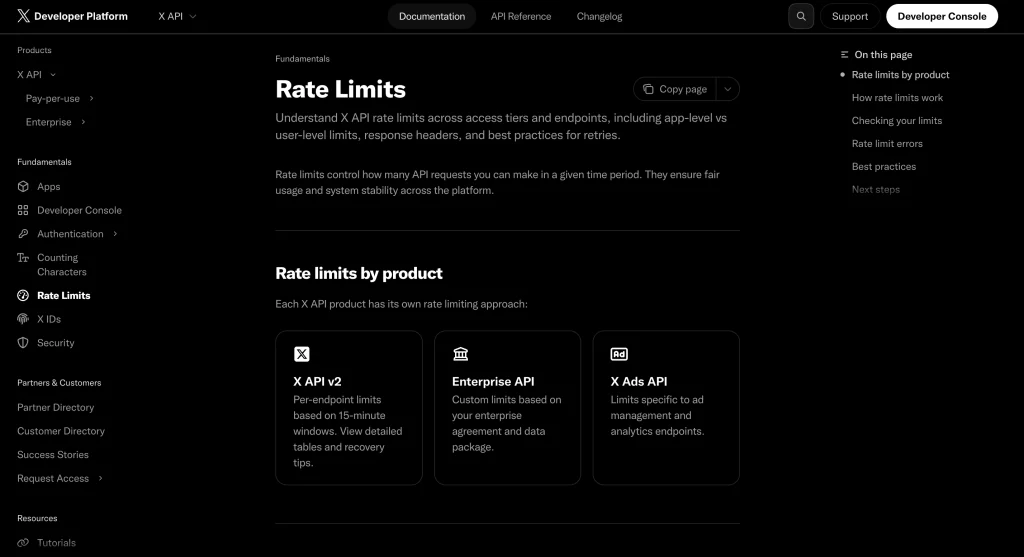
Buying more credits won’t automatically increase these request limits. You can find more details in X’s API rate-limit documentation or read Multilogin’s guide to Twitter rate limits.
What about X API Enterprise pricing?
X offers Enterprise access for applications that need higher volumes or custom arrangements.
Unlike the public pay-per-use rates, Enterprise pricing isn’t listed as one fixed monthly price for everyone.
You’ll need to contact X with your usage requirements to get an appropriate quote.
Can you automate multiple X accounts using the API?
Yes, X allows certain automated publishing activities through its official API, as long as you follow its rules.
That doesn’t mean every automated action is permitted, even if you’ve paid for API access.
Here’s a quick overview based on X’s official Automation Rules.
| Activity | What X allows |
| Publishing original automated posts | Allowed when compliant |
| Scheduling posts | Allowed through compliant methods |
| Posting identical or substantially similar content across accounts | Prohibited |
| Automated replies | Restricted to specific conditions |
| Automated likes | Prohibited |
| Automated reposts | Allowed under conditions, but aggressive or spammy reposting is prohibited |
| Bulk following or unfollowing | Prohibited |
| Scripting the X website to automate actions | Prohibited |
X also has specific restrictions for automated replies. Its Manage Posts documentation explains when a reply is permitted through the self-service API.
If you’re managing several accounts, focus on original content and legitimate activity. Having API access doesn’t remove X’s rules about spam, consent, or coordinated behavior.
Can you automate X without paying for the API?
You can publish manually through the X website or mobile app without API charges. But using scripts to automate the website or app isn’t a compliant alternative to API access.
X prohibits non-API-based automation, including scripting its website, and warns that violations can result in account suspension.
If you need automated publishing, use the official X API or an authorized service that follows X’s rules.
How do you manage X API access for several accounts?
Each account needs to authorize the application before it can publish posts on that account’s behalf. If you manage many accounts, keeping their login sessions and authorization steps organized becomes important.
X uses OAuth to let account owners approve application access.
For example, an application that publishes posts must request the appropriate permission, such as tweet.write.
The OAuth 2.0 authorization guide explains how this works.
For third-party accounts, you also need express consent for the automated actions your application will perform. OAuth authorization alone doesn’t replace every consent requirement.
Where does Multilogin fit into this workflow?
Multilogin is a cloud Android phone platform for multi-account management. Alongside its cloud phones, it provides isolated browser profiles for web-based accounts, built-in proxies, and centralized management.
For X API authorization, browser profiles are the relevant feature, since the login and OAuth approval steps take place in a browser.
If you’re managing several authorized X accounts, you can organize the process like this:
- Create a browser profile in Multilogin. Give it a clear name so you know which X account belongs to it.
- Set up the connection. Choose the appropriate settings and proxy for your legitimate account-management workflow.
- Sign in to X. Open the browser profile and log in manually to the relevant account.
- Authorize your application. Follow the OAuth approval link and review the permissions being requested.
- Do the same for your other accounts. Keep each account’s browser session in its own profile.
- Use the API for publishing. Once authorization is complete, your application can make permitted requests using its API credentials and valid user tokens.
You can follow Multilogin’s guide to creating and launching browser profiles for more details.
Does Multilogin make X API access cheaper?
No. Multilogin doesn’t change X’s API prices or replace API access. It helps you keep browser sessions separate and organize account access. Automated publishing still happens through the official API, subject to X’s rules.
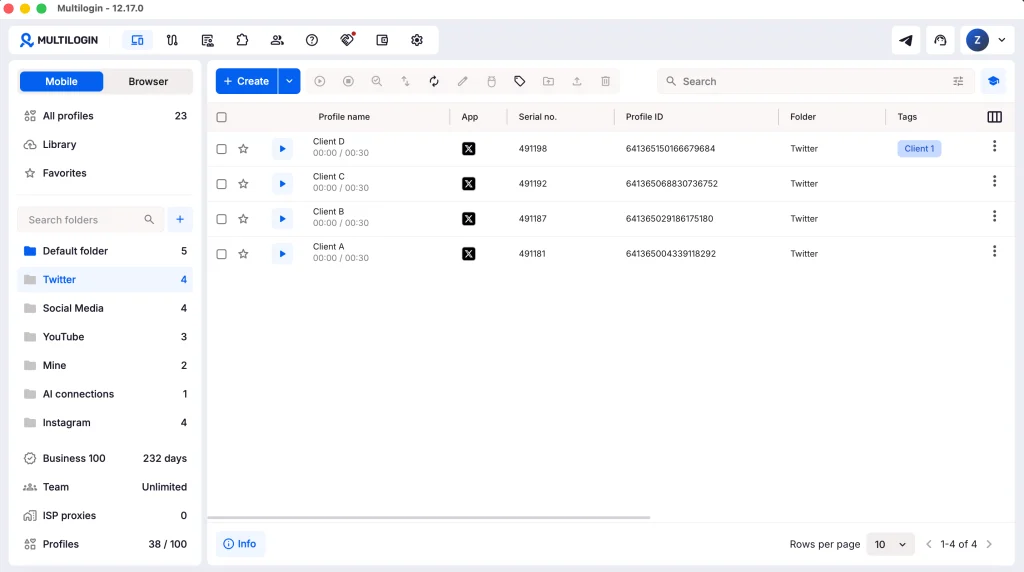
You also don’t need to keep every browser profile open while your API integration publishes posts using valid authorization tokens.
If you already handle several accounts and want a more organized login setup, you can explore Multilogin’s pricing and plans or read more about managing multiple Twitter accounts.
Is X API pay-per-use worth it in 2026?
For low-volume publishing, pay-per-use can be a practical option because there’s no fixed self-service subscription to cover every month. But the bill depends on what your application does.
A regular post costs only $0.015. Add a URL, and the cost rises to $0.20. If your application also searches for posts, retrieves user data, or runs AI-driven workflows, those requests add to the total.
Before building a large integration, estimate how much you’ll publish and read each month. Set a spending limit and make sure the automation follows X’s policies.
And if you’re managing several authorized accounts, keep the two tasks separate: use the X API for compliant automated publishing and dedicated browser profiles when you need to organize manual access and authorization.
Frequently asked questions about Twitter (X) API pricing
Is the X API free in 2026?
The standard X API is paid, but eligible developers may receive promotional credits or special access.
X has documented a $20 credit incentive for eligible first-time purchasers and a separate first auto-recharge match of up to $50. These offers have conditions, expiry dates, and availability requirements.
Certain approved Public Utility Apps may also qualify for free access.
Check X’s current credit incentives before relying on an offer.
How much does the Twitter API cost per month?
There’s no fixed monthly fee for standard pay-per-use access. You pay based on activity.
For example, 1,000 regular post-creation requests cost $15, while 1,000 URL post-creation requests cost $200 at current rates.
Does X charge separately for every account?
No. There isn’t a fixed monthly API fee for each account you connect. Your application is charged for billable API operations, so accounts with more activity may generate higher costs.
<strong>Are the old X API Basic and Pro plans still available?</strong>
X has moved its standard self-service API pricing toward pay-per-use. The Basic and Pro subscription model described in older guides may no longer reflect the current developer offering.
How much does X API Enterprise cost?
Enterprise pricing depends on your requirements and agreement with X. You’ll need a direct quote for high-volume or custom access.
Can one X API application work with several accounts?
Yes, provided the accounts authorize the application and the activity follows X’s policies. Managing accounts belonging to other people also requires express consent for automated activity.
Is Tweepy free to use with the X API?
Tweepy is an open-source Python library, but X API requests made through it are still subject to X’s pricing. Using a free library doesn’t make the underlying API free.
Does X Premium include API access?
X Premium and X API access are separate products. Paying for Premium doesn’t automatically give you unlimited API credits.
<strong>How can I avoid unexpected X API charges?</strong>
Set a spending limit, monitor API usage, control pagination, and avoid unnecessary requests. If you use AI agents, restrict how much data they can retrieve without additional approval.
<strong>What happens when my X API credits run out?</strong>
Your application can stop making successful API requests when the available credits are exhausted. You can buy more credits or configure automatic recharge, subject to your spending limits.



 Join 4,200+ subscribers