





Operating multiple online accounts has become standard practice in affiliate marketing, e-commerce, SMM, ad verification, and more. However, platforms use advanced tracking methods like browser fingerprinting and mobile device signals to link accounts, leading to restrictions, suspensions, or bans that can risk business operations.
Multilogin and XLogin address this challenge in fundamentally different ways. Multilogin combines real Android Cloud Phones with isolated browser profiles in one multi-account platform, while XLogin focuses primarily on separate browser environments and fingerprint masking.
Multilogin, a market leader for nearly a decade, combines real Android Cloud Phones, browser-profile technology, built-in proxies, and robust automation tools. XLogin, a newer competitor, focuses on browser fingerprint masking and account isolation.
This page compares Multilogin and XLogin across key features such as mobile device environments, browser fingerprint reliability, proxy integration, automation, security, team collaboration, and support. We aim to help you choose the best platform for your multi-account workflows, with a focus on the additional flexibility Multilogin provides by bringing Cloud Phones and browser profiles together.
About XLogin
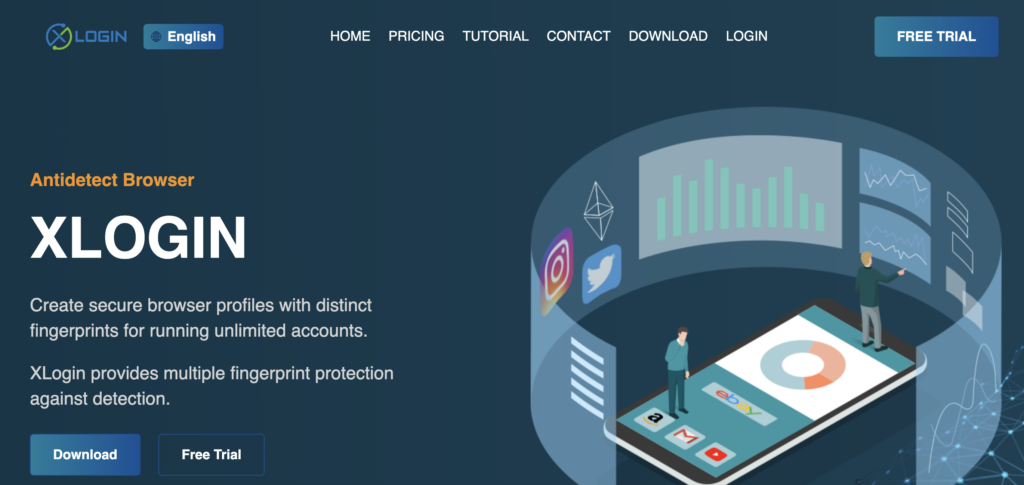
XLogin is a relatively new player in the antidetect browser market, offering solutions for managing multiple browser profiles and protecting against fingerprinting detection. The company is headquartered in China, and while it has gained attention for its browser profile management features, it lacks the extensive track record and broader mobile-and-browser ecosystem that established platforms like Multilogin provide.
-
Foundation date: XLogin was founded in 2019.
-
Country: XLogin is based in China.
-
Company Focus: XLogin focuses on providing tools to help users create separate browser environments, mask fingerprints, and manage multiple accounts, but it is still building its reputation compared to longer-standing alternatives.
Feature comparison: Multilogin Cloud Phones vs. XLogin browser
Let’s delve into a detailed comparison of key features between Multilogin and the Xlogin browser.Comparison chart Multilogin vs Xlogin browser
| Multilogin | Xlogin | |
| Features & Profiles | Cloud Phones + browser profiles: Combines real Android Cloud Phones with isolated browser profiles in the same platform. The current lineup includes Free, Pro 10, Pro 20, Pro 50, and Business plans starting from 100 profiles. Browser workflows support cloud & local storage options, while built-in residential proxies are included. | Standard profile system: Up to 3,000 profiles on highest planusing separate local directories for cookies/storage. Fingerprint substitution on a Chromium-based engine. No built-in proxies (uses third-party proxies). |
| Security & Privacy | Enterprise-grade security: Encrypted cloud storage and AES-256 encryption for profile data. Regular updates and compliance focus (e.g., GDPR). Option to mix local vs. cloud storage for safety. | Basic security measures: Profiles isolated by design, but encryption method not publicly specified. Data hosted in user directories; no clear info on compliance or data deletion policies. |
| Usability & UI | User-friendly interface: A unified dashboard for managing Cloud Phones, browser profiles, proxies, settings, and team workflows. Extensive documentation and tutorials available. | Straightforward but less polished: Provides a functional interface in English. Core features are present, but some advanced settings can be less intuitive (limited official documentation and smaller community support to guide users). |
| Customer Support | 24/7 expert support: Responsive support team available around the clock, assisting in multiple languages (English, Russian, Chinese, etc.) without auto-translation. Active community and knowledge base for self-help. | Business-hours support: Help is offered via Telegram/Skype/email during Monday–Friday, 9–18:00 (UTC+8). Lacks real-time 24/7 coverage. Documentation is limited; users often rely on community chats for help. |
| Pricing & Plans | Flexible & scalable: Start with the Free Plan, then move to Pro 10 from $7.08/month, Pro 20, or Pro 50. Business plans start from 100 profiles. Plans include Cloud Phone minutes and built-in proxy traffic, with team capacity increasing by tier and unlimited seats on Business 100 and above. | Higher entry cost: Plans start at $99/month (Solo, 200 profiles). Includes a free 3-day trial for new users. Sub-accounts (team access) capped per plan (5 on Solo, 20 max), and advanced features (e.g. full API) only in the priciest plan. |
| Cloud & Local Profiles | Yes, plus real Android Cloud Phones | Cloud only |
| Stealth Browser Updates | Regular, fast rollout | Slower updates |
| Browser Core | Mimic (Chromium), Stealthfox (Firefox) | Chromium-based (Implied) |
| Fingerprinting | Real data-based browser-profile fingerprints, >20 params, regular updates | Replaces fingerprint, details unclear |
| Built-in Proxy Traffic | Yes (Residential, included in plans) | No |
| Ease of Use | Unified Cloud Phone and browser-profile workflow | Moderate |
| Updates | Regular (Cloud Phone environment, Browser Core & Fingerprints) | Unclear |
Device environments & browser fingerprinting: mobile and desktop account isolation
Reliable multi-account management depends on keeping account environments separate and consistent. Multilogin approaches this across both mobile and browser workflows: real Android Cloud Phones handle native apps, while dedicated browser profiles provide fingerprint isolation for web-based accounts. This gives Multilogin a broader environment model than Xlogin, which focuses primarily on browser profiles.- Multilogin combines real Android Cloud Phones with two custom-built browser cores: Mimic, based on Chromium, and Stealthfox, based on Firefox. This gives users separate environments for native mobile apps and web workflows. For browser profiles, Multilogin’s fingerprints are generated based on aggregated data from real-user devices. Users have granular control over more than 20 customizable fingerprint parameters, including WebGL metadata, Canvas, audio context, fonts, screen resolution, and more. Each profile’s fingerprint is automatically matched to the right environment and adjusted to fit the proxy settings. Multilogin also runs frequent updates to its browser cores and fingerprint mechanisms, while Cloud Phones provide independent Android environments for mobile applications.
- Xlogin claims to use an “indigenous” approach, where it replaces the original fingerprint with a different one. However, key details about the source of these replacement fingerprints, the customizability of their parameters, and the frequency of updates are not clearly disclosed. Xlogin’s approach lacks transparency and has not been proven through public testing. This raises concerns about its reliability, especially for high-stakes accounts.
Proxy management & integration: seamless vs. manual
Proxies are integral to multi-accounting, providing the necessary IP address diversity. The ease and reliability of proxy integration significantly impact workflow efficiency.- Multilogin simplifies proxy management significantly by offering built-in premium residential proxies included with paid plans. Pro 10 includes 1GB/month, Pro 20 includes 2GB/month, Pro 50 includes 3GB/month, while Business 100 includes 5GB/month, with additional traffic available for purchase. These proxies come from a vast pool covering over 150 countries. The platform features an easy-to-use interface for managing these built-in proxies or integrating third-party providers, supporting HTTP, HTTPS, and SOCKS5 protocols. The same proxy infrastructure can support workflows across browser profiles and Cloud Phones.
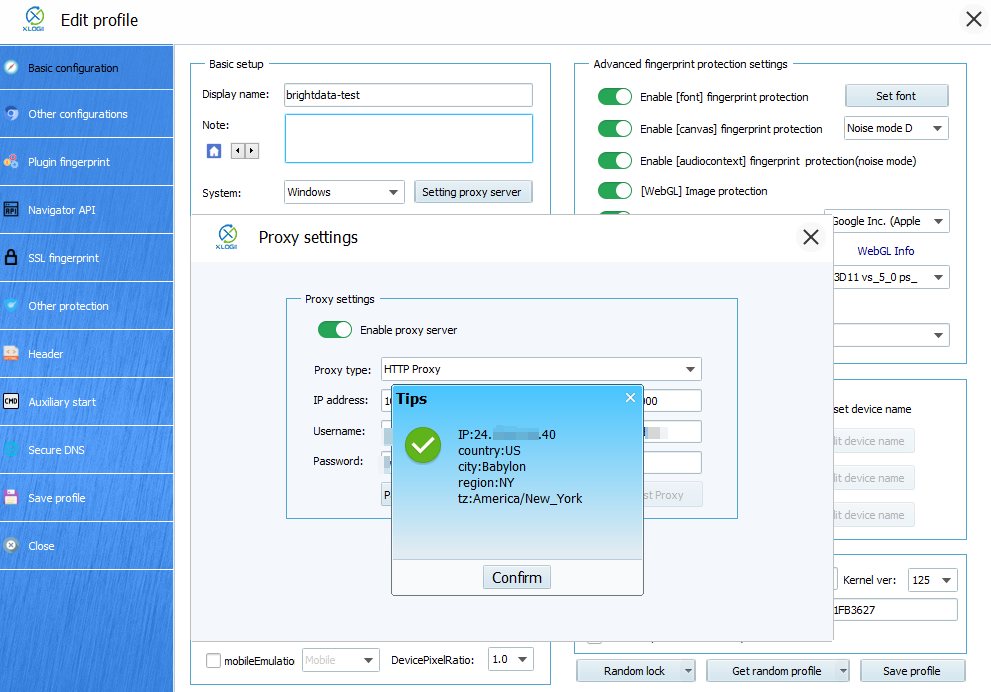
- Xlogin does not offer built-in proxies. Users must source, configure, and manage proxies entirely from third-party providers. While Xlogin supports HTTP, HTTPS, and SOCKS5 protocols and includes a proxy tester, the setup process is entirely manual. This adds complexity, potential compatibility issues (as noted by Bright Data regarding residential proxies in certain modes), and hidden costs associated with sourcing reliable external proxies. While Xlogin lists many proxy partners, the integration burden falls entirely on the user.
Web automation capabilities: flexibility for scale
Automating repetitive tasks is crucial for scaling multi-accounting operations efficiently. Framework compatibility and API capabilities are key differentiators.- Multilogin is built with automation in mind, offering robust support for industry-standard frameworks like Selenium and Playwright (via CDP). It also provides a well-documented Standard OpenAPI, allowing developers to integrate Multilogin seamlessly into custom workflows using languages like Python or C#. This enables programmatic control over profile creation, launching, updating, and management. Additionally, Multilogin features AI Quick Actions, allowing users to automate simple tasks like launching profiles or setting proxies without writing any code.
- Xlogin supports automation via the Selenium WebDriver. Their website also suggests using third-party visual automation tools like Browser Automation Studio. However, information regarding a dedicated API for broader programmatic control or support for other popular frameworks like Playwright or Puppeteer is absent from their main site. This suggests potentially limited flexibility for developers building complex, custom automation solutions compared to Multilogin.
Data Privacy & Security: Trust and Compliance
When dealing with multiple accounts, often containing sensitive information, the security and privacy practices of your multi-account platform provider are paramount.- Multilogin is headquartered in Estonia (European Union) and operates under strict GDPR compliance, taking user data privacy seriously from day one. They have clear policies regarding data handling and deletion; for instance, upon subscription cancellation, all user data, including browser profiles and activity logs, is automatically deleted after three months. Passwords are securely hashed (never stored in plain text), and sensitive information is encrypted and safely stored in the cloud. Multilogin protects user information not just from external threats but also from internal misuse and encourages users to follow local laws. They also offer a recycle bin feature, allowing recovery of accidentally deleted profiles, adding a layer of operational safety.
- While Xlogin claims to create isolated browser environments, crucial details about their data privacy and security practices are missing from their website. Their GDPR compliance status is unstated, and specifics regarding data encryption methods, storage security, data retention/deletion policies, and security audits are not provided. This lack of transparency makes it difficult to assess the trustworthiness of the Xlogin antidetect browser with sensitive account data.
Teamwork & collaboration: scaling with your team
For agencies and businesses managing accounts collaboratively, robust team management features are essential.- Multilogin is designed for teamwork. Pro 10 includes 1 team seat, while Pro 20 and Pro 50 include 2 team seats. Business plans starting from 100 profiles offer unlimited team seats. Multilogin provides advanced team management features, allowing administrators to assign user roles, manage permissions granularly, and securely share profiles or groups of profiles among team members. This structured approach facilitates efficient collaboration across both Cloud Phone and browser workflows.
- Xlogin offers basic team collaboration with sub-accounts. For example, the Solo plan supports up to 5 sub-accounts, while the Scale plan allows up to 20 sub-accounts. XLogin’s system is less scalable for larger teams, and concurrent usage of the same profile by multiple users can trigger account security checks. The system is not as advanced as Multilogin’s dedicated team management system.
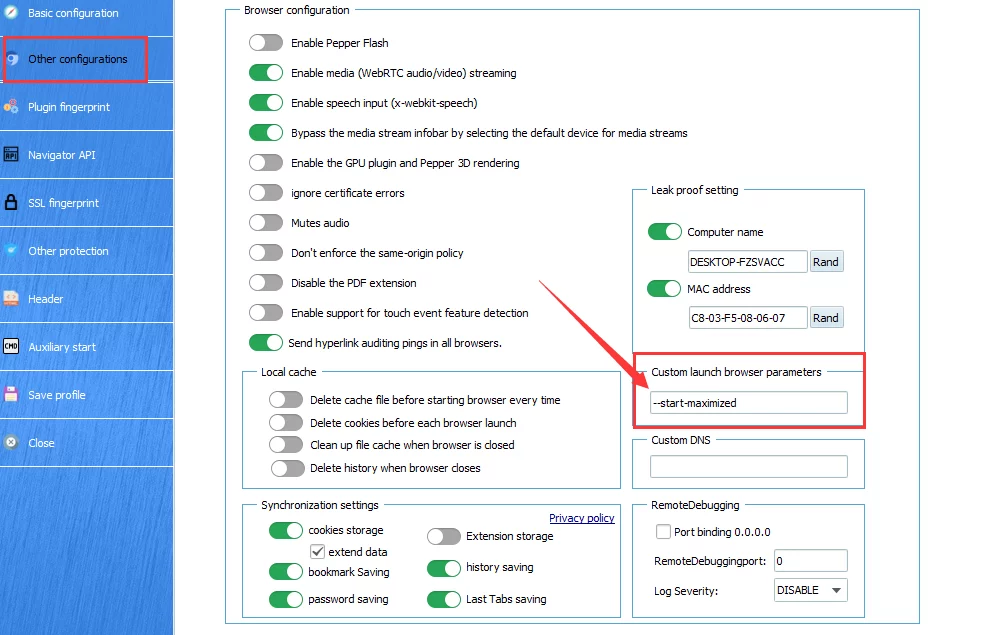 Comparison: Multilogin offers a comprehensive and scalable solution for team collaboration, with clearly defined plan limits, roles, permissions, and sharing capabilities suitable for businesses of different sizes. Xlogin’s teamwork features appear less developed and lack the transparency needed for organizations requiring structured collaboration tools. Multilogin is the better choice for teams needing integrated mobile and browser multi-account workflows.
Customer support & updates: reliability when you need it
Reliable support and consistent software updates are crucial for maintaining smooth multi-account operations across mobile and browser environments.- Multilogin excels in customer support, offering 24/7 assistance via live chat and email in multiple languages (including English, Russian, Chinese, Vietnamese, and Portuguese). They maintain an extensive, searchable help center with detailed documentation and tutorials. Furthermore, Multilogin provides regular updates across its browser cores, fingerprinting databases, and platform infrastructure, helping users maintain stable mobile and browser workflows.
- Xlogin offers business-hours support (Monday to Friday, 9:00 AM to 6:00 PM UTC+8). While support is available via Telegram, Skype, and email, users may experience delays if they need help outside of business hours. Additionally, XLogin lacks an integrated live chat option and a rich online help center, so users often rely on community discussions for support.
Pricing & plans
- Multilogin now offers a Free Plan instead of the previous paid trial, allowing users to start with Multilogin Cloud Phones and browser workflows before upgrading. Paid options begin with Pro 10 from $7.08/month, followed by Pro 20 from approximately $12.42/month and Pro 50. Business plans start from 100 profiles and include unlimited team seats. Pro plans also include monthly Cloud Phone minutes and premium proxy traffic, helping users keep mobile, browser, and proxy workflows inside one platform.
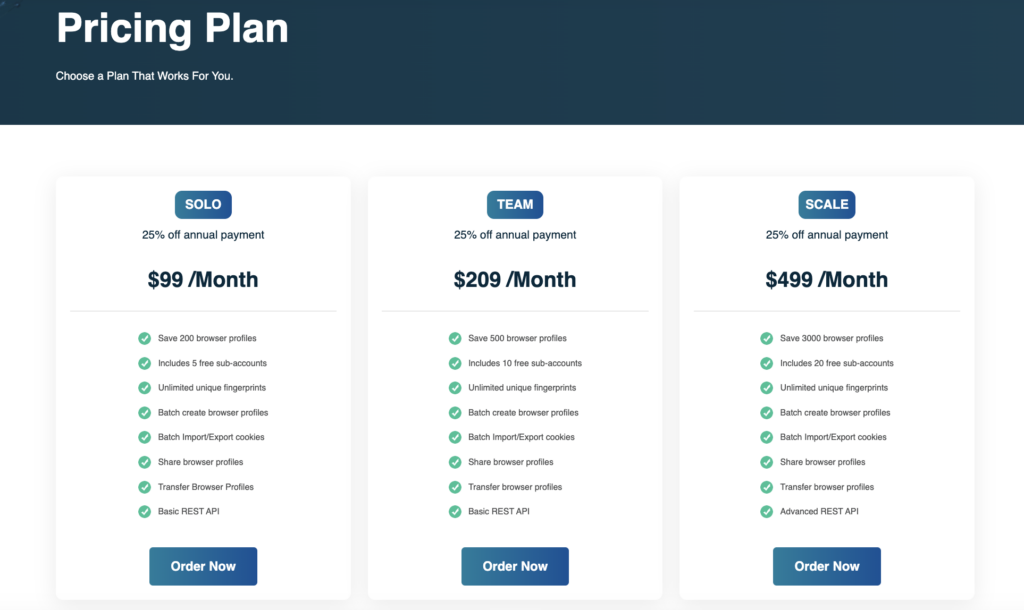
- XLogin starts at $99/month for 200 profiles, which is more expensive than Multilogin’s entry-level paid plan. While it does offer a free trial, the starting price is higher, and the plans can get quite expensive, especially for businesses needing more than 20 sub-accounts.
Why choose Multilogin Cloud Phones over XLogin browser? The clear advantage
While both Multilogin and Xlogin can support multi-account workflows, they approach the problem differently. XLogin is primarily a browser-profile product, while Multilogin combines real Android Cloud Phones with browser profiles, built-in proxies, automation, and team collaboration in one platform. If you’re looking for a reliable, scalable XLogin alternative that also supports native mobile workflows, Multilogin provides the more complete setup. Here’s why professionals and businesses trust Multilogin:- Real Android Cloud Phones: Run native mobile apps in independent Android environments instead of relying only on browser-based profiles.
- Reliable browser profile isolation: Multilogin’s browser-profile layer uses real-user data for fingerprint generation, regular updates, and two distinct browser cores (Mimic & Stealthfox), providing a stronger web environment than Xlogin‘s less transparent methods.
- Integrated proxy solution: Save time and reduce complexity with Multilogin’s built-in premium residential proxies, included directly within paid plans. Avoid the hassle and potential unreliability of sourcing and managing third-party proxies required by Xlogin.
- Powerful and flexible automation: Scale your operations effectively with Multilogin’s robust support for Selenium, Playwright, and its well-documented Standard OpenAPI. Xlogin offers more limited automation options.
- Proven security and GDPR compliance: Operate with confidence knowing Multilogin adheres to strict EU data privacy regulations (GDPR) and employs transparent, robust security measures. Xlogin lacks clarity on its security and compliance posture.
- Scalable team features: Pro 20 and Pro 50 include 2 team seats, while Business plans from 100 profiles offer unlimited seats alongside advanced roles and permissions.
- Flexible pricing: Start with the Free Plan, move to Pro 10 from $7.08/month, then scale through Pro 20, Pro 50, and Business as your operation grows.
- Reliable support and updates: Benefit from 24/7 multi-language support and consistent updates across the platform. Xlogin‘s support structure and update frequency remain unclear.

