



You started with one Shopify store. You had a great product, a clear vision, and the hustle to make it happen. And it worked. Your first store is a success. You’ve proven the concept, you’ve found your audience, and you’re generating consistent revenue.
Now, you’re dreaming bigger.
You see the potential to expand into new markets. You want to test your products in Europe, in Asia, in South America. You want to build a global brand, a global audience, a global empire of multiple Shopify stores.
But here’s the problem: scaling to multiple Shopify stores is not as simple as just duplicating your first store. It’s a complex operational challenge that can quickly turn into a nightmare of banned ad accounts, logistical chaos, and brand dilution.
If you try to manage 10 Shopify stores without a solid framework, you’re not just risking your growth. You’re risking your entire business.
In this Multilogin Academy guide, we’re going to give you that framework. We’ll show you how to scale your DTC brand and manage multiple Shopify stores safely and efficiently. We’ll cover everything from market testing and localization to ad account management and team collaboration. This is the growth framework that top DTC brands are using to build their global empires.
Start your 3-day trial of Multilogin for just €1.99 and begin building your multi-store empire today.
The Problem: The Chaos of Managing Multiple Shopify Stores
Scaling a DTC brand across multiple Shopify stores is a minefield of operational and technical challenges. Here are the biggest problems you’ll face:
1. Ad Account Armageddon for Multiple Shopify Stores
This is the big one. To promote your new stores, you’ll need to run ads on platforms like Facebook, Google, and TikTok. But if you try to run ads for 10 different stores from the same ad account, you’re asking for trouble.
Platforms like Facebook have strict policies against running multiple businesses from a single ad account. If they detect that you’re doing this, they can ban your ad account, your Business Manager, and even your personal profile. And when that happens, all of your multiple Shopify stores go dark.
Understanding how Facebook detects and bans accounts is critical for any multi-store operation. The platform uses sophisticated browser fingerprinting technology to link accounts, and once they identify a pattern, the bans happen fast.
2. The Multi-Login Mess of Multiple Shopify Stores
Managing 10 Shopify stores means managing 10 different logins, 10 different dashboards, and 10 different sets of analytics. It’s a logistical nightmare. You’ll spend hours every day just logging in and out of accounts, trying to keep everything straight.
This is where multi-account management becomes essential. Without proper tools, you’re wasting valuable time that could be spent growing your business.
3. Brand Dilution Across Multiple Shopify Stores
If you’re not careful, scaling to 10 stores can dilute your brand. It’s hard to maintain a consistent brand identity when you’re juggling multiple websites, marketing campaigns, and customer service teams.
4. Team Collaboration Chaos with Multiple Shopify Stores
How do you give your team members access to 10 different Shopify stores without sharing your login credentials? If you have multiple people logging into the same accounts from different locations, you’re going to trigger security alerts and risk getting your accounts locked.
5. The Detection Trap for Multiple Shopify Stores
Even if you try to keep everything separate, platforms are smart. They use sophisticated detection methods to link your stores, including:
- IP Address: If you’re logging into multiple stores from the same IP address, they’ll know.
- Browser Fingerprint: If all of your stores have the same browser fingerprint, they’ll know.
- Cookies and Cache: If you’re not properly isolating your accounts through cookie isolation, they’ll know.
Platforms also track Canvas fingerprinting, WebGL fingerprints, and dozens of other parameters that make detection nearly impossible to avoid without professional tools.
The Consequences of Mismanaging Multiple Shopify Stores
If you try to scale without a proper framework, you’re setting yourself up for failure. The consequences can be devastating:
Banned Ad Accounts: Your primary marketing channel will be shut down, and your sales will plummet. A Facebook shadow ban or complete account suspension can happen without warning.
Locked Shopify Stores: You could lose access to your stores, your products, and your customer data.
Wasted Time and Money: You’ll spend thousands of dollars and hundreds of hours trying to fix a broken system.
Stagnant Growth: Your dream of building a global brand will die before it even gets started.
The average cost of recovering from a banned ad account is between $10,000 and $50,000 in lost revenue, not counting the time spent appealing and rebuilding. For serious DTC brands, the stakes are too high to risk operating without proper protection.
The Solution: A Framework for Managing Multiple Shopify Stores
The only way to scale your DTC brand and manage multiple Shopify stores safely and efficiently is to use a professional antidetect browser that creates a completely separate, unique, and consistent browser environment for each store and its associated ad accounts.
That’s exactly what Multilogin does. And it’s the foundation of our growth framework for multiple Shopify stores.
How the Framework for Multiple Shopify Stores Works
The framework is simple. For each new Shopify store you create, you also create a dedicated Multilogin browser profile. This profile becomes the central hub for that store. It’s where you manage:
- The Shopify store itself
- The Facebook ad account
- The Google ad account
- The TikTok ad account
- The email marketing platform
- The customer service platform
Each profile is a completely isolated environment with its own unique browser fingerprint, IP address (from the built-in proxies), cookies, and cache. It’s like having a separate, dedicated laptop for each of your multiple Shopify stores, but without the cost and hassle.
This approach leverages what’s known as virtual browser technology, which creates authentic, isolated browsing environments that platforms cannot link together.
The Multilogin Advantage for Multiple Shopify Stores
Here’s why Multilogin is the perfect tool for this framework:
- Bulletproof Ad Account Protection for Multiple Shopify Stores
With Multilogin, you can create a separate, unique browser profile for each of your ad accounts. This makes it virtually impossible for platforms like Facebook and Google to detect that your accounts are linked. You can run ads for all 10 of your stores without the fear of a single ban taking down your entire operation.
Our technology goes beyond simple IP spoofing or user agent spoofing. We provide complete fingerprint masking across 55+ parameters that platforms use to track users.
- Built-in Residential Proxies for Multiple Shopify Stores
Multilogin is the only antidetect browser that includes residential proxies in the subscription price. You get access to a pool of over 30 million residential and mobile IPs, all included. This saves you $50-200/month per store in proxy costs.
Unlike datacenter proxies, residential proxies use real IP addresses from real internet service providers, making them virtually undetectable by platforms. Learn more about the difference in our guide on residential proxies vs datacenter proxies.
- Centralized Management for Multiple Shopify Stores
With Multilogin, you can manage all 10 of your stores from a single dashboard. No more logging in and out of accounts. No more multi-login mess. Everything is organized, efficient, and easy to manage.
This is true session management at scale, allowing you to maintain dozens or even hundreds of separate browsing sessions without confusion or risk.
- Secure Team Collaboration for Multiple Shopify Stores
You can create separate profiles for each of your team members and assign them specific permissions. Your marketing manager can have access to the ad accounts, your customer service team can have access to the Shopify stores, and you can oversee everything from your master account. All without sharing login credentials or risking detection.
- Automation for Scaling Multiple Shopify Stores
Multilogin has a powerful API that integrates with Selenium and Puppeteer for web automation. You can automate everything from product uploads to ad campaign creation, allowing you to scale your business faster than you ever thought possible.
Step-by-Step Guide: Setting Up Multiple Shopify Stores with Multilogin
Here’s how to implement the framework using Multilogin:
Step 1: Get Multilogin for Your Multiple Shopify Stores
Start your 3-day trial of Multilogin for just €1.99. The Pro 10 plan is perfect for this framework and includes 10 browser profiles with built-in proxies.
Step 2: Create a Profile for Your First Shopify Store
If you already have a successful Shopify store, the first step is to migrate it to a Multilogin profile. Create a new profile, name it after your store, and configure it with a unique fingerprint and proxy location.
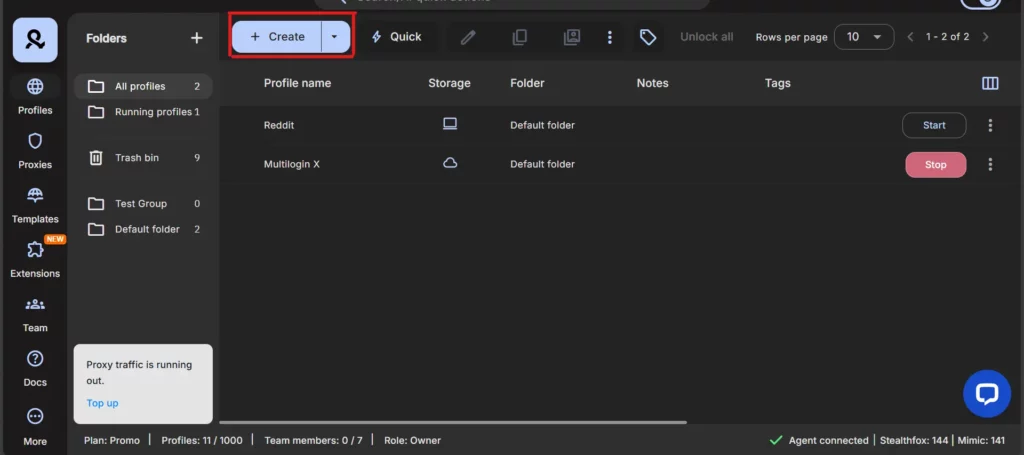
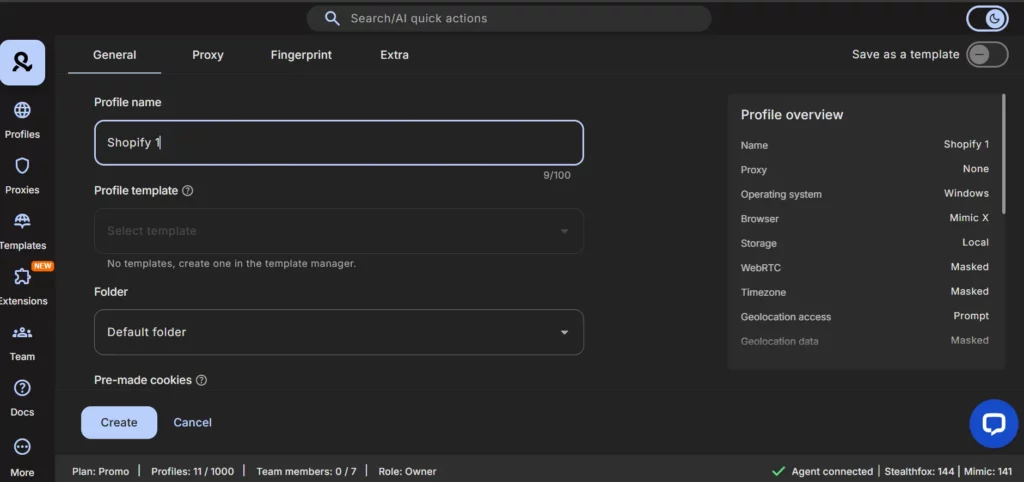
Try Multilogin now for €1.99! Create unlimited Google accounts
When setting up your profile, Multilogin automatically configures device emulation parameters to match your chosen operating system and browser type, creating a completely authentic digital fingerprint.
Step 3: Market Research and Testing for Your Next Shopify Store
Before you launch your second store, you need to do your research. Identify a new market you want to enter (e.g., the UK, Germany, Australia). Research the local competition, pricing, and marketing channels.
Consider using web scraping techniques to analyze competitor pricing and product offerings. Tools like web scraping for market research can help you gather competitive intelligence safely.
Step 4: Create a New Profile for Your Second Shopify Store
Create a new Multilogin profile for your second store. Name it after the new market (e.g., “Shopify UK”). In the proxy settings, select the country that corresponds to the new market (e.g., United Kingdom).
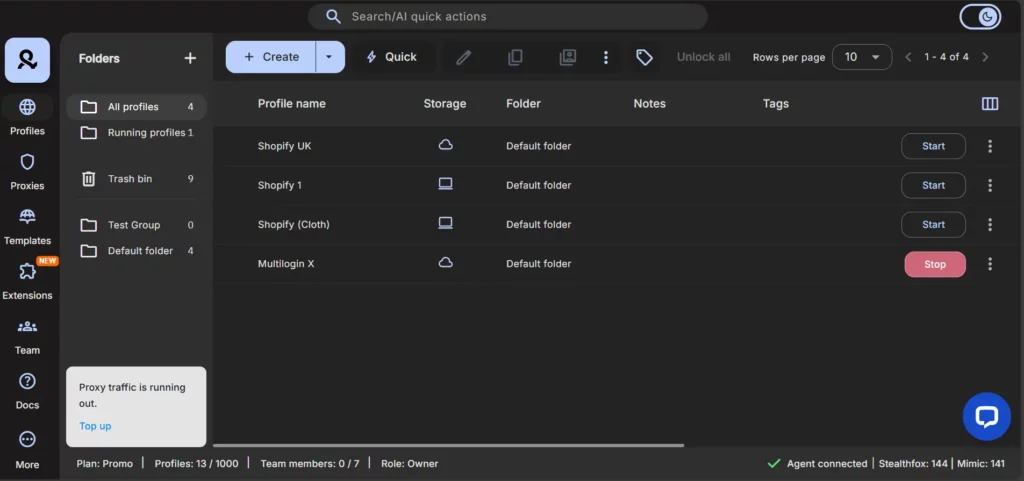
This ensures proper geolocation spoofing that matches your business presence in that market. For UK-based operations, you might also want to explore our UK proxy and antidetect bundle.
Step 5: Localize Your New Shopify Store
Launch your new profile and create your new Shopify store. Localize everything:
- Language: Translate your store into the local language.
- Currency: Display prices in the local currency.
- Shipping: Offer local shipping options.
- Marketing: Create marketing campaigns that are culturally relevant.
Step 6: Create New Ad Accounts for Your New Shopify Store
Inside your new Multilogin profile, create new ad accounts on Facebook, Google, and TikTok. These ad accounts will be completely separate from your first store’s ad accounts.
For Facebook advertising, consider reading our guide on how to avoid getting banned from Facebook before launching campaigns. You may also want to explore aged Facebook accounts to reduce the risk of immediate bans on new accounts.
Step 7: Launch and Iterate on Your Multiple Shopify Stores
Launch your new store and start running ads. Monitor your results closely and iterate on your products, marketing, and operations. Once your second store is profitable, you can repeat the process for your third, fourth, and tenth stores.
Advanced Strategies for Multiple Shopify Stores
Once you have the basic framework in place, consider these advanced tactics:
Geographic Diversification Strategy
Don’t limit yourself to English-speaking markets. Consider expanding to:
- Europe: Use our Germany proxy bundle, France proxy bundle, or Spain proxy bundle
- Asia: Explore Japan proxy options or Korea proxy services
- Latin America: Consider Brazil proxy infrastructure or Mexico proxy solutions
- Oceania: Target Australia with dedicated proxies
Each market requires its own localized approach, but Multilogin’s built-in residential proxies make expansion seamless.
Product Category Specialization
Instead of running one general store per country, consider creating specialized stores for different product categories. This allows you to:
- Build authority in specific niches
- Create targeted marketing campaigns
- Test products with lower risk to your main brand
Multi-Channel Expansion
Once your Shopify stores are established, expand to other platforms using the same Multilogin framework:
- Create multiple Amazon accounts for each product line
- Manage multiple eBay accounts for liquidation sales
- Run multiple Etsy accounts for handmade variations
This diversification protects you from platform-specific risks and maximizes your market reach.
Proof and Results: The Power of Managing Multiple Shopify Stores
So, what are the real-world results of implementing the Multilogin 1-to-10 Growth Framework?
1. Safe and Sustainable Scaling of Multiple Shopify Stores
DTC brands that use this framework can scale to 10 stores and beyond without the fear of getting shut down. Their ad accounts are protected, their stores are isolated, and their growth is sustainable.
2. Increased Revenue and Profitability from Multiple Shopify Stores
By entering new markets, you can tap into new revenue streams and increase your overall profitability. We have users who have doubled or even tripled their revenue within the first year of implementing this framework.
3. Global Brand Presence with Multiple Shopify Stores
This framework allows you to build a true global brand. You can have a presence in multiple countries, with localized stores that cater to the specific needs of each market.
4. Operational Efficiency for Multiple Shopify Stores
With Multilogin, you can manage all of your stores from a single dashboard. This saves you time, reduces complexity, and allows you to focus on what you do best: growing your business.
5. Peace of Mind When Managing Multiple Shopify Stores
This is the most important result of all. With the Multilogin 1-to-10 Growth Framework, you can finally stop worrying about getting banned. You can focus on your growth, knowing that your business is built on a solid, secure foundation.
Many of our users also leverage Multilogin for related e-commerce activities like dropshipping and e-commerce automation, further multiplying their revenue streams.
Take Action: Build Your Multi-Store Empire Today
You’ve built a successful Shopify store. You’ve proven the concept. Now it’s time to think bigger.
The Multilogin 1-to-10 Growth Framework is your roadmap to building a global DTC empire. It’s the framework that top brands are using to scale their businesses, enter new markets, and achieve their dreams.
This isn’t just about managing multiple Shopify stores. This is about building a resilient, diversified e-commerce business that can withstand platform changes, market shifts, and economic uncertainty. This is about creating multiple streams of income, expanding your global reach, and achieving financial freedom.
And you can get started today for less than the cost of a coffee.
Start your trial of Multilogin and take the first step towards building your global empire.
Don’t let the fear of getting banned hold you back. Don’t let the chaos of scaling overwhelm you. With the right framework and the right tools, you can achieve anything.
The DTC brands making millions didn’t get there by playing it safe. They got there by scaling aggressively with the right infrastructure. Join them.
FAQs
Yes, but only if you’re using Multilogin. Each browser profile runs in a completely isolated environment with its own fingerprint, cookies, and IP address. Without this isolation, platforms like Facebook and Google will detect that all your stores are coming from the same device and may flag or ban your ad accounts.
Traditional methods like using Chrome’s incognito mode or managing multiple Chrome profiles are not sufficient for professional multi-store operations because they don’t provide complete fingerprint isolation.
Multilogin offers different plans depending on your needs. The Pro 10 plan includes 10 browser profiles, perfect for managing 10 Shopify stores. If you need more, the Pro 100 plan includes 100 profiles. There’s no technical limit—we have users managing hundreds of stores with Multilogin.
For comparison with other solutions, check out our detailed guides on Multilogin vs GoLogin, Multilogin vs AdsPower, and Multilogin vs Incogniton.
No, Shopify actually encourages merchants to create multiple stores for different brands, markets, or product lines. The issue is not with Shopify itself, but with the ad platforms (Facebook, Google, TikTok) that can ban your ad accounts if they detect you’re running multiple businesses from the same browser environment.
Learn more about platform-specific risks in our guides on Facebook banned accounts and Instagram IP bans.
A VPN only changes your IP address, but ad platforms track 55+ other parameters like Canvas fingerprints, WebGL data, fonts, timezone, screen resolution, and behavioral patterns. If these don’t match your IP location or if they’re identical across accounts, you’ll get flagged.
Multilogin creates completely unique browser environments for each store, not just different IPs. This includes comprehensive browser fingerprinting protection that VPNs simply cannot provide.
Multilogin starts at €5.85/month for the Pro 10 plan (10 profiles) or €19.17/month for Pro 100 (100 profiles). This includes built-in residential proxies worth $50-200/month per store if purchased separately. That’s a savings of $500-2,000/month for 10 stores.
Compare this to the cost of separate proxy subscriptions, VPN services, and the risk of losing your entire business to an account ban. Learn more about residential proxy pricing in our comprehensive guide.
It’s recommended to use separate payment methods (credit cards or PayPal accounts) for each store, especially if you’re running ads on Facebook or Google. This adds an extra layer of separation and reduces the risk of your accounts being linked.
If you’re concerned about managing multiple PayPal accounts, we have a dedicated guide on how to do this safely.
Yes! That’s one of the biggest advantages of Multilogin. You can see all your browser profiles in one dashboard and switch between them instantly. No more logging in and out of accounts or juggling multiple devices.
This centralized approach to multi-account management saves hours of administrative work every week.
Absolutely! Multilogin works with any web-based platform. Our users manage Amazon stores, eBay accounts, social media profiles, ad accounts, affiliate marketing campaigns, and much more.
It’s a universal solution for anyone who needs to manage multiple online accounts safely. Check out our guides on managing multiple Instagram accounts, running multiple TikTok accounts, and operating multiple Facebook accounts.

