



It’s 3 AM. You get an email from Amazon with the subject line: “Your Amazon.com selling privileges have been removed.”
Your heart sinks. You log into Seller Central and see the dreaded red flag. Your account is suspended. But it gets worse. You check your other two Amazon stores—the ones you’ve been carefully building for years—and they’re suspended too. All of them. Linked.
Your entire business, your income, your team’s livelihood—all gone in an instant. All because Amazon’s algorithm decided your multiple Amazon seller accounts were “related.”
This isn’t a hypothetical scenario. It’s the #1 reason sellers with multiple Amazon accounts get suspended in 2025. And it’s the silent killer that’s wiping out 6- and 7-figure businesses overnight.
If you’re running multiple Amazon stores without a bulletproof defense strategy, you’re not just taking a risk. You’re playing Russian roulette with your entire business.
In this Multilogin Academy guide, we’re going to show you how to build that defense. We’ll break down exactly how Amazon links multiple accounts, why traditional methods like VPNs and separate devices fail, and how to implement a multi-store strategy that’s not just safe, but scalable to $1M and beyond.
This isn’t about gaming the system. It’s about building a resilient, professional business that can withstand the unpredictable nature of the Amazon ecosystem.
Start your 3-day trial of Multilogin for just €1.99 and protect your Amazon business from devastating account bans.
The Problem: How Amazon Detects Multiple Seller Accounts
Amazon’s “Related Accounts” policy is intentionally vague. They don’t tell you exactly what they track, because if they did, it would be easier to circumvent. But based on thousands of suspension cases, we know they’re looking at a wide range of data points to link multiple Amazon seller accounts.
How Amazon Links Your Multiple Accounts
Amazon’s detection system is a multi-layered web that connects the dots between your accounts. Here are the main ways they do it:
- IP Address Tracking for Multiple Amazon Accounts
This is the most basic one. If you log into two different Seller Central accounts from the same IP address, Amazon will flag them as related. This includes your home Wi-Fi, your office network, and even your mobile hotspot.
Understanding IP reputation is critical for multi-account operations. Amazon maintains extensive databases of suspicious IP addresses, and logging in from the same IP is the fastest way to trigger their detection systems.
- Browser Fingerprinting for Multiple Amazon Accounts
This is where it gets sophisticated. Your browser sends a ton of information to Amazon every time you log in. This includes:
- Canvas Fingerprint: A unique identifier based on how your browser renders graphics.
- WebGL Fingerprint: Similar to Canvas, but based on 3D graphics rendering.
- Fonts: The list of fonts installed on your computer.
- Screen Resolution: The size of your screen.
- Timezone Spoofing: Your computer’s timezone setting.
- Language: Your browser’s language setting.
- Plugins: The list of browser plugins you have installed.
All of this information creates a unique “fingerprint” for your device. If two accounts have the same fingerprint, Amazon knows they’re coming from the same person. This is called browser fingerprinting, and it’s far more sophisticated than most sellers realize.
Amazon also tracks client rects, WebGL renderers, hardware concurrency, and dozens of other parameters that create your unique digital fingerprint.
- Cookies and Cache Linking Multiple Amazon Accounts
Amazon uses cookies to track your activity across the web. If you’re not properly isolating your accounts through cookie isolation, Amazon can use these cookies to link them.
Even using incognito mode won’t protect you. Amazon’s tracking goes far deeper than what incognito mode can hide. They track supercookies and other persistent identifiers that survive browser clearing.
- Personal and Business Information for Multiple Amazon Accounts
This one is obvious, but it’s still a common mistake. Using the same:
- Bank account
- Credit card
- Business address
- Phone number
- Email address
…across multiple accounts is a guaranteed way to get them linked.
- Behavioral Patterns Across Multiple Amazon Accounts
Amazon’s AI is smart. It can detect patterns in how you manage your accounts. If you’re logging in at the same time every day, using the same product listing templates, or even using the same customer service responses, Amazon can use this to link your accounts.
This is where behavioral analytics come into play. Amazon tracks keystroke dynamics, mouse movement patterns, and even the way you navigate through Seller Central. Advanced bot detection software can identify these patterns with frightening accuracy.
The Consequences of Linked Multiple Amazon Accounts: A Total Business Annihilation
When Amazon links your accounts, the consequences are catastrophic:
Simultaneous Suspension: If one account gets suspended for any reason (a policy violation, a customer complaint, etc.), all of your linked accounts will be suspended too.
Loss of Inventory: Your FBA inventory will be frozen. You won’t be able to sell it or get it back.
Loss of Funds: Your funds will be held by Amazon for 90 days or more.
Loss of Reputation: Your seller rating will be destroyed, and you’ll lose all the hard-earned reviews and feedback you’ve built up.
Permanent Ban: In many cases, a linked account suspension is permanent. You’ll never be able to sell on Amazon again.
The average cost of an Amazon account suspension is estimated to be between $50,000 and $200,000. For a 7-figure seller, it can be much higher.
This is why proper multi-account management isn’t optional—it’s essential infrastructure for your business.
Failed Solutions for Managing Multiple Amazon Seller Accounts
Many sellers try to solve this problem with traditional methods, but these methods are either ineffective, impractical, or both.
- VPNs for Multiple Amazon Accounts
A VPN only changes your IP address. It does nothing to change your browser fingerprint. Amazon will still see that all of your accounts are coming from the same device. Using a VPN is like wearing a different hat but the same clothes—it’s not a real disguise.
Learn why VPNs fail in our comprehensive comparison: VPN vs antidetect browser.
- Separate Devices for Multiple Amazon Accounts
Some sellers try to use a separate laptop and internet connection for each account. This is not only expensive and impractical, but it’s also not foolproof. It’s easy to make a mistake and log into the wrong account from the wrong device. And what happens when you need to scale to 5 or 10 accounts? Are you going to have 10 laptops and 10 internet connections?
- Virtual Machines (VMs) for Multiple Amazon Accounts
Virtual machines are detectable. Platforms like Amazon can see that you’re using a VM through device emulation detection, which is a red flag in itself. Plus, VMs are resource-intensive and can slow down your computer.
Modern bot detection systems can easily identify VM environments through inconsistencies in hardware fingerprinting and system configurations.
- Cheap Antidetect Browsers for Multiple Amazon Accounts
There are many cheap antidetect browsers on the market that promise to solve this problem. But here’s the truth: most of them have weak fingerprinting technology. They might mask a few basic parameters, but they don’t create a complete, consistent fingerprint.
We’ve reviewed many alternatives: GoLogin, AdsPower, Incogniton, and others. While some offer basic protection, none match Multilogin’s comprehensive fingerprint masking capabilities.
Using a cheap antidetect browser is like buying a cheap parachute—it might work, but do you really want to take that risk?
The Solution: The Multilogin Strategy for Multiple Amazon Seller Accounts
The only way to safely and securely manage multiple Amazon seller accounts is to use a professional antidetect browser that creates a completely separate, unique, and consistent browser environment for each account.
That’s exactly what Multilogin does.
How Multilogin Protects Your Multiple Amazon Seller Accounts
Multilogin is not just a tool; it’s a complete defense system for your multi-store Amazon business. Here’s how it works:
- Bulletproof Browser Fingerprinting for Multiple Amazon Accounts
Multilogin creates a unique, real, and consistent browser fingerprint for each of your Amazon accounts. It masks over 55 fingerprinting parameters, including:
- Canvas and WebGL
- Fonts and audio context
- Screen resolution and hardware specs
- Timezone and language
- And dozens more
Everything is consistent. If Multilogin says you’re using a Dell laptop in California, every single fingerprinting parameter will match that device and location. This makes it virtually impossible for Amazon to detect that your accounts are linked.
Our technology prevents cross-browser fingerprinting, login fingerprinting, and even advanced techniques like WebGPU metadata tracking.
- Built-in Residential Proxies for Multiple Amazon Accounts
This is a game-changer. Multilogin is the only antidetect browser that includes residential proxies in the subscription price. You get access to a pool of over 30 million residential and mobile IPs, all included.
This means:
- No need to spend $50-200/month on separate proxies
- No integration headaches
- No risk of using blacklisted proxy IPs
It just works, right out of the box. Learn more about how residential proxies protect your accounts better than datacenter proxies ever could.
- Complete Isolation for Multiple Amazon Accounts
Each Multilogin browser profile is a completely separate environment through browser isolation. Each profile has its own:
- Browser fingerprint
- IP address (from the built-in proxies)
- Cookies and cache
- Bookmarks and history
There is zero overlap between your accounts. It’s like having a separate, dedicated laptop for each account, but without the cost and hassle.
This level of isolation prevents cross-site tracking, session replay detection, and other advanced tracking methods Amazon uses.
- Secure Team Collaboration for Multiple Amazon Accounts
If you have a team, you can use Multilogin to securely share access to your Amazon accounts without sharing your login credentials. You can create separate profiles for each team member and assign them specific permissions. This eliminates the risk of a team member accidentally linking your accounts.
Proper session management is critical when multiple team members access the same accounts from different locations.
- Automation for Scaling Multiple Amazon Accounts
If you’re serious about scaling your Amazon business, you need automation. Multilogin has a powerful API that integrates with Selenium and Puppeteer for web automation. You can automate everything from inventory management to customer service, saving you hundreds of hours.
Our browser automation capabilities include human typing simulation and mouse movement emulation to avoid automated browsing detection.
Step-by-Step Guide: Setting Up Your Multiple Amazon Seller Accounts
Here’s how to set up your multi-store defense strategy using Multilogin:
Step 1: Get Multilogin for Your Multiple Amazon Accounts
Start your 3-day trial of Multilogin for just €1.99. The Pro 10 plan is perfect for getting started and includes 10 browser profiles with built-in proxies.
Step 2: Create a New Browser Profile for Each Amazon Account
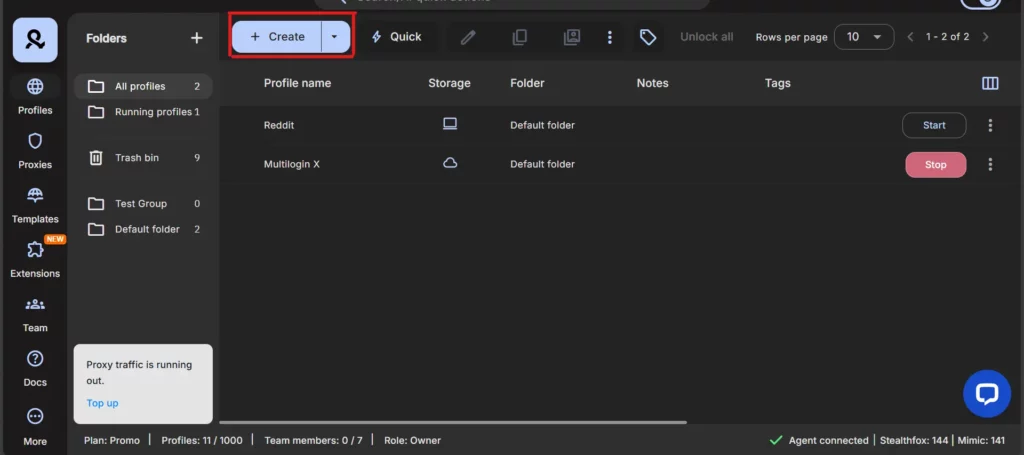
In the Multilogin dashboard, click “Create” to start setting up a new browser profile. Give your profile a name (e.g., “Amazon Store 1”).
Try Multilogin now for €1.99! Create unlimited Google accounts
Step 3: Configure Your Profile for Each Amazon Account
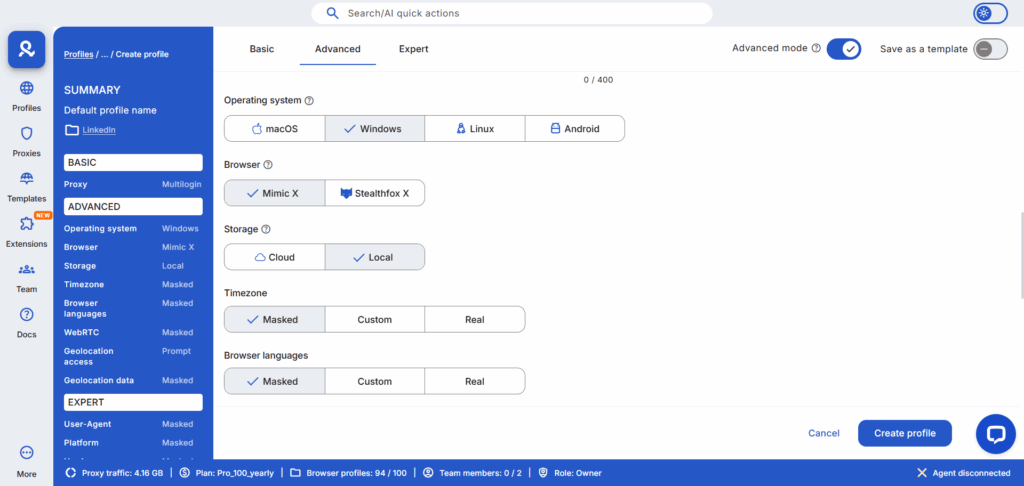
- Operating System: Choose the operating system you want to emulate (Windows, Mac, or Linux).
- Browser: Choose the browser you want to use (Mimic, based on Chromium, or Stealthfox, based on Firefox).
- Proxy: This is the important part. Select “Multilogin Proxy” and choose the country you want your IP address to be in. You can choose from over 100 countries.
Multilogin supports various proxy types including rotating proxies, static residential proxies, and mobile proxies. You can also integrate external proxy services if needed through our proxy management system.
Step 4: Configure Fingerprint Settings for Each Amazon Account (Optional)
For most users, Multilogin’s default fingerprint settings are perfect. But if you want more control, you can customize over 55 fingerprinting parameters.
Advanced users can configure WebGL renderers, Canvas graphics, client hints, and other sophisticated parameters.
Step 5: Launch Your Profile and Create Your Amazon Account
Click “Start” to launch your new browser profile. It will open a new browser window with a completely unique fingerprint and IP address. Now, you can go to Amazon and create your new seller account.
Step 6: Repeat for Each of Your Multiple Amazon Accounts
Repeat steps 2-5 for each new Amazon account you want to create. Make sure to use a different profile for each account.
Important: Remember to use separate personal and business information for each account (bank account, credit card, address, etc.). Multilogin can’t protect you if you’re using the same information across multiple accounts.
Advanced Strategies for Managing Multiple Amazon Seller Accounts
Once you have the basic Multilogin setup in place, you can start implementing more advanced strategies to further protect and scale your business.
Strategy 1: Geographic Diversification for Multiple Amazon Accounts
One of the most effective ways to diversify your risk is to sell in multiple Amazon marketplaces. With Multilogin, you can create separate browser profiles for each marketplace (e.g., Amazon.com, Amazon.co.uk, Amazon.de, etc.).
This has several advantages:
Reduced risk: If you get suspended in one marketplace, your other marketplaces will not be affected.
Increased revenue: You can tap into new customer bases and take advantage of different market trends.
Currency diversification: You can earn revenue in multiple currencies, which can protect you from currency fluctuations.
How to implement with Multilogin:
- Create a new browser profile for each marketplace.
- In the proxy settings, select the country that corresponds to the marketplace (e.g., United Kingdom proxies for Amazon.co.uk, Germany proxies for Amazon.de, Japan proxies for Amazon.co.jp).
- Use a separate bank account and credit card for each marketplace.
Consider exploring our geographic-specific proxy bundles for USA, Canada, Australia, and dozens of other countries.
Strategy 2: Brand Diversification for Multiple Amazon Accounts
If you have multiple brands, you should create a separate Amazon store for each brand. This allows you to:
Build a strong brand identity: Each store can have its own branding, messaging, and customer experience.
Target different customer segments: You can tailor your products and marketing to specific customer niches.
Reduce risk: If one brand gets a bad review or a policy violation, it won’t affect your other brands.
How to implement with Multilogin:
- Create a new browser profile for each brand.
- Use a different proxy location for each brand to further separate them.
- Use separate branding, logos, and marketing materials for each store.
Strategy 3: Product Category Diversification for Multiple Amazon Accounts
If you sell products in multiple categories, it’s a good idea to create a separate store for each category. This can help you:
Become a category expert: You can build a reputation as the go-to seller for a specific product category.
Improve your SEO: You can optimize each store for specific keywords and search terms.
Reduce risk: If one product category becomes saturated or unprofitable, you can focus on your other categories.
How to implement with Multilogin:
- Create a new browser profile for each product category.
- Use different proxy locations and browser fingerprints for each profile.
- Tailor your product listings and marketing to each category.
Strategy 4: Amazon Arbitrage Operations
Many successful sellers use Multilogin for retail arbitrage and online arbitrage operations. By maintaining separate accounts for sourcing and selling, you can scale operations without risk.
This strategy works particularly well with e-commerce automation tools that can help you identify profitable products and manage listings across multiple stores.
Proof and Results: The $1M+ Difference for Your Multiple Amazon Accounts
So, what are the real-world results of implementing the Multilogin Multi-Store Defense Strategy?
- Unprecedented Security and Stability for Multiple Amazon Accounts
Sellers who use Multilogin report a 99.9% success rate in avoiding linked account suspensions. They can manage multiple accounts with confidence, knowing that their business is protected by the best technology in the industry.
- Scalability to $1M and Beyond with Multiple Amazon Accounts
With Multilogin, you can scale your Amazon business without limits. You can test new products, enter new markets, and build a portfolio of successful stores, all without the fear of losing everything to a single ban.
We have users who are managing over 1,000 Amazon accounts with Multilogin. That’s the level of scalability we’re talking about. Many use our platform alongside other e-commerce operations including multiple eBay accounts, Shopify stores, and Etsy shops.
- Increased Profitability with Multiple Amazon Accounts
By diversifying your business across multiple stores, you can:
Reduce risk: If one store has a bad month, your other stores can pick up the slack.
Increase revenue: You can target different niches and customer segments with each store.
Maximize ad spend: You can run separate ad campaigns for each store, optimizing your budget for maximum ROI.
Sellers who implement a multi-store strategy see an average revenue increase of 3-5x within the first two years.
- Peace of Mind for Sellers with Multiple Amazon Accounts
This is the most important result of all. With Multilogin, you can finally stop worrying about getting banned. You can focus on what you do best: building your business.
Many sellers also use Multilogin for related activities like web scraping Amazon reviews for competitive research, price monitoring, and market research.
Integration with Other E-commerce Platforms
While this guide focuses on Amazon, the same Multilogin framework works across multiple e-commerce platforms:
- eBay Sellers: Manage multiple eBay accounts for different product lines
- Shopify Merchants: Run multiple Shopify stores targeting different markets
- Etsy Shops: Operate multiple handmade or vintage shops
- Marketplace Sellers: Expand to platforms like Walmart, Target, and international marketplaces
This multi-platform approach, sometimes called dropshipping and e-commerce automation, allows you to build a truly diversified online retail empire.
Build Your Fortress for Your Multiple Amazon Accounts
You have a choice to make. You can continue to operate your Amazon business on a foundation of sand, hoping that you don’t get caught. Or you can build a fortress that can withstand anything Amazon throws at it.
The Multilogin Multi-Store Defense Strategy is that fortress.
It’s the strategy that thousands of 6-, 7-, and 8-figure Amazon sellers are using to protect their businesses and scale to new heights. This isn’t just about avoiding bans—it’s about building a sustainable, scalable e-commerce empire that can weather any storm.
Think about it: every day without proper protection is a day you’re risking everything you’ve built. Your inventory, your reviews, your customer relationships, your income—all vulnerable to a single algorithmic decision by Amazon.
And you can get started today for less than the cost of a coffee.
Start your 3-day trial of Multilogin for just €1.99
Don’t wait until it’s too late. Don’t wait until you get that dreaded email. Protect your business today.
Join thousands of successful Amazon sellers who sleep soundly knowing their accounts are protected by the most advanced antidetect technology available. Your future self will thank you.
FAQs
Yes, Amazon has sophisticated detection systems that track IP addresses, browser fingerprints, cookies, device IDs, and even behavioral patterns. If they detect linked accounts, all of them can be suspended simultaneously. That’s why using proper isolation tools like Multilogin is critical for running multiple stores safely.
Amazon uses advanced bot detection and fraud detection algorithms that can identify patterns across seemingly unrelated accounts.
Amazon’s policy allows you to operate multiple seller accounts, but you need to have a legitimate business reason for each one (like selling in different categories or operating separate brands). You must also get approval from Amazon before creating additional accounts. The key is keeping them properly isolated so Amazon doesn’t flag them as related.
Learn more about legitimate use cases in our guide to managing multiple Amazon accounts.
A VPN only changes your IP address, but Amazon tracks 55+ other parameters like Canvas fingerprints, WebGL data, fonts, timezone, screen resolution, and behavioral patterns. If these don’t match your IP location or if they’re identical across accounts, you’ll get flagged. Multilogin creates completely unique browser environments for each account, not just different IPs.
Read our detailed comparison: Free proxy vs antidetect browser to understand why proxies and VPNs alone aren’t sufficient.
Multilogin starts at €5.85/month for the Pro 10 plan (10 profiles) or €19.17/month for Pro 100 (100 profiles). This includes built-in residential proxies worth $50-200/month if purchased separately. Compare that to losing a $100K+ Amazon business to a ban, and the ROI is obvious.
For high-volume sellers, check out our guide on best dedicated residential proxy providers for additional proxy options.
Yes, but only if you’re using Multilogin. Each browser profile runs in a completely isolated environment with its own fingerprint, cookies, and IP address. Without this isolation, Amazon will detect that all accounts are coming from the same device and link them together.
This is fundamentally different from managing multiple Chrome profiles, which offers no real protection against fingerprinting.
If you’re using Multilogin correctly, a suspension on one account won’t affect your others because they’re completely isolated. Amazon won’t be able to link them. However, if you’re not using proper isolation, a single suspension can trigger a domino effect that takes down all your accounts.
This is similar to how IP bans work on other platforms—proper isolation is your only defense.
It’s highly recommended. Using different legal entities (LLCs, corporations) for each store adds an extra layer of protection. If one store gets sued or suspended, your other businesses remain safe. Plus, it makes it harder for Amazon to link your accounts through business registration data.
Yes, and you should! Multilogin’s built-in proxies let you assign different geographic locations to each account. This makes your accounts look like they’re being managed by different people in different cities, which significantly reduces the risk of detection.
This is proper geolocation spoofing combined with IP rotation for maximum protection.
Yes, Multilogin’s API integrates with popular automation tools like Selenium, Puppeteer, and Playwright. You can automate inventory management, repricing, order processing, and more. Learn more about web automation and browser automation capabilities.

