




Managing multiple accounts across mobile apps has become more demanding as platforms strengthen device checks, session controls, and account-security systems. For teams working in social media marketing, e-commerce, app testing, customer operations, or other mobile-first workflows, relying on racks of physical phones can quickly become expensive, difficult to maintain, and hard to scale.
GeeLark is a cloud phone platform built for mobile multi-account management and increasingly positioned as an AI-assisted workspace for social media operations. It lets users create and control multiple Android cloud phones from one dashboard, with each device operating as a separate mobile environment. In this updated review, I’ll examine GeeLark’s cloud phone experience, automation tools, collaboration features, pricing model, and how it compares with Multilogin’s newer cloud-first positioning.
What is GeeLark?
GeeLark is a cloud-based platform that provides remote Android cloud phone profiles. Instead of purchasing and maintaining a separate physical smartphone for every account, users can access multiple hosted Android environments from a computer. Each cloud phone has its own device configuration, app data, login state, and network setup, helping teams keep mobile workflows organized and separated.
The platform is mainly designed for users who work with mobile-first apps such as TikTok, Instagram, Facebook, Telegram, Gmail, and other services that are easier to operate inside an Android environment than through a desktop browser. GeeLark also combines cloud phones with automation, content-generation tools, analytics, and team-management features.
Key feature of GeeLark: cloud phone. What is that?
A cloud phone is an Android environment hosted remotely and streamed to the user’s computer. It behaves like a smartphone for installing apps, saving sessions, and running mobile workflows, but the user does not need to own or physically maintain the device.
GeeLark describes its cloud phones as different from conventional desktop emulators. Users rent device access through the platform, select a cloud phone while creating a profile, assign the required network settings, and then install apps through the available marketplace or Android interface. The result is a mobile workspace that can be opened remotely whenever the user needs it.
This model can reduce the operational burden associated with charging phones, replacing damaged hardware, updating devices manually, and organizing many physical units across employees or locations.
First impressions of GeeLark’s cloud phone platform
Let me walk through what GeeLark currently offers to someone using the platform for the first time.
The website is relatively easy to navigate, and the account-registration process is straightforward. After completing the initial steps, I was able to install the desktop application and access the main dashboard without needing advanced technical knowledge.
I started by creating a new profile.

The profile-creation screen includes the main configuration fields in one place. On the Pro plan, Quick Create and Bulk Create options are also available, which can make it easier to prepare multiple environments or assign profiles to a structured team workflow.
GeeLark has also discussed iOS cloud phone development, although availability and feature coverage may change over time. Users who specifically require iOS should confirm the current product status before planning a workflow around it.
To configure an Android cloud phone, users enter details such as the profile name, group, tags, and proxy information. A proxy connection is required before launching a GeeLark cloud phone, which means proxy sourcing and proxy costs need to be considered separately from the platform subscription and device-usage charges.
The right-side panel displays relevant device specifications, including the Android version, time zone, and other environment details. Keeping this information visible during setup is useful for teams that need consistent configurations across accounts, clients, or regions.
Once the initial setup was complete, I launched the cloud phone from the dashboard. The first launch took longer than later launches, which is common when a hosted device is being prepared for the first time.

The cloud phone provides a familiar Android-style interface. Apps can be installed through GeeLark’s built-in marketplace, and users can interact with the device by clicking, dragging, and swiping with a mouse.
Installed apps may not appear directly on the home screen, so users may need to swipe up to open the app menu. This interaction feels closer to using a mobile device than working with a standard desktop profile.
The built-in marketplace can also provide different versions of certain applications, such as global or regional releases. This may be useful for QA, localization checks, and region-specific app workflows, although teams should always verify app compatibility and platform requirements before deployment.

The sidebar includes shortcuts for reviewing device and environment information. During the original hands-on test, TikTok and Instagram opened and ran without noticeable interface problems.

Overall, GeeLark presents a relatively accessible interface for users who are new to cloud phones. The dashboard groups profile creation, device launching, app installation, and team functions in a way that is easy to understand after a short onboarding period.
Powerful functionality
Cloud phones remain GeeLark’s central feature, but the platform now combines them with several additional capabilities designed for social media and mobile operations.
- Cloud technology. GeeLark provides remotely accessible Android environments intended to reduce dependence on physical device farms. Each cloud phone can maintain its own apps, account data, device settings, and assigned network configuration. This gives teams a repeatable way to separate mobile workflows while controlling them from one dashboard.
- Automation. GeeLark provides RPA-based tools for scheduled posting and other repetitive in-app actions. Templates can help teams standardize recurring workflows, while the Synchronizer feature can mirror selected actions across multiple profiles. Automation is most useful when it supports a planned workflow, such as a structured content calendar guide, rather than replacing account-specific review and quality control.
- GeeLark AI. The platform includes AI-assisted content features for image generation, image-to-video workflows, text-to-video creation, and video editing. These tools place GeeLark within a broader group of AI marketing tools designed to reduce repetitive production work across social channels.
- AI analytics. GeeLark has added analytics features intended to help users review content performance and identify trends across campaigns. The value of these dashboards depends on the platforms connected, the quality of available data, and how consistently teams label and organize their profiles.
- Team collaboration. Role-based permissions, operation logs, profile groups, and shared access can help agencies or distributed teams control who can view, launch, or edit specific environments. Before scaling, businesses should confirm which collaboration features are included in their selected plan.
GeeLark: platform benefits
- Mobile-native app access. Cloud phones let teams operate Android applications in a dedicated mobile environment instead of forcing every task through a desktop browser. This is useful for mobile-first publishing, app testing, customer support, and campaign management.
- Fewer physical devices to maintain. A cloud setup reduces the need to purchase, label, charge, store, update, and replace large numbers of smartphones.
- Remote access from one dashboard. Users can organize and open cloud phones from a centralized workspace, which is more practical for remote teams than sharing physical devices.
- Separated workflows. Each cloud phone can retain its own apps, session history, and assigned connection settings, helping prevent accidental overlap between clients, projects, or account groups.
- Operational flexibility. Teams can add or remove cloud phone capacity as their workload changes instead of committing to a fixed inventory of physical hardware.
Platforms and use cases
GeeLark lists support and setup resources for platforms including TikTok, Instagram, YouTube, Facebook, X, Reddit, Pinterest, Gmail, Telegram, and other mobile apps. For teams focused on Instagram, this guide to running multiple Instagram accounts explains how dedicated cloud phone environments can be organized without mixing app data and sessions.
Common legitimate use cases for a cloud phone platform include:
- Social media management. Agencies and in-house teams can assign separate mobile environments to brands, markets, campaigns, or account owners.
- Affiliate and performance marketing. Teams can separate authorized campaign workflows across projects and maintain clearer operational records.
- Mobile app testing. QA teams can review app behavior, layouts, and releases across different Android versions and device configurations.
- Online reputation management. Businesses can organize approved brand-monitoring and customer-engagement workflows across social platforms.
- Cloud gaming and app access. Users can run compatible Android apps remotely without relying on local mobile hardware.
- Ad verification. Marketing and QA teams can review how authorized ads, landing experiences, or mobile content appear across selected regions and environments.
- E-commerce operations. Teams can separate approved buyer-support, seller-management, customer-service, and storefront workflows.
- Content production. AI-assisted image and video tools can support creative production, repurposing, and scheduling across multiple social accounts.
As with any account-management platform, users remain responsible for following the terms, verification requirements, advertising policies, and acceptable-use rules of every third-party service they access.
Pricing
GeeLark uses a customizable pricing model rather than one simple flat fee. The subscription price changes according to the selected number of profiles and plan level, while cloud phone usage, rental options, parallel capacity, and external proxies may be charged separately.
| Plan | Profiles / bonus minutes | What’s included |
| Free | 2 profiles / 30 bonus minutes, 1 seat | Profile creation and management, proxy management, selected RPA tools, operation logs, and access to the GeeLark AI assistant |
| Base | Scales from 5 profiles upward, starting with a monthly bonus-minute allocation | Free-plan features plus expanded administration, API-related functionality, profile transfer, role and permission controls, ADB access, and parallel-operation options |
| Pro | Scales from 20 profiles upward, with plan-dependent bonus minutes | Base-plan features plus quick and bulk creation, cloning, Synchronizer access, and GeeLark AI content-generation tools |
| Custom | Designed for very large profile requirements | Custom limits, service options, and enterprise arrangements for larger organizations |
GeeLark’s device-related charges are separate from the subscription fee. Depending on the current pricing structure, teams may need to account for active-use minutes, daily caps, monthly device rental, parallel capacity, automation usage, and third-party proxy expenses. Because these components can change, businesses should confirm the latest figures directly on GeeLark’s pricing page before estimating total monthly cost.
This layered model offers flexibility, but it can also make forecasting more complex. A low profile-subscription price does not necessarily represent the full cost of operating several cloud phones for long sessions, especially when proxies and additional capacity are purchased separately.
How Multilogin compares with GeeLark
GeeLark is primarily centered on cloud phones and AI-assisted social workflows. Multilogin’s updated positioning is broader: it brings Android Cloud Phones, browser profiles, built-in residential proxies, automation support, and team operations together in one platform. This makes Multilogin one of the best cloud phones to consider when a team needs to manage both mobile apps and web-based workflows.
- Cloud phones and browser profiles in one workspace. GeeLark focuses mainly on Android cloud phones. Multilogin supports both cloud phone environments for mobile-first apps and isolated browser profiles for web-based work, allowing teams to organize mobile and desktop operations without maintaining separate systems.
- Built-in residential proxies. GeeLark requires users to configure a proxy before launching a cloud phone, so proxy selection and billing are handled separately. Multilogin includes residential proxy traffic in every plan, giving teams access to a managed proxy network directly within the same platform.
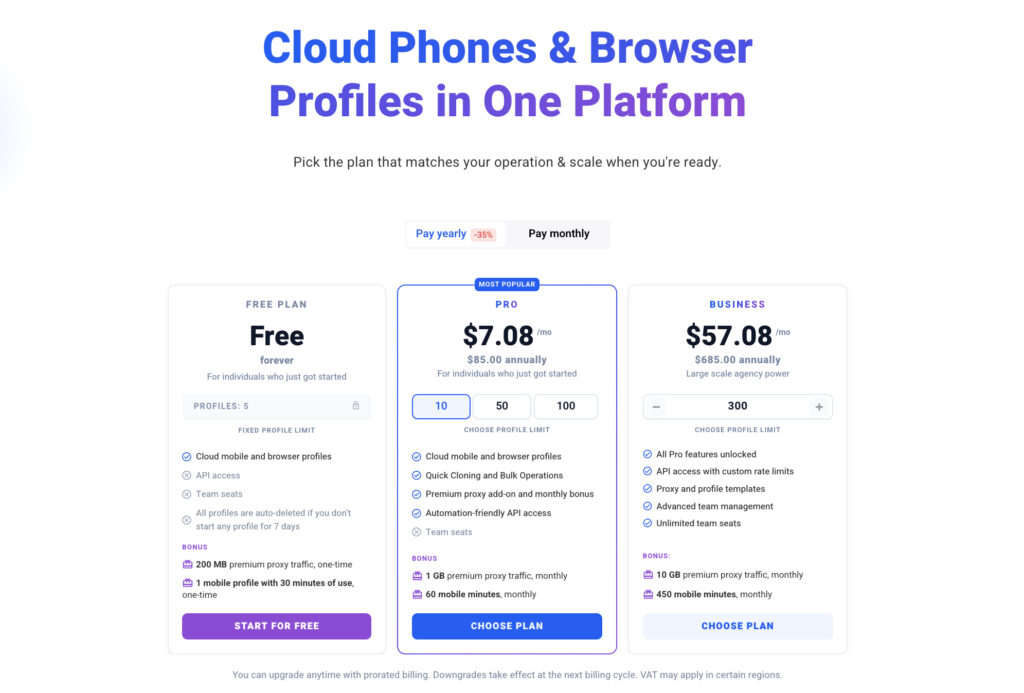
- Clear entry pricing. Multilogin now starts with a permanent free plan rather than a paid trial. Paid Pro 10 plans cost $11/month or $7.08/month when billed annually. Cloud Phones, residential proxies, and browser profiles are available within the same product structure, although usage allowances and limits vary by plan.
- Automation support. GeeLark provides RPA templates and Synchronizer functions on eligible tiers. Multilogin supports API-based workflows and tools such as Selenium, Puppeteer, Playwright, and Postman for teams that need deeper browser automation. Gradual, policy-compliant onboarding workflows can also be supported by guides such as how to warm up accounts.
- Team and agency workflows. Both platforms provide collaboration features, but Multilogin is designed to combine mobile profiles, browser profiles, proxy traffic, automation, and profile organization under one account structure. This can simplify onboarding and cost management for agencies that support multiple clients.
Multilogin’s new cloud-first positioning
Android Cloud Phones support native mobile apps, browser profiles support web workflows, residential proxies are integrated into the platform, and automation and collaboration tools help teams manage higher operational volume.
The Multilogin cloud phone guide for social media marketing explains how dedicated Android environments can be used for mobile-first platforms. The Multilogin Free Plan provides a no-credit-card starting point, while the Multilogin Cloud Phone product update covers the redesigned mobile workflow and current platform capabilities.
Updated Multilogin pricing
| Plan | Price | Positioning |
| Free | $0, with no time limit | A starting plan for testing Multilogin’s browser and Cloud Phone workflows before moving to a paid subscription |
| Pro 10 monthly | $11/month | Designed for individual users and smaller operations that need more profiles, recurring allowances, and automation access |
| Pro 10 annual | $7.08/month, billed annually | The lower effective monthly rate for users who choose annual billing |
Multilogin starts with a free plan, so users can test the platform before committing. Paid plans then start at $7.08/month when billed annually, with Cloud Phones, residential proxies, and browser profiles brought together within one product ecosystem.
Which platform is the better fit?
GeeLark remains a relevant option for teams that primarily need Android cloud phones, built-in social content tools, and RPA-style mobile automation. Its flexible profile slider and usage-based device pricing may suit teams that are comfortable forecasting several separate cost components and sourcing their own proxies.
Multilogin is the stronger fit for teams that want one operational platform for both mobile and browser-based account workflows. Its combination of Android Cloud Phones, isolated browser profiles, built-in residential proxy traffic, automation support, and team-management capabilities reduces the need to connect multiple standalone services.
The most important difference is no longer simply one cloud phone provider versus another. It is whether the business needs a mobile-only tool or a unified environment that supports mobile apps, web sessions, proxies, automation, and collaboration as operations grow.


