


Discover Multilogin now and get 50% off your first month!

Multilogin vs. BlueStacks

*Attention: 50% discount is currently available for the Pro Plan

BlueStacks vs. Multilogin
Multilogin logo representing the Estonian-origin platform for advanced multi-account management and anonymity.
Cloud phones in Multilogin Icon

Cloud phones

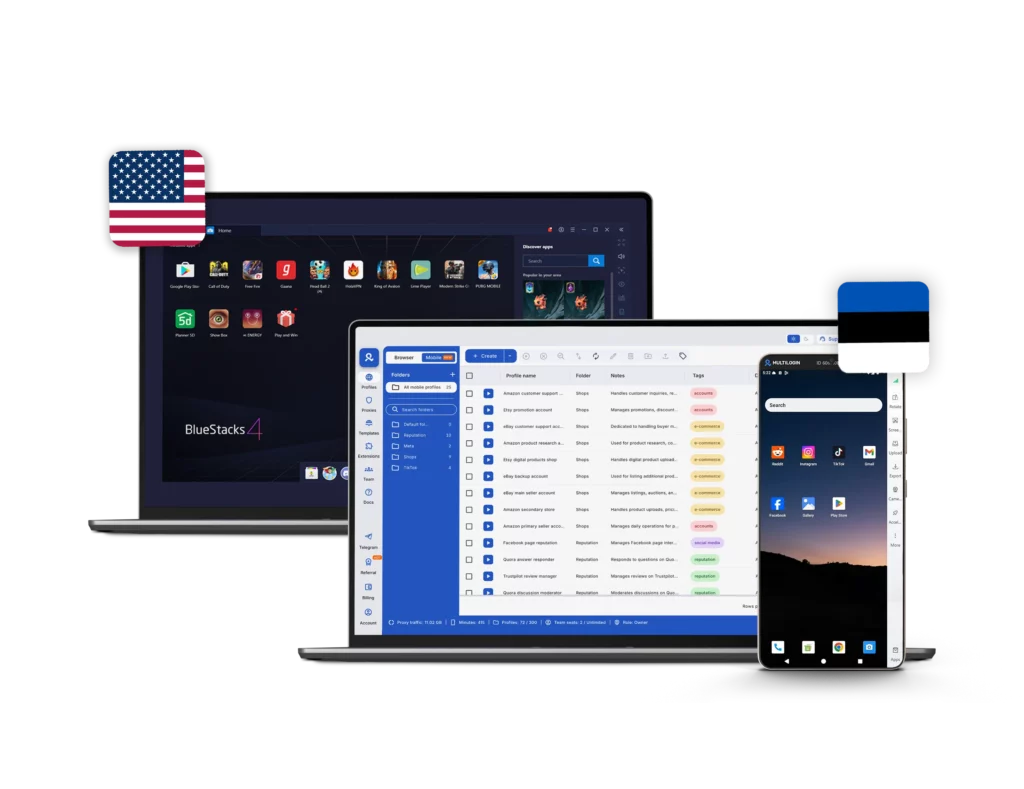
Multilogin provides cloud phones running full Android operating systems (Android 10–15) with realistic device identities for multiple use cases, from gaming to multi-accounting and social media marketing. Users can choose specific smartphone brands such as Samsung, Google Pixel, Xiaomi, and others, each with consistent device identifiers and persistent environments and install apps via a built‑in store or APK upload, keeping persistent app data, cache, and login states for long‑term native app workflows.


BlueStacks is a local Android emulator that runs on your computer through virtualization, mainly used for gaming. It does not provide real cloud-based Android devices. All environments operate from your own hardware, meaning performance and scalability depend entirely on your PC’s CPU, RAM, and storage capacity.

Icon of a proxy symbol representing proxy features and integration capabilities in the comparison.

Built-in proxies

Multilogin integrates residential and mobile proxy management directly into the platform. Access over 30 million IPs across 150 countries, city-level targeting, ISP filtering, and sticky sessions of up to 24 hours. External proxies can also be imported and managed from the same interface.

BlueStacks does not include built-in proxy infrastructure. Users must research and configure proxies manually. Network separation is not native to the emulator and requires additional setup.

Icon representing browser fingerprinting technology and anti-detection features in the comparison.

Browser fingerprinting customization

Multilogin gives you control over 55+ fingerprint parameters: from Canvas and Web to geolocation, timezone, language, and the profile OS—with daily tests across 50+ platforms. You also get deep proxy customization down to city, GPS and ISP to match real-world network conditions. Profile export/import keeps fingerprints and pre-made cookies attached to your workflows

BlueStacks does not offer fingerprint management or browser-level identity control. It replicates Android functionality but does not isolate digital identities or provide proxy customization.

Browser flexibility icon blue

Platform flexibility

Multilogin offers advanced browser profiles flexibility, with Mimic (Chromium), allowing teams to run desktop web accounts with fully isolated fingerprints and persistent sessions. Alongside this, Multilogin provides Android cloud phones with support for 30+ real device models, all managed within the same workspace.

BlueStacks focuses on running Android apps inside the emulator. It does not include an antidetect browser or structured desktop-mobile identity alignment. Browser behavior remains tied to the local machine environment.

Customer Support

Multilogin provides 24/7 customer support via live chat and email, with multilingual coverage in English, Russian, Chinese, Vietnamese, and Portuguese. Users also have access to Multilogin Academy, detailed documentation, and structured onboarding resources for professional use cases.

BlueStacks support is primarily by e-mail and help pages on the website, so if you’re having any issues and need a quick solution, there is no live support and it can take a while to hear back from support.

Icon symbolizing teamwork, designed as interconnected puzzle pieces representing collaboration and unity.

Teamwork

Multilogin is built for teams and agencies. It offers role-based access control, shared profiles without credential sharing, activity logs, and structured workspaces. Teams can manage multiple clients, accounts, and workflows while maintaining clear separation and accountability.

BlueStacks is built primarily for individual users. While multiple emulator instances can be launched, there are no collaboration tools such as built-in team roles, access permissions, and shared environments.

Data privacy & security

Multilogin fully complies with GDPR, guaranteeing strong data protection. If you ever cancel your subscription, all of your data — including browser profiles — is automatically deleted within three months. Passwords are securely hashed, and any sensitive information is encrypted and stored safely.

BlueStacks follows standard consumer software privacy practices and operates under its public privacy policy. However, it does not provide identity isolation, advanced fingerprint control, or structured session separation by design. It is not optimized for scenarios requiring strict account compartmentalization or regulated data governance.

Icon representing pricing or cost information, typically symbolized by a dollar sign or price tag.

Pricing & Plans

Multilogin starts with a 3-day trial for €1.99, including 5 browser profiles so you can test your setup before committing. After the trial, plans start at €9/month, or €5.85/month when billed annually.
Each subscription gives you access to browser profiles, Cloud Phones, and built-in residential proxies within one structured plan. Cloud Phone usage is billed transparently per minute, with starter 60 minutes included. Additional minutes and residential proxy traffic can also be purchased separately, with clear per-minute and per-GB pricing — keeping scaling flexible and predictable.

BlueStacks is free to download and use for running Android apps and games on PC or Mac. However, the platform relies heavily on in-app advertisements and sponsored placements, which can significantly impact the user experience. While the core emulator is free, optional VPS hosting for higher-performance setups typically ranges from approximately $24.99 to $80.99 per month. In addition, users who need IP separation must rely on third-party proxy services, and scaling often requires stronger hardware. When you factor in proxy costs, infrastructure upgrades, and external tools, the total operational expense can quickly exceed the cost of a structured cloud-based solution.

What Multilogin offers that BlueStacks doesn't

Free residential proxies in each plan 

Antidetect technology within the browser

Passes all browser fingerprint checkers

Daily testing on 50+ websites

AI-driven automation

Profile warmup with pre-farmed cookies

24/7 customer support in 5 languages

Cloud phones and browser profiles in one platform

BlueStacks user or new to the game? Get 50% off your first month.

Explore Multilogin, a smarter BlueStacks alternative.

Multilogin vs. BlueStacks recap chart

Find out why Multilogin is the preferred BlueStacks alternative

Multilogin logo representing the Estonian-origin platform for advanced multi-account management and anonymity.
Cloud Phones
Real cloud phones
No, only android emulator
Chromium
Yes (Mimic)
Yes
Firefox
Yes (Stealthfox)
Yes
Country of origin
🇪🇪 Estonia
🇺🇸 United States
Platform compatibility
Windows, macOS, Linux
Windows, macOS
Resource consumption
Requires 4GB RAM
High CPU/ RAM usage. Depends on local hardware
Device type
Full-featured cloud Android phones
Local Android emulator running via virtualization
Anti-fingerprinting technology
Advanced level
None (no fingerprint management)
Quick profile creation
Yes
No, manual setup per emulator
Security
Isolated browser profiles, per-profile proxy control
Basic local environment, no advanced identity isolation
Built-in proxies at no additional cost
Yes
No
Mobile proxies
Yes
No
Mobile App Marketplace
Yes
Yes
Support for all use cases
Yes
No
Support
24/7 Live Support in 5 languages
Only by e-mail
Suits well for team management
Yes (role-based access, shared environments)
No (designed for individual local use)
Market Position
Beginner-friendly and flexible for individuals and small teams, with room to scale.
Built primarily for gaming and casual Android app usage

Manage Unlimited Mobile and & Web Accounts

Multilogin comes with built-in residential proxies to make multi-accounting, web scraping and web automation easier than ever. No extra setup, no third-party services—just undetectable browsing at no additional cost.
  • 3-day access to Multilogin

  • 5 cloud or local profiles

  • 200 MB proxy traffic included

  • 3-day access to Multilogin

  • 5 cloud or local profiles

  • 200 MB proxy traffic included

Why people love Multilogin

Dominik

The product is excellent, and the support team is highly professional.
The product keeps improving with continuous updates. In this space, many competitors have come and gone, and I continue to choose Multilogin because others don’t come close in terms of features or overall experience.

Evgeny S.

Web, Small Business

If you really need a high-quality antidetect browser, then Multilogin is definitely the one.
100% anonymity pass on all checkers. Convenient to work in several browsers at the same time. Handles dozens of Facebook and TikTok accounts from a single computer.

Nino Latif

The best service for great ideas and big minds!
Always here for their clients, always ready to help out. I am using the service for 3-4-5 months now and brought me lots of great things 🙂 Hope to grow it on a larger scale and continue using the service ...

Nino L.

Marketing Agent, Small-Business

Started using Multilogin in August/September 2021. Been using it for a couple of years now and I am very satisfied overall. They are always looking and finding ways to improve their app and make it easier...

George M.

Co-Founder, Small-Business

Quite Likely The Best Privacy Browser Out There!

There are quite a few things I like about Multilogin. My favorite, most definitively, is the teams feature allowing you to easily share specific browser profiles with different team members...

Tim R.

Project Manager, Small-Business

Fast, reliable and convenient anti-detect browser.
All the infrastructure of the browser is built to be convenient for any size of the team. We have 0 concerns regarding the speed and efficiency of the browser.

Award winning multiple account management platform

High Performer
Momentum leader
Best support
Momentum leader

See more comparisons

Adspower logo featured on the Multilogin comparison page, representing the browser's branding and identity.

Compare with

Compare with

Compare with

Incogniton logo displayed on the Multilogin comparison page, linking to its detailed comparison with Multilogin.

Compare with

Octobrowser logo

Compare with

Linken Sphere логотип

Compare with

Compare with

Showcasing the Kameleo logo, representing the antidetect browser for multi-account management and online privacy.

Compare with

DICloak logo, representing the antidetect browser for multi-account management and online privacy.

Compare with

MoreLogin logo displayed on the Multilogin comparison page, representing the browser's brand in the comparison with Multilogin.

Compare with

Compare with

Undetectable logo

Compare with

The official logo of NST Browser, showcased in a detailed comparison with Multilogin and VMLogin for antidetect browser features.

Compare with

Ghostbrowser logo, representing the brand in the antidetect browser comparison.

Compare with

VMLogin logo, representing the antidetect browser solution, featured in a comparison with Multilogin.

Compare with

Hidemyacc logo

Watch the Multilogin demo

Learn how Multilogin enhances your anonymity. Enter your name, surname, and email below, and we’ll send you our demo video straight to your inbox. As a BlueStacks alternative, you’ll gain a clear understanding of how Multilogin can benefit you.

Multilogin vs BlueStacks — Android Emulator or Cloud Phone? 

Running Android apps on desktop used to be simple: install an emulator, launch it, and you’re good to go. That’s exactly what made BlueStacks so popular. 

But there’s a big difference between Cloud Phone vs Android Emulator. 

The BlueStacks Android emulator was designed for gaming, entertainment, and everyday app usage. Multilogin Cloud Phones were designed for identity control, proxy alignment, and long-term operational stability. 

If you’re searching for a BlueStacks alternative, you’re likely already feeling that difference. 

Multilogin vs BlueStacks: The Core Difference 

BlueStacks emulator for PC runs Android locally through virtualization. Everything happens inside your own machine. Your CPU, RAM, storage, and BIOS virtualization settings define how well it performs. 

For one or two instances, it works. But the moment you scale, the limits become visible. 

Multilogin doesn’t emulate Android on your computer. It provides fully hosted Android cloud phones that operate independently in the cloud. Each environment runs as its own device, not as a window inside your PC. 

That distinction matters more than it seems. 

With BlueStacks, scaling means upgrading hardware. With Multilogin, scaling means launching another cloud phone. 

Multilogin vs BlueStacks: Performance Under Load 

Many BlueStacks reviews praise its simple setup. And for casual use, that’s fair. 

But performance issues become common once multiple instances are running: 

  • CPU and RAM usage spike quickly 
  • Startup times increase 
  • Lag and freezing appear under heavier workloads 
  • Storage grows dramatically as app data accumulates 

On lower-end or older machines, BlueStacks can slow down the entire system. Even on stronger PCs, running several instances simultaneously pushes hardware hard. 

Multilogin removes the hardware bottleneck entirely. 

Because cloud phones run remotely, your local computer is no longer the limiting factor. You can manage multiple Android environments without draining RAM or overloading your system. 

There’s no Hyper-V conflict. No BIOS virtualization headaches. No risk of one emulator crash affecting every session. 

That stability is structural. 

Multilogin vs BlueStacks: Proxy and Network Control 

This is where the difference becomes critical.  

BlueStacks has no built-in proxy infrastructure. If you need IP separation, you configure it manually through Windows network settings, ADB adjustments, or external VPN tools.  

That adds friction and increases the risk of misconfiguration. And because the android emulator BlueStacks runs locally, all instances still originate from the same base machine unless carefully segmented. Even with multi-instance support, they share the same host environment. 

Multilogin Cloud Phones includes a pool of +30 million built-in residential and mobile proxy integraded with no additional cost and allow clean per-device IP alignment, where you can choose from +195 countries. Each cloud phone can operate with: 

  • Dedicated network routing 
  • Stable regional signals 
  • Persistent identity behavior 
  • Consistent proxy-device matching 

You’re not patching network separation on top of an emulator. It’s built into the infrastructure. 

Multilogin vs BlueStacks: Identity and Fingerprinting 

BlueStacks was never built for fingerprint control. It’s an emulator designed to replicate Android functionality, not to isolate digital identities or manage long-term account environments. 

There’s no advanced fingerprint management. No browser-level identity isolation. No coordination between mobile and desktop sessions. 

Multilogin takes a different approach. Its cloud phones are based on real smartphone models like Samsung, Google Pixel, and Xiaomi, running Android versions 10 through 15 with authentic device identifiers such as IMEI, Android ID, and MAC address fully configured. That creates a mobile environment that behaves the way social platforms expect a real device to behave. 

But the real distinction goes beyond the Android layer. 

Multilogin’s antidetect browser works alongside cloud phones, extending identity control to the browser level. Cookies, local storage, hardware signals, software parameters, and session data are isolated per profile. Mobile apps and browser workflows stay aligned under one structured identity framework. 

The result is consistency: 

  • Sessions persist over time. 
  • Identities remain separated. 
  • Teams operate without overlap. 

By combining genuine Android cloud devices with advanced browser fingerprint isolation, Multilogin makes multi-account operations more stable, predictable, and easier to maintain over the long term. 

Multilogin vs BlueStacks: Team workflows and support 

BlueStacks is built primarily for individual users running apps locally on a single machine. While you can launch multiple emulator instances, collaboration isn’t part of the design. Teams often end up sharing system access, passing credentials back and forth, or manually coordinating session handoffs on the same device — which quickly becomes messy as operations grow. 

Multilogin is built from the ground up for team-based social media operations. Agencies and in-house teams can share access to cloud phones and browser profiles without exposing login details, define user roles and permissions, and keep clear separation between accounts and clients. Activity logs provide a clear record of access, simplifying the process of tracking who did what and when, which in turn helps teams maintain order and accountability. 

The contrast is also evident in the support provided. Multilogin’s 24/7 live chat support, offered in multiple languages including English, Russian, Chinese, Vietnamese, and Portuguese, ensures that global teams can readily obtain swift, technical assistance when problems surface. This support covers everything from profile setup and proxy configuration to scaling workflows — a level of operational backing that local emulator software simply does not provide. 

 configuration to scaling workflows. For businesses managing time-critical social media campaigns across different regions, this level of support offers an added layer of dependability. 

Final Verdict: Multilogin vs. BlueStacks

If you’re searching for “BlueStacks alternative,” you’re probably already encountering hardware limits, proxy complexity, or identity concerns. 

BlueStacks is a local emulator. Multilogin is cloud-based identity infrastructure. 

That difference defines everything. 

Multilogin Cloud Phones eliminate hardware dependency, integrate proxy alignment natively, isolate each Android environment properly, and extend identity control into browser workflows. 

For gaming and casual usage, BlueStacks works. 

For professional, multi-account environments that require stability, separation, automation and scalability, Multilogin is the stronger long-term solution. 

FAQ

The BlueStacks Android emulator runs locally on your computer using virtualization. That means performance, scaling, and network behavior are all tied to your hardware. Multilogin, on the other hand, provides real Android cloud phones hosted remotely. Each device runs independently in the cloud, with its own identifiers and proxy alignment. The difference isn’t just performance — it’s infrastructure. 

BlueStacks emulator for PC works well for casual app usage or one or two instances. But when you scale, hardware limits, shared host environments, and manual proxy setups become serious constraints. Because everything runs from the same base machine, identity separation is limited. For structured, multi-account operations, Multilogin offers stronger isolation and long-term stability. 

Many BlueStacks reviews highlight smooth setup and ease of use, especially for gaming. However, once multiple instances are running, CPU and RAM usage increase quickly. Startup times can grow longer, storage expands over time, and older machines may slow down significantly. Since BlueStacks runs locally, performance is always dependent on your PC’s resources. Multilogin removes that dependency by running cloud phones remotely.

No. The android emulator BlueStacks does not include built-in proxy infrastructure. Users typically configure proxies manually through Windows settings, ADB adjustments, or third-party tools. This adds complexity and increases the risk of traffic leaks. Multilogin includes 30M+ built-in residential and mobile proxies with per-device IP alignment, allowing cleaner and more reliable network separation. 

BlueStacks is not malware, and it is safe for general use. However, it was not designed for professional fingerprint control or identity management. There’s no browser-level isolation and no structured coordination between mobile and desktop sessions. For professionals looking for a BlueStacks alternative focused on identity separation and long-term account stability, Multilogin provides a more suitable framework.

If your goal is gaming or light app testing, BlueStacks can be sufficient. But if you’re managing multiple accounts, running campaigns across regions, or coordinating work across a team, Multilogin is the better choice. As a BlueStacks alternative, it offers cloud-based Android devices, built-in proxy alignment, browser fingerprint isolation, and scalable team workflows — features designed for professional, multi-account environments rather than casual use.

Thank you! We’ve received your request.
Please check your email for the results.
We’re checking this platform.
Please fill your email to see the result.

Multilogin works with amazon.com