



Discover Multilogin now & get 50% off for your first month!

Multilogin vs. Genlogin

*Attention: 50% discount is currently available exclusively for the Pro Plan

Multilogin vs. Genlogin
Multilogin logo representing the Estonian-origin platform for advanced multi-account management and anonymity.
Cloud phones in Multilogin Icon

Cloud phones

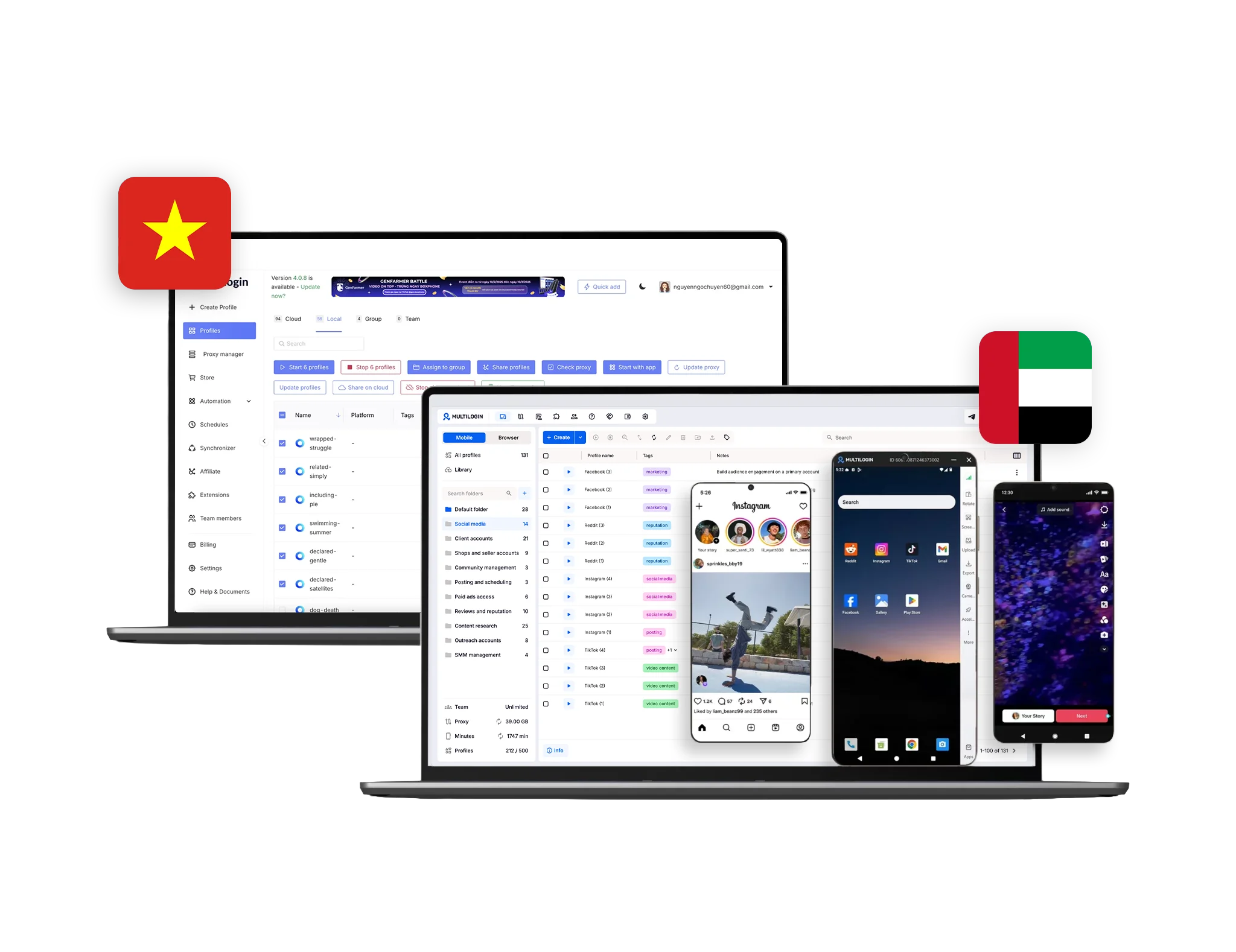
Multilogin offers Android Cloud Phones that let you run apps like Instagram, TikTok, YouTube, Reddit, and more inside separate mobile devices in the cloud. You can choose from 12+ popular phone brands, including Samsung and Xiaomi, and assign one cloud phone per account. Each phone comes with its own mobile IP and location, so accounts stay separate. Your app data and logins stay saved, so you can post, engage, and manage accounts without starting over every time; all from one simple dashboard.

Genlogin does not offer Android cloud phones, meaning you cannot run native mobile apps inside a dedicated device environment. It only supports browser profiles, which means no separate mobile device per account, no persistent mobile app sessions, no mobile-grade proxy matching inside a device, and no true mobile workflow support for apps like Instagram or TikTok.

Built-in proxies

Multilogin includes built-in residential and mobile proxies with access to 30+ million IPs across 195+ countries. Each cloud phone gets its own matched mobile IP and location, helping apps like Instagram and TikTok run more consistently. You can also use sticky sessions and rollover traffic, and connect your own proxies if needed.

GenLogin does not provide built-in proxies, so users must purchase third-party proxies separately and configure them manually. This adds extra setup steps, increases costs, and makes ongoing management more complicated.

web automation

Web automation

Multilogin excels in high-load automation, ideal for managing thousands of accounts. It automates logins, bypasses CAPTCHAs, and customizes browser fingerprints. Supporting Selenium, Playwright, Postman, Puppeteer, and Multilogin CLI, Multilogin offers a powerful solution for complex, large-scale automation tasks.

GenLogin supports basic web automation, but it does not support Selenium, Playwright, or Puppeteer. This limits its ability to handle complex automation workflows and makes it less suitable for managing large numbers of accounts at scale.

Browser fingerprinting customization

Multilogin provides advanced anti-fingerprinting with 55+ customizable fingerprint parameters, covering canvas, WebGL, geolocation, timezone, language, fonts, resolution, and more. It includes two dedicated browser engines, Stealthfox (Firefox-based) and Mimic (Chromium-based) for deeper identity variation. Key features such as Active Session Lock, Google Services support, Custom DNS, and port scan protection help strengthen account stability. The platform is tested to pass major browser fingerprint checkers, helping profiles remain consistent across platforms.

GenLogin offers basic fingerprint customization, including canvas noise mode and limited WebGL and timezone control. However, it does not provide deep fingerprint management, does not offer 55+ customizable fingerprint parameters, and lacks advanced geo-sync capabilities, making it less suitable for users who require stronger identity control across multiple accounts.

Browser flexibility icon blue

Platform flexibility

Multilogin offers Android Cloud Phones for mobile apps and advanced browser profiles for web platforms in one unified dashboard. Cloud phones run full Android environments where you can choose different phone brands and OS versions. For web accounts, you can switch between Stealthfox (Firefox-based) and Mimic (Chromium-based) engines. It also includes built-in residential and mobile proxies, so both browser profiles and cloud phones run with matched IPs and locations — all managed from one place.

Genlogin offers isolated browser profiles through its Titan Browser engine, with local and cloud storage and basic controls like IP and user-agent settings. However, it runs on a single Chromium-based engine, does not offer a Firefox alternative, and does not provide Android cloud phones for native mobile apps. This means no separate mobile device environments and reduced flexibility for users who need both web and mobile account management.

Browser core & antidetect updates​

Teamwork

Multilogin makes team collaboration simple and controlled. Share cloud phones and browser profiles with your team, assign roles, and decide who can view, edit, or launch accounts. Each account stays secure without passing passwords around. As your team grows, you can organize profiles, assign devices, and manage access from one dashboard, keeping everything structured, clear, and under control.

GenLogin lacks advanced team collaboration features, making it harder for teams to share profiles or manage tasks together. It also does not offer Android cloud phones, so teams cannot assign or manage separate mobile devices for native app workflows within the same platform.

Data privacy & security

Data privacy & security

Multilogin is a European-based company that complies with GDPR regulations, meaning your data is handled under strict privacy standards and deleted three months after your subscription ends. Passwords are securely hashed and never stored in plain text, and account data is protected with AES encryption, including encrypted sessions before they are stored in the cloud.

GenLogin, based in Vietnam, provides encryption for account management and sessions but lacks clear information on GDPR compliance. While its data protection is solid, the lack of transparency on this issue may concern users, particularly those in regions with high privacy standards.

Browser core & antidetect updates​

Browser core & antidetect updates

Multilogin provides detailed updates with the best schedule: every 2 to 4 weeks after the official release. The focus is on browser core and antidetect technology. These updates, driven by user feedback, improve functionality, security, and compatibility with web scraping and automation tools.

GenLogin updates its browser core periodically, but updates are less frequent and less detailed. They are mainly focused on bug fixes and interface improvements, rather than proactive improvements in detection resistance, core stability, or mobile infrastructure support.

Multilogin vs x browser pricing: Multilogin is cheaper

Pricing

Multilogin’s pricing starts at €1.99 for a 3-day trial and from €9/month for regular plans, offering access to browser profile management, cloud and local profile storage, and premium residential proxy traffic. Each plan includes API access with 50 RPM, and residential proxy traffic starts at just €3/GB. As a bonus, users get 1 GB of premium residential proxy traffic included every month.  Cloud phones are also very affordable, and all pricing is fully transparent with no hidden costs.

GenLogin offers a plan priced at $45, but it does not include residential or mobile proxies. Users must purchase proxies separately, which increases the total cost and adds extra setup. As a result, the overall expense can become significantly higher once proxy services are added.

What Multilogin offers that GenLogin browser doesn't

Cloud phones for social media platfroms

Passes all browser fingerprint checkers

Built-in residential proxies

24/7 customer support in 5 languages 

Daily testing on 50+ websites

Assisted onboarding​

Unlimited free team member accounts​

Locally stored profiles​

GenLogin user or new to the game? Get 50% off your first month.

Discover Multilogin, a reliable alternative to GenLogin

Multilogin vs. GenLogin recap chart

Find out why Multilogin is the preferred alternative to GenLogin

Multilogin logo representing the Estonian-origin platform for advanced multi-account management and anonymity.
Platform maturity
Launched in 2015, more mature and stable platform
Launched in 2022, less mature platform
Cloud phone
Yes
No
Country of origin

Estonia Flag Estonia


Vietnam

 
Platform compatibility
macOS, Windows, Linux
macOS, Windows
Mobile emulation
IOS, Android
No
Security
High security
High security
Quick profile creation
Yes
Yes

Frequent updates

Frequent and detailed updates
Regular updates
Built-in proxies
Yes
No
Custom browser fingerprint generation
Yes
Limited
Account password protection
Yes
Yes
Support
24/7 Live Support, supports 5 languages
Available, can be slow
Knowledge center
Yes
Yes
Profile warmup with pre-farmed cookies
Yes
No
Real-time external IP change detection
Yes
No
Market position
Beginner-friendly and scalable for businesses and teams of any size
Suitable for small to medium-sized businesses

Manage Unlimited Mobile and & Web Accounts

Multilogin comes with built-in residential proxies to make multi-accounting, web scraping and web automation easier than ever. No extra setup, no third-party services—just undetectable browsing at no additional cost.
  • 3-day access to Multilogin

  • 5 cloud or local profiles

  • 200 MB proxy traffic included

  • 3-day access to Multilogin

  • 5 cloud or local profiles

  • 200 MB proxy traffic included

Why people love Multilogin

Dominik

The product is excellent, and the support team is highly professional.
The product keeps improving with continuous updates. In this space, many competitors have come and gone, and I continue to choose Multilogin because others don’t come close in terms of features or overall experience.

Evgeny S.

Web, Small Business

If you really need a high-quality antidetect browser, then Multilogin is definitely the one.
100% anonymity pass on all checkers. Convenient to work in several browsers at the same time. Handles dozens of Facebook and TikTok accounts from a single computer.

Nino Latif

The best service for great ideas and big minds!
Always here for their clients, always ready to help out. I am using the service for 3-4-5 months now and brought me lots of great things 🙂 Hope to grow it on a larger scale and continue using the service ...

Nino L.

Marketing Agent, Small-Business

Started using Multilogin in August/September 2021. Been using it for a couple of years now and I am very satisfied overall. They are always looking and finding ways to improve their app and make it easier...

George M.

Co-Founder, Small-Business

Quite Likely The Best Privacy Browser Out There!

There are quite a few things I like about Multilogin. My favorite, most definitively, is the teams feature allowing you to easily share specific browser profiles with different team members...

Tim R.

Project Manager, Small-Business

Fast, reliable and convenient anti-detect browser.
All the infrastructure of the browser is built to be convenient for any size of the team. We have 0 concerns regarding the speed and efficiency of the browser.

Award winning multiple account management platform

High Performer
Momentum leader
Best support
Momentum leader

See more comparisons

Adspower logo featured on the Multilogin comparison page, representing the browser's branding and identity.

Compare with

Compare with

Compare with

Incogniton logo displayed on the Multilogin comparison page, linking to its detailed comparison with Multilogin.

Compare with

Octobrowser logo

Compare with

Linken Sphere логотип

Compare with

Compare with

Showcasing the Kameleo logo, representing the antidetect browser for multi-account management and online privacy.

Compare with

DICloak logo, representing the antidetect browser for multi-account management and online privacy.

Compare with

MoreLogin logo displayed on the Multilogin comparison page, representing the browser's brand in the comparison with Multilogin.

Compare with

Compare with

Undetectable logo

Compare with

The official logo of NST Browser, showcased in a detailed comparison with Multilogin and VMLogin for antidetect browser features.

Compare with

Ghostbrowser logo, representing the brand in the antidetect browser comparison.

Compare with

VMLogin logo, representing the antidetect browser solution, featured in a comparison with Multilogin.

Compare with

Hidemyacc logo

Multilogin vs. Genlogin: detailed comparison for 2026

Genlogin is a newer player in the antidetect browser market. It focuses mainly on browser profile isolation and basic fingerprint control. While it may cover simple multi-accounting needs, it lacks the infrastructure depth required for users managing web and mobile accounts at scale.

Multilogin goes beyond browser profiles. It combines advanced antidetect browsers, built-in residential proxies, automation integrations, and Android cloud phones inside one unified platform. Below is a clear breakdown of the differences.

Genlogin download and setup experience

Genlogin offers a basic installer for Windows and macOS with a simple registration flow. However, it does not include built-in residential proxies, so users must purchase and configure third-party proxies separately. This adds extra setup steps and increases operational complexity.

Multilogin includes built-in residential proxies directly inside the platform and allows users to manage both browser profiles and Android cloud phones from the same dashboard, without external tools.

GenLogin browser: What you need to know

GenLogin focuses on browser fingerprint masking within a single Chromium-based engine. It offers basic profile isolation and limited fingerprint adjustments.

Multilogin provides two browser engines: Mimic (Chromium-based) and Stealthfox (Firefox-based), giving users broader fingerprint variation. It also offers 55+ customizable fingerprint parameters, advanced geo-sync controls, and daily testing across major platforms.

More importantly, Genlogin does not provide Android cloud phones, meaning there is no way to run native mobile apps inside a dedicated device environment. Multilogin allows you to manage both browser accounts and mobile app accounts in separate, isolated environments.

Cloud phones: mobile infrastructure Genlogin does not have

Genlogin is browser-only.

Multilogin includes Android cloud phones that run native apps in full Android environments. Each account can operate on its own dedicated cloud phone with persistent app data, saved login sessions, and matched geolocation.

This means you can:

  • Run TikTok, Instagram, Facebook, or Telegram inside native apps

  • Keep mobile sessions stable between uses

  • Isolate each mobile account at the device level

  • Align mobile and browser identities in one dashboard

Genlogin cannot offer mobile-native account management because it does not provide cloud phones.

How GenLogin automation compares to Multilogin

GenLogin automation supports task scheduling and offers some built-in automation templates. However, it doesn’t yet support deeper integrations with frameworks like Playwright or Puppeteer, which are essential for large-scale operations. Multilogin, on the other hand, supports Selenium, Puppeteer, Playwright, Postman, and Multilogin CLI, offering greater flexibility for developers and automation experts.

Genlogin sign up process


The Genlogin sign up process is simple and allows you to test the free plan without entering payment details. But unlike Multilogin, Genlogin does not currently offer a money-back guarantee. This may be a downside for users who want to test full functionality before committing to a paid plan.


Multilogin vs Genlogin: Which One to Choose

Here’s why it’s the right choice:

  • Android emulation: Multilogin offers powerful Android emulation features, allowing users to manage multiple Android profiles and accounts efficiently from a single device. This built-in functionality is invaluable for those looking to operate multiple accounts across Android apps without risking detection or fingerprinting.
  • No need to purchase separate proxies:
  • Unified web and mobile management: Manage browser profiles and Android cloud phones from one dashboard. Run web accounts in Mimic or Stealthfox while handling mobile accounts inside dedicated cloud phones, all organized in a single interface for easier control and scaling.

  • Android cloud phones included: Run native mobile apps inside separate cloud phone environments. Each account keeps its app data and login sessions saved, with device-level isolation that helps maintain stable and independent mobile workflows.

  • Perfect for non-technical people:
  • Ideal solution for team collaboration: Teams can easily share profiles, control access, and synchronize data across devices for seamless team collaboration when working on digital marketing, web scraping, and other tasks.

Genlogin: Targeted Toward Technical Users

Here’s why Genlogin isn’t beginner-friendly:

  • Complex setup: Genlogin is more geared towards users with prior experience in configuring proxies and dealing with browser fingerprinting.
  • Separate proxy purchases needed:
  • Limited Team Features:
  • Steep Learning Curve:

Conclusion 

For beginners, individuals, and small teams seeking an easy-to-use, comprehensive, and secure anti-detect browser, Multilogin stands out as the superior choice. Its user-friendly interface, Android emulation, advanced features, and robust support make it an excellent starting point for those new to anti-detect technology.

FAQ: Multilogin vs. GenLogin

GenLogin is an antidetect browser designed to help users manage multiple online accounts without getting flagged or banned. It works by creating isolated browser profiles with randomized fingerprints. However, compared to alternatives like Multilogin, GenLogin offers less customization and fewer advanced automation features.

Yes, Genlogin offers a free trial, but it’s important to note that the trial may not be as secure as paid versions. Additionally, Genlogin does not include proxies by default, meaning you will need to add and pay for proxies separately, which can add to the overall cost.

In contrast, Multilogin offers a more secure and integrated experience. It includes residential proxies as part of its subscription, and you can start with a 3-day trial for just €1.99, giving you a fully functional experience with no additional proxy costs during the trial period. This makes Multilogin a more convenient and cost-effective option, especially for users who need both secure browsing and proxy services bundled together.

Genlogin can be integrated with various proxy providers, but you will need to configure them separately. There’s no inclusion of residential proxies by default, and users must handle proxy management themselves. In contrast,  Multilogin provides built-in residential proxies, no need to buy and install them seperately.

You can download GenLogin directly from the company’s official site. It’s compatible with Windows and macOS. While the process is easy, you’ll need to manually configure your proxies, unlike the integrated solution provided by Multilogin.

Genlogin does not have the feature of native mobile emulation or mobile antidetect. It supports the use of proxies, and while it does support real-device fingerprinting, it is more desktop focused. In order to emulate mobile devices on Genlogin, you would need to use third-party mobile proxies; however, this doesn’t fully emulate mobile browsers. If you need this feature, then a more suitable mobile emulation alternative would be Multilogin. 

However, there are some points to consider:


morelogin.com


pixelscan.net

While the GenLogin-antidetect browser provides a decent level of anonymity, it’s more suited for beginners or smaller teams. Businesses and professionals dealing with sensitive tasks or large-scale account management often prefer Multilogin for its advanced antidetect features, superior browser core updates, and higher-level automation support.

Watch the Multilogin demo

Get a 10-minute video demo of how Multilogin can help you scale your multi-account management. Enter your name, surname, and email below, and we’ll send you our demo video straight to your inbox.

Name
Last Name
Email *
Thank you! We’ve received your request.
Please check your email for the results.
We’re checking this platform.
Please fill your email to see the result.

Multilogin works with amazon.com