
So, you want to expand your YouTube empire. You have a great idea for a new channel, but you’re worried about the logistics. Can you create it with your existing Gmail account? Will YouTube link it to your main channel? What if one channel gets a strike? Does it put your entire operation at risk?
These are the right questions to ask. While YouTube allows you to create multiple channels from a single Google account, doing it safely—especially at scale—is not as simple as clicking “Create Channel” over and over. YouTube’s algorithm is designed to detect and penalize inorganic or risky behavior.
This guide explains the official methods for creating multiple channels, the hidden risks of doing so, and the professional solution for managing a multi-channel network without fear of it all coming crashing down: Multilogin cloud phones.
The Short Answer: Yes, You Can Create Multiple YouTube Channels
Let’s get the main questions out of the way. Yes, you can create multiple YouTube channels with one email address. In fact, according to YouTube’s official guidelines, you can manage up to 100 channels from a single Google Account.
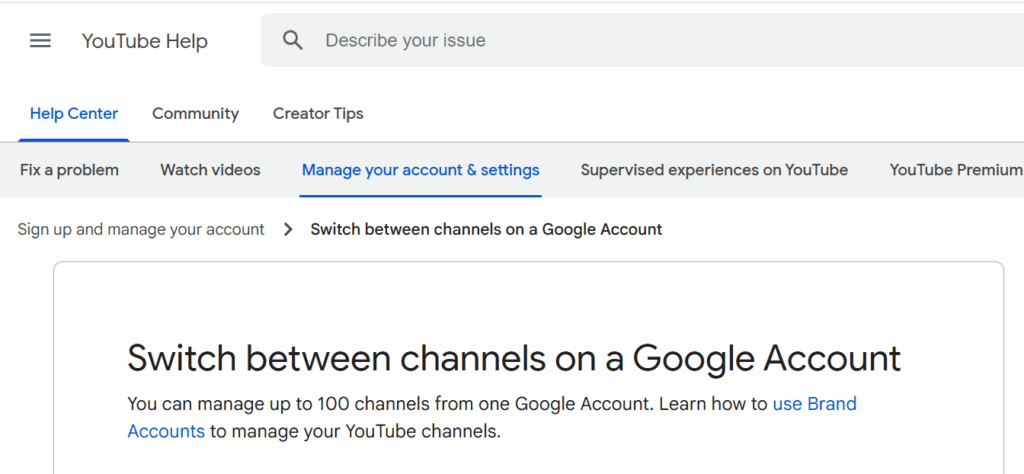
This is done through a feature called Brand Accounts. A Brand Account is a separate identity that is owned by your Google account but is not publicly linked to it. It can have its own name, branding, and, most importantly, its own YouTube channel. This is similar to how you’d create multiple Gmail accounts for different purposes, but within a single Google ecosystem.
Feature | Personal YouTube Channel | YouTube Brand Account Channel |
Ownership | Tied directly to your Google Account. | Owned by the Google Account, but is a separate entity. |
Management | Only you can manage it. | You can add other people as managers or owners. |
Branding | Uses your Google Account name and picture. | Can have a completely different name and brand. |
Scalability | Poor. Not designed for teams or multiple projects. | Excellent. Designed for collaboration and managing multiple assets. |
For anyone serious about running more than one channel, using a Brand Account is non-negotiable. It’s the only way to properly separate your projects and prepare for future growth. Teams running social media marketing operations understand this principle applies across all platforms.
The Hidden Risk: Why Managing Multiple Channels Is Dangerous
While creating multiple channels is easy, managing them from the same device and IP address is where the danger lies. YouTube’s systems are built to find and penalize accounts that seem to be artificially linked or violating policies in a coordinated way.
Here’s the risk: If one of your channels gets a serious policy strike or is terminated, YouTube can and will take action against all other channels it associates with you.
How does YouTube associate your channels?
- Shared Google Account: This is the most obvious link. All channels under one Google account are inherently connected through the same login credentials.
- IP Address: If you manage all your channels from the same home or office IP, YouTube knows they’re all operated by the same entity. This IP address tracking is one of the primary methods platforms use to detect multi-account operations.
- Device Fingerprint: This is the most powerful and unavoidable link. YouTube analyzes your browser, OS, hardware, and other signals to create a unique fingerprint for your device. Managing multiple channels from the same computer, even in different browser tabs, creates a clear digital trail. Understanding browser fingerprinting is crucial for anyone running multiple accounts.
Imagine spending years building five different channels, each with thousands of subscribers. One day, you make a mistake on a smaller, experimental channel, and it gets terminated. Since all your channels are linked through the same digital fingerprint, YouTube’s automated systems could flag and terminate your entire network overnight.
The Professional Solution: True Isolation with Multilogin Cloud Phones
To manage a multi-channel network safely, you need to break the links that YouTube’s algorithm uses to connect them. You need to make each channel look like it’s being run through a completely different person, on a different device, from a different location. This is what Multilogin cloud phones are built for.
A cloud phone is a real Android operating system hosted in the cloud. When you manage a YouTube channel through it, you’re operating from a trusted, native mobile environment. Using a separate cloud phone for each channel achieves perfect isolation.
Here’s how it solves the risk:
- Unique Device Fingerprint: Each Multilogin cloud phone has its own unique and genuine mobile device fingerprint. To YouTube, it looks like each channel is being managed from a separate physical smartphone.
- Isolated IP Address: You can assign a different high-quality residential proxy to each cloud phone. This means each channel has its own clean, trusted IP address from a different location. Whether you need USA proxies, UK proxies, or any other location, the proxy management system ensures complete isolation.
- No Shared Data: Cookies, cache, and login sessions are completely isolated within each cloud phone. There’s zero data leakage between your channels. This session isolation is what prevents platforms from linking accounts.
With this setup, if one channel ever has a problem, the others are completely insulated from the fallout. They’re not digitally linked in any way that YouTube can detect. This is the same principle teams use for managing multiple social media accounts across different platforms.
How to Create and Manage Multiple YouTube Channels Safely with Multilogin
Step 1: Create Your First Channel (The Standard Way)
If you don’t have one already, create your first YouTube channel using your main Google account. This will be your personal channel. This process is similar to creating a Google account, but specifically for YouTube.
Step 2: Create a Brand Account for Your New Channel
- Go to your YouTube channel list page
- Click “Create a new channel”
- Give your new Brand Account a name and click “Create.” You now have a second channel
This step is straightforward, but what comes next is where most creators make critical mistakes.
Step 3: Isolate Your Channels with Multilogin Cloud Phones
Now, for the critical step. Do not manage this new channel from your regular browser.
- Get Multilogin: Sign up for a Multilogin plan that includes cloud phones. Starting at €5.85/month, you get access to professional-grade multi-account management infrastructure.
- Create a Cloud Phone Profile: In the Multilogin app, create a new mobile profile for your new YouTube channel. Name it after the channel for easy organization. Each profile gets its own unique device identity.
- Assign a Proxy: Assign a clean residential proxy to this profile. Multilogin provides access to 30 million residential IPs across 195+ countries. Choose a location that makes sense for your channel’s target audience.
- Log In: Launch the cloud phone, open the YouTube app, and log in to your Google account. Select the new Brand Account channel you just created. The mobile-native environment ensures YouTube sees this as a legitimate mobile user.
Step 4: Repeat for All Future Channels
For every new channel you create, repeat Step 3. Create a brand new, dedicated cloud phone profile for it. Never manage more than one channel from the same cloud phone. This isolation principle is what protects your entire operation.
Why This Matters for Content Creators
Professional content creators and agencies understand that diversification is key to sustainable growth. You might want separate channels for:
- Different Content Niches: Gaming, tutorials, vlogs, and product reviews each deserve their own channel and audience.
- Different Languages or Regions: A channel for English speakers and another for Spanish speakers, each with location-appropriate content and geolocation settings.
- Client Work: Agencies managing multiple client channels need complete isolation to prevent cross-contamination and maintain professional boundaries.
- Testing and Experimentation: A separate channel for testing new content formats without risking your main channel’s reputation and algorithm standing.
The cloud phone approach makes all of this possible without the constant fear of one mistake destroying your entire operation. Teams using this infrastructure also apply it to managing multiple TikTok accounts, Instagram profiles, and Facebook pages with the same security benefits.
Advanced Strategies for Multi-Channel Success
- Stagger Your Upload Schedules: Don’t post to all your channels at the same time. Vary your upload schedules to avoid creating patterns that YouTube’s algorithm might flag as coordinated inauthentic behavior.
- Use Different Proxies for Different Niches: If you have a gaming channel and a cooking channel, use proxies from different regions. This geographic diversity makes the accounts look even more separate and authentic.
- Maintain Separate Content Libraries: Store your video files and editing projects separately for each channel. This organizational practice extends to your digital infrastructure—each channel should feel like a completely separate business.
- Monitor Each Channel’s Analytics Independently: Use YouTube Studio through each channel’s dedicated cloud phone. This ensures your viewing behavior and analytics access patterns remain isolated per channel.
- Warm New Channels Properly: Just like you’d warm up an Instagram account, new YouTube channels need gradual activity ramp-up. Don’t immediately start uploading daily content on a brand new channel. Build trust with the platform first.
Common Mistakes That Get Channels Linked
- Switching Between Channels in the Same Browser: Even if you log out and log back in, your browser fingerprint remains the same. YouTube can still link the accounts.
- Using the Same Device for All Channels: Desktop browsers, even in incognito mode, don’t provide real isolation. Your hardware fingerprint gives you away.
- Reusing Content Across Channels: While repurposing content is fine, uploading identical videos to multiple channels you own can trigger YouTube’s duplicate content detection.
- Cross-Promoting Too Aggressively: Frequently mentioning your other channels or linking between them makes the connection obvious. Keep cross-promotion minimal and strategic.
- Using Poor Quality Proxies: Datacenter proxies and free VPNs are easily detected. Always use premium residential proxies for professional operations.
The Cost of Not Isolating Your Channels
Consider the real-world impact of losing multiple channels at once:
- Years of content creation wiped out overnight
- Thousands or millions of subscribers lost
- Revenue streams eliminated instantly
- Brand partnerships terminated
- No clear path to appeal or recovery
The cost of proper isolation through cloud phones is minimal compared to the value of the channels you’re protecting. Professional creators and agencies understand this isn’t an expense—it’s insurance against catastrophic loss.
Teams running serious operations have learned this lesson, often the hard way. The same principles apply whether you’re managing YouTube channels, running e-commerce accounts, or operating affiliate marketing campaigns. Proper isolation is non-negotiable.
These fake viewer websites often fail because they cannot bypass TikTok’s security. They might ask you to complete surveys or download suspicious software, which are red flags. A safe approach to viewing stories more privately is to avoid these tools altogether. There is no legitimate way to view a private TikTok story anonymously.
No more juggling physical devices or risking account links. Try Multilogin's cloud phones now.
Frequently Asked Questions About How to Create Multiple YouTube Channels
Yes, you can create and manage up to 100 YouTube channels under a single Gmail/Google account through using Brand Accounts. This is YouTube’s official method for multi-channel management.
If you manage them all from the same device and IP address, yes. YouTube will link them and can suspend your other channels. Using Multilogin cloud phones to isolate each channel is the best way to prevent this cross-contamination.
No, you can link multiple YouTube channels to a single AdSense account for monetization. However, you should still manage each channel from its own isolated cloud phone environment to prevent linking issues.
On YouTube, click your profile picture in the top-right corner and select “Switch account.” You’ll see a list of all personal and Brand Account channels you manage. However, for maximum security, always access each channel through its dedicated cloud phone.
Yes, Brand Accounts allow you to add other users as managers or owners. Each team member should access the channel through their own cloud phone with appropriate proxy settings to maintain isolation and security.
If a hacker gains access to your Google account, they can access all channels linked to it. This is why proper secure browsing practices and isolation are critical. Cloud phones add an additional layer of security through unique device fingerprints and IP addresses.
Build Your YouTube Empire on a Solid Foundation
Running multiple YouTube channels is a powerful strategy for diversifying your content and reaching new audiences. But doing it without a professional isolation strategy is like building a skyscraper on a foundation of sand. It’s not a matter of if it will collapse, but when.
Stop leaving your hard work vulnerable. Using Multilogin cloud phones, you can manage each of your channels in its own secure, isolated environment, protecting your entire network from the domino effect of a single channel’s mistake.
The infrastructure you build for YouTube protection extends to all your online operations. Whether you’re managing multiple Gmail accounts, Discord communities, or Telegram channels, the isolation principle remains the same.
Ready to scale your YouTube presence safely? Try Multilogin and build your multi-channel strategy the right way.

