

Discover why teams choose Multilogin

Multilogin vs. BitCloudPhone

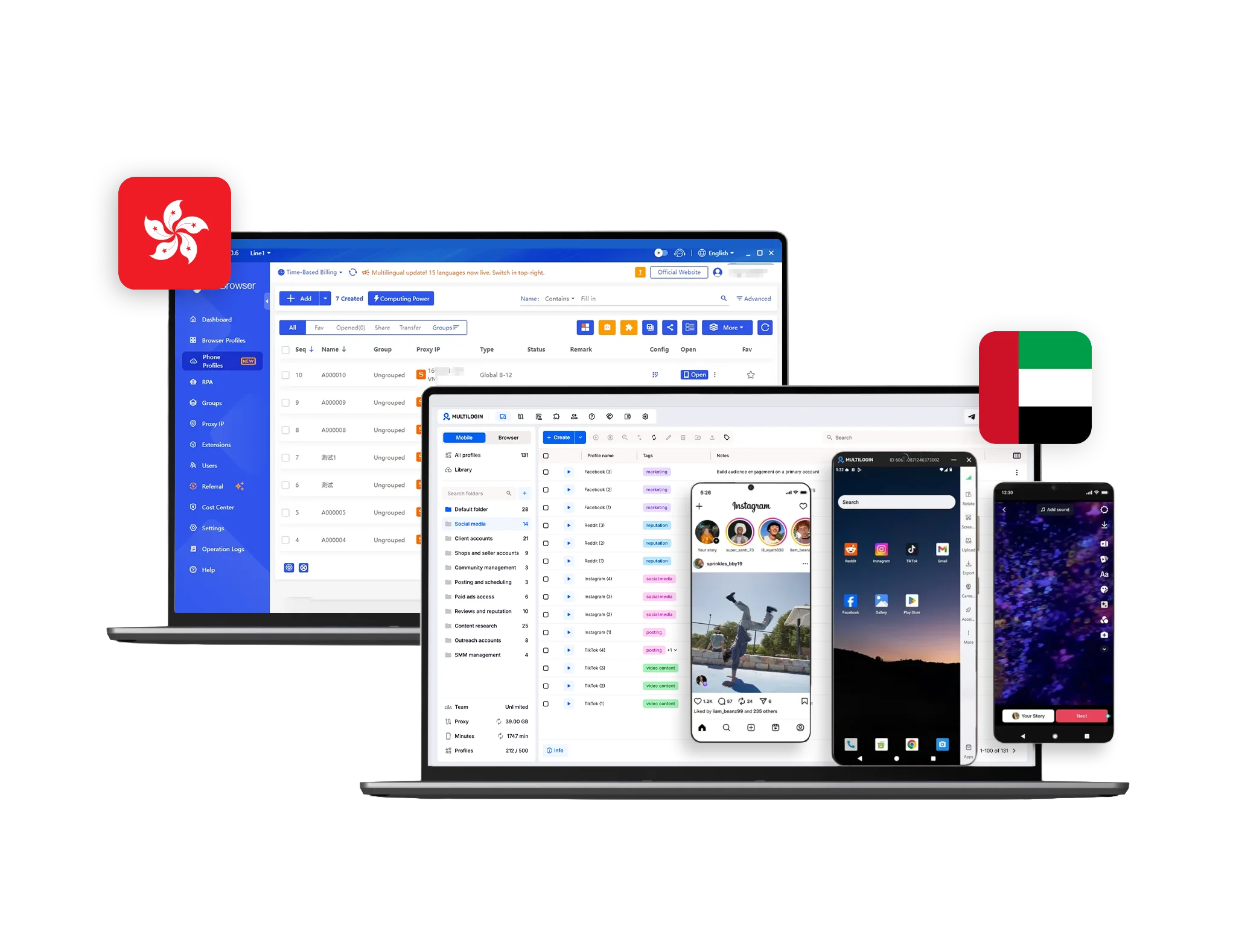
Multilogin vs BitCloudPhone dashboard comparison for cloud phones and browser profiles with Hong Kong and Estonia flags.
Multilogin logo representing the Estonian-origin platform for advanced multi-account management and anonymity.
Cloud phones in Multilogin Icon

Cloud phones

Multilogin Cloud Phones are full Android devices hosted in the cloud, each with its own unique system fingerprint and stable device identity. They let you launch native mobile apps, control multiple cloud phones from a single dashboard, and connect through built-in residential proxies to keep sessions consistent and trusted by platforms.

BitCloudPhone’s cloud phones run on Android emulation rather than real ARM hardware, which can fail hardware attestation checks on platforms that verify genuine device signals.

Icon of a proxy symbol representing proxy features and integration capabilities in the comparison.

Built-in proxies

Multilogin includes built-in residential proxies with access to 30+ million premium IPs across 150+ countries, sticky 24-hour sessions, traffic rollover, and automatic quality filtering to keep your accounts stable.

BitCloudPhone requires external proxies, so scaling means juggling sourcing, rotation, and auditing across many devices, which slows down broad geo changes and adds configuration effort.

Web automation symbol

Web automation

Multilogin supports high-volume web automation via major frameworks (Selenium, Puppeteer, Playwright, Postman), enabling scraping, account orchestration, and form submission with low detection risk. Automation let operators launch profiles, assign proxies, and organize groups using plain-text prompts, simplifying work processes. Fingerprints are profile-based and stable: you can fully customize them at profile creation.

BitCloudPhone provides basic Android functionality, but it lacks support for process automation, adds latency sensitivity and UI coordinate fragility for web-first tasks, ties parallelism to how many devices are active, and still bills runtime even for short runs.

Browser flexibility icon blue

Browser flexibility

Multilogin supports cloud phone mobile profiles and web browser profiles. Profiles run locally or in the cloud, with per profile extensions, user agent, resolution and device overrides, plus window sync and per profile proxy assignment, so you can match real Android and desktop environments precisely.

BitCloudPhone doesn’t include desktop browser profiles at all, only an in-device mobile browser within the emulated phone, so there’s no per-profile browser core switching, engine control, or browser-level fingerprint customization.

Icon representing browser fingerprinting technology and anti-detection features in the comparison.

Browser fingerprinting customization

Multilogin gives you 55+ fingerprint controls: from Canvas and WebGL to geolocation, timezone, language, and the profile OS—and we test them daily across 50+ platforms. You also get deep proxy customization down to city and ISP to match real-world network conditions. Profile export/import keeps fingerprints and Cookie Robot attached to your workflows.

BitCloudPhone’s web fingerprints depend entirely on the hosted device image and browser stack, so fine-tuning for web-only work requires extra coordination across the device template, locale, and proxy, and variance between devices can introduce inconsistencies.

Data privacy & security

Based in Europe, Multilogin fully complies with GDPR, guaranteeing strong data protection. If you ever cancel your subscription, all of your data — including browser profiles — is automatically deleted within three months. Passwords are securely hashed, and any sensitive information is encrypted and stored safely to prevent both external breaches and internal misuse.

BitCloudPhones can be spun up for risky app tests, then shut down for clean states, which is convenient for short missions, yet full Android devices run in provider infrastructure, so you need clear policy for ADB, ROOT and strict access control at the device level. Furthermore, they show no GDPR compliance.

Icon symbolizing teamwork, designed as interconnected puzzle pieces representing collaboration and unity.

Teamwork

Multilogin makes teamwork simple and secure. Share browser profiles without exposing data and control access with role-based permissions. Teammates can pause or resume sessions without losing progress or disrupting anyone’s flow. It’s great for beginners and small teams, and it also scales for heavy workloads, supporting 10,000+ profiles with role-based management when you need it.

Using BitCloudPhones sub-accounting and device sharing make it easy to hand a dedicated phone to a specialist with, or keep a device per client or per campaign, which some app teams prefer for ownership clarity. However, managing devices introduces inventory overhead, window juggling, and contention when several operators need the same app context, which can feel heavy for web centric workloads.

Icon representing pricing or cost information, typically symbolized by a dollar sign or price tag.

Pricing & Plans

Multilogin’s Free Plan includes 5 browser profiles to test your setup. Paid plans start from $7.08/month, with cloud phones and proxies included and no hidden fees.

BitCloudPhone uses time-based billing, starting at $90/month for 100 phones. No trial period is provided.

What Multilogin offers that BitCloudPhone doesn't

Integration with popular development tools​

Profile warmup with Cookie Robot

Browser profiles

Daily testing on 80+ websites

Built-in residential proxies

Passes all browser fingerprint checkers

Assisted onboarding​

Free plan with mobile profile

BitCloudPhone user or new to the game?

Explore Multilogin, a smarter alternative to BitCloudPhone.

Multilogin vs. BitCloudPhone recap chart

Find out why Multilogin is the preferred BitCloudPhone alternative

Multilogin logo representing the Estonian-origin platform for advanced multi-account management and anonymity.
Browser profiles
Yes (Mimic)
No
Device type
Full-featured cloud Android phones
Cloud Android devices
Android versions
Android 10 – 16
Limited selection
Smartphone models
Real brands and models (Samsing, Redmi, Vivo, Google, etc)
Limited selection (Samsung, Vivo, Oppo)
Platform compatibility
macOS, Windows, Linux
Windows, macOS
Security
Isolated browser profiles, per-profile proxy control
Basic level

Anti-fingerprinting technology

Advanced level
Standard
Quick profile creation
Yes
Yes
Frequent updates
Public release notes and core versions
Public update log
Mobile App Marketplace
Yes
No
Built-in proxies at no additional cost
Yes
No
Account password protection
Yes
Yes
Knowledge center
Yes
Limited
Support
24/7 Live Support in 5 languages
Support is limited to business hours, no 24/7 coverage.
Trial
Free plan
No
Suits well for team management
Yes
No
Market Position
Beginner-friendly and flexible for individuals and small teams, with room to scale.
Built mainly for technical users and larger teams

Grow your social media accounts with Multilogin cloud phones

Build account trust, reach any location, and boost your engagement
  • Unlimited time

  • Mobile and browser profiles included

  • Free built-in proxies & mobile minutes

  • Unlimited time

  • Mobile and browser profiles included

  • Free built-in proxies & mobile minutes

Why people love Multilogin

Nino Latif

The best service for great ideas and big minds!
Always here for their clients, always ready to help out. I am using the service for 3-4-5 months now and brought me lots of great things 🙂 Hope to grow it on a larger scale and continue using the service ...
Nick H.

Nick Horvath

Marketing agency

Efficient Account Management and Outstanding Support with Multilogin
Multilogin has been an excellent tool for managing multiple accounts efficiently. The setup was quick, and I was able to start using it right away with no learning curve. The interface feels just like Chrome, making it easy to navigate and work without interruption. Performance has been smooth, and browsing feels natural and responsive.
Sagar Chandra R

Sagar C.

Social Media Marketing

Effortless Multi-Account Management with Multilogin
I use Multilogin to manage multiple social media accounts safely and efficiently. It keeps each account in a separate digital profile, preventing blocks and saving time. I love the account isolation and friendly interface, which makes managing multiple profiles fast, secure, and easy. The initial setup was straightforward and easy.
Hamza Arif

Hamza Arif

E-commerce Manager

Perfect browser for work, worth the money!
My overall experience with Multilogin has been excellent. I really like its intuitive dashboard, reliable customer support, and competitive pricing. It has become an essential part of my e-commerce business, and I highly recommend it to anyone looking for a dependable solution.

Nino L.

Marketing Agent, Small-Business

Started using Multilogin in August/September 2021. Been using it for a couple of years now and I am very satisfied overall. They are always looking and finding ways to improve their app and make it easier...
Nathan Green

Nathan Green

Digital Marketing Specialist

Great Tool with Even Better Support
I've been using Multilogin for a while now, and I’m genuinely impressed with both the product and the support behind it. Their customer support is outstanding — always quick to respond, super helpful, and ready to assist with any issues or questions you have. You really feel like you're being taken care of.

George M.

Co-Founder, Small-Business

Quite Likely The Best Privacy Browser Out There!

There are quite a few things I like about Multilogin. My favorite, most definitively, is the teams feature allowing you to easily share specific browser profiles with different team members...

Watch the Multilogin Demo

Learn how Multilogin can boost your business. Check the video below to see its full capabilities in a short demo video.

Award winning multiple account management platform

High Performer
Momentum leader
Best support
Momentum leader

See more comparisons

Adspower logo featured on the Multilogin comparison page, representing the browser's branding and identity.

Compare with

Compare with

Compare with

Incogniton logo displayed on the Multilogin comparison page, linking to its detailed comparison with Multilogin.

Compare with

Octobrowser logo

Compare with

Linken Sphere логотип

Compare with

Compare with

Showcasing the Kameleo logo, representing the antidetect browser for multi-account management and online privacy.

Compare with

DICloak logo, representing the antidetect browser for multi-account management and online privacy.

Compare with

MoreLogin logo displayed on the Multilogin comparison page, representing the browser's brand in the comparison with Multilogin.

Compare with

Compare with

Undetectable logo

Compare with

The official logo of NST Browser, showcased in a detailed comparison with Multilogin and VMLogin for antidetect browser features.

Compare with

Ghostbrowser logo, representing the brand in the antidetect browser comparison.

Compare with

VMLogin logo, representing the antidetect browser solution, featured in a comparison with Multilogin.

Compare with

Hidemyacc logo

Multilogin vs BitCloudPhone: which handles multi-account workflows better in 2026

If you manage multiple online identities, the platform you choose will shape how smoothly your day runs. Multilogin and BitCloudPhone both keep accounts separate, but they do it in very different ways.

BitCloudPhone gives you cloud-based Android devices, so you can run native apps and control each device remotely. Multilogin goes further by combining cloud phones and its own Mimic browser in one workspace, allowing teams to manage both mobile app sessions and browser-based identities under the same system. With realistic fingerprints, isolated storage, and integrated proxy control, Multilogin is built for long-term multi-account operations across platforms.

Here’s what to know before you pick a platform for 2026.

Multilogin vs BitCloudPhone: everyday use

BitCloudPhone is designed for app workflows. You spin up phones in the cloud, sign in to native apps, bind a proxy per device, and, if needed, script actions with ADB. This suits teams that live inside mobile apps, need push notifications, or want device-level signals like sensors. For web-only tasks, the device layer can feel heavier, because each action goes through a remote phone, and each phone needs its own configuration, proxy, and runtime.

Multilogin supports both sides of modern workflows. Alongside isolated browser profiles, it offers real Android cloud phones (versions 10–16) running realistic smartphone models, so teams can operate native social media apps while keeping sessions stable over time. At the same time, every browser profile remains its own isolated identity space, with separate cookies, cache, and storage, making it easy to switch between mobile apps and mobile web without mixing signals.

Choose BitCloudPhone when your workflow depends entirely on native Android apps. If you need a unified system for managing multiple accounts across both mobile and browser environments, Multilogin’s combined setup is easier to scale.

Multilogin vs BitCloudPhone: Which one works better with proxies

Multilogin brings proxy work inside the same workspace where you manage both browser profiles and cloud phones. You can attach residential or mobile proxies directly to each identity, tap into a global pool with sticky sessions, and use built-in filters to avoid flagged or low-quality IPs. This is especially valuable when running cloud phone sessions alongside browser accounts, because identities stay consistent across platforms.

BitCloudPhone lets you bind a proxy per device, which gives granular control when you want a specific exit IP for one phone. But proxies are external, so at scale you juggle sourcing, rotation, and auditing across many devices, and broad geo changes take longer when every phone needs an update.

Multilogin vs BitCloudPhone: Fingerprinting technology

BitCloudPhone is designed for app workflows. You spin up phones in the cloud, sign in to native apps, bind a proxy per device, and, if needed, script actions with ADB. This suits teams that live inside mobile apps, need push notifications, or want device-level signals like sensors. BitCloudPhone provides basic Android functionality, but it lacks support for process automation, adds latency sensitivity and UI coordinate fragility for web-first tasks, ties parallelism to how many devices are active, and still bills runtime even for short runs.

Multilogin supports both sides of modern workflows. Alongside isolated browser profiles, it offers real Android cloud phones (versions 10 through 16) running realistic smartphone models, so teams can operate native social media apps, including running multiple Instagram accounts through Multilogin cloud phones, while keeping sessions stable over time. At the same time, every browser profile remains its own isolated identity space, with separate cookies, cache, and storage, making it easy to switch between mobile apps and mobile web without mixing signals.

Choose BitCloudPhone when your workflow depends entirely on native Android apps. If you need a unified system for managing multiple accounts across both mobile and browser environments, Multilogin’s combined setup is easier to scale.

Multilogin vs BitCloudPhone: which one works better with proxies

Multilogin brings proxy work inside the same workspace where you manage both browser profiles and cloud phones. You can attach residential or mobile proxies directly to each identity, tap into a global pool with sticky sessions, and use built-in filters to avoid flagged or low-quality IPs.

That consistency matters most for platforms where account history builds slowly, like running multiple Reddit accounts through Multilogin cloud phones, since a jumping IP can undo months of account age just as easily as a new one.

BitCloudPhone requires external proxies, so scaling means juggling sourcing, rotation, and auditing across many devices, which slows down broad geo changes and adds configuration effort.

Multilogin vs BitCloudPhone: managing social media accounts

For social media work, the real question isn’t technical depth, it’s whether an account looks and behaves like it belongs to a real person over time.

BitCloudPhone’s cloud phones run on Android emulation rather than real ARM hardware, which can fail hardware attestation checks on platforms that verify genuine device signals, an increasingly common check on TikTok, Instagram, and other apps that watch for coordinated activity. It also has no separate browser side, so any web-based part of a social media workflow, managing a Business Suite dashboard or an ad account, falls outside what BitCloudPhone covers at all.

Multilogin runs on real Android environments with genuine device identifiers, well suited to a cloud phone built for Instagram or any other app that checks device signals closely. Its Mimic browser profiles cover the web side of the same accounts, so a social media manager running both the app and a browser-based dashboard for the same client keeps both under one identity system instead of two separate tools.

Multilogin vs BitCloudPhone: differences in customer support

The support each platform offers reflects its focus.

Multilogin provides live chat and email 24/7 in English, Russian, Portuguese, Chinese, and Vietnamese. That combination suits teams that need fast technical help with profile setup, proxy troubleshooting, and cloud phone workflows, the kind of support that’s easier to lean on when a social media management checklist already keeps day-to-day operations organized.

BitCloudPhone offers in-app online support and public contact channels, including WeChat, Telegram, and WhatsApp, along with a help center and ticket inbox. Official pages do not clearly list staffed languages, and typical office hours are 10:00 to 22:00, Monday to Sunday. App-focused teams can get started quickly, while web-first teams may need more back and forth to translate device guidance into browser-specific steps.

Multilogin vs BitCloudPhone: security and data privacy

BitCloudPhone runs Android emulation in the cloud. For everyday app operations this is safe and convenient, since each device can be created fresh, signed in, and then shut down. Because devices live on provider infrastructure, organizations should define who can start phones, bind proxies, enable ADB or ROOT, and export data. Per-device policies and careful shutdown help avoid lingering artifacts and unintended runtime.

Multilogin is built for long-term multi-account privacy across both browser profiles and cloud phones. Every identity is sandboxed with separate cookies, storage, and fingerprints, and teams can store profiles locally or in the cloud with access controls, roles, and permissions. That level of separation is what lets you run multiple OnlyFans accounts without linking them, and it applies the same way to any other platform where cross-linked accounts create a real business risk.

Multilogin is the stronger long-term choice for professional multi-account work

Multilogin is the better long-term choice for professional multi-account workflows. It gives you isolated browser profiles, realistic Android cloud phones, advanced fingerprint control, integrated proxy management, and automation support with Playwright, Puppeteer, Selenium, or Postman.

If you need to manage many identities across both mobile apps and mobile web with stability and repeatability, Multilogin scales more cleanly and keeps operations predictable. Account isolation is only half the job, though; pairing it with the right approach to AI in social media management covers the content side neither platform handles directly.

BitCloudPhone is an option when your workflows depend mainly on native Android apps, push notifications, or sensor access, though its emulation-based devices and lack of browser profiles limit it outside that use case.

FAQ

BitCloudPhone provides cloud-hosted Android devices that you operate from your computer. It’s designed for running native mobile apps, testing app flows, receiving push notifications, and managing devices with per-phone proxies.

Yes, for typical app tasks it’s safe and convenient. You create a phone, sign in, and work in a clean environment. For teams with web-first requirements, devices run in the provider’s cloud, so it’s worth setting clear rules for who can enable ADB or ROOT, how proxies are bound, and when devices are shut down.

Core features include cloud phones with quick creation, per-device proxy binding, sub-accounts and sharing, ADB scripting with optional ROOT, and a growing API and documentation set. These are aimed at app-centric workflows rather than browser-centric automation.

BitCloudPhone uses time-based billing, starting at $90/month for 100 phones. No trial period is provided.

Multilogin’s Free Plan includes 5 browser profiles to test your setup. Paid plans start from $7.08/month, with cloud phones and proxies included and no hidden fees.

Yes. Multilogin cloud phones run full Android environments (versions 10 through 16) on realistic smartphone models, letting you install and operate native apps like TikTok, Instagram, Facebook, and others. This makes it easier to manage mobile-first workflows with stable long-term sessions, the same way you would on a real device.

Unlike basic emulators, Multilogin cloud phones provide isolated cloud-based Android devices with genuine device identifiers and consistent fingerprint signals. Combined with Multilogin’s Mimic browser profiles, they let teams manage both mobile app accounts and browser accounts in one unified identity system, reducing cross-linking risk and improving account safety at scale.

Yes, indirectly. Isolated cloud phones keep each account’s activity separate, which supports testing different approaches to growing Instagram Reels engagement without one account’s performance data or restrictions bleeding into another’s.

Multilogin’s API and automation integrations support building an AI agent for social media management, so routine tasks can run without constant manual input. BitCloudPhone’s automation stays limited to ADB scripting, which covers device actions but not the broader workflow orchestration an AI agent typically needs.

Telegram
Thank you! We’ve received your request.
Please check your email for the results.
We’re checking this platform.
Please fill your email to see the result.

Multilogin works with amazon.com