


eBay proxies & cloud phone bundle
Run each eBay store on its own Multilogin cloud phone with a residential IP from 150+ countries. Proxies are included in every plan, so there’s no separate proxy bill to manage.


Perfect for multiple accounts
Unique cloud phones for each account

Publish everywhere
Reach more than 150 locations

Grow organically
Post from real devices
One platform, unlimited eBay accounts
Run more eBay stores from one dashboard

Built-in proxies for every eBay store

Steady connections for every eBay store

Save time with ready-to-use eBay proxies

How to get started and grow on every platform
Time is money. Start in minutes
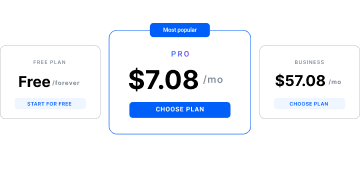
Sign up
Choose a plan and download the app
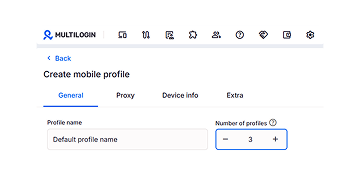
Create mobile profile
Customize the device model and choose location
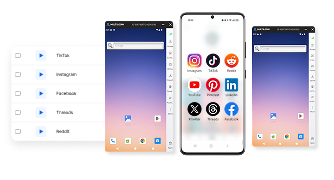
Run your accounts
Use separated browser profile to earn
Sign up
Choose a plan and download the app
Create mobile profile
Customize the device model and choose location
Run your accounts
Use separated browser profile to earn
Watch the Multilogin Demo
What is Multilogin?
Trusted by thousands of creators, sellers & online earners

Ha D.
Social Media Marketing Retail

Nino Latif

Stanislav K.
Marketing Manager

Elen S.
Marketing Manager

Hamza Arif
E-commerce Manager


Nick Horvath
Marketing agency
Start planning your project today
Upload content, automate posts and engagements: all in one unified dashboard
The most awarded multi accounting platform















Explore more solutions for any platform you need
FAQ
Can I have multiple eBay accounts?
Yes. eBay allows members to have more than one account, for example to separate buying from selling or to run different product lines. Every account must meet eBay’s buyer and seller standards, and no account can be used to get around a restriction.
What is an eBay proxy?
An eBay proxy is an IP address your store connects through instead of your own network. It sets the IP and location eBay sees for that store, which helps when you run several stores or sell on eBay sites in other countries.
Do I need a proxy to run multiple eBay accounts?
Yes, if you want each eBay account to connect from its own IP and location. A proxy only covers the network, though, so each account also needs its own device environment, such as a Multilogin cloud phone or browser profile.
What type of proxy is best for eBay?
Residential and mobile proxies are the best fit for eBay, because their IPs come from home internet and mobile carrier networks. Use a mobile proxy for the eBay app on a cloud phone, and a residential proxy for Seller Hub in a browser profile. Keep one stable IP per store rather than rotating it constantly.
Can I use one proxy for several eBay accounts?
It’s better not to. When several stores share one IP, they look like they connect from the same place. Give each eBay account its own proxy, matched to the eBay site it sells on.
Which proxy location should I choose for my eBay store?
Choose the country of the eBay site the store sells on: Germany for eBay.de, the UK for eBay.co.uk, the US for eBay.com. Keep that location for the life of the store instead of switching between countries.
Does Multilogin include proxies for eBay?
Yes. Built-in residential, ISP and mobile proxies are included in every Multilogin plan, with locations in 150+ countries and geolocation matched automatically. On paid plans, extra traffic starts from $2.275 per GB, and unused traffic rolls over.
Can I use my own proxy for eBay with Multilogin?
Yes. Multilogin supports HTTP, HTTPS, ISP and SOCKS5 proxies. Cloud phones run on remote servers, so they need a public proxy. Local addresses such as 192.168.x.x or 127.0.0.1 won’t work.
Will a proxy stop my eBay account from being restricted?
No. A proxy gives each store its own IP and location, but eBay still judges every account on its policies and seller standards. Duplicate listings or other policy issues apply no matter which IP a store uses.
Do cloud phones change eBay's rules for multiple accounts?
No. Cloud phones give each account its own environment, but every store still has to follow eBay’s policies. For example, listing the same fixed price item on two of your stores still breaks eBay’s duplicate listings policy.
eBay proxy: give every store its own IP and its own cloud phone
An eBay proxy gives each store its own IP address and location, which matters when you sell on more than one account or more than one eBay site. A proxy only covers the network, though. Stores that share one phone or browser still share everything else. Multilogin puts built-in proxies, cloud phones and browser profiles in one plan, so every eBay store gets its own IP and its own device.
What an eBay proxy does, and what it doesn’t
An eBay proxy routes a store’s traffic through a different IP address, so eBay sees the store connecting from the proxy’s location instead of your own network. That is useful when you run several stores, or when a store sells on an eBay site in another country.
A proxy changes where the connection comes from. It doesn’t change the device, the app data or the login session. Two eBay stores on the same phone, each with its own proxy, still share one device and one app environment.
In short, a proxy solves the network side of running multiple eBay accounts. A separate device for each store solves the rest.
Why eBay stores get harder to manage with proxies alone
eBay stores get harder to manage with proxies alone because the proxy changes the IP but leaves the shared device, app data and sessions in place. eBay links accounts that belong to the same member, and under the eBay multiple accounts policy, a restriction on one account may lead to similar restrictions on the others. Keeping each store’s setup separate helps you keep each store’s record separate too.
| Setup issue | What it looks like | How to fix it |
|---|---|---|
| Several stores on one device | Switching eBay logins on the same phone or browser, with a different proxy each time | One cloud phone or browser profile per store |
| Mixed sessions and app data | Logging out of one store and into the next in the same app | A persistent session for each store that never mixes |
| IPs that rotate constantly | The same store connects from a new IP every few minutes | One stable IP per store |
| Location that doesn’t match the store | A UK store connecting from a US address | A proxy location matched to the eBay site the store sells on |
The problems usually show up slowly: more verification prompts, sessions that log out, and time lost fixing access instead of selling.
Which proxy type works best for eBay
Residential and mobile proxies work best for eBay because their IPs come from home internet and mobile carrier networks, the same kinds of connections eBay buyers and sellers use every day. Datacenter IPs are cheaper but come from server ranges that many other users share.
| Proxy type | Where the IP comes from | Best eBay use | Relative cost |
|---|---|---|---|
| Residential | Home internet providers | Seller Hub and web tasks in a browser profile, most store setups | Medium |
| Mobile | Mobile carrier networks | The eBay app on a cloud phone | Higher |
| ISP | Static IPs registered to internet providers | Stores that need one fixed IP for a long time | Medium |
| Datacenter | Server farms and hosting providers | Research and price checks, not store logins | Lower |
For most sellers, the simplest rule is one stable residential or mobile IP per store. Multilogin’s guide to proxies in cloud phones notes that mobile proxies are usually the best match for cloud phones. If you already pay for proxies elsewhere, Multilogin also accepts your own HTTP, HTTPS, ISP and SOCKS5 proxies.
Match each store’s location to its eBay site
Set each store’s proxy to the country of the eBay site it sells on, and keep it there. A store on eBay.de connects from Germany, a store on eBay.co.uk connects from the UK, and a store on eBay.com connects from the US.
A matched location keeps the store consistent: the IP, the device’s location settings and the marketplace all point to the same place. It also lets you see local search results, shipping options and prices the way buyers in that market see them.
In Multilogin, you pick a country when you create a cloud phone or browser profile. The built-in residential proxy assigns an IP in that country, and the geolocation matches it automatically. Once a store has a location, leave it alone. A store that jumps between countries looks unusual and is harder to keep in good standing.
Pair your eBay proxy with a Multilogin cloud phone
Pairing an eBay proxy with a Multilogin cloud phone gives each store a separate device as well as a separate IP. The proxy handles where the store connects from. The cloud phone handles everything else the store runs on.
Each store gets its own cloud phone
A Multilogin cloud phone is an Android phone hosted in the cloud and controlled from the Multilogin desktop app. Each eBay store runs on its own cloud phone with its own app data, login history, IP and location. When you stop and restart the phone, the eBay app opens already signed in, on the same device and in the same location as before.
Seller Hub runs in a browser profile
Seller Hub, bulk listing and reports work best in a browser. Multilogin browser profiles give each store a separate browser with its own cookies, session and IP, and they use no mobile minutes. Sync the location between a store’s cloud phone and its browser profile so the store always connects from the same place.
One dashboard for proxies, phones and profiles
Proxies, cloud phones and browser profiles all sit in the same Multilogin dashboard. You don’t need a separate proxy provider, a separate phone tool and a spreadsheet to track which IP belongs to which store. See how this works for multiple eBay accounts.
How to set up an eBay proxy in Multilogin, step by step
Setting up an eBay proxy in Multilogin takes five steps, and the proxy comes with the cloud phone, so there are no proxy credentials to copy in.
- Create a cloud phone for the store. In the Multilogin desktop app, go to Profiles, open the Mobile tab and create a new cloud phone. Name it after the store and its eBay site, for example “eBay UK: vintage cameras”.
- Pick the country. Choose the country that matches the store’s eBay site. The built-in proxy assigns an IP in that country, with matched geolocation.
- Start the cloud phone. Mobile minutes count only while the phone is running.
- Install the eBay app. Install it from the cloud phone’s built-in Apps list, which uses no proxy traffic. Installing from Google Play also works but uses proxy traffic. See how to install apps on Android cloud phones.
- Sign in and stop the phone when you’re done. The store keeps its IP, location, app data and login state for the next session.
To use your own proxy instead, add it to the cloud phone or browser profile in step 2. Multilogin supports HTTP, HTTPS, ISP and SOCKS5.
eBay proxy traffic and costs
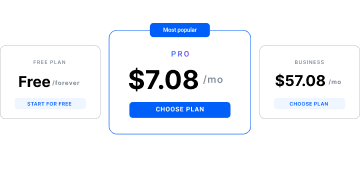
Multilogin includes built-in residential proxy traffic in every plan, so you don’t pay a separate proxy provider for your eBay stores. Multilogin offers a free plan with no time limit and no credit card needed. Paid plans start from $7.08 per month.
| Plan size | Proxy traffic | Mobile minutes |
|---|---|---|
| Free (up to 5 profiles, 1 cloud phone) | 200 MB, one time | 30, one time |
| 10 profiles | 1 GB per month | 60 per month |
| 50 profiles | 3 GB per month | 75 per month |
| 100 profiles | 5 GB per month | 150 per month |
| 300 profiles | 10 GB per month | 450 per month |
On paid plans, extra proxy traffic starts from $2.275 per GB, and unused traffic and minutes roll over while your account stays active. Free plan allowances don’t renew and can’t be topped up. Check the Multilogin pricing page for current plans.
Buying proxies separately means a second bill, a second dashboard and credentials to paste into every store. With built-in proxies, the cost of the IP is part of the same subscription as the cloud phone that uses it.
Manage eBay stores and proxies with a team
Teams share eBay stores in Multilogin by assigning cloud phones and browser profiles, and each store’s proxy goes with it. Nobody needs the proxy credentials, and nobody logs in to a store from their own home network by mistake.
- Team seats and permissions. Decide which stores each teammate can open. The number of seats depends on your plan.
- Share and assign. Hand a store to the next shift, and it opens with the same IP, location and login state.
- Bulk actions. Start, stop or tag several stores at once.
- Notes and colour tags. Label each store by eBay site, client or product line, so the right proxy location is clear at a glance.
What an eBay proxy won’t fix
An eBay proxy, even paired with a cloud phone, doesn’t change how eBay judges the store itself. Plan around these limits:
- Duplicate listings. eBay’s duplicate listings policy doesn’t allow more than one fixed price listing of an identical item from the same seller, including under different usernames. A new IP doesn’t change that. The exception is separate listings on different eBay sites, as long as their shipping options don’t clutter search results on any one site.
- Policy problems. If one account is restricted, a new IP or a new store won’t resolve it. Work through eBay’s steps on that account first.
- SMS verification. Multilogin cloud phones can’t receive SMS or calls, so keep a phone number that eBay accepts ready for verification codes.
- Your own connection. A slow internet connection makes the cloud phone stream lag, whatever proxy the store uses.
Give your next eBay store its own IP and device
A good eBay proxy setup comes down to one stable IP per store, matched to the eBay site it sells on, on a device no other store uses. Multilogin brings built-in proxies, cloud phones and browser profiles into one plan, so each store gets its own connection and its own environment from one dashboard.
Start free, no credit card needed, and set up your first cloud phone for your next eBay store.
