Create multiple Temu accounts

Create multiple Temu accounts safely on one device with Multilogin. Keep each Temu profile fully isolated, use Multilogin browser environments as needed, and emulate real user behavior to prevent account links or suspensions.

create multiple temu accounts

Manage multiple Temu accounts

Create and manage all your Temu accounts from one beginner-friendly, organized dashboard. Each profile operates with its own unique browser fingerprint, with up to 55+ browser fingerprinting options, reducing the risk of account links or suspensions. Everything stays fully separated and easy to control in one place.

create multiple temu accounts

Manage Temu access from any device

Log in once, then pick up your Temu work from any computer without sharing passwords or triggering alerts. 
Multilogin securely stores profile data and sessions in the cloud, so each profile continues to look like a consistent device to Temu whenever you resume. 

create multiple temu accounts

Run multiple Temu profiles with one click

Create bulk browser profiles with Quick AI Actions and use multiple Temu accounts without any complexity.
Each profile gets its own clean, dedicated IP with a single click. You can duplicate, export, or transfer profiles securely, keeping your entire workflow smooth and hassle-free.

Share Temu accounts with your team 

Agency, brand, or remote managers?  Share Temu profiles safely using role-based permissions and encrypted cloud profiles. 
Hand off work, pause sessions, and resume later—everyone stays in sync without exposing credentials. 

create multiple temu accounts

Avoid Temu account bans with built-in proxies

Multilogin provides built-in residential and long-session sticky proxies to keep your IP consistent for every Shein login.
Work with 30M+ global IP pool across 150+ locations. Switch regions when needed while keeping each account stable and protected from bans or security flags.

What is antidetect browser?

An antidetect browser is a specialized tool designed to hide a user’s digital fingerprint and provide anonymity online by masking device and browser details. It is commonly used to manage multiple accounts on various platforms without triggering detection or bans.

MetaMask Airdrop

Why choose Multilogin for managing multiple Temu accounts?

Multilogin provides everything you need to run multiple Temu accounts securely and efficiently:

  • Realistic antidetect browser profiles
  • Clean residential proxies to avoid detection
  • Full isolation between every Temu account
  • Support for popular automation tools: Puppeteer, Playwright, Selenium and Postman
Image illustrating why it is important to use an antidetect browser.

Multilogin features for creating multiple Temu accounts

Icon representing Multilogin's feature to bypass bot protection.

Bypass bot detection

Our anti-fingerprinting tech bypasses multi-account and automated browser detection by masking unique browser fingerprints.

An icon representing Team Collaboration with Multilogin.

Team collaboration

You can collaborate on browser profiles and easily share passwords, cookies, and session progress with team members.

Icon representing data sync over the cloud with Multilogin.

Data sync over cloud

Use cloud browser profiles to sync data across multiple devices or VPS instances.

An icon representing fingerprint adjustment to match proxy feature of Multilogin.

Fingerprint adjustment to match proxy

Automatically adjust browser fingerprints to match proxy locations, supporting all types for enhanced security.

Icon representing Multilogin's support for all proxy types, including HTTP, HTTPS, and SOCKS5.

Support for all proxy types

Use our proxies or bring your own. All proxy types are supported.

Icon representing residential rotating IPs in Multilogin.

Residential rotating IPs

Our residential proxies are tested daily ensuring flawless performance with major platforms.

Icon representing the Android Chrome browser in Multilogin.

Chrome or Firefox interface

Our Mimic and Stealthfox browsers fully emulate Chrome or Firefox, providing you with a different digital identity in each browser window.

An icon representing High Load Supported feature of Multilogin.

High load supported

Our platform supports high loads, making it ideal for operations of any size.

Icon representing the Manual Mode feature in Multilogin.

Manual mode

Manually control the settings of your browser profiles in secure virtual environments.

An icon representing browser action automation feature in Multilogin.

Browser action automation

Automate repetitive tasks with Selenium, Playwright, and Puppeteer automation drivers, bypassing anti-bot algorithms.

Related solutions you might like

Most Awarded Antidetect Browser

Kinza awards for Multilogin.
Conversion club badge for Multilogin.
Mask group badge for Multilogin
Startup 2019 awards badge for Multilogin
badge for Multilogin
Best Value Software 2022 badge for Multilogin
Best support
Momentum leader
High Performer
High Performer Small Business
SourceForge top performer 2023 badge
GetApp user reviews badge

How to start using Multilogin 

Start collecting data effortlessly with the industry leading antidetect browser.

Step 1 of how to use Multilogin

Sign up

Register using a verified email address. 

Step 2 of how to use Multilogin

Choose your plan

Select from various subscription plans tailored to your business needs.

Step 3 of how to use Multilogin

Download Multilogin agent

Available for Windows, Mac, and Linux.

Step 4 of how to use Multilogin

Access the Multilogin dashboard

Start creating and managing antidetect browser profiles.

Step 5 of how to use Multilogin

Run multiple Temu accounts

Set up and manage multiple Temu accounts using separate browser profiles, all from one secure platform.

Watch the Multilogin Demo for creating multiple accounts on Temu

Get a 10-minute demo video on how Multilogin can help you easily build your database of Temu accounts while remaining undetected. Just fill in your name, last name and email below, and we’ll deliver the demo video directly to your inbox.

Image of locked video for Multilogin demo preview

Manage multiple Temu accounts with no bans

Start using Multilogin today

Create Multiple Temu accounts with Multilogin

Are you working with multiple Temu accounts on a daily basis? If so, what’s your strategy to avoid getting banned or detected? In 2025 alone, Temu’s user base exploded, and with it, their detection systems became more aggressive.  

Temu’s security algorithms have only become more sophisticated. Business owners, e-commerce sellers, or even individuals looking for the best deals are interested in managing multiple Temu accounts.  

But Temu has strict policies against users having more than one personal account. However, a convenient and professional Temu multiple accounts alternative is the antidetect browser, which keeps all your accounts safe and undetectable. 

Why Temu's detection systems are effective 

Temu, like other major e-commerce platforms, invests heavily in anti-fraud technology. Their systems are designed to detect and flag users who violate their terms of service by creating multiple accounts. Here’s what they look for:

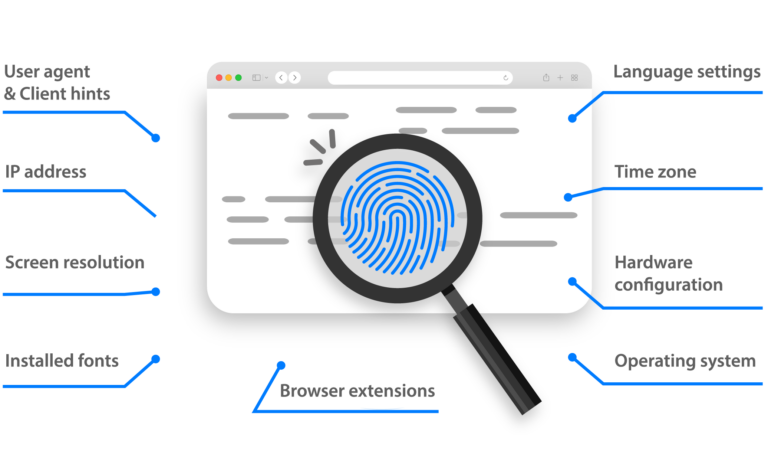
Browser fingerprinting is a unique identifier created from your device’s hardware and software configuration. It includes over 50 data points, such as your operating system, browser version, screen resolution, installed fonts, and more. 

If multiple accounts share the same fingerprint, they will be linked and suspended. Your IP address is another critical data point that Temu monitors. If you’re accessing multiple accounts from the same IP, Temu will know they’re all connected to you. 

Additionally, browser cookies and cache store information about your browsing activity. If you’re not careful, this data can be used to link your accounts together. 

How to Create Multiple Temu Accounts the Right Way 

The only way to safely and effectively manage multiple Temu accounts is to use a professional antidetect browser like Multilogin. With Multilogin, you can create an unlimited number of virtual browser profiles.  
Each profile has its own unique and authentic browser fingerprint, making it appear as a genuine, distinct user to Temu’s detection systems. 

You can assign a unique IP address to each of your browser profiles using our built-in residential proxies or by integrating your own. Our platform makes it easy to manage your proxies and ensure your accounts stay separate and secure.  

All your Temu accounts can be managed from a single, centralized dashboard. No more juggling multiple browsers or devices. With Multilogin, you can switch between accounts with a single click, saving you time and eliminating costly mistakes.
 
Whether you’re a solo entrepreneur or a growing team, Multilogin is built to scale with you. Our platform supports unlimited team members with role-based access control, so you can collaborate securely and efficiently as your business grows. 

Key Benefits of Managing Multiple Temu Accounts with Multilogin

Managing multiple Temu accounts has never been easier or safer with Multilogin. Whether you’re an e-commerce reseller, affiliate marketer, or a power user, here are the key benefits of using Multilogin to manage your Temu accounts:

  1. Avoid Account Bans and Suspensions: Multilogin isolates each account with a unique browser fingerprint, IP address, and cookies. This ensures that your accounts won’t be linked or flagged by Temu’s detection systems, significantly reducing the risk of bans.

  2. Scalability at Your Fingertips:
Whether you need to manage 5 or 500 accounts, Multilogin can scale with your business. Create and manage unlimited accounts with ease, all from a single, centralized dashboard. No more juggling devices or switching browsers—everything is neatly organized in one place.

  3. Unified Desktop & Mobile Management:
Multilogin allows you to manage both desktop and mobile profiles. No more needing to switch between physical phones or dealing with mobile-only solutions. Handle all your accounts from a single, unified platform, with the flexibility to manage mobile-specific tasks when needed.

  4. Seamless Proxy and Cookie Management: Each of your Temu accounts can be assigned its own unique residential proxy and cookie set. This ensures that accounts are completely isolated and have no overlap in data, further decreasing the chances of detection or linking.

  5. Streamlined Workflow with Automation:
Multilogin automates much of the process, allowing you to quickly clone profiles, import/export cookies, and assign proxies in just a few clicks. Automate your workflow to save time and eliminate the risk of manual errors that can lead to account issues.

How to Start Managing Temu Accounts

Getting started with Multilogin for managing your Temu accounts is quick and easy. Here’s how you can set everything up and start scaling your e-commerce operations:


  1. Sign Up for Multilogin: Head to the Multilogin website and register with a verified email address. Choose a plan that fits your needs, whether you’re just starting with a few accounts or scaling to hundreds.

  2. Download the Multilogin Agent or Desktop App: Multilogin is available for Windows, Mac, and Linux. Download and install the agent or desktop app on your computer, then open the Multilogin dashboard.

  3. Create Your Browser Profiles:
Once logged into your dashboard, you can easily create individual browser profiles for each Temu account. Each profile will have its own unique browser fingerprint, IP address, and cookies to ensure complete isolation from other accounts.

  4. Assign Residential Proxies and Set Up Cookies:
Multilogin allows you to assign a unique residential proxy to each Temu account. You can also import/export cookies to warm up new accounts and maintain session continuity. This ensures that your accounts won’t get flagged for suspicious activity.

  5. Start Managing Your Temu Accounts:
 Once your profiles are set up, you can easily log into Temu with each account. The profiles will remain completely isolated, ensuring that each account appears as a distinct user to Temu’s detection systems.

  6. Scale as Needed: As your business grows, you can easily create more profiles, automate tasks, and collaborate with your team. Multilogin’s platform is built to scale with your business, allowing you to manage unlimited accounts and continue growing without limitations.

Conclusion

Managing multiple Temu accounts can be a challenge, especially with the platform’s advanced detection systems. But with Multilogin, you can securely and efficiently handle multiple accounts without the risk of detection or bans.

Whether you’re an e-commerce reseller, affiliate marketer, or digital agency, Multilogin provides the scalability, security, and efficiency you need to grow your business on Temu. With advanced fingerprinting technology, residential proxies, and a unified dashboard, Multilogin is the professional solution for managing Temu accounts.

Stop relying on risky workarounds and start managing your multiple Temu accounts with Multilogin today.


FAQ

Yes, you may have as many Temu accounts as you want. Multilogin helps you in managing these accounts in the simplest way possible. It allows you to navigate between accounts, without the interference of cookies or the exchange of data, and as a result your accounts remain clean and per Temu’s guidelines. This simplifies management for you which enables real-time growth of each business without the extra troubles of misunderstanding or legal complications. 

Step 1: Prepare Your Information 
Gather the necessary information for each account. Ensure that you have distinct branding elements ready for each account. 
Step 2: Use Multilogin to Create Profiles 
Install and open Multilogin create separate profiles that will give you an opportunity to run unique email addresses for each Temu account. Use the multiple profiles on the browser to ensure that each of the Temu accounts has its profile. This enables you to store your cookies, sessions and data separately so that each account runs on its own, and so that it is conformant with the Temu guidelines. 
Step 3: Register Each Temu Account 
For each profile in Multilogin, go to the Temu website and click on “Register.” Follow the prompts in created account, entering the unique email and account details for that specific profile. Repeat this process for each account. 

The use of multiple accounts has more than one advantage while operating in the Temu online marketplace. First of all, it makes it possible to expand the range of products, and this always contributes to the attraction of clients. It can also help optimize your marketing and create better customer relations.  
Further, Multilogin ensures that there is proper management by ensuring that there is a secure space for each account. You can easily collect information on performance, sales, account analysis, and customer responses. Besides, this capability can result in time-saving while helping you make the right decisions for growing each account. 

If Temu bans your account, it can be frustrating, but understanding the reason behind the ban is crucial. Common causes include violations of Temu’s policies, such as improper use of multiple accounts or engaging in prohibited practices. First, review Temu’s guidelines to identify any potential missteps. If you believe the ban is unwarranted, you can contact Temu support for clarification and appeal the decision. Multilogin helps you safely manage multiple Temu accounts by creating separate, secure browser profiles. By using residential proxies and reliable IP addresses, Multilogin minimizes the risk of detection and bans, ensuring your accounts remain active and compliant. 

Multilogin is built for users who need secure, scalable solutions for managing multiple accounts. It integrates advanced fingerprinting, residential proxies, and cloud-based session storage, ensuring your accounts stay safe and undetectable.

Watch the demo for multi-account management

Thank you! We’ve received your request.
Please check your email for the results.
We’re checking this platform.
Please fill your email to see the result.

Multilogin works with amazon.com