


Discover why teams choose Multilogin

Multilogin vs. MASQ

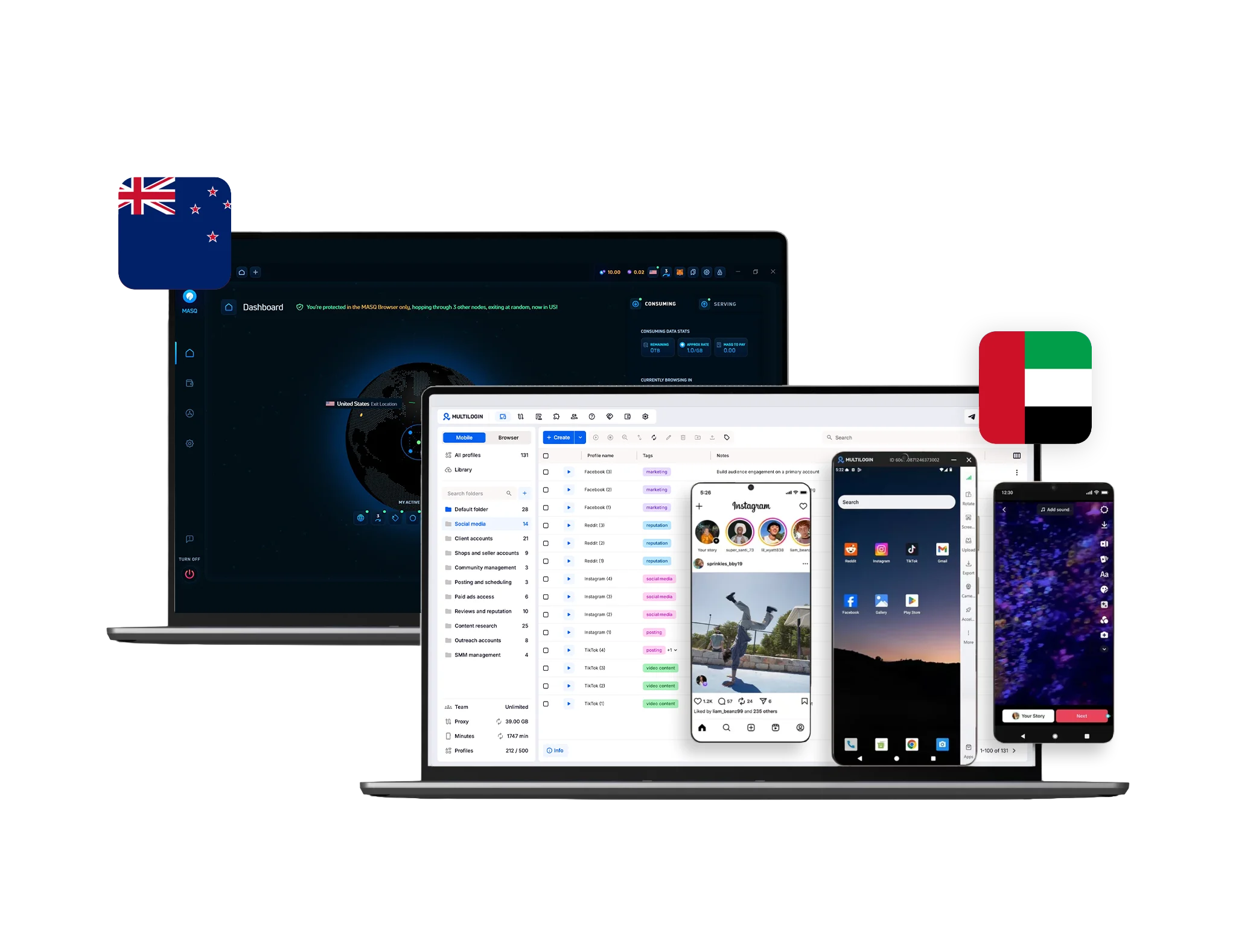
Comparison of MoreLogin and Multilogin dashboards, with the Chinese and Estonian flags displayed, showcasing profile management and workspace features for handling multiple accounts.
Multilogin logo representing the Estonian-origin platform for advanced multi-account management and anonymity.
masq-logo.f556cb18afa193f39a8d

Built-in proxies

Every Multilogin plan includes residential proxies. 30+ million premium IPs across 150+ countries, precise city-level targeting, and connections that stay stable for up to 24 hours.

Unused traffic rolls over monthly, and the quality filter keeps out bad IPs automatically.

Got your own proxies? Multilogin works with those too full flexibility, zero hassle.

MASQ uses a mandatory internal proxy gateway and does not allow third-party/external proxies. Proxy features are basic (no city targeting or reliable sticky sessions) and are managed entirely by MASQ, reducing control and session stability versus Multilogin.

web automation

Web automation

Multilogin supports high-volume web automation via major frameworks (Selenium, Puppeteer, Playwright), enabling scalable scraping, account orchestration, and form submission with low detection risk. Its AI Quick Actions and Multilogin CLI let operators launch profiles, assign proxies, and organize groups using plain-text prompts, simplifying complex processes. Built-in CAPTCHA mitigation and dynamic fingerprint adjustments ensure smooth, stealthy automation.

MASQ isn’t designed for automation frameworks. It focuses on interface-driven use — users must manually launch profiles and perform actions. There’s no integration with frameworks like Selenium or Playwright, limiting automation and scalability for teams that rely on robotic browsing.

Fingerprinting customization

With support for 55+ customizable browser fingerprint parameters, Multilogin gives users extensive control over settings such as WebGL, Canvas, fonts, timezone, geolocation, hardware signals, and cookie automation. Frequent updates help maintain consistency across modern web platforms.

MASQ offers basic fingerprint customization (Canvas, WebGL, fonts) with some randomization. However, profile isolation and configuration options are more limited, which can affect consistency when managing multiple accounts across platforms.

Data privacy & security

Data privacy & security

Multilogin, based on Europe, fully complies with GDPR, guaranteeing strong data protection. If you ever cancel your subscription, all of your data — including browser profiles — is automatically deleted within three months. Passwords are securely hashed, and any sensitive information is encrypted and stored safely to prevent both external breaches and internal misuse.

MASQ encrypts local data and uses sandboxing for isolation, but doesn’t clarify enterprise-level certifications or compliance standards. It does not provide independent verification of data protection measures, making it a less transparent option for teams requiring strict compliance.

Teamwork

Teamwork

Multilogin makes teamwork simple and secure. You can safely share browser profiles with teammates without exposing sensitive data, and every member gets role-based permissions. Managers stay in control with clear permission settings, while team members can pick up exactly where they left off — pausing or resuming sessions without losing progress or disrupting the workflow.

MASQ allows sharing through its interface, but lacks fine-grained role control or multi-user permission settings. Suitable for small teams, yet coordination and access management can become messy as the number of accounts or members grows.

Icon symbolizing customer support services, highlighting availability and assistance in the comparison.

Customer Support

Multilogin’s support team is always here for you — 24/7. You’ll be assisted by real experts who speak English, Vietnamese, Russian, Chinese, and Portuguese, with no automated translations in between. Every day, we test Multilogin across 50+ major websites to make sure everything runs smoothly.

MASQ’s support is limited to a Telegram bot in English, with no multilingual options or live chat. Its resources are minimal, which may leave users without clear solutions for complex technical issues.

Browser Flexibility Icon

Browser flexibility

Multilogin provides cloud phones and browser profiles for managing accounts across any platforms. It is easy to get started and manage accounts on major platforms like TikTok, Instagram, or Facebook without extra costs.

MASQ does not offer browser flexibility features.

Icon representing pricing or cost information, typically symbolized by a dollar sign or price tag.

Pricing

Multilogin offers flexible pricing starting with a 3-day trial for $2. he trial includes full functionality so users can test the platform. Regular plans start from $6.50 per month when billed annually. Every plan combines cloud phones, browser profiles, residential proxies, and mobile minutes.

MASQ’s Premium plan starts at $8/month and focuses on decentralized VPN and privacy features. But here’s the catch: no proxies included. You’ll need to buy those separately from a third-party provider, which easily adds another $30-50/month. Suddenly, that “cheap” plan costs you $42-62/month total.

What Multilogin offers that MASQ doesn't

+55 Fingerprint customizable parameters

Android profile emulation

Passes all browser fingerprint checkers 

Daily testing on 50+ websites

AI-driven automation

Profile warmup with pre-farmed cookies

24/7 customer support in 5 languages

Custom browsers: Mimic & Stealthfox

Explore Multilogin: A More Complete Alternative to MASQ

Multilogin vs. MASQ recap chart

Find out why Multilogin is the smarter alternative to MASQ

Multilogin logo representing the Estonian-origin platform for advanced multi-account management and anonymity.
Cloud Phone
Yes
No
Platform maturity

Launched in 2015, more mature and stable platform

Launched in 2020

Platform compatibility
macOS, Windows, Linux
macOS, Windows
Security
High security
Standard security
Quick profile creation
Yes
Yes

Frequent updates

Yes, frequent and detailed updates
No
Built-in proxies
Yes
Yes
Custom browser fingerprint generation
Yes
Yes, but limited
Account password protection
Yes
No
Knowledge center
Yes
No
Support
24/7 Live Support, available in 5 languages
Telegram bot support only
Passes all browser fingerprint checkers
Yes
No
Suits well for team management
Yes
Yes, but small teams only
Market Position
Simple for beginners, powerful for growing teams.
Ideal for individuals and small teams.

Manage Unlimited Mobile and & Web Accounts

Multilogin comes with built-in residential proxies to make multi-accounting, web scraping and web automation easier than ever. No extra setup, no third-party services—just undetectable browsing at no additional cost.
  • 3-day access to Multilogin

  • 5 cloud or local profiles

  • 200 MB proxy traffic included

  • 3-day access to Multilogin

  • 5 cloud or local profiles

  • 200 MB proxy traffic included

Why people love Multilogin

Nino Latif

The best service for great ideas and big minds!
Always here for their clients, always ready to help out. I am using the service for 3-4-5 months now and brought me lots of great things 🙂 Hope to grow it on a larger scale and continue using the service ...
Nick H.

Nick Horvath

Marketing agency

Efficient Account Management and Outstanding Support with Multilogin
Multilogin has been an excellent tool for managing multiple accounts efficiently. The setup was quick, and I was able to start using it right away with no learning curve. The interface feels just like Chrome, making it easy to navigate and work without interruption. Performance has been smooth, and browsing feels natural and responsive.
Sagar Chandra R

Sagar C.

Social Media Marketing

Effortless Multi-Account Management with Multilogin
I use Multilogin to manage multiple social media accounts safely and efficiently. It keeps each account in a separate digital profile, preventing blocks and saving time. I love the account isolation and friendly interface, which makes managing multiple profiles fast, secure, and easy. The initial setup was straightforward and easy.
Hamza Arif

Hamza Arif

E-commerce Manager

Perfect browser for work, worth the money!
My overall experience with Multilogin has been excellent. I really like its intuitive dashboard, reliable customer support, and competitive pricing. It has become an essential part of my e-commerce business, and I highly recommend it to anyone looking for a dependable solution.

Nino L.

Marketing Agent, Small-Business

Started using Multilogin in August/September 2021. Been using it for a couple of years now and I am very satisfied overall. They are always looking and finding ways to improve their app and make it easier...
Nathan Green

Nathan Green

Digital Marketing Specialist

Great Tool with Even Better Support
I've been using Multilogin for a while now, and I’m genuinely impressed with both the product and the support behind it. Their customer support is outstanding — always quick to respond, super helpful, and ready to assist with any issues or questions you have. You really feel like you're being taken care of.

George M.

Co-Founder, Small-Business

Quite Likely The Best Privacy Browser Out There!

There are quite a few things I like about Multilogin. My favorite, most definitively, is the teams feature allowing you to easily share specific browser profiles with different team members...

Award winning multiple account management platform

Kinza awards for Multilogin.
Conversion club badge for Multilogin.
Mask group badge for Multilogin
Startup 2019 awards badge for Multilogin
badge for Multilogin
Best Value Software 2022 badge for Multilogin
High performer 2024 badge for Multilogin
Leader 2024 badge for Multilogin
Best support 2024 badge for Multilogin
Easiest to do business with 2024 badge
SourceForge top performer 2023 badge
GetApp user reviews badge

See more comparisons

Compare with

Compare with

Compare with

Compare with

Compare with

Compare with

Compare with

Compare with

Compare with

Compare with

Compare with

Compare with

Compare with

Compare with

Compare with

Multilogin vs MASQ Browser: Which tools wins in 2026?

If you are managing multiple online identities or digital workspaces, the browser you choose will determine how smoothly your day goes. Both Multilogin and MASQ Browser (masqad) are designed to help users maintain separate browser environments for different accounts and workflows, but they take different approaches to doing so.

Multilogin was created in 2015, and it’s features were built keeping in mind the business standard for professionals who need deep fingerprint isolation, advanced automation compatibility, and reliability on a large scale. Every profile works like a real device and has its own settings, so that every session looks and acts like a real user.   

Meanwhile, MASQ’s emerging browser, developed by Tech Geeks, focuses on simplicity and accessibility. IIt provides tools for managing multiple browser profiles, along with fingerprint customization, proxy integration, and streamlined profile management for teams handling multiple accounts.

Here’s what you need to know about how MASQ Browser and Multilogin compare and which one will be best for you in 2026. 

Multilogin vs. MASQ: Which one is better for everyday use?

MASQ Browser is designed to make multi-account management feel simple and approachable. The interface might take a while for beginners to get used to, but the side panels make it easy to set up and launch multiple profiles at once. You can connect proxies and manage accounts all in one place, and it feels more like a modern browser than a technical tool.  

But that ease of use comes at a cost. MASQ’s layout works well for small-scale operations, but it can feel limited once you start handling dozens or hundreds of profiles. Profile control and fingerprint depth are basic compared to professional platforms, and sessions aren’t as isolated — meaning advanced users may run into cross-data risks when automating or scaling operations. 

Meanwhile, Multilogin’s platform is user-friendly and intuitive, with a built-in residential proxy system that lets you use more than 30 million clean IPs from +195 countries. It lets you target cities and have sticky sessions that last 24 hours, so you can have stable, consistent identities without having to do anything manually all the time. Multilogin’s smart filtering is even better because it automatically avoids flagged or low-quality IPs. This means you don’t have to worry about accidentally getting banned for using burned addresses again.  

For professionals who run sensitive or large-scale businesses, whether it’s for e-commerce, affiliate campaigns, or social media management, this level of proxy control and reliability isn’t just nice to have—it’s necessary. 

Multilogin vs MASQ: Fingerprinting Technology  

Browser fingerprinting is the biggest technical gap between these two platforms. 

Unlike MASQ, which focuses on fingerprint spoofing features such as custom canvas, WebGL, fonts, and allows randomization parameters, Multilogin’s Mimic (Chromium) and Stealthfox (Firefox) browsers generate unique, realistic fingerprints for each profile — with over 55 customizable parameters including WebGL, Canvas, audio, timezone, fonts, and hardware. These are constantly updated to keep up with changing anti-fraud systems using machine-learning detection models. 

The result? Platforms like Facebook, Amazon, and TikTok all see each profile as a separate real person. Multilogin’s advanced fingerprinting technology makes it much less likely that you will get caught. This means your accounts will stay active longer without getting banned or put through verification loops. 

Multilogin vs MASQ: Proxy Integration and Session Stability 

The MASQ Browser makes it easy to connect to and test proxies, but it doesn’t have a lot of options for setting them up. You can’t focus on certain cities or keep sessions going for a long time without stopping. Both things are very important for building trust signals on big platforms. Another issue is that MASQ needs a proxy connection to work, which can make it harder for people who want to control their own connections. 

With Multilogin, you have full control and freedom over how to manage proxies. It works with all major types of proxies, such as residential, mobile, and ISP proxies. You can also set up a different proxy for each browser profile to keep your privacy safe. Sessions can stay open for as long as they need to, making sure that every identity works from a stable, consistent IP environment that platforms see as real. 

Multilogin also gives you 1 GB of free proxy traffic every month, and prices start at just €3 per extra GB. These built-in proxies support sticky sessions and can be linked to profiles with just one click. You don’t need any extra tools or to set them up manually.  

Multilogin vs MASQ: Differences in Customer Support  

MASQ only has a bot on Telegram to help you, but Multilogin has live chat that is open 24/7 and offers support in many languages, such as English, Russian, Portuguese, and Chinese. This is great for teams all over the world that need quick, technical help with a comprehensive knowledge base. 


Multilogin vs MASQ: Device Compatibility and Performance 

The MASQ Browser works well on desktops, but it only works on macOS and Windows right now. This makes it less flexible for people who need to use it on more systems or on the go. 

On the other hand, Multilogin works with macOS, Windows, and Linux, and it has mobile browser emulation, which lets users mimic Android or iOS environments right from their desktop. This lets teams test how people use mobile devices, run campaigns that are aimed at mobile users, and keep fingerprints the same across both desktop and mobile simulations, all in the same workspace. 

Multilogin vs MASQ:  Pricing 

MASQ focuses primarily on privacy tools and decentralized VPN services. Its Premium plans start at $8/month when billed annually or $14/month when billed monthly, giving users access to multi-hop routing, premium network speeds, and other privacy-focused features.

Multilogin offers accessible pricing starting with a 3-day trial for $2. The trial includes full functionality so users can test the platform. Regular plans start from $6.50/month when billed annually. Every plan combines cloud phones, browser profiles, residential proxies, and mobile minutes.

While MASQ is designed for private browsing and decentralized networking, Multilogin is built for professionals who need to manage multiple browser profiles, automate workflows, and scale account operations. For teams handling multiple accounts, Multilogin provides a more comprehensive toolkit and greater flexibility as requirements grow. 

Final Verdict: Multilogin or MASQ? 

If you need a simple way to avoid detection, MASQ Browser is a good place to start for individuals or small groups. It is easy to use, works with popular tools, and covers the basics of managing multiple accounts.

Multilogin, on the other hand, gives you the same access with a lot more depth. It’s built for both newcomers and professionals who need precision, privacy, and scalability. With advanced fingerprint isolation, built-in proxy management, and mobile emulation, Multilogin helps you start small and grow confidently, being the best choice in 2026. 


FAQ: Multilogin vs. MASQ

MASQ Browser (masqad.com) is an antidetect browser developed by Tech Geeks, mainly used by individuals and small teams who need a simple way to handle multiple profiles without complex setup or enterprise-level tools. 

Yes, MASQ Browser is safe for everyday multi-account work. It isolates sessions, supports proxies, and uses encrypted connections to keep user data private. However, for users who need enterprise-grade protection — including advanced fingerprint isolation, sandboxed browser environments, and automation-ready security — Multilogin provides a higher level of privacy and long-term account stability. 

Core MASQ Browser features include multi-profile management, built-in proxy support, AI-powered browsing automation, and integration with a wide range of tools. It’s designed to make antidetect browsing accessible for small teams. 
By contrast, Multilogin expands these capabilities with dynamic fingerprinting, mobile browser emulation, API and CLI automation, and enterprise scalability — making it the go-to solution for professional users managing hundreds of accounts securely. 

MASQ’ Light plan starts at $12/month, the Pro and Team plan at $45/month, plus $15 per additional seat. Multilogin, meanwhile, starts with a €1.99 three-day trial, with monthly plans from €9 to €159, offering advanced features like integrated proxies, automation compatibility, and strong anti-detect protection — a better long-term investment for serious multi-account operators. 

Watch the Multilogin Demo

Learn how Multilogin can boost your business. Check the video below to see its full capabilities in a short demo video.
Telegram