







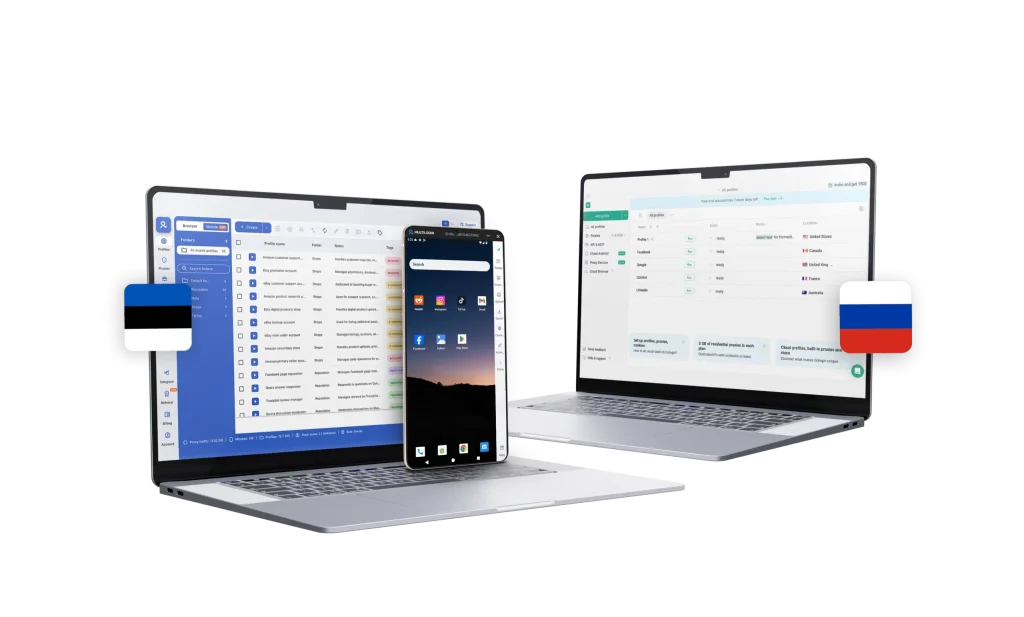
-
Cloud phones
Multilogin
Multilogin gives you Android cloud phones that run native apps just like standard mobile devices. You can choose from +15 phone brands, including Samsung and Oppo, install apps from the built-in store or upload APKs, and keep app data, cache, and login sessions saved between uses. Everything is managed from one dashboard, making social media account management more organized and easier to scale.
GoLogin
GoLogin does not offer cloud phones; mobile app workflows must use physical devices or separate cloud phone services, which can be inconvenient if you need to manage mobile platforms.
-
Built-in proxies
Multilogin
Multilogin offers built-in residential and mobile proxies with access to over 30 million IPs across 150+ countries and supports ISP targeting. It includes super-sticky IP sessions of up to 24 hours and bandwidth rollover to ensure optimal performance and extensive geographic coverage.
GoLogin
GoLogin claims access to 20M proxies worldwide, including datacenter, residential, and mobile types. However, it does not specify clear country-level targeting, which can be a major drawback for users needing location precision. Many users report frequent IP recycling, detection issues, and inconsistent residential quality. Pricing is also high.
-
Usability and user interface
Multilogin
Multilogin is beginner-friendly. Easily access profiles, settings, cloud phones, and support from one platform. Both Mimic Browser and cloud phones are easy to set up and navigate without any technical knowledge.
GoLogin
GoLogin offers a basic interface with simple navigation. However, some settings are somewhat hidden, and while profiles are central, certain features are not immediately visible, as the main controls are tucked under various buttons.
-
Web automation
Multilogin
Multilogin works with tools like Postman, Selenium, Playwright, and Puppeteer, so you can continue using your existing scripts. It also supports automation of simple tasks such as posting and liking. With AI Quick Actions, you can automate routine actions like launching profiles, assigning proxies, and organising accounts without writing code. You can chain up to 10 actions in one flow.
GoLogin
GoLogin supports automation via its API and works with Puppeteer, Selenium, and Playwright, but it does not offer Postman‑style automation or built‑in no‑code tools. It also lacks workflow action chaining and requires manual debugging and script management.
-
Browser fingerprinting customization
Multilogin
Multilogin spoofs browser fingerprints and mimics Windows, macOS, Linux, or Android. It offers 55+ fingerprint options, including canvas, WebGL, geolocation, timezone, language, hardware, and fonts. It ensures every profile is unique and isolated. Multilogin tests profiles daily on more than 50 websites, providing reliable protection against tracking.
GoLogin
GoLogin protects against browser fingerprinting by letting you create unique profiles. However, on some devices, you can only use fingerprints that match your actual device. For example, on a Windows computer, you’ll use Windows fingerprints. GoLogin is not as advanced as Multilogin.
-
Browser flexibility
Multilogin
Multilogin is very flexible. It provides browser profiles for web-based workflows and authentic cloud phones for mobile apps. You can easily switch between or manage cloud phones alongside web-based profiles, making Multilogin fit any use case.
GoLogin
GoLogin doesn’t offer cloud phones, only Chrome-based profiles. This makes GoLogin limited compared to Multilogin’s all-in-one solution.
-
Teamwork
Multilogin
In Multilogin, team collaboration is easy and transparent. Users can assign granular roles and permissions for each team member, control access to profiles and groups, and organize workflows. Cloud storage makes it simple to share profiles between team members.
GoLogin
GoLogin lets teams share profiles and workspaces with basic roles and cloud sync. It supports folder sharing and simple profile permissions but has limited team management features.
-
Customer support
Multilogin
Multilogin support team is skilled and available 24/7. We speak five languages: English, Vietnamese, Russian, Chinese, and Portuguese without relying on automated translation. Multilogin Academy provides guides and tutorials to help users get the most out of the platform. Many users who have compared GoLogin and Multilogin find that Multilogin stands out for its prompt and effective support.
GoLogin
GoLogin offers live chat support that responds to customers’ queries. However, some users who have tried both GoLogin and Multilogin support services say that the expertise and technical knowledge of GoLogin’s support are lower compared to Multilogin.
-
Perfomance
Multilogin
Multilogin is generally more mature and reliable than GoLogin. It handles multiple profiles better and excels in controlling browser fingerprinting. Browser profiles remain undetectable, and its cloud phones provide Android devices with consistent connections.
GoLogin
GoLogin is less stable than Multilogin. It has faster speeds but struggles with multiple profiles on less powerful devices. Detection issues are often linked to user behavior and proxy quality.
-
Pricing
Multilogin
Multilogin pricing starts with a free plan with 5 cloud mobile and browser profiles. Paid plans start $7.08 per month (if billed annually) and include advanced browser profile management with unique cloud phone devices in one package. Transparent pricing for cloud phones ensures device and usage costs are clear, with no hidden fees. With browser profiles and Android cloud phones in one platform, Multilogin delivers a 2‑in‑1 solution for desktop and mobile account management.
GoLogin
GoLogin pricing starts at $9/month for a limited number of browser profiles. Costs increase quickly as you scale profiles, team access, and cloud launches, with higher tiers required for larger setups. Compared to Multilogin, pricing scales faster, making GoLogin a more expensive option for teams that need more profiles and advanced functionality.
What Multilogin offers that GoLogin doesn’t
Multilogin lets you manage multiple accounts from one beginner-friendly platform. You get a full set of features needed for both browser and mobile account management without any extra tools.
GoLogin user or looking for cloud phones?
Explore Multilogin, a smarter alternative to GoLogin.
Multilogin vs. GoLogin recap chart
Find out why Multilogin is the preferred GoLogin alternative
-
Platform maturity
Multilogin
Launched in 2015, more mature and stable platform
GoLogin
Launched in 2019, less mature platform
-
Cloud phones
Multilogin
Included
GoLogin
Not included
-
Country of origin
Multilogin
Estonia
GoLogin
Russia
-
In-app browser and plugin support
Multilogin
Mimic Browser (Chromium-based), Stealthfox Browser (Firefox-based)
GoLogin
Orbita Browser (Chromium-based)
-
Browser support
Multilogin
Chrome and Firefox
GoLogin
Chrome only
-
Security
Multilogin
High security, uses md5, SHA-2, and AES
GoLogin
High security, uses Argon2 and AES
-
Undetectability
Multilogin
Advanced
GoLogin
Average
-
Anti-fingerprinting technology
Multilogin
Advanced
GoLogin
Basic
-
Team collaboration
Multilogin
Advanced
GoLogin
Basic
-
Built-in proxies
Multilogin
High quality residential proxies with access to over 30M IPs across 195+ countries
GoLogin
Mostly integrated proxies (datacenter, residential & mobile)
-
Quick profile creation
Multilogin
Included
GoLogin
Included
-
Support
Multilogin
24/7 Live Support, supports 5 languages
GoLogin
Available, can be slow
-
Knowledge centre
Multilogin
Included
GoLogin
Not included
-
Unlimited free team member accounts
Multilogin
Included
GoLogin
Not included
-
Passes all browser fingerprint checkers
Multilogin
Included
GoLogin
Not included
-
Free plan / Trial
Multilogin
Included
GoLogin
Included
-
Market Position
Multilogin
Beginner-friendly and scalable for businesses and teams of any size
GoLogin
Suitable for beginners and small teams
Grow your social media accounts with Multilogin cloud phones
Build account trust, reach any location, and boost your engagement
- Unlimited time
- Mobile and browser profiles included
- Free built-in proxies & mobile minutes
Why people love Multilogin
-

A Good Cloud Phone for Account Management
Running a small team means I need control over who can access what, and Multilogin handles that well. The team access controls let me manage permissions without giving everyone the keys to every account. On top of that, the cloud phones keep everything isolated so one account issue doesn’t put the rest at risk. Solid choice for agencies managing multiple clients or accounts.
-

The best service for great ideas and big minds!
Always here for their clients, always ready to help out. I am using the service for 3-4-5 months now and brought me lots of great things 🙂 Hope to grow it on a larger scale and continue using the service …
-

Cloud phones make it easy to manage multiple TikTok accounts with AI agents
I use Multilogin to manage a bunch of AI agents running TikTok accounts for different countries. Since each agent needs its own account, I wanted an easy way to keep everything organized. Cloud phones make it super easy. Every account has its own phone, so I don’t have to buy or manage a bunch of real devices. I can see everything in one dashboard while the AI agents handle posting and the rest of the daily work.
-

Ideal for Social Media Management
I mainly use Multilogin for client social media management, and the cloud phones have been the biggest advantage for me. I can keep different clients in separate environments, leave their sessions running, and jump between accounts without constantly switching physical devices. It feels much more practical than trying to manage everything from a pile of phones.
-

Perfect browser for work, worth the money!
My overall experience with Multilogin has been excellent. I really like its intuitive dashboard, reliable customer support, and competitive pricing. It has become an essential part of my e-commerce business, and I highly recommend it to anyone looking for a dependable solution.
-

Safer accounts using Cloud Phones for social profiles
Running social profiles on cloud phones feels safer, everything is properly separated instead of relying on browser fingerprint tricks alone. Been running mine for a couple months with zero linking issues.
-

Efficient Account Management and Outstanding Support with Multilogin
Multilogin has been an excellent tool for managing multiple accounts efficiently. The setup was quick, and I was able to start using it right away with no learning curve. The interface feels just like Chrome, making it easy to navigate and work without interruption. Performance has been smooth, and browsing feels natural and responsive.
The award-winning platform for social media growth













See more comparisons
- Compare with Android Emulator
-
Compare with

-
Compare with

- Compare with Browser Emulator
-
Compare with
-
Compare with
-
Compare with
-
Compare with

-
Compare with

-
Compare with
-
Compare with

-
Compare with

-
Compare with
-
Compare with

-
Compare with
-
Compare with

-
Compare with
-
Compare with

-
Compare with

-
Compare with
-
Compare with

-
Compare with

-
Compare with

-
Compare with

-
Compare with
-
Compare with

-
Compare with

-
Compare with
-
Compare with

-
Compare with
-
Compare with
-
Compare with
-
Compare with

-
Compare with
-
Compare with

-
Compare with

-
Compare with

-
Compare with

Watch the Multilogin Demo
Learn how Multilogin can boost your business. Check the video below to see its full capabilities in a short demo video.
GoLogin vs. Multilogin: Which antidetect browser performs better in 2026?
If you’re managing multiple online accounts, antidetect browsers aren’t optional anymore. Platforms are getting smarter about catching suspicious behavior, and using the wrong tool can get your accounts flagged fast.
This comparison breaks down GoLogin and Multilogin to show which one actually holds up in 2026.
Cloud Phones: GoLogin Desktop Only vs Real Mobile Devices in Multilogin
GoLogin is built around browser fingerprinting and profile management, but it does not include Android cloud phones. If you work with mobile apps like Instagram or TikTok, you will need separate emulators or third‑party cloud phone services. That means more tools to manage and extra costs on top of your main setup.
Multilogin brings browser profiles and Android cloud phones together in one platform. You can run native mobile apps inside isolated Android devices without using outside providers. Everything is controlled from the same dashboard, whether you are working on desktop profiles or mobile accounts.
If you manage both web and app‑based accounts, keeping everything in one place simply makes daily work easier. Multilogin covers both environments, so you do not have to piece together different tools.
GoLogin vs Multilogin: User experience (Which feels better for daily work)
GoLogin keeps it simple. Type in your email and password, and you’re in. The dashboard works fine if you’re just getting started or only managing a couple of profiles. But once you’re juggling more than a few accounts, it starts feeling cramped. Finding the right profile or changing settings takes more clicks than it should.
Multilogin is built for people who need something reliable without getting into complicated technical setups. Here’s what makes it easier to use:
- Clean interface: You’re not hunting for features. Everything is where you’d expect it to be.
- Quick organization: Sort profiles by client, platform, or campaign in a few clicks.
- Fast profile setup: Spinning up new profiles or environments doesn’t take long.
- Android cloud phones included: Run mobile apps and browser profiles from the same dashboard without extra tools or technical knowledge.
Managing both web and app accounts stays straightforward even if tech isn’t your thing.
A marketing director we talked to put it this way: “We switched from GoLogin last year and saw an immediate productivity boost. Our team stopped fighting with the interface and got back to focusing on actual campaign work.”
For smaller teams or solo users, Multilogin is reliable, easy to pick up, and keeps things manageable.
GoLogin vs Multilogin: Proxy integration (Which saves you more headaches)
Both GoLogin and Multilogin offer built-in proxy support, but the quality and implementation differ significantly—especially when it comes to serious, large-scale account management. GoLogin‘s proxy network is limited to around 10,000 IPs across 78 countries. During my testing, I frequently encountered IP recycling, which raised red flags on platforms like TikTok and Amazon. Additionally, GoLogin only supports country-level targeting, which restricts precision and makes city-specific localisation impossible—a major issue for region-sensitive platforms.
Multilogin provides built‑in proxies: residential and mobile. You get access to over 30 million clean IPs across 150+ countries, with 95%+ quality. City‑level targeting and 24‑hour sticky sessions ensure stable, consistent identities. Smart filtering automatically avoids flagged or low‑quality IPs, keeping your accounts safe without manual work. You do not need to rely on third‑party proxy providers or VPNs for your social media accounts.
If proxies are part of your daily workflow, Multilogin offer smarter, safer infrastructure built for scale.
GoLogin vs Multilogin: Fingerprinting technology
For businesses that handle high-value accounts, fingerprinting is quite important. The way a platform manages fingerprints can have a direct effect on the security of accounts and the dependability of operations.
Limitations of GoLogin Fingerprinting
GoLogin offers simple ways to change fingerprints, which don’t always work against more advanced detection methods. Important topics are:
Fingerprint diversity is confined to factors that are identical to the host device, which makes them less effective against anti-fraud systems.
Finding security holes on high-security platforms: Testing on Facebook Business Manager, Amazon Seller Central, and other advanced systems showed that there were several detection flags.
Key issues include:
- Hardware-dependent fingerprints: Fingerprint diversity is limited to parameters similar to the host device, reducing effectiveness against anti-fraud systems.
- Detection vulnerabilities on high-security platforms: Testing on Facebook Business Manager, Amazon Seller Central, and other advanced systems revealed multiple detection flags.
- Consistent user reports of issues: Industry forums show GoLogin users frequently experience elevated detection rates despite following best security practices.
Independent testing also confirmed multiple high-value accounts being flagged, highlighting a systemic problem with GoLogin’s fingerprinting approach.
Multilogin fingerprinting advantages
Multilogin provides advanced fingerprinting protection through its proprietary browsers and key features:
- Mimic (Chromium-based) and Stealthfox (Firefox-based): Dual-browser support allows platform-specific flexibility.
- Advanced browser fingerprinting with 55+ parameters: Covers canvas, WebGL, geolocation, timezone, language, and more.
- Cookie robot: Ensures consistent session management across multiple accounts.
- Proven fingerprint protection: Antidetect engine tested daily across 50+ platforms for reliable stealth.
- Continuous updates and AI Quick Actions: Enhanced with machine learning for improved detection avoidance and automation of routine tasks.
Controlled testing shows that accounts managed with Multilogin maintain operational integrity substantially longer than with GoLogin. For organizations where account security directly impacts revenue, these advanced features make Multilogin the clear choice.
GoLogin customer support: slower response times compared to Multilogin
GoLogin offers customer support via email and Telegram, but response times can be slow. Users have reported delays in resolving technical issues and limited troubleshooting resources.
Multilogin provides 24/7 live chat, email, and Telegram support in multiple languages, including English, Vietnamese, Russian, Chinese, and Portuguese. A comprehensive knowledge base and an Academy section help users get started quickly, while faster response times make it a more reliable option for individuals and small teams who need guidance and immediate support.
Orbita (GoLogin) vs Mimic (Multilogin) – A Full comparison
The real difference between antidetect browsers comes down to how they handle fingerprinting and device emulation. GoLogin uses Orbita, a Chromium-based browser. Multilogin gives you two options: Mimic (Chromium-based) and Stealthfox (Firefox-based). Having both means you can match different environments more accurately and handle a wider range of account types.
Here’s how GoLogin and Multilogin stack up across the features that actually matter:
- Fingerprint protection
- Automation capabilities
- Team management tools
- Mobile device support
Orbita – GoLogin’s Chromium Browser
Orbita looks and feels just like regular Chrome. That’s the point—it’s meant to be familiar and easy to use. If you’re running a few accounts and don’t need advanced setups, Orbita can get the job done. You can change standard fingerprint settings like WebRTC, canvas, timezone, or geolocation, and it will usually pass basic fingerprinting tests.
But here’s the catch: Orbita doesn’t go much further than that. The fingerprints it generates lean heavily on your device’s real hardware, which means there’s less variety and less protection against advanced detection systems. If you’re only dabbling, it works fine. If you’re managing sensitive or high-value accounts, the cracks start to show.
Mimic – Multilogin’s Chromium Browser
Mimic takes the same foundation (Chromium) but builds on it in a way that’s specifically designed for stealth. Instead of just tweaking the basics, Mimic gives you 55+ fingerprinting options—everything from fonts and WebGL to hardware, language, and even media devices. Each profile looks like a unique, natural browsing environment, not just another Chrome clone.
In 2026, Multilogin also added machine-learning updates, which means fingerprints aren’t static. They evolve and adapt, keeping pace with the platforms that are constantly upgrading their detection methods. This results in accounts that tend to stay alive much longer without raising red flags. And, importantly, you’re not locked into Chromium alone—Mimic works alongside Stealthfox (Firefox-based), giving you the flexibility Orbita simply doesn’t offer.
GoLogin vs Multilogin: Total cost analysis (Enterprise value assessment)
GoLogin promotes itself as an affordable option with accessible monthly pricing. For light usage, this can seem sufficient. But once your workflow expands, the real expenses begin to surface. Costs increase when you factor in:
- Separate proxy subscriptions
- External Android emulators or cloud phone services
- Extra time spent managing multiple tools
- Potential account losses due to weaker identity protection
Initial savings can quickly disappear when additional services and operational inefficiencies are added to the equation.
Multilogin is affordable and self‑sustainable. Paid plans begin at $7.08 per month (if billed annually). Entry‑level plans include browser profiles, built‑in proxy traffic, and a defined amount of cloud phone usage, with no hidden add‑ons.
For individuals and small teams, this results in more predictable spending and a simpler setup overall.
Final Verdict: GoLogin or Multilogin?
GoLogin may not be enough even in the early stages. Fingerprint control is basic, proxy options are limited, and managing multiple profiles becomes harder as you scale. There are no built‑in cloud phones, so running mobile apps requires additional tools. For small teams, this often means juggling separate services just to keep accounts active.
Multilogin provides a complete solution for individuals and small teams. It combines advanced fingerprint protection, built‑in residential and mobile proxies, and real Android cloud phones in one platform. You manage browser profiles and mobile apps from the same dashboard without technical setup or third‑party providers. It is built to remain stable, simple, and reliable as your account portfolio grows.
FAQ: Multilogin vs. GoLogin
What is the GoLogin browser?
GoLogin is an antidetect browser that lets you create and manage multiple browser profiles. It changes your browser fingerprint to make it harder for platforms to link your accounts through device and browsing data. Works for running multiple social media, e-commerce, or ad accounts at once. But it’s browser-only and doesn’t include mobile device options.
Multilogin takes a broader approach. Beyond fingerprint protection, you get:
- Built-in residential and mobile proxies: No need to source proxies separately
- Android cloud phones: Run native mobile apps alongside browser profiles
- One platform for everything: Manage web and mobile accounts without switching tools
- Regular updates: The platform gets tested and updated consistently to stay ahead of detection
For individuals and small teams who need accounts to stay protected and working consistently, Multilogin covers more ground.
Check our detailed GoLogin review to see which one fits your needs better.
How does GoLogin compare to Multilogin?
While GoLogin is a workable entry-level solution, Multilogin offers more advanced features, 55+ fingerprinting customization options, GDPR compliance, and built-in proxy management. More importantly, when you factor in the price-to-quality ratio, Multilogin delivers far greater value—offering enterprise-level security and automation tools at highly competitive pricing.
Is GoLogin proxy a built-in proxy service?
Yes, GoLogin now includes built-in proxy access. While GoLogin now includes access to built-in proxies, they still require setup and careful management to avoid detection issues. GoLogin offers a mix of datacenter, residential proxies, but their IP pool is limited compared to top-tier alternatives—reports suggest availability of around 10,000 rotating addresses across 78 countries.
By contrast, Multilogin’s built-in proxy system is tightly integrated and optimised for anti-detect use. It features a global pool of over 30 million residential proxies in 150+ countries, with 95% clean IPs and super-sticky sessions that can last up to 24 hours. This provides a far more reliable and scalable setup
What is GoLogin’s pricing?
While GoLogin’s most affordable plan is the Professional plan at $49/month, costs can escalate quickly. Additional fingerprint options, more proxy traffic, and extra team seats are priced separately, making it less flexible for scaling teams or long-term use.
In contrast, Multilogin’s most affordable Pro plan starts at just €9/month, making it ideal for individuals and small teams. Even at this entry level, users get access to powerful anti-detect features and 1GB of free residential proxy traffic each month, included and automatically renewed. That’s a built-in bonus many platforms don’t offer at this price point.
Multilogin also delivers:
- Advanced fingerprinting with 20+ configurable parameters
- Support for both Mimic (Chromium) and Stealthfox (Firefox)
- Android profile emulation
- Unlimited free team accounts
- Seamless automation tools and cloud profile sync
For professionals looking to scale operations affordably and securely, Multilogin offers better long-term value, performance, and flexibility—without the hidden add-ons. Plus, you can unlock an exclusive 50% discount, making it an even smarter choice.
Can I use GoLogin for TikTok?
Yes, GoLogin does support managing multiple TikTok accounts, but with TikTok’s increasingly strict detection systems, reliability becomes a critical issue. Although GoLogin offers built-in proxy access, many users report that their proxies lack true stickiness and can be flagged during activity spikes—a serious risk when dealing with TikTok’s sensitive algorithms.
In contrast, Multilogin provides enterprise-grade stability and stealth, making it far better suited for managing TikTok accounts at scale. Its built-in residential proxy system gives you access to a 30M+ IP pool across 150+ countries, with 95% clean IPs and super-sticky sessions lasting up to 24 hours. Combined with advanced fingerprint updates and automation support, Multilogin significantly reduces the risk of bans and detection.
Who are Multilogin and GoLogin for?
Both tools are designed to help users manage multiple accounts securely and efficiently, but Multilogin offers a more advanced, scalable, and reliable solution. With advanced fingerprinting featuring 55+ customizable parameters, unlimited free team accounts, and a built-in proxy system offering access to 30M+ clean residential IPs across 150+ countries—including 24-hour sticky sessions—Multilogin provides unmatched stability and stealth.
It also supports dual browser engines (Mimic and Stealthfox), Android profile emulation, and integrates seamlessly with automation frameworks like Selenium, Puppeteer, Playwright, and Postman. With features like AI Quick Actions and full OpenAPI access, users can automate complex workflows with ease and confidence.
For professionals and businesses that need to scale multi-account operations without compromise, Multilogin is the clear winner.
What kind of support does GoLogin offer?
GoLogin provides support via email and Telegram, but response times can vary. Some users report delays in resolving technical issues, especially during peak times. By contrast, Multilogin offers 24/7 live chat support in multiple languages, which makes it more reliable for businesses that need urgent help.
Is GoLogin cost-effective for small teams?
Not really. GoLogin’s Professional plan is $9/month annually, but you only get 2 GB of residential proxy traffic and no cloud phones. If you move up to Business or Enterprise at $59 to $149/month or higher, proxy limits stay capped and you still need separate tools for mobile.
Multilogin starts at €1.99 with paid plans from €9/month. Every plan includes residential and mobile proxies plus Android cloud phones. You’re not paying for extra services or adding tools as you scale up. What you start with is what you keep working with.
What is GoLogin used for?
GoLogin is an antidetect browser for managing multiple online accounts. You set up separate browser profiles with different fingerprints and proxies. Websites think each profile is a different person. It gets used a lot in affiliate marketing, e-commerce, and social media when someone needs to run multiple accounts without them getting linked.
Multilogin does browser profiles too, but it also gives you Android cloud phones and built-in proxies in the same platform. You can run mobile apps and browser accounts from one place instead of piecing together different tools. Setup doesn’t require any technical background. If you need to manage accounts across web and mobile without everything feeling scattered, it handles that.
How much does GoLogin cost?
GoLogin has multiple plans with different limits on profiles and features. Prices start low, but advanced options like API access, team seats, or high-volume use often add extra cost. Proxies are not included, so you’ll need to buy them separately.
With Multilogin, pricing is transparent and simple. You can start with a free plan, which includes five browser profiles and proxy traffic. The Pro plan starts from €5.85 per month (annual billing) for ten profiles — everything included. There are no hidden fees or confusing add-ons, and you can scale easily as your workflow grows.
What is the best GoLogin alternative?
If GoLogin feels like too much work or you’re tired of patching together different tools, Multilogin is worth looking at. You get browser profiles, built-in residential and mobile proxies, and real Android cloud phones all in one place.
GoLogin usually means finding your own proxy providers and adding separate tools for mobile. Multilogin handles that internally. Pricing starts with a €1.99 intro option, then €9/month for paid plans. Browser and mobile accounts run from the same dashboard, which cuts down on the switching and setup hassle.
For solo users or small teams who just want accounts to work without constant technical problems, it’s a cleaner setup.
Does GoLogin guarantee that I’ll never get blocked or banned?
GoLogin can’t guarantee that your accounts will never get blocked. Detection depends on many factors like proxy quality, browsing patterns, and how new accounts behave. GoLogin helps lower the risk, but there’s still a chance of bans, especially if profiles look too “fresh.”
Multilogin reduces that risk further with pre-farmed cookies and realistic fingerprints that simulate natural user behavior. Because every plan includes premium residential proxies, your profiles start with trusted, human-like browsing history and stable IPs — making bans far less likely during warm-up.
How secure is GoLogin? Can I enable 2FA?
Yes, GoLogin allows you to enable two-factor authentication (2FA) for extra account protection. However, most data are stored in their cloud environment, so users have limited control over where and how profiles are kept.
Multilogin also supports 2FA but gives you flexible storage options — local or encrypted cloud — so you decide where your data lives. Profile data such as cookies, extensions, and bookmarks are fully synced and protected. Combined with secure proxies and continuous product updates, you get a calm, worry-free browsing experience.
What type of proxies do I need for GoLogin?
GoLogin supports external HTTP(S) and SOCKS proxies, which you can purchase and configure manually, and also provides built-in proxies (about 2 GB of traffic in paid plans). The quality of these proxies directly affects how “real” your browser profiles look. Residential or mobile proxies work best, but traffic is shared and city/state-level targeting is limited, and high-volume usage may require additional costs.
Multilogin eliminates those complications entirely — every subscription includes built-in premium residential proxy traffic. Proxy traffic is included per plan (e.g., Pro plans include 1–5 GB/month; Business plans include 10 GB), and if you need more, you can top up additional traffic inside the app. Unused traffic rolls over while your subscription stays active. There’s no extra setup or external accounts required, and everything you need to stay undetected is included from day one, with a beginner-friendly interface and full control over profile and proxy management.
Can I customize where GoLogin appears from?
Yes. In GoLogin, you can assign a proxy to each browser profile to make it appear from a chosen location. GoLogin provides built-in proxies , including residential, mobile, and datacenter types. However, these proxies are shared and have limited targeting options — for example, you cannot select specific cities or states. You can also tweak time zones and languages to match the proxy region manually. This setup can take time, especially if you use multiple providers.
Multilogin includes built-in residential proxies in every plan and simple tools to assign and configure them. Users must choose the proxy location and adjust geolocation/timezone manually if they want perfect consistency, but everything works within a beginner-friendly interface, making the process smooth and fast.
GoLogin vs Multilogin: Which is better for multi-account management?
GoLogin covers the basics of fingerprinting and profile separation, but its features remain limited. Proxy options are restricted, mobile workflows require external tools, and scaling multiple accounts can become difficult to manage.
Multilogin provides a more complete solution for individuals and small teams. It combines advanced fingerprint protection, built‑in residential and mobile proxies across 150+ locations, and real Android cloud phones in one platform. Browser profiles and mobile apps are managed from the same dashboard, without third‑party services or complex setup.
For social media management, e‑commerce, and everyday multi‑account work, Multilogin offers a more stable and practical environment as your needs grow.
How does GoLogin pricing compare?
GoLogin may look cheaper at first, but the real cost often increases once you add external proxies, extra mobile tools, and the time spent managing everything separately. Limited built‑in infrastructure means you may need additional services to run accounts efficiently.
Multilogin offers a free plan with browser profiles, proxy traffic, and cloud phone minutes to start. Paid plans start at €9 per month and include browser profiles, built‑in residential and mobile proxies, and access to Android cloud phones. Higher‑tier plans expand profile limits and usage while keeping everything inside one system. For individuals and small teams, this bundled approach makes scaling more predictable and cost‑effective without stacking multiple subscriber