








-
Cloud phones
Multilogin
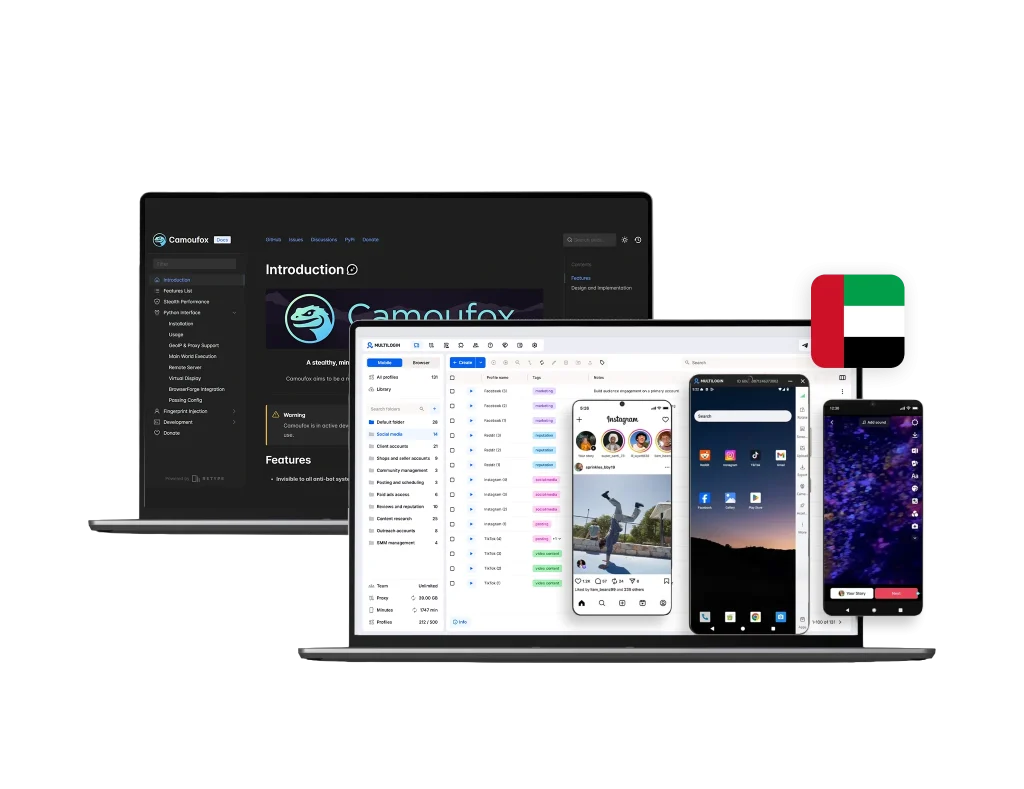
Multilogin provides cloud phones for social media management. They are fully unique Android devices hosted in the cloud. You can run native mobile apps and control multiple accounts from a single dashboard.
Camoufox
Camoufox doesn’t offer cloud phones at all. There’s no mobile app support, no Android environment, and no dashboard.
-
Built-in proxies
Multilogin
Multilogin comes with a built-in residential proxy system, streamlining setup and reducing the risk of account bans to keep your workflows stable and secure. With access to a global pool of over 30 million IPs across 150+ countries, it offers extensive reach and flexibility. The platform supports super-sticky sessions up to 24 hours, bandwidth rollover, and smart IP filtering for consistent performance. For added control, you can also import and manage third-party proxies directly within Multilogin, tailoring the configuration to suit your specific needs.
Camoufox
Camoufox does not include any built-in proxy services. Users are responsible for sourcing, configuring, and managing their own third-party proxies (e.g., HTTP, SOCKS5). So users bear the full cost, reliability and security risks associated with their chosen proxy providers. It also lacks an automatic IP rotation feature. Users must manually change IPs or implement external scripts to manage IP rotation, which can be time-consuming and less efficient for large-scale operations.
-
Web automation
Multilogin
Multilogin is designed to scale effortlessly, whether you’re handling a handful of accounts or managing thousands, making it ideal for projects of any size. It works seamlessly with automation tools like Selenium, Playwright, Puppeteer, and Postman, allowing you to use your existing scripts with minimal changes. For custom workflows, the Standard OpenAPI provides full control and adaptability. Additionally, AI Quick Actions let you automate routine tasks—like opening profiles, setting proxies, or organising accounts—without coding, and you can chain up to ten steps in one streamlined process.
Camoufox
Camoufox supports automation through its integration with Playwright and a Python interface. However, it does not offer a direct, comprehensive API for advanced programmatic control, which can make integrating with complex automation workflows more challenging and require custom scripting. Camoufox is built exclusively on a customized Firefox browser engine. This limits compatibility to Firefox-specific browser fingerprints and may not be suitable for tasks requiring Chromium-based environments.
-
Browser fingerprinting customization
Multilogin
Multilogin enables advanced fingerprint customization with control over 20+ parameters, including geolocation, user-agent, cookies, time zone, language, device memory, hardware concurrency, and WebGL. This allows you to create distinct, undetectable browser profiles at scale. Fingerprints automatically sync with assigned proxies for enhanced stealth. Additionally, Multilogin supports Android emulation for mimicking mobile behaviour when required. A built-in recycle bin lets you restore deleted profiles or permanently delete them, giving you complete control over your data.
Camoufox
Camoufox provides basic fingerprint spoofing capabilities, including user agent, screen resolution, and WebGL properties. For more granular or advanced fingerprint manipulation, users often need to delve into manual configurations or rely on external scripts, which can be technically demanding.
-
Browser flexibility & OS support
Multilogin
Multilogin offers two browser engines—Mimic (based on Chromium) and Stealthfox (based on Firefox)—so you can choose the one that best fits your needs. It runs natively on Windows, macOS, and Linux, and also supports Android profile emulation. This setup provides full flexibility for managing browser identities and automation tasks across both desktop and mobile environments.
Camoufox
Camoufox stores browsing profiles locally on the user’s device. This means profiles are not automatically synchronized across multiple devices, and users must manually back up or transfer profiles if working from different computers.
-
Teamwork
Multilogin
Multilogin’s collaboration features are beginner-friendly and highly convenient, making them ideal for individuals and small teams who want to work efficiently without technical setup. You can share profiles and workspaces, assign clear role-based permissions, and manage everything through an intuitive, cloud-synced dashboard that keeps data up to date for everyone. With real-time activity logs and flexible team seats, collaboration stays smooth, secure, and scalable.
Camoufox
Camoufox provides only basic collaboration capabilities, making teamwork less convenient for small or non-technical users. Sharing profiles often requires manual export and import or third-party file-sharing tools, which can be time-consuming and less secure. The lack of built-in team management or cloud syncing makes scaling and coordination harder, especially for teams that need a simple, centralized way to work together.
-
Customer support
Multilogin
Multilogin actively monitors over 50 major websites daily to maintain the effectiveness of its anti-detect technology. It offers 24/7 support in several languages, including English, Russian, Chinese, Vietnamese, and Portuguese, with a team of highly trained specialists. Users can access help through multiple communication channels, and detailed documentation is available for those who prefer to resolve issues independently.
Camoufox
Camoufox is primarily community-driven, typically through platforms like GitHub issues. This means response times and the availability of solutions can vary, and there is no dedicated support team for critical issues or urgent assistance.
-
Pricing
Multilogin
Multilogin starts you off with a free plan, including 5 browser profiles so you can test your setup and workflows first. After the trial, plans start at $7.08.
Cloud Phone usage is billed transparently per minute, with starter Cloud Phone packages already included in the subscription. There are no hidden fees — core features and built-in proxy infrastructure are part of the plan, so costs stay predictable as you scale.Camoufox
Camoufox is free and open-source, with no paid plans or subscription fees. But that means you’re on your own for the surrounding infrastructure — hosting, proxies, and support all fall on you, since there’s no managed dashboard or cloud phones included. For small automation projects this model works fine, but the real costs of proxies, cloud hosting, and technical upkeep show up as usage grows.
What Multilogin offers that Camoufox Browser doesn’t
Multilogin lets you manage multiple accounts from one beginner-friendly platform. You get a full set of features needed for both browser and mobile account management without any extra tools.
Discover the power of Cloud Phones
Discover Multilogin, a reliable alternative to Camoufox
Multilogin vs. Camoufox recap chart
Find out why Multilogin is the smarter alternative to Camoufox
-
Cloud phone
Multilogin
Included
Camoufox
Not included
-
Chromium
Multilogin
Yes (Mimic)
Camoufox
Not included
-
Firefox
Multilogin
Yes (Stealthfox)
Camoufox
Included
-
Platform compatibility
Multilogin
macOS, Windows, Linux
Camoufox
Windows, macOS, Linux
-
Security
Multilogin
High security
Camoufox
Standard security
-
Anti-fingerprinting technology
Multilogin
High level
Camoufox
Standard level
-
Quick profile creation
Multilogin
Included
Camoufox
Included
-
Frequent updates
Multilogin
Frequent and detailed updates
Camoufox
Regular updates
-
Built-in proxies
Multilogin
Included
Camoufox
Not included
-
Custom browser fingerprint generation
Multilogin
Included
Camoufox
Included
-
Account password protection
Multilogin
Included
Camoufox
Not mentioned
-
Support
Multilogin
24/7 Live Support, supports 5 languages
Camoufox
Not included
-
Knowledge center
Multilogin
Included
Camoufox
Included
-
Suits well for team management
Multilogin
Included
Camoufox
Not included
-
Free plan
Multilogin
Included
Camoufox
Not included
-
Market position
Multilogin
Beginner-friendly and scalable for businesses and teams of any size.
Camoufox
Complex setup; limited usability for beginners and teams.
Grow your social media accounts with Multilogin cloud phones
Build account trust, reach any location, and boost your engagement
- Unlimited time
- Mobile and browser profiles included
- Free built-in proxies & mobile minutes
Why people love Multilogin
-

A Good Cloud Phone for Account Management
Running a small team means I need control over who can access what, and Multilogin handles that well. The team access controls let me manage permissions without giving everyone the keys to every account. On top of that, the cloud phones keep everything isolated so one account issue doesn’t put the rest at risk. Solid choice for agencies managing multiple clients or accounts.
-

The best service for great ideas and big minds!
Always here for their clients, always ready to help out. I am using the service for 3-4-5 months now and brought me lots of great things 🙂 Hope to grow it on a larger scale and continue using the service …
-

Cloud phones make it easy to manage multiple TikTok accounts with AI agents
I use Multilogin to manage a bunch of AI agents running TikTok accounts for different countries. Since each agent needs its own account, I wanted an easy way to keep everything organized. Cloud phones make it super easy. Every account has its own phone, so I don’t have to buy or manage a bunch of real devices. I can see everything in one dashboard while the AI agents handle posting and the rest of the daily work.
-

Ideal for Social Media Management
I mainly use Multilogin for client social media management, and the cloud phones have been the biggest advantage for me. I can keep different clients in separate environments, leave their sessions running, and jump between accounts without constantly switching physical devices. It feels much more practical than trying to manage everything from a pile of phones.
-

Perfect browser for work, worth the money!
My overall experience with Multilogin has been excellent. I really like its intuitive dashboard, reliable customer support, and competitive pricing. It has become an essential part of my e-commerce business, and I highly recommend it to anyone looking for a dependable solution.
-

Safer accounts using Cloud Phones for social profiles
Running social profiles on cloud phones feels safer, everything is properly separated instead of relying on browser fingerprint tricks alone. Been running mine for a couple months with zero linking issues.
-

Efficient Account Management and Outstanding Support with Multilogin
Multilogin has been an excellent tool for managing multiple accounts efficiently. The setup was quick, and I was able to start using it right away with no learning curve. The interface feels just like Chrome, making it easy to navigate and work without interruption. Performance has been smooth, and browsing feels natural and responsive.
The award-winning platform for social media growth














See more comparisons
- Compare with Android Emulator
-
Compare with

-
Compare with

- Compare with Browser Emulator
-
Compare with

-
Compare with
-
Compare with

-
Compare with

-
Compare with

-
Compare with

-
Compare with

-
Compare with

-
Compare with

-
Compare with

-
Compare with

-
Compare with

-
Compare with

-
Compare with

-
Compare with

-
Compare with
-
Compare with

-
Compare with

-
Compare with

-
Compare with

-
Compare with
-
Compare with

-
Compare with

-
Compare with
-
Compare with

-
Compare with

-
Compare with

-
Compare with

-
Compare with

-
Compare with

-
Compare with

-
Compare with

-
Compare with

-
Compare with
Watch the Multilogin Demo
Learn how Multilogin can boost your business. Check the video below to see its full capabilities in a short demo video.
Multilogin vs. Camoufox in 2026
Managing multiple online accounts in 2026 takes more than creating isolated browser profiles. You need a solution that prevents bans, simplifies automation, integrates proxies, and scales with your business.
Camoufox has attracted attention among beginners for its low cost and Firefox-based setup. It’s a lightweight option for those just testing multi-account workflows.
Multilogin, on the other hand, is built for professionals who value reliability, built-in proxies, and advanced fingerprint control. It combines everything you need—browser, proxies, automation, and teamwork—into one platform. Start our free plan today.
Camoufox fingerprinting: Basic spoofing for small setups
Camoufox browser provides isolated profiles with limited fingerprint masking, covering basic parameters like user agent, WebGL, and screen resolution. For users running only a few accounts, it’s fine.
But when your operation grows, these limited settings can trigger detection systems more easily. Camoufox doesn’t offer advanced fingerprint rotation or detailed control over time zones, languages, and hardware.
Multilogin delivers far more depth with over +50 customizable fingerprint parameters, including hardware concurrency, fonts, media devices, and WebGL precision. Profiles behave like genuine users and sync automatically with their assigned proxies.
You can even enable Android emulation to simulate real mobile devices. Combined with daily testing on 50+ major platforms, Multilogin keeps accounts undetectable and stable long-term.
Verdict: Camoufox covers entry-level masking; Multilogin keeps you invisible at scale.
Proxy management: Manual setup vs built-in reliability
Camoufox doesn’t include any built-in proxy traffic. Users must buy proxies from third parties, set them up manually, and rotate IPs themselves. This adds cost, time, and technical risk—especially when running multiple accounts.
Multilogin solves this with integrated residential proxies in every plan. You get access to over 30 million IPs across 150+ countries with sticky sessions lasting up to 24 hours. Proxy traffic rolls over monthly, and setup takes one click.
You can still import your own proxies if needed, but everything—including tracking and management—happens inside Multilogin’s dashboard.
Verdict: Camoufox depends on external proxies; Multilogin is ready to go out of the box.
Automation and scalability
Camoufox supports Playwright and Python integration, letting users run small scripts. However, it lacks a dedicated API or CLI for large-scale automation, making complex workflows harder to manage.
Multilogin integrates with Selenium, Puppeteer, Playwright, Postman, and offers its own OpenAPI and CLI for full control. It also includes AI Quick Actions, a no-code tool that lets you chain up to ten workflow steps automatically.
Whether you’re managing 10 or 10,000 profiles, Multilogin handles scaling effortlessly.
Verdict: Camoufox supports basic scripts; Multilogin supports complete automation and scaling.
Browser flexibility and OS support
Camoufox runs only on a customized Firefox engine, limiting it to Firefox-based fingerprints.
Multilogin gives you both Mimic (Chromium) and Stealthfox (Firefox) engines, so you can choose the one your platform prefers. It runs on Windows, macOS, and Linux, with optional Android emulation for mobile workflows.
Verdict: Camoufox offers one browser type; Multilogin provides full flexibility.
Read the Multilogin extension guide for automation and testing.
Teamwork and collaboration
Camoufox stores profiles locally, meaning users must manually export and share files. There’s no cloud sync, workspace sharing, or permission management—making teamwork slow and error-prone.
Multilogin includes cloud-based workspaces, role-based permissions, and real-time activity logs. You can invite teammates, assign roles, and manage everything securely in one dashboard.
Verdict: Camoufox is made for solo users; Multilogin is built for teams of any size.
Customer support and reliability
Camoufox relies mainly on community support through GitHub and forums, so help can be delayed and inconsistent. Updates also arrive less frequently.
Multilogin provides 24/7 live support in five languages—English, Russian, Chinese, Vietnamese, and Portuguese. Its tech team tests the engine daily on 50+ websites to ensure consistent stealth performance.
Verdict: Multilogin offers professional, always-on support; Camoufox leaves users to troubleshoot on their own.
Camoufox vs Multilogin: A feature comparison
When comparing Camoufox vs Multilogin, the difference in functionality becomes clear:
- Built-in proxies: Multilogin includes residential proxy traffic in every plan. Camoufox requires third-party setup.
- Fingerprinting: Multilogin offers advanced control (20+ parameters) and Android emulation. Camoufox supports only basic spoofing.
- Automation: Multilogin integrates with API, CLI, Selenium, and Playwright; Camoufox is limited to Playwright/Python.
- Teamwork: Multilogin supports cloud sync, real-time collaboration, and permissions. Camoufox has none of these.
- Browser engines: Multilogin provides both Chromium and Firefox; Camoufox is Firefox-only.
- Support: Multilogin delivers 24/7 expert assistance; Camoufox depends on the community.
- Scalability: Multilogin runs up to 10,000+ profiles; Camoufox suits only small setups.
Verdict: Multilogin combines simplicity, scalability, and built-in proxies in one reliable cloud phone —Camoufox does not.
Best Camoufox alternative
If you’re exploring a Camoufox alternative, Multilogin is the stronger, more complete choice in 2026. It removes manual proxy setup, automates daily work, and stays stable even when managing thousands of accounts.
Here’s why users switch:
- Everything in one place: Browser, proxies, automation, and team tools all built together.
- Quick start: Works right after installation — no setup headaches.
- Proven fingerprint protection: Over 20 parameters tested daily to stay ahead of detection systems.
- Room to grow: From 10 to 10,000 profiles with secure cloud sync.
- Real 24/7 support: Get help anytime from trained specialists.
Try Multilogin for yourself: Start the free plan today, including 5 Cloud Phone and browser profiles, a one-time bonus of 200 MB of premium proxy traffic, and 1 Cloud Phone with 30 minutes of use. There is no time limit and no credit card required.
Final verdict: Multilogin or Camoufox?
Camoufox browser is a practical entry-level tool for beginners who only need basic fingerprint spoofing and local control. It’s simple and cheap—but limited.
Multilogin, however, is the professional standard for 2026. It’s an all-in-one cloud phone that provides built-in proxies, deep fingerprinting, automation, and team collaboration—everything you need to grow safely and efficiently.
If your goal is stability, scale, and simplicity, Multilogin is the clear winner.
FAQ
What is Camoufox browser used for?
Camoufox browser is an antidetect tool built on a modified Firefox engine. It helps users manage multiple online accounts by creating isolated browser profiles with basic fingerprint spoofing. It’s mainly used by beginners or small operators who want a simple, low-cost way to separate accounts for social media, e-commerce, or testing.
What makes Multilogin better than Camoufox?
Multilogin includes everything in one subscription — browser, built-in residential proxies, automation support, and team collaboration. It offers 50+ fingerprint parameters, AI Quick Actions for no-code automation, and cloud profile sync across devices. Camoufox lacks these integrated features and depends on manual setup.
Does Multilogin include proxies?
Yes. Every Multilogin plan includes built-in residential proxy traffic. You get access to over 30 million clean IPs in 150+ countries, with sticky sessions and smart IP rotation. This means you can start managing multiple accounts safely without buying or configuring external proxies.
Can Camoufox and Multilogin be used for the same tasks?
Both tools help manage multiple accounts, but their target users differ. Camoufox suits individuals running a few profiles manually. Multilogin is built for teams, agencies, and businesses that need automation, security, and large-scale account management.