








-
Built-in proxies
Multilogin
Multilogin includes a built-in residential proxy system that simplifies setup and reduces the risk of bans. We offer access to over 30 million IPs in 150+ locations, with features like super-sticky sessions (up to 24 hours), bandwidth rollover, and IP quality filters. There’s no need for third-party tools—proxies are ready to use inside each plan. For those with existing providers, we support smooth proxy integration for maximum flexibility.
swSpyBrowser
swSpyBrowser doesn’t include built-in proxies. Users must manually connect external proxy services, typically through HTTP or SOCKS5. There are no sticky session options, no country-level filtering, and no built-in rotation tools. As a result, setup takes longer and the risk of bans increases if low-quality proxies are used.
-
Web automation
Multilogin
At Multilogin, we support advanced automation and work with tools like Selenium, Puppeteer, and Playwright. You can use our browser to run tasks like scraping data, creating accounts, or filling out forms without getting blocked. We also help you bypass CAPTCHAs and offer an API for complex workflows.
swSpyBrowser
swSpyBrowser does not offer native integration with automation tools. All actions must be performed manually, and there is no available API for developers. This can slow down repetitive or high-volume tasks and may not suit automation-heavy workflows.
-
Browser fingerprinting customization
Multilogin
You can manually adjust more than 50 fingerprint parameters in Multilogin, including WebGL, canvas, user agent, time zone, and language. Each profile is matched to your proxy automatically, making it look like a real, unique user. We also offer Android cloud phones for mobile-first platforms.
swSpyBrowser
swSpyBrowser claims to offer fingerprint customization features, including user agent, screen resolution, WebRTC, and WebGL. However, due to limited public documentation, the depth of control and consistency of these settings cannot be fully verified. Advanced tuning and proxy-matched fingerprints may not be supported.
-
Browser flexibility
Multilogin
Multilogin includes both a Chromium-based browser (Mimic) and a Firefox-based browser (Stealthfox). You can switch between them depending on the site or fingerprint sensitivity, making your setup more stable and adaptive.
swSpyBrowser
swSpyBrowser supports only a basic Chromium browser, with no Firefox support or built-in browser switching. It’s a single-engine setup, which may not be ideal for users who need flexibility across different platforms or fingerprint detection systems.
-
Data privacy & security
Multilogin
At Multilogin, we prioritize security. Our platform encrypts all profile data at rest and in transit, ensuring that sensitive information remains protected. We comply with GDPR standards, providing users with confidence in data handling practices. Additionally, our cloud-based infrastructure allows for secure storage and synchronization of browser profiles across devices, enhancing both security and usability.
swSpyBrowser
swSpyBrowser operates as a local solution, storing profiles directly on the user’s device. According to available information, it does not offer built-in encryption for profile data by default. Users concerned about data security may need to implement additional measures to safeguard their information. Furthermore, swSpyBrowser does not provide public documentation regarding GDPR compliance, leaving its adherence to data protection regulations unclear.
-
Teamwork
Multilogin
Multilogin is designed to be highly convenient for single users and small teams, making it especially comfortable for newbies. You can share browser and cloud phone profiles instantly with role-based access, automatic session sync, and encrypted cloud storage. Everything works out of the box, so even first-time users can collaborate smoothly without profile transfers or risky credential sharing.
swSpyBrowser
swSpyBrowser is designed primarily for individual users. It does not offer built-in team collaboration features such as role-based permissions, shared sessions, or cloud-based synchronization. All profiles are stored locally, and there is no functionality for real-time collaboration or profile sharing among team members.
-
Customer support
Multilogin
Multilogin offers 24/7 live support in five languages: English, Russian, Chinese, Vietnamese, and Portuguese. Our support team is known for fast responses and deep technical knowledge. You can reach us through live chat or email, and we also provide a detailed Knowledge Base to help you get started or solve issues on your own.
swSpyBrowser
swSpyBrowser offers support via email, Telegram, and Skype, with assistance available on weekdays from 9:00 to 19:00 Moscow time. On weekends, responses are provided within a few hours. While they offer remote support through tools like AnyDesk or TeamViewer, there is no live chat or multilingual support.
-
Platform updates
Multilogin
Multilogin releases updates every 2 to 4 weeks to stay ahead of detection systems and maintain full compatibility with major websites. Each update improves fingerprint protection, browser and cloud phone stability, and automation tool integration.
swSpyBrowser
swSpyBrowser updates its browser 1–4 times per month, with the software code responsible for user anonymity and security updated daily on their servers. This approach aims to maintain user anonymity and security.
-
Pricing & Plans
Multilogin
Multilogin starts you off with a free plan, including 5 browser profiles so you can test your setup and workflows first. After the trial, plans start at $7.08/.
Cloud Phone usage is billed transparently per minute, with starter Cloud Phone packages already included in the subscription. There are no hidden fees — core features and built-in proxy infrastructure are part of the plan, so costs stay predictable as you scale.swSpyBrowser
swSpyBrowser is sold as a one-time license for $39.90. The pricing is fixed and non-flexible—there are no monthly plans, no usage-based tiers, and no upgrade paths. Since the software doesn’t include built-in proxies, users must also purchase third-party proxy services separately, which increases the total cost depending on how many profiles are in use.
What Multilogin offers that swSpyBrowser doesn’t
Multilogin lets you manage multiple accounts from one beginner-friendly platform. You get a full set of features needed for both browser and mobile account management without any extra tools.
What Multilogin offers that swSpyBrowser doesn’t
Explore Multilogin, a smarter alternative to swSpyBrowser.
Multilogin vs. swSpyBrowser recap chart
Find out why Multilogin is the preferred swSpyBrowser alternative
-
Chromium
Multilogin
Yes (Mimic)
swSpyBrowser
Included
-
Firefox
Multilogin
Yes (Stealthfox)
swSpyBrowser
Not included
-
Cloud Phones
Multilogin
Included
swSpyBrowser
Not included
-
Platform compatibility
Multilogin
macOS, Windows, Linux
swSpyBrowser
Windows only
-
Resource consumption
Multilogin
Requires 4GB RAM
swSpyBrowser
Requires 2GB RAM
-
Security
Multilogin
High security
swSpyBrowser
Local encryption only; no GDPR or audit transparency
-
Anti-fingerprinting technology
Multilogin
Advanced level
swSpyBrowser
Standard level
-
Quick profile creation
Multilogin
Included
swSpyBrowser
Not included
-
Account password protection
Multilogin
Included
swSpyBrowser
Included
-
Frequent updates
Multilogin
Frequent and detailed updates
swSpyBrowser
Regular updates
-
Built-in proxies at no additional cost
Multilogin
Included
swSpyBrowser
Not included
-
Custom browser fingerprint generation
Multilogin
Included
swSpyBrowser
Partial
-
Account password protection
Multilogin
Included
swSpyBrowser
Not included
-
Knowledge center
Multilogin
Included
swSpyBrowser
Limited
-
Suits well for team management
Multilogin
Included
swSpyBrowser
Not included
-
Market Position
Multilogin
Convenient and flexible for individuals, small teams, non-technical users, and beginners
swSpyBrowser
Built mainly for technical users and larger teams
-
Free plan
Multilogin
Included
swSpyBrowser
Not included
-
Support
Multilogin
24/7 Live Support, supports 5 languages
swSpyBrowser
Telegram, Skype, and email support
Grow your social media accounts with Multilogin cloud phones
Build account trust, reach any location, and boost your engagement
- Unlimited time
- Mobile and browser profiles included
- Free built-in proxies & mobile minutes
Why people love Multilogin
-

A Good Cloud Phone for Account Management
Running a small team means I need control over who can access what, and Multilogin handles that well. The team access controls let me manage permissions without giving everyone the keys to every account. On top of that, the cloud phones keep everything isolated so one account issue doesn’t put the rest at risk. Solid choice for agencies managing multiple clients or accounts.
-

The best service for great ideas and big minds!
Always here for their clients, always ready to help out. I am using the service for 3-4-5 months now and brought me lots of great things 🙂 Hope to grow it on a larger scale and continue using the service …
-

Cloud phones make it easy to manage multiple TikTok accounts with AI agents
I use Multilogin to manage a bunch of AI agents running TikTok accounts for different countries. Since each agent needs its own account, I wanted an easy way to keep everything organized. Cloud phones make it super easy. Every account has its own phone, so I don’t have to buy or manage a bunch of real devices. I can see everything in one dashboard while the AI agents handle posting and the rest of the daily work.
-

Ideal for Social Media Management
I mainly use Multilogin for client social media management, and the cloud phones have been the biggest advantage for me. I can keep different clients in separate environments, leave their sessions running, and jump between accounts without constantly switching physical devices. It feels much more practical than trying to manage everything from a pile of phones.
-

Perfect browser for work, worth the money!
My overall experience with Multilogin has been excellent. I really like its intuitive dashboard, reliable customer support, and competitive pricing. It has become an essential part of my e-commerce business, and I highly recommend it to anyone looking for a dependable solution.
-

Safer accounts using Cloud Phones for social profiles
Running social profiles on cloud phones feels safer, everything is properly separated instead of relying on browser fingerprint tricks alone. Been running mine for a couple months with zero linking issues.
-

Efficient Account Management and Outstanding Support with Multilogin
Multilogin has been an excellent tool for managing multiple accounts efficiently. The setup was quick, and I was able to start using it right away with no learning curve. The interface feels just like Chrome, making it easy to navigate and work without interruption. Performance has been smooth, and browsing feels natural and responsive.
The award-winning platform for social media growth















See more comparisons
- Compare with Android Emulator
-
Compare with

-
Compare with

- Compare with Browser Emulator
-
Compare with

-
Compare with

-
Compare with

-
Compare with

-
Compare with

-
Compare with

-
Compare with

-
Compare with

-
Compare with

-
Compare with

-
Compare with

-
Compare with

-
Compare with

-
Compare with

-
Compare with

-
Compare with

-
Compare with
-
Compare with

-
Compare with

-
Compare with

-
Compare with

-
Compare with

-
Compare with

-
Compare with

-
Compare with

-
Compare with

-
Compare with

-
Compare with

-
Compare with

-
Compare with

-
Compare with

-
Compare with

-
Compare with

-
Compare with
Watch the Multilogin Demo
Learn how Multilogin can boost your business. Check the video below to see its full capabilities in a short demo video.
Multilogin vs swSpyBrowser : The best browser to choose in 2026
Running multiple accounts in 2026 isn’t just about avoiding detection — it’s about working at scale, managing complexity, and staying secure. That requires more than just basic fingerprint masking. You need built-in proxies, automation, and tools that support real collaboration.
swSpyBrowser is a lightweight, locally installed browser popular among Russian-speaking users. It offers basic fingerprint spoofing and unlimited local profiles with a one-time license. But as soon as you need to automate tasks, share profiles, or scale beyond one device, its limitations become hard to ignore.
Let’s see how it stacks up against Multilogin.
swSpyBrowser fingerprinting: Fixed presets, no depth
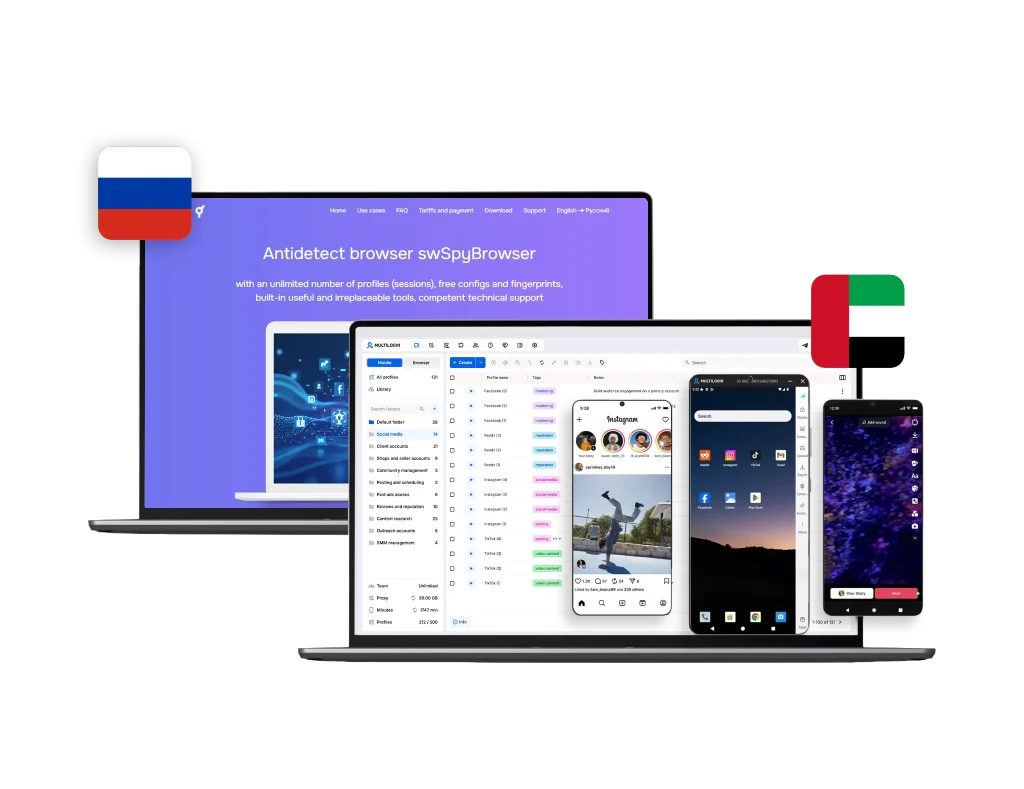
The swSpyBrowser interface gives users a few toggles to adjust visible browser data — things like user agent, language, screen resolution, WebRTC, and WebGL. While this may be enough to avoid basic fingerprint checks, the options are limited to predefined presets. There’s no way to manually fine-tune specific values or align the fingerprint with your proxy connection.
Multilogin takes a different approach. For mobile-first platforms, Cloud Phones give each profile a real Android device with genuine hardware, OS-level signals, and app behavior — not a simulated mobile environment. For web-based platforms, browser profiles can be customized with over 50 fingerprint parameters, including hardware characteristics, canvas behavior, time zone, and audio context. In both cases, these settings are automatically matched with your proxy, so each profile presents a consistent, genuine identity.
SwSpyBrowser is functional for basic anonymity, but for platforms with stricter detection (like Facebook, Google, or Amazon), it lacks the control needed to maintain long-term stealth. If you’re specifically managing Facebook accounts, it’s also worth learning how to avoid getting banned from Facebook — a common issue when proxy alignment and fingerprinting aren’t handled correctly.
swSpyBrowser proxy setup: 100% manual, 0% assistance
swSpyBrowser does not include any built-in proxy services. Users must purchase proxies from third-party providers and enter the configuration manually for each profile. It supports HTTP, HTTPS, and SOCKS5 formats, but the browser doesn’t offer tools to test proxy quality, manage sessions, or rotate IPs.
This setup may work for small-scale users, but it becomes time-consuming and risky at scale. Any misconfiguration — like an expired IP or mismatched geo-location — can lead to immediate account bans.
Multilogin removes that complexity. It comes with a built-in residential proxy pool featuring over 30 million IPs across 150+ locations. Every plan includes 1 GB of proxy traffic per month, and sticky sessions can last up to 24 hours. You can assign proxies to browser profiles in one click — no need to leave the app or paste proxy strings.
No automation support: swSpyBrowser is not built for scaling
swSpyBrowser does not support any type of browser automation. There’s:
- No API
- No integration with Selenium, Puppeteer, or Playwright
- No support for automated profile creation or task execution
For solo users managing just a few profiles manually, this might be enough. But once you need to handle dozens of accounts, run repeatable tasks, or integrate browser control into a larger system — swSpyBrowser becomes a bottleneck.
Multilogin, in contrast, supports full automation out of the box. You can use popular frameworks, connect through our public API, or speed up operations with AI Quick Actions. It’s built not just for control, but for growth.
To streamline multi-account automation and reduce manual errors, explore our tips on how to run multiple Gmail accounts efficiently.
swSpyBrowser team workflows: No cloud, no sharing, no sync
swSpyBrowser is strictly a local solution. Every browser profile stays on your device, with no way to sync or share with other users. There’s no team interface, no shared sessions, and no permission system. This makes it difficult for small groups or newbies who need simple collaboration.
Multilogin provides cloud-based storage, role-based access, and real-time sync, making teamwork simple and secure from the start. Profiles can be shared in just a few clicks — no file exports, no risky credential sharing, and no technical setup. It’s designed to be convenient and flexible for individuals and small teams, especially comfortable for newbies who want everything to work out of the box.
s wSpyBrowser user experience and support: Feels outdated
The interface of swSpyBrowser is basic and functional but hasn’t kept up with modern standards. The design is cluttered, some settings are hard to locate, and the overall experience can feel dated — especially for users new to this type of tools.
Support is also limited. swSpyBrowser offers assistance via Telegram, Skype, and email, but only during business hours (Moscow time). There’s no live chat, no multilingual support, and documentation is minimal — with no structured knowledge base or onboarding materials.
Multilogin offers a more polished experience, with regular UI updates, clear profile workflows, and an extensive Help Center. Support is available 24/7 in five languages, so users can get help when they need it — not just during one time zone.
swSpyBrowser pricing: Low cost, no flexibility
swSpyBrowser is available for a one-time payment of $39.90 per device. That makes it an affordable choice for individual users who only need a basic solution on a single machine. However, this model comes with trade-offs.
- The license is tied to one device — if your hardware changes, you’ll need to repurchase
- There are no subscription tiers, team plans, or volume discounts
- There’s no trial period and no built-in features like proxies or automation
Multilogin offers more flexibility. You can start with a Free plan with no time limit and no credit card required, and regular plans begin at $7.08/month — including built-in residential proxy traffic, API access, Cloud Phones and browser profiles, and cloud sync. You only pay for what you need, and scale up when you’re ready.
Why Multilogin is the best swSpyBrowser alternative in 2026
swSpyBrowser can work for users who only need a simple, local browser tool with basic fingerprint customization. But the moment you need to scale, automate, manage mobile-first platforms, or collaborate, its limitations become obvious.
Multilogin offers everything swSpyBrowser lacks:
- Cloud Phones — real Android devices for mobile-first platforms like TikTok and Instagram, alongside browser profiles for web-based workflows
- Advanced fingerprint isolation (50+ editable parameters)
- Built-in residential and mobile proxies with 30M+ IPs, sticky sessions, and filtering
- Automation support via Selenium, Puppeteer, Playwright, and the Multilogin API
- Cloud-based profile storage, real-time sync, and role-based team access
- Regular updates, GDPR compliance, and 24/7 multilingual support
For users managing multiple accounts across web and mobile platforms, Multilogin is the more complete and future-ready platform.
Final verdict
swSpyBrowser is a low-cost, offline browser tool made for individual users with simple needs. It helps with basic fingerprint customization and local profile separation but lacks the tools required for scaling, automation, or managing accounts on mobile-first platforms like TikTok and Instagram.
Multilogin is built for social media marketers and agencies who need more control, reliable account isolation, and smoother workflows. With Cloud Phones for mobile-first platforms, browser profiles for web-based ones, built-in proxies, automation support, team collaboration, and real-time sync, it gives marketers everything needed to grow multiple social media accounts safely — and at scale.
If you’re working solo with a few profiles, swSpyBrowser may be enough. But if you’re managing accounts for multiple clients or brands, or you’re serious about performance and reliability, Multilogin is the smarter choice for 2026.
FAQ
Can swSpyBrowser profiles be exported or backed up?
swSpyBrowser does not offer built-in tools for profile export or cloud backup. All profiles are stored locally on your device, and manual copying may lead to fingerprint inconsistencies or data loss. This makes long-term profile portability more difficult compared to cloud-based alternatives.
Does swSpyBrowser offer updates for fingerprint technologies?
There is no public roadmap or changelog for fingerprint updates in swSpyBrowser. While the core anonymity engine is updated on their servers, users have limited insight into how fingerprinting is maintained over time or whether it adapts to platform changes.
Can swSpyBrowser run multiple profiles at the same time?
Yes, swSpyBrowser allows you to run multiple profiles simultaneously. However, performance may depend on your system resources, and there’s no built-in session management or monitoring tools to organize or schedule profile usage.
Is there a trial version of swSpyBrowser?
No, swSpyBrowser does not currently offer a free trial. Users must pay the full one-time license fee before using the product. This may be a concern for those who want to test features before committing.
Multilogin offers a free plan for unlimited time and no credit card required, so you can try the platform’s features before scaling.
Does swSpyBrowser have cloud phones?
No. swSpyBrowser is a local, Windows-only browser tool with no mobile emulation or Android environment support. It manages separate browser profiles on desktop but has no equivalent to Multilogin’s Cloud Phones, which run as real Android devices in the cloud. That gap matters most on mobile-first platforms like TikTok and Instagram, where accounts are increasingly evaluated by device-level and app-level signals that a desktop browser simply can’t produce.
Teste it today with our Free Plan!