

Manage multiple QQ accounts

Run multiple QQ profiles safely with Multilogin. Publish content, manage groups, and engage with users using fully isolated browser profiles and unique fingerprints.

Create multiple QQ accounts

Use a beginner‑friendly dashboard to handle your QQ profiles.

Do a full account warm-up with Cookie Robot and set 55+ fingerprint parameters to create authentic browser profiles and reduce verification checks.

Password‑free QQ access from any device

Access all your QQ accounts from one device without switching hardware. Login in a separate browser profile with unique fingerprints and clean IPs to reduce security checks and verification flags.

Run as many QQ accounts as you need

Duplicate, export, tag, and filter profiles to organize QQ accounts by groups, clients, or campaigns. Use Quick AI Actions to create QQ‑ready profiles in bulk, assign clean residential IPs instantly, and scale content posting, outreach, or community management.

Coordinate multiple QQ accounts with your team

Assign team members to manage specific QQ groups or client profiles while keeping each account fully isolated.

Track activity, schedule posts, and manage campaigns—across a few accounts or dozens.

Avoid QQ account restrictions with built‑in proxies

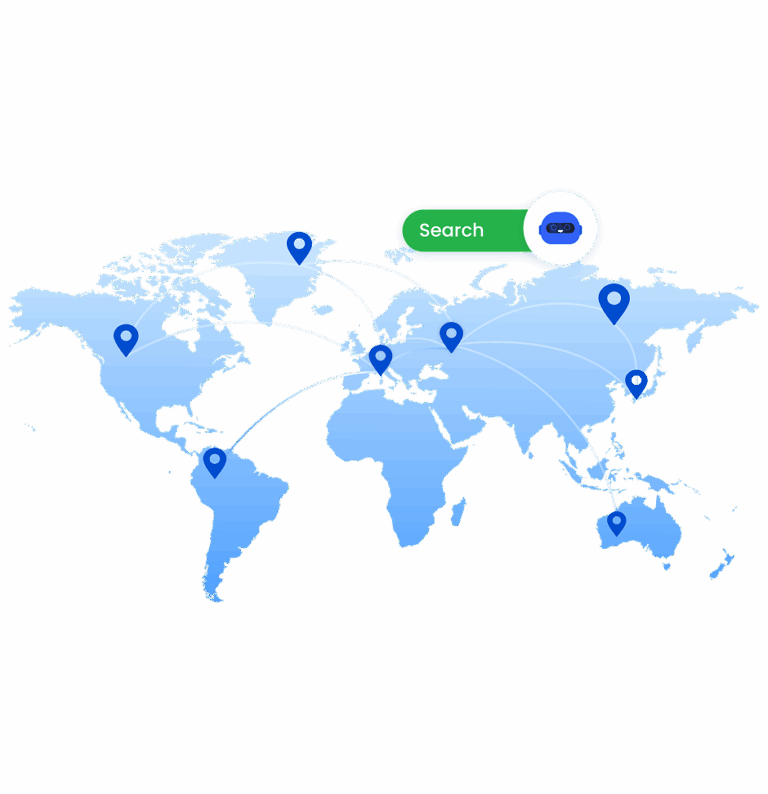
Create a consistent IP setup for every QQ profile using Multilogin’s built-in proxies, without relying on external providers. Access 30M+ residential IPs across 150 locations, with city‑level and ISP‑level targeting to keep each account trusted and reduce freezes, locks, or verification prompts.

Try Multilogin Risk-Free — Just €1.99!

Run multiple accounts with zero bans or blocks. Start your 3-day trial and test everything for less than a coffee.
  • 3-day access to Multilogin

  • 5 cloud or local profiles

  • 200 MB proxy traffic included

  • 3-day access to Multilogin

  • 5 cloud or local profiles

  • 200 MB proxy traffic included

What is an antidetect browser?

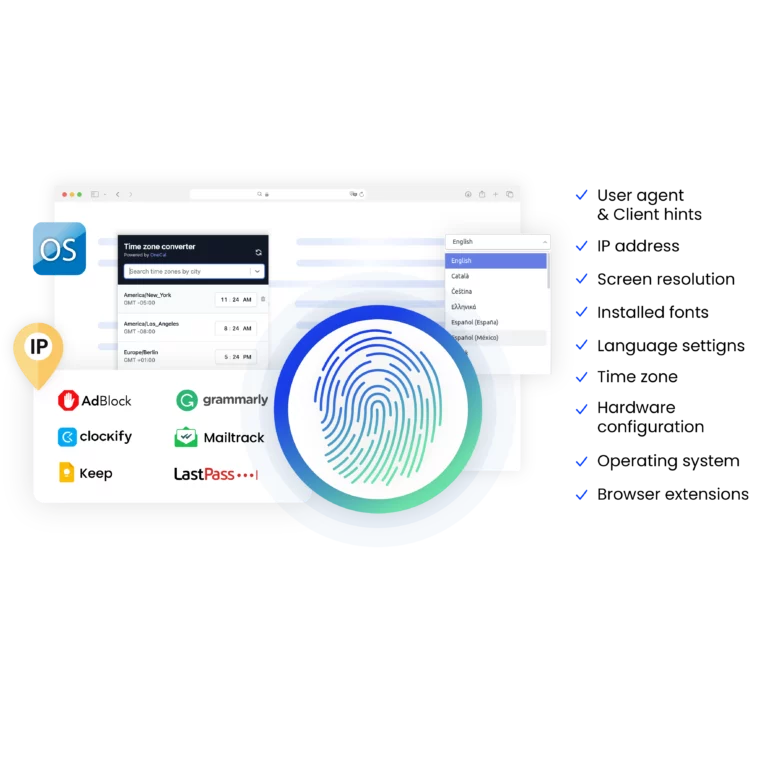
An antidetect browser like Multilogin gives each QQ profile a unique digital identity:

  • Hide your real device fingerprint
  • Make every QQ account appear as a separate, real user
  • Run dozens or hundreds of QQ profiles from one device without account linkage
Image showcasing what an antidetect browser is.

Why choose Multilogin for managing multiple QQ accounts?

With Multilogin it’s easy to:


  • Use 55+ fingerprint parameters to create realistic, QQ profiles
  • Assign clean residential IPs from 30M+ addresses across 150 locations
  • Do full browser isolation with custom Chromium‑based cores
  • Connect QQ workflows to automation tools like Puppeteer, Playwright, Selenium and Postman
A visual showcasing why it is essential to use Multilogin's built-in proxy, making your browsing experience more convenient.

What Multilogin offers that other antidetect browsers don't

Free residential proxies in each subscription plan

Daily testing on 50+ websites

Passes all browser fingerprint checkers

Profile warmup with pre-farmed cookies

AI-powered automation

Super sticky sessions last up to 24 hours

Multilogin features for creating multiple QQ accounts

Icon representing Multilogin's feature to bypass bot protection.

Bypass bot detection

Our anti-fingerprinting tech bypasses multi-account and automated browser detection by masking unique browser fingerprints.
An icon representing Team Collaboration with Multilogin.

Team collaboration

You can collaborate on browser profiles and easily share passwords, cookies, and session progress with team members.

Icon representing data sync over the cloud with Multilogin.

Data sync over cloud

Use cloud browser profiles to sync data across multiple devices or VPS instances.

An icon representing fingerprint adjustment to match proxy feature of Multilogin.

Fingerprint adjustment to match proxy

Automatically adjust browser fingerprints to match proxy locations, supporting all types for enhanced security.

Icon representing Multilogin's support for all proxy types, including HTTP, HTTPS, and SOCKS5.

Support for all proxy types

Use our proxies or bring your own. All proxy types are supported.

Icon representing residential rotating IPs in Multilogin.

Residential rotating IPs

Our residential proxies are tested daily ensuring flawless performance with major platforms.
Icon representing the Android Chrome browser in Multilogin.

Chrome or Firefox interface

Our Mimic and Stealthfox browsers fully emulate Chrome or Firefox, providing you with a different digital identity in each browser window.

An icon representing High Load Supported feature of Multilogin.

High load supported

Our platform supports high loads, making it ideal for operations of any size.

Icon representing the Manual Mode feature in Multilogin.

Manual mode

Manually control the settings of your browser profiles in secure virtual environments.

An icon representing browser action automation feature in Multilogin.

Browser action automation

Automate repetitive tasks with Selenium, Playwright, and Puppeteer automation drivers, bypassing anti-bot algorithms.


Related solutions you might like

Most awarded antidetect browser

Kinza awards for Multilogin.
Conversion club badge for Multilogin.
Mask group badge for Multilogin
Startup 2019 awards badge for Multilogin
badge for Multilogin
Best Value Software 2022 badge for Multilogin
High performer 2024 badge for Multilogin
Leader 2024 badge for Multilogin
Best support 2024 badge for Multilogin
Easiest to do business with 2024 badge
SourceForge top performer 2023 badge
GetApp user reviews badge

How to start using Multilogin 

Start collecting data effortlessly with the industry leading antidetect browser.

Step 1 of how to use Multilogin

Sign up

Register using a verified email address. 

Step 2 of how to use Multilogin

Choose your plan

Select from various subscription plans tailored to your business needs.

Step 3 of how to use Multilogin

Download Multilogin

Available for Windows, Mac, and Linux.

Step 4 of how to use Multilogin

Access the Multilogin dashboard

Start creating and managing antidetect browser profiles.

Step 5 of how to use Multilogin

Run multiple QQ accounts

Set up and manage multiple email accounts using separate browser profiles, all from one secure platform.

Watch the Multilogin Demo for creating multiple accounts on QQ

Get a 10-minute demo video on how Multilogin can help you easily build your database of QQ accounts while remaining undetected. Just fill in your name, last name and email below, and we’ll deliver the demo video directly to your inbox.

Name
Last Name
Email *
Image of locked video for Multilogin demo preview

Manage multiple QQ accounts: Guide for 2025

QQ is huge. It is one of China’s biggest social platforms. For anyone serious about the Chinese market—marketers, businesses, or pro gamers—you need more than one account. But making and keeping multiple QQ accounts is hard. The platform is designed to stop you. You face technical blocks and quick bans.

Set up and run multiple QQ accounts on a single desktop with Multilogin. Each account runs in its own safe browser profile. This stops blocks, bans, and endless verification loops. 

Let’s take a look at how Multilogin can help you set up your QQ accounts.

Why managing multiple QQ accounts can be a problem

Most people start with simple fixes. At first, they seem good enough. The cost only becomes clear when accounts are lost and access disappears.

  • VPNs and proxies do not isolate accounts: The browser fingerprint stays the same, which makes account linkage easy. QQ sees multiple accounts coming from the same virtual device, even if the IP is different.
  • Switching devices is expensive and slow: Buying and managing multiple phones or computers creates huge overhead. It takes time to set up, costs more to run, and slows down daily work.
  • The “Phone number problem” is a constant hurdle: QQ requires phone verification for stable accounts. If you try to register many accounts from the same environment, you will face repeated “Server busy” errors or immediate bans.

Lost QQ access disrupts workflows. Teams spend hours recovering accounts or creating new ones. Money goes into replacements instead of growth. If your business relies on QQ, these methods introduce risk rather than control.

Reduce the risk of QQ bans with built-in proxies

Logging into many accounts from the same IP address is a huge red flag. It will get all your accounts banned at once. Stop using shared IPs or external proxy tools. Multilogin has premium residential proxies built-in. They give you clean, dedicated IPs that match your target location.

  • 24-hour sticky sessions for stable connections.
  • 95% clean IPs to avoid bans.
  • 30M+ residential IPs in 195+ countries.
  • City-based targeting in 1,400+ cities.

Functional benefits for QQ multi-accounting in Multilogin

Managing multiple accounts safely requires more than separate browsers. Each profile must behave like a real, independent user to avoid detection. Multilogin provides the tools businesses need:

  • Unique digital identities: Each profile uses over 55 parameters to bypass detection systems, preventing account linking.
  • Cookie Robot: Simulate real browsing history to reduce risks for new accounts and increase account trust.
  • Mobile profile emulation: Ensures authenticity for QQ accounts, which are often more stable when accessed from a mobile environment. Mobile proxies are also available. 
  • Secure cloud storage: Keeps cookies, session data, and bookmarks consistent across devices and allows safe team access.
  • Automation-ready:Integrates with APIs, Selenium, Puppeteer, and other tools to save time and reduce manual work on repetitive tasks.

Enterprise-grade reliability Supports thousands of profiles with 24/7 support and continuous platform testing to protect accounts.

Use cases for multiple QQ accounts

You need multiple, safe QQ accounts for many high-value tasks:


  1. Marketing & E-commerce: QQ Groups and Qzone are powerful marketing tools. Multiple accounts let you target different groups. You can run regional campaigns. You can manage many client accounts from one safe system.
  2. Gaming & Virtual goods: QQ is part of Tencent’s huge gaming world. Gamers use many accounts to play region-locked Chinese games (like Valorant Mobile). They also use them to farm in-game money or items.

Data scraping and research: QQ Groups are full of real-time customer data. Market researchers need this. You must use separate, safe accounts for data collection. This keeps your main business accounts safe from being flagged.

Why Multilogin is the best choice for QQ

Proxies alone are not enough to keep QQ accounts safe. QQ checks more than just your IP. It looks at screen size, OS signals, browser settings, time zone, and language. If these things are the same, your accounts can still be linked.

Multilogin solves this at the core. Every QQ account runs in a fully isolated browser profile. It acts like a separate, real device. It has its own fingerprint and network identity. This is exactly what QQ expects from a real user.

Create multiple QQ accounts FAQ

The best way to make a QQ account is to get the official QQ mobile app (on iOS or Android). You need a nickname, password, and a real phone number to sign up. International numbers work, but success can be hit-or-miss because of security checks.

Yes, you can make a QQ account in America. QQ accepts US phone numbers for sign-up. But to keep the account stable and safe from bans, you should use an anti-detect browser like Multilogin. This lets you control your digital fingerprint and IP. It makes your account look like a real, unique user. You can also use Chinese proxies built into Multilogin to create a Chinese account.

Creating a QQ account outside China can be tricky because of the phone verification requirement. The simple truth is: stable QQ accounts require a valid phone number.

  • Phone verification is mandatory
    QQ uses it for initial sign-up and later security checks.
  • International numbers are accepted but often fail
    Many virtual or free numbers do not receive verification codes.
  • Errors are common
    Messages like “Server busy” or “Too many attempts” appear if QQ flags your IP or device as suspicious, especially when creating multiple accounts from the same place.

Conclusion: For most users outside China, a real phone number is the only reliable way to register and maintain a QQ account.

QQ asks for friend verification when it thinks your login or sign-up is suspicious. It’s a security step. Multilogin stops this. It makes sure your login environment (IP, browser fingerprint) is always the same and unique. This greatly lowers the chance of triggering these security checks.

Both are owned by Tencent. QQ is more for younger people, gamers, and group chats (QQ Groups). It works well on the desktop. WeChat is more for mobile, daily life, payments, and personal chats. For running many accounts, QQ’s desktop client works better with Multilogin’s browser solution.

Without proper isolation, even a handful of accounts on the same device can trigger detection systems. Providers like Tencent track fingerprints, cookies, and device data to detect multiple accounts.


With Multilogin, small teams and beginners can safely manage dozens or even hundreds of accounts from a single device. Each account runs in its own browser profile with a unique fingerprint, making accounts appear as separate users and preventing linkage.

Thank you! We’ve received your request.
Please check your email for the results.
We’re checking this platform.
Please fill your email to see the result.

Multilogin works with amazon.com