





An Instagram content calendar is not a posting schedule. A posting schedule tells you when to publish. A content calendar tells you what to publish, why, in which format, for which audience, toward which goal, and where the idea came from. The difference between an account that fills a feed and an account that builds something is almost always the difference between those two things.
For social media managers handling multiple client accounts, the content calendar is the operational foundation that makes consistent, strategic Instagram management possible at scale.
Without it, content gets created reactively, client accounts drift from their original goals, and the manager spends their days firefighting rather than building. With it, a single manager can run ten or fifteen Instagram accounts without losing track of what any of them are doing or why.
This guide covers the complete process for 2026: how to find content ideas using social listening and geographic research, how to structure content pillars, the format mix the algorithm actually rewards, the right posting cadence, and how to manage multiple client Instagram profiles safely from one dashboard.
Multilogin is not an afterthought in this workflow. It is part of the research process, the content idea sourcing process, and the account management infrastructure that makes everything else possible at scale.
For the broader planning context, see the complete content calendar guide and the social media management checklist.
Step one: find content ideas before you build the calendar
The most common reason a content calendar falls apart by week three is that it was built without enough content ideas to sustain it. Managers plan slots before they have enough raw material to fill them, and by mid-month they are creating content reactively because the calendar ran out of substance.
The solution is to run a content ideation session before you touch the calendar. The output of that session is a bank of 30 to 50 content ideas per account, across all content pillars, that you can draw from throughout the month. Here is how to build that bank.
Social listening: what your audience is actually asking
Social listening is the process of monitoring what your target audience is saying, asking, and engaging with across Instagram and adjacent platforms. It is the fastest way to find content ideas that are already proven to generate engagement, because you are building content around conversations that are already happening rather than guessing at what might resonate.
For Instagram specifically, social listening covers four sources:
- Comment sections on competitor and peer accounts. The comment sections on the highest-performing posts in your niche are a direct feed of what your target audience wants to know, what they agree and disagree with, and what questions they are asking that are not being answered. Spend 30 minutes per month reading comment sections on the top five accounts in your client’s niche. Every question in those comments is a potential content idea. Every disagreement is a potential hot take or unpopular opinion format. Every “I needed this” or “can you do one on X?” is a direct content brief from your target audience.
- Instagram search and hashtag behaviour. Type your client’s niche keyword into Instagram search and look at both the top posts and the suggested searches. Suggested searches show you what people are actually looking for, not what you assume they want. The accounts appearing in top posts for your niche keywords show you which formats and topics the algorithm is currently rewarding in that space.
- DMs and comment replies on the client’s own account. The questions that come into a client’s DMs and comments are the highest-quality content ideas available because they are literally questions from the existing audience. Build a habit of logging these each week into a shared idea bank document. One common question from the audience is worth twenty ideas from a brainstorm session.
- Cross-platform listening on Reddit and TikTok. Reddit threads in relevant subreddits surface the deep, specific questions that people are asking when they think nobody is watching. TikTok comments and the TikTok search bar reveal what short-form content is resonating around the same topics. Both are underused research sources for Instagram content planning. See how to use Reddit accounts for managing research profiles safely across platforms.
Geographic content research with Multilogin cloud phones
This is the content research step that most Instagram content calendars miss entirely, and it is one of the most significant competitive advantages available to agencies and managers who are willing to do it properly.
Instagram’s algorithm shows different content to users in different geographic regions. What is trending in the US is not necessarily trending in the UK, Australia, or Southeast Asia. What formats are performing in one market may be six months ahead of or behind another market. If you are managing accounts for clients who operate in specific regions, or if you are trying to find content ideas that are not yet saturated in your primary market, geographic content research gives you an enormous edge.
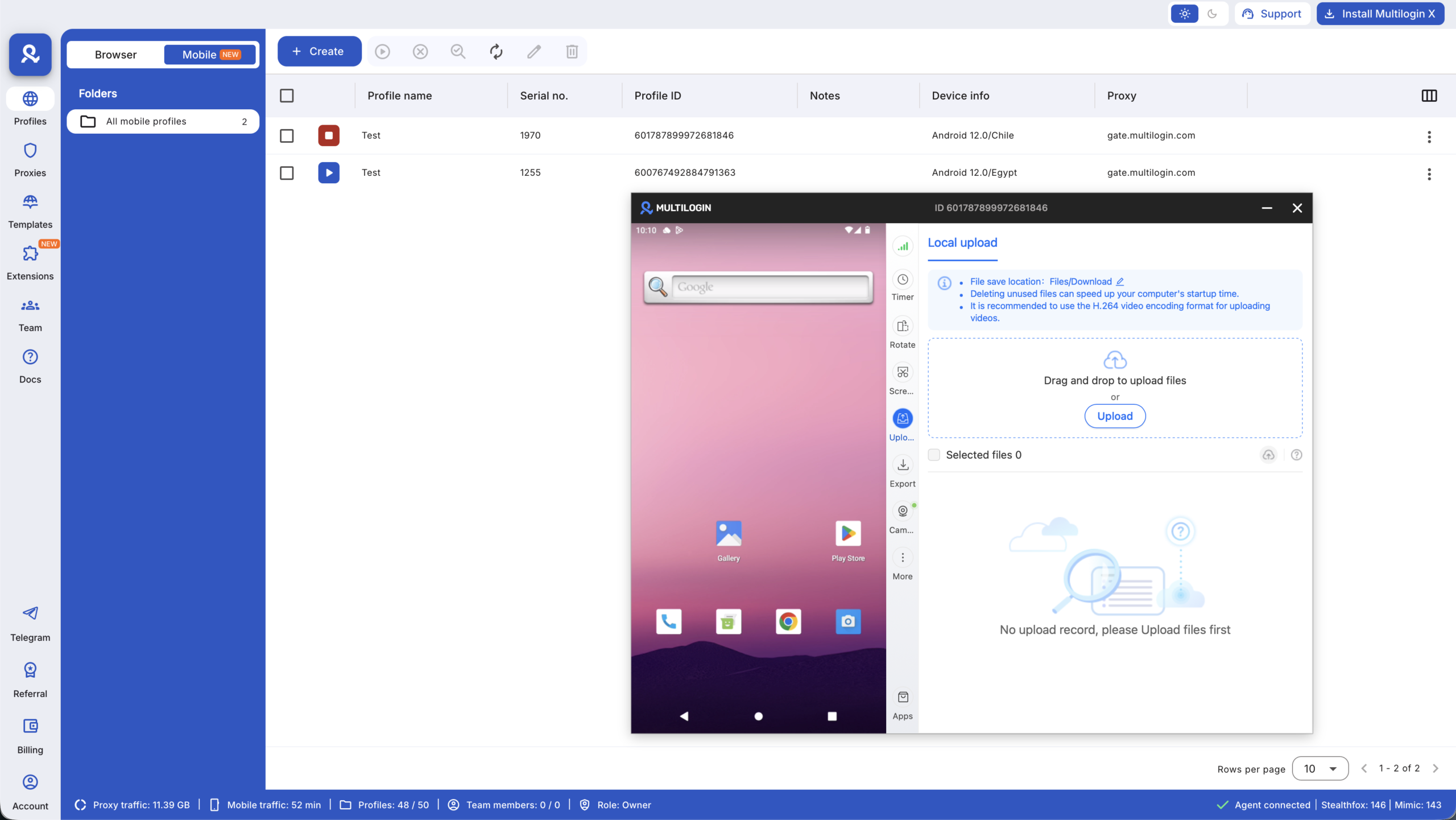
This is where Multilogin cloud phones become part of the content research process, not just the account management process. Each cloud phone is a real Android device in the cloud with its own residential proxy IP assigned to a specific geographic region. When you open Instagram on a cloud phone configured with a UK residential proxy, you see the UK Instagram feed: UK trending sounds, UK Explore page, UK suggested accounts. When you open a second cloud phone configured with a US proxy, you see a genuinely different feed.
In practice, this means you can run three or four cloud phones simultaneously, each assigned to a different geographic region, and use them as research tools to identify:
- Content formats and topics that are performing in one market but have not yet appeared in another, giving you an early mover advantage when you bring them to your primary market
- How competitors are positioning their content differently across different regions
- Which trending sounds and formats are gaining traction in markets your client wants to expand into
- Regional differences in how the same product or service is discussed, which affects caption language, hook style, and content angle
For clients targeting multiple geographic markets, geo-specific cloud phones mean you can research and plan content for each market with actual market-specific data rather than assumptions. A brand expanding from the US into the UK or Southeast Asia benefits from a content calendar built on what is actually working in those markets, not on what worked in the home market applied without adaptation.
This research workflow takes one to two hours per month per account and produces a significantly more informed content idea bank than any single-geography research process can deliver. For the full setup, see cloud phones for social media and best cloud phones for Instagram.
Building the content idea bank
Once social listening and geographic research are complete, you have raw material. The next step is organising it into a usable idea bank. A simple structure works best: a shared document or Notion database with one row per idea, tagged by content pillar, format, and target platform. Each idea should have enough detail to be turned into a brief without additional research: the topic, the angle, the hook, and the format it suits best.
Aim for 30 to 50 ideas per client per month before you start building the calendar. That sounds like a lot until you realise that a 30-minute social listening session typically surfaces 15 to 20 ideas on its own, and geographic research adds another 10 to 15. The goal is to never be in a position where you are staring at a blank calendar trying to invent content from nothing. You are selecting from an abundant bank, not creating from scarcity.
AI tools accelerate this process significantly. Claude for social media managers can take a list of audience questions sourced from social listening and produce full content briefs, hook variations, and caption drafts for each one. ChatGPT prompts for social media growth covers the specific prompts that work best for this ideation workflow. See also best AI tools for social media marketing for the full toolkit.
Step two: set the goals your calendar is built around
Every Instagram content calendar should start with a clear answer to one question: what is this account actually trying to do? The format mix, posting frequency, content type balance, and caption style all flow from the answer.
The most common Instagram goals for brand and business accounts in 2026 are audience growth (reaching new followers through Reels and shareable content), engagement depth (building a relationship with existing followers through carousels and Stories), traffic (driving link clicks to a website, product page, or lead magnet), and conversion (turning followers into customers, enquiries, or leads through promotional and social proof content).
Most accounts need a mix of all four. The ratio depends on where the account currently sits. A new account needs to weight heavily toward audience growth. An established account with a warm, engaged following needs to weight more toward conversion and engagement depth. Set the ratio clearly before building the calendar, because it determines which formats and pillars get priority slots each week.
For the strategic layer behind goal-setting, see how to plan social media content and the guide to content pillars.
Step three: build your content pillar structure
Content pillars are the recurring topics and themes that define what an Instagram account consistently talks about. They are what give an account a clear identity, what make it easy for the algorithm to categorise and distribute the content, and what make content planning faster because the topic selection is done once at the pillar level rather than individually for every post.
Most Instagram accounts work well with three to five content pillars. Fewer than three and the account becomes repetitive. More than five and it loses focus and confuses both the algorithm and the audience.
A practical pillar structure for a social media management agency might cover: educational content with tips and platform updates (builds authority, drives saves), behind-the-scenes content showing the work and the team (builds trust and relatability), client results and case studies (drives conversion and social proof), tool and resource recommendations (drives saves and shares), and opinion or perspective content (drives comments and shares).
Each pillar maps to a different set of engagement signals. Educational content drives saves. Behind-the-scenes drives comments and DMs. Results and case studies drive shares and profile visits. Opinion content drives comments. Building a pillar structure that covers all of these signal types means every week’s content calendar naturally produces the full range of engagement the algorithm rewards.
Colour-code posts by content pillar in your calendar so you can easily see at a glance if you have a good mix of content for the upcoming week. This makes it immediately obvious if any pillar is being over or underused before the content is created, not after it is published.
Geographic research with Multilogin cloud phones also feeds into pillar refinement. If your geo-research reveals that educational content is dramatically outperforming opinion content in the target market, the pillar weighting for that client’s calendar should reflect that, not a generic recommended split. Different markets have different content consumption preferences, and a calendar built on actual market data outperforms one built on global averages.
Step four: understand the 2026 Instagram format mix
Not all Instagram formats are equal in 2026, and they do not all do the same job. Building a calendar without a planned format mix means defaulting to whatever is easiest to produce, which is usually the format that performs least well for the specific goal.
- Reels are the primary discovery format. Reels consistently receive two to three times more non-follower reach than feed posts. For accounts under 50,000 followers, Reels deliver the highest median reach of any format. They are how new audiences find the account. Reels now reward the full watch-through more than the hook. If viewers drop at three seconds, the algorithm limits distribution. The hook matters, but the entire video needs to hold attention.
- Carousels are the primary engagement and save format. Carousels have the highest engagement rate of any format in 2026 at a 0.55% average. Each slide swipe counts as engagement, and the algorithm reshows carousels in the feed to people who did not finish swiping. For accounts with 50,000 to 500,000 followers, carousels outperform Reels on reach as well as engagement. Carousels built around educational content, step-by-step guides, and visual frameworks drive the highest save rates of any format.
- Stories are the relationship format. Stories only reach two to nine percent of followers, but the people who watch are the warmest audience. They already know the account and want more. Stories with polls, question stickers, and interactive features generate replies and direct messages that deepen relationship signals with existing followers. They should be planned for community management and retention, not for reach or discovery.
- Static single images remain useful for brand aesthetic and certain announcement content but should be kept to around 10% of the total mix. Static engagement dropped 17% year over year and has declined 30% since 2022.
The recommended weekly format mix for most business and brand accounts in 2026:
- Reels: 2 to 3 per week (primary discovery and reach driver)
- Carousels: 2 to 3 per week (primary engagement and save driver)
- Stories: daily or near-daily (relationship and retention)
- Static posts: 1 per week maximum (brand aesthetic, announcements)
Geographic research with Multilogin cloud phones adds a layer here too. The format mix that performs best in one market is not always the same in another. If your geo-research on a UK-configured cloud phone shows carousels dramatically outperforming Reels in the target niche, the UK-facing calendar should reflect a heavier carousel weighting. If your US-configured cloud phone shows the opposite, the US calendar should differ accordingly. The format mix should be market-specific, not one-size-fits-all.
Step five: set your posting cadence
Accounts that post consistently between four and seven times per week receive the strongest algorithmic support. Adam Mosseri has stated publicly that the ideal cadence for growth is two Reels per week plus three to five feed posts, and that consistency matters more than volume. Posting multiple times per day without maintaining quality causes the algorithm to distribute reach across posts, meaning each individual post receives less engagement, which lowers overall ranking signals.
Many accounts get better results with three to five posts per week (a mix of Reels and carousels) and near-daily Stories, provided they optimise retention, saves, and shares. For most social media managers running client accounts, three to five feed posts per week is the sustainable cadence that produces consistent growth without burning out the content creation process.
For managing accounts across different time zones, posting at audience peak hours matters. See the guide to growing Instagram Reels engagement for timing data. For accounts targeting specific regional audiences, the peak posting windows differ by market. A cloud phone configured to a target region lets you check when the regional Explore page is most active, giving you a real-world signal for timing that generic global data cannot replicate.
Step six: build the calendar structure
A working Instagram content calendar has five core components: the date and time slot, the format, the content pillar, the topic or concept drawn from the idea bank, and the performance goal. Additional fields for caption draft, asset status, approval status, and analytics data can be added as the workflow requires.
Here is what a single week looks like in a well-structured Instagram content calendar for a business account:
| Day | Format | Pillar | Topic | Goal |
|---|---|---|---|---|
| Monday | Carousel | Educational | 5 mistakes that slow Instagram growth | Saves |
| Tuesday | Reel | Opinion | Unpopular take: posting every day does not grow your account | Reach, comments |
| Wednesday | Stories x3 | Behind the scenes | Content batching day plus poll | Relationship, DMs |
| Thursday | Carousel | Tools | The 4 tools in every social media manager’s stack | Saves, shares |
| Friday | Reel | Results | Before and after: client account growth in 60 days | Reach, profile visits |
| Weekend | Stories x2 | Community | Question sticker: what is your biggest Instagram challenge? | Replies, DMs |
This structure covers all content pillars, is optimised for three different engagement signal types, and every post has a clear purpose. Every idea in it came from the idea bank built during the social listening and geo-research phase, not from a last-minute scramble.
Step seven: the monthly planning and review cycle
The weekly structure above is the execution layer. The monthly planning layer is where strategy lives and where Multilogin’s geographic research capability pays off most clearly.
- Review last month’s performance data. Pull reach, impressions, saves, shares, and engagement rate for every post. Identify the top three performing posts by save rate (carousels) and by reach (Reels). Note what they had in common: topic, format, hook style, posting day, or pillar. Do more of that next month. Compare performance data against the geo-research from last month: did the formats and topics you identified as trending in the target region actually outperform others when published? Refine the research process based on what converted.
- Run geographic research for the next month. Open your regional cloud phones in Multilogin, browse the Explore pages and trending audio in each target market, and note what formats and topics are gaining traction. Bring those signals back into the next month’s idea bank before building the calendar. This is a one to two hour session that produces more useful content direction than most agencies’ quarterly strategy reviews.
- Map the upcoming month’s key dates. Identify any product launches, campaigns, seasonal moments, or industry events in the next 30 days. These need content slots reserved around them, not squeezed in reactively. A product launch needs content in the two weeks before it, content on the day, and follow-up content in the week after.
- Plan the repurposing cycle. Identify the top-performing carousel or Reel from last month and plan to repurpose it. A carousel that drove high saves can become a Reel covering the same topic in video format. A Reel with high reach can be reformatted as a carousel for the audience who prefer reading over watching. See how to repurpose content for the full framework.
Tools that support the Instagram content calendar workflow
- Content research and geographic listening: Multilogin cloud phones configured to target markets for Explore page research, trending audio monitoring, and competitor content analysis across regions. This is the research infrastructure that no scheduling tool provides.
- Idea organisation: Notion or Google Sheets for the idea bank and calendar structure. Notion’s database views work particularly well because you can switch between a calendar view (to see the month at a glance), a kanban view (to track production status), and a table view (to filter by pillar, format, or client).
- Scheduling and publishing:Buffer for clean scheduling at per-channel pricing. Planable for teams needing collaborative client approval before posts go live. SocialBee for evergreen content recycling. For a full comparison see best social media management software.
- Analytics and reporting: Native Instagram Insights for day-to-day performance. Meta Business Suite for Facebook and Instagram in one view. Sprout Social for formal client-facing monthly reports.
- AI content production:Claude for social media managers for caption drafting, brief writing, and maintaining brand voice across multiple client accounts. Claude prompts for Instagram for specific prompt frameworks. Claude prompts to grow your social media for growth-focused content workflows.
Managing multiple client Instagram content calendars safely
Multilogin’s role in the content calendar workflow does not end at research. It is also the account infrastructure that makes running multiple client Instagram calendars operationally safe.
Instagram is a mobile-first platform that detects device and session signals at the hardware level. Managing multiple client accounts from the same phone or the same browser session creates account linking risks that can affect every account in a shared environment. A flag on one client’s account can spread to others when those accounts share a device identity or IP.
Each client Instagram profile needs its own dedicated cloud phone profile with its own real Android device identity, its own persistent session history, and its own residential proxy IP. The same cloud phones used for geographic content research double as the isolated account environments for publishing and managing each client’s profile. One cloud phone configured to a UK residential proxy researches UK content trends and then manages the UK client account. The research workflow and the account management workflow use the same infrastructure.
This integration means Multilogin is present at every stage of the content calendar process: geographic research at the ideation stage, account isolation at the publishing stage, and warm-up management at the account setup stage for any new client profiles. For the full account setup and warm-up process, see how to warm up an Instagram account and managing multiple Instagram accounts. For the agency-scale workflow, see how to run multiple Instagram accounts with Multilogin cloud phones.
Multilogin offers a permanent free plan with no credit card required, covering 5 social profiles with 200 MB of residential proxy traffic and 30 minutes of cloud phone usage. Paid plans start from $7.08 per month on annual billing for Pro 10, covering 10 profiles with 60 mobile minutes per month and 1 GB of proxy traffic per month. Additional cloud phone minutes at $0.0073 per minute with rollover. Business plans from $57.08 per month annually cover 300 or more profiles with unlimited team seats. Full pricing at multilogin.com/pricing.




